history
linux
open source
Technology
9M2PJU, AppImage, Arch Linux, Ariff Abdullah, AUR, BSD 2-Clause, BSD Explorer, BSD file manager, dual-pane file manager, Freebsd, FreeBSD committer, FreeBSD sound(4), GdkPixbuf, GTK 1.2, Malaysian open source, MinGW, MyBSD, MyBSD Project, retro computing, Ruby GTK, ruby-gtk-fix, skywizard, software preservation, Tomoyo Explorer, Unix history, WSLg, X11, XQuartz, Yamato Nadeshiko
9M2PJU
0 Comments
MyBSD Tomoyo Explorer: Preserving Ariff Abdullah’s Classic Ruby GTK FreeBSD File Manager
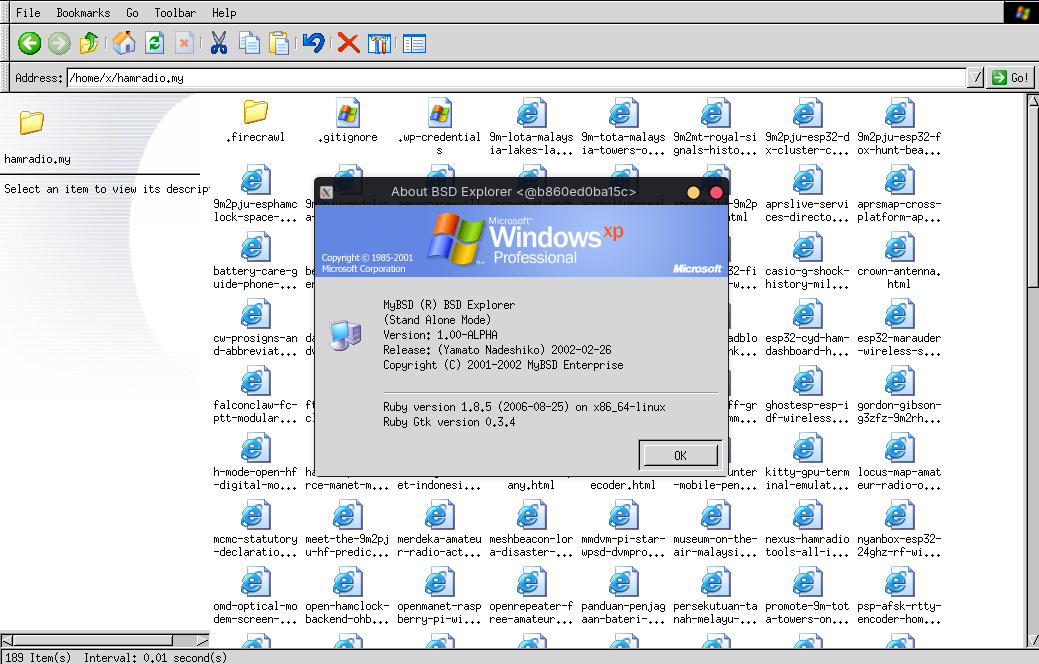
TL;DR: MyBSD Tomoyo Explorer (originally BSD Explorer) is a classic BSD/Unix graphical desktop file manager written in Ruby with GTK+ 1.2 and GdkPixbuf, created between 1999 and 2002 by Malaysian FreeBSD committer Ariff Abdullah (skywizard) as part of the MyBSD Project. The 9M2PJU preservation project re-packages the original v1.00-ALPHA “Yamato Nadeshiko” release as a self-contained Linux AppImage, an Arch Linux AUR package, a macOS app bundle, a Windows executable, and a native FreeBSD port, so software historians and Unix enthusiasts can still run a piece of Malaysian open source heritage on modern operating systems.
Graphical file managers are usually taken for granted. On a modern GNOME or KDE desktop, Files (Nautilus) and Dolphin are everywhere, and on Windows, Explorer has been the default for three decades. Yet in the late 1990s and early 2000s, FreeBSD and the broader Unix workstation world had no such luxury. The dominant options were either bare command-line shells, the heavyweight and notoriously slow GNU Midnight Commander, or commercial Motif and CDE tools that shipped with expensive Unix workstations from Sun, SGI, and HP. For a Malaysian open source developer working on FreeBSD at the turn of the millennium, the obvious answer was to write one.
That developer was Ariff Abdullah, known online as skywizard, a FreeBSD src/ports committer and one of the founding figures of the Malaysian BSD community. Between 1999 and 2002, as part of the MyBSD Project, he authored a small, fast, customizable graphical file manager in Ruby on top of GTK+ 1.2 and called it Tomoyo Explorer (also known historically as BSD Explorer). The original v1.00-ALPHA, codenamed “Yamato Nadeshiko”, was released on 26 February 2002.
This article is a long-form look at what MyBSD Tomoyo Explorer is, who Ariff Abdullah was, why GTK+ 1.2 and Ruby mattered in that era, how the file manager was engineered, and how the 9M2PJU preservation project now packages the original source for Linux, macOS, Windows, and FreeBSD so that this piece of Malaysian computing heritage doesn’t quietly disappear.
Last updated: August 2026.
What Is MyBSD Tomoyo Explorer?
The MyBSD Tomoyo Explorer is a classic BSD and Unix graphical desktop file manager, written in the Ruby programming language and built on the GTK+ 1.2 widget toolkit with GdkPixbuf for image rendering, originally created by Ariff Abdullah (skywizard) for the Malaysian BSD community between 1999 and 2002, and re-packaged for modern operating systems by 9M2PJU under the BSD 2-Clause License.
In plain terms, it is the kind of dual-pane file manager that early-2000s FreeBSD users wanted but rarely had: a left-hand directory tree, a right-hand file canvas, multi-selection, file info cards, a quick path entry bar, mount and filesystem usage gauges, customizable icon themes, and a footprint small enough that it ran comfortably on the hardware of the day. The codename “Yamato Nadeshiko” refers to the idealized traditional Japanese feminine figure, a quiet, resilient archetype that suited a lightweight, no-drama utility built to get out of the way and do its job.
The project lives at github.com/9M2PJU/MyBSD-Tomoyo-Explorer, with a dedicated landing page at tomoyo.hamradio.my and an Arch User Repository package at tomoyo-explorer-bin.
The Man Behind It: Ariff Abdullah (skywizard)
To understand why Tomoyo Explorer exists, you have to understand who wrote it. Ariff Abdullah, online handle skywizard, was a Malaysian open source developer and an official FreeBSD committer with commit access to both the src and ports trees. His FreeBSD developer PGP key (1024D/C5304CDA, registered 1 October 2005) carried three identities: [email protected], [email protected], and [email protected]. His personal FreeBSD homepage lived at people.freebsd.org/~ariff/, and his own server was tomoyo.MyBSD.org.my, the same name he later gave to the file manager.
Ariff is best known in the FreeBSD world for his work on the kernel sound subsystem. Through 2005 and 2006 he posted a long series of major patches to the freebsd-multimedia mailing list that reworked the sound(4) driver framework, added 24-bit and 32-bit PCM support, introduced a new sampling rate converter, implemented soft volume control, and fixed long-standing vchan and AC97 mixer issues. The diffs he posted to people.freebsd.org/~ariff/test/ (including sound.c at 25,563 bytes and sound.ko at 427,199 bytes) were the foundation of the modern FreeBSD audio stack. The MyBSD homepage still credits him as “salah seorang pengaturcara bahagian ‘Sound’ untuk sistem operasi FreeBSD” (one of the programmers of the FreeBSD Sound subsystem) and thanks him for “sumbangan berterusan pada FreeBSD sejak tahun 2005” (continuous contributions to FreeBSD since 2005).
Before the FreeBSD kernel work, and roughly in parallel with the founding of MyBSD, Ariff wrote Tomoyo Explorer. It was a side project, the kind of thing a developer builds because the existing tools annoy him. Ruby was a young language at the time (Ruby 1.8 wouldn’t land until 2003), GTK+ 1.2 was the current stable toolkit, and FreeBSD on the desktop was a niche but passionate community. A native, fast, good-looking file manager written in a high-level scripting language was a genuine contribution.
MyBSD: Malaysia’s BSD Community
MyBSD, formally the Malaysian BSD Project, is a small independent Malaysian open source community founded around 1999 to 2001. The official founding date recorded on the MyBSD site is Wednesday, 8 March 2000, 06:44:04 GMT. Headquartered in Kuala Lumpur and organized as a nonprofit, the group describes itself as a “perkumpulan bebas” (independent gathering) of people interested in internet technology, BSD, Linux, GNU, and, in their own words, “sains, anti-gravity, anime, lagu, ayam, itik, rumahtangga” (science, anti-gravity, anime, songs, chickens, ducks, household matters).
The group’s slogan is “Brag Less, Bite More”, which they explicitly translate as “Shut Up and Do It”. That ethos is the cultural context for Tomoyo Explorer: a working tool, shipped, not advertised. MyBSD ran (and in places still runs) several self-hosted projects, including the Gelojoh reverse proxy and web server, the MyTBS IPv6 TunnelBroker, and Tomoyo Explorer itself. The community communicated over IRC (#MyBSD on irc.dal.net and irc.freenode.net) and email, and operated its own servers with IPv6 connectivity long before IPv6 was mainstream in Malaysia.
MyBSD is explicitly independent. Their about page stresses that the group has no affiliation with any other BSD community, online or otherwise, and that they do what they want, when they want, how they want. That independence is part of why Tomoyo Explorer was written from scratch rather than contributed to an existing project: the MyBSD way was to build the thing you needed, ship it, and let it speak for itself.
Why GTK+ 1.2 and Ruby Mattered in 2002
Modern readers may wonder why anyone in 2002 would choose GTK+ 1.2 and Ruby for a file manager. The answer is a mix of practicality and timing.
GTK+ 1.2 was the working toolkit
GTK+ 2.0 was released in March 2002, the same month as the Tomoyo Explorer v1.00-ALPHA release. But for software already in development since 1999, GTK+ 1.2 was the stable, well-understood target. GTK+ 1.2 shipped with the GtkCTree widget for hierarchical tree views and GtkCList for columned lists, both of which were the natural primitives for a dual-pane file manager. It was lightweight by the standards of the day, ran natively under X11 on FreeBSD and Linux without heavyweight dependencies, and was already installed on any desktop running GNOME 1.x or a GTK-based theme.
The catch with GTK+ 1.2 is that it is now a deprecated, unmaintained toolkit. Modern Linux distributions don’t ship it, and modern Ruby doesn’t bind to it. This is the core preservation problem the 9M2PJU project solves by bundling the original Ruby 1.8 runtime and GTK+ 1.2 libraries inside a self-contained AppImage.
Ruby was the right scripting layer
In 1999 to 2002, Ruby was a rising scripting language with clean object-oriented semantics and a growing Japanese and Asian developer community (Ruby’s creator Yukihiro Matsumoto is Japanese, which resonates with the “Yamato Nadeshiko” codename). For a single-developer side project, writing a file manager in Ruby on top of the ruby-gtk bindings was dramatically more productive than writing the same thing in C. The tradeoff was raw speed, which Ariff addressed with a custom C extension.
The ruby-gtk-fix C extension
To overcome the performance ceiling of pure Ruby driving a GTK+ 1.2 tree, Tomoyo Explorer ships a custom C extension called ruby-gtk-fix. This extension hooks directly into GtkCTree tree traversal and GtkCList row rendering, bypassing the Ruby object layer and manipulating widget internals through direct memory pointers. The result is the “instant startup and acceleration” the project advertises: tree population and list scrolling happen at near-native C speed. While the rest of the application logic stays in readable Ruby.
Architecture and Features
Tomoyo Explorer is small. The standalone AppImage is 4.28 MB, the macOS bundle is 1.14 MB, the Windows ZIP is 476 KB, the Windows launcher binary is 24.5 KB, and the source tarball is 394 KB. Runtime memory footprint is under 15 MB of RAM. These numbers would have been unremarkable in 2002 and are astonishing today, when a typical Linux file manager idles at hundreds of megabytes.
+-----------------------------------------------------------------------+
|                MYBSD TOMOYO EXPLORER ARCHITECTURE                     |
+-----------------------------------------------------------------------+
|  Ruby 1.8 Application Layer                                           |
|  - Dual-pane UI logic, file ops, path entry, mount gauges             |
|  - Icon theme selection (WinXP, Win98, KDE 2.0)                       |
|                                |                                      |
|                                v                                      |
|  ruby-gtk-fix C Extension (direct memory pointers)                   |
|  - GtkCTree tree traversal acceleration                               |
|  - GtkCList row rendering acceleration                                |
|                                |                                      |
|                                v                                      |
|  GTK+ 1.2 Widget Toolkit + GdkPixbuf (image rendering)               |
|                                |                                      |
|                                v                                      |
|  X11 Display (Linux, FreeBSD, macOS via XQuartz)                      |
+-----------------------------------------------------------------------+
Dual-pane tree architecture
The main window is split into a left-hand directory tree navigator and a right-hand file canvas. The tree shows the filesystem hierarchy, the canvas shows the contents of the selected directory with multi-selection support, file info cards, and a quick path entry bar for jumping directly to a directory by typing its path. This is the classic Norton Commander / Midnight Commander lineage, but rendered as a native GTK+ 1.2 application rather than a text-mode curses interface.
Authentic era icon themes
Tomoyo Explorer ships carefully styled 16×16 and 32×32 icon packs for Windows XP, Classic Windows 98, and KDE 2.0, rendered with GdkPixbuf transparency. For users who lived through that era, launching the file manager and seeing the WinXP folder icons is a genuine period-accurate experience. For users who didn’t, it’s a tangible piece of desktop computing history, the visual language of an era when 16×16 pixels was a serious constraint and every icon was hand-drawn.
Partition and mount gauges
A built-in storage monitor parses the host filesystem tables. On FreeBSD it reads mount output, on Linux it reads /proc/mounts, and it renders visual usage meters and capacity bars for each mounted filesystem. This is a small feature, but it reflects the Unix workstation mindset of the era: the file manager should know about the system, not just the user’s home directory.
Zero external dependencies (in the modern packaging)
The original 2002 release assumed a FreeBSD system with Ruby 1.8, ruby-gtk, and graphics/ruby-gdk_pixbuf installed from ports. The 9M2PJU preservation packaging removes that assumption. The Linux AppImage bundles its own isolated Ruby 1.8 runtime and GTK+ 1.2 libraries, so it runs on Ubuntu, Debian, Fedora, Arch, and other modern distributions without requiring the user to install any deprecated packages on the host. The macOS bundle and Windows package apply the same principle.
Open source heritage
The original code is preserved under the permissive BSD 2-Clause License, with copyright held by Ariff Abdullah and the MyBSD Project Team (1999 to 2002). The 9M2PJU packaging work is added on top, also under BSD 2-Clause, with clean modern documentation, automated CI/CD releases via GitHub Actions, and AUR integration. The license file in the repository spells this out explicitly.
The Preservation Project: 9M2PJU’s Modern Packaging
The 9M2PJU preservation project is the difference between Tomoyo Explorer being a footnote in FreeBSD history and being a runnable program in 2026. The work falls into a few concrete buckets.
Source recovery and repository structure
The repository at github.com/9M2PJU/MyBSD-Tomoyo-Explorer preserves the original v1.00-ALPHA "Yamato Nadeshiko" source code, the C fixes, and the icon themes under ruby-BSD-Explorer/. The macOS Application Bundle packaging and the tomoyo.icns generator live under macos/. The Windows launcher source (launcher.c), resource script (tomoyo.rc), and build script live under windows/. The official Arch User Repository package source lives under aur/tomoyo-explorer-bin/. The FreeBSD port Makefile and package description live under freebsd/. The universal install.sh installer handles Linux, macOS, and FreeBSD. The Dockerfile and build-appimage.sh are CI build inputs (a legacy Debian etch environment with Ruby 1.8 and GTK+ 1.2) used to produce the Linux AppImage, not needed by end users. The GitHub Pages website source for tomoyo.hamradio.my lives under docs/.
CI-built binaries
The Linux AppImage is built automatically by GitHub Actions on every release tag. The build environment is deliberately a legacy Debian etch container with Ruby 1.8 and GTK+ 1.2, because those are the exact libraries the original 2002 code expects. The output is a self-contained AppImage that bundles the Ruby runtime, GTK+ 1.2, GdkPixbuf loaders, and the native C acceleration modules, so it runs out of the box on modern Linux distributions without requiring legacy system libraries. Users download and run, no local build tools required.
AUR package
For Arch Linux users, the package tomoyo-explorer-bin is published in the Arch User Repository, installable with yay -S tomoyo-explorer-bin or paru -S tomoyo-explorer-bin. This installs system-wide with a menu shortcut and icons, the conventional Arch way, rather than as a per-user AppImage.
Universal 1-liner installer
For users who want the simplest possible path, a universal installer is provided:
curl -fsSL https://raw.githubusercontent.com/9M2PJU/MyBSD-Tomoyo-Explorer/master/install.sh | bash
On Linux x86_64 it downloads and configures the AppImage, icons, and a .desktop launcher in ~/.local/bin/. On macOS (Apple Silicon and Intel) it downloads the app bundle, places it in ~/Applications/, and symlinks tomoyo-explorer into ~/.local/bin/. On FreeBSD it downloads the source tarball, builds the ruby-gtk-fix C extension, and configures binaries, icons, and a .desktop launcher in ~/.local/.
Installation by Operating System
Linux (AppImage or AUR)
The recommended path on Linux is the standalone AppImage, a portable x86_64 binary with the bundled Ruby 1.8 and GTK+ 1.2 runtime. It runs on Ubuntu, Debian, Fedora, Arch, and other modern distributions.
# Download and make executable
curl -LO https://github.com/9M2PJU/MyBSD-Tomoyo-Explorer/releases/download/v1.00-ALPHA/MyBSD_Tomoyo_Explorer-x86_64.AppImage
chmod +x MyBSD_Tomoyo_Explorer-x86_64.AppImage

# Run, pointing at your home directory
./MyBSD_Tomoyo_Explorer-x86_64.AppImage ~/
For Arch users, the AUR package is the cleaner option:
yay -S tomoyo-explorer-bin
# or
paru -S tomoyo-explorer-bin
macOS (app bundle or 1-liner)
On macOS, download the MyBSD_Tomoyo_Explorer-macOS.zip, extract it, and drag MyBSD Tomoyo Explorer.app into /Applications. Because GTK+ 1.2 is an X11 application, macOS requires XQuartz for graphical display. Install it via Homebrew:
brew install --cask xquartz
Alternatively, run the universal 1-liner, which downloads the app bundle, places it in ~/Applications/, and symlinks tomoyo-explorer into ~/.local/bin/.
Windows (exe, zip, or WSL)
On Windows, download the standalone MyBSD_Tomoyo_Explorer.exe (24.5 KB, a 64-bit native launcher compiled with MinGW-w64 with an embedded icon and version resources) or the complete MyBSD_Tomoyo_Explorer-win64.zip (476 KB) distribution containing the executable launcher, themes, configs, and scripts. Extract and double-click MyBSD_Tomoyo_Explorer.exe.
On Windows 10 and 11, the WSL2 path with WSLg gives full graphical acceleration and native Linux filesystem access:
wsl curl -fsSL https://raw.githubusercontent.com/9M2PJU/MyBSD-Tomoyo-Explorer/master/install.sh | bash
FreeBSD (native)
On FreeBSD, install the runtime dependencies from the original 2002 instructions and run the universal installer, or use the included FreeBSD port skeleton:
# Runtime dependencies
pkg install ruby18 ruby-gtk graphics/ruby-gdk_pixbuf

# Universal installer
curl -fsSL https://raw.githubusercontent.com/9M2PJU/MyBSD-Tomoyo-Explorer/master/install.sh | bash

# Or, the FreeBSD port skeleton
cd freebsd/
make install clean
Source distribution
The original source distribution archives, including the C extension source and the full icon sets, are available as a .tar.gz (394 KB):
tar -xzvf bsd-explorer-v1.00-ALPHA.tar.gz
cd bsd-explorer-v1.00-ALPHA
ruby explorer_alone
MyBSD Tomoyo Explorer vs. Modern and Retro File Managers
| Feature | MyBSD Tomoyo Explorer | GNOME Files (Nautilus) | KDE Dolphin | GNU Midnight Commander | PathMixer / Retro FM |
|---|---|---|---|---|---|
| Era | 1999 to 2002, preserved 2026 | Modern | Modern | 1994, still maintained | Various retro projects |
| Language | Ruby 1.8 + C extension | C (GTK 4) | C++ (Qt 6) | C | Varies |
| Toolkit | GTK+ 1.2 | GTK 4 | Qt 6 | curses (text mode) | Varies |
| Dual-pane tree | Yes (GtkCTree + canvas) | No (single pane) | Optional (split) | Yes (text mode) | Varies |
| Memory footprint | Under 15 MB RAM | Hundreds of MB | Hundreds of MB | Under 10 MB | Varies |
| Mount and filesystem gauges | Yes (FreeBSD mount, Linux /proc/mounts) | Limited | Yes | No | Varies |
| Period-accurate icon themes | Yes (WinXP, Win98, KDE 2.0) | No | No | No | Sometimes |
| Self-contained bundle | Yes (AppImage bundles Ruby 1.8 + GTK 1.2) | System packages | System packages | System packages | Varies |
| License | BSD 2-Clause | GPL | GPL | GPL | Varies |
| FreeBSD native | Yes (port skeleton) | Yes (ports) | Yes (ports) | Yes (ports) | Varies |
The point of the comparison isn’t to argue that Tomoyo Explorer replaces Nautilus or Dolphin. It doesn’t. The point is that Tomoyo Explorer occupies a distinct niche: a period-accurate, dual-pane, lightweight, BSD-licensed file manager that runs natively on FreeBSD and is now packaged to run anywhere. For retro computing, for software preservation, for FreeBSD desktop enthusiasts, and for anyone who wants a 15 MB file manager instead of a 300 MB one, it’s a genuine option.
Why Software Preservation Matters
There is a tendency in open source to treat old code as disposable. If a project hasn’t been updated in five years, the assumption is that it is dead and should be replaced. That assumption is wrong, and Tomoyo Explorer is a good example of why.
First, old code is historical evidence. Tomoyo Explorer is a primary source for how a Malaysian FreeBSD developer in 1999 to 2002 thought a file manager should work, what widget primitives he reached for, what icon aesthetics he chose, and what performance tradeoffs he was willing to make. Reading the source is more informative than any retrospective article, including this one.
Second, old code is often technically interesting in ways modern code isn’t. The ruby-gtk-fix C extension that hooks GtkCTree and GtkCList through direct memory pointers is a small, readable example of how to accelerate a scripting-language GUI by dropping to C at the hot path. That pattern is still relevant.
Third, old code is cultural. MyBSD’s “Brag Less, Bite More” ethos, Ariff’s decision to name his file manager after his personal server tomoyo.MyBSD.org.my, the “Yamato Nadeshiko” codename, the Win98 and KDE 2.0 icon themes: these are the fingerprints of a specific community at a specific moment. When the code is lost, the fingerprints are lost with it.
The 9M2PJU preservation project is, in this sense, a small act of digital conservation. The original source is kept intact under the BSD 2-Clause License, the original copyright is preserved, the modern packaging is layered on top without rewriting history, and the result is something a new user can actually run instead of just read about.
Frequently Asked Questions (FAQ)
What is MyBSD Tomoyo Explorer?
MyBSD Tomoyo Explorer is a classic BSD and Unix graphical file manager written in Ruby with GTK+ 1.2, created by Malaysian FreeBSD committer Ariff Abdullah (skywizard) between 1999 and 2002, and re-packaged for modern Linux, macOS, Windows, and FreeBSD by 9M2PJU.
Who was Ariff Abdullah (skywizard)?
Ariff Abdullah, online handle skywizard, was a Malaysian open source developer and official FreeBSD src/ports committer, best known for reworking the FreeBSD sound(4) kernel audio subsystem from 2005 onward and for founding work in the MyBSD Malaysian BSD community.
Does Tomoyo Explorer run on modern Linux?
Yes. The 9M2PJU preservation project bundles the original Ruby 1.8 runtime and GTK+ 1.2 libraries inside a self-contained 4.28 MB AppImage, so it runs on Ubuntu, Debian, Fedora, Arch, and other modern distributions without requiring legacy system packages.
Is MyBSD Tomoyo Explorer free and open source?
Yes. The original 1999 to 2002 code is licensed under the BSD 2-Clause License with copyright held by Ariff Abdullah and the MyBSD Project Team. The 9M2PJU modern packaging is added on top under the same BSD 2-Clause License.
How do I install MyBSD Tomoyo Explorer on Arch Linux?
Install the AUR package tomoyo-explorer-bin with yay -S tomoyo-explorer-bin or paru -S tomoyo-explorer-bin. This installs system-wide with a menu shortcut and icons. Alternatively, download the standalone AppImage from the GitHub releases page.
Summary: A Small Malaysian File Manager Worth Keeping
MyBSD Tomoyo Explorer isn’t the most famous file manager, the most powerful file manager, or the most widely used file manager. It’s a 4.28 MB Ruby and GTK+ 1.2 application written by one Malaysian developer at the turn of the millennium, codenamed after an idealized Japanese archetype, and named after the developer’s own personal server. That is exactly why it is worth preserving.
The 9M2PJU preservation project takes Ariff Abdullah’s original v1.00-ALPHA “Yamato Nadeshiko” source, keeps it intact under the BSD 2-Clause License, and wraps it in modern packaging so that it runs on Linux, macOS, Windows, and FreeBSD in 2026. The AppImage bundles the original Ruby 1.8 and GTK+ 1.2 runtime. The AUR package gives Arch users a clean system install. The macOS bundle and Windows package bring the same period-accurate dual-pane experience to those platforms. The FreeBSD port skeleton keeps the original native path alive.
If you care about open source history, about FreeBSD desktop heritage, about Malaysian computing, or simply about having a 15 MB file manager that does exactly what a file manager should do, give it a try. Star the repository, share it with your local Unix users group, and if you find bugs in the modern packaging, file an issue. The original code is Ariff’s. The packaging is 9M2PJU’s. The history is everyone’s.
73 from 9M2PJU.
Sources and Further Reading
- MyBSD Tomoyo Explorer – Official Project Site
- MyBSD Tomoyo Explorer – GitHub Repository (9M2PJU/MyBSD-Tomoyo-Explorer)
- MyBSD Tomoyo Explorer – Arch User Repository (tomoyo-explorer-bin)
- MyBSD – Brag Less, Bite More (Malaysian BSD Group)
- MyBSD – Tentang Kami (About Us)
- Ariff Abdullah – FreeBSD Developer PGP Keys (FreeBSD Handbook)
- Ariff Abdullah – FreeBSD People Page (people.freebsd.org/~ariff/)
- Massive sound changes / fix (24/32bit pcm support) – freebsd-multimedia mailing list, August 2005
- Soft volume control mixer controller – freebsd-multimedia mailing list, September 2005
- Malaysian BSD Project (MyBSD) – LinkedIn
- GTK+ 1.2 Documentation Archive (GNOME Developer Center)
- Ruby Programming Language – Official Site
- 9M2PJU Ham Radio Blog and Open Source Projects











Post Comment