qFT8: The Free Zero-Setup Android App for Portable FT8, FT4, FT2, and JS8 Operations
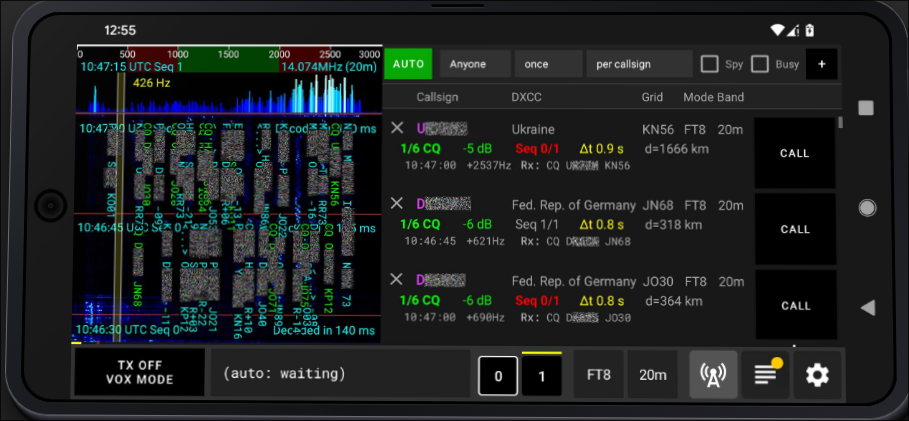
TL;DR: qFT8 by Luis Quesada Torres (HB9IPH) is a free, ad-free Android digital modes application that enables full FT8, FT4, FT2, and JS8 operations directly from a smartphone or tablet. Featuring plug-and-play USB CAT and audio support for over 50 transceivers (including QRP Labs QMX/QDX, ICOM IC-705/7300, Yaesu, Xiegu, and Elecraft), automated SOTA/POTA hunting, on-device LoTW TQSL signing, QRZ sync, JS8 free-text chat, and a built-in remote control web server, it eliminates the need to carry a laptop into the field.
Field operations have always represented the ultimate test of amateur radio efficiency. When you’re packing your gear for a Summits on the Air (SOTA) activation, a Parks on the Air (POTA) deployment, or emergency communications in remote terrain, every hundred grams in your backpack matters. For years, running weak-signal digital modes like FT8 or JS8 meant lugging a laptop, external sound cards, tangled audio cables, and bulky power banks into the wilderness.
While Raspberry Pi setups and small single-board computers reduced the physical footprint, they still introduced complexity: extra displays, wireless dongles, boot times, and power draw. Meanwhile, the most powerful computer in your pocket – your Android smartphone – sat idle.
Developed by Luis Quesada Torres (HB9IPH), qFT8 completely changes portable digital operating. It’s a lightweight, zero-setup Android application that turns your phone into a complete digital modes powerhouse. With native single-cable USB CAT and audio support for modern transceivers, full LoTW cryptographic signing on-device, conversational JS8 chat, and deep SOTA/POTA automation, qFT8 delivers a desktop-class digital experience without the computer.
Last updated: August 2026.
What Is qFT8?
qFT8 is an open-source, zero-setup Android application for amateur radio operators that transmits and decodes FT8, FT4, FT2, and JS8 digital signals through direct USB transceiver control, audio cables, or acoustic coupling without requiring a computer.
+-------------------------------------------------------------------------+
|                         qFT8 SYSTEM ARCHITECTURE                        |
+-------------------------------------------------------------------------+
|                                                                         |
|  [ Modern Android Device ]                                              |
|  +-------------------------------------------------------------------+  |
|  | User Interface: Spectrogram | Active Stations | Log | Settings   |  |
|  | Engines: FT8 / FT4 / FT2 / JS8 Demodulator & Modulator Engine     |  |
|  | Automation: Smart Target Selector | Auto-CQ | SOTA/POTA Badges    |  |
|  | Integrations: Direct LoTW TQSL Signing (.p12) | QRZ.com XML API   |  |
|  | Utilities: High-Precision NTP Clock | GPS Maidenhead Grid Solver  |  |
|  | Networking: Embedded HTTP Remote Control Web Server               |  |
|  +-------------------------------------------------------------------+  |
|         |                                 |                             |
|    (USB OTG / CAT)                   (Internal)                         |
|         |                                 |                             |
|         v                                 v                             |
|  +---------------------------+     +-------------------------------+    |
|  | Hardware Control & Audio  |     | Remote Control Browser Client |    |
|  | - USB Serial CAT (PTT/VFO)|     | (Phone / Tablet / PC Browser) |    |
|  | - USB PCM Digital Audio   |     +-------------------------------+    |
|  | - SWR / Power Telemetry   |                                          |
|  +---------------------------+                                          |
|         |                                                               |
|         +-------------------------+-------------------------+           |
|         |                         |                         |           |
|         v                         v                         v           |
|  [ QRP Labs QMX / QDX ]    [ ICOM IC-705 / 7300 ]    [ Xiegu / Yaesu ]  |
|  Single USB-C Cable        Single USB-C / Micro-B    Digirig / CAT Link |
|                                                                         |
+-------------------------------------------------------------------------+
The application runs directly on Android 8.0 and newer devices, utilizing optimized C/C++ digital signal processing libraries (incorporating components from ft8_lib, KISSFFT, usb-serial-for-android, and foundations inspired by FT8CN). Rather than acting as a simple audio monitor, qFT8 provides complete two-way automated station management, real-time waterfall visualization, and native hardware transceiver control over standard USB OTG connections.
Supported Transceivers and Hardware Interfacing
One of the greatest strengths of qFT8 is its out-of-the-box hardware compatibility. The software includes built-in serial drivers and audio routing profiles for more than 50 popular transceivers, eliminating the driver hell often experienced on mobile platforms.
+-------------------------------------------------------------------------+
|                     TRANSCEIVER INTERFACING OPTIONS                     |
+-------------------------------------------------------------------------+
|                                                                         |
| 1. Direct USB (CAT + Digital Audio via Single Cable):                   |
|    [Android Phone] <--- USB OTG Cable ---> [QMX / IC-705 / IC-7300]     |
|                                                                         |
| 2. External Audio Interface (CAT + Isolated Audio):                     |
|    [Android Phone] <--- USB OTG ---> [Digirig Mobile] <---> [Radio]     |
|                                                                         |
| 3. Acoustic / VOX Operation (Zero Cables):                              |
|    [Android Speaker/Mic] <))) Acoustic Coupling (((> [Radio Mic/Spk]    |
|                                                                         |
+-------------------------------------------------------------------------+
1. Direct USB Plug-and-Play Transceivers
For transceivers with internal USB sound cards and USB CAT interfaces, a single USB OTG cable between your phone and the radio handles bi-directional audio, VFO frequency setting, PTT keying, and power/SWR reporting:
- QRP Labs: QMX, QMX+, QDX, and QDX-M (with full telemetry monitoring on QMX).
- ICOM: IC-705, IC-7300, IC-7300 MK2, IC-7610, IC-7000, IC-7100, IC-7200, IC-7410, IC-7600, IC-7700, IC-7800, IC-7850, IC-7851, IC-9100, IC-9700, IC-706MKIIG, IC-746/PRO, and IC-756PRO series.
- Yaesu: FT-710, FT-891, FT-991, FT-991A, FT-DX10, FTDX101, and FTX-1.
- Elecraft: K4, K4D, K4HD, K3, K3S, KX3, KX2, KH1, and K2 (with KIO2).
- Xiegu: X6100 and X6200.
- Kenwood: TS-480, TS-590, and TS-2000 series.
- Lab599 / Other: Discovery TX-500, FX-4CR.
2. Generic Audio Interfaces and Digirig
For radios without built-in USB audio codecs (such as the Xiegu G90, Yaesu FT-817/818, or handheld VHF/UHF transceivers), qFT8 interfaces smoothly through a USB soundcard interface like the Digirig Mobile or standard USB audio dongles paired with hardware VOX or serial PTT lines.
3. Acoustic Coupling and Phone-to-Phone Testing
If you have no cables at all in the field, qFT8 can operate via acoustic coupling. By positioning the phone’s microphone near the radio speaker and enabling VOX on the transceiver, you can decode and transmit digital signals. You can even run qFT8 on two smartphones sitting in the same room to practice digital QSO procedures and test decoding before heading outdoors.
Digital Modes Supported: FT8, FT4, FT2, and JS8
qFT8 supports four distinct weak-signal digital protocols, each tailored for different operating conditions, contest pacing, and communication styles.
+-------------------------------------------------------------------------+
|                        SUPPORTED DIGITAL MODES                          |
+-------------------------------------------------------------------------+
|                                                                         |
| Mode    Slot Duration  Bandwidth   Sensitivity   Primary Application    |
| ----------------------------------------------------------------------- |
| FT8     15.0 seconds   50 Hz       -21 dB SNR    Weak-signal DXing      |
| FT4     7.5 seconds    90 Hz       -17.5 dB SNR  Fast contesting & POTA |
| FT2     3.75 seconds   180 Hz      -14 dB SNR    High-speed exchanges   |
| JS8     6 to 30 sec    50 to 250Hz -24 dB SNR    Keyboard-to-keyboard   |
|                                                                         |
+-------------------------------------------------------------------------+
FT8 (15-Second Frame)
The undisputed gold standard of weak-signal HF digital communication. Operating on synchronized 15-second cycles, FT8 uses 8-FSK modulation with 77-bit structured payloads and Low-Density Parity Check (LDPC) forward error correction. It decodes signals buried as deep as -21 dB below the noise floor in a standard 2.5 kHz voice bandwidth.
FT4 (7.5-Second Frame)
Designed primarily for digital contesting, FT4 operates twice as fast as FT8 with 7.5-second transmission slots and 4-GFSK modulation. It allows operators to complete a full two-way QSO in under 30 seconds, making it ideal for rapid POTA activations during heavy band openings.
FT2 (3.75-Second Fast Mode)
An experimental ultra-fast mode operating on 3.75-second sequences. FT2 quadruples the throughput of FT8, providing an agile option for fast VHF/UHF tropospheric scatter or high-speed localized HF data transfer.
JS8 (Conversational Free-Text Chat)
Unlike structured FT8 exchanges that only transmit signal reports and grid squares, JS8 (derived from Jordan Sherer KN4CRD’s JS8Call) enables free-form keyboard text chatting over weak-signal channels. qFT8 incorporates a dedicated multi-speed JS8 engine supporting:
- Slow Mode (30s frames, 50 Hz): Extreme sensitivity down to -24 dB SNR.
- Normal Mode (15s frames, 50 Hz): Standard JS8 conversational speed (-21 dB SNR).
- Fast Mode (10s frames, 80 Hz): Balanced keyboard chat (-17.5 dB SNR).
- Turbo Mode (6s frames, 250 Hz): High-speed messaging under good propagation.
JS8 Chat: Free-Form Text Messaging in the Field
In addition to traditional structured QSO exchanges, qFT8 includes a full-featured conversational JS8 chat panel. Incoming and outgoing traffic is automatically categorized into dedicated channel tabs:
+-------------------------------------------------------------------------+
|                         qFT8 JS8 CHAT INTERFACE                         |
+-------------------------------------------------------------------------+
|                                                                         |
| Channels: [GLOBAL] | [@CQ] | [@ALLCALL] | [@SOTA] | [9M2PJU] | [HS0ZDJ] |
| ----------------------------------------------------------------------- |
| [14:22:15] <@SOTA> W6/CA-001 QRV 14.078 MHz 5W                          |
| [14:22:45] <9M2PJU> HS0ZDJ 73 TNX FOR QSO FROM SELANGOR                 |
| [14:23:15] <HS0ZDJ> 9M2PJU RR 73 ES GL IN FIELD                         |
| ----------------------------------------------------------------------- |
| Compose: [@SOTA ] Hello from Gunung Tahan Summit QRP 5W...       [SEND] |
|                                                                         |
+-------------------------------------------------------------------------+- [GLOBAL] Master Channel: Displays every decoded transmission across the entire audio passband along with your own sent traffic for complete situational awareness.
- Broadcast Channels (
@CQ,@ALLCALL): Used for general announcements, CQ calls, and open band queries visible to all listening stations. - Directed Group Channels (
@GROUPNAME): Allows operators to filter traffic for specific nets, such as@EMERGENCY,@SOTA,@POTA, or@NET. - Direct Station Tabs: Tapping any station callsign automatically opens a private conversation thread with full message history. All transmissions remain open and unencrypted over the air in accordance with amateur radio regulations.
- Multi-Chunk Message Streaming: Long messages are automatically fragmented, numbered, transmitted sequentially across consecutive cycles, and reassembled smoothly by the receiving client.
SOTA and POTA Automation for Field Operators
Operating digital modes on a windy summit or in a rainy national park demands minimal screen tapping. qFT8 is purpose-built for field operating activities like Summits on the Air (SOTA) and Parks on the Air (POTA).
+-------------------------------------------------------------------------+
|                     PORTABLE ACTIVATION WORKFLOW                        |
+-------------------------------------------------------------------------+
|                                                                         |
|  [ Auto-Detect Activator CQ ] ---> [ Purple SOTA/POTA Badge Displayed ]  |
|                                                     |                   |
|                                                     v                   |
|  [ Auto Mode Priority Sort ] <--- [ Filter by Target / Highest SNR ]    |
|              |                                                          |
|              v                                                          |
|  [ Execute Automated QSO ] ---> [ Auto-Log ADIF with Summit/Park Ref ]  |
|                                                     |                   |
|                                                     v                   |
|                                   [ Background LoTW / QRZ Upload ]      |
|                                                                         |
+-------------------------------------------------------------------------+
For Chasers and Hunters
When configured in SOTA Hunter or POTA Hunter mode, qFT8 continuously scans incoming decodes for activator CQ calls and specific reference identifiers (such as W6/CA-001 or K-1234). Active reference stations are highlighted with distinctive purple badges in the station list and prioritized at the top of the queue. In AUTO mode, qFT8 will systematically call the strongest active activator, complete the exchange, log the contact with the correct reference data, and move to the next target.
For Activators
When activating a park or summit:
- Enter your reference in the activator field (e.g.,
MY-0001or9M/WP-001). - Set your CQ modifier to
CQ SOTAorCQ POTA. - Arm the transmitter and enable AUTO mode.
- qFT8 automatically manages caller queues, exchanges signal reports, logs timestamps and Maidenhead grids, and generates clean activation logs ready for direct submission to the SOTA and POTA databases.
GPS and Sub-Millisecond NTP Clock Synchronization
Accurate time synchronization is mandatory for FT8 and FT4 decoding. When operating off-grid beyond cellular towers, smartphone clocks can drift by several seconds, breaking digital decodes. qFT8 includes:
- Built-in NTP Sync Engine: Pulls sub-millisecond network time when connected to cellular data or Wi-Fi.
- Automated GPS Grid Resolver: Pulls hardware GPS coordinates from the phone chipset to calculate your 6-character Maidenhead grid square automatically without exposing precise location coordinates.
- Low-Power Screen-Off Execution: Runs as an Android Foreground Service, allowing the app to maintain full decode and transmit cycles while the screen is locked, saving substantial battery power during multi-hour activations.
On-Device Logbook of the World (LoTW) and QRZ Synchronization
Most mobile ham radio logging apps require manual ADIF export and desktop TQSL signing. qFT8 changes this by implementing native, on-device cryptographic signing and automatic cloud logbook synchronization.
+-------------------------------------------------------------------------+
|                      LOGGING & CLOUD SYNC ENGINE                        |
+-------------------------------------------------------------------------+
|                                                                         |
|  [ Completed QSO ]                                                      |
|         |                                                               |
|         +---> [ Local SQLite ADIF Database ] (With Deduplication)       |
|         |                                                               |
|         +---> [ On-Device TQSL Engine ] ---> [ Auto-Upload to ARRL LoTW]|
|         |     (Uses Local .p12 Cert)         (Background SSL / API)     |
|         |                                                               |
|         +---> [ QRZ.com XML API ] ---------> [ Real-Time Log Upload ]   |
|                                                                         |
+-------------------------------------------------------------------------+
Native LoTW TQSL Signing
By importing your official .p12 station certificate (exported from ARRL TQSL on your computer) along with your LoTW login credentials, qFT8 signs your QSO records cryptographically on the phone. Once enabled:
- Automatic Upload: Every logged QSO is digitally signed and uploaded to the ARRL LoTW servers in the background.
- Automated QSL Verification: qFT8 automatically performs confirmation checks 30 days after a QSO to verify whether the DX station confirmed the contact, updating your local logbook badges accordingly.
QRZ.com XML Integration
For subscribers with QRZ XML logbook access, qFT8 provides instant bi-directional synchronization. As soon as you log a contact, the QSO is pushed to QRZ.com, ensuring your public logbook is always up to date.
Intelligent ADIF Deduplication
When importing historical log files from WSJT-X, N1MM, or cloud logbooks, qFT8 matches QRZ Log IDs and QSO timestamps to prevent duplicate records, ensuring clean DXCC and WAS tracking.
Embedded Remote Control Web Server
qFT8 features a built-in lightweight HTTP web server that lets you monitor and control your station remotely over your local Wi-Fi, mobile hotspot, or home LAN.
+-------------------------------------------------------------------------+
|                   REMOTE WEB CONTROL CONFIGURATION                      |
+-------------------------------------------------------------------------+
|                                                                         |
|  [ Radio + Phone in Tent / Attic ]                                      |
|  Android Device running qFT8                                            |
|  Embedded HTTP Server (Port 8080)                                       |
|         |                                                               |
|         +--- Wi-Fi / Hotspot LAN Connection ---> [ Laptop / iPad / PC ] |
|                                                  Browser Web Interface: |
|                                                  - Live Spectrogram     |
|                                                  - Active Stations List |
|                                                  - One-Click CALL/AUTO  |
|                                                  - Live QSO Log Viewer  |
|                                                                         |
+-------------------------------------------------------------------------+
By enabling the web server in settings and accessing http://:8080 from any web browser, you gain access to:
- Live Waterfall & Spectrogram: Real-time visual display of decoded band signals.
- Active Station List: View candidate stations, signal-to-noise ratios (SNR), and distance calculations.
- Interactive Station Control: Toggle AUTO mode, adjust target criteria, or manually tap CALL to trigger a transmission from your laptop or tablet.
- Live QSO Log: Real-time confirmation monitoring without having to look at your phone screen.
This feature is particularly valuable for operating from the comfort of a tent while the antenna and radio remain stationed outside, or running a secondary monitoring display on your shack PC.
Comparison: qFT8 vs Other Mobile Digital Solutions
To see how qFT8 compares to other mobile digital setups and legacy alternatives, examine the feature matrix below:
| Feature | qFT8 (Android) | FT8CN / FT8AF | FT8TW | DroidStar | WSJT-X (PC / Raspberry Pi) |
|---|---|---|---|---|---|
| Primary Focus | HF/VHF Digital Modes | FT8 Mobile | Multi-Mode Digital | Digital Voice (DMR/M17) | Full Desktop Digital Suite |
| Supported Modes | FT8, FT4, FT2, JS8 | FT8 | FT8, FT4, JS8, WSPR | DMR, M17, YSF, P25, D-STAR | FT8, FT4, JT65, FST4, MSK144 |
| Direct USB CAT/Audio | Yes (50+ Rigs) | Limited | Limited | USB Vocoder / Modem | Full Rigctld / Hamlib |
| QRP Labs QMX/QDX Support | Native Plug-and-Play | Manual Audio | Manual Audio | N/A | Full USB Audio/CAT |
| JS8 Keyboard Chat | Yes (Dedicated Tabs) | No | Limited | No | Yes (via JS8Call standalone) |
| On-Device LoTW Signing | Yes (Native .p12) |
No | No | No | Yes (via Desktop TQSL) |
| QRZ.com XML Sync | Yes (Real-Time) | No | No | No | Via External Loggers |
| Remote Web Control | Yes (Built-in HTTP) | No | No | No | Via GridTracker / Web Interfaces |
| Screen-Off Background TX | Yes (Foreground Service) | Partial | Partial | Yes | Yes (Headless OS) |
| Hardware Required | Phone + USB Cable | Phone + Soundcard | Phone + Cable | Phone Only (or Vocoder) | Laptop / Pi + Display + Soundcard |
| Software Cost | 100% Free / No Ads | Free | Free | Free (Open Source) | 100% Free / Open Source |
Step-by-Step Quick Start: From Download to First QSO
Setting up qFT8 takes less than five minutes. Follow this step-by-step walkthrough to get on the air:
+-------------------------------------------------------------------------+
|                        QUICK START WORKFLOW                             |
+-------------------------------------------------------------------------+
|                                                                         |
| Step 1: Download & Install (Google Play or GitHub APK Release)          |
| Step 2: Grant Permissions (Record Audio, Location, Notification)        |
| Step 3: Configure Settings (Callsign, Grid, Power, LoTW / QRZ)          |
| Step 4: Connect USB OTG Cable to Transceiver & Grant USB Access         |
| Step 5: Select Band & Mode (e.g. 20m FT8) -> Arm Transmitter -> AUTO    |
|                                                                         |
+-------------------------------------------------------------------------+
Step 1: Download and Installation
- Google Play Store: Search for
qFT8and install the official package. - Direct GitHub APK: Download the latest release (
qFT8-v2.40.apkor newer) directly from the qFT8 GitHub Releases page or the qFT8 Official Website. Sideload the APK onto your Android phone or tablet.
Step 2: Grant Mandatory Permissions
When launching qFT8 for the first time, grant the requested Android permissions:
- Record Audio: Mandatory for capturing digital audio streams from the USB sound card or microphone.
- Approximate Location: Recommended for calculating your Maidenhead grid locator automatically.
- Notifications & Background Battery Exemption: Mandatory for allowing qFT8 to operate smoothly as a foreground service with the screen turned off.
Step 3: Configure Station Settings
Open the Settings tab and configure your base station profile:
- Callsign: Enter your licensed amateur radio callsign (e.g.,
9M2PJU). - Grid Locator: Allow automatic GPS resolution or enter your 4/6-character grid (e.g.,
OJ03vc). - Transceiver Model: Select your connected radio from the dropdown (e.g.,
QRP Labs QMXorICOM IC-7300). - CAT Settings: Set the corresponding baud rate (e.g.,
38400or115200depending on radio firmware).
Step 4: Connect the Transceiver
- Plug a USB OTG adapter into your Android phone and connect the USB data cable to your transceiver.
- Android will display a prompt: “Allow qFT8 to access this USB device?”. Tap Always Allow and confirm.
- Verify that the bottom bar of qFT8 displays the active frequency and tuned band without error.
Step 5: Making Your First QSO
- Select your target band from the band selector (e.g.,
20m - 14.074 MHz). - Watch the waterfall populate with decoded callsigns and Maidenhead locators.
- Automated Operation: Tap AUTO. qFT8 will automatically select the best target according to your filters, call CQ if the band is clear, and execute the full 6-stage QSO exchange.
- Manual Operation: Tap CALL next to any specific station in the list to initiate a manual contact. Once the QSO finishes, qFT8 automatically returns to AUTO mode.
Practical Field Tips and Troubleshooting
To ensure reliable digital operations in portable environments, keep these practical field tips in mind:
1. Eliminating USB Disconnects and RF Feedback
If your phone disconnects from the radio the moment you start transmitting, common-mode RF current is likely coupling into the USB cable:
- Always use a high-quality, shielded, short USB data cable.
- Clip a Type 31 or Type 43 ferrite choke on both ends of the USB OTG lead.
- Keep your antenna feedpoint and unun well away from the operating position.
- Reduce transmit power if operating high-SWR portable wire antennas.
2. Audio Level Calibration and ALC
Overdriving the audio input will cause splatter, widen your transmitted signal, and reduce decoding efficiency:
- Set your phone media volume to approximately 70-80%.
- Adjust the transceiver USB input gain so that your radio’s Automatic Level Control (ALC) reads zero or just barely registers on peaks.
- On the QRP Labs QMX, verify that power output matches your target wattage without triggering SWR cutoff alerts.
3. Off-Grid Time Keeping
When operating in remote valleys without cellular coverage:
- Connect to cellular data or Wi-Fi before heading into the field to let qFT8 lock its internal NTP time reference.
- If the phone drifts while offline, use a standalone GPS timekeeper or adjust the manual timing offset slider in the Settings tab until decoded frames matches the 15-second boundary marks.
Frequently Asked Questions (FAQ)
What is qFT8?
qFT8 is a free Android amateur radio app developed by Luis Quesada Torres (HB9IPH) that provides zero-setup decoding and transmission for FT8, FT4, FT2, and JS8 digital modes directly through USB transceiver control or audio cables.
Do I need a laptop or computer to use qFT8?
No. qFT8 runs entirely on your Android smartphone or tablet, handling digital signal processing, USB CAT keying, audio streaming, logging, and on-device LoTW TQSL cryptographic signing without requiring a PC.
Which transceivers work with a single USB cable?
Transceivers with built-in USB sound cards and CAT control, including the QRP Labs QMX/QDX, ICOM IC-705, IC-7300, Yaesu FT-710, FT-891, Xiegu X6100, and Elecraft KX2/KX3, connect directly using a single USB OTG cable.
Does qFT8 support JS8 free-text chat?
Yes. qFT8 includes a dedicated JS8 conversational chat panel with multi-speed support (Slow, Normal, Fast, Turbo), broadcast channels (@CQ, @ALLCALL), directed group channels (@SOTA, @EMERGENCY), and direct station message tabs.
Can qFT8 run with the phone screen turned off?
Yes. qFT8 runs as an Android Foreground Service with background battery exemptions, allowing full FT8/FT4 decoding, automated QSO sequencing, and transmission to continue smoothly while your phone screen is locked.
Why qFT8 Is an Essential Tool for Modern Digital Hams
Amateur radio digital modes are often criticized for binding operators to glowing computer monitors and desk setups. While FT8 changed weak-signal HF communication, the hardware overhead of carrying laptops into the field alienated many minimalist portable operators.
qFT8 bridges this gap cleanly. By integrating advanced DSP demodulation, plug-and-play transceiver USB control, real-time JS8 chat, and direct cryptographic LoTW signing into a 6 MB Android application, Luis Quesada Torres (HB9IPH) has delivered one of the most practical software tools for modern amateur radio.
Whether you’re chasing rare DX from a park bench, running a high-speed SOTA activation on a windswept peak, or setting up emergency field communications, qFT8 gives you full digital capability directly from your pocket.
73 from 9M2PJU.
Sources and Further Reading
- qFT8 Official Website – Official homepage, documentation, and APK download links.
- qFT8 GitHub Repository – Source-available repository, release tags, and issue tracker by Luis Quesada Torres (HB9IPH).
- Reddit r/amateurradio qFT8 Community Discussion – Original community release announcement and user feedback.
- ARRL Logbook of the World (LoTW) – Official electronic QSL confirmation service and TQSL certificate guidance.
- JS8Call Open Source Project – Official documentation for the JS8 weak-signal conversational digital protocol by KN4CRD.
- QRP Labs QMX Transceiver Documentation – Technical specifications and digital mode interface guide for the QMX.
- HamRadio.my Amateur Radio Resources – Technical guides, open-source software projects, and portable ham radio operating reviews.

Post Comment