891app: Serverless Browser CAT Control for the Yaesu FT-891 via WebSerial
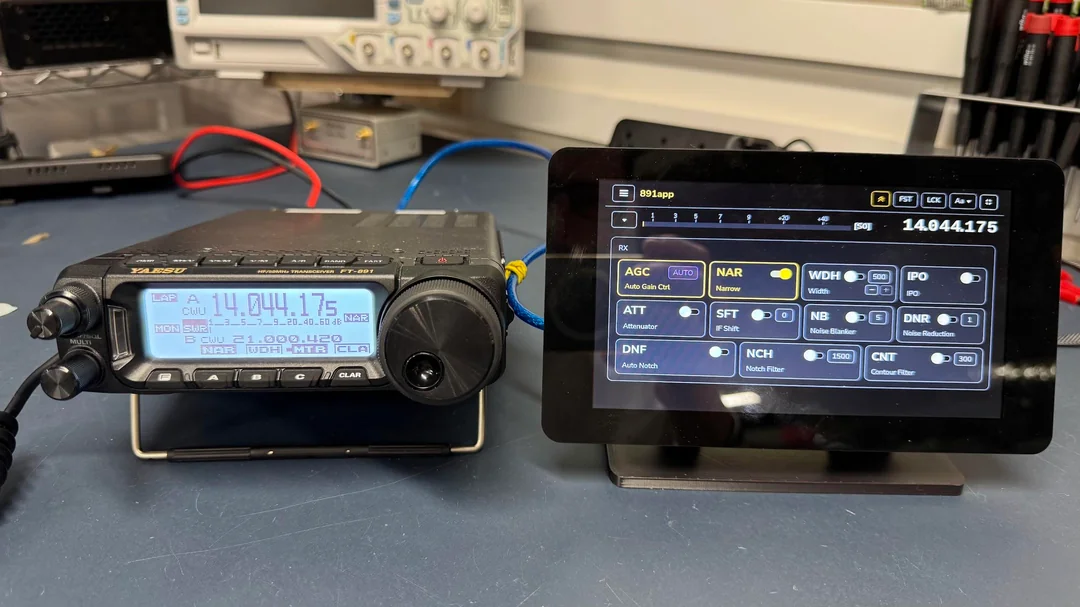
TL;DR: 891app is a free, open-source Progressive Web App (PWA) created by Christian (DL5LZ) that delivers full CAT transceiver control for the Yaesu FT-891 directly inside any modern web browser. Utilizing the W3C WebSerial API over a standard USB cable, it eliminates drivers, server backends, and Java dependencies on Windows, Linux, macOS, Raspberry Pi, and Android.
What Is 891app?
891app is an installable, client-side Progressive Web App (PWA) developed by Christian (DL5LZ) that provides complete Computer Aided Transceiver (CAT) control, digital signal processing adjustment, menu configuration, and voice keying for the Yaesu FT-891 HF/50MHz transceiver. Accessible at dl5lz.net/891app, the application communicates directly with the radio over a single USB cable using standard browser WebSerial and WebUSB APIs without requiring backend servers, native drivers, or middleware software.
+-----------------------------------------------------------------------+
|                       891app Web Application                          |
|  (Chromium Browser · Installable PWA · WebSerial / WebUSB Engine)     |
+-----------------------------------+-----------------------------------+
                                    | USB-A / USB-C Cable (Direct CAT)
                                    v
+-----------------------------------------------------------------------+
|                        Yaesu FT-891 Transceiver                       |
|   (VFO-A/B · DNR/DNF/APF · Filter Width · DVS Voice & CW Keying)      |
+-----------------------------------------------------------------------+
The Yaesu FT-891 is renowned for its high-performance receiver, 100W output, and ultra-compact chassis, making it one of the most popular portable rigs for Parks on the Air (POTA), Summits on the Air (SOTA), and mobile operations. However, its small front panel requires navigating multi-layered menu trees with a single rotary dial. 891app exposes all critical transceiver functions to a single, intuitive on-screen interface.
Evolution: From 891ctrl to Serverless WebSerial
Before 891app, DL5LZ developed 891ctrl, a Java-based desktop CAT controller. While functional, 891ctrl required users to install Java Runtime Environments (JRE), configure local serial port drivers, and maintain desktop dependencies across different operating systems.
With the advent of the W3C WebSerial API in modern Chromium-based browsers, DL5LZ completely re-architected the software into a lightweight, serverless web application:
- Zero Backend Infrastructure: All CAT command parsing, polling loops, and UI updates execute locally in the browser JavaScript engine.
- Instant Hardware Access: Plugging in the FT-891 USB cable and clicking Connect prompts a native browser serial port selector.
- Offline PWA Installation: Users can install 891app to their desktop or home screen, allowing the app to run completely offline without an active internet connection.
Core Features and Transceiver Controls
891app packs comprehensive station management tools into an adaptable, touch-friendly graphical interface.
+-----------------------------------------------------------------------+
|                           891app Control Modules                      |
+-----------------------+-----------------------+-----------------------+
| Frequency & VFO       | DSP & Audio Filtering | Memory & Macros       |
+-----------------------+-----------------------+-----------------------+
| · VFO-A / VFO-B sync  | · DNR 15-level slider | · DVS voice message TX|
| · Split mode operation| · DNF / APF toggles   | · CW macro memory     |
| · Quick band hopping  | · Contour & IF Shift  | · Custom CAT macros   |
| · Direct keypad entry | · Variable IF Width   | · Full Menu Editor    |
+-----------------------+-----------------------+-----------------------+
1. Advanced DSP and Filter Shaping
Navigating the FT-891 menu to adjust Digital Noise Reduction (DNR) or audio bandwidth during a crowded contest can be cumbersome. 891app provides instant on-screen sliders and toggles for:
- Digital Noise Reduction (DNR): 1 to 15 level slider.
- Digital Notch Filter (DNF) and Audio Peak Filter (APF): Instant toggles.
- IF Shift, Contour, and Width: Real-time visual passband adjustments.
2. Digital Voice System (DVS) and CW Memory Keyer
Operators can trigger the internal Yaesu DVS voice memories (DVS-1 through DVS-5) and CW message buffers directly from clickable screen buttons, perfect for repetitive calling during POTA activations.
3. Visual Menu Entry Editor
The FT-891 contains over 100 internal menu parameters. 891app provides a searchable, organized menu editor that reads, updates, and writes configuration settings straight to the radio non-volatile memory without tedious knob twisting.
4. Custom Macros and Control Panels
Users can create custom buttons mapped to raw Yaesu CAT command strings, allowing personalized automated workflows, antenna tuner triggers, and fast mode transitions.
5. Integrated Demo Mode
For hams exploring the interface before heading to the shack, 891app includes an interactive Demo Mode directly on the web page that simulates transceiver responses and controls without physical hardware.
Platform Compatibility and Setup Scenarios
891app runs across a broad range of operating systems and hardware configurations:
+------------------------------------------------------------------------+
|                      Platform Compatibility Matrix                     |
+---------------------+-------------------+------------------------------+
| Platform            | Supported Browser | Connection Method            |
+---------------------+-------------------+------------------------------+
| Windows 10 / 11     | Chrome, Edge, Brave| Standard USB-A to USB-Mini   |
| Linux (Ubuntu/Debian)| Chromium, Chrome  | USB-A / Serial permissions   |
| Raspberry Pi (RPi OS)| Chromium          | Touchscreen / USB CAT        |
| macOS (Apple Silicon)| Chrome, Edge, Opera| USB-C / USB-A to Mini       |
| Android Tablets/Phones| Chrome, Brave    | USB-C OTG Cable              |
| Apple iOS / iPadOS  | Not Supported     | Apple WebKit API restriction |
+---------------------+-------------------+------------------------------+
Raspberry Pi Field Touchscreen Setups
Combining a Raspberry Pi, a compact official touchscreen display, and 891app creates a rugged, standalone touchscreen front-end for the FT-891. Mounted in a mobile go-box or field backpack, it gives operators a large visual panadapter-style control head with low DC power consumption.
Android Field Operations
Using a simple USB-C On-The-Go (OTG) adapter, operators can connect an Android smartphone or tablet directly to the FT-891. Launching 891app in Chrome turns the mobile device into a field control console for portable activations.
Software Comparison
The table below contrasts 891app with traditional amateur radio rig control software:
| Capability / Metric | 891app (DL5LZ) | Ham Radio Deluxe | Flrig (Fldigi Suite) | OmniRig Engine |
|---|---|---|---|---|
| Architecture | Serverless WebSerial PWA | Desktop Application Suite | Desktop Application | Windows COM Service |
| Installation | Zero Install / One-Click PWA | Full Desktop Installer | Full Desktop Installer | System Service Installer |
| Java / Runtime Required | None | None (C++) | None (C++) | None (Win32) |
| Supported OS | Win, Linux, Mac, RPi, Android | Windows only | Windows, Linux, macOS | Windows only |
| FT-891 Menu Editor | Yes (Searchable UI) | Basic Controls | Basic Controls | None (Driver only) |
| DVS Voice Triggering | Yes (Direct On-Screen) | Partial | Partial | No |
| Hardware Required | Single USB Cable | USB Cable / Soundcard | USB Cable / Soundcard | USB Cable |
| Cost & License | Free & Open Source | Commercial ($99+) | Free (GPL) | Free Closed Source |
Step-by-Step Connection Guide
Connecting your Yaesu FT-891 to 891app takes less than two minutes:
1. Configure the FT-891 Internal Menu
Ensure your FT-891 CAT rate matches standard speeds:
- Set Menu 05-06 [CAT RATE] to
38400bps(or9600bps). - Set Menu 05-07 [CAT TOT] to
100ms. - Set Menu 05-08 [CAT RTS] to
ENABLE.
2. Connect the Hardware
Connect a standard USB cable from the FT-891 rear USB mini port to your computer, Raspberry Pi, or Android USB-OTG port.
3. Open 891app
- Launch Google Chrome, Chromium, or Microsoft Edge.
- Navigate to dl5lz.net/891app.
- Click the Connect button in the upper toolbar.
- Select the Silicon Labs CP210x Enhanced COM Port from the browser pop-up prompt.
- 891app will instantly sync frequencies, S-meter levels, and filter settings with your transceiver.
Frequently Asked Questions
Do I need to install software or drivers to run 891app?
On modern operating systems (Windows 10/11, macOS, modern Linux, and Android), the CP210x USB UART drivers are built-in. No external software or backend servers are required; the app runs directly inside your web browser.
Can 891app run offline in the field without internet?
Yes. 891app is a Progressive Web App (PWA). Once loaded or installed to your home screen or desktop, the service worker caches all assets locally, allowing full operation with no internet access.
Why does 891app not work on an iPad or iPhone?
Apple restricts all iOS and iPadOS web browsers to the WebKit rendering engine, which currently does not support the W3C WebSerial API. 891app requires WebSerial support found in Chromium-based desktop and Android browsers.
Does 891app support digital voice keying?
Yes. 891app can trigger pre-recorded Yaesu DVS voice memory channels (DVS-1 through DVS-5) directly from on-screen buttons, as well as transmit automated CW text macros.
Is 891app free and open source?
Yes. 891app was created by DL5LZ as a free, open-source gift to the amateur radio community, with active discussion and user feedback on the FT-891 groups.io community.

Post Comment