Menu Maiden: Real-Time Maidenhead Grid Squares and GPS Clock Sync for macOS
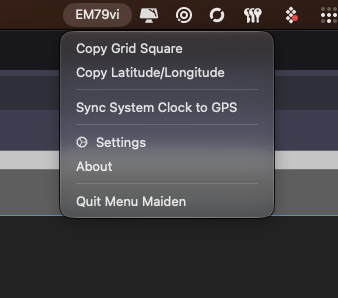
TL;DR: Menu Maiden is a free, open-source macOS menu bar application developed by Scott Pettigrew (Scott Kuma) that calculates and displays your real-time Maidenhead Grid Square. Designed for portable amateur radio operators doing POTA and SOTA, it supports both macOS Location Services and USB NMEA GPS dongles, offering multi-precision grid displays and off-grid system clock synchronization for digital modes like FT8.
What Is Menu Maiden?
Menu Maiden is a lightweight, open-source macOS menu bar utility that converts live position data into Maidenhead Locator System grid squares with selectable precision. Created by Scott Pettigrew under the GPL-3.0 license, the app is tailored specifically for portable amateur radio operators participating in Parks on the Air (POTA), Summits on the Air (SOTA), and VHF/UHF contest operations where knowing your exact geographical grid square is essential.
+------------------------------------------------------------------------+
|                          Menu Maiden Status Bar                        |
|   [ EM79vi ]  <-- Left-click to cycle precision (2, 4, 6, 8 chars)     |
+-----------------------------------+------------------------------------+
                                    |
   +--------------------------------+--------------------------------+
   |                                                                 |
   v                                                                 v
+-------------------------------+         +------------------------------+
| macOS Location Services       |         | USB Serial NMEA GPS Dongle   |
| (Wi-Fi / Cell Positioning)    |         | (Auto-Baud / Raw NMEA Stream)|
+-------------------------------+         +------------------------------+
                                                         |
                                                         v
                                          +------------------------------+
                                          | Off-Grid System Clock Sync   |
                                          | (Calibrated FT8 Timing Sync) |
                                          +------------------------------+
When operating in remote wilderness locations without cellular coverage, conventional online mapping tools and NTP time servers become inaccessible. Menu Maiden bridges this gap on macOS by ingesting satellite coordinates directly from USB NMEA GPS receivers, updating your grid locator in real time, and disciplining your Mac system clock for digital radio operations.
Key Features for Portable Operators
Menu Maiden is designed with the operational needs of field operators and DXers in mind.
+------------------------------------------------------------------------+
|                           Core Feature Modules                         |
+-----------------------+-----------------------+------------------------+
| Grid Precision Engine | Dual Position Sources | Timing & Synchronization|
+-----------------------+-----------------------+------------------------+
| · 2 to 8 char display | · CoreLocation support| · GPS system clock sync|
| · One-click cycling   | · USB serial NMEA GPS | · Latency compensation |
| · Optional ALL CAPS   | · Auto-baud detection | · Sub-second accuracy  |
| · Instant clipboard   | · Live comparison view| · Stale-lock safety    |
+-----------------------+-----------------------+------------------------+
1. Live Menu Bar Grid Display with Precision Cycling
The menu bar item displays your active Maidenhead grid locator at all times. Left-clicking the status item cycles dynamically through precision levels:
- 2 Characters (Field): Approximate area of 1,200 x 1,400 miles (e.g.
EM). - 4 Characters (Square): Standard HF contest grid of 70 x 100 miles (e.g.
EM79). - 6 Characters (Subsquare): Precise VHF/UHF and POTA locator of 3 x 4 miles (e.g.
EM79vi). - 8 Characters (Extended): Ultra-high accuracy of 1,500 x 2,300 feet (e.g.
EM79vi12).
2. Dual Position Ingestion and Comparison
Operators can choose between two position sources:
- macOS Location Services: Uses native CoreLocation framework when connected to Wi-Fi.
- USB NMEA GPS Dongle: Connects to standard USB serial GPS receivers (such as u-blox, GlobalSat, or Beitian dongles) using automatic baud rate detection.
- Position Comparison Table: Settings include a side-by-side diagnostic table comparing timestamps, coordinates, and precision from both sources simultaneously.
3. Off-Grid GPS System Clock Synchronization
Digital amateur radio modes like FT8, FT4, and JS8Call require your computer clock to remain synchronized within one second of UTC. In remote field environments with no internet access, macOS cannot reach internet NTP servers.
Menu Maiden includes a Sync System Clock to GPS command that sets the Mac system clock directly from the GPS satellite time fix. To maximize timing precision:
- Fresh-Lock Validation: The command is only enabled when a valid GPS satellite fix has been received within the last 5 seconds.
- Latency Compensation: Includes a millisecond-level calibration stepper in Settings to cancel out GPS chipset processing latency and serial buffer delays, achieving reliable timing for digital mode decoding.
4. Fast Clipboard and Coordinate Formatting
Right-clicking the menu bar icon exposes instant shortcuts to copy your Maidenhead grid square or geographic coordinates. Coordinates can be exported in Decimal Degrees, Degrees/Minutes/Seconds (DMS), or Degrees/Decimal Minutes (DDM).
Software Comparison
The table below highlights how Menu Maiden compares with alternative positioning and time utilities on macOS:
| Capability / Metric | Menu Maiden | WSJT-X Built-in Grid | MacDoppler | BktTimeSync (Windows VM) |
|---|---|---|---|---|
| Primary Platform | Native macOS Menu Bar | Cross-Platform App | macOS Desktop App | Windows Only |
| Grid Square in Menu Bar | Yes (Always visible) | No (Inside app only) | No (Satellite window) | No |
| Click-to-Cycle Precision | Yes (2, 4, 6, 8 chars) | No (Static setting) | No | No |
| USB Serial NMEA GPS | Yes (Built-in parser) | No (Requires GPSD) | Yes (Serial GPS) | Yes (NMEA / PPS) |
| Offline GPS Clock Sync | Yes (Calibrated shell) | No | No | Yes (Direct Clock Sync) |
| Comparison View | Yes (Location vs GPS) | No | No | No |
| License & Price | Open Source (GPL-3.0, Free) | Open Source (GPL) | Commercial ($98) | Freeware |
Building and Installing from Source
Menu Maiden is distributed as an open-source Swift application built with SwiftUI and XcodeGen.
1. Prerequisites
Ensure you have macOS 13.0 (Ventura) or newer and Xcode 15 installed. Install XcodeGen via Homebrew:
brew install xcodegen2. Clone and Generate Project
Clone the GitHub repository and generate the .xcodeproj bundle:
git clone https://github.com/scottkuma/menu-maiden.git
cd menu-maiden
xcodegen generate
open MenuMaiden.xcodeproj
3. Build and Run
- Select the
MenuMaidenbuild scheme in Xcode and click Run. - On first launch, grant Location Services permission, or plug in a USB GPS receiver and select it under Settings -> GPS.
- The live grid square will appear immediately in your macOS menu bar.
Frequently Asked Questions
What is Menu Maiden?
Menu Maiden is a native macOS menu bar utility that displays your current Maidenhead Grid Square locator in real time and provides off-grid GPS system clock synchronization for amateur radio operators.
How does Menu Maiden calculate grid squares without an internet connection?
When paired with a standard USB NMEA GPS receiver, Menu Maiden reads latitude and longitude coordinates directly from satellite NMEA sentences and converts them locally into Maidenhead locators using pure mathematical algorithms.
Can Menu Maiden synchronize my Mac clock for FT8 in the field?
Yes. When connected to a USB GPS receiver with an active satellite lock, Menu Maiden can set your Mac system clock to GPS atomic time, enabling accurate FT8 and FT4 digital operation without internet access.
Which USB GPS receivers work with Menu Maiden?
Any standard USB serial GPS dongle that outputs NMEA 0183 sentences (such as u-blox 7/8/9, GlobalSat ND-105C / BU-353, or VK-162) is compatible with Menu Maiden.
Why is Menu Maiden distributed outside the Mac App Store?
Setting the macOS system clock requires privileged administrative shell execution, which is restricted by the Mac App Store sandbox. Distributing Menu Maiden outside the sandbox ensures full GPS clock synchronization functionality.




Post Comment