Tiny RF Simulator: Modular C++20 and Dear ImGui RF Signal Chain Modeling
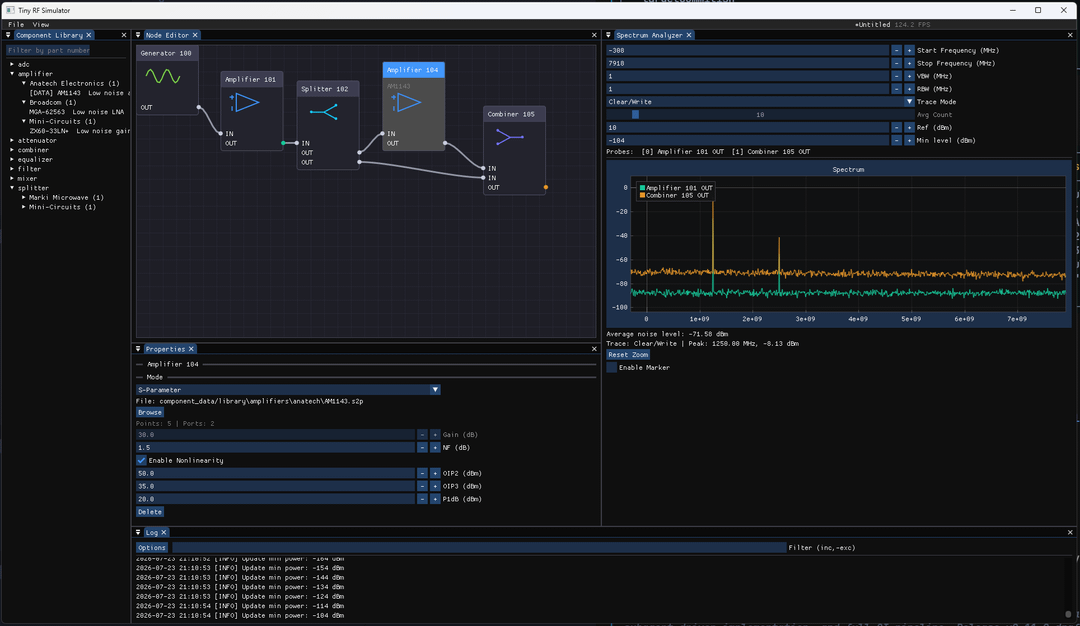
TL;DR: Tiny RF Simulator is a free, open-source C++20 application developed by striderZA that models complex RF signal cascades in real time. Powered by Dear ImGui and ImPlot, it allows engineers and radio amateurs to assemble cascades of amplifiers, mixers, filters, and ADCs, probing any intermediate node to visualize spectrum behavior, intermodulation distortion, and noise figure.
What Is Tiny RF Simulator?
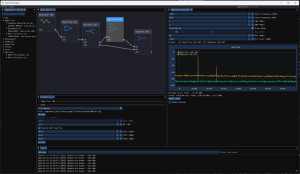
Tiny RF Simulator is a lightweight, high-performance desktop RF signal chain simulator built in C++20 that computes real-time frequency-domain and time-domain signal propagation through cascaded radio frequency components. Created by striderZA under the Apache-2.0 license, the software combines a modular component architecture with an interactive Dear ImGui and ImPlot graphical interface, enabling users to test RF designs, inspect intermodulation products, and evaluate receiver dynamic range without commercial EDA licenses.
+------------------------------------------------------------------------+
|                       Tiny RF Simulator Workspace                      |
+-------------------+      +-------------------+      +------------------+
| RF Source / Tone  | RF   | Bandpass Filter   | RF   | LNA (Amplifier)  |
| · Center Freq/Amp +----->| · S21 Touchstone  +----->| · Gain, NF, OIP3 |
| · Phase Noise/THD |      | · Out-of-Band Rej |      | · P1dB & Nonlin  |
+-------------------+      +---------+---------+      +--------+---------+
                                     |                         |
                                     v [Probe Node A]          v [Probe Node B]
                           +---------------------------------------------+
                           |  Real-Time Spectrum & Noise Power Analyzer  |
                           |  · Instant FFT · IMD Products · Dynamic Rang|
                           +---------------------------------------------+
Designing RF front-ends, up/down converters, or Software Defined Radio (SDR) receiver stages requires balancing gain, noise figure, third-order intercept point (OIP3), and filter selectivity. Tiny RF Simulator delivers instant visual feedback on how adjustments to a single component impact the entire signal chain.
Core Simulation Features and Architecture
Tiny RF Simulator is engineered for speed and interactive exploration:
+------------------------------------------------------------------------+
|                          System Architecture                           |
+-----------------------+-----------------------+------------------------+
| Component Modeling    | RF Analysis Suite     | Software Engine        |
+-----------------------+-----------------------+------------------------+
| · Nonlinear amps (IP3)| · Live Spectrum (FFT) | · C++20 core engine    |
| · Mixers & LO leakage | · Virtual VNA (Gain)  | · Dear ImGui & ImPlot  |
| · S-parameter filters | · Noise Figure (NF)   | · Dirty-flag caching   |
| · ADC DDC decimation  | · Max/Min hold traces | · .rfsim project files |
+-----------------------+-----------------------+------------------------+
1. Nonlinear Component Modeling
Components model real-world physical behaviors rather than idealized mathematical linear responses:
- Amplifiers: Gain, Noise Figure (NF), 1dB Compression Point (P1dB), Second-Order Intercept (OIP2), and Third-Order Intercept (OIP3).
- Mixers: Up/Down conversion, RF-to-IF and LO-to-RF leakage, conversion loss, and spurious intermodulation products.
- Filters and Transmission Lines: Standard Butterworth, Chebyshev, and Bessel topologies, alongside direct Touchstone (.s2p) S-parameter file imports.
- ADCs and Digital Downconverters: Quantization noise, effective number of bits (ENOB), Numerically Controlled Oscillator (NCO) tuning, and polyphase channelizer decimation.
2. High-Speed Dirty-Flag Caching Engine
To maintain a responsive 60+ FPS user interface, the simulator employs a dirty-flag dependency cache. When an operator adjusts a gain slider or alters a local oscillator frequency, the engine only recalculates downstream nodes affected by the change, leaving upstream calculations intact.
3. Comprehensive Virtual Instrumentation
- Real-Time Spectrum Analyzer: Interactive FFT plot featuring Max/Min Hold, video averaging, interactive delta markers, and integrated channel power measurements.
- Virtual Vector Network Analyzer (VNA): Sweeps the cascade across frequency to generate transmission gain (S21) and cumulative Noise Figure (NF) curves.
- IQ Constellation and Time-Domain Displays: Inspect baseband modulation and signal integrity directly before digital demodulation.
Component Comparison and Simulation Workflows
The table below highlights how Tiny RF Simulator compares with traditional RF design tools:
| Feature / Metric | Tiny RF Simulator | Keysight ADS / Genesys | Qucs-S / SPICE | ADIsimRF Calculator |
|---|---|---|---|---|
| Primary Focus | Real-time modular cascade simulation | Full electromagnetic & circuit EDA | Circuit-level nodal simulation | Static spreadsheet cascade |
| User Interface | Interactive Dear ImGui & ImPlot | Heavy multi-window desktop suite | Classical schematic capture | Web / Desktop forms |
| Execution Speed | Real-Time 60+ FPS (C++20) | Slow (Batch simulation) | Moderate (Transient solver) | Instant (Static math only) |
| Intermodulation (IMD) | Live visual spectrum generation | Harmonic balance solver | Transient FFT | Calculated tabular values |
| S-Parameter Imports | Yes (Touchstone .s1p / .s2p) | Yes (Full S/Y/Z parameters) | Yes (Linear S-parameters) | Limited |
| ADC / DSP Modeling | Yes (DDC, ENOB, Polyphase) | Yes (DSP Ptolemy engine) | No | Basic ADC calculations |
| Cost & License | Open Source (Apache-2.0, Free) | Commercial ($10,000+) | Open Source (GPL) | Free Proprietary |
Building and Running from Source
Tiny RF Simulator uses CMake and Ninja for fast, cross-platform builds on Linux, macOS, and Windows:
1. Prerequisites
Ensure you have a modern C++20 compiler (GCC 11+, Clang 14+, or MSVC 2022) and CMake 3.20+ installed.
2. Clone the Repository
Clone the repository and submodules:
git clone --recursive https://github.com/striderZA/Tiny-RF-Simulator.git
cd Tiny-RF-Simulator
3. Compile and Run
Generate the build system and compile the binary:
cmake -B build -G Ninja -DCMAKE_CXX_COMPILER=g++ -DCMAKE_C_COMPILER=gcc
cmake --build build
./build/bin/rf_simulator
Frequently Asked Questions
What is Tiny RF Simulator?
Tiny RF Simulator is a free, open-source C++20 application that models cascaded RF systems, enabling users to build signal chains and probe intermediate nodes to observe real-time spectrum and noise behaviors.
How does the simulator handle nonlinear distortion?
The engine computes second- and third-order intermodulation products using component P1dB, OIP2, and OIP3 parameters, accurately modeling harmonics, spur generation, and gain compression.
Can I import real-world component measurements?
Yes. Tiny RF Simulator supports standard Touchstone (.s1p and .s2p) S-parameter files, allowing you to import real filter, amplifier, and antenna measurements directly into the cascade.
Is Tiny RF Simulator suitable for SDR receiver design?
Yes. With dedicated ADC, digital downconverter (DDC), polyphase filter bank, and NCO mixer modules, it is ideally suited for designing and optimizing Software Defined Radio receiver front-ends.
Which operating systems are supported?
Tiny RF Simulator compiles natively on Linux, Windows, and macOS using standard C++20 compilers and OpenGL rendering.

Post Comment