KiwiDX: The Native Windows Client for Driving KiwiSDR, OpenWebRX, and WebSDR Networks
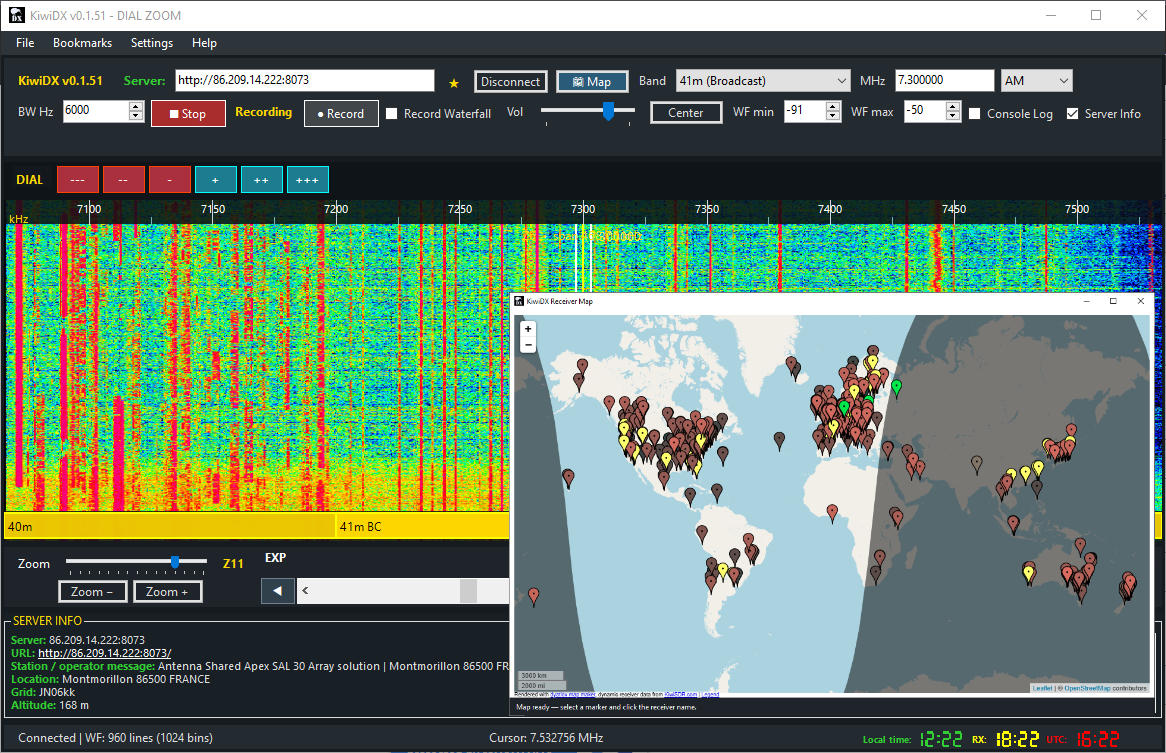
TL;DR: KiwiDX is an open-source Windows desktop application created by Kmilo Noa (
noakmilo) that connects directly to thousands of public KiwiSDR, OpenWebRX, and WebSDR receivers worldwide. Built on C# and .NET 8, KiwiDX bypasses heavy web browser engines with native WebSocket streaming, providing smooth spectrum waterfalls, interactive world map receiver switching, 128 kbps MP3 and synchronized 480p MP4 waterfall video recording, built-in Ham Radio and SWL listening logs with SIMPO reporting, and a real-time DX community chat.
What Is KiwiDX?
KiwiDX is an open-source native Windows desktop client built in C# and .NET 8 that connects directly to the worldwide KiwiSDR, OpenWebRX, and WebSDR network over WebSockets to provide high-performance HF spectrum visualization, audio reception, synchronized recording, and interactive DX logging without relying on a web browser.
+-----------------------------------------------------------------------------------+
|                                 KIWIDX WORKSPACE                                  |
+-----------------------------------------------------------------------------------+
|  [Server URL / Favorites Dropdown]  [Protocol: Auto/Kiwi/OWRX/WebSDR]  [Connect]  |
|  [Tuning: 7.100.000 MHz] [Mode: LSB/USB/CW/AM/NBFM] [BW: 2.4 kHz] [Map Window]  |
+-----------------------------------------------------------------------------------+
|                                                                                   |
|    ================ LIVE FFT SPECTRUM SCOPE & WATERFALL ================          |
|    - 0 to 30 MHz High-Resolution Waterfall Display (Blue/Cyan/Yellow Palette)     |
|    - Adaptive MHz Frequency Scale & Band Edge Boundary Lines                      |
|    - Instant Zoom (Z0 to Z14) & Precision Center Tuning Controls                  |
|                                                                                   |
+-----------------------------------------------------------------------------------+
|  [Vol / Mute]  [Rec MP3 Audio]  [Rec MP4 Waterfall + Sync Audio]  [WF Min/Max dB] |
+-----------------------------------------------------------------------------------+
|  Status: Connected | Local: 14:30 (Green) | RX QTH: 22:30 (Yellow) | UTC: 06:30   |
+-----------------------------------------------------------------------------------+
For years, amateur radio operators, shortwave listeners (SWLs), and utility DXers have relied on web-based SDR networks like the KiwiSDR Network, WebSDR, and OpenWebRX to monitor radio propagation, check their transmitted signals across different continents, chase rare DX, or listen to distant broadcast stations. While browser-based interfaces made Software Defined Radio accessible to anyone with an internet connection, browsers present inherent drawbacks:
- Heavy memory and CPU consumption across multiple open browser tabs.
- Audio stuttering and buffer underruns when background tabs are throttled by modern browser power-saving mechanisms.
- Cumbersome bookmark management scattered across generic browser bookmarks.
- Inability to record synchronized waterfall video alongside receiver audio without complex third-party screen capture software.
- Fragmented logging workflows requiring separate desktop loggers or spreadsheets.
KiwiDX solves these challenges by packaging the entire Software Defined Radio listening experience into a dedicated, fast desktop application designed specifically for radio enthusiasts.
Why Move Away from Web Browsers for SDR Listening?
Browsers are general-purpose document renderers, not real-time digital signal processing instruments. When running a wideband HF waterfall inside Chrome, Firefox, or Edge, the browser DOM overhead, JavaScript garbage collection spikes, and WebAudio pipeline latency introduce friction.
+------------------------------------+------------------------------------+
| Traditional Browser-Based KiwiSDR  | KiwiDX Native Desktop Client       |
+------------------------------------+------------------------------------+
| Heavy JavaScript DOM & canvas      | Native Direct2D/GDI+ rendering     |
| Audio throttled when tab unfocused | Background audio via NAudio engine |
| Generic browser bookmark folders   | Server-specific frequency memory   |
| No native synchronized MP4 capture | Built-in 480p MP4 + 128k MP3 rec   |
| Disconnected from radio logbooks   | Integrated Ham Radio & SWL logs    |
| Cluttered browser chrome & tabs    | Dedicated radio receiver workspace |
+------------------------------------+------------------------------------+
1. Zero Background Throttling
Modern web browsers aggressively throttle background tabs to save battery and CPU cycles. When listening to a KiwiSDR while working in another application, audio often glitches or disconnects entirely. KiwiDX runs its audio receive loops on dedicated background worker threads using NAudio, delivering uninterrupted sound regardless of window focus.
2. Native WebSocket Protocol Engine
Instead of executing megabytes of JavaScript client code inside an engine sandbox, KiwiDX speaks the native KiwiSDR WebSocket protocol directly. It opens dual asynchronous WebSocket streams (/ws/kiwi/{timestamp}/SND for audio and /ws/kiwi/{timestamp}/W/F for waterfall data), decodes ADPCM/PCM audio packets in real time, and unpacks FFT spectral bins with minimal CPU overhead.
3. Integrated Toolset for Radio Operators
In a standard web browser, logging a heard station, checking the greyline, taking notes, or recording a rare signal requires switching between four or five different applications. KiwiDX integrates frequency bookmarks, server favorites, global receiver mapping, SIMPO logging, and multimedia recording into a unified workflow.
Architectural Deep Dive: Under the Hood of KiwiDX
KiwiDX is built with modern C# targeting the .NET 8 runtime, combining high-level asynchronous architecture with efficient low-level binary data parsing.
                  +-----------------------------------+
                  |        KiwiDX User Interface      |
                  |  (WinForms / WorkspaceTheme.cs)   |
                  +-----------------+-----------------+
                                    |
          +-------------------------+-------------------------+
          |                         |                         |
+---------v---------+     +---------v---------+     +---------v---------+
|    KiwiClient     |     | ReceiverProtocols |     |  Community Chat   |
|  WebSocket Engine |     |  WebView2 Bridge  |     |  WebSocket Client |
+---------+---------+     +---------+---------+     +---------+---------+
          |                         |                         |
   +------+------+           +------+------+                  |
   |             |           |             |                  |
+--v---+     +---v---+   +---v----+   +----v----+             |
| Audio|     |Water- |   |Open-   |   | WebSDR  |             |
|Stream|     | fall  |   | WebRX  |   | (Twente)|             |
+--+---+     +---+---+   +---+----+   +----+----+             |
   |             |           |             |                  |
+--v---+     +---v---+       +------+------+                  |
|NAudio|     |FFmpeg |              |                         |
|Engine|     | MP4   |       +------v------+                  |
+------+     +-------+       |   WebView2  |                  |
                             |   Runtime   |                  |
                             +-------------+                  |
                                    |                         |
+-----------------------------------v-------------------------v-----+
|                 Global Public SDR Servers & Services              |
|          KiwiSDR / OpenWebRX / University of Twente / Chat        |
+-------------------------------------------------------------------+
Direct KiwiSDR WebSocket Protocol
When connecting to a KiwiSDR server, KiwiClient.cs establishes dual independent WebSocket channels:
- Audio Stream (
/ws/kiwi/{timestamp}/SND): Negotiates audio sample rates, modulation modes (AM, LSB, USB, CW, NBFM, IQ), and bandpass cutoffs (SET low_cut=300 high_cut=2700). The client processes incoming binary ADPCM frames using an optimized step-table decoder and streams raw 16-bit linear PCM directly to the audio buffer. - Waterfall Stream (
/ws/kiwi/{timestamp}/W/F): Receives high-speed spectral lines containing 1024 FFT frequency bins. The waterfall engine processes incoming frames off the UI thread and pushes pixel arrays into a double-buffered bitmap canvas.
Multi-Protocol Detection and Hybrid Bridges
Beyond KiwiSDR, KiwiDX features an intelligent protocol analyzer in ReceiverProtocols.cs. When a user enters any SDR server address, KiwiDX inspects the remote HTML structure to identify the server type:
- KiwiSDR: Identified by
/kiwi/scripts and native element containers. Driven directly via high-speed native WebSockets. - OpenWebRX: Identified by
openwebrx-panel-receivercontainers. Embedded seamlessly via a lightweight Microsoft Edge WebView2 bridge that retains SDR profiles and waterfall controls. - WebSDR (including University of Twente): Identified by
websdr-base.jsandwebsdr-controls.js. Embedded with frequency and mode synchronization, allowing users to tune the famous Dutch wideband WebSDR directly from KiwiDX.
Workspace Tour and Key Features
The KiwiDX interface is organized logically from top to bottom, putting essential receiver operations right at your fingertips.
+----------------------------------------------------------------------------------------------------+
| File  Bookmarks  Settings  Help                                                                    |
+----------------------------------------------------------------------------------------------------+
| [KiwiDX v0.2.0] Server: [ http://86.209.14.222:8073     |v] [* Fav] [Disconnect] [Map]            |
| Band: [ 40m (Ham) |v]  Freq: [ 7.100000 ] MHz  Mode: [ LSB |v]  BW Hz: [ 2400 ]                   |
+----------------------------------------------------------------------------------------------------+
| DIAL  [ --- ] [ -- ] [ - ] [ + ] [ ++ ] [ +++ ]                                                    |
+----------------------------------------------------------------------------------------------------+
| kHz   7050        7074 (FT8)    7100 (LSB)    7125          7150          7175          7200   |
| ================================================================================================== |
| ~~~ LIVE WATERFALL DISPLAY (High-Contrast White Passband Edge Lines, 2.5px Thickness) ~~~~~~~~~~~ |
| ~~~~~~~~~~~~~~~~~~~~~~~~~~~~~~~~~~~~~~~~~~~~~~~~~~~~~~~~~~~~~~~~~~~~~~~~~~~~~~~~~~~~~~~~~~~~~~~~~~ |
+----------------------------------------------------------------------------------------------------+
| Zoom: [======o=========] Z11 EXP   [Zoom -] [Zoom +]   Center: [ Center ]  WF: Min [-91] Max [-50] |
+----------------------------------------------------------------------------------------------------+
| [Stop] [Rec Audio (MP3)]  [x] Rec Waterfall (MP4)  Vol: [====o====]  [x] Mute                      |
+----------------------------------------------------------------------------------------------------+
| Status: Connected | WF: 960 lines | Cursor: 7.100250 MHz | Local: 12:22 | RX: 18:22 | UTC: 16:22   |
+----------------------------------------------------------------------------------------------------+
1. Top Receiver & Tuning Bar
- Editable Server Dropdown: Select from preloaded favorites or type any custom IP address/domain name.
- Quick Band Selector: Instantly jump between Amateur Radio bands (160m through 10m), International Shortwave Broadcast bands (11m to 120m), Medium Wave (MW), and Long Wave (LW).
- Direct Frequency Entry & Mode Selection: Dial precise frequencies in MHz down to 1 Hz resolution. Supports AM, LSB, USB, CW, CWN, NBFM, and raw IQ.
- Bandwidth & Passband Filtering: Adjust filter width in Hz. High-contrast 2.5-pixel white passband edge lines clearly define the active reception window over the waterfall.
2. High-Performance Waterfall & Spectrum Display
- Downward Flowing Waterfall: New spectral lines enter smoothly at the top and flow downward.
- Custom Color Palettes: Optimized blue/cyan/yellow visual palette for maximum contrast on weak CW and SSB signals.
- Adaptive MHz Scale: Dynamic frequency scale adjusts automatically as you zoom from full 0-30 MHz overviews (Z0) down to razor-sharp 200 Hz passbands (Z14).
- Step Tuning Buttons: Quick-step buttons (
---,--,-,+,++,+++) let you step across the band in 100 Hz, 500 Hz, 1 kHz, 5 kHz, 9 kHz, or 10 kHz increments.
3. Tri-Color Multi-Zone Digital Clocks
In the bottom-right status bar, KiwiDX displays three independent 7-segment digital clocks:
- Local Time (Green): Your local PC timezone.
- Receiver Time (Yellow): The true local time at the remote SDR station’s physical QTH (calculated via GPS telemetry and daylight saving offsets).
- UTC Time (Red): Coordinated Universal Time, essential for amateur radio logbooks and broadcast schedule coordination.
Interactive Global Receiver Discovery Map
Finding active KiwiSDR receivers across the globe has never been easier. Clicking the Map button opens an interactive worldwide map rendered via OpenStreetMap and Leaflet.
+-------------------------------------------------------------------+
|                     KiwiDX Global Receiver Map                    |
+-------------------------------------------------------------------+
|  [+]                                                              |
|  [-]     o (North America)         o (Europe)       o (Asia)      |
|              o                         o       o                  |
|                 o (South America)         o (Africa)    o (Oceania)|
|                                                                   |
|  [================= Live Day / Night Greyline =================]  |
+-------------------------------------------------------------------+
| Map ready - Click any marker pin to instantly switch receiver.    |
+-------------------------------------------------------------------+- Live Day/Night Greyline Terminator: Displays solar illumination and darkness zones across the globe in real time, helping DXers target greyline propagation peaks on 160m, 80m, and 40m.
- One-Click Connection Switching: Click on any receiver pin in France, Japan, Australia, South Africa, or Brazil to automatically switch your active session without retyping URLs.
- Station Metadata Tooltips: View antenna descriptions (e.g. “Shared Apex SAL 30 Array”, “Beverage 400m”, “Active Mini-Whip”), Maidenhead grid squares, and station location before connecting.
Synchronized Audio and Waterfall Video Recording
One of the standout features of KiwiDX is its dual multimedia recording engine.
+-----------------------------------------------------------------------------+
|                          KiwiDX Recording Pipeline                          |
+-----------------------------------------------------------------------------+
|                                                                             |
|  1. High-Quality MP3 Audio:                                                 |
|     Incoming PCM Stream ----> NAudio Buffer ----> 128 kbps MP3 Encoder      |
|                                                                             |
|  2. Synchronized 480p MP4 Video:                                            |
|     Waterfall Bitmap Stream  \                                              |
|                               +---> FFmpeg Pipeline ---> Synchronized MP4   |
|     Decoded Audio Stream     /      (480p Video @ 15fps + 128k AAC Audio)   |
|                                                                             |
+-----------------------------------------------------------------------------+
1. 128 kbps MP3 Audio Recording
Clicking Record in audio mode captures incoming demodulated audio directly to a standard 128 kbps MP3 file. Recordings are named automatically with the station frequency, mode, and timestamp, making archiving shortwave broadcasts and DX pileups effortless.
2. 480p MP4 Waterfall Video Capture via FFmpeg
When the Record Waterfall checkbox is selected, KiwiDX captures the live waterfall display alongside synchronized demodulated audio into an MP4 video file powered by an embedded FFmpeg pipeline (WaterfallVideoRecorder.cs). This produces self-contained video captures showing the exact waterfall signals, fading patterns, and audio demodulation, ideal for sharing on YouTube, club presentations, or social media.
Built-In DX and Shortwave Listening (SWL) Log System
KiwiDX includes a comprehensive logging engine accessible by right-clicking the dial or via the Logging menu.
+-------------------------------------------------------------------------------+
|                       KiwiDX Listening Log Manager                            |
+-------------------------------------------------------------------------------+
| [Ham Radio Logs]  [Shortwave Listening (SWL) Logs]  [Add Manual Report...]    |
+-------------------------------------------------------------------------------+
| UTC Time             Freq (kHz)   Mode   Station / Call   QTH / Program  RST  |
| 2026-09-16 04:15:00  7100.000     LSB    9M2PJU           Malaysia       59   |
| 2026-09-16 04:22:30  9420.000     AM     BBC World Svc    Woofferton     SIMPO|
+-------------------------------------------------------------------------------+
| [Edit Selected]  [Delete Selected]  [Export Selected Report (.txt)...]        |
+-------------------------------------------------------------------------------+
Ham Radio Logging Mode
Automatically captures:
- Remote Receiver URL & Station Name
- Connected Antenna information
- Exact Frequency, Amateur Band, and Modulation Mode
- Local time, remote RX time, and UTC timestamp
- Callsign, QTH, and RST signal report
Shortwave Listening (SWL) Mode with SIMPO Rating
SWL reports include the standard international SIMPO code evaluation:
- S (Signal Strength): 1 (Barely audible) to 5 (Extremely strong)
- I (Interference): 1 (Severe) to 5 (Nil)
- M / N (Noise / Atmospheric QRN): 1 (Severe) to 5 (Nil)
- P (Propagation / Fading QSB): 1 (Severe) to 5 (Steady)
- O (Overall Merit): 1 (Unusable) to 5 (Excellent)
- Program Details: Captures language, broadcaster name, and commentary.
Manual Logging for External Radios
You do not need to be actively connected to a remote SDR to use the logger. Clicking Add manual report… lets you log receptions made on your own desktop transceivers or portable receivers (such as an XHDATA D-808, Tecsun PL-880, or Icom IC-7300), entering receiver model and antenna data manually.
Persistent Storage & Text Export
All logs are saved atomically in %LOCALAPPDATA%\KiwiDX\listening-logs.json with an automatic .bak backup on every save. Any individual entry can be exported instantly to a clean, human-readable UTF-8 .txt file ready to paste into QSL requests or email reception reports to shortwave broadcasters.
Integrated Community DX Chat
KiwiDX v0.2.0 introduces a native, dockable/detachable Community Chat sidebar.
+---------------------------------------------------------------+
| Community Chat                                            [x] |
+---------------------------------------------------------------+
| [#hamradio]  [#shortwave]                                     |
+---------------------------------------------------------------+
| <VK3XXX> Hearing strong 9M2PJU on 7.100 MHz LSB via JA1 Kiwi! |
| <G4ABC> 9420 kHz BBC Woofferton S9+20 into Twente WebSDR      |
| <9M2PJU> Thanks for the report! 73 from Kuala Lumpur!         |
+---------------------------------------------------------------+
| Nick: [ 9M2PJU      ]  Msg: [ Type your message...     ] [Send]|
+---------------------------------------------------------------+- Dual Channels: Separate
#hamradioand#shortwavediscussion channels. - Clickable Tuning Links: When operators share a spot in chat (e.g.
14.205 MHz USBorhttp://...), clicking the link tunes your receiver directly to that exact frequency and mode. - Dockable & Detachable: Keep chat docked to the right of the waterfall or detach it into a floating window across multi-monitor setups.
- Protected Backend: Powered by an asynchronous Python/aiohttp service (
community-chat/) with Cloudflare Turnstile anti-bot verification to prevent spam.
Technical Comparison: KiwiDX vs Browser vs Traditional SDR Apps
| Feature / Capability | KiwiDX Desktop Client | Standard Web Browser Tab | SDR++ / GQRX (with plugins) |
|---|---|---|---|
| Primary Focus | Native KiwiSDR / WebSDR Client | General Web Page Rendering | Local SDR Hardware (RTL-SDR/HackRF) |
| Background Audio Reliability | 100% Stable (Dedicated Thread) | Unreliable (Tab Throttling) | 100% Stable (Native Application) |
| Memory & CPU Footprint | Very Low (~60-120 MB RAM) | High (~400-900 MB per tab) | Low (~80-150 MB RAM) |
| Direct KiwiSDR WebSocket Engine | Yes (Native C# Parsing) | No (Heavy JS in Browser Engine) | Limited (Via 3rd-party plugins) |
| OpenWebRX & WebSDR Support | Yes (Hybrid WebView2 Bridge) | Yes (Manual Tab Navigation) | No (Local SDR protocols only) |
| Interactive Global Receiver Map | Built-in with 1-Click Connect | External web page required | No built-in web receiver map |
| Synchronized MP4 Waterfall Video | Built-in (FFmpeg Pipeline) | No (Requires OBS / screen recorder) | No (Audio WAV only) |
| Tri-Zone Clocks (Local/RX/UTC) | Built-in 7-Segment Clocks | No (Only server local time) | UTC / PC clock only |
| Ham Radio & SWL SIMPO Logging | Built-in with UTF-8 TXT Export | No (Manual external logging) | Basic CSV / Frequency bookmark |
| Built-in DX Community Chat | Built-in with Click-to-Tune | Separate chat window / Discord | No built-in chat system |
| License | Open Source (MIT) | N/A (Proprietary Browsers) | Open Source (GPL / MIT) |
Installation and Quick Start Guide
KiwiDX is distributed as both an automated Windows installer and a portable ZIP package.
+---------------------------------------------------------------------------+
|                          KiwiDX Setup Walkthrough                         |
+---------------------------------------------------------------------------+
|                                                                           |
|  Step 1: Download KiwiDX Release ZIP or Setup EXE from GitHub Releases    |
|  Step 2: Ensure .NET 8 Desktop Runtime & WebView2 Runtime are installed   |
|  Step 3: Launch KiwiDX.exe and select a receiver from the dropdown or Map |
|  Step 4: Pick your band, mode, and frequency, and start DXing!           |
|                                                                           |
+---------------------------------------------------------------------------+
System Requirements
- Operating System: Windows 10 or Windows 11 (64-bit x64).
- Runtime: Microsoft .NET 8 Desktop Runtime (included in self-contained installer builds).
- Web Component: Microsoft Edge WebView2 Runtime (preinstalled on modern Windows 10/11 systems; used for Map and WebSDR hybrid bridge).
- Video Recording: Embedded
ffmpeg.exe(included in official release packages).
Step 1: Download and Install
- Visit the KiwiDX Releases Page on GitHub.
- Download the latest installer (
KiwiDX_v0.2.0_Setup_x64.exe) or portable ZIP (KiwiDX_v0.2.0_Windows_x64.zip). - Run the installer or extract the portable ZIP into a directory of your choice.
Step 2: First Launch & Receiver Selection
- Launch
KiwiDX.exe. - In the top toolbar, select a public receiver from the Server dropdown or click the Map button to open the global receiver discovery map.
- Click any station pin on the map to establish a live connection.
- Adjust your volume slider and enjoy crystal-clear HF reception.
Step 3: Tuning and Bookmarking
- Use the Band dropdown to jump to your favorite amateur or shortwave band.
- Click and drag the waterfall or use your mouse scroll wheel over the frequency scale to tune.
- Save interesting frequencies by selecting Bookmarks > Add Bookmark.
- To export your bookmarks and server favorites for safekeeping, navigate to Bookmarks > Import/Export Bookmarks (stored cleanly as JSON in
%LOCALAPPDATA%\KiwiDX).
Frequently Asked Questions (FAQ)
What operating systems does KiwiDX support?
KiwiDX is built natively for 64-bit Windows 10 and Windows 11 using .NET 8 and WinForms. It does not run natively on Linux or macOS, though it can be run on Windows virtual machines.
Do I need an SDR hardware dongle attached to my PC to use KiwiDX?
No. KiwiDX is a remote client application that connects to thousands of internet-connected KiwiSDR, OpenWebRX, and WebSDR receivers hosted by radio operators and universities worldwide. No local SDR hardware is required.
Can KiwiDX connect to WebSDR and OpenWebRX servers in addition to KiwiSDR?
Yes. KiwiDX features multi-protocol detection that automatically identifies KiwiSDR, OpenWebRX, and WebSDR servers (such as the University of Twente WebSDR), bridging tuning controls, frequency readout, and audio seamlessly.
How does KiwiDX record video waterfalls with synchronized audio?
KiwiDX captures real-time waterfall bitmap frames and feeds them alongside the decoded receiver PCM audio stream directly into an embedded FFmpeg pipeline, producing high-quality 480p MP4 video files at 15 frames per second.
Where are my favorites, bookmarks, and listening logs stored?
All user configuration files are stored safely in %LOCALAPPDATA%\KiwiDX (favorites.json, bookmarks.json, startup.json, listening-logs.json). They persist across application updates and feature automatic .bak backups on save.
Sources and Further Reading
- KiwiDX GitHub Repository: github.com/noakmilo/KiwiDX
- KiwiDX Releases & Downloads: github.com/noakmilo/KiwiDX/releases
- Official KiwiSDR Website & Network: kiwisdr.com
- University of Twente WebSDR: websdr.ewi.utwente.nl:8901
- OpenWebRX Project: openwebrx.de
- NAudio Audio Library for .NET: github.com/naudio/NAudio




Post Comment