Pcap Flow Lab: The Flow-Centric PCAP and PCAPNG Analyzer for Large-Scale Network Traffic Analysis
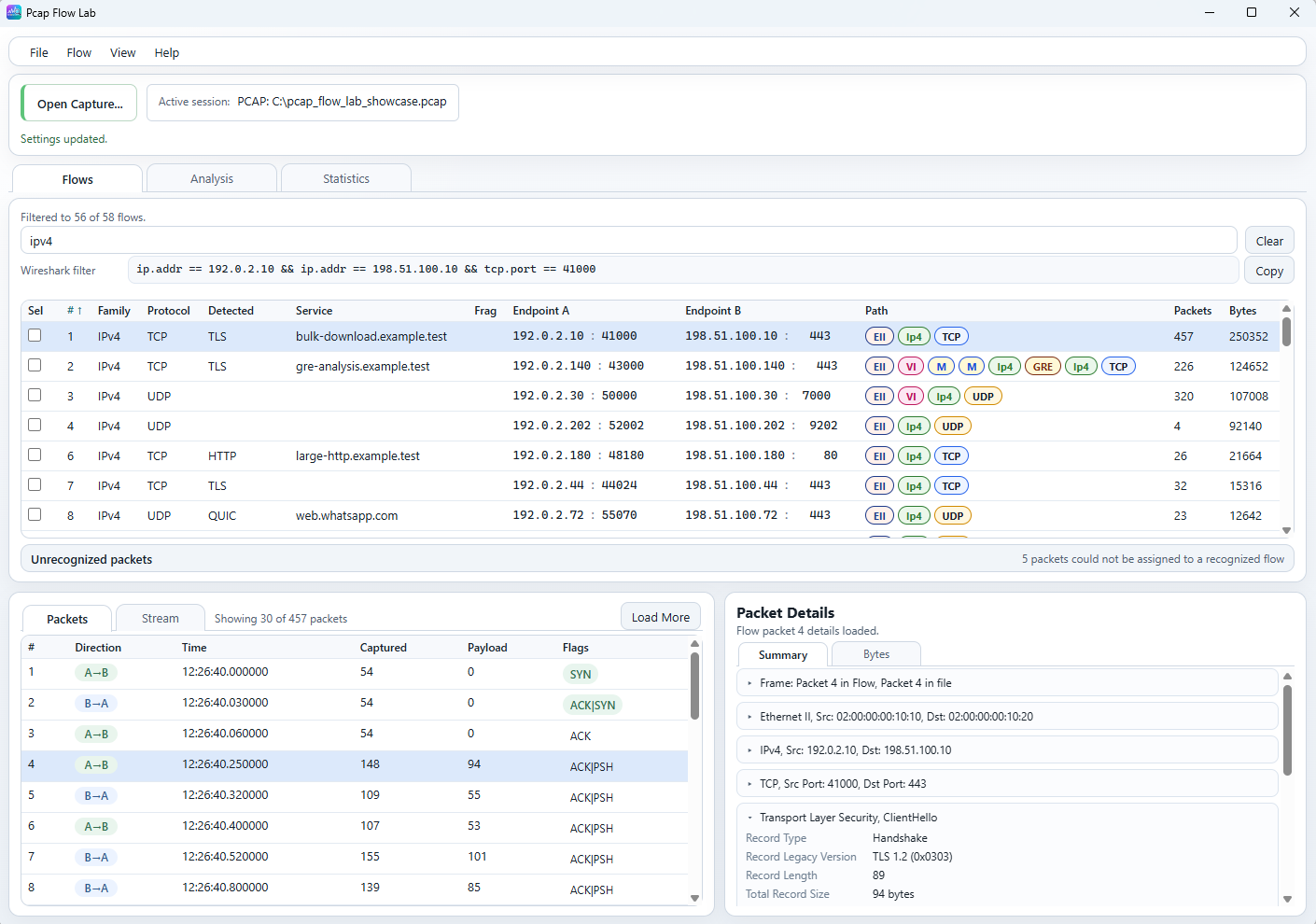
TL;DR: Pcap Flow Lab by Alexey Vasilev is an open-source C++20 and Qt 6 application designed for analyzing network captures through a conversation-centric, flow-based model. By indexing multi-gigabyte PCAP and PCAPNG files around 5-tuples and encapsulation-aware Protocol Paths (VLAN, MPLS, VXLAN, GRE), it eliminates the memory bottlenecks and cognitive overload of packet-by-packet inspection while seamlessly generating Wireshark display filters for deep forensic pivots.
When troubleshooting a complex network anomaly, diagnosing VoIP stutter, or analyzing security captures, the traditional first step is loading a .pcap or .pcapng file into Wireshark. Wireshark is the undisputed industry standard for deep packet dissection down to individual protocol bits and field flags. However, when opening multi-gigabyte captures containing millions of packets, traditional packet-list interfaces present two major challenges:
- Cognitive Overload: Chronological packet lists interleave hundreds of unrelated conversations, forcing engineers to manually craft display filters before they even understand what traffic exists in the file.
- Resource Exhaustion: Global session reconstruction and state-tracking across tens of gigabytes of raw data often consume immense amounts of system RAM, leading to UI freezes and crashes.
The Pcap Flow Lab project created by Alexey Vasilev on GitHub (Apache-2.0 licensed) provides a complementary, modern solution. Instead of treating individual packets as the primary navigation unit, Pcap Flow Lab reorganizes capture analysis around flows (conversations), Protocol Path encapsulation, and bounded on-demand inspection.
What is Pcap Flow Lab?
Pcap Flow Lab is an open-source C++20 network analysis application and CLI tool that organizes packet captures into discrete communication flows, preserving encapsulation context and enabling on-demand stream analysis across large PCAP and PCAPNG datasets.
+-------------------------------------------------------------------------+
|                       Pcap Flow Lab Architecture                        |
+-------------------------------------------------------------------------+
| Input: [Raw PCAP / PCAPNG Captures] or [Saved Analysis Index Files]     |
+------------------------------------+------------------------------------+
                                     |
+------------------------------------v------------------------------------+
|               High-Performance C++20 Core Analysis Engine               |
|  - Fast Streaming Parser (PCAP / PCAPNG / Linux Cooked)                 |
|  - Flow Aggregator: 5-Tuple + Protocol Path Encapsulation Identity      |
|  - Reusable Binary Index Generator (Open Instantly Without Re-Scanning) |
+------------------------------------+------------------------------------+
                                     |
+------------------------------------v------------------------------------+
|               Three Core Interactive Workspaces                         |
|  +-------------------+--------------------+--------------------------+  |
|  | 1. Flows Workspace| 2. Analysis Worksp.| 3. Statistics Workspace  |  |
|  | - Filterable Table| - Rate & Direction | - Capture-Wide Totals    |  |
|  | - Protocol Badges | - Burst / Idle Hist| - Top Endpoints & Ports  |  |
|  | - Live Wireshark  | - Inter-Arrival    | - Protocol Path Tree     |  |
|  |   Filter Export   | - Packet Size Dist | - QUIC / TLS Summaries   |  |
|  +-------------------+--------------------+--------------------------+  |
+------------------------------------+------------------------------------+
                                     |
+------------------------------------v------------------------------------+
|               Bounded On-Demand Inspection Layer                        |
|  - Selected Flow Stream Assembly (HTTP, TLS, DNS, Bounded QUIC)         |
|  - Selected Packet Structural Summary & Authoritative Hex/Byte Views    |
|  - Smart Targeted Flow Export (Extract Only the Necessary Packets)      |
+------------------------------------+------------------------------------+
                                     |
                  +------------------+------------------+
                  |                                     |
+-----------------v-----------------+ +-----------------v-----------------+
|   Qt 6 Desktop GUI (Primary)      | |   Command-Line Interface (CLI)    |
|   & Experimental Tauri Frontend   | |   (Scripting, CI, Terminal Work)  |
+-----------------------------------+ +-----------------------------------+
Pcap Flow Lab does not aim to replace Wireshark. Instead, it serves as the initial navigation deck: allowing engineers to rapidly identify which flows matter, inspect protocol timing and encapsulation anomalies, and then pivot directly to Wireshark via auto-generated display filters when low-level byte dissection is required.
The Philosophy: Why Start with Flows Instead of Packets?
In network forensics and performance troubleshooting, the critical first question is rarely “What is inside packet number 1?” Rather, engineers need to answer:
- Which endpoints are consuming the bulk of the capture bandwidth?
- Which flows are experiencing asymmetric transfer rates, retransmissions, or long idle gaps?
- What encapsulated tunnels (VLANs, MPLS, VXLAN, GRE) are active inside the capture?
- How does a specific TLS or HTTP session behave over time?
+-------------------------------------------------------------------------+
|                  Traditional vs Flow-Centric Workflows                  |
+-------------------------------------------------------------------------+
| Traditional Packet-List Model:                                          |
| [Pkt 1 (DNS)] -> [Pkt 2 (TCP)] -> [Pkt 3 (ARP)] -> [Pkt 4 (TLS)]        |
| - Interleaved packets from dozens of unrelated sessions                 |
| - Requires complex initial display filtering to isolate conversations   |
| - Heavy memory consumption on multi-gigabyte captures                   |
+------------------------------------+------------------------------------+
                                     |
+------------------------------------v------------------------------------+
| Pcap Flow Lab Flow-Centric Model:                                       |
| +--------------------------------------------------------------------+  |
| | Flow #1: 192.0.2.10:41000 <-> 198.51.100.10:443 (TLS) [457 Pkts]   |  |
| | Flow #2: 192.0.2.140:43000 <-> 198.51.100.140:443 (GRE->TLS)       |  |
| | Flow #3: 192.0.2.30:50000 <-> 198.51.100.30:7000 (UDP) [320 Pkts] |  |
| +--------------------------------------------------------------------+  |
| - Clean, top-level inventory of active conversations                    |
| - Encapsulation hierarchy visible at a glance via visual badges         |
| - Select a flow to inspect its packets, reconstructed stream, or stats  |
+-------------------------------------------------------------------------+
By presenting a consolidated flow table first, Pcap Flow Lab reduces millions of scattered packet rows into a concise set of structured conversations. Selecting any single flow instantly scopes the lower inspection panes to show only the packets, directions, flags, and payload buffers belonging to that exact dialogue.
The Killer Feature: Protocol Path and Encapsulation Identity
In modern data centers, cloud networks, enterprise WANs, and amateur radio IP mesh systems (such as AREDN), packets rarely travel over plain flat Ethernet. They are frequently encapsulated inside VLAN tags, MPLS labels, VXLAN overlays, GRE tunnels, and VPN tunnels.
Standard network analyzers identify flows solely by their 5-tuple:
Flow ID = (Source IP, Destination IP, Source Port, Destination Port, Transport Protocol)This model breaks down when identical IP addresses communicate across different overlay segments or tunnel instances. Pcap Flow Lab introduces Protocol Path Identity, making encapsulation layers an explicit part of flow identification:
+-------------------------------------------------------------------------+
|                     Protocol Path Visual Badge Examples                 |
+-------------------------------------------------------------------------+
| Direct Flow:       [Eth] -> [IPv4] -> [TCP]                             |
| VLAN Tagged:       [Eth] -> [VLAN 100] -> [IPv4] -> [UDP]               |
| Nested MPLS/GRE:   [Eth] -> [VLAN] -> [MPLS] -> [MPLS] -> [IPv4] ->     |
|                             [GRE] -> [IPv4] -> [TCP]                    |
| Overlay Tunnel:    [Eth] -> [IPv4] -> [UDP] -> [VXLAN VNI:5001] ->      |
|                             [Eth] -> [IPv6] -> [TCP]                    |
+-------------------------------------------------------------------------+
Supported encapsulation parameters include:
- VLAN VID (IEEE 802.1Q)
- MPLS Labels (Multi-Protocol Label Switching)
- VXLAN VNI (Virtual Extensible LAN)
- Geneve VNI (Generic Network Virtualization Encapsulation)
- GTP-U TEID (GPRS Tunneling Protocol User Plane)
- GRE Keys (Generic Routing Encapsulation)
- IP-in-IP & IPsec (AH/ESP) tunnels
In the UI, Protocol Paths are rendered as clear, color-coded inline badges, letting operators distinguish tunneled traffic from native traffic instantly without digging through protocol layer trees.
The Three Core Workspaces
Pcap Flow Lab organizes analysis across three dedicated workspaces:
+-------------------------------------------------------------------------+
|                      Pcap Flow Lab Workspace Matrix                     |
+-------------------------------------------------------------------------+
| 1. Flows Workspace         | 2. Analysis Workspace | 3. Statistics Wksp.|
| - Flow inventory table     | - Rate & throughput   | - Capture totals   |
| - Protocol Path badges     | - Directional ratios  | - Protocol charts  |
| - Packet sequence pane     | - Burst / idle stats  | - Top endpoints    |
| - Stream reconstruction    | - Inter-arrival times | - Top port usage   |
| - Auto Wireshark filter    | - Size distributions  | - Path tree aggreg.|
+----------------------------+-----------------------+--------------------+
1. Flows Workspace
The primary entry point of the application. It displays the active flow table alongside live filtering controls.
- Top Bar: Quick-filter input and an automated Wireshark filter generator (e.g.,
ip.addr == 192.0.2.10 && tcp.port == 41000) with a one-clickCopybutton. - Flow Table: Lists endpoint addresses, detected protocols (TLS, HTTP, DNS, QUIC, SSH, etc.), service names (e.g., SNI or HTTP hostnames), packet counts, and byte volume.
- Lower Panes: Selecting a flow loads its packet sequence, showing packet direction (
A->BvsB->A), timestamps, delta times, payload sizes, and TCP flags (SYN,ACK,PSH,FIN). The right pane displays structural summaries and raw hexadecimal/ASCII byte streams.
2. Analysis Workspace
Where the Flows workspace provides navigation, the Analysis workspace provides quantitative depth for a single selected conversation:
- Throughput & Rate Graphs: Plots transmission bitrates and packet rates over time.
- Directional Histograms: Visualizes client-to-server (
A->B) versus server-to-client (B->A) payload volume and burstiness. - Inter-Arrival Times: Analyzes jitter, network latency, and TCP acknowledgment turnaround delays.
- Packet Size Distribution: Displays histograms of frame lengths, highlighting MTU bottlenecks, fragmentation, or small-packet keepalive patterns.
3. Statistics Workspace
Provides a high-level overview of the entire capture file:
- Global Totals: Total frame count, elapsed duration, average capture bitrate, and dropped/unassigned packet counts.
- Protocol Distribution: Hierarchical breakdown of transport and application protocols.
- Top Talkers: Ranked tables of top source and destination IP addresses, autonomous system numbers, and service ports.
- Protocol Path Aggregation Tree: Groups traffic by encapsulation hierarchy, showing which VLANs, VXLAN VNIs, or MPLS paths carry the heaviest traffic loads.
Bounded Memory Management and Reusable Indexes
One of Pcap Flow Lab’s most significant engineering achievements is its ability to handle massive captures smoothly on standard desktop hardware.
+-------------------------------------------------------------------------+
|                 Large Capture Memory Management Model                   |
+-------------------------------------------------------------------------+
| Raw Capture on Disk (e.g., 30 GB PCAP File)                             |
+------------------------------------+------------------------------------+
                                     |
+------------------------------------v------------------------------------+
| Lightweight Ingestion & Metadata Indexing Pass                          |
| - Builds flow registry and timing boundaries in RAM                     |
| - Memory usage remains well below total capture file size               |
+------------------------------------+------------------------------------+
                                     |
+------------------------------------v------------------------------------+
| Save Reusable Analysis Index (.idx)                                     |
| - Reopen massive captures in seconds without rescanning raw packets     |
+------------------------------------+------------------------------------+
                                     |
+------------------------------------v------------------------------------+
| Bounded On-Demand Inspection                                            |
| - Stream reassembly executes ONLY when a specific flow is clicked       |
| - Releases temporary memory buffers when moving to another flow         |
+-------------------------------------------------------------------------+
1. Bounded Stream Reconstruction
In many packet tools, enabling TCP stream reassembly forces the application to globally buffer and reconstruct every TCP stream across the entire file during ingestion, quickly exhausting RAM.
Pcap Flow Lab uses bounded on-demand reconstruction. It records flow boundaries during the fast ingestion pass, but only reconstructs stream data (such as TLS records, HTTP transactions, or DNS payloads) when the user actively selects that specific flow.
2. Reusable Analysis Indexes
After processing a large capture, Pcap Flow Lab can export a reusable binary analysis index. When returning to investigate the capture later, opening the index restores the complete flow inventory, metadata tables, and capture statistics instantly without re-reading gigabytes of raw PCAP data from disk.
Technical Comparison: Network Analysis Tool Ecosystem
To illustrate where Pcap Flow Lab fits alongside other network diagnostic tools, consider the following technical matrix:
| Feature / Tool | Pcap Flow Lab | Wireshark | Zeek (Bro) | ntopng |
|---|---|---|---|---|
| Primary Focus | Flow navigation & encapsulation | Deep packet dissection | Network security monitoring | Real-time traffic flow monitor |
| User Interface | Modern Qt 6 GUI, CLI, Tauri | Qt GUI & CLI (tshark) |
Headless CLI & log outputs | Web-based dashboard |
| Navigation Unit | Flows (Conversations) | Individual sequential packets | Connection logs (conn.log) |
Live interfaces & flow tables |
| Protocol Path Awareness | Native visual encapsulation badges | Nested protocol tree view | Protocol analyzers | Basic VLAN / interface tags |
| Large File Performance | Reusable index, low memory use | High RAM on huge captures | High throughput log generator | Designed for live interfaces |
| Stream Reconstruction | On-demand for selected flow | Global / follow-stream | Full session logging | Flow metrics tracking |
| Wireshark Integration | Generates display filter strings | Native | N/A | PCAP export integration |
Installation and Quick Start Guide
Pcap Flow Lab is written in modern C++20 and supports Linux, Windows, and macOS. Prebuilt binaries for Windows and Ubuntu are available on the GitHub Releases page.
+-------------------------------------------------------------------------+
|                       Build from Source Workflow                        |
+-------------------------------------------------------------------------+
| Step 1: Install Build Dependencies (Ubuntu / Debian)                    |
| sudo apt update && sudo apt install cmake build-essential \             |
|      qt6-base-dev qt6-declarative-dev libqt6widgets6                    |
+------------------------------------+------------------------------------+
                                     |
+------------------------------------v------------------------------------+
| Step 2: Clone Repository                                                |
| git clone https://github.com/AlexeyVasilev/PcapFlowLab.git              |
| cd PcapFlowLab                                                          |
+------------------------------------+------------------------------------+
                                     |
+------------------------------------v------------------------------------+
| Step 3: Configure and Compile with CMake                                |
| cmake -S . -B build -DCMAKE_BUILD_TYPE=Release                          |
| cmake --build build --config Release -j$(nproc)                         |
+------------------------------------+------------------------------------+
                                     |
+------------------------------------v------------------------------------+
| Step 4: Launch GUI or CLI Tool                                          |
| ./build/pcap-flow-lab-gui                                               |
+-------------------------------------------------------------------------+
1. Building from Source (Linux)
To compile Pcap Flow Lab on Ubuntu 24.04 or Debian:
# Install dependencies
sudo apt update
sudo apt install cmake g++ qt6-base-dev qt6-declarative-dev qt6-tools-dev

# Clone and build
git clone https://github.com/AlexeyVasilev/PcapFlowLab.git
cd PcapFlowLab
cmake -S . -B build -DCMAKE_BUILD_TYPE=Release
cmake --build build --config Release -j$(nproc)
2. Using the Command-Line Interface (CLI)
Pcap Flow Lab includes a powerful standalone CLI (pcap-flow-lab) that does not require Qt:
# Display general capture summary
./build/pcap-flow-lab summary capture.pcap

# List top flows filtered by protocol and sorted by byte volume
./build/pcap-flow-lab flows capture.pcap --filter TLS --sort bytes:desc

# Inspect detailed metrics for a specific flow ID
./build/pcap-flow-lab flow-info capture.pcap --flow 4

# Export only the packets from selected flows into a clean PCAP
./build/pcap-flow-lab export-flows capture.pcap --flows 1,4,7 --output filtered_subset.pcap
3. Exploring with the Showcase Capture
The project repository includes a curated sample capture (examples/showcase/pcap_flow_lab_showcase.pcap) demonstrating diverse protocols, nested GRE/MPLS tunnels, TLS handshakes, HTTP transactions, and fragmented UDP streams. It is an ideal testbed for evaluating the interface.
Practical Use Cases for Network and Ham Radio Operators
While designed for enterprise and cybersecurity engineering, Pcap Flow Lab’s flow model is equally valuable across amateur radio network deployments:
- AREDN Mesh & Tunnel Auditing: Amateur Radio Emergency Data Networks (AREDN) frequently run IP-over-radio alongside internet mesh tunnels (GRE, WireGuard, VLANs). Pcap Flow Lab visually separates local RF mesh packets from tunneled backhaul flows via its Protocol Path badges.
- OpenTAKServer & ATAK Diagnostics: Troubleshooting Cursor-on-Target (CoT) XML and Protobuf streams over TLS across multiple client tactical nodes.
- Digital Voice Hotspot & Reflector Debugging: Analyzing UDP jitter and packet loss on MMDVM, DMR, or D-STAR connections to remote XLX or BrandMeister reflectors.
- Targeted Packet Extraction: Rather than sending a 10 GB capture file to a colleague, use Pcap Flow Lab’s
export-flowsfeature to extract only the 500 KB conversation of interest into a clean standalone PCAP.
Frequently Asked Questions (FAQ)
What is Pcap Flow Lab?
Pcap Flow Lab is an open-source C++20 and Qt 6 desktop application and CLI tool that analyzes PCAP and PCAPNG captures using a flow-centric model with encapsulation-aware Protocol Path tracking.
Does Pcap Flow Lab replace Wireshark?
No. Pcap Flow Lab complements Wireshark by providing fast flow-level navigation, traffic statistics, and encapsulation mapping, while generating Wireshark display filters for deep bit-level packet dissection.
What is Protocol Path identity?
Protocol Path identity includes encapsulation layers (such as VLAN IDs, MPLS labels, VXLAN VNIs, and GRE keys) as part of a flow’s identity, ensuring tunneled and overlay traffic is properly distinguished.
How does Pcap Flow Lab handle multi-gigabyte PCAPs?
It uses a lightweight streaming ingestion pass and bounds expensive stream reassembly to only the currently selected flow, keeping memory usage well below total capture file sizes.
Can Pcap Flow Lab run without a graphical interface?
Yes. The project includes a full-featured command-line interface (pcap-flow-lab) that supports capture summaries, flow filtering, flow inspection, and targeted PCAP extraction in headless environments.
Summary: A Flow-Centric Upgrade for Network Forensics
Pcap Flow Lab fills a critical gap in the network engineer’s toolkit. By elevating conversations and encapsulation paths to first-class citizens, developer Alexey Vasilev has created a tool that makes large packet captures accessible, intuitive, and lightning-fast to navigate.
Whether you are hunting network latency bottlenecks, auditing complex overlay tunnels, or analyzing tactical radio mesh protocols, Pcap Flow Lab provides the high-level clarity needed before diving into deep packet dissection.
73 from 9M2PJU.
Sources and Further Reading
- Pcap Flow Lab GitHub Repository – Official source code, releases, and documentation.
- Pcap Flow Lab User Documentation – Complete guides for Desktop UI, CLI, and architecture.
- Wireshark Foundation – The world’s foremost network protocol analyzer.
- AREDN Mesh Networking – High-speed amateur radio emergency data networks.
- Tcpdump & Libpcap – Standard packet capture libraries and tools.
- Self-Host an OpenTAKServer Stack – Tactical data and mesh communications guide on HamRadio.my.


Post Comment