Tracexy: The Native, Session-First Wireshark Alternative and Network Intelligence App for macOS
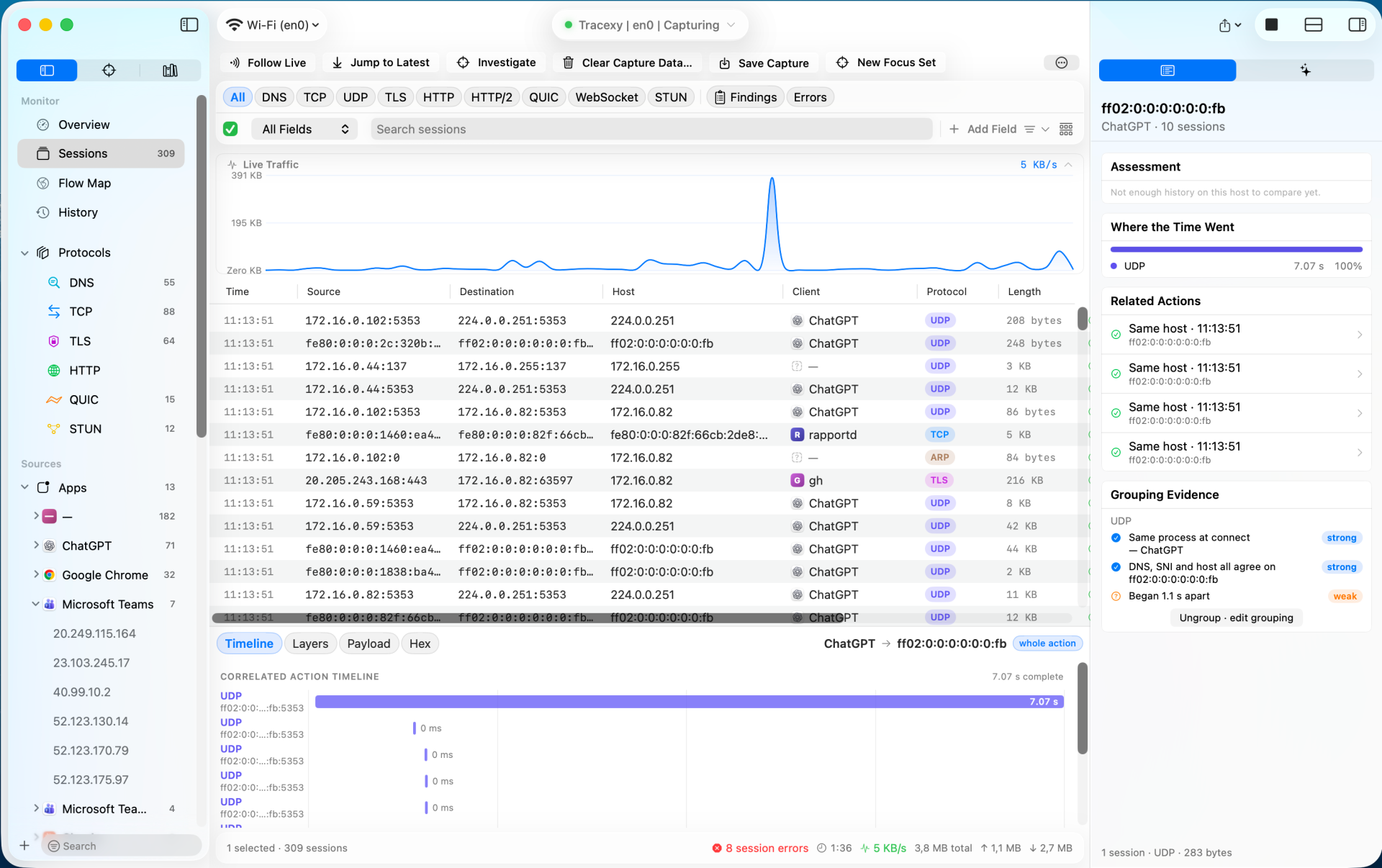
TL;DR: Tracexy by RockxyApp is an open-source, native macOS network intelligence application built in Swift and SwiftUI that organizes network traffic into explainable sessions rather than raw packet noise. Featuring process-aware attribution, explainable multi-protocol correlation (DNS, TLS, HTTP, QUIC), isolated project workspaces, and deep hex inspection, it bridges the gap between high-level application firewalls and low-level packet sniffers like Wireshark.
For macOS developers, system administrators, and security researchers, diagnosing network traffic has long felt polarized between two distinct categories of tools:
- Low-Level Packet Analyzers (Wireshark, tcpdump): Extremely thorough at bit-level protocol dissection, but heavy, cross-platform, non-native, and focused on individual packet rows that interleave dozens of unrelated background services into a wall of noise.
- Application Proxies and Connection Monitors (Proxyman, Charles, Little Snitch, LuLu): Excellent at showing which macOS apps are reaching out to the internet or intercepting HTTPS requests, but unable to inspect arbitrary transport protocols, raw framing, multi-protocol timings, or low-level network evidence.
The Tracexy project created by RockxyApp on GitHub (AGPL-3.0 licensed, hosted at rockxy.io/tracexy) fills this void. Built specifically for macOS using Swift 5, SwiftUI, and AppKit, Tracexy combines passive packet capture with a session-first intelligence model. It correlates raw frames into coherent conversations, attributes traffic to specific local processes, evaluates grouping evidence with transparent confidence ratings, and keeps raw hexadecimal packet details just one click away.
What is Tracexy?
Tracexy is an open-source native macOS network analysis application that passively captures network interfaces and PCAP files, organizing raw frames into explainable, process-attributed sessions with interactive timeline analytics and multi-layer protocol decoding.
+-------------------------------------------------------------------------+
|                         Tracexy System Architecture                     |
+-------------------------------------------------------------------------+
| Capture Sources: [Live Interfaces: Wi-Fi, Eth, VPN] or [PCAP / PCAPNG]  |
+------------------------------------+------------------------------------+
                                     |
+------------------------------------v------------------------------------+
|               Native macOS Privileged Capture Helper                    |
|  - High-performance libpcap passive frame ingestion                    |
|  - Zero-packet-drop bounded ring buffering                              |
|  - Process & Socket Table Attribution (Maps sockets to app bundles)     |
+------------------------------------+------------------------------------+
                                     |
+------------------------------------v------------------------------------+
|               Session & Multi-Protocol Correlation Engine               |
|  - Direction-normalized 5-tuple canonical session grouping              |
|  - Correlated Activity Linker (DNS query -> TCP SYN -> TLS -> HTTP/QUIC)|
|  - Grouping Evidence Evaluator (Assigns Strong/Weak confidence states)  |
+------------------------------------+------------------------------------+
                                     |
+------------------------------------v------------------------------------+
|               SwiftUI / AppKit Native macOS Interface                   |
|  +-------------------+--------------------+--------------------------+  |
|  | 1. Sidebar        | 2. Sessions Table  | 3. Inspector Pane        |  |
|  | - Protocol counts | - App Icons        | - Host Assessment        |  |
|  | - Process sources | - Bandwidth Graph  | - Grouping Evidence      |  |
|  | - Project Manager | - Correlated Time  | - Time Breakdown         |  |
|  +-------------------+--------------------+--------------------------+  |
|  | 4. Detail Pane: [Timeline]  [Layers]  [Payload]  [Raw Hex View]   |  |
+-------------------------------------------------------------------------+
Rather than forcing users to wade through disconnected packet streams, Tracexy groups bidirectional communication into single session entities while retaining full underlying evidence for validation.
Core Philosophy: Sessions Before Packets
In standard network analysis, viewing an HTTPS request typically requires hunting through a DNS lookup, an ARP resolution, a three-way TCP handshake, TLS Client/Server Hello exchanges, and multiple encrypted data segments.
Tracexy takes a session-first approach:
+-------------------------------------------------------------------------+
|                  Traditional Packet Sniffer vs Tracexy                  |
+-------------------------------------------------------------------------+
| Traditional Wireshark Packet List:                                      |
| Packet #1: DNS Standard query A api.openai.com                          |
| Packet #2: TCP 54321 -> 443 [SYN]                                       |
| Packet #3: DNS Standard query response api.openai.com 104.18.2.1        |
| Packet #4: TCP 443 -> 54321 [SYN, ACK]                                  |
| Packet #5: TLSv1.3 Client Hello                                         |
| Packet #6: TLSv1.3 Server Hello                                         |
| (Interleaved with 40 background packets from Slack, Dropbox, and mDNS)  |
+------------------------------------+------------------------------------+
                                     |
+------------------------------------v------------------------------------+
| Tracexy Correlated Session Model:                                       |
| +--------------------------------------------------------------------+  |
| | [ChatGPT App] -> api.openai.com:443 (TLS 1.3) [45 KB, 180 ms]      |  |
| | Evidence: DNS query matched, Process socket verified, TLS SNI valid|  |
| +--------------------------------------------------------------------+  |
| - Single coherent session entry with client application icon            |
| - Correlated sub-millisecond timeline of handshake events               |
| - Direct access to decoded protocol fields and hex without noise        |
+-------------------------------------------------------------------------+- Canonical 5-Tuple Grouping: Bidirectional packets between endpoints are consolidated into a single dialogue with total byte counts, directional ratios, and duration metrics.
- Process Attribution: By monitoring native macOS kernel socket states, Tracexy identifies the exact application binary responsible for initiating or receiving the connection (e.g.,
ChatGPT,Google Chrome,Microsoft Teams,curl,git). - Correlated Activity Chains: Related events, such as the initial DNS resolution and the subsequent TLS handshake, are linked into a single chronological timeline.
- Honest Unknowns: If an operating system process terminates before its socket can be resolved or if packet fragmentation obscures a header, Tracexy transparently marks the field as unknown rather than generating speculative metadata.
Explainable Correlation and Grouping Evidence
A unique capability of Tracexy is its Grouping Evidence engine. In complex networks, automated correlation tools often make hidden assumptions. Tracexy makes its reasoning completely transparent in the right-hand Inspector pane:
+-------------------------------------------------------------------------+
|                    Tracexy Grouping Evidence Inspector                  |
+-------------------------------------------------------------------------+
| Target: 172.16.0.82:5353 (mDNS Multi-cast)                             |
| Client: ChatGPT (Process ID 4120)                                       |
|                                                                         |
| Grouping Criteria Evaluated:                                            |
| [✓] Same process at connect time -> ChatGPT               (STRONG)      |
| [✓] DNS query, TLS SNI, and target host agree on endpoint (STRONG)      |
| [!] Handshake began 1.1s after initial DNS resolution     (WEAK)        |
|                                                                         |
| Action Options: [Keep Grouped]  [Ungroup / Edit Grouping]               |
+-------------------------------------------------------------------------+- Confidence Indicators: Groupings are rated from
strongtoweakor flagged withcontested-attributionwhen multiple processes share overlapping socket bindings. - User Override: If automated heuristics group two distinct transactions together, engineers can click Ungroup / Edit Grouping to split them into separate sessions.
Key Features and Workspaces
Tracexy is engineered specifically for macOS 14+ (Sonoma, Sequoia, and newer), utilizing Apple’s native design system:
+-------------------------------------------------------------------------+
|                    Tracexy Feature and UI Breakdown                     |
+-------------------------------------------------------------------------+
| 1. Live Traffic Bandwidth Monitor                                       |
| - Real-time throughput graph with configurable zoom and history         |
+------------------------------------+------------------------------------+
| 2. Multi-Protocol Quick Filters                                         |
| - One-click buttons: All, DNS, TCP, UDP, TLS, HTTP, QUIC, STUN, Errors  |
+------------------------------------+------------------------------------+
| 3. Deep Evidence Inspector                                              |
| - [Timeline]: Microsecond Gantt chart of connection lifecycle           |
| - [Layers]: Structural decode tree of Ethernet, IP, TCP, and TLS        |
| - [Payload]: Extracted application buffers and decrypted stream data    |
| - [Hex]: Authoritative raw bytes with offset and ASCII cross-highlight  |
+------------------------------------+------------------------------------+
| 4. Isolated Projects Architecture (v0.7.0)                              |
| - Separate workspaces, saved captures, and custom BPF filters           |
| - Export configuration-only .tracexyproject files                       |
+-------------------------------------------------------------------------+
1. Isolated Project Workspaces
Introduced in v0.7.0, Tracexy allows engineers to organize complex investigations into isolated Projects. Each project maintains its own capture workspaces, saved session histories, custom BPF capture filters, and privacy settings, preventing data bleed across different client investigations.
2. Multi-Protocol Decoding Support
Tracexy decodes a wide array of network layers:
- Link & Framing: Ethernet II, macOS loopback (
lo0), Thunderbolt, VPN, and tunnel adapters (utun). - Network Layer: IPv4, IPv6, ARP, ICMP, ICMPv6.
- Transport Layer: TCP (with sequence tracking and retransmission detection), UDP, STUN.
- Application Layer: DNS / mDNS, TLS (versions 1.0 through 1.3 with SNI extraction), HTTP/1.1, HTTP/2, WebSocket, and QUIC.
3. Local-First Privacy Architecture
All captured frames, session tables, and derived metadata remain strictly on the local machine. Tracexy stores session history in a local SQLite database that indexes metadata summaries without persistently caching sensitive raw packet payloads, ensuring compliance with enterprise privacy standards.
Technical Comparison: Network Analysis Tools on macOS
| Feature / Capability | Tracexy | Wireshark | Proxyman / Charles | Little Snitch / LuLu |
|---|---|---|---|---|
| Primary Model | Process-aware sessions | Individual packet rows | HTTP/HTTPS application proxy | Network firewall & monitor |
| Native macOS UI | Native SwiftUI & AppKit | Cross-platform Qt | Native Mac GUI | Native Mac GUI |
| Process Attribution | Direct socket-to-PID mapping | Requires external capture tags | Intercepted app proxy | Real-time kernel filter |
| Protocol Scope | L2 through L7 protocols | Full protocol dissection | HTTP, HTTPS, WebSocket, gRPC | Process connection rules |
| Encapsulation & Hex | Direct one-click hex view | Authoritative full hex | Payload body viewer only | Connection endpoints only |
| Evidence Explanation | Explicit grouping confidence | Manual analysis | N/A | Process path verification |
| Project Isolation | Yes (.tracexyproject) |
Profile-based | Workspace-based | Profile-based |
Step-by-Step Guide: Building and Running Tracexy
Tracexy can be built from source on any Mac running macOS 14.0 or newer with Xcode 15+.
+-------------------------------------------------------------------------+
|                       Build from Source Workflow                        |
+-------------------------------------------------------------------------+
| Step 1: Clone the Tracexy Repository                                    |
| git clone https://github.com/RockxyApp/Tracexy.git                      |
| cd Tracexy                                                              |
+------------------------------------+------------------------------------+
                                     |
+------------------------------------v------------------------------------+
| Step 2: Open and Build in Xcode                                         |
| open Tracexy.xcodeproj                                                  |
| Select scheme: Tracexy > My Mac, then press Cmd+B                       |
+------------------------------------+------------------------------------+
                                     |
+------------------------------------v------------------------------------+
| Step 3: Run and Grant Capture Permissions                               |
| Launch Tracexy, select interface (e.g., Wi-Fi en0), and click Start     |
+-------------------------------------------------------------------------+
1. Cloning the Source
git clone https://github.com/RockxyApp/Tracexy.git
cd Tracexy
2. Building via Command Line (Xcodebuild)
xcodebuild -project Tracexy.xcodeproj -scheme Tracexy -configuration Release build3. Running an Investigation
- Select Capture Interface: Click the interface dropdown in the top toolbar to choose between Wi-Fi (
en0), Ethernet, Thunderbolt, or tunnel adapters (utun0). - Apply BPF Capture Filters: (Optional) Enter standard Berkeley Packet Filters (e.g.,
port 53 or port 443) to limit initial capture volume. - Analyze Live Sessions: Observe active sessions populate in real time with client process icons, protocol classifications, and directional byte metrics.
- Inspect Grouping Evidence: Select any session to view its microsecond timeline, decoded protocol layers, and raw hex bytes in the inspector pane.
- Import Existing PCAPs: Drag and drop
.pcap,.pcapng, or.pcap.gzfiles directly into a project window to analyze captures recorded on Linux servers, routers, or remote nodes.
Practical Applications for Developers, Sysadmins, and Radio Operators
- macOS Application Network Auditing: Determine exactly which third-party analytics endpoints, telemetry servers, or background APIs an application contacts upon startup.
- Ham Radio IP Mesh & Gateway Diagnostics: When operating AREDN mesh nodes, OpenTAKServer stacks, or digital voice hotspots connected to a Mac, Tracexy isolates local control traffic from tunneled radio data streams.
- VoIP and WebRTC Troubleshooting: Diagnose STUN and UDP packet timing, latency jitter, and connection teardowns during live audio/video communications.
- Clean PCAP Subsetting: Isolate single suspect sessions from a busy Wi-Fi capture and export them as standalone, anonymized capture files.
Frequently Asked Questions (FAQ)
What is Tracexy?
Tracexy is an open-source, native macOS network analysis application built in Swift and SwiftUI that organizes network traffic into explainable, process-attributed sessions.
Is Tracexy a complete replacement for Wireshark?
No. Tracexy serves as a session-first intelligence layer that simplifies high-level conversation navigation and process attribution, while providing one-click raw packet and hex views for deep analysis.
How does Tracexy attribute traffic to macOS applications?
Tracexy correlates live socket table events from the macOS kernel with captured network frames, accurately mapping connections to specific application process IDs and app bundles.
Can Tracexy import standard PCAP and PCAPNG files?
Yes. Tracexy can import uncompressed PCAP, PCAPNG, gzip-compressed captures, TCP Viewer session archives, and Linux cooked captures.
Does Tracexy send telemetry or captured packets to the cloud?
No. Tracexy is strictly local-first. All packet captures, session summaries, and project databases remain entirely on your local Mac.
Summary: Modern Network Intelligence Built for the Mac
Tracexy demonstrates what happens when deep network engineering meets thoughtful native design. By prioritizing sessions, process attribution, and explainable evidence, RockxyApp has built an indispensable tool for macOS users who want the forensic clarity of a packet analyzer without the friction of traditional multi-platform sniffers.
Whether you are debugging API handshakes, auditing app privacy, or managing remote radio network gateways, Tracexy offers a clean, powerful lens into your Mac’s network activity.
73 from 9M2PJU.
Sources and Further Reading
- Tracexy GitHub Repository – Official open-source codebase and issue tracker.
- Tracexy Official Website – Feature tour, live demos, and documentation.
- Rockxy Ecosystem Overview – Suite of local-first application and network inspection tools.
- Wireshark Network Protocol Analyzer – Industry standard deep packet analysis software.
- Pcap Flow Lab on HamRadio.my – Flow-centric PCAP analysis for Linux and Windows.
- Apple Developer: Network & Packet Capture – Documentation on macOS networking, SwiftUI, and AppKit.




Post Comment