FamilyWell: The Self-Hosted Family Organizer for Lists, Calendar, Spending, and AI Help
TL;DR: Quick Summary
FamilyWell is a source-available self-hosted family organizer for the people you live with, built as a modular Laravel plus React PWA with a built in MCP server for AI assistants. One install covers shared shopping lists grouped by aisle, shared to-dos with important and recurring extensions, a family calendar with month and timeline views plus private subscribe links, spending with quick add and who owes whom trackers plus receipt photos and optional AI scanning, projects with progress, recipes with a servings calculator, plus notes, contacts, birthdays, inventory, and vehicles. Each family switches on only the modules it uses, shares anything as family wide, invited only, or private, and sees changes live through WebSockets. It is free for personal noncommercial use under PolyForm Noncommercial 1.0.0, not an OSI open source license, with self-hosting via one Docker image plus Postgres plus Redis plus Reverb, SQLite for local dev, and a hosted option with a one click hourly reset demo. If your household runs on screenshots of lists, scattered calendar invites, and who paid for what messages, this is the private home base that replaces all three without selling family data.
What Is FamilyWell?
FamilyWell is a self-hosted modular family organizer that puts shared shopping lists, tasks, calendar, spending, projects, recipes, and vehicle records for one household into a single installable web app with live updates and optional AI assistant access.
In practice that means one login for the whole house. You register the first account, it creates a family, you invite the people you live with with admin or member roles, then you open Settings then Modules and switch on only what that household uses. A couple with no car leaves Vehicles off. A shared house with heavy cooking turns on Shopping plus Recipes plus Inventory. A family with kids turns on Calendar plus Birthdays plus Tasks plus Spending. The home screen then brings it together: this month spending, what is on now and next, birthdays, plus what is due today and this week. Everything is reachable from a phone home screen as a PWA, changes appear live for everyone, and English or Romanian follows each person. For AI help, a built in MCP server lets Claude, ChatGPT, Cursor, or VS Code read and update lists and calendar within per module permissions you approve at connect time.

Why Family Software Keeps Failing Normal Households
Paper lists work until two people shop at once. Then the failures repeat in every home:
- List fragmentation: one person keeps the grocery list in notes, another in chat, a third takes a photo of the fridge. Nobody knows which copy is current.
- Calendar sprawl: school dates live in email, work shifts in another app, birthdays in memory. The family misses the overlap until it collides.
- Money fog: one person pays for fuel, another for groceries, a third for the plumber. Who owes whom becomes a month end argument.
- App sprawl: a grocery app, a to-do app, a budget app, a recipe app, a car app. Five logins, five privacy policies, five places where kids data sits.
The market answered with partial tools. Cozi nailed shared calendar plus lists but holds data on someone else cloud. Apple and Google family sharing is convenient but ties the household to one vendor account system. OurHome gamified chores for kids. Tody nailed cleaning rotation. Splitwise nailed who owes whom. YNAB nailed budgeting discipline. Paprika nailed recipe scaling. Grocy nailed pantry nerds. None covers a normal week in one private place: shop tonight, fix the car Friday, birthday Sunday, trip next month, plus who paid.
Self-hosting answers the privacy half. A family organizer holds the most sensitive data there is: where kids swim every week, when the house is empty for a trip, what medicine is on the list, what the car number and documents are. FamilyWell keeps that database on your own server with Postgres in production or SQLite locally, files in your own S3 compatible bucket, and an offline capable PWA shell. The MCP angle answers the convenience half: instead of opening five screens to plan dinner, you ask your assistant what is missing for a recipe and it checks inventory, scales servings, and adds gaps to shopping, within permissions you granted.
Meet the Project: Small Core, Modules, Source-Available
FamilyWell by bvdr shows 88 stars, 23 forks, and 827 commits on main at the time of writing. The About line is direct: the family organizer for the people you live with, self-hostable, modular Laravel plus React PWA with an MCP server for AI assistants, free for personal use. The project site is familywell.org with hosted service at familywell.co including a one click live demo.
License matters here and the README states it plainly: source-available, not open source. PolyForm Noncommercial 1.0.0 allows personal and family use, self-hosting for your own household, studying and modifying for noncommercial purposes, including use by noncommercial organisations like a charity or school as defined. It forbids commercial use including selling or reselling, paid hosting, or use inside a business. Copies must keep the license and Required Notice line. For commercial licensing, contact through familywell.co. That distinction is honest and sustainable for a household tool: you can read everything, run everything at home, and contribute, but you can’t rehost it as a paid service.
What You Get: Families, Modules, and a Home Screen
Families, not just accounts
Invite the people you live with. Everyone shares the same data with roles for admin and member. Adults manage modules and members, kids or housemates get member access, and granular sharing refines further per item.
Modules you switch on per family
Settings then Modules controls the household surface. Bundled modules:
- Shopping: several shared lists, grouped by aisle per shop, a focused shopping mode, voice and paste input.
- Tasks: shared to-do lists with sub tasks, due dates, assignees, plus Important and Recurring to-do extensions.
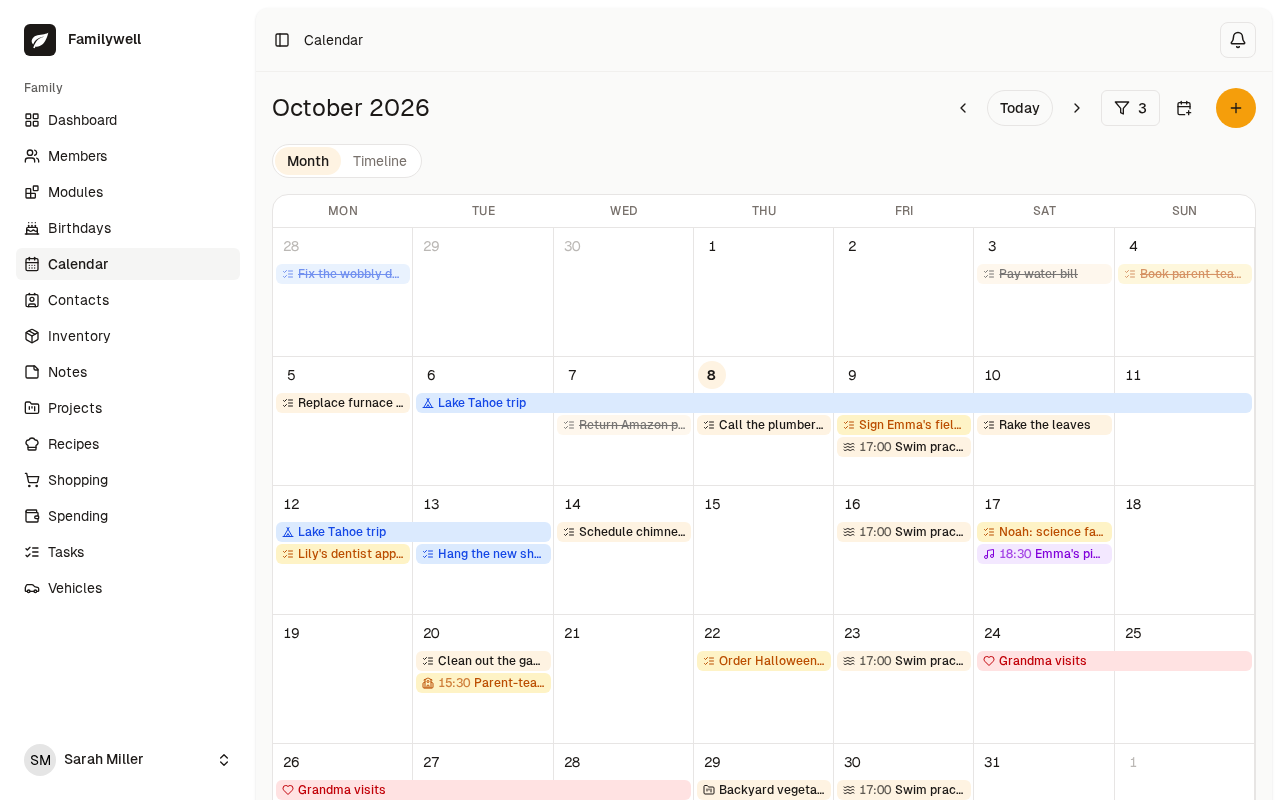
- Calendar: month and timeline views, repeating events, people and to-dos on events, automatic overlays from tasks, birthdays, cars, and projects, plus a private subscribe link for Google or Apple Calendar.
- Spending: quick add expenses, categories, shared trackers with automatic who owes whom, multi currency, receipt photos, optional AI receipt scanning.
- Projects: bigger family efforts with tasks, progress, and linked shopping lists.
- Recipes: family recipes with a calculator that scales by servings, total amount, or what you have on hand, plus add to shopping.
- Notes, Contacts, Birthdays, Inventory, Vehicles: notes, shared contacts, birthday reminders, what is in the house and what is running low, plus mileage, maintenance, documents, fuel, tyres, and history for each family car.
Each module is a self contained folder under modules with routes, controllers, models, migrations, and optional frontend bundle, registered through a service provider plus module.json. The tiny important_todos module is the documented starter example for building your own.
A home screen that brings it together
Instead of six badges with red dots, one screen shows this month spending, what is on now and next, birthdays, plus what is due today and this week. That’s the daily driver view for a busy parent.

Granular sharing that matches real life
Anything shareable can be family wide, invited only, or private, with per person roles plus read only public links. The grocery list is family wide, the anniversary trip project is invited only for two partners, the medical note is private. Public links help a landlord see a repair list without an account.
Shopping and Recipes: From Craving to Aisle in Two Taps
The grocery loop is where FamilyWell earns its keep.

Voice or paste a messy list, watch items land in aisles per shop, open shopping mode in the store for big checkboxes, and let optional TypeSafe AI sorting move catch all Other items to Dairy, Produce, Plumbing, or the best fit right after save. Back home, Recipes closes the loop:

Scale by servings for guests, by total amount for meal prep, or by what you have when flour is short. Units convert across g and kg, ml and l, plus spoons. While to taste items and non scalable items stay fixed. One tap adds missing ingredients to the right shopping list. That single flow replaces a recipe app plus a calculator plus a retyped list.
Calendar: Month for Planning, Timeline for Truth

Month view handles birthdays, trips, and recurring swim practice at a glance. Timeline view handles brutal weeks where school pickup overlaps a dentist slot and a car service. Repeating events carry people and linked to-dos, and the calendar auto shows task due dates, birthdays, car due dates, and project starts without manual copying. A private subscribe URL feeds Google or Apple Calendar for the one partner who lives in their work calendar. For a radio club family, the same pattern tracks contest weekends, antenna maintenance windows, and license renewal dates alongside school events.
Spending: Quick Add Today, No Argument at Month End

Quick add favors speed at the checkout: amount, category, shop, done. Shared trackers then compute who owes whom automatically, with multi currency for trips across the causeway or abroad. Snap a receipt photo for warranty, and with a Google Gemini key set, Scan receipt reads amount, currency, date, category, shop, and note from rotated or low quality multilingual slips for about $0.001 per scan, pre filled for review. The button and endpoint only exist when the key is set, otherwise the app returns 404 for that path. That gating keeps the base install lean for families who want no AI at all.
Projects, Inventory, and Vehicles: The Long Tail That Kills Other Apps

Projects hold the multi week efforts: house move, bathroom fix, Raya trip, exam season. Tasks plus progress plus linked shopping lists stop the classic split where tasks live in one app and the buy list in another.
Inventory answers what is in the house and what is running low, from printer paper to 18650 cells to coax connectors for the shack drawer. Low stock can jump straight to shopping.

Vehicles track mileage, fuel, tyres, maintenance schedules with km or month intervals plus one off due points, repairs, expenses, and documents. The app flags what is due, keeps history, and can export a signed PDF link valid 24 hours for a buyer or workshop. For portable radio families, the same record tracks the field vehicle that carries masts, batteries, and tents to SOTA summits.
Works With AI Assistants: The MCP Server Done Right
FamilyWell exposes an MCP server so Claude, ChatGPT, Cursor, VS Code, and any MCP client can read and change family data on your behalf:
- Address:
https://mcp.familywell.co/mcphosted, orhttps://your host/mcpself-hosted, overridable withMCP_SERVER_URL - Auth: OAuth 2.1 authorization code plus PKCE, no API keys or personal tokens to leak
- Scope: one family per connection, with per module No access, Read, or Read and write chosen on the consent screen
Flow: add the remote MCP server in your assistant, sign in if needed, pick one family plus per module access starting at No access, then Allow. Every connection shows consent again, even for a previously connected app, so each carries its own family and permissions. Modules enabled later stay invisible until you reconnect, surfaced as not_connected with a hint plus a Not included badge in Settings then Connected apps. Disconnect stops access immediately, leaving a family cuts all its connections, and idle connections expire after 30 days.
Tool coverage is broad: family and today core tools, task and shopping CRUD plus search plus trash restore, spending add plus summary plus categories, notes, vehicles including mileage logs and fuel and maintenance plus signed history PDF, contacts, birthdays, recipes with scale plus add to shopping, inventory with needs attention, projects, and full calendar event plus to-do tools. Interactive widgets render right in chat, so a shopping list or calendar event looks native in the assistant.
Safety details show care: deletes go to 30 day trash with restore tools and a purge tool, file tools accept chat attachments or public https URLs or base64 with 12 MB PDF and image sniffing plus private address blocking, mileage backdates must fit between surrounding readings, maintenance supports recurring intervals and one off due points, and recipe scaling uses shared maths between PHP and JS tested from the same fixture. Photos go out as signed URLs valid about 2 days so guest pages work without a session.
Example prompts that stay within least privilege: give Shopping read and write plus Recipes read to plan five dinners from chicken and rice, scale to six servings, and add gaps to the weekend list. Give Calendar read to ask what collides with a 9M field day Saturday. Give Vehicles read to ask which service is due before a 500 km drive. Start narrow, widen only when the assistant proves it needs more.
Realtime, Installable, and Bilingual
Changes appear live for everyone through Laravel Reverb WebSockets. So two people editing the same list in the store don’t overwrite each other. The app installs to the home screen as a PWA for offline tolerant use at markets with weak signal. Two languages ship so far: English and Romanian, selectable per person, which also proves the translation pipeline for community Malay, Chinese, or Tamil contributions later.
Tech Stack and Module System
| Layer | Choice |
|---|---|
| Backend | PHP 8.2 plus, Laravel 12, Laravel Octane with FrankenPHP |
| Frontend | Inertia.js 2, React 19, TypeScript, Tailwind CSS v4 |
| Realtime | Laravel Reverb WebSockets |
| Database | PostgreSQL in production, SQLite local zero config |
| Storage | Any S3 compatible bucket, Cloudflare R2 in cloud build |
| Build | Vite |
One Docker image runs the same self-hosted and in cloud. Core lives in app for families, auth, sharing, and modules, features live in modules, frontend lives in resources/js, routes in routes, docs in docs, plus a DigitalOcean App Platform config in .do. New modules follow module.json plus a service provider, and important_todos is the minimal reference to copy.
Self-Hosting: One Image, Compose Stack, Ten Minutes
Prerequisites for local dev are PHP 8.2 plus, Composer, Node 22 plus, and npm, with no database server since SQLite is default:
git clone https://github.com/bvdr/familywell.git
cd familywell
composer install
npm install
cp .env.example .env
php artisan key:generate
touch database/database.sqlite
php artisan migrate
php artisan modules:migrate
composer dev
Open http://localhost:8000, register the first account to create a family, then enable modules. The composer dev runner serves app plus queue plus logs plus Vite together. Use npm run build for production assets.
Production uses a compose stack of app plus Reverb plus Postgres plus Redis:
cp .env.example .env
php artisan key:generate
docker compose up -d --build
docker compose exec app php artisan migrate --force
docker compose exec app php artisan modules:migrate
A prebuilt image lives at ghcr.io/bvdr/familywell:latest to skip local builds. Before exposing publicly: change Postgres and app DB passwords to strong values, set APP_ENV=production and APP_DEBUG=false, set APP_URL plus Reverb public values to the real https domain, add Caddy or nginx or Traefik for TLS pointing at app port 8000 and Reverb port 8080, configure real file storage so receipt photos survive restarts, and configure mail for invites. Upgrade with pull plus build plus both migrate commands. Realtime is optional: set BROADCAST_CONNECTION=log and drop Reverb, the app still works with manual refresh.
Demo account and AI keys
A Try the live demo button appears once a demo family exists. Visitors sign in as owner with one click at /demo, can change anything, and the scheduler wipes and reseeds hourly with demo:reset, which only runs when exactly one family carries the is_demo flag, so real families are safe.
php artisan db:seed --class=DemoSeeder --force
php artisan demo:reset
Optional AI keys live in .env and are never committed:
GEMINI_API_KEY=your-key-here
TYPESAFE_API_KEY=your-key-here
Gemini enables receipt scanning. TypeSafe sorts Other aisle items and Other expenses into best fit categories plus one tap Sort Other with progress. Get Gemini free at aistudio.google.com/apikey.
Comparison: FamilyWell Against the Usual Suspects
| Attribute | FamilyWell | Cozi | Apple and Google family | OurHome plus Tody | Grocy plus budget apps |
|---|---|---|---|---|---|
| Hosting and privacy | Self-hosted Docker, your Postgres and S3, no vendor lock | Vendor cloud, account required | OS vendor cloud, account required | Vendor cloud, account required | Self-hosted but split across apps |
| Cost model | Free personal noncommercial, source-available PolyForm | Free plus paid Gold | Free with device, cloud upsell | Free plus paid | Free open source mix, setup heavy |
| Coverage in one app | Lists, tasks, calendar, spending, projects, recipes, inventory, vehicles, notes, birthdays, contacts | Calendar, lists, some extras | Calendar, location, purchases, partial lists | Chores, tasks, groceries subset | Pantry plus budget plus docs, glued manually |
| Calendar power | Month plus timeline, repeats, overlays, private subscribe link | Strong shared calendar | Strong but OS tied | Basic | Weak or external |
| Money clarity | Quick add, who owes whom, multi currency, receipts, AI scan | Basic lists | Split via separate Pay apps | Points not money | Strong budget but separate login |
| AI help | MCP server with OAuth plus per module scopes plus chat widgets | None | OS assistant, broad access | None | None |
| Offline and PWA | Installable PWA, Realtime via Reverb, optional no Reverb mode | Apps with offline gaps | Native offline | Apps with offline gaps | Varies by app |
| Best for | Private household hub you control | Quick shared calendar start | Single vendor households | Kids chores motivation | Hobbyist self-hosters who enjoy glue |
The honest takeaway: pick Cozi for fastest shared calendar with no server, pick Apple or Google when everyone already lives in one ecosystem, pick OurHome when chore gamification matters most, assemble Grocy plus Firefly plus Wallabag when you enjoy tuning three systems. Pick FamilyWell when one private hub for lists plus calendar plus money plus cars plus AI help outweighs a ten minute Docker setup.
Practical Workflows That Stick After Week One
- Sunday shop in 20 minutes: scale two recipes to six servings, add gaps to the weekend list, open shopping mode in store, check aisles per shop, snap receipts at checkout, review Gemini prefill at home.
- Trip project without chat chaos: create a project for the Cameron Highlands drive, add tasks for booking plus packing plus car check, link a buy list for snacks and spares, put fuel and tyre checks in Vehicles, and share the project invited only to drivers.
- Car service before road tax: log mileage monthly, watch maintenance due flags for oil and brakes, attach the workshop invoice PDF, export signed history for the buyer when selling, and keep road tax and insurance docs in the same record.
- Month end money without fights: run spending summary by category, open the shared tracker for who owes whom, settle one transfer instead of ten small claims, and archive receipt photos for warranty.
- Field day family style: track the portable station as a project with tasks for antennas plus batteries plus food, keep the site shopping list linked, log fuel for the support vehicle, and put the event on the family calendar so school runs route around it.
Honest Limitations
- Source-available, not OSI open source. PolyForm Noncommercial blocks commercial hosting and business use. Home and charity use is fine, but read the license before helping a shop run on it.
- Small community so far. 88 stars and 23 forks mean fast attention from the maintainer but thinner docs and fewer third party modules than Cozi or Grocy ecosystems.
- Two languages today. English and Romanian only. Malay, Chinese, and Tamil need contributors, though per person settings make that work clean once added.
- Hosted versus self-host split. familywell.org for project info versus familywell.co for hosted service can confuse bookmarks. Self-hosters should pin their own domain plus the GitHub repo.
- Single image simplicity has edges. Public exposure needs manual hardening: DB passwords, production flags, real domain for app plus Reverb, TLS proxy, persistent storage, and mail. The docs list each step, but there’s no magic secure me button.
- AI features cost and depend on keys. Gemini scans cost about $0.001 each and need a key, TypeSafe sorting needs its own key. Without keys those buttons simply don’t appear, which is good privacy design but can confuse reviewers expecting them.
Why It Matters
Household load is invisible work, and invisible work defaults to one tired person holding it all in memory. A shared organizer makes the load visible, assignable, and checkable without nagging. Self-hosting keeps that visibility private: swim practice times, trip dates, car plates, and kid birthdays stay in your own database, not in an ad profile. The module switch keeps it calm: a small family never sees fleet management complexity, a big household can switch everything on. The MCP server points to where this category must go next: private AI that helps with dinner and budgets inside permissions you granted, not a cloud assistant that reads everything because it can. For Malaysian multigenerational homes juggling school, work shifts, pasar runs, and balik kampung seasons, one calm hub beats five noisy apps.
Frequently Asked Questions (FAQ)
What is FamilyWell?
FamilyWell is a self-hosted modular family organizer in one PWA. It shares shopping lists, tasks, calendar, spending, projects, recipes, inventory, and vehicles for one household with live updates and optional AI access.
Is FamilyWell open source and free?
It is source-available and free for personal noncommercial use under PolyForm Noncommercial 1.0.0. You can self-host and modify at home, but commercial hosting or business use needs a separate license.
What do I need to self-host it?
Docker plus one compose stack with app, Reverb, Postgres, and Redis, plus a domain with TLS for public use. Local trial needs only PHP, Composer, Node, and SQLite with two migrate commands.
How does AI assistant access work?
A built in MCP server uses OAuth plus PKCE for one family per connection with per module No access, Read, or Read and write. You approve scopes on each connect and can disconnect anytime.
Can it replace Cozi or Google Family?
Yes for households wanting one private hub for lists, calendar, money, and cars under their control. Stay with Cozi or Google when you want zero server care and already live in that ecosystem.
Sources and Further Reading
- FamilyWell GitHub Repository – Source, README, screenshots, modules, docs, and issue tracker.
- FamilyWell Project Site – Overview, hosted option, and live demo entry.
- FamilyWell Hosted Service – Cloud version, demo account, and commercial licensing contact.
- FamilyWell MCP Server Docs – OAuth flow, per module tools, files, trash, and widget behavior.
- FamilyWell Self-Hosting Guide – Compose stack, prebuilt image, TLS, storage, mail, and upgrades.
- FamilyWell Configuration Reference – Full environment variables including Gemini and TypeSafe keys.
- FamilyWell Module System Docs – How modules register and how to build your own.
- PolyForm Noncommercial 1.0.0 License – What source-available personal use allows and what commercial use forbids.
- Laravel 12 Documentation – Backend framework behind FamilyWell core and modules.
- Inertia.js 2 with React – Frontend bridge used for the PWA pages.
- Model Context Protocol Specification – Open standard behind the AI assistant integration.
- Cozi Family Organizer – Mainstream hosted alternative for shared calendar and lists.
- Grocy Self-Hosted Pantry – Self-hosted alternative focused on pantry and chores for comparison.
73 de 9M2PJU


Post Comment