amateur radio
open source
Technology
9M2PJU, ACARS, AirCopy, APRS, armel, BEAM, chirp, custom firmware, DP32G030, DualTachyon, Egzumer, F4HWN, fagci spectrum analyzer, Fox Hunt, K5Viewer, Morse beacon, muzkr, OneOfEleven, PY32F071, Quansheng UV-K1, Quansheng UV-K5 V3, RF Log, UV Studio
9M2PJU
0 Comments
Quansheng UV-K1 and UV-K5 V3 F4HWN Custom Firmware Guide: Spectrum, APRS, Fox Hunt, and Multiboot
TL;DR: Quick Summary
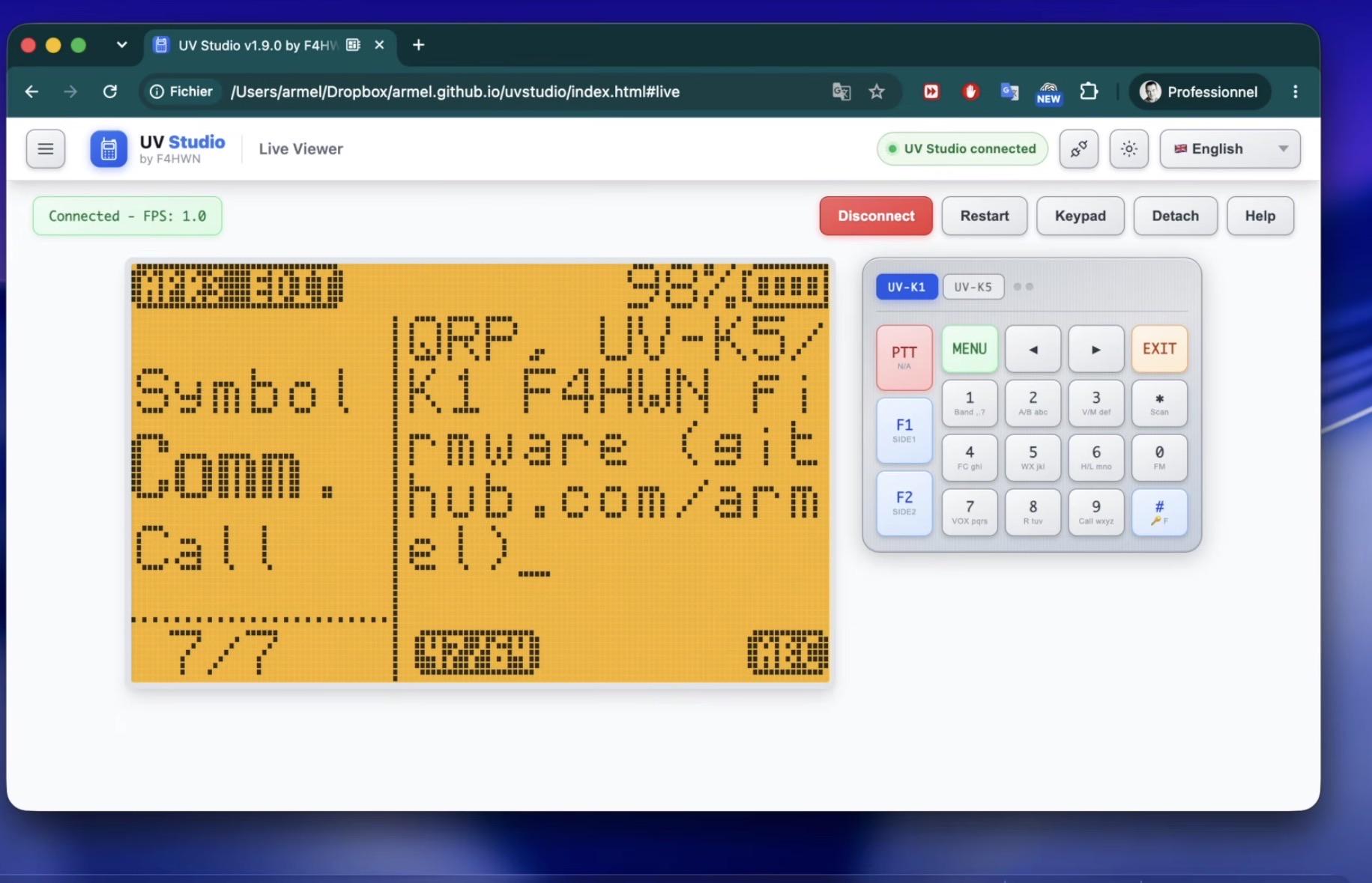
This is the F4HWN custom firmware port for Quansheng UV-K1 and UV-K5 V3, the newer PY32F071 based radios, maintained jointly by muzkr and armel (Armel F4HWN). It’s a fork of the popular F4HWN firmware for the older UV-K5 V1 DP32G030, which itself grew from Egzumer plus OneOfEleven plus fagci spectrum work on top of DualTachyon original open firmware. It ships as four ready editions plus a manual Custom build: Fusion for everyday use, Transfer with AirCopy and BEAM wireless cloning, FieldOps with first responder controls plus Fox Hunt and Morse beacon, and Labs with a 30 app overlay platform including APRS RX, APRS TX, APRS digipeater, ACARS aircraft decode, CW decoder and keyer, SSTV, POCSAG, and games. Key system features include multiboot with one protected Main backup plus four user firmware slots, multiconfig banks switchable at runtime with SetCfg, Full Watch across VFO A plus VFO B plus two priority channels, reworked power levels from under 20 mW to 5 W, IARU calibrated S meter, 24 scan lists plus MIX and ALL with 150 frequencies per second scanning, automatic RX and TX RF logging to external flash, and full browser based management in UV Studio with live screen mirroring, screenshots, remote keys, calibration backup, and one click flashing. You need a compatible USB cable, a desktop Chrome or Edge browser, and a calibration backup before you start. Read the safety notes, use the CHIRP driver bundled with each release, and only transmit where your license allows.
What Is the UV-K1 and K5V3 F4HWN Custom Firmware?
The UV-K1 and K5V3 F4HWN custom firmware is an open source Apache 2.0 replacement firmware for Quansheng UV-K1 and Quansheng UV-K5 V3 handhelds built around the PY32F071 microcontroller, adding spectrum analysis, advanced scanning, APRS tools, Fox Hunt direction finding, Morse beaconing, RF activity logging, multiboot firmware slots, and browser based management to low cost VHF and UHF radios.
In practice it turns a 30 dollar class handheld into a field lab. You flash one .bin file from your browser with UV Studio, keep a calibration backup named by radio serial number, and the radio reboots into a familiar Quansheng style UI with far more menus: SetPwr for user power, SetPTT for Classic or OnePush push to talk, SetTOT and SetEOT alerts, SetCtr contrast, SetInv invert, SetLck lock scope, SetMet meter style, SetGUI layout, SetRxA audio profile, SetTmr timers, SetOff deep sleep, SetNFM 12.5 or 6.25 kHz, SetVol volume, SetScn scan mode, SetNav navigation, and SetCfg config bank. The same radio can then run a spectrum sweep with fagci analyzer, log every contact to RF Log, hunt a hidden fox transmitter with a scrolling signal graph, send an APRS position beacon at 1200 baud Bell 202 AFSK, or boot a completely different firmware image from a multiboot slot by holding MENU at power on.

From 30 Dollar Handheld to Open Firmware Legend: A Short History
2023: The UV-K5 arrives and DualTachyon opens the door
Quansheng released the UV-K5 as a cheap dual band VHF and UHF handheld with AM receive, FM broadcast receive, USB-C charging, and a Beken BK4819 radio chip paired with a DP32G030 ARM microcontroller on V1 hardware. The stock firmware was basic. Then DualTachyon published the first open source firmware for the UV-K5 V1, proving the flash could be rewritten, the LCD and keys could be driven, and the BK4819 could be controlled beyond factory limits. That single release created the entire ecosystem. Without it, none of the later forks exist.
2023 to 2024: OneOfEleven, Egzumer, and fagci add the fun
Three parallel efforts defined the V1 golden age:
- OneOfEleven added fast scanning, long press replicating F key actions, channel name editing in menu, channel plus frequency display, scan list shortcuts, configurable buttons, battery percent and voltage in the status bar, longer backlight times, mic bar, RSSI meter, more steps, and more sensitive squelch.
- fagci built the spectrum analyzer that made jaws drop: real time sweep across a range, rendered on a 128 by 64 LCD, toggled with F plus 5. Mikhail code also contributed SSB demodulation ideas.
- Egzumer merged OneOfEleven with fagci spectrum plus personal mods: backlight dimming, battery voltage calibration in menu, better percent calculation for 1600 or 2200 mAh cells, more button functions, long press MENU as a button, better DCS and CTCSS scanning with STAR SCAN in the tone menu, Piotr022 style meter, restore on scan exit, reordered menus, LCD crash fix, and many small fixes.
Suddenly a 25 dollar radio could scan faster than many 300 dollar radios, show spectrum, and run community builds from a browser flasher.
2024 to 2025: Armel F4HWN turns a mod into a platform
Armel, callsign F4HWN, forked Egzumer and productized it. Instead of one build, he shipped use case editions: Bandscope, Broadcast, Basic, RescueOps with first responder focus, and Game with Breakout. He reworked power to eight steps, replaced EEPROM S meter thresholds with fixed IARU Region 1 VHF and UHF calibrated values, added Classic and Tiny meter and GUI styles, MAIN ONLY plus DUAL plus CROSS screen modes, RX blink, squelch and step on screen, last RX indication, improved lists, resume on startup, new Set menus, new key combos, AirCopy wireless cloning with percent gauge, K5Viewer live screen streaming to a computer, and deep cleanup including no PWM noise and better squelch. That UV-K5 V1 F4HWN firmware passed 1,100 stars and became the reference many clubs standardize on.
2025 to 2026: New hardware forces a port
Quansheng moved newer UV-K1 and UV-K5 V3 production to the PY32F071 microcontroller. V1 binaries don’t run on the new MCU, flash layout differs, and drivers need porting. That’s the gap this repository fills. Muzkr and armel ported the F4HWN feature set forward to PY32F071, restructured for CMake presets, Docker builds, and external flash use, and added the multiboot plus multiconfig plus overlay apps architecture described below. At the time of writing it shows 784 stars, 212 forks, and 2,272 commits. The matching UV Studio web app now targets UV-K1 and UV-K5 V3 explicitly.
For buyers this history matters for one practical reason: check which MCU your radio has before downloading anything. V1 DP32G030 builds and V3 plus K1 PY32F071 builds aren’t interchangeable. When in doubt, read the Wiki, check the label under the battery, and ask in Issues with photos and version screen info.
Which Radios and Chips Are Supported
- Supported: Quansheng UV-K1 with PY32F071 MCU, Quansheng UV-K5 V3 with PY32F071 MCU.
- Not covered here: older UV-K5 V1, UV-K6, and 5R variants with DP32G030 MCU use the separate armel uv-k5-firmware-custom repository.
- License: Apache 2.0, carrying forward DualTachyon original copyright. The authors strongly encourage keeping forks open source in the ham spirit.
- Risk note from upstream, quoted in spirit: this firmware has no real brain, please use your own. It may brick your radio, in which case you need another radio. Back up calibration with UV Studio right after flashing.
Fusion, Transfer, FieldOps, Labs, and Custom: Pick One
The Docker helper compile-firmware.sh builds presets into build/Preset folders with matching .elf, .bin, and .hex outputs plus flash and RAM usage. Default is Fusion. All builds Fusion, Transfer, FieldOps, and Labs together.
| Edition | Based on | Adds | Best for |
|---|---|---|---|
| Fusion | Generic reference | Spectrum analyzer, FM broadcast and VOX, UV Studio plus K5Viewer, audio profiles plus Audio Scope, RF Log, Full Watch, multiboot with Main backup plus 4 slots, multiconfig banks | Everyday ham use, the safe first flash |
| Transfer | Fusion | AirCopy wireless bank transfer plus BEAM channel transfer, cable clone at 460800 baud, Flash 2M full 2 MiB clone | Clubs cloning channels to many radios |
| FieldOps | Fusion | First responder controls, Fox Hunt receiver, Morse beacon transmitter | ARDF events, SOTA and POTA activators, EmComm |
| Labs | Broad selection, not a strict superset | Overlay apps platform with apps from external flash in a 4 KiB RAM overlay, up to 48 slots from a 30 app collection, newest and least settled | Experimenters who accept rough edges |
| Custom | Hidden technical default | Manual CMake options only | Developers trimming for size or testing flags |
A note novices miss: Labs isn’t simply Fusion plus everything. Features may be exchanged between releases to preserve stability and memory headroom. If you need AirCopy reliability for a club programming day, run Transfer. If you want APRS experiments, run Labs. Keep Fusion as your known good Main backup.
Build examples:
./compile-firmware.sh
./compile-firmware.sh Fusion
./compile-firmware.sh Transfer
./compile-firmware.sh FieldOps
./compile-firmware.sh Labs
./compile-firmware.sh All
Extra CMake options pass through:
./compile-firmware.sh FieldOps -DENABLE_VOX=OFF
./compile-firmware.sh Fusion -DENABLE_FEAT_F4HWN_GAME=ON
./compile-firmware.sh Fusion -DDEV=ON
DEV=ON keeps normal output in build/Fusion and updates archive/f4hwn.fusion.development.bin, tagged DEV on the version screen. Publishing that archive remains an explicit git action.
Multiboot and Multiconfig: Five Firmwares, Five Configs, No Fear
Multiboot
External flash holds one automatically maintained Main firmware backup plus four user firmware slots. Each image is validated before restore to internal flash, and the selector shows edition and version per valid slot.
To open the selector: power off, hold MENU, power on, release when the selector appears. Use UP and DOWN to choose, MENU to restore, EXIT to leave unchanged.
Caution from upstream: never power off while a slot is being restored. A half written internal flash is how bricks happen.
Practical setup used by many owners:
- Main: known good Fusion release from GitHub Releases
- Slot 1: current daily Fusion
- Slot 2: Transfer for programming days
- Slot 3: FieldOps for fox hunts
- Slot 4: Labs for APRS and app tests
Multiconfig
Multiconfig gives one independent bank for Main and for each of the four user slots. A bank holds memory channels and names, VFO settings, scan lists, radio settings, and edition specific settings. By default each firmware slot uses the same numbered bank.
The SetCfg menu applies another bank immediately with no restart and no firmware change. The status bar shows CFG M or CFG 1 to CFG 4. That means one radio can carry a 9M repeater bank, a PMR446 listen only bank, an airband receive bank, and a hunt bank, and switch in seconds. Compatible configs can be shared across editions.
Full Watch: Two VFOs Plus Two Priority Channels
Normal dual watch flips between VFO A and VFO B. Full Watch adds two priority channels from existing scan list priority settings into the same cycle, so four targets are monitored: VFO A, VFO B, priority 1, priority 2. Duplicates, invalid entries, and channels already in a VFO are ignored automatically.
The RxMode menu gives two behaviors:
FULL RX / RESPONDreplies on whichever channel opened squelchMAIN TX / FULL RXalways transmits on the selected main VFO
Animated chevrons show the background cycle while the normal VFO display stays usable for tuning and operating. Example: set VFO A to your club repeater, VFO B to 144.520 simplex calling, priority 1 to the event talkaround channel, priority 2 to a weather net, run MAIN TX / FULL RX, and you’ll never reply on the wrong net by accident.
Overlay Apps and APRS: A Handheld That Runs Programs
Labs stores up to 48 apps from the current 30 app collection in external flash. Each app loads into a dedicated 4 KiB RAM overlay only while running. Larger read only assets like text, fonts, bitmaps, and tables stay in external flash. Use app files from the same firmware release so ABI and capability flags match.
Current collection groups:
- Radio tools: Broadcast FM, Fox Hunt, Beacon, Beam, Signal Finder, Spectrum3D, ToneCall
- Digital and signal: ACARS RX, ATIS RX, APRS RX, APRS TX, APRS Edit, APRS DIGI, CW Decode, CW Keyer, SSTV, POCSAG RX, Sonde M20, EPIRB 406
- Diagnostics: System Info, Flash Map
- Games and demos: Breakout, Cube3D, Minesweeper, Plasma, Rapid Roll, Snake, Sokoban, Space Impact, Tetris
APRS in depth
- APRS RX receives AX.25 UI frames with Bell 202 AFSK at 1200 baud, shows common position formats and Mic-E data, and keeps a five frame history. It is receive only and pairs well with a rooftop flowerpot antenna for local digipeater spotting.
- APRS TX sends a position beacon using an editable callsign with boot message fallback. Companion APRS Edit edits callsign, SSID, digipeater path, position, symbol, and an 89 character comment. Keep paths short in dense areas. A single
WIDE1-1hop is plenty near a fill in digi. - APRS DIGI is a deliberately limited
WIDE1-1fill in digipeater with path independent duplicate suppression and channel busy protection. It is meant to cover a hut, hall, or campsite, not to replace a hilltop digipeater.
All three are experimental and Labs only. Test on dummy load first, confirm frequency, deviation, and path with a second receiver, and only then beacon on air.
ACARS and friends
ACARS RX decodes the 2400 bit/s AM-MSK aircraft data link, checks odd parity and CRC, and keeps a three message history with aircraft address, flight ID, label, and printable text. Near Subang, KLIA, Senai, or Kuching it provides a steady stream of airframes without any extra hardware. ATIS RX, POCSAG RX pager decode, Sonde M20 radiosonde chase support, EPIRB 406 distress frame display, CW Decode, and SSTV round out a surprisingly complete VHF and UHF monitoring lab for the price of a pizza.
Caution repeated from upstream: transmitting apps must only be used on frequencies, power levels, and modes your license and local rules allow.
Radio and Signal Handling: Power, Meter, and Audio You Can Trust
Reworked power levels
Low 1: below about 20 mWLow 2: about 125 mWLow 3: about 250 mWLow 4: about 500 mWLow 5: about 1 WMid: about 2 WHigh: about 5 WUser: configurable throughSetPwr
Low 1 is ideal for bench tests into a dummy load, short range fox hunt transmitters, or cross room APRS tests without desensing the whole street. Set your User value to the legal limit for the service you use most, then assign maximum power to a quick action for emergencies.
IARU calibrated S meter
Fixed S0 to S9+ values replace old EEPROM thresholds, following IARU Region 1 VHF and UHF guidance. Classic and Tiny display styles are available in SetMet. Signal reports finally mean something comparable between two F4HWN radios on the same band.
Bandwidth, lock, and profiles
- Configurable 12.5 kHz or 6.25 kHz narrow FM via
SetNFM - Per channel TX lock for scan and monitor channels you mustn’t key up on
- Adjustable RX volume via
SetVolplus advanced RX audio profiles for FM and AM viaSetRxA - Regional frequency lock profiles for amateur bands, PMR446, FRS, GMRS, and MURS
- Battery profiles for 1600, 2200, and 3500 mAh packs, plus voltage calibration in menu and better percent math
Spectrum Analyzer: Fagci Engine, F4HWN Polish
Press F plus 5 to open the analyzer inherited from fagci and refined here:
- Channel names shown in spectrum view
- Persistent spectrum settings across reboots
- Faster and smoother rendering
- Better behavior when freezing sweep or unplugging USB-C
- Optional automatic restore of analyzer state at startup
Practical use on a UV-K1: set a 2 MHz span around 144 to 146 MHz during a contest, freeze on a spike, and you have found the simplex frequency without endless spinning. On UHF, sweep 430 to 440 MHz before a SOTA activation to pick a quiet simplex channel. Remember the hardware limits below: a wide open front end means strong broadcast or pager signals can paint stripes across the display. That is information too, just not a fault.
Scanning That Hits 150 Frequencies Per Second
- Up to 24 named scan lists plus 1 mixed list
- Each memory channel assigned to
OFF,01to24, orALL ALLscans every channel exceptOFFMIXcombines any subset of the 24 lists into one scan set- Auto select of next valid list when requested list is empty
- Direct select while scanning:
00for ALL,01to24for that list,25for MIX - Long press MENU while scanning to exclude the current channel
- Up to 64 frequency exclusions for birdies and junk
- Very fast mode near 150 frequencies per second
- Live progress, RSSI, and detected CTCSS and DCS display
- Configurable resume behavior and optional auto restore at startup
A starter scheme that works in Klang Valley: list 01 repeaters, list 02 simplex and calling, list 03 airband receive only, list 04 PMR446 receive, MIX of 01 plus 02 for daily carry. Put birdies in exclusions once, not every scan.
User Interface, Audio, and Daily Ergonomics
VFO and status bar
Improved VFO screen with Classic and Tiny meter plus Classic and Tiny frequency info layouts, MAIN ONLY, DUAL, FULL, and CROSS modes, RX activity on the active VFO, optional RX LED blink, squelch, monitor, step, tone info, last RX, and RX plus TX timers. Status bar has updated fonts and icons, menu index stays visible while editing, frequency and channel input are saner, audio level display is clearer, and AirCopy shows percent plus gauge.
Backlight and display
Smooth backlight fading, manual F plus 8 for min and max toggle plus F plus 9 to return to strategy, configurable contrast SetCtr, inverted mode SetInv, radio specific navigation SetNav, improved power on message with optional logo, and system info pages for version plus build, battery, flash and SRAM use, and project QR codes.
PTT and timers
Classic and OnePush PTT via SetPTT, configurable timeout and end of transmission alerts as off, sound, visual, or both, Audio Scope on RX and TX with better OnePush plus DTMF plus 1750 Hz behavior, configurable deep sleep SetOff, and quick actions for RX mode, main only, virtual PTT, wide and narrow, 1750 Hz tone, mute, audio profile, max power, and offset removal. For net control, turn RX and TX timers on with SetTmr and let the radio keep you honest.
Fox Hunt and Morse Beacon: ARDF Without Extra Boxes
Dedicated Fox Hunt receiver
- Calibrated S meter display
- Scrolling signal history graph with peak, minimum, and trend
- Selectable RF attenuation for close in work
- Silent, Geiger style, and received audio modes
- Long press F keypad lock with arrows still adjusting attenuation
- Mirrored to K5Viewer in UV Studio for coaching
Hunt flow that works: start with no attenuation and Geiger audio, follow rising pitch and graph trend, add attenuation as the meter pins, switch to silent plus graph for the final 20 meters to avoid alerting other hunters. The history graph matters more than any single reading because multipath lies and trends don’t.
Independent Morse beacon
Identifiers MOE, MOI, MOS, MOH, MO5, and MO plus optional callsign ID, configurable TX and idle periods, live TX and idle countdowns, persisted settings, interactive control during TX, shared long press F lock, and TX lock plus modulation plus battery safety checks.
For a Malaysian club hunt, set a 60 second cycle with 15 seconds TX, legal low power on a clear simplex frequency with committee approval, callsign ID on, and log the start coordinates sealed. Pair with the 9M2PJU ESP32 fox hunt beacon project for multi fox events.
RF Log: Every Contact Recorded in External Flash
Enable RF Log and the radio records RX and TX activity to external flash with direction, frequency and channel, channel name, duration, S meter level, and battery voltage. On radio history supports RX and TX filtering plus detail views. In UV Studio the same data appears as a live dashboard with analytics and CSV export.
Uses that surprise owners: contest QSO counts without paper, repeater activity surveys for new repeater proposals to MCMC, battery drain versus TX time analysis, and proof of interference times when filing reports. Export CSV monthly and the log becomes a station diary.
AirCopy, BEAM, Cable Clone, and Full Flash Clone
AirCopy v6.1 wireless transfer
AirCopy sends one 128 channel bank, radio settings, or all banks plus settings in one run. Version 6.1 adds stop and wait with acknowledgements both ways: receiver ACKs CRC32 compare frames and every stored data frame, missing ACK retries up to three times, invalid or out of sequence or mismatched selections are rejected rather than silently applied, and the progress screen reports retries and receive errors while distinguishing already identical blocks from copied blocks.
Before data, radios compare CRC32 in groups up to 24 blocks. The receiver returns a difference bitmap so only differing blocks transmit. Each radio frame carries up to three consecutive 64 byte blocks, roughly doubling throughput over older one block framing.
Important: wire format isn’t compatible with older versions. Both radios must run the same firmware version or the transfer will be rejected by design.
Cable clone and Flash 2M
Transfer also supports direct radio to radio cable cloning over UART at 460800 baud. Press STAR in AirCopy to switch between AIR COPY and CABLE COPY, select bank, Settings, or All with UP and DOWN, then MENU on sender and EXIT on receiver.
Cable mode adds Flash 2M, a full 2 MiB external flash clone. Sectors compare by CRC32 and only differing sectors write. The device specific calibration sector is never copied or erased, and the receiver must restart after success. That calibration protection is the difference between a convenient clone and a ruined receiver.
Settings, Shortcuts, and Assignable Keys
New or extended menus include SetPwr, SetPTT, SetTOT, SetEOT, SetCtr, SetInv, SetLck, SetMet, SetGUI, SetRxA, SetTmr, SetOff, SetNFM, SetVol, SetScn, SetNav, and SetCfg, plus improved PonMsg, BackLt, TxTOut, ScnRev, and KeyLck. Full VFO state restores with long press EXIT. Squelch changes with F plus UP or DOWN persist.
Handy combos:
F + UPorF + DOWN: squelch levelF + F1orF + F2: frequency stepF + 8: backlight min and max toggleF + 9: return to backlight strategy
Assignable short and long press actions include RX mode, main only display, virtual PTT, wide and narrow, 1750 Hz tone, mute, audio profile, max power, offset removal, BEAM, RF Log, Fox Hunt, Beacon, and ToneCall overlay app in Labs.
Reliability, Limits, and Honest Hardware Talk
Improvements in this port include better squelch and meter behavior, fixed DTMF overlay, fixed scan range limits, cleaner startup, no PWM audio noise, better serial and K5Viewer keys, better VFO persistence, plus refactoring and memory optimization. DTMF calling and scrambler stay disabled in Fusion. Legacy AM Fix menu is gone because the fix is enabled by default.
Radio performance section from upstream deserves repeating: Quansheng UV-Kx radios have no track tuned band pass filtering, so the front end is wide open. In high RF sites reception gets hard, AM degrades first and most severely, FM stays more usable. Firmware improves margins but can’t add hardware selectivity. For the price they are excellent toys to learn with, not professional transceivers. Plan antennas, attenuators, and expectations accordingly.
Flash It Safely With UV Studio and CHIRP
What you need
- UV-K1 or UV-K5 V3 with PY32F071, charged battery, compatible USB programming cable with USB-C or dual jack
- Desktop Chrome, Brave, Edge, Opera, or Firefox 151 plus with Web Serial support
- Firmware .bin from Releases, plus bundled CHIRP driver from the same release
- Ten quiet minutes with no power cuts
Flash steps
- Open UV Studio Flash Firmware view at armel.github.io/uvstudio.
- Connect radio with programming cable and put it in DFU flash mode.
- Pick an official F4HWN Fusion release from the catalog or load a local .bin.
- Click Flash Firmware, select the serial port, and watch the progress bar.
- Let the radio restart on its own. Don’t unplug mid flash.
Calibration backup first habit
- After first boot, open Dump Calibration in UV Studio with radio in normal mode.
- Click Dump Calibration Data, then Download calibration.dat.
- Rename the file with the serial number from the label under the battery, for example
UV-K1-xxxx-calibration.dat. - Before returning to stock or trying another firmware family, open Restore Calibration and write that file back, then wait for full completion.
CHIRP needs the dedicated driver bundled with each release. Download firmware and driver together from the Releases page. Using a mismatched driver is the most common cause of confusing channel errors.
Comparison: Which Quansheng Firmware Should You Run
| Attribute | F4HWN K1 plus K5V3 port | Stock Quansheng | Egzumer V1 | OneOfEleven V1 | IJV style mods |
|---|---|---|---|---|---|
| Target hardware | UV-K1 and UV-K5 V3 PY32F071 | All variants as shipped | UV-K5 V1 DP32G030 | UV-K5 V1 DP32G030 | Varies by build |
| License | Apache 2.0, open source | Proprietary | Apache 2.0 family | Apache 2.0 family | Mixed, check build |
| Editions | Fusion, Transfer, FieldOps, Labs, Custom | Single image | Main plus variants | Main plus options | Single or few |
| Spectrum | Fagci analyzer with names, persistence, fast render | Basic or none | Yes | Partial | Sometimes |
| Scan speed and lists | About 150 per second, 24 plus MIX plus ALL, 64 exclusions | Slow, basic lists | Fast | Fast | Medium |
| APRS and data | RX, TX, Edit, DIGI plus ACARS, POCSAG, CW, SSTV in Labs | None | Limited | Limited | Rare |
| Fox Hunt and beacon | Dedicated RX graph plus Morse TX with MO identifiers | None | No | No | No |
| Logging | RF Log to flash plus UV Studio CSV | None | No | No | No |
| Cloning | AirCopy v6.1 CRC plus cable plus Flash 2M | Wired stock only | Basic AirCopy | Basic | Basic |
| PC tools | UV Studio flashing plus K5Viewer plus CHIRP driver bundled | Factory CPS | k5prog plus web flashers | Web flashers | Mixed |
| Multiboot slots | Main backup plus 4 slots with validation | None | No | No | No |
| Best for | PY32 owners who want one firmware for all uses | Warranty safe baseline | V1 owners staying put | V1 minimalists | Specific niche needs |
The honest takeaway: stay on stock only if warranty and simplicity outweigh everything. V1 owners with a working Egzumer or OneOfEleven setup need no rush to change hardware. New UV-K1 and V3 buyers should start with Fusion, keep Main as backup, and add Transfer or FieldOps or Labs only when a real task needs it.
Practical Shack Workflows for 9M Operators
Program repeaters once, clone to the club
Build the repeater bank in CHIRP with the release matched driver, flash Fusion to every radio, verify one radio on air with low power into a dummy load, then AirCopy bank plus settings radio to radio. Both radios on the same version, same band plan, quiet frequency, and patience for retries. Export RF Log CSV after the event as attendance proof for the club record.
Run a 2 meter fox hunt
Load FieldOps to the hunter radios, set a legal simplex frequency with committee clearance, enable Fox Hunt receiver with Geiger audio, and hide a Beacon radio with MO plus callsign ID on Low 1 power with timed TX and idle. Mirror one hunter screen to a laptop with K5Viewer so juniors can watch the graph while seniors handle antennas. Log Fox Hunt distances in RF Log for the prize table.
Add an APRS tracker for a SOTA activation
Load Labs, set callsign plus SSID plus short path in APRS Edit, confirm 144.390 MHz region practice or local 9M APRS convention before TX, test into dummy load while a second handheld on APRS RX watches the five frame history, then beacon from the summit at sensible intervals. Keep a voice backup frequency in VFO B under Full Watch so you never miss the chaser call while the beacon runs.
Why It Matters
The Quansheng story is the best proof in years that open firmware beats throwaway hardware. A budget handheld with a wide open front end should have been landfill after one season. Instead DualTachyon opened it, OneOfEleven made it fast, fagci made it see spectrum, Egzumer merged the best, and F4HWN turned the merge into editions, logging, cloning, and browser tools a club can teach in an evening. This port continues that chain across a microcontroller change that could have split the community into V1 haves and V3 have nots. By keeping the same menus, the same UV Studio flow, and the same Apache 2.0 openness, muzkr and armel keep every new UV-K1 buyer inside the shared knowledge base instead of starting over. That continuity is worth more than any single feature.
Frequently Asked Questions (FAQ)
Which radios run this firmware?
Only Quansheng UV-K1 and UV-K5 V3 with PY32F071 MCU. Older UV-K5 V1 with DP32G030 uses the separate F4HWN V1 repository. Check the Wiki and the label under the battery before flashing.
How do I flash without bricking?
Use UV Studio in desktop Chrome or Edge, enter DFU flash mode, flash the matched release .bin, never unplug mid write, then dump calibration.dat and rename it by serial number for safekeeping.
Does CHIRP work normally?
No, you need the dedicated CHIRP driver bundled with each release. Download firmware and driver together from the Releases page. A mismatched driver causes confusing channel errors.
Can it do APRS and Fox Hunt?
Yes, in Labs edition. APRS RX decodes 1200 baud Bell 202 with five frame history, APRS TX beacons with editable callsign and path, and Fox Hunt gives signal graph plus attenuation with Morse beacon using MO identifiers.
Is it legal to use expanded TX?
Only where your license allows. Use per channel TX lock, regional lock profiles, low power, and dummy load tests first. In Malaysia follow MCMC and MARTS band plans and never transmit outside your privileges.
Sources and Further Reading
- UV-K1 and K5V3 F4HWN Firmware Repository – Source, README, presets, releases, Wiki manual, and issue tracker.
- F4HWN UV-K5 V1 Firmware Repository – Parent project for DP32G030 radios, edition history, and 1.1k star reference.
- Egzumer UV-K5 Firmware – Merge base of OneOfEleven plus fagci spectrum plus personal mods.
- DualTachyon Original UV-K5 Firmware – First open source firmware that made the ecosystem possible.
- UV Studio by F4HWN – Browser flashing, K5Viewer mirroring, calibration backup, boot logo, RF Log, and firmware slots.
- Quansheng UV-K1 Teardown – Hardware notes for the K1 platform.
- Ludwich66 Quansheng UV-K5 Wiki – Community hardware, mods, and background database.
- Amnemonic Quansheng Tools and Info – Tools and information collection for UV-K5 firmware.
- IARU Region 1 VHF and UHF S Meter Recommendation – Basis for the calibrated S meter used here.
- CHIRP Radio Programming – Base programming tool, use only with the bundled F4HWN driver for this firmware.
- MARTS Malaysian Amateur Radio Transmitters Society – Malaysian band plans, licensing guidance, and club support.
- MCMC Malaysian Communications and Multimedia Commission – Regulator for spectrum, licensing, and equipment rules in Malaysia.
- APRS Official Info – Bell 202 packet, Mic-E, digipeating, and operating practice behind the APRS apps.
- Reddit Featured Image Reference – UV Studio Live Viewer screenshot used as featured image reference.
73 de 9M2PJU

Post Comment