amateur radio
General Interest
Technology
9M2PJU, amateur radio training, Atelier de circuite, breadboard simulator, Bucharest makers, circuit duel, circuit workshop, EAEA, Early Alpha Engineering, electronics education, Elmer, gas sensor, homebrew, kids electronics, LED circuits, Ohm law, potato battery, qrp, STEM Romania
9M2PJU
0 Comments
EAEA Circuit Workshop: Kids Breadboard Simulator That Teaches Real Electronics in 22 Lessons
TL;DR: Quick Summary
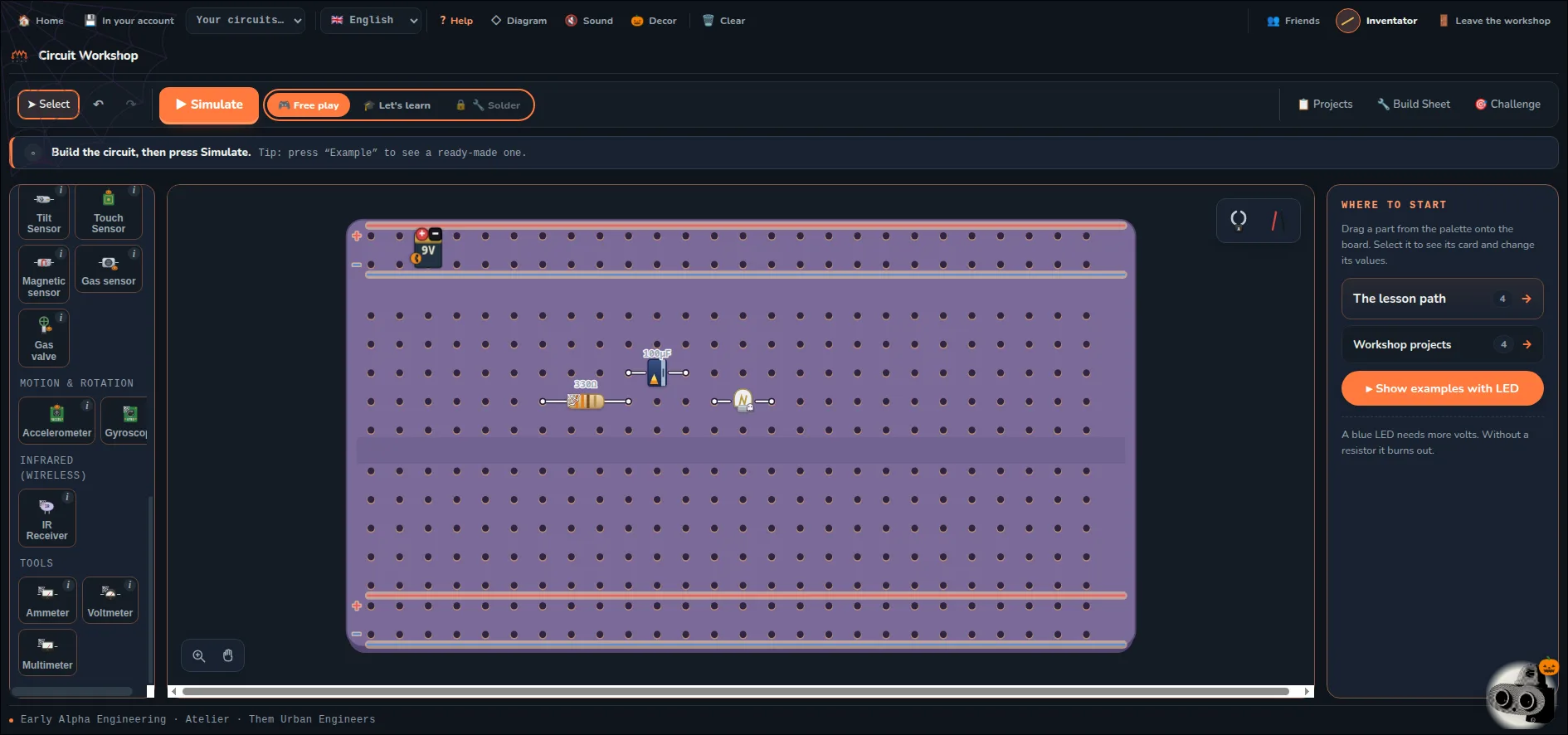
The EAEA Circuit Workshop at atelier.eaea.ro is a browser based breadboard simulator built by Early Alpha Engineering Academy in Romania for kids aged 8 to 18. You drag a battery, resistor, LED, button or motor onto a virtual breadboard, press Simulate, and watch the current flow with honest physics behind it. The guided path runs 22 lessons from the first lit LED to a gas sensor and a potato battery, backed by 330 learning cards, 80 example builds, 33 build-to-spec projects, 137 broken circuits to repair across 26 fault families, and 28 parts in the tray. Kids log in with a name and a 4 digit PIN, no email and no password to forget. Teachers print entry slips with workshop codes and get a whole group inside in about two minutes. The first four lessons are free with no card and no sign up. For ham radio parents, Elmers and club instructors, this is one of the fastest ways to give a child real breadboard confidence before they ever touch a QRP kit or a soldering iron.
What Is the EAEA Circuit Workshop?
The EAEA Circuit Workshop is a browser based electronics simulator where kids build DC circuits on a virtual breadboard and test them with a physics honest Simulate button.
In practice it looks like the plastic breadboard on a real workbench. You drag parts from a tray onto the board, wire them across the same hole patterns you would use in hardware, then press Simulate. Current flows on screen, LEDs light, motors spin, and meters read. Get the resistor wrong and the LED burns. Get the wiring wrong and the panel tells you why, with no smoke and no replacement parts to buy. Every lesson ends with a build sheet, so the same circuit can be rebuilt on a real breadboard with real parts. The page you land on is deliberately simple: a card that says Build circuits that actually work, one orange button for kids who have a code, one quiet button to try the simulator with no account, and a line for parents, teachers and afterschool programs pointing at packages. The login behind it at /elev/atelier asks for three things only: the workshop code from a teacher slip, the name the child chose, and a 4 digit PIN.

Who Built It: Two Brothers, One Bucharest Workshop
Early Alpha Engineering Academy (EAEA) is a maker school in Romania founded in late 2023 by two brothers, Alex and Stefan.
The origin story is short and verifiable. The brothers turned a personal passion for technology into a kids academy covering electronic play, programming and 3D printing, with the stated belief that mistakes are part of the process and every failed attempt is a lesson. The academy serves ages 8 to 18, reports more than 70 students, and in December 2024 won the grand prize at Innovators for Children, a Romanian competition for products built for kids. The company behind it is EARLY ALPHA ENGINEERING S.R.L., registered in Calarasi, with a listed address in Bucharest at Jiului St. 2A and a legal seat at Str. Stadionului 40 Bis in Calarasi. Contact is open: [email protected] and +40 761 131 636, plus Instagram, Facebook and TikTok under earlyalphaengineering.
Why this matters for the simulator: the circuits, the wrong answers in the quizzes and the fault families in repair mode read like they were written by people who actually teach kids with real parts. The classic example is the fruit battery. A potato has no current in it, but push in two nails of different metals and you get a cell, zinc as minus and copper as plus, same as a real battery. A potato gives a small voltage, a lemon a little more because it’s more sour. Wire up an LED and it stays dark. Put the ammeter in and you see why: the current is hundreds of times too small. Only at the third lemon in series does a red LED glow, faintly, and the lesson says that is exactly right. Fruit gives little, but it gives. That’s a teacher speaking, not a textbook.
How the Simulator Works: Place Parts, Press Simulate, Watch Current
The core loop has three steps and no distractions.
- Step 1: place parts on a breadboard. Battery, resistor, LED, button and motor go onto the board exactly like the plastic one in the EAEA workshop. The visual language is shared on purpose: the platform stylesheet copies its palette and spacing from the simulator itself, so the web pages and the workbench look like one product.
- Step 2: press Simulate and watch current flow. The LED lights, the motor spins, meters respond. Ohm’s law does the work behind the scenes instead of sitting as a formula on a blackboard.
- Step 3: build it for real. Each lesson ends with a build sheet so the student rebuilds the same circuit on a physical breadboard with physical parts.
The honesty is the point. Parts don’t pretend. A red LED lights at around 1.8 V while a blue one needs around 3 V. The resistor really holds current back. Push too much voltage through a part and it burns on screen, and the student finds out why. The simulator is the referee everywhere, including in duels: there’s no hand in button, you press Simulate and the checker judges the circuit. A wrong circuit gets a panel message about what is missing, with no penalty.
Login friction is near zero by design. A child types the workshop code only once, picks a name and a 4 digit PIN, and those stay theirs. Next time it is name plus PIN. No email address is needed to start, and there’s no password to forget. The platform uses only cookies needed for operation, including one that remembers the chosen language, and states it uses no analytics or advertising cookies. It works on phone, tablet and computer, which matters for families with one shared device and for classrooms with mixed hardware.
The 22 Lesson Path: From First LED to Gas Sensor and Potato Battery
The guided path is 22 lessons in order, from the first lit LED to repairing a broken circuit at the end.
Each step unlocks a new part in the tray, a badge on the shelf and a pack of cards. The parts list grows the way a real junk box grows: battery, resistor, LED in several colors, button, motor, then sensors and the famous garden battery. Near the far end sit the gas sensor with its valve and the potato battery build, which reuses everything learned about voltage, current, series cells and faint glow. The site advertises the totals openly in both Romanian and English: 22 lessons, 330 learning cards, 80 example builds, 33 projects to build, 137 broken circuits to fix, 28 parts in the tray. The first four lessons are free, with no card and no sign up. So a parent can test the whole loop before paying anything.
The pedagogy line on the landing page is blunt: you learn by building, not by reading. This isn’t a course with pictures. You place the parts, press Simulate and see straight away whether it worked. Get it wrong and nothing breaks, it tells you why. That matches the academy motto that failure is data. Cards never block the way forward. Getting a quiz card wrong sends it to the back of the deck with the explanation shown on the spot. The method is the mistake.
What You Get: The Numbers in One Table
| What | How many | What it means in practice |
|---|---|---|
| Guided lessons | 22 | Ordered path from battery plus resistor plus LED to gas sensor and potato battery |
| Learning cards | 330 | About 15 per lesson, one question with four options, wrong cards recycle with explanation |
| Example builds | 80 | Library demos including the shortest working circuit for each part |
| Build to spec projects | 33 | Told what it must do, not how, like traffic light or sensor alarm |
| Broken circuits to fix | 137 in 26 families | Given a symptom only, find the fault, from open joints to wrong values |
| Parts in tray | 28 | Each with its own physics, including fruit cells |
| Duel tasks | 43 | From parallel LEDs to gas sensor with valve, only tasks both players unlocked |
| Duel format | 5 rounds, first to 3 | Two friends, same task, own boards, clock running, simulator judges |
| Languages | 7 | Romanian, English, German, French, Spanish, Italian, Serbian |
| Free entry | First 4 lessons | No card, no sign up, try button on the front page |
Four Ways to Play With the Same Board
The same breadboard serves four modes, which is smart because kids tire of rails quickly.
- Lessons. The path of 22 in order. Each step unlocks a part, a badge and a card pack. Best for the first month.
- Free build. An empty breadboard and the whole unlocked tray. No goal, no verdict. Build whatever you want and press Simulate. The site itself says this is where the real play happens.
- Projects. Traffic light, night light, sensor alarm, motor on a switch. The brief states the behavior, never the wiring. Best for the jump from following steps to designing.
- Repair shop. A circuit that doesn’t work plus its symptom, nothing else. What is wrong is yours to find. With 137 faults in 26 families, this is the mode that builds the troubleshooting reflex every ham recognizes from the bench.
Then there is the fifth format, the one kids talk about: the Circuit Duel. Two friends build the same circuit against the clock. Each works on their own board inside the workshop they already know. Both get the same task, whoever holds a correct circuit first wins the round, first to three round wins takes the duel. The flow is simple: on the friends page you press Challenge to a duel, the friend gets the invite wherever they are in the workshop and answers Yes or No. The task pool only picks jobs whose parts both players unlocked, so a beginner doesn’t lose for lack of parts. Wins stay on the profile and on the friends page. The duel is played from a workshop account between two players who are friends on the platform.
Learning Cards: Fifteen Per Lesson, Written From Real Mix Ups
After every lesson comes a deck of about fifteen cards covering the parts and circuits just built.
Three card styles rotate: cards that ask for the why and not just the name, cards that show four schematic symbols and ask which one is the resistor, and cards that draw a breadboard and ask what happens to it. The decoys are the good part. Every wrong option is a real mix up heard in the EAEA workshop, written by hand. A typical example asks what the battery does in a circuit, with options like making electrons from nothing, giving the circuit electrical energy, or stopping current when there is too much. Miss one and the explanation appears right there, then the card goes back to the end of the deck. Three stars for a clean run, but cards never gate progress. The site says it plainly: getting it wrong is the method, not the punishment.
Parts With Real Physics and the Garden Battery
Twenty eight parts sit in the tray, each with its own behavior.
Tapping a part shows what gets built with it, an example from the library and the shortest circuit where it works. LEDs follow color physics. Resistors limit current for real. Motors load the supply. The ammeter tells the truth even when the truth is disappointing, which is the whole fruit battery lesson. Three lemons in series, zinc to copper, barely light a red LED. That faint glow teaches series aiding, internal resistance and expectation management better than any paragraph. For a ham parent, this is the exact intuition a child needs before their first crystal set, direct conversion receiver or QRP transmitter: voltage pushes, resistance limits, current does the work, and weak sources stay weak no matter how much you wish otherwise.
Classroom and Family Access Without Email
The access model is the most classroom literate part of the product.
- For families. No email, no password. Name plus 4 digit PIN. One account per seat, each with its own progress, badges and shelf of saved circuits. Phone, tablet and computer all work.
- For groups. The teacher prints entry slips, hands them out, and every student is inside. The signup form shows the code format openly: AC dash four characters dash four characters. No accounts to create one by one, no chasing parents for email addresses. Teacher accounts and groups come with a per student sheet that shows where each child stopped, plus a per group report one click away. The demo group label on the page reads Group A with 12 students, which matches a real class.
- For parents and afterschools. The front page asks directly whether you are a parent, a teacher or run an afterschool program, then points at packages, account login and account creation. Package choice and pricing live behind the pachete pages, which keeps the student pages clean.
Seven languages are supported: Romanian, English, German, French, Spanish, Italian and Serbian. The Romanian copy is the richest, the English copy is complete on the student facing pages, and the marketing page carries both. For Malaysian and international families reading hamradio.my, English is enough to run the full loop.

EAEA Workshop Compared With Common Alternatives
| Simulator or bench | Age fit | Classroom onboarding | Repair practice | Head to head play | Real build link |
|---|---|---|---|---|---|
| EAEA Circuit Workshop | 8 to 18, PIN login | Entry slips, group inside in minutes, no emails | 137 faults in 26 families, symptom only | Circuit Duel, 43 tasks, simulator judges | Build sheet every lesson |
| Falstad CircuitJS | Teens and adults | Link sharing, no roster | User supplied circuits | None built in | None, export only |
| Tinkercad Circuits | 10 and up, account needed | Classes with accounts | Guided starter faults | None built in | Arduino and micro:bit focus |
| EveryCircuit | Teens and adults | Single user accounts | Community circuits | None built in | None, animation first |
| Real breadboard only | 10 and up with supervision | Parts purchasing and sorting | Whatever breaks that day | Informal races | The real thing, with real cost of mistakes |
The table is honest about trade offs. Falstad and Tinkercad simulate more territory including AC and microcontrollers. A real breadboard teaches touch and smell. EAEA wins on onboarding friction, repair volume, duel motivation and the tight loop from virtual success to physical build for young beginners.
Why Ham Radio Operators Should Care
Ham radio runs on the exact reflexes this workshop trains.
- Elmer in a browser. Every club has more kids interested than adults free to teach Ohm’s law on a Tuesday night. Four free lessons plus a PIN login turn a curious visitor into a self starting learner before the first club night.
- Breadboard confidence before QRP. A child who has burned a virtual LED by skipping the resistor will size the resistor on a real Pixie, Frog Sounds or crystal set without argument. That saves parts and tears.
- Troubleshooting as a sport. The 137 repair jobs are the junior version of signal tracing a dead transmitter: observe the symptom, form a hypothesis, test, repeat. Contest and field day operators live on that loop.
- Outreach that fits schools. Print slips, hand them out, whole group inside. No email collection means no data protection fight with a school office. A ham club doing a STEM day or a Youngsters On The Air warm up can run the duel on a projector and let the room shout.
- A path toward homebrew. DC literacy first, then kits, then antennas and measurement. The potato battery today, a dummy load and a field strength meter tomorrow.
Getting Started in About Ten Minutes
- Step 1: open the front door. Go to atelier.eaea.ro in any modern browser. Pick Romanian or English at the top.
- Step 2: press the quiet button. Choose Try the simulator, no account needed. If the guest door redirects to login on your visit, use the first four free lessons path from the marketing page instead.
- Step 3: run lessons one to four. Battery plus LED, add the resistor, add the button, then the first blinking behavior. Press Simulate every time and read the panel when it fails.
- Step 4: get a code for the full path. Kids get an entry slip from a teacher. Parents and afterschool programs follow the packages link, log in or create an adult account, and assign seats. Keep the PIN somewhere safe, it’s the only key.
Tip from the signup page worth repeating: the code is typed only once. After that the name and PIN are yours. Write the workshop name exactly, it’s what the teacher and classmates see.
Honest Limitations
- Full path sits behind login. The student area at /elev/atelier needs a workshop code plus name plus PIN. The guest invite currently redirects to that login, so anonymous deep linking is unreliable.
- Proprietary platform, not open source. No public repo or license was found. Treat saved circuits and progress as hosted on EAEA servers.
- Web only. No offline desktop build was advertised. A stable connection is needed, plus a modern browser for the canvas and simulation.
- Romanian first. English student pages are complete, but the deepest marketing copy and some help text remain richest in Romanian. Browser translation covers the rest.
- DC beginner scope. This is batteries, resistors, LEDs, buttons, motors and sensors. Don’t expect RF, transmission lines or antenna modeling. That is fine, it’s a feeder, not a replacement for ham tools.
Frequently Asked Questions
What ages is the EAEA Circuit Workshop built for?
It targets ages 8 to 18. Lessons start with battery plus LED and grow toward sensors and repair jobs, so younger kids follow the path while teens push into projects, repair shop and duels.
Does my child need an email address to join?
No. Kids join with a workshop code typed once, then a chosen name and a 4 digit PIN. There’s no email field and no password to forget.
How much is free before paying?
The first four lessons are free with no card and no sign up. That covers the core place parts plus Simulate loop before a family or school buys seats.
Can a teacher onboard a whole class fast?
Yes. The teacher prints entry slips with codes, hands them out, and students self register. Teacher accounts add groups, per student sheets and one click group reports.
Why would a ham radio family use a kids circuit app?
Because DC intuition transfers. Resistor sizing, LED polarity, series cells, current limits and fault finding are the same skills behind QRP kits, station wiring and field repair.
Sources and Further Reading
- EAEA Circuit Workshop Front Page – Build circuits that actually work, try button, packages link and language picker.
- Student Login at /elev/atelier – Workshop code plus name plus 4 digit PIN entry studied for this article.
- Student Signup at /elev/inscriere – One step code form showing 22 lessons, saved circuits and classmate hearts.
- Atelier de Circuite Marketing Page – Full stats: 22 lessons, 330 cards, 80 builds, 33 projects, 137 repairs, 28 parts, duel rules.
- About Early Alpha Engineering Academy – Founders Alex and Stefan, 2023 founding, ages 8 to 18, 70 plus students, Innovators for Children 2024 win.
- EAEA Subscriptions – Weekday and intensive plans context for the academy behind the simulator.
- Early Alpha Engineering on Facebook – Workshop photos and announcements.
- Early Alpha Engineering on Instagram – Short build videos and class activity.
73 de 9M2PJU

Post Comment