amateur radio
open source
Technology
Aether Radio, browser remote, DX cluster, Field Ops, FT8 on radio, HOTA, IU1WXY, js8call, LGPL, lighthouses, MOTA, ON6URE, open source firmware, OpenX6X00, POTA, PSK Reporter, QRP transceiver, R1CBU, RF.Guru, RTTY, sota, sstv, TCI server, TOTA, VFO-Knob, WCA, WSPR, WWBOTA, WWFF, Xiegu X6100, Xiegu X6200
9M2PJU
0 Comments
OpenX6X00: Free Open Source Firmware for Xiegu X6100 and X6200 with On-Radio Digital Modes, DX Cluster and Browser Control
TL;DR: Quick Summary
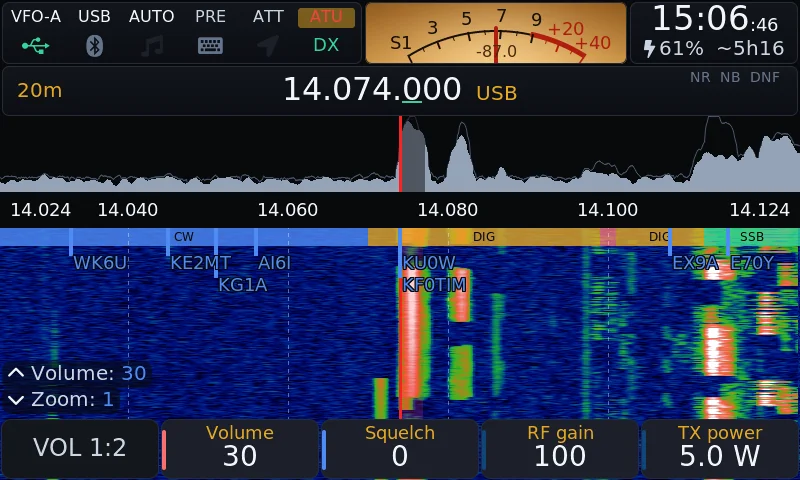
OpenX6X00 is free and open source firmware for the Xiegu X6100 and X6200 QRP transceivers, maintained by RF.Guru. It replaces the stock system with a full station that runs from a microSD card: FT8, FT4, FT2, JS8, WSPR, PSK, Olivia, RTTY, SSTV, WeFax and NavTex decoded and sent on the radio itself with no PC or sound card cable, DX cluster spots drawn live on the waterfall, nine portable activation programs with offline lists and ADIF logging, a TCI v2.0 server for the VFO-Knob, and Panel plus Screen pages that put the whole radio in any browser on your network. It’s a fork of the last open IU1WXY release v0.127, cleaned of every closed server dependency, audited three times, and updated from the radio itself with signed bundles and automatic rollback. Version v0.3.4 from 25 October 2026 fixes X6200 transmit power hold and adds FM broadcast plus airband receive.
What Is OpenX6X00?
OpenX6X00 is free and open source firmware for the Xiegu X6100 and X6200 portable HF transceivers that turns either radio into a self contained digital station with on-device decoding, cluster display, portable logging and browser remote control.
In practice that means one microSD card image per radio, about 98 MB zipped and about 570 MB written, with settings and logs kept on a DATA partition on the same card. You write the card once with BalenaEtcher or Rufus, keep the original Xiegu card aside as your way back, and every later version arrives over the network from Settings > Info > Update with signature checks and a kept previous version for automatic rollback. The project lives at https://openx6x00.org/ with source at https://github.com/Guru-RF/OpenX6X00 under LGPL-2.1-or-later for the GUI and GPLv3 for the image as a whole, with every original author copyright kept in the files.
Why OpenX6X00 Exists: From R1CBU to IU1WXY to an Open Fork
The X6100 gets a second life from the community
The Xiegu X6100 shipped as a compact Linux based QRP radio with a 4 inch touch display, internal battery and built in sound card paths that made it ideal for portable digital work. The stock firmware covered the basics but left much of that potential unused.
Two community efforts changed that. Oleg Belousov R1CBU and Georgy Dyuldin R2RFE wrote the R1CBU GUI, with CW receiver improvements, direct spectrum rendering and main knob handling. Giovanni Ricciardi IU1WXY then rewrote the GUI into a full station: theme system, Field Ops portable interface, Bands propagation view, DX cluster client, WSPR, SSTV transmit, RTTY, WeFax transmit, CW keyboard, Bluetooth work and a layer system. All of it was published under the LGPL for anyone to read, build and improve.
The door closes on 17 October 2026
On 17 October 2026 IU1WXY published v0.127, the last release with source. From v0.128 the author chose closed firmware: binaries only, tied to a phone app and an update server of the author’s own. That’s the author’s right, and the project page says so plainly. But the work that got the firmware to that point was open, and it deserved to stay that way.
RF.Guru carries the open line forward
OpenX6X00 forks v0.127 and carries on where the open code stopped, under the same licence. It is maintained by RF.Guru, the makers of the VFO-Knob, led by Joeri Van Dooren ON6URE. The fork statement is simple: no accounts, no app, no server to depend on. Firmware you can read, build yourself and update straight from the radio.
Before adding the second radio, the team refactored the code so the GUI no longer knew which radio it ran on. Board devices, radio types, one hardware interface per model, capability checks instead of baseband version checks, a stub radio for PC builds, atomic radio state and GUI thread handling for keys and CAT. The X6200 then went in as one file over Aether Radio’s open X6200 control library. A third radio is now the same job: a backend that answers one header file.
What OpenX6X00 Does on the Radio
Every digital mode on the radio itself
No PC, no sound card cable, no phone:
- FT8, FT4 and FT2 with CQ, reply, auto sequence, Hound mode, POTA tag and ADIF log. FT8 decodes go to PSK Reporter when enabled, and the app sends WSJT-X UDP for GridTracker and loggers.
- JS8 compatible with JS8Call, all four speeds at once, inbox, relays, heartbeats and APRS.
- WSPR decode and beacon with upload to wsprnet.org.
- PSK31, PSK63, Olivia, JTTY and RTTY with PSK Reporter upload.
- SSTV receive with VIS detection plus transmit with templates and denoise.
- WeFax and NavTex receive, with DSC decoding on NavTex.
- CW decoder that copies down to about 0 dB SNR with word splitting, CW keyboard with send queue and Live mode, messages with {CALL} and {HIS} macros, USB and Bluetooth paddles, plus a CW trainer using Koch method.
APP > Modes holds thirteen modes from RTTY to NavTex in an icon grid, and the Modes grid is reachable without digging through text menus.
DX cluster drawn on the waterfall
This is the feature that changes daily HF habits the most. Spots appear directly on the waterfall, in a column beside it and in a full app that follows the VFO:
- Filters by mode, band and activity including POTA, SOTA, WWBOTA and HOTA
- Alerts on calls and prefixes
- Spot snap when turning slowly
- Fifteen public telnet servers built in, DXFUN by default
- One login with a Link switch, plus its own login beside your logger so both can use the same call at once
On WiFi or wired Ethernet, with no relay server in between. The radio connects straight to the cluster you pick.
Field Ops: nine portable programs with big tiles
Field Ops is a second interface built for gloves and sunlight, with one big tile per program. Pick a program and it shows the nearest references from GPS or from your QTH locator, using whole world lists kept on the card. Start begins the activation and its ADIF log, and the screen counts what a valid activation needs.
| Programme | Full name | Activation screen counts | Spot goes to |
|---|---|---|---|
| SOTA | Summits On The Air | QSOs / 4 | DX cluster, SOTAwatch needs an approved client |
| POTA | Parks On The Air | QSOs / 10 | pota.app, also after a QSY and at End |
| WWBOTA | World Wide Bunkers On The Air | QSOs / 25, 10 for S5 and Z3 bunkers | wwbota.org, no account |
| HOTA | History On The Air | Calls / 5, one UTC day, within 500 m | cqhota.app with your own key |
| WWFF | World Wide Flora and Fauna | QSOs / 44 | WWFF Spotline with your own key |
| TOTA | Towers On The Air, lookout towers | QSOs / 13, 3 on VHF, within 200 m | DX cluster |
| WCA | World Castles Award | QSOs / 50, within 1 km | DX cluster |
| MOTA | Mills On The Air, GMA mills | Calls / 4, within 1 km and in sight of mill | DX cluster |
| LH | Lighthouses by ARLHS numbers | Calls / 4, within 1000 m and in sight of light | DX cluster as LH ARLHS BEL 002 |
Update list fetches all nine lists once and the radio works offline after. Most castles have no position in the list except Belgium, Germany, England, Czech Republic and Sweden. Lighthouses use ARLHS numbers as GMA writes them. Every QSO goes to the card at once with MY_SIG and MY_SIG_INFO fields. Towers, castles, mills and lights worked from another activation log as SIG and SIG_INFO, shown as T2T, C2C, M2M and L2L. TOTA, WCA, MOTA and LH need no account because their lists are public and spotting posts to the DX cluster only. Nothing is spotted by itself.
Bands, radio tools and station helpers
- Bands: live picture of 160 to 6 m from the cluster and Reverse Beacon Network, with a test beacon that shows who hears you from your own antenna.
- Radio core: IARU Region 1 band plan strip including 60 m and strips for bands you add, independent VFOs, Birdie Cal that finds the radio’s own carriers to mark and notch, S-meter in bars or on a lit needle dial, long press actions on every key, editable bands, memories and channels, transverters, RX recorder, screen recording and screenshots, voice messages, SWR scan, Walkie Talkie portrait mode, PRE and ATT controls, broadcast bands in AM.
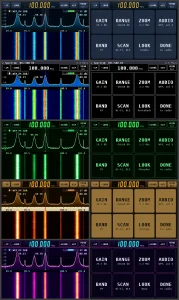
- Themes: every color, corner, font and waterfall palette comes from the theme. RF.Guru near black with gold for on and electric blue accent ships as default, plus Classic, Outdoor, Outdoor-Negative, VISION, Black Metal, Total Black, RS, Holo and Material 3. Your own themes go on the SD card.
- Bluetooth and wireless: WiFi that states why a join failed on screen, USB Ethernet adapter with DHCP or fixed address, USB tethering, custom network name, Bluetooth CAT for three clients plus headphones and keyboards with pairings that survive a new image.
The X6200 From the Same Tree
The X6200 runs the same GUI, the same apps, the same web pages and the same TCI server, built for the X6200 on Aether Radio’s open X6200 buildroot and control library. The build is MODEL=x6200, with its own card image and update bundle carrying x6200 in the name. The updater on a radio takes only the bundle for its own model.
X6200 specific points:
- SAM and WFM on the AM key, with WFM filter up to 10 kHz
- MFK knob inner ring selects what the MFK controls in every state
- Spectrum from the base’s own PSD with zoom 1 to 4
- X6200.local on the LAN
- FM broadcast 87.5 to 108 MHz and airband 118 to 137 MHz receive after 6 m on the band keys
- PRE and ATT on the VOL 2:2 page since the X6200 has no PRE key
- TX settings cards follow what the base can do
Version v0.3.4 matters here. Releases v0.3.0 to v0.3.3 lost transmit power about a second into a transmission on the X6200. Version v0.3.4 fixes it: tested into a dummy load on both base 1.0.7 and 1.0.8, AM, FM, FT8 and digital hold 4.9 to 5.0 W at a 5 W setting. The TX monitor is silent at volume 0, with mute and with Bluetooth headphones on mute speaker. Hand mic audio is still listed as not yet verified.
Privacy: No Server in the Loop
The privacy difference is stated in one sentence on the project site and worth repeating: OpenX6X00 has no server in the loop. Everything the radio sends goes to the service you chose, and only when you switch it on.
OpenX6X00 sends:
- Firmware version to GitHub Releases when you check for updates
- PSK Reporter spots straight from the radio to report.pskreporter.info over UDP, once you turn it on
- DX cluster connection direct to the public telnet cluster you pick
- POTA, WWBOTA, HOTA and WWFF spots to api.pota.app, api.wwbota.org, cqhota.app and spots.wwff.co, each only when enabled
- SOTA, TOTA, WCA, MOTA and lighthouse spots to your DX cluster
- QRZ Logbook with your own API key, WSPR to wsprnet.org, time from public NTP
Nothing about the radio or its use goes to RF.Guru or anyone else: no radio ID, no usage counters, no integrity check, no account. Full details are on the project’s privacy page with a list of every destination and when each one transmits.
The closed IU1WXY firmware from v0.128, in its own words from the v0.130 first start notice, sends a radio ID, firmware version, use counters and an integrity check to x6100-link.it, with images carrying an ID tied to the downloading account, cluster and PSK Reporter spots routed through the site, and WWFF plus POTA spotting through the site too.
Signed Updates From the Radio Itself
Write the card once. Every later version arrives over the network, and if it doesn’t come up the radio goes back by itself.
- Settings > Info > Update on the radio, or System > Update on the web page: Check, Install, progress display
- Each release carries a signed bundle of GUI and web server files, a manifest with SHA-256 per file, and an ECDSA P-256 signature whose public key is in the image
- The radio verifies the bundle, stages the files, swaps them in with a journal while keeping the previous set, and restarts its software in about 17 seconds
- The new GUI confirms itself after a minute of running. Three crashes before that and the start loop puts the previous files back on its own
- A power cut mid install is undone at the next start, with a manual go back button on the web page
- When a release also has a new card image for the radio, Check says so and what it brings, and keeps saying it until the image is on the card
From v0.3.4 a power off with the POWER key saves the running log for a bug report, and the boot screen reads Maintained by ON6URE for RF.Guru.
The Radio in a Browser: Panel and Screen Pages
What the closed phone app did, as two pages the radio serves itself. Nothing to install, any phone, tablet or PC on your network.
Open the radio address, x6100.local or x6200.local, or its IP:
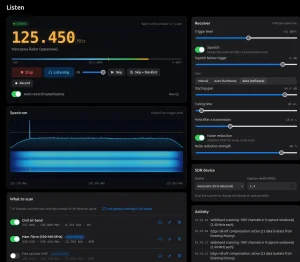
- Panel page: the radio controls laid out for touch. Live spectrum and waterfall from the radio FFT with tap to tune and pinch to zoom, frequency, band, mode, step and zoom buttons, every switch and level, S-meter, cluster spots with tap to tune, FT8 app with decodes and tap to answer, CW decoder text, log form, RX audio and browser microphone for TX. Portrait on a phone, side by side on a tablet or PC, with a light theme for sun and an App mode without menu.
- Screen page: the radio own display streamed live with every front key and the three knobs, for apps and settings exactly as if standing in front of it. Picture choice Sharp, Balanced or Fast for slow links, with Fast giving about 9 frames a second where Sharp gives 4.
- Web configurator: bands, digital frequencies, memories, cluster, Field Ops, CW messages, macros, logs with every program reference, files, gallery, backup and restore, display, time, network name, Ethernet, TCI and updates.
Security is pairing based. Anyone on the network can watch. To operate, a browser pairs once with a six digit code the radio shows for two minutes. The first browser paired is the admin, which lists and revokes the others. One holder controls the RF side at a time: a browser, a TCI client or the operator at the radio, who always wins. A held PTT is a lease: three seconds without the page and the radio unkeys, three minutes at most. A QSO sent into a gap is asked about when the link returns, never doubled.
On a cable beats on WiFi. The radio own WiFi is weak and shares its chip with Bluetooth. Put a USB Ethernet adapter in the USB port at any time and the radio uses the cable, holds WiFi off and brings it back when the cable comes out. The tested adapter is the Delock 81570. DHCP or fixed address in Settings > Wireless > Ethernet.
TCI v2.0 Server for the VFO-Knob
The radio speaks TCI, the protocol of Expert Electronics that AetherSDR and the VFO-Knob speak too. Put the knob on the same WiFi or Ethernet and it tunes, keys and hears the radio like any other: frequency, mode, filter, AGC, RIT, drive, PTT, meters and audio both ways.
- On by default, switch in Settings > General > TCI SERVER and on the web page, TCP port 50001
- RX audio as int16 mono at 24 kHz, TX audio frames the other way
- Clients set to Operate or Listen only, all together
- An operating client takes control the moment it tunes or keys unless someone is on the air
- No login as the protocol has none, so set Listen only or off on a network you don’t trust
Installation Guide
What you need
- Xiegu X6100 or X6200, ideally on a 13.8 V supply for baseband work
- A microSD card 8 GB or larger, any card that holds the 570 MB image with room for logs and recordings
- A card reader, BalenaEtcher or Rufus or dd, and five minutes
- Keep the original Xiegu card aside. It is your way back.
Step by step
- Download the image for your radio from the latest release at https://github.com/Guru-RF/OpenX6X00/releases/latest. The radio is in the file name: OpenX6X00-x6100-v0.3.4-sdcard.img.zip or OpenX6X00-x6200-v0.3.4-sdcard.img.zip. Each is about 98 MB zipped. Unzip it.
- Write it to the microSD card with BalenaEtcher, Rufus or dd. Don’t write it to the original Xiegu card.
- Put the card in the radio and switch on. The DATA partition for settings and logs is created in the free space at first start. A card that already carried an earlier OpenX6X00 image keeps its DATA, settings and logs. Download a Backup from the web configurator first all the same.
- After boot, set callsign, QTH locator and WiFi or Ethernet in Settings. Then Settings > Info > Update, Check, Install. The updater takes only the bundle for its own model. A new card image is only needed when the kernel or a driver changes, and the radio says so.
Baseband versions that work
Each radio runs two firmwares. OpenX6X00 is the Linux side on the card. The baseband is Xiegu firmware of the radio board for DSP, RF, power and keyer. OpenX6X00 talks to it and never changes it. Settings > Info > Baseband shows its version.
| Radio | Baseband | Status with OpenX6X00 |
|---|---|---|
| X6100 | V1.1.8 build 240915003, Xiegu base on most radios since late 2024 | Works, the bench X6100 runs it |
| X6100 | V1.1.9 build 251127001, newer Xiegu base | Works, uses zoom and IF shift |
| X6100 | x6100_base_patch r13 by gdyuldin on V1.1.6 | Works, adds TX audio and calibration options plus battery curve |
| X6200 | 1.0.7 from January 2026 | Works |
| X6200 | 1.0.8 from August 2026, fixes CW keyer speed and stuck S-meter, adds CW macros | Works, the bench X6200 runs it |
Settings that need a newer base stay hidden when the base is too old. Updating the baseband uses Xiegu own system on internal memory: power from a 13.8 V 3 A supply with battery out, boot Xiegu update image from a spare card, System Setting > Firmware Upgrade with the new xgf file, wait for 100 percent, QUIT, Factory Reset for Xiegu settings only, then put the OpenX6X00 card back.
Comparison: Stock Xiegu vs Closed IU1WXY vs OpenX6X00
| Attribute | Stock Xiegu firmware | IU1WXY v0.128 and later closed | OpenX6X00 v0.3.4 open |
|---|---|---|---|
| License and source | Closed vendor image | Closed binaries, own terms | LGPL-2.1-or-later GUI, GPLv3 image, full source on GitHub |
| Radios covered | X6100 and X6200 each own line | X6100 focused | X6100 and X6200 from one tree |
| Digital modes on radio | Basic | Full suite with phone app link | Full suite: FT8, JS8, WSPR, PSK, Olivia, RTTY, SSTV, WeFax, NavTex |
| DX cluster on waterfall | No | Yes through site relay | Yes direct to public telnet, spots on waterfall |
| Portable programs | Basic SOTA and POTA | SOTA, POTA, WWBOTA, HOTA, WWFF | Nine: plus TOTA, WCA, MOTA, LH with offline lists |
| Browser control | No | Closed phone app | Panel plus Screen pages, no install, pairing codes |
| TCI server for knobs | No | No | TCI v2.0 on port 50001 for VFO-Knob |
| Updates | Xiegu card images | x6100-link.it channel | Signed GitHub bundles from radio with rollback |
| Telemetry and accounts | Vendor only | Radio ID, counters, integrity check, account link | None, direct to chosen service only when enabled |
| Audit and trust | Vendor QA | Not published | Three audits, 39 findings closed with one commit each |
The honest takeaway: stock firmware is the safe vendor baseline and the way back. The closed IU1WXY line has the most polished phone integration if you accept its account and server model. OpenX6X00 is the choice when you want the code readable, the network path direct, both radios from one tree and updates without depending on one person’s server.
Practical Shack Workflows
Portable activation with no laptop
Charge the X6100 or X6200, pack a wire antenna and put the OpenX6X00 card in. On site open Field Ops, pick SOTA or POTA, let GPS or your locator pull the nearest references from the offline lists, Start the activation, call CQ from the radio with CW macros or the CW keyboard, log each QSO straight to ADIF on the card, and self spot to pota.app or the cluster from the same screen. Export the ADIF later from the web configurator Files page. This is the workflow the big tile interface was built for.
FT8 from a deck chair with a phone
Join the radio to a phone hotspot or a USB Ethernet adapter to a travel router. Open http://x6100.local/panel on the phone, tap the FT8 app, watch decodes with country and flag, tap a CQ to answer, run auto sequence with Hold control, and log without touching the radio. Keep TX power at 5 W and watch the TX strip seconds counter. Pair the browser once with the six digit code and you are the control holder until you release.
A VFO-Knob station on the desk
Put the radio and a VFO-Knob on the same LAN, leave TCI on in Settings > General > TCI SERVER, and tune, change mode and filter, adjust RIT and drive, key and hear audio both ways from the knob. Set clients to Listen only when guests or a club network are on the same LAN.
Contest weekend band map
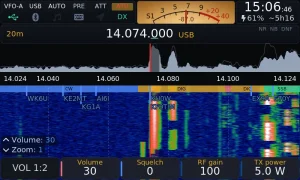
Open the Bands app for a live 160 to 6 m picture from cluster plus Reverse Beacon Network spots, pick the framed best band, then follow the cluster app with 85 spots around the VFO on 20 m. Tap a spot on the Panel page to QSY. Broad contest weekends like CQ WW SSB are exactly when the waterfall plus band plan strip plus cluster callsigns view in the featured image earns its keep.
Honest Limitations
- Hand mic audio on the X6200 isn’t yet verified. Everything else on base 1.0.7 and 1.0.8 tests clean at v0.3.4, but check the release notes before relying on the hand mic.
- New card images still need a reflash. Radio updates are automatic, but kernel or driver changes need a new image write. The radio tells you when, and DATA normally survives, but back up first.
- WiFi is weak by hardware. The radio own WiFi shares its chip with Bluetooth. For remote browser or TCI use, plan on the Delock 81570 USB Ethernet adapter or a close access point.
- JB style exclusive modes don’t apply here. Unlike some SSTV forks with fork only modes, OpenX6X00 stays compatible with standard clusters, PSK Reporter, pota.app and ADIF loggers.
- The fork is young and moving fast. v0.3.4 is dated 25 October 2026 with 211 commits. Read the release notes and back up the card before each jump.
Why It Matters
There is a pattern in ham radio that keeps repeating: a vendor ships capable hardware, the community writes the software that unlocks it, then the community line closes and the knowledge risks going with it. The X6100 lived that arc in public, from R1CBU GUI to IU1WXY rewrite to closed binaries in one month.
OpenX6X00 breaks the cycle in the right way. It keeps the licence, keeps every author name in the files, removes the phone home paths instead of just forking the features, documents the privacy model service by service, publishes three audits with each finding closed in its own commit, and ports the whole station to a second radio behind a clean hardware layer so a third radio is the same job again. The result is a QRP station that works with no laptop on a summit, no app in an app store, and no server that can vanish.
For Malaysian portable operators the fit is direct. A 5 W X6100 or X6200 with an end fed wire, offline SOTA and POTA lists, direct cluster spots and ADIF on the card is a complete activation kit for Gunung Angsi or a POTA park, and the browser Panel means the phone in your pocket is the large display the radio never had.
Frequently Asked Questions (FAQ)
What is OpenX6X00?
It is free open source firmware for the Xiegu X6100 and X6200, maintained by RF.Guru. It runs from a microSD card and adds on-radio digital modes, DX cluster display, nine portable programs and browser control.
Which radios and versions does it support?
Xiegu X6100 on base V1.1.8, V1.1.9 or patched r13, and Xiegu X6200 on base 1.0.7 or 1.0.8. Version v0.3.4 from 25 October 2026 fixes X6200 transmit hold at full power.
Does it phone home or need an account?
No. There are no accounts and no RF.Guru server in the loop. The radio talks direct to GitHub for updates and to services you enable like clusters, PSK Reporter or POTA.
How do updates work after the first install?
Settings > Info > Update fetches a signed bundle for your model, verifies ECDSA plus SHA-256, installs with the previous version kept, and rolls back automatically on repeated crashes.
Can I go back to stock Xiegu firmware?
Yes. Keep the original Xiegu microSD card aside. Power off, swap cards and boot. OpenX6X00 never changes the baseband on internal memory.
Sources and Further Reading
- OpenX6X00 Official Site – Project home, features, Field Ops details, browser pages, install and FAQ.
- OpenX6X00 GitHub Repository – Source, 211 commits, issue tracker, manual, themes and audit docs.
- OpenX6X00 v0.3.4 Release Notes – X6200 transmit fix, cluster login fix, band plan and Fast picture changes.
- OpenX6X00 Manual – Every app and setting, web pages, TCI server, CAT commands and build.
- OpenX6X00 Privacy Page – Every destination the radio sends to and when.
- R1CBU GUI by R1CBU and R2RFE – The open GUI this lineage stands on.
- AetherX6100Buildroot – Build system for the X6100 image.
- AetherX6200Buildroot – Build system for the X6200 image.
- RF.Guru – Maintainer of OpenX6X00 and maker of the VFO-Knob.
- VFO-Knob – The network tuning knob that speaks TCI to the radio.
- Xiegu Downloads – Stock update images and baseband files for X6100 and X6200.
- POTA Official Site – Parks program referenced by Field Ops spotting.
- SOTA Official Site – Summits program referenced by Field Ops.
73 de 9M2PJU

Post Comment