Wirely v1.5.2: Free Open Source Circuit Design and Simulation App for Desktop and Browser
TL;DR: Quick Summary
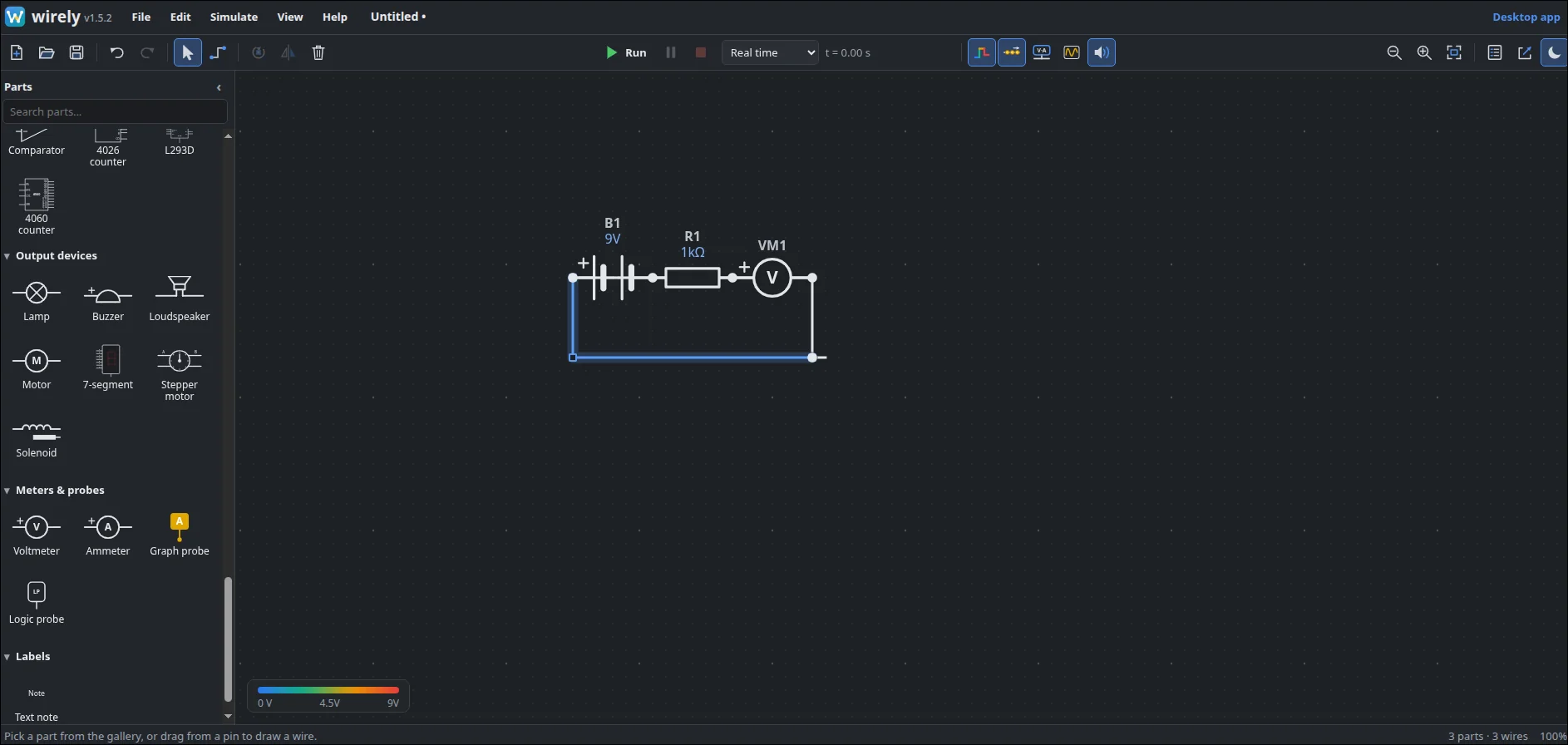
Wirely is a free and open source circuit design and simulation app that runs on Windows, Mac, Linux and right in your web browser. Built by Richard Willmott with AI assistance and released as v1.5.2 in October 2026, it gives you a drag and drop schematic editor with 84 parts using British IEC or US symbols, a real SPICE method solver checked against hand calculations and ngspice, and a live stage where LEDs glow, motors spin with back EMF, relays click, buzzers sound, wires show voltage by color with moving current dots, and a 4 probe oscilloscope graphs 555 timers, filters and buck converters. Parts use real type numbers like BC547, IRF540, LM358 and PC817, mistakes pop with an explanation like real hardware, readings pin to any wire, and export makes report ready PNG, SVG and PDF plus a CSV parts list. Try it at wirely-app.github.io with nothing to install, or download the desktop build.
What Is Wirely?
Wirely is a free and open source circuit simulator that trades netlists for drawing: sketch the schematic, press play, and watch it behave like the bench version.
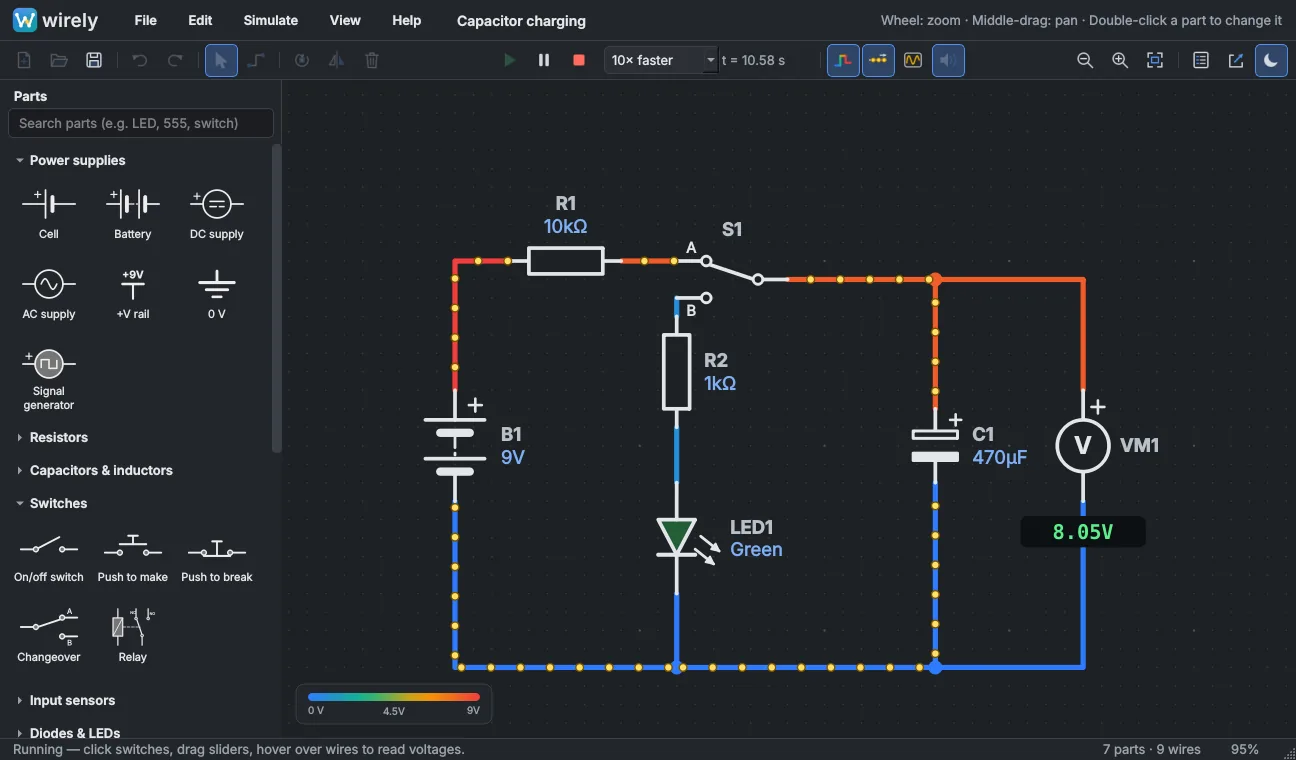
In practice that means one app with a parts gallery, a sheet, a Run button with speed from 10x down to 1/1000 slow motion, voltage colored wires with current flow dots, click and drag interaction while running, hover readings on any wire, one button Readings for the whole circuit, a graph with up to four probes, and export for documentation. Underneath sits a nodal equation solver with Newton-Raphson for semiconductors plus automatic step control, MOSFETs fitted to datasheet gate charge and on resistance, op-amps fitted to gain bandwidth and slew rate, lamps with thermal resistance curves, motors with back EMF and relays with pull in hysteresis. The project lives at https://github.com/wirely-app/wirely-app.github.io with 17 commits, 425 automated tests, and a live site at https://wirely-app.github.io/ running the same Python engine through Pyodide with your circuits staying on your machine.
Why It Exists: Between Toy Simulators and Netlist Tools
The author wanted to try circuits before building them at work and at home in something quick and friendly. Friendly drag and drop simulators mostly cost money and target schools only, while free professional tools like LTspice and ngspice are powerful but eat time in netlists, models and graph setup.
Wirely aims between: as easy as drawing, free, local with no cloud and no account, and accurate enough to trust at work. Sketch to see what lights, what runs hot and what pops, click switches and drag sliders mid run, hover any wire for volts and amps, graph signals, pick real part numbers, and export clean diagrams for reports and worksheets. Every revision is tested against known answers.
Drawing: 84 Parts, Two Symbol Styles, Fast Keys
The editor holds 84 parts with IEC or US symbols, search to find by 555, LED or relay, drag pin to pin wiring, W key branches with junction dots, double click to type values like 10k, 4k7, 100n or 2M2, double click transistors and MOSFETs to pick real types with guidance on why AO3400 beats 2N7002 here, R and F keys to rotate and flip, undo and redo, copy and paste, text notes, autosave plus crash recovery.
Press Play: A Bench That Moves and Makes Noise
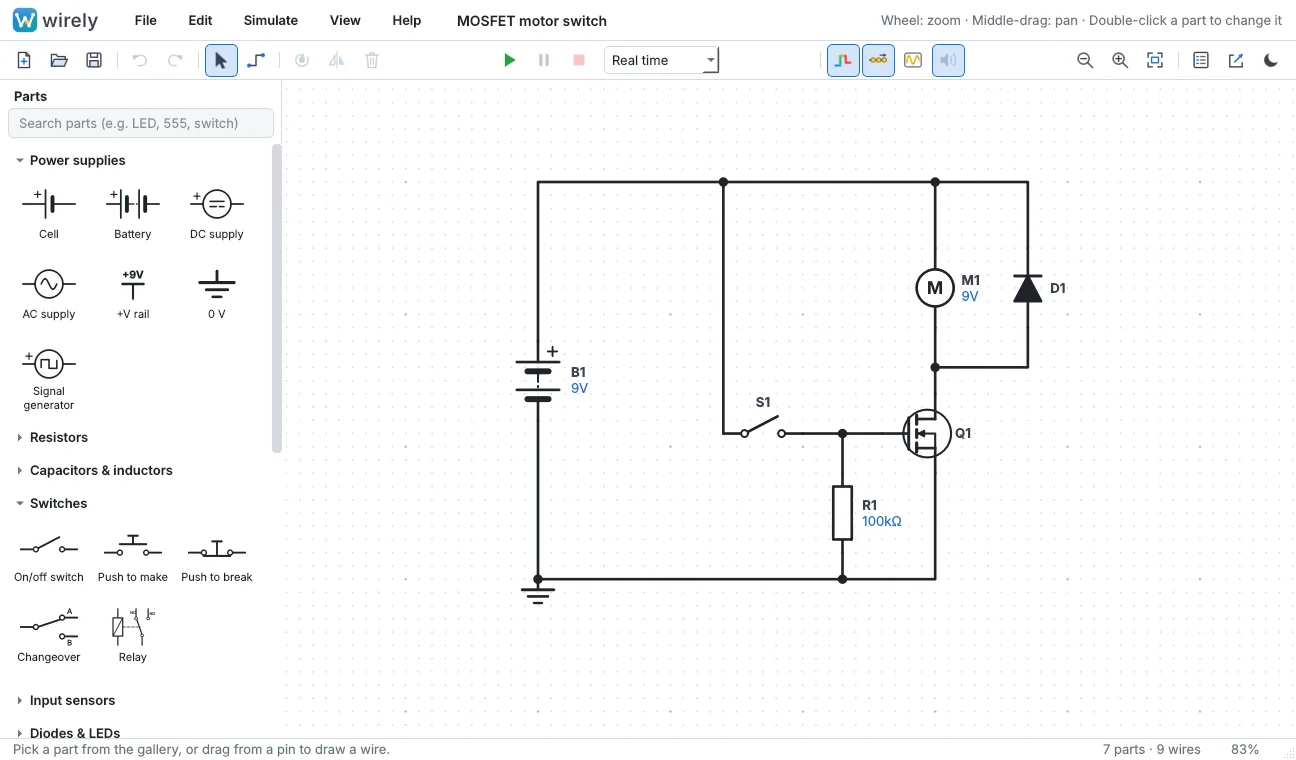
Run with Play or F5. Wires take the color of their voltage from blue at 0 V to red at top supply with the scale in the corner, dots flow for current, LEDs and lamps glow with PWM dimming like real life, motors slow under load, relays click, buzzers and speakers sound the simulated signal, meters read live. Click switches, hold push buttons, drag pot and sensor sliders or wheel them, change speed to freeze a transient. Stop with Shift+F5 returns to edit with popped parts mended.
Hover any wire or part for voltage, current with direction and power. Readings shows all at once, click pins one reading to the sheet, Copy readings pastes the lot into a spreadsheet. Graph probes A to D open an oscilloscope underneath with volts and time per division plus auto mode, hover readout, frequency per probe and picture save, toggled with Ctrl+G.
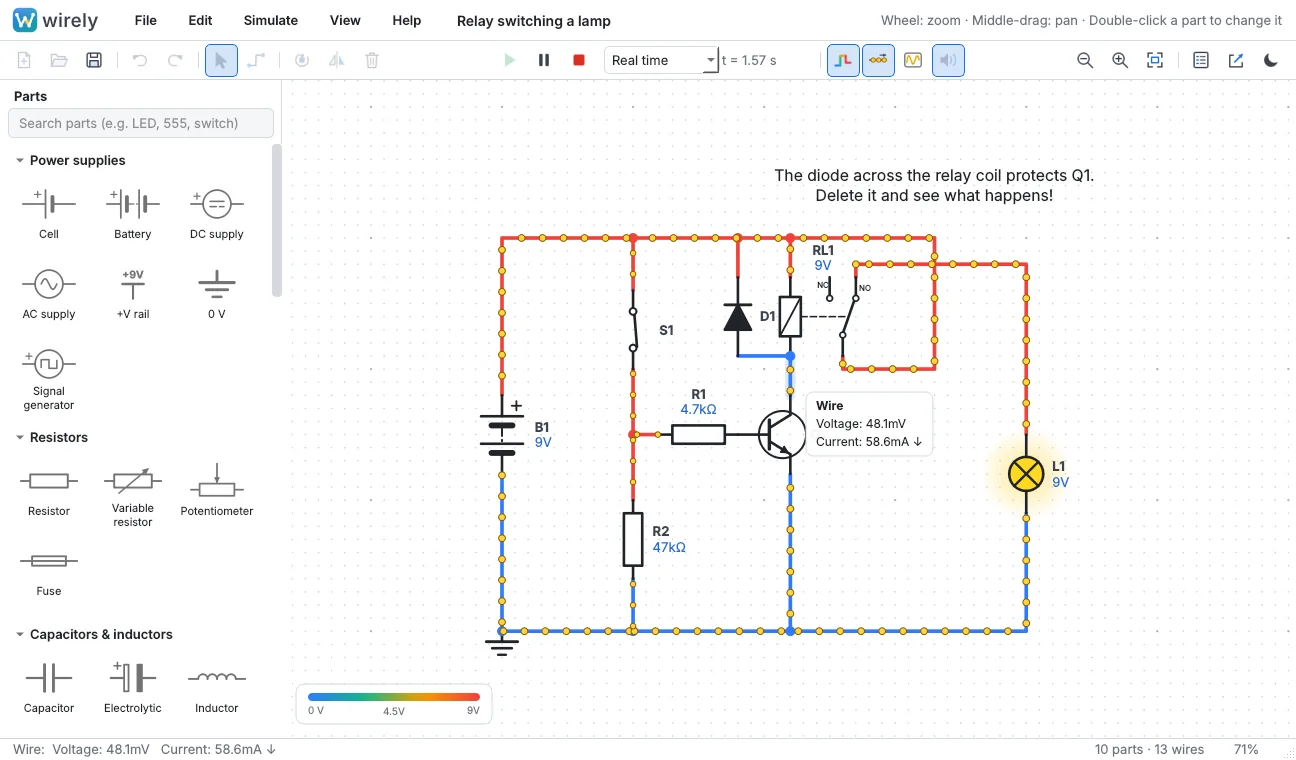
Parts fail like hardware and say why: LED straight across a battery, resistor over its power rating, reversed electrolytic, relay coil without flyback diode killing the transistor, MOSFET or motor over voltage, blown fuse, shorted supply. Chips with supply pins left floating take the highest supply automatically so quick sketches just work.
Parts That Matter for Radio Builders
The gallery covers the analog building blocks hams reach for: 555 timer, LM358 and TL071 op-amps, LM393 and LM311 comparators, L293D motor driver, logic gates, 4017, 4026 and 4060 counters, 4511 decoder with 7 segment display, 7805, 7809, 7812, LM1117 and LM317 regulators, 74HC164, 165, 595 and 597 shift registers, 4051 analog switch, TL431 references, PC817, 4N25, 4N35, TLP521 and 6N139 optoisolators, TLP3122A solid state relay, MOSFETs including IRF540 and IRLZ44N, transistors including BC547, 2N2222 and TIP31, thyristors, relays, PWM signal generator, plus bi-color and RGB LEDs, bridge rectifier, transformer, DPDT parts, Hall sensor, solenoid, stepper motor, rotary switch, 12 key keypad, crystal clock, JK flip flop and 4093 Schmitt NAND.
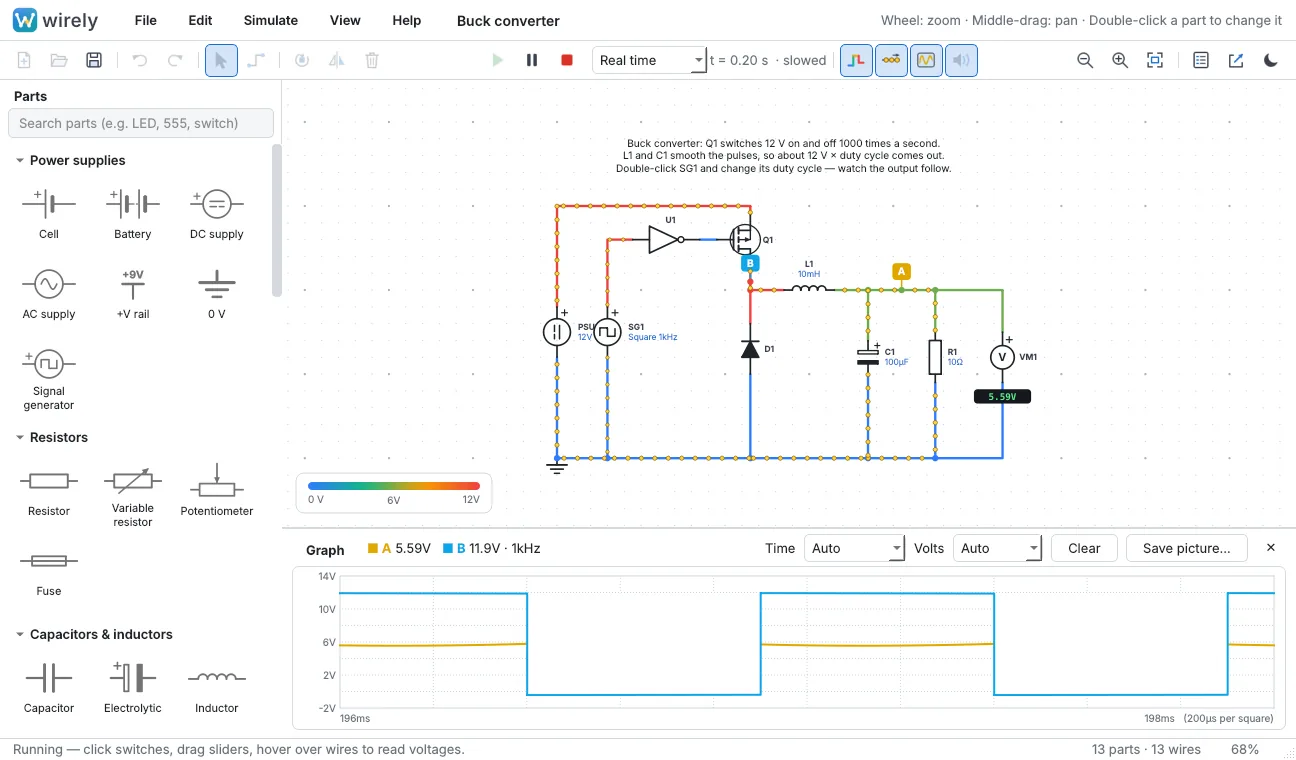
That buck example is the accuracy story in miniature: Wirely reports 5.750 V out with 0.391 V ripple against ngspice at 5.759 V with identical ripple, and IRF540 switching delays land within nanoseconds. Gate charge fits land within a few percent of datasheets across a dozen MOSFET types.
Browser or Desktop: Same Wirely, Two Shapes
Desktop builds come from the latest release with no Python needed: Windows Setup exe with Start menu plus .wirely file association, Apple Silicon dmg dragged to Applications, Linux AppImage made executable with a desktop installer script. First run quirks are documented: Windows SmartScreen needs More info then Run anyway, unsigned Mac builds need right click Open, and AppImage without FUSE runs with extract and run.
The browser build at wirely-app.github.io is the same parts, symbols, examples and simulator in Chrome, Edge, Firefox or Safari with no install and no account, handy for Chromebooks and school PCs. Save gives a .wirely file both versions open, File then Copy a link embeds the circuit for Classroom or Teams, first visit caches for offline use, and Chrome can install it as an app. It runs slightly slower, downloads about 14 MB on first start, and exports PNG only. Visit counting uses cookieless GoatCounter. Touchpads scroll and pinch, touch screens drag the sheet.
Comparison: Wirely, Paid Classroom Tools and SPICE
| Attribute | Wirely v1.5.2 | Paid classroom simulators | LTspice and ngspice |
|---|---|---|---|
| Draw then run | Yes, drag and drop with live interaction | Yes, friendly | Netlist first, slower to sketch |
| Cost and account | Free GPL-3.0, local, no account | Paid, school focused | Free, local, pro learning curve |
| Real part numbers | Yes, BC547, IRF540, LM358, PC817 and more | Simplified ideals | Yes, full model libraries |
| Failure behavior | Pops with reason | Rarely | Depends on setup |
| Graph | 4 probe scope with frequency | Basic | Full analyses |
| Export | PNG, SVG, PDF plus CSV parts list | Varies | Varies |
| Runs in browser | Yes, offline after first visit | Often | No |
| Best for | Workbench checks, classes, worksheets | Guided lessons | Final verification |
The honest takeaway: keep SPICE for sweeps, noise and Monte Carlo. Use Wirely to try it in a minute, teach it in a lesson, or document it for a report.
Practical Ham and Bench Uses
- Bias and dropper math: sketch the divider or LED feed, hover for current and power before touching the iron.
- 555 timing: astable and monostable against the graph, then check against the 425 test backed timing.
- Regulator sanity: 7805 or LM317 with load current and dissipation read live, ripple on the scope.
- Relay driver discipline: switch a coil without a flyback diode once here instead of on a real transistor.
- Worksheets: export white paper SVG or PDF plus parts list CSV for club builds and classes.
Honest Limitations
- No layout. Schematic and simulation only, no PCB or breadboard view.
- No SPICE import yet. Built in typical value models only, no temperature, offset, noise or multi pole op-amps, so no capacitive load ringing.
- Time domain only. Scope style graph with no AC sweep, noise or Monte Carlo analysis.
- Simple logic. Gates, 4017, 4511 and flip flops, no microcontrollers.
- Fast switchers slow down. Buck at 1 kHz runs slower than real time with a slowed label. Answers stay right, arrival takes longer.
Why It Matters
Bench time is scarce and parts cost money. A free local tool that draws like a whiteboard, solves like SPICE, breaks like hardware and exports like documentation shortens every build loop from idea to solder. For classrooms and clubs it removes the two classic blockers at once: nothing to buy and nothing to install for the browser path, yet diagrams good enough for real reports. That combination is rare and worth keeping.
Frequently Asked Questions (FAQ)
What is Wirely?
It is a free GPL-3.0 circuit design and simulation app for Windows, Mac, Linux and browsers. Draw with 84 parts, press play, probe and graph live, then export diagrams and parts lists.
Do I need to install anything?
No for the browser path at wirely-app.github.io, which works offline after the first visit. Desktop builds need only their installer or AppImage with no Python required.
How accurate are the numbers?
A SPICE method solver checked by 425 tests against hand math and ngspice, with MOSFETs and op-amps fitted to datasheets. Buck output and ripple match ngspice within millivolts.
Can students share circuits easily?
Yes. Save a .wirely file both versions open, or copy a link with the circuit inside for Classroom or Teams where each opener gets a copy.
What can it not do?
No PCB layout, no SPICE model import, no AC sweep or Monte Carlo, simple logic only, and fast switchers run slower than real time.
Sources and Further Reading
- Wirely GitHub Repository – Source, 425 tests, releases, examples and packaging.
- Wirely Live Web App – Try v1.5.2 in the browser with no install.
- Wirely Latest Release – Windows, Mac and Linux downloads.
- Wirely Building Guide – Source runs, tests and installer builds.
- ngspice Circuit Simulator – Reference simulator used for Wirely cross checks.
- Falstad Circuit Simulator Tradition – The interactive simulation style Wirely continues in open source.
- EAEA Circuit Workshop for Kids – HamRadio.MY companion story on breadboard simulation for young builders.
73 de 9M2PJU




Post Comment