DahDahDit: The Free Browser Morse Trainer That Teaches You to Copy CW by Ear
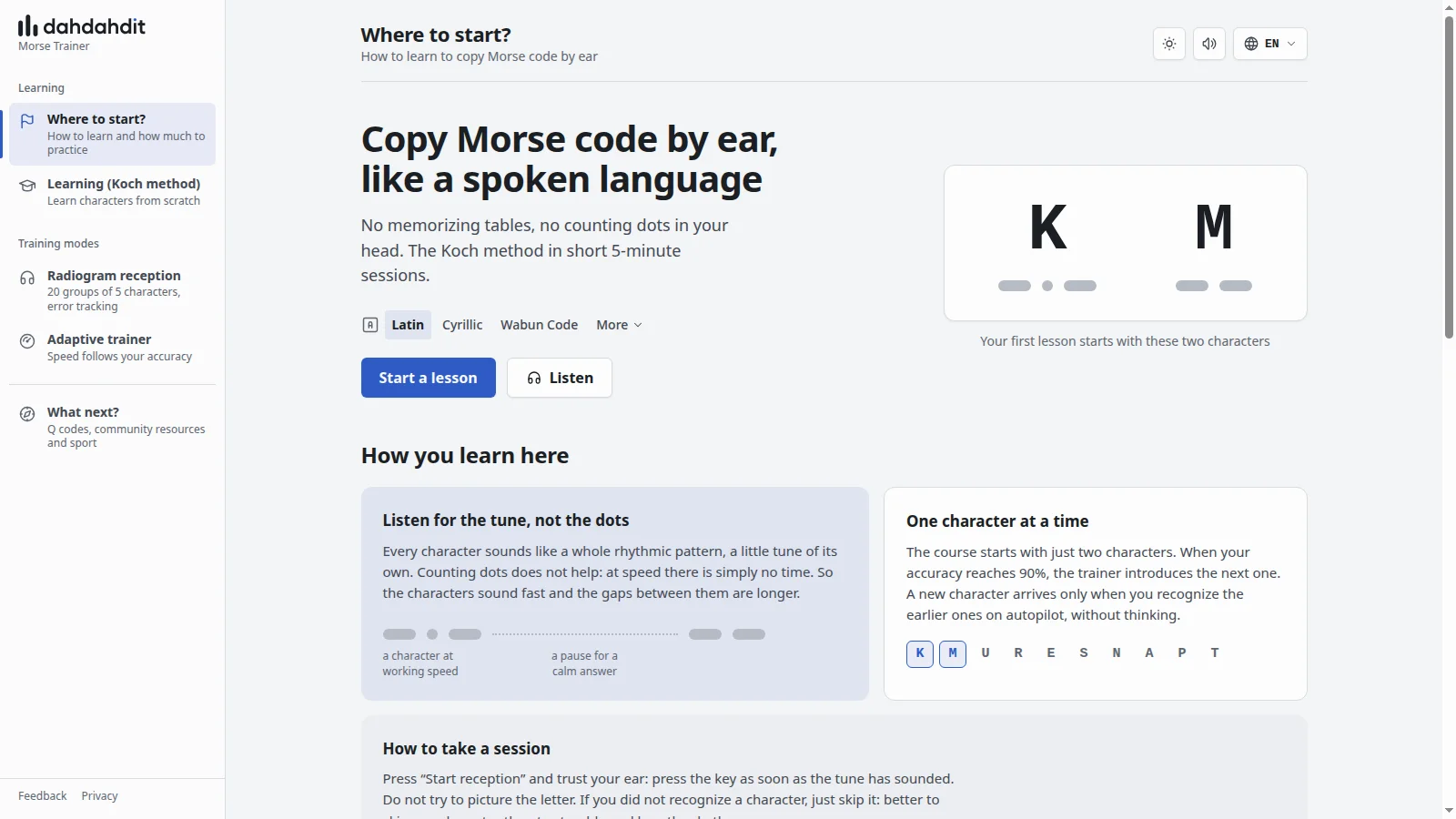
DahDahDit at dahdahdit.com is a free browser based Morse code trainer that teaches you to copy CW by ear with the Koch method in short 5 minute sessions, no signup, no install and no memorized dot tables.
TL;DR: DahDahDit is a free, no account Morse trainer that starts with just K and M at full 20 WPM character speed, adds one Koch character at a time at 90 percent accuracy, and builds copy skill with 5 minute sessions spaced at least 2 hours apart. It includes a Koch course with Latin, Cyrillic and Wabun tracks, a 20 group radiogram mode with error review, an adaptive 14 to 60 WPM trainer, plus Q codes, prosigns and HST sprint practice, with a clear path to VBand, LCWO, Morse Code Ninja, CW Academy and your first on air QSO.
What DahDahDit Is
DahDahDit is a free online Morse code trainer that teaches International Morse, Cyrillic Morse and Wabun code by ear using the Koch method, Farnsworth style timing and adaptive speed, entirely in the browser.
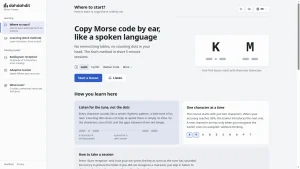
Open dahdahdit.com, pick Latin, Cyrillic or Wabun Code, press Start a lesson, and you are copying within seconds. There’s nothing to download, no account to create and no settings maze to survive first. The interface is one page per job: Where to start, Learning, Radiogram reception, Adaptive trainer and What next. Keyboard control stays constant across modes with Enter to start or pause, Esc to reset and Space to skip a character you missed.
The pitch on the homepage is blunt and correct: copy Morse code by ear, like a spoken language. You don’t memorize tables, you don’t count dots in your head, and you don’t picture letters. You learn each character as a whole rhythmic tune, the way you recognize a spoken word without spelling it.
That design puts DahDahDit in a small group of trainers that get the pedagogy right from lesson one. Many apps still drill slow characters with a lookup chart beside them, which builds exactly the wrong reflex. DahDahDit does the opposite: characters always sound at working speed, and only the gaps between them stretch out to give you thinking room.
Why the Method Works: Koch, Farnsworth and the 5 Minute Rule
The Koch method in one minute
German psychologist Ludwig Koch developed his method in the 1930s while training radio operators, and it remains the fastest proven path to head copy. The recipe has three parts:
- Start with just two characters, K and M on DahDahDit.
- Drill them at full character speed until recognition is automatic.
- Add the next character only when accuracy on the current set hits 90 percent.
DahDahDit follows this exactly. The course holds 41 symbols in the Latin track, and the Active symbols counter shows how many you have unlocked. A new character arrives only when earlier ones come on autopilot, without conscious decoding. That 90 percent gate feels slow on day one and fast by week three, because each new sound lands on a solid foundation instead of a shaky pile of half learned tunes.
Full speed characters, stretched gaps
Beginners often ask why lesson one already plays at 20 WPM. The answer is reflex protection. At 5 WPM you have time to count dits and dahs, so your brain learns counting. At 20 WPM counting is impossible, so your brain learns pattern recognition instead. DahDahDit plays every character at working speed and lengthens only the pause between characters, the technique popularized as Farnsworth timing after Donald R. Farnsworth W6TTB.
The homepage visualizes this as two blocks: a character at working speed, then a pause for a calm answer. Three pause settings (Standard, Medium, Long) let you widen that gap on a bad day without slowing the characters themselves. This is the single most important difference between trainers that produce operators and trainers that produce memorizers.
Short sessions, long breaks
DahDahDit prescribes a practice rhythm that surprises newcomers:
- One session: 5 minutes
- A day, at most: 20 minutes
- Minimum time between sessions: 2 hours
- Ideal: three or four short sessions, morning, lunch and evening
Listening reflexes consolidate during breaks, not during marathons. The first minutes of a session carry your sharpest attention, then fatigue pushes you back into counting dots. After a break the next session feels easy again. If you take one idea from this post, take this one: four focused 5 minute sessions beat one tired 60 minute grind every time.
Practical tips from the course page reinforce the same point. Rest your fingers over the letters you’re learning before you start, keep your eyes off the keyboard, and trust your ear. Press the key as soon as the tune has sounded. If you missed one, skip it with Space rather than stumbling and losing rhythm. Typing speed doesn’t matter. Not searching for keys with your eyes does.
Tour of the Trainer: Four Modes That Cover Lesson One to Contest Speed
1. Learning, the Koch course
The Learning page is where every beginner should live for the first weeks. It shows live accuracy, active symbol count, a 5 minute countdown, pause length control and a symbol picker with Change. Lessons run Latin International Morse by default, with Cyrillic and Wabun Code tracks plus a More menu for extensions.
What to do here:
- Run one 5 minute block per sitting.
- Keep Farnsworth gaps on Medium or Long until accuracy stabilizes, then tighten to Standard.
- Don’t preview the next character list. Let the trainer surprise you.
- Stop at 20 minutes per day even if you feel good. Bank the win and come back after 2 hours.
The no chart philosophy is deliberate. The site FAQ asks outright why there’s no Morse code chart here, and the answer is that a chart beside the trainer teaches your eyes while your ears stay idle. Hide the chart, cover the keyboard legend if you must, and let the miss hurt a little. That small discomfort is the learning signal.
2. Radiogram reception, the 20 group workout
Once characters start arriving by themselves, move to Radiogram reception. This mode sends 20 groups of 5 characters in classic radiogram format, tracks accuracy, correct count, errors and skips, and lets you walk back with arrow keys to fix mistakes. You can drill Letters, Digits, Mixed or With punctuation, and set speed around a default of 11 WPM.
This is your bridge from isolated characters to real copy. Five character groups force you to hold rhythm across a full line, recover from a missed character without collapsing, and review exactly which pairs confuse you. Watch the error list for mirror pairs such as K and R, S and H, or D and B. When the same confusion repeats three sessions in a row, drop back to the Koch page for a short remedial block on just those sounds, then return.
3. Adaptive trainer, speed that follows your accuracy
The Adaptive trainer answers the classic plateau question: when do I go faster? Here the speed adjusts every 5 groups across a 14 to 60 WPM scale, shown with a progress percentage, block accuracy and overall accuracy. Play well and the next block steps up. Struggle and it steps back down without drama.
Use it as a twice weekly test, not a daily driver. Warm up with one Koch block, run two or three adaptive blocks, and note where accuracy falls below 90 percent. That number is your honest working speed. Train just under it, test just over it, and the ceiling rises a little each week.
4. What next, Q codes, prosigns and the road to air
The What next page is the part most trainers forget, and it is where DahDahDit earns a bookmark. Once you copy clean characters at 15 to 20 WPM, it points you at real signals and real people:
- Make a first contact with no radio through VBand, where you send from keyboard, on screen pads or a connected key on shared channels.
- Keep drilling with LCWO, Morse Code Ninja and CW Academy.
- Listen to live CW at the bottom of the bands, 7.000 to 7.040 MHz on 40 meters and 14.000 to 14.070 MHz on 20 meters, via WebSDR and KiwiSDR.
- Check where you are heard with the Reverse Beacon Network.
- Learn Q codes and prosigns by ear inside DahDahDit itself, with meanings attached.
- Join a community built for beginners: SKCC, FISTS and NAQCC.
- Taste High Speed Telegraphy with in browser copying texts and RufzXP style callsign sprinting, plus links to the IARU HST rules and the original RufzXP and Morse Runner programs.
Licensing pointers to the ARRL and RSGB close the loop for US and UK readers. Malaysian readers can follow the 9M2PJU license guide path and then use the same listening chain, because CW needs no new theory once you hold a callsign, only practice.
WPM, PARIS and the Numbers Beginners Actually Need
The site FAQ includes a plain English explainer for WPM and the PARIS standard, and it is worth repeating because every trainer quotes speeds differently. In Morse timing the word PARIS, including its inter character and inter word spaces, defines one standard word of 50 dit units. WPM counts how many such words fit in a minute, so 20 WPM means 1,000 dit units per minute, or about 60 milliseconds per dit. CPM, characters per minute, appears beside WPM in the DahDahDit HUD for the same reason: groups per minute translate more directly to radiogram copy.
Two practical consequences follow. First, compare trainers by character speed, not Farnsworth effective speed, because stretched gaps flatter the number. DahDahDit shows both, which is honest. Second, aim milestones make sense only against PARIS: 15 to 20 WPM solid character copy is the threshold the What next page names for live air, CW Academy beginner courses target about 25 WPM by graduation, and HST championship copying runs far beyond that with only 5 errors allowed per minute of groups.
Digits deserve a special note. They are longer than letters and break rhythm for every beginner. Use the Letters plus Digits plus Mixed progression deliberately: master letters to 90 percent, add digits in radiogram mode at 11 WPM, then mix. Punctuation comes last because you’ll meet it rarely on air but constantly in contests and bulletins.
DahDahDit vs Other Free Trainers
No single trainer owns the whole journey from first dit to first DX QSO. Here is how DahDahDit compares to the other free tools hams actually recommend.
| Trainer | Method | Best for | Cost and account | Where DahDahDit wins |
|---|---|---|---|---|
| DahDahDit | Koch from K and M, full speed characters, Farnsworth gaps, adaptive 14 to 60 WPM | True beginners to 20 WPM copy with zero setup | Free, no signup, browser only | Fastest first lesson, cleanest interface, built in Q codes, prosigns and HST sprint |
| LCWO | Koch plus MorseRider, word, callsign and QSO training | Structured progression past 20 WPM into words and calls | Free, account required, multilingual | DahDahDit needs no account and starts faster, LCWO goes further into vocabulary |
| Morse Code Ninja | Massive practice audio library at graded speeds | Daily head copy volume, words, phrases and calls | Free, no account, audio focused | DahDahDit teaches characters interactively, Ninja supplies endless listening miles afterward |
| CW Academy | Live advisor led classes, beginner to 25 WPM plus | Accountability, sending form and on air confidence | Free, application plus schedule | DahDahDit is instant and self paced, Academy adds a human coach and keying critique |
| Long Island CW Club | Daily live classes at all levels | Community practice every day | Paid membership, live schedule | DahDahDit is free solo drill, LICW is live community |
| Morse with Google | Gamified Gboard tapping exercises | Playful first exposure on a phone | Free, browser plus Gboard | DahDahDit trains ear copy at real speeds, Google trains tapping familiarity |
| VBand | Browser keying with live operators | First QSOs before owning a radio | Free, browser plus optional key | DahDahDit builds copy, VBand builds contacts, use them as a pair |
The pragmatic stack for 2026 is simple. Learn characters on DahDahDit, build vocabulary miles on LCWO and Morse Code Ninja, make first contacts on VBand, then graduate to a coached course at CW Academy or the daily schedule at Long Island CW Club. Each tool covers the stage it was designed for, and none asks for money at the beginner stage.
For readers of this site, two companion posts fit naturally on either side of DahDahDit. The Morse Code Ninja practice library guide covers what to do once characters click and you need hours of graded audio, while the DeepCW neural decoder story shows how machine listening approaches the same signal from the opposite direction. The Glissando musical weak signal mode is further afield but a fun reminder that chirps and rhythm can carry information far below the noise.
A 4 Week Plan That Fits Real Life
Week 1, K through roughly the first six characters. Run three 5 minute Koch blocks a day with at least 2 hours between them. Morning coffee, lunch and evening works exactly as the site suggests. Don’t chase speed. Chase 90 percent. Keep pauses on Medium or Long. End each day by writing down which two characters confused you most.
Week 2, through the first dozen characters. Keep the same three block rhythm. Add one radiogram block every other day at 11 WPM letters only, purely for rhythm exposure. Don’t worry about the score. When a new Koch character arrives, give it two full days before judging it. New sounds always dip accuracy first.
Week 3, complete the alphabet plus early digits. Shift to two Koch blocks plus one radiogram block per day. Move pause length toward Standard. Start the in site Q codes trainer for five minutes twice a week, because QTH, QSL and QRZ arrive early in every real QSO and you want them preloaded.
Week 4, mixed groups and first live listening. Run one Koch remedial block on your worst pairs, one Mixed radiogram block and one Adaptive test block. Spend the saved fourth block listening to a WebSDR or KiwiSDR receiver on 40 or 20 meters, just finding the CW sub band on the waterfall and letting real fists wash over you. Then book a VBand practice contact. Send slowly, copy what you can, and enjoy the moment the tunes turn into language.
If life interrupts, don’t restart from zero. Drop back one Koch step, run two easy 5 minute blocks to rebuild confidence, and continue. Streaks help but spaced repetition forgives.
Going Further: Clubs, Contests and Good Operating
DahDahDit hands you the keys and points at the right doors. Three deserve emphasis for new CW operators.
First, join a slow speed community early. SKCC celebrates mechanical keys where every fist sounds different, FISTS explicitly helps newcomers at modest speeds, and NAQCC pairs QRP simplicity with beginner friendly sprints. A club gives you patient contacts who slow down without complaint, which no trainer can simulate.
Second, try contest simulation before a real contest. DahDahDit links the original Morse Runner pileup simulator by design: it has no pileup exercise of its own and says so honestly. Run Morse Runner for ten minutes a week once you copy calls at 15 WPM, then try the in browser RufzXP sprint where 50 callsigns arrive in a row and speed rises with every correct answer. Your first real pileup will still be humbling, but it won’t be incomprehensible.
Third, learn the operating courtesies alongside the code. Listen before transmitting, send at the speed you can copy, leave gaps between overs, and learn the standard exchange shape: call, RST, QTH, name, then 73. The prosigns trainer on DahDahDit covers SK, KN, BK and 73 by ear, which are exactly the signs that frame a clean QSO ending.
High Speed Telegraphy sits at the far end of the same road. The IARU HST championships test minute long copying of letters, figures and mixed groups with tight error limits, plus RufzXP and pileup disciplines. You don’t need to want a medal to benefit: one HST copying block a month is a superb honesty check on your working speed.
Practical Notes and Honest Limits
Dahdahdit runs entirely client side in the browser, which brings real advantages and a few limits worth stating plainly.
- Privacy is minimal by design. There’s no account, nothing to install and a dedicated privacy page. Progress lives in your browser, so switching devices restarts the course unless you replay the early lessons, which at Koch speed takes one sitting anyway.
- Audio needs a quiet room and modest volume. Use wired headphones if your laptop speakers smear dits at 20 WPM. Keep system notifications muted during the 5 minute block.
- Keyboard layout matters less than the site jokes suggest. Rest fingers over the active letters, ignore touch typing ideals, and never look down mid group. Accuracy first, speed later.
- Sending is out of scope. DahDahDit is a copy trainer. Pair it with VBand or a local club night for keying form, spacing and paddle setup. Copy gets you understanding, sending gets you contacts.
- Non Latin tracks are first class. Cyrillic and Wabun Code get their own symbol sets rather than a transliteration hack, which matters for Russian and Japanese operators and for shortwave listeners who chase those signals.
None of these are reasons to wait. They are reasons to start today, exactly where the homepage tells you to start: K and M, five minutes, trust your ear.
Sources and Further Reading
- DahDahDit Morse Trainer
- DahDahDit Koch Learning Page
- DahDahDit Radiogram Reception
- DahDahDit Adaptive Trainer
- DahDahDit What Next Guide
- DahDahDit Q Codes Trainer
- DahDahDit Prosigns Trainer
- LCWO Learn CW Online
- Morse Code Ninja Practice Library
- CW Academy by CWops
- VBand Online Morse QSOs
- WebSDR Global Receiver Network
- KiwiSDR Receiver Network
- Reverse Beacon Network
- SKCC Straight Key Century Club
- FISTS CW Club
- NAQCC North American QRP CW Club
- ARRL Learning Morse Code
- RSGB Radio Society of Great Britain
- IARU High Speed Telegraphy
- RufzXP Callsign Training
- Morse Runner Pileup Simulator
- Morse with Google Learn Page
73 de 9M2PJU

Post Comment