WeeChat Radio: Free Open Source HF and VHF Chat with Store-and-Forward, Mesh Hops, and Radio Email
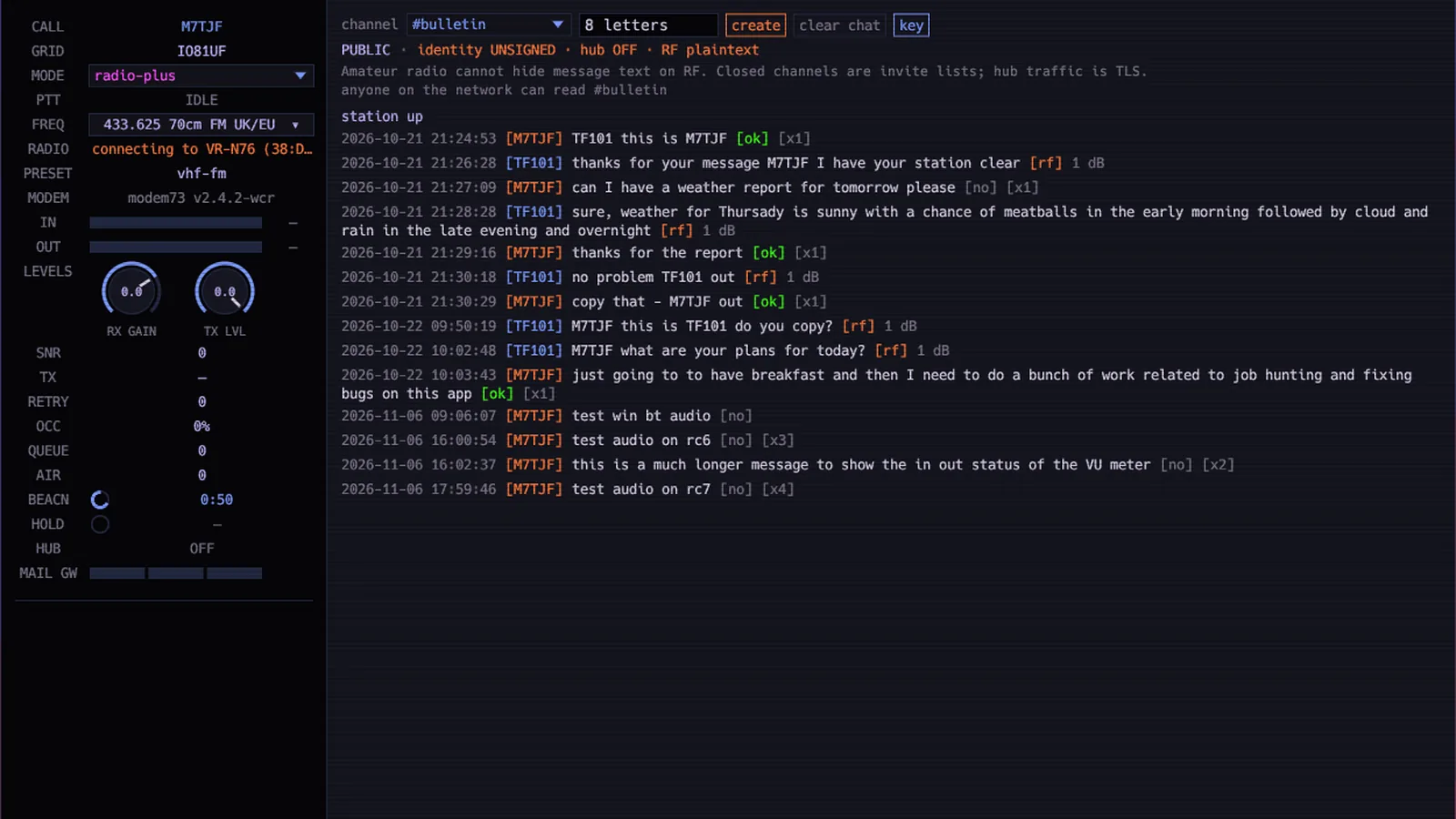
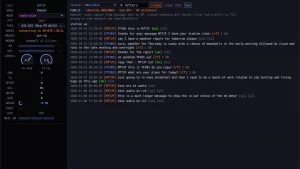
A Reddit screenshot stopped me mid scroll. It showed a dark terminal style chat window, a station panel reading M7TJF on 433.625 MHz, and a live channel called #bulletin where two operators traded weather reports and breakfast plans with little delivery marks like [ok] and [rf] after every line. No web browser, no phone app, no cloud account. Just typed chat moving over real radio, with the computer quietly reporting signal numbers beside each exchange. The program was WeeChat Radio v1.0.16, and the post title said it plainly: FOSS HF and VHF chat with store-and-forward.
This post walks through what WeeChat Radio is, who built it, how its four connection modes bridge radio and internet, how mesh hops and store-and-forward carry messages beyond direct range, which radios it talks to, how to install it in minutes, how to read an on air screen like the Reddit one, and where it sits next to JS8Call, VarAC, Winlink, and Meshtastic.
TL;DR: WeeChat Radio by Tobias Franklin M7TJF is free open source chat software for licensed amateurs that sends typed messages over HF and VHF radio, over the internet, or both at once. It relays out of range stations through mesh hops, holds messages with store-and-forward until they can be delivered, bridges cross frequency contacts through gateway stations, and even carries email over radio. Install takes one command, setup asks a few questions, and radios from a VR-N76 over Bluetooth to an HF rig over CAT are supported.
What WeeChat Radio Is
WeeChat Radio is free open source station software for licensed amateur radio operators that sends typed chat over HF and VHF radio, over the internet, or both, using the WeeChat chat framework on screen and the modem73 data modem on the air. The wcr program runs as a small chat server on your own computer. So you type in the built-in desktop app, a terminal UI, or the classic WeeChat program itself, and your words leave the station as audio tones through whatever radio you connected.
The author is Tobias Franklin M7TJF at Thaum Labs, a UK amateur who built it as an alternative to radio applications he found complicated and busy. He is upfront about the construction: it was built fast with the Cursor AI coding editor, the core features are tested, and bug reports go to the public GitHub repository. The code is mostly Rust, the daemon and hub carry an Apache-2.0 license, and the WeeChat helper script is GPL-3.0. At the time of writing the project sits at version 1.0.17 with 741 commits, 7 open issues, and a public changelog, which is exactly the shape of young software that works but still moves quickly.
Two design choices define the whole project. First, nobody needs a radio to join in: internet only mode with a guest name lets friends and family chat from a laptop, which makes it a club tool rather than a hermit tool. Second, everything degrades gracefully. Lose the internet and the radio half keeps working. Lose direct range and relaying stations carry the message. Lose the other operator and the message waits instead of dying.
The Hybrid Trick: Four Modes That Mix Radio and Internet
Most digital ham tools pick one world. You are either on RF or on the internet. WeeChat Radio treats them as ingredients and gives you four modes to mix them, switchable at any time. Your icon and map pin change color with the mode so the whole network can see how each station is connected.
| Mode | What leaves your station | What it is for |
|---|---|---|
| internet | Chat travels over the internet to the hub only | Friends, family, and anyone without a licence or a radio |
| internet-radio | You key your own radio and also gateway other stations between air and internet | The link station: an always on home or club setup that bridges worlds |
| radio | Your messages go out over the air and stay there | Pure off grid operating, exercises, and operators who want RF only |
| radio-plus | You transmit by radio only, but any gateway that hears you may carry the message online | Portable and mobile stations that want internet reach without internet of their own |
The signature moment looks like this. You are out portable with a handheld and no phone signal. Your friend is on a laptop in another country. You send a line over the radio. A station on your frequency that happens to be online hears it and passes it to the internet, and your line gains a [gw] mark. Your friend reads it on their laptop and replies, the reply rides back through the same path, a receipt arrives, and your sent line flips to [ok]. Your end never touched the internet at all.
Gateway stations can also work across frequencies. As long as one internet connected station with a radio can bridge the gap, a chat room can span bands that never hear each other directly, with most members offline from the internet entirely. Mail gateways go one step further and stay quiet on voice style traffic: set to mail only, a gateway still hears and shows chat but keys the transmitter for mail alone.
Mesh Hops: Talking Past Your Own Range on One Frequency
The feature the Reddit title brags about is hops, the built in mesh relaying. When a station hears your message it keeps a copy and sends it onward. The project front page draws the canonical example: daytime on 40 meters at 7.045 MHz USB, where London to Kyiv at 2,130 km is too weak to decode directly, but Frankfurt hears London clearly and Krakow hears Frankfurt clearly, so the message walks across three stations and the receipt walks back the same way.
A direct message can be passed on three times before it stops. Prefix it with ! and it travels one step further, or !! in an emergency for maximum reach. Every relay spends signal budget, and the app shows remaining hops plus per hop signal numbers so you can watch a path degrade in real time. In the Reddit screenshot you can see the compact form of this: lines tagged [x1] marking single hop traffic flowing through the channel.
This is genuine mesh behavior on one frequency with ordinary FM or SSB radios, no internet involved and no special hardware. It answers the oldest HF net control headache, the station everyone hears but who hears nobody, by letting the middle of the group do the carrying automatically.
Store-and-Forward and Radio Email
Hops solve distance. Store-and-forward solves absence. If the destination station isn’t on air, or the band is closed, or the path is busy, the network holds the message and delivers it when a route opens instead of dropping it. Queue and retry counters in the station panel show this working: messages waiting, attempts made, channel occupancy, and time held. The status bar vocabulary is small and worth learning on day one: [tx] means your line was sent, [ok] means it was delivered, [no] means it never got through, and [rf] flags traffic that arrived over radio rather than the internet.
Email rides on the same rails. The desktop app has an email tab beside live chat, and a radio-plus station can send and receive internet mail through any gateway it can hear, with mail finding a gateway automatically or going to one you name. A Raspberry Pi gateway with a Digirig makes this concrete: bolt it to a mast, leave it always on, and it offers chat relay plus email to every radio-plus station in range while you sleep. The Pi guide even includes a web portal with chat, mail, station health, CPU and temperature cards, and one click software updates that wait for the radio to go quiet before restarting.
Taken together these three systems, hybrid modes, hops, and store-and-forward, form the project thesis: a message composed once should keep trying every available path until somebody reads it.
The Modem Underneath: modem73
On the air, WeeChat Radio speaks through modem73, an external data modem project that turns each message into packets and plays them through the radio as audio. The wcr installers place the modem next to the station software, and setup picks a preset for your band and conditions. The Reddit screenshot names one directly: modem73 v2.4.2-wcr running a vhf-fm preset on 433.625 MHz.
The docs describe the expected behavior honestly. Weak signal handling means retries, slower presets, and plain language level meters that tell you in words whether receive audio is good, low, high, or clipping, plus which knob to turn. Busy detection is automatic, keyed to the data signal on VHF and UHF FM and to audio level on HF. On receive you’ll see SNR numbers beside traffic, and the front page example quotes the kind of figures to expect, plus 8 to plus 13 dB per hop on a working daytime 40 meter chain. If HF is your main target, read the weak signals page before blaming the antenna: dropping to a slower preset often succeeds where shouting louder fails.
Starting points from the official docs are 14.070 MHz on 20 meters and 144.950 MHz on 2 meters, always cross checked against your own band plan. Set squelch to zero for data so weak sync headers aren’t chopped, and remember a licence is required to transmit while none is needed to receive or to chat internet only.
Radios It Talks To
Setup is a questionnaire rather than a config file exam. It asks for callsign, grid square, radio path, and hub and map choices, then installs what it needs. Five radio paths cover nearly every shack:
| Path | What you need | Best for |
|---|---|---|
| VR-N76, UV-PRO, or GA-5WB over Bluetooth | A radio with a built in TNC, no cable at all | Portable chat with the phone left in the pocket |
| Handheld plus Digirig or AIOC | A VHF or UHF handheld and a USB sound cable | The classic first data station, and the Pi gateway build |
| HF rig with CAT | An HF radio the computer controls over USB for PTT and frequency | 20 and 40 meter nets, email over long paths |
| VOX lead | Any radio that keys when it hears tones, plus a headphone cable | Older rigs and quick experiments |
| KISS TNC | Mobilinkd, a Bluetooth serial port, or any serial KISS TNC | Operators who already own packet gear |
Named supported radios include the Xiegu X6100, X6200, G90, G106, and X5105, the Yaesu FT-710, the QRP Labs QDX, the (tr)uSDX family, the AnyTone AT-5555N and Retevis RT95 through Digirig, and the VR-N7600 over Bluetooth. The Reddit operator ran the Bluetooth path with a Vero VR-N76, visible in the screenshot as a connecting line to the handheld, which is exactly the cable free portable setup the project advertises.
Installed in Minutes, Chatting in Five
Linux and macOS users copy one line, curl -fsSL https://weechatradio.com/install.sh | sh, then run wcr setup and wcr gui. Windows users paste one line into a normal PowerShell window, leave it open for several minutes while WeeChat arrives via Cygwin with no administrator rights needed, then open WeeChat Radio from the Start menu. First launch is setup: pick a callsign or guest name, and you land in #bulletin where the whole network says hello.
The daily vocabulary fits on an index card. Type a line and press send. [tx] means it left, [ok] means somebody confirmed it, [no] means it never arrived. Switch modes with /radio mode or the F2 key. Open the map to see who is on air right now with 24 hour playback. Run wcr help on your own machine for the offline manual. Updates need no terminal: click the version indicator in the app or the Software card on the Pi portal, and the updater verifies the SHA-256, waits for the radio to go idle, restarts, and rolls back to the previous version if the new one fails to start.
The documentation set is unusually complete for software this young: a five minute start, a two computer sound only trial for people with no radio at all, per OS install guides, per radio guides, antenna calculators for HF and VHF, a path planner that drops two pins and returns frequency and power, a range test mode that logs a drive into a coverage map, troubleshooting for slow installs and clock skew, and a full wire protocol plus public API for developers and hub operators.
Reading the Screenshot Like an Operator
The Reddit image deserves a slow look because it compresses the whole system into one window. Top bar: live chat, email, on air, stop, weechat, map, setup, and quit tabs, an update notice for 1.0.17, and UTC plus local clocks. Left panel: call M7TJF, grid IO81UF, radio-plus mode, idle PTT, 433.625 MHz on the 70 centimeter FM preset for the UK and EU, RX gain and TX level dials, and a telemetry stack of SNR, transmit state, retries, occupancy, queue length, airtime, beacon countdown, hold, hub, and mail gateway states.
The chat tells the operational story. M7TJF and TF101 exchange signal reports and a weather request with per line receipts: [ok] for delivered, [rf] with a decibel figure for radio received, [no] for unconfirmed tests, and [x1] hop counts. You can see the developer dogfooding in real time, with test lines about Bluetooth audio, VU meters, and fixing bugs in the app sitting beside genuine ragchew. For a newcomer the takeaway is practical: if your screen looks like this, with mode, frequency, levels, and marks all populated, your station is healthy and any missing replies are propagation, not configuration.
WeeChat Radio Next to the Usual Suspects
No tool wins everything, and the project own docs include app and mode comparison pages that grade honestly. Here is the short version for a ham deciding where an evening goes:
| Tool | What it is best at | Where WeeChat Radio differs |
|---|---|---|
| JS8Call | Weak signal keyboard chat with directed messaging and relay | WeeChat adds internet hybrid modes, group chat rooms, and email |
| VarAC | Fast FM and HF chat with mailboxes and broadcast discipline | WeeChat adds mesh hops, gateways, and no radio internet participants |
| Winlink | Formal email over radio with a global gateway network | WeeChat adds casual group chat and works with no account or sign up |
| Fldigi with FLMSG | Multi mode decoding and structured emergency forms | WeeChat is chat first with delivery receipts instead of form first |
| Meshtastic | Off grid text on UHF with true mesh | WeeChat rides real HF and VHF ham bands with voice capable radios |
| APRS messaging | Short tactical packets with global infrastructure | WeeChat carries longer conversations with store-and-forward and rooms |
| VarAC HF chat | Live conversation with mailboxes on HF and FM | WeeChat adds radio only mesh relaying plus gateway email in one app |
| APRSdroid on Android | APRS position and message handling from a phone | WeeChat runs full chat rooms and email, not 67 character packets |
| DroidStar digital voice | Voice over DMR, YSF, and M17 from a phone or PC | WeeChat is typed text over your own HF or VHF radio |
If you already live in one of these tools, WeeChat Radio isn’t a replacement. It’s the casual layer above them: the room where the net meets before and after the formal traffic, open to the member with no radio at all.
Honest Limits
The author flags the biggest one himself: early software that works but will change. Expect UI text with AI fingerprints, version churn, and the occasional sharp edge, and keep settings backups. The GitHub tracker is small but real, so file bugs instead of shrugging.
Radio law still applies in full. Amateur content rules mean no obscured message text on RF, closed channels are invite lists rather than encryption, and hub traffic is TLS while air traffic is plaintext for anyone to read, exactly as the app banner in the screenshot warns. Transmitting needs a licence everywhere it normally does, guest mode is internet only, and every frequency suggestion must bow to your national band plan.
Performance limits are physics, not bugs. Small file attachments are a VHF and UHF affair. HF throughput suits chat and email, not bulk transfer. Hops multiply range but divide speed, and a three hop chain on a busy channel demands patience and short messages. Gateways are volunteers, so a radio-plus station with nobody in earshot is just a radio station until the network grows around it.
Why It Matters
The reason the screenshot travelled is that it shows a future many of us have wanted since packet radio faded: typed ham chat that a newcomer can join in five minutes, from a laptop with no radio, sitting beside an old hand on a mountaintop with a Bluetooth handheld. Clubs get a persistent room that survives field day, EmComm groups get store-and-forward plus email without running a Winlink gateway, SOTA and POTA activators get a spotting and ragchew channel that follows them up the hill, and youth programs get a screen that looks like the messengers kids already live in.
That low floor with a high ceiling is the whole bet. If WeeChat Radio keeps its installer simple, its docs complete, and its protocol open, the gateway map fills in one Raspberry Pi at a time, and the next Reddit screenshot will show a longer hop chain than London to Kyiv.
Sources and Further Reading
- WeeChat Radio homepage
- Why WeeChat Radio
- Guides index
- Docs index
- Modes reference
- Hops and relaying
- Store and forward
- Email over radio
- Compare modes
- Compare apps
- Calling frequencies
- Raspberry Pi gateway guide
- VR-N76 and UV-PRO Bluetooth guide
- Live station map
- Project changelog
- Source code on GitHub
- modem73 data modem
- WeeChat chat framework
- Digirig sound and CAT interface
73 de 9M2PJU.

Post Comment