amateur radio
open source
4Z1AC, ACie, AI gateway, amateur radio, DigiRig, digital chat, EA5HVK, email gateway, EmComm, emergency communications, ft8, ham radio, HF digital modes, ICS forms, Irad Deutsch, js8call, OFDM, packet radio, PACTOR, QO-100, ragchew, raspberry pi, soundcard modem, VARA modem, VarAC, VarAC Wednesday, VMail, winlink
9M2PJU
0 Comments
VarAC: The Free HF/FM/SAT Digital Chat App Bringing Real-Time Conversation Back to Ham Radio
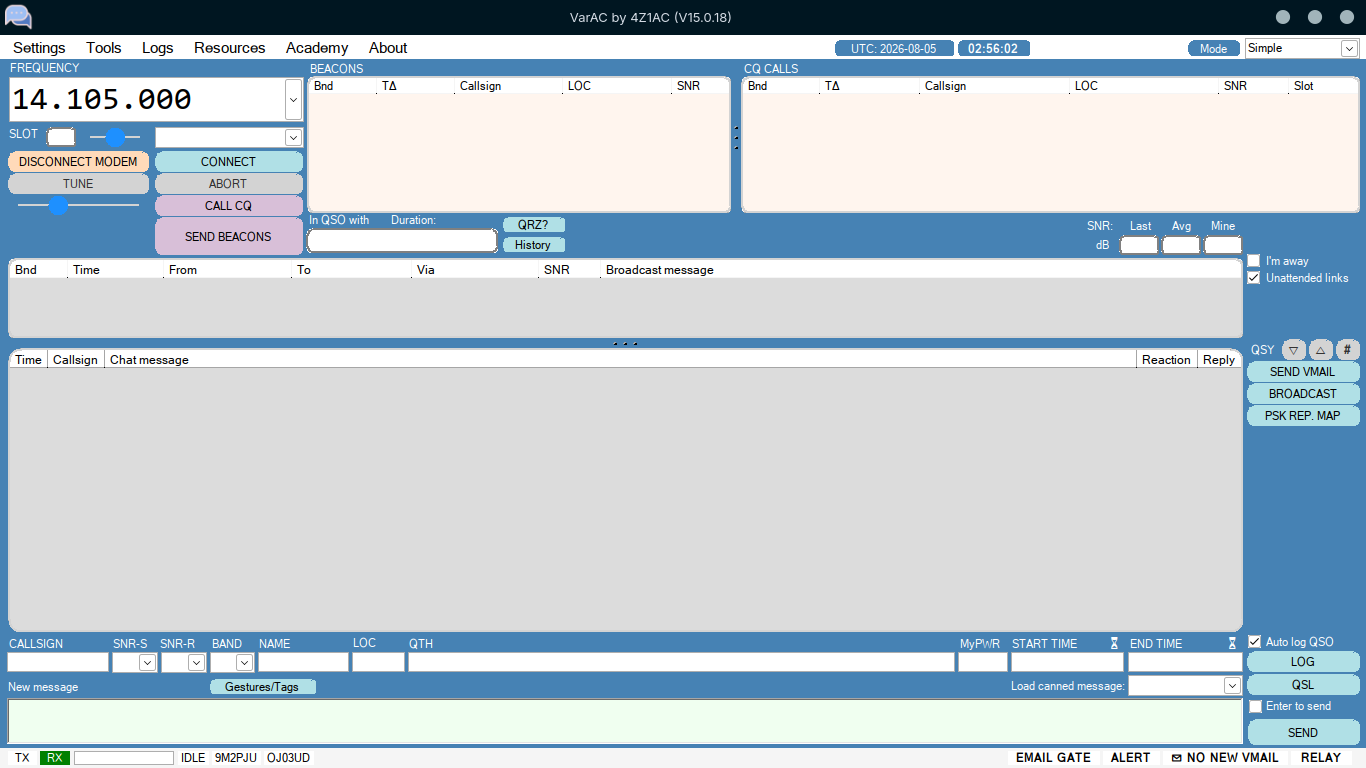
VarAC: The Free HF/FM/SAT Digital Chat App Bringing Real-Time Conversation Back to Ham Radio
There is a particular kind of loneliness in modern HF digital operating. You fire up FT8, watch the waterfall fill with decodable tones, exchange a 79-byte grid square and a signal report with a station 14,000 km away, log it, and move on. The contact is real, the QSL is valid, the DXCC credit counts, but you never actually spoke to anyone. The mode was designed for one thing, weak-signal confirmation, and it does that one thing astonishingly well, but it was never meant for conversation.
VarAC takes a different bet. It assumes that what a lot of hams actually want is to talk to each other, in real time, over the air, with a keyboard instead of a microphone, on bands where a voice QSO would be impossible. It uses the VARA modem, a soundcard-based OFDM waveform that punches far above its bandwidth class, and it wraps that modem in a chat client that feels closer to a 2020s messaging app than to a 1990s packet terminal. CQ calls, typing indicators, emojis, file transfers, mailboxes, beacons, an email gateway, an AI gateway, an emergency communications mode, and a weekly global net that draws hundreds of check-ins. Free for licensed hams. Used by more than 90,000 operators in over 100 countries.
This is what VarAC is, where it came from, what it can do, and why it is worth a place in your digital toolbox alongside Winlink, JS8Call, and the rest.
Last updated: August 2026.
What Is VarAC?
VarAC is a free, modern HF, VHF, UHF and satellite peer-to-peer real-time chatting and emergency communication (EmComm) application for amateur radio operators, built on top of the VARA soundcard modem. It is written in C# and runs natively on Windows, with community-supported Wine installations on Linux, Raspberry Pi, and macOS.
The author is Irad Deutsch, 4Z1AC, an Israeli amateur who has been licensed since he was 13 and who spent decades on packet radio, AMTOR, PACTOR, GTOR, CLOVER, PSK and the FT8 family before deciding that what he really wanted was a chat application with “lots of cool features to chat with my fellow hams.” When the VARA modem appeared, he adopted it because, in his words, it “provides the protocol robustness of PACTOR coupled with the ability to handle challenging SNR levels like FT8.” VarAC is the result. He maintains it in close contact with VARA’s author, Jose Alberto Nieto Ros EA5HVK, but with no business relationship, the project is, as 4Z1AC puts it, “purely for fun.”
The headline numbers tell the story of why it caught on:
- 90,000+ operators in over 100 countries.
- Free for licensed amateurs and CB operators. A separate commercial PACTOR version is sold by SafecomLink for non-ham and PACTOR use cases.
- VARA HF throughput up to 7,050 bps in a 2,300 Hz SSB passband, or 1,500 bps in a 500 Hz narrow passband.
- VARA FM throughput up to 13,000 bps narrow or 25,000 bps wide on VHF/UHF.
- QO-100 satellite support, with published uplink and downlink frequencies.
- A weekly VarAC Wednesday net that regularly draws 200 to 300+ check-ins from over 200 unique operators worldwide.
If you have ever wanted FT8-style weak-signal performance but with an actual conversation attached, VarAC is built for you.
The VARA Modem: What Makes VarAC Possible
VarAC is the chat client. The engine underneath it is VARA, a high-performance soundcard modem developed by Jose Alberto Nieto Ros, EA5HVK, and distributed as shareware (free to try, license required for full-speed operation on HF, free for FM narrow). VARA is what gives VarAC its speed and its stubborn ability to hold a link in bad conditions.
OFDM at HF
VARA is an OFDM (Orthogonal Frequency-Division Multiplexing) modem, the same family of waveforms that powers LTE, Wi-Fi, DVB-T and digital broadcast. Instead of pushing all data through one carrier, it splits the data across many closely-spaced orthogonal sub-carriers, each modulated at a low symbol rate. The VARA HF modem uses a fixed symbol rate per carrier and a stack of adaptive speed levels, around 17 of them, so the link can shift up and down in real time as propagation changes, without dropping the connection.
The result is a waveform that, in a 2,300 Hz SSB passband, can move user data at up to 7,050 bps in standard mode and 8,489 bps in tactical mode, while still decoding at signal-to-noise ratios where a voice QSO would be long gone. VarAC quotes reliable decoding down to -22 dB SNR, which is the kind of number you normally associate with FT8 rather than with a connection-oriented chat protocol.
Two modems, one app
VARA comes in two flavours, and VarAC supports both:
- VARA HF, for the 160m through 10m bands plus 6m SSB, designed for the 2,400 Hz SSB passband. Selectable 500 Hz or 2,300 Hz bandwidth.
- VARA FM, for 2m and 70cm FM, taking advantage of the wider FM audio passband to hit 13,000 bps narrow (mic/speaker audio) or 25,000 bps wide (9600-baud data port audio on the rear mini-DIN connector).
There is also a VARA SAT variant for satellite work, and VarAC publishes QO-100 frequencies (downlink 10.489.595 GHz, uplink 2.400.095 GHz) for operators with the right dish and downconverter hardware.
Why this matters
For decades, the practical choice for HF email and file transfer was a hardware SCS PACTOR modem, an excellent device that costs roughly the same as a mid-range transceiver. VARA, running on a $30 USB soundcard interface like a DigiRig or a SignaLink, delivers throughput that competes with PACTOR-IV for most real-world links, at a fraction of the cost. That democratisation is a big part of why VarAC, Winlink-over-VARA, and the broader VARA ecosystem have grown so fast.
Calling Frequencies and Slot-Based Operation
VarAC is organised around a small set of published calling frequencies, one per band, where operators park and listen. When two stations want to QSO, they exchange a QSY request and the radio automatically moves both ends to a free slot a few hundred Hz up or down the band, leaving the calling frequency clear for the next CQ. This is the slot-based technology that lets many simultaneous links coexist on a single shared frequency, which is also what makes VarAC’s EmComm mode practical: every operator in a relief net can sit on the same frequency and the modem sorts out who talks to whom.
Popular calling frequencies (USB dial)
| Band | Frequency |
|---|---|
| 80m | 3.595 MHz |
| 40m | 7.105 MHz |
| 20m | 14.105 MHz |
| 15m | 21.105 MHz |
| 10m | 28.105 MHz |
| 2m FM | 144.950 MHz |
| 70cm FM | 439.600 MHz |
Additional calling frequencies
| Band | Frequency |
|---|---|
| 160m | 1.995 MHz |
| 60m (non-US) | 5.355 MHz |
| 30m | 10.133 MHz |
| 17m | 18.107 MHz |
| 12m | 24.927 MHz |
| 6m SSB | 50.330 MHz |
| 6m FM | 51.550 MHz |
| 2m SSB | 144.170 MHz |
| 70cm SSB | 432.550 MHz |
QO-100 satellite
- Downlink: 10.489.595 GHz
- Uplink: 2.400.095 GHz
The frequencies are a shared resource, not “ours” nor “theirs.” VarAC’s documentation is explicit about this: monitor before transmitting, be respectful of ongoing QSOs, and feel free to establish alternative calling frequencies in accordance with your local regulations and band plans.
The weekly VarAC Wednesday net
Every Wednesday, the VarAC community runs a global check-in net modelled on the long-running Winlink Wednesday. Operators connect to a beacon running the VarAC Email Gateway, send a check-in message to [email protected], and the message is relayed over HF to the internet via the gateway station. Recent weeks have drawn 294 check-ins from 215 unique operators, with 121 of them including GPS positions that populate a live map. The net publishes weekly results, a trending graph of unique operators, a callsign query tool, and a set of awards:
- Half-Century Award, for 50 check-ins.
- Pioneer Award, for 20 check-ins during 2025, the inaugural year.
- Growth Award, for participation in the 2025 growth campaign.
- El Tio De La VARA, for checking in on 24 or 31 December 2025 (a nod to the inspiration for the VARA name).
- Birthday Award, for checking in on 8 October, VarAC’s application birthday.
- Superstation Contest awards, tied to the community’s card-and-dice scoring game that rewards real, meaningful QSOs and DX contacts.
There is also a Sunday broadcast-mode chat room on 20m slot-15 (14.108.750 MHz) from 14:00 to 16:00 UTC, for those who want a more relaxed weekend ragchew.
Key Features at a Glance
VarAC is feature-rich for a free application. The full list, from the official site:
- CQ calls using the VARA protocol, with a built-in slot sniffer to find a clear frequency slot before you transmit.
- “Is typing” indicator, so you can see when your QSO partner is composing a reply, just like a phone messenger.
- Chat gestures, sounds and emojis that travel over RF, bringing a bit of fun to HF QSOs.
- RIG control via CAT, RTS/DTS, OmniRig, FLrig and Hamlib, so VarAC can spin your VFO for automatic QSY.
- Frequency monitor, listen to the calling frequency and see ongoing QSOs before you key up.
- Message queue, type as many messages as you like, they transmit in order.
- Realtime metrics, SNR, retries, throughput, so you can watch link quality as it happens.
- Automatic and canned messages, preconfigured welcome messages and predefined snippets (rig info, QTH, etc.) for fast EmComm responses.
- 500 Hz and 2,300 Hz bandwidth selection, pick narrow for CW-filter radios or wide for full SSB audio.
- Beacons, let other stations know you are on frequency and reachable.
- Built-in speller, spell check as you type, no typos on the air.
- File and image transfer, binary files, text, images, with VARA’s ARQ ensuring 100% delivery.
- Automatic QSY, move a QSO up or down the band with a single click, both radios follow.
- Auto QSO logging in ADIF format, with hooks into popular loggers.
- Customised look, colours, fonts, dark mode.
- Multilingual UI, over 10 languages.
- UI modes, Simple, Advanced, or EmComm, the interface declutters itself based on what you are doing.
- VMail-Box, send and receive VarAC mails, with relay notifications that alert you when a VMail is waiting at another station.
- Ping, check link validity before committing to a QSO.
- Email gateway, send and receive internet email via other VarAC stations acting as SMTP/IMAP bridges.
- HamPlay, play games over RF with other VarAC users.
- Inquire module, pull data (rig info, location, stats) from your QSO partner on demand.
- GPS integration, share your current location with the net.
That is a lot for a free app, and it is worth dwelling on a few of the features that distinguish VarAC from the rest of the digital-mode field.
VMail and the Mailbox Metaphor
VarAC’s VMail system is a hybrid of live chat and store-and-forward mail. You can send a VMail directly to another station in a live QSO, or you can leave a VMail parked at a relay station for the recipient to pick up later. When the recipient’s station next beacons, the relay station sends a relay notification over the air, alerting them that a message is waiting. This is the same store-and-forward discipline that packet BBS operators used in the 1980s and 1990s, but with a modern UI and a modem that actually works at HF.
VMail message size limits are sensible for the medium:
- 500 characters default for outgoing HF messages.
- 10,000 characters in HF EmComm mode, for longer situation reports.
- 1,000,000 characters on FM, where bandwidth is not the constraint.
Incoming messages are unlimited in size.
The VarAC Email Gateway: HF to Internet, Decentralised
This is the feature that gets the most attention from EmComm planners, and for good reason. Any VarAC station can run an Email Gateway, turning itself into a bridge between the VarAC radio network and the internet email system. Outgoing VMails are forwarded to real internet email addresses via SMTP. Incoming internet email is pulled via IMAP, converted to VMails, and routed back to VarAC users over the air. Configuration is straightforward with a free email provider such as Gmail.
The VarAC team is explicit about how this differs from Winlink RMS, the long-dominant radio email system, and the comparison is worth quoting directly because it explains the architectural choice:
| VarAC Email Gateway | Winlink RMS | |
|---|---|---|
| Architecture | Every station can run a gateway, decentralised, built-in redundancy | Single backbone on Amazon AWS, single point of failure |
| Scalability | Scales by adding gateways | Centralised service limits scalability |
| Frequency | Single shared frequency, no frequency lists | Users download and update a list of RMS gateways |
| Finding gateways | All nodes visible on the shared frequency | Users try connecting to different gateways until one answers |
| Cross-node replies | Connect to any node to retrieve your reply | Must connect to the same gateway you sent through |
| Incoming alerts | Relay notifications over HF | Must actively poll for new mail |
| Email alerts for HF events | Beacons, CQs, broadcasts, messages | N/A |
| Outgoing size | 500 chars default, 10k EmComm, 1M on FM | Unlimited |
| Live HF to email chat | Yes, bi-directional, in development | After send/receive, you disconnect |
| Gestures | Sound and visual | Plain text |
| ICS templates | Text-based, transmission-efficient | HTML-based, higher overhead |
The point is not that Winlink is bad, it is not, it is the backbone of radio email worldwide and rightly so. The point is that VarAC offers a decentralised alternative where every station is a potential gateway, there is no central server to fail, and operators do not need to maintain a list of RMS frequencies to find a working node. For EmComm scenarios where the internet is down and you want redundancy, that is an attractive property.
The AI Gateway: ACie, an Over-the-Air Assistant
The newest addition to the VarAC gateway family is ACie, an AI-powered assistant that runs on a VarAC station and answers questions from other operators over HF, VHF or satellite. The use case is field operations: you are deployed off-grid, you have a question you would normally Google, but you have no internet. You connect to a VarAC station running the AI gateway, ask your question, and ACie fetches an answer from the internet and sends it back, adapting the response length to the bandwidth constraints of the radio link.
It is a clever idea. Web browsing over HF is painfully slow, but a single question-and-answer exchange, compressed and sent via VARA ARQ, is practical. The AI gateway is the kind of feature that would have sounded like science fiction ten years ago and now just sounds like a sensible field tool.
VarAC for EmComm
VarAC has a dedicated EmComm mode that reconfigures the application for emergency communications. Switching into EmComm mode is a single click, and it changes the behaviour of the client in several ways at once:
- ICS templates, use the built-in ICS message forms (ICS-213, ICS-214, etc.) or create your own custom forms, transmitted as text-efficient templates rather than HTML.
- Skip Caller ID and SNR, conserve time and power by stripping standard QSO overhead from each frame.
- Urgent VMails, all messages are flagged as urgent.
- Rapid beaconing, beacon interval drops to every 5 minutes so the rest of the net knows you are alive.
- Last connections peeking, see recent contacts made by your EmComm team members.
- EmComm UI, the interface strips out routine features and leaves only what an operator needs in a crisis.
- Visible EmComm beacon, your beacon is prominently highlighted on other stations’ dashboards.
- File transfer auto-approval, incoming files are accepted automatically, no manual click needed at a busy station.
Beyond the mode itself, VarAC’s EmComm feature set is built around a few core promises:
- Reliable link under poor conditions. QRP, small antennas, bad location, portable setup, VARA holds a link down to -22 dB SNR.
- Speed. 1,500 bps at 500 Hz, 7,050 bps at 2,300 Hz on HF, up to 25,000 bps on FM. The fastest data rates on HF/VHF/UHF, per VarAC’s claim.
- Guaranteed delivery. VARA ARQ mode means 100% delivery certainty, QSB and noise notwithstanding.
- Broadcasts. Send a message to an individual or a group in one transmission, propagate through digipeater chains for wider reach.
- Realtime alerts. Agreed-upon keywords trigger visual and sound alerts across the entire EmComm chain with a single transmission.
- Path finder. If you cannot reach a station directly, VarAC helps locate intermediaries who can relay your message.
- Alert Center. A consolidated view of alerts from beacons, data feeds, broadcasts and CQs, click to respond.
- High concurrency. All EmComm operators on one frequency, slot-based technology handles multiple simultaneous links, VarAC controls your VFO automatically.
- Constant beaconing. Track your team’s presence and propagation in real time.
- VMails and relay notifications. Store-and-forward mail with automatic alerts when mail is waiting.
- Email gateway. RF to internet email, so field operators can reach the outside world from a disaster zone with no network infrastructure.
- File transfer. Compressed images, documents, forms, fast even to unattended stations.
- Forms and templates. ICS standard and custom.
- GPS integration. Real-time location sharing across the net.
There is a downloadable EmComm one-pager and a longer tactical scenarios guide on the VarAC site for teams that want to plan exercises around the tool, and there is a directory of existing VarAC EmComm groups you can join to practice.
VarAC Wednesday and the Community
The VarAC Wednesday net, run from varacwednesday.net by Jason Johnson K3JSJ and Mark Rosneck KB0US, is the clearest evidence that VarAC has become a real community rather than just a piece of software. It is a weekly global digital net where operators check in by sending a VMail, relayed through an email gateway beacon, to [email protected]. The format is deliberately modelled on Winlink Wednesday, and the team encourages operators to check in to both.
How a typical check-in works:
- Open VarAC and click the VMail button.
- Tick “Send as email”, address it to
[email protected], optionally copy yourself to verify delivery. - Identify a clear slot using the Slot Sniffer in the Call CQ menu.
- Connect to a beacon displaying the Email Gateway icon (a lightning bolt).
- Send a QSY request to that beacon for the slot you found.
- Both stations automatically QSY to the slot, the email transfers, you disconnect.
The first Wednesday of the month requests a weather report. The third Wednesday requests an ICS-213. The rest of the month uses a standard check-in template. The site publishes weekly results, a check-in map, a callsign query tool, and a metrics page with trending graphs of unique operators and new-operator counts. The awards listed above are issued from there.
For operators who want more than a weekly check-in, there is a Sunday broadcast-mode chat room on 20m slot-15 (14.108.750 MHz), 14:00 to 16:00 UTC, with a Google Calendar reminder available.
Extensions and the Developer Ecosystem
VarAC exposes a core data engine and a SQLite database structure that developers can integrate with, and the community has built a small library of extensions:
- VarAC Log Mapper by Enzo Scarongella IU7IWT, a retro-styled web tool that maps VarAC activity in real time and provides station utilities.
- VarAC Superstation by the VarAC Wednesday team (K3JSJ, KB0US), a global card-and-dice scoring game that rewards real QSOs and DX contacts.
- VarAC Bot by Sergio Dias CR7AXH, an open source Telegram bot that forwards VarAC alerts (beacons, CQs, broadcasts, VMails, relay notifications with SNR) to your phone.
- VarAC Cloudlog Uploader by Kim Huebel DG9VH, an open source service that pushes VarAC log entries to a self-hosted Cloudlog instance.
- VARA Radio Web Services (VRWS), an open source server that bridges VarAC users to the wider web, letting connected operators surf the internet through your station.
The extensions library is community-maintained, with the VarAC team noting that they are not responsible for extension quality and that users should follow each extension’s own licence.
Installing VarAC
Windows (native)
- Download VarAC from the official download page.
- Download and install the VARA modem (VARA HF, VARA FM, or VARA SAT depending on your use case) from EA5HVK’s site, linked from the VarAC download page.
- Install VarAC to its default folder (
C:\VarAC) or a location of your choice. - Configure your soundcard interface (a DigiRig, SignaLink, SCU-17, DRA-30, or any 16-bit 48 kHz soundcard), your CAT control (Hamlib, FLrig, OmniRig, or direct CAT/RTS/DTR), and your VARA modem path in VarAC settings.
- Set your callsign, pick a calling frequency, and you are on the air.
Linux, Raspberry Pi, and macOS (via Wine)
VarAC is written in C#, so it runs on Windows natively. On Linux, Raspberry Pi (a Pi 4 or Pi 5 is recommended), and macOS, the community-supported path is Wine. The official guide walks through it:
- Install WineLink, which deploys Wine with the VARA modem components.
- Install the ttf-mscorefonts-installer package, VarAC needs the Microsoft core fonts.
- Download VarAC, unzip, and place the files in
~/.wine/drive_c/VarAC/. - Launch with
env WINEDEBUG=-all wine ~/.wine/drive_c/VarAC/VarAC.exe. - Enable Linux compatible mode in VarAC settings, either through the settings menu or by editing
VarAC.iniand settingLinuxCompatibleMode=ON.
On a Raspberry Pi 5, the 73Linux script by KM4ACK is the easiest path: it sets up Pi-Apps, which installs Box86 and Wine, after which you install VARA HF, VARA FM, and VarAC inside the Wine environment. A 32-bit Raspberry Pi OS Bookworm prefix is recommended over 64-bit for compatibility with the legacy 32-bit Windows binaries. On Linux Mint, community guides cover both 32-bit and 64-bit Wine prefixes.
Hardware you will need
- An HF or VHF/UHF transceiver with a soundcard interface (data port or mic/speaker).
- A USB soundcard interface such as a DigiRig Mobile, DigiRig Audio, SignaLink USB, Yaesu SCU-17, Masters Communications DRA-30, or any equivalent 16-bit 48 kHz soundcard.
- A CAT control cable if you want automatic QSY and frequency tracking (recommended).
- A Windows PC, Linux PC, or Raspberry Pi 4/5 to run VarAC and VARA.
That is the entire bill of materials. No $500 hardware modem required.
VarAC vs Other Digital Modes
A quick orientation for operators coming from other modes:
- vs FT8 / FT4: FT8 is a one-shot weak-signal confirmation mode, not a chat protocol. VarAC uses VARA, which has comparable weak-signal robustness but is connection-oriented, supports arbitrary text and files, and gives you a live two-way conversation. “Tech Minds” ran a 2023 YouTube review titled “VarAC better than FT8” for ragchew purposes, and the comparison is fair if what you want is conversation rather than DXCC credits.
- vs JS8Call: JS8Call is the closest peer, a keyboard-to-keyboard chat mode built on the JS8 waveform. VarAC, on VARA, is significantly faster (up to 7,050 bps vs JS8’s roughly 120 bps usable throughput) and has a richer feature set (email gateway, AI gateway, EmComm mode, file transfer, ICS forms). JS8Call is fully open source and runs natively on Linux, which VarAC does not.
- vs Winlink: Winlink is the standard for store-and-forward radio email. VarAC’s Email Gateway is a decentralised alternative, see the comparison table above. The two are complementary, many operators run both, and VarAC Wednesday explicitly encourages checking in to both Winlink Wednesday and VarAC Wednesday.
- vs Packet / AX.25: VARA outperforms classic 300/1200/9600 baud AX.25 packet on every axis, speed, noise immunity, and reliability. VARA also exposes a KISS interface, so it can drop in as a TNC replacement for APRS, BBS, and EmComm applications that expect a packet TNC.
- vs PACTOR: PACTOR-IV hardware modems (SCS PTU) are the gold standard for HF email, but they cost $1,500 or more. VARA, on a $30 soundcard interface, delivers comparable real-world throughput for most links. VarAC’s author offers a separate PACTOR version via SafecomLink for operators who already have PACTOR hardware or need a commercial licence.
Why It Matters
VarAC matters for three reasons.
First, it brings real-time conversation back to HF digital. The FT8 era has been great for DXCC chasers and contesters, but it has been quietly brutal for ragchewers. VarAC gives the ragchewer a mode that is fast enough, robust enough, and friendly enough to actually have a conversation on a band where a voice QSO would be impossible.
Second, it democratises high-performance HF data. VARA on a $30 soundcard interface delivers throughput that used to require a $1,500 hardware modem. That opens up email, file transfer, and EmComm data to operators and clubs who could never justify a PACTOR modem.
Third, it offers a decentralised EmComm architecture. In a disaster, the internet goes down, the cellular network goes down, and the Winlink CMS backbone on AWS is suddenly unreachable from the affected area unless there is an RMS gateway with a working internet uplink somewhere in range. VarAC’s model, where every station is a potential email gateway and there is no central server, is a useful piece of redundancy for any EmComm plan.
And it is free, for licensed hams, maintained by a developer who openly says he does it for fun. That is a rare combination.
Getting Started
If you have a Windows PC, a transceiver, and a soundcard interface, you can be on VarAC in an evening:
- Download VarAC and the VARA modem from the official site.
- Read the user manual and watch the technical deep-dive video.
- Join the VarAC Academy if you want a structured course.
- Join the Facebook group or the Telegram chat for help.
- Check the PSKReporter map to see who is currently on VarAC near you.
- Hop on a calling frequency, send a CQ, and start chatting.
If you want a structured first outing, wait for the next VarAC Wednesday and check in. The net is friendly to newcomers, the check-in procedure is well documented, and you will get a confirmation email back through the gateway that proves your station works end to end.
73, and good chatting.
Sources and Further Reading
- VarAC official website: https://www.varac-hamradio.com/
- VarAC download: https://www.varac-hamradio.com/download
- VarAC for EmComm: https://www.varac-hamradio.com/emcomm
- VarAC Email Gateway: https://www.varac-hamradio.com/varac-email-gateway
- VarAC AI Gateway (ACie): https://www.varac-hamradio.com/ai-gateway
- VarAC Academy: https://www.varac-hamradio.com/academy
- VarAC Extensions: https://www.varac-hamradio.com/extensions
- VarAC FAQ (Irad Deutsch, 4Z1AC): https://www.varac-hamradio.com/faq
- VarAC User Manuals: https://www.varac-hamradio.com/post/varac-user-manuals
- VarAC Technical Deep Dive video: https://www.varac-hamradio.com/forum/manuals/varac-technical-deep-dive-video-presentation
- Installing VarAC on Linux/Raspberry Pi/Mac using Wine: https://www.varac-hamradio.com/post/installing-varac-on-linux-raspberry64-using-wine
- VARA Modem (EA5HVK, Jose Alberto Nieto Ros): https://rosmodem.wordpress.com/
- VARA HF Modem Specification (Rev 2.0.0, April 2018): https://sbcara.org/wp-content/uploads/2025/08/VARA-Specification.pdf
- VARA Modem with VarAC Chat Application (WA8LMF): http://wa8lmf.net/VARA/index.htm
- VarAC Wednesday net: https://www.varacwednesday.net/
- VarAC Wednesday check-in instructions: https://www.varacwednesday.net/varac-wednesday
- VarAC Wednesday results: https://www.varacwednesday.net/varac-wednesday/results
- VarAC Wednesday awards: https://www.varacwednesday.net/awards
- QSO Today Episode 496, Irad Deutsch 4Z1AC (transcript): https://www.qsotoday.com/uploads/2/4/5/0/24502639/episode_496_irad_deutsch_4z1ac_transcript_r.pdf
- Winlink Express, VarAC, and VARA Modem on a Raspberry Pi 5 (DL1GKK): https://dl1gkk.com/winlink-express-varac-and-vara-modem-on-a-raspberry-pi-5/
- VarAC User Manual v10.1.0 (PDF, hosted by DL3CR): https://dl3cr.de/wp-content/uploads/2024/10/VarAC-Manual-EN-V10.1.0.pdf
- SafecomLink (PACTOR version and commercial licence): https://www.safecomlink.com/
- VarAC Facebook group: https://www.facebook.com/groups/varahf
- VarAC Telegram chat: https://t.me/+UduFxPTOXZI2Yjlk
- HamRadio.my, Amateur Radio Resources, Tools and Reviews: https://hamradio.my/
- About 9M2PJU, Malaysian Amateur Radio Operator: https://hamradio.my/about-9m2pju-malaysian-amateur-radio-operator/




Post Comment