SARTrack: From Ham Radio Hobby to Life-Saving Search and Rescue Command System
If you have ever wondered how modern search and rescue teams coordinate dozens of volunteers across rugged terrain, keep track of everyone in real time, and still maintain a complete operational log, the answer might be sitting on a Windows laptop running a piece of software called SARTrack.
I stumbled across https://www.sartrack.co.nz/ recently and realized this project deserves way more attention than it gets. What started 19 years ago as a niche APRS tool for amateur radio enthusiasts has quietly evolved into one of the most capable, field-proven SAR and emergency management platforms available today. The wild part is this: for non-commercial users, it is free.
So let’s break down exactly what SARTrack is, how it works, who it is for, and why SAR teams from New Zealand to Canada are building their operations around it.
The Origin Story: APRS Roots
To understand SARTrack, you need to know what APRS is. APRS stands for Automatic Packet Reporting System. It is a digital communications protocol invented by ham radio operators in the 1990s. Think of it as radio-powered texting plus GPS.
With APRS, a ham can hook a GPS to their VHF radio, and every few minutes their radio will automatically broadcast a short data packet. The packet says: “Here is my callsign, here is my exact lat/long, here is my altitude, and here is a short status message.” Anyone else with an APRS receiver and mapping software sees a little icon moving on their screen.
For decades, APRS was mainly a hobbyist thing. Weather stations, high-altitude balloons, off-road 4WD groups, and storm chasers used it. But one developer, Brian ZL1UEN based in New Zealand, saw bigger potential.
19 years ago he released the first version of SARTrack. At the time, it was just a slicker, more powerful APRS client for Windows. But he built in extra features specifically for Search and Rescue. Why? Because SAR teams in NZ were already using ham radio for comms in the backcountry, and they needed better situational awareness than a paper map and a radio log.
Fast forward to 2025. SARTrack is no longer just an APRS program. It is a full incident management suite.
The Two Modes: Hobby vs. Professional
This is the clever part of SARTrack’s design. When you install it, you choose how it runs:
1. Amateur Radio APRS Mode
Install it this way and you get what most hams expect: a world-class APRS mapping and messaging client. You can:
- Plot APRS stations, objects, and weather data on detailed offline maps
- Send and receive APRS messages and bulletins
- Run digipeat and iGate functions
- Interface with TNCs, soundcard modems, and internet servers
- Filter and log traffic for later review
If you are a ham, this alone makes SARTrack worth downloading. It is more polished than Xastir and more SAR-focused than APRSIS32.
2. SAR Mode
This is where things get serious. Flip the switch to SAR mode and SARTrack becomes an Operational Management System. The interface changes, new modules unlock, and it stops behaving like a ham radio program. It starts acting like a professional command post tool.
In SAR mode, SARTrack can:
- Fuse multiple tracking sources: VHF APRS, UHF digital radios, commercial satellite trackers like SPOT, InReach, TrackMe, cell-phone based apps, and the native SARTrack Android app
- Manage teams as resources: Assign callsigns, team names, capabilities, and taskings
- Draw search areas: Polygons, circles, routes. Auto-calculate area size and assign to teams
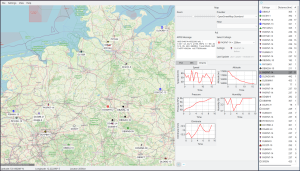
- Live resource tracking: See every team, vehicle, dog unit, and helicopter on one map, updating in near real-time
- Incident logging: Every message, location update, status change, and note is time-stamped and saved to a database
- Overlay weather, LINZ topo maps, aerial imagery, and custom GIS data
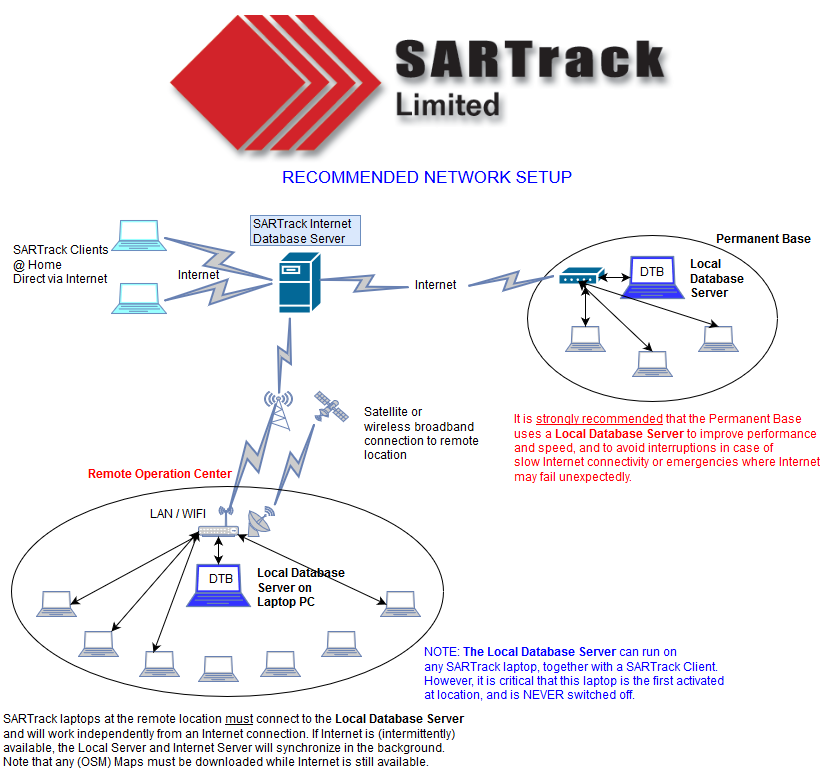
- Run a multi-terminal network: One machine acts as the Database Server. Multiple Terminals at base, forward CP, or EOC all connect and share the same live picture
- Logistics support: Track assets, equipment, and personnel shifts. There is even a PDF guide called “SARTrack for IMT Managers” for Incident Management Team workflows
Basically, it turns a laptop into the kind of command software that usually costs emergency agencies 20,000 dollars or more per license.
Core Architecture: How a SARTrack Deployment Looks
A typical SAR operation running SARTrack has three layers:
Layer 1: The Field Teams
Each team carries one or more trackers. Options include:
- VHF Ham Radio plus APRS: Cheapest, longest range in mountains. Needs ham license. SARTrack decodes it directly.
- SARTrack Member App on Android: Uses cell data when available, falls back to APRS-over-radio via Bluetooth TNC. Also does forms, messaging, and tasking.
- Commercial Satellite Trackers: TrackMe, SPOT, Garmin inReach, ZOLEO. SARTrack can ingest their data feeds so you see satellite-only teams on the same map as radio teams.
- Digital Radio: DMR, NXDN, P25 radios that output GPS. SARTrack has decoders for many formats.
Layer 2: The Communications Link
All those position reports have to get back to base. Options:
- RF: A VHF base station plus digipeaters on ridgelines. 100 percent off-grid.
- Internet: 4G or Starlink at base to pull in satellite tracker feeds and share data between bases.
- Hybrid: RF for field-to-base, internet for base-to-EOC. SARTrack handles both at once.
Layer 3: The Command Post
This is where SARTrack Terminal plus Database Server runs. Usually Windows 10 or 11 laptops. The Database Server is the single source of truth. All terminals read and write to it, so the Incident Controller, Planning, Logistics, and Radio Operator all see the same map and log. You can even run it on Linux with Wine. There is a dedicated “How to install SARTrack on Linux” guide.
Standout Features for SAR Users
Digging through the SARTrack site, these are the features that make SAR managers switch from paper maps:
1. Unified Tracking
Most SAR software only handles one brand of tracker. SARTrack does not care. A VHF APRS team next to a helicopter with a satellite tracker next to a ground team using the Android app will all show up as different icons on the same screen. That is huge for mixed-agency responses.
2. Operational Focus
It is not just dots on a map. You can right-click a team and Assign Task, Mark as Resting, Log Clue Found, or Request Extraction. All of that goes into the incident log automatically. After the operation, you export the whole log for debriefs and legal records.
3. Offline First
SAR happens where there is no cell service. SARTrack runs 100 percent offline. Download LINZ or NZ Topo maps, satellite imagery, and terrain data beforehand. RF tracking does not need internet. The database syncs between terminals over a local WiFi router if you have one.
4. Deployment Guides
The developers clearly run real operations. The site has step-by-step docs for “Preparation, Deployment and Operations” in the field. Not just software manuals. These are actual SAR checklists. There is also a recommended database layout diagram and a guide for IMT logistics.
5. Cost
This is the big one. SARTrack software is free for non-commercial use. Volunteer SAR, AREC, LandSAR, Civil Defence, hobbyist ham radio: 0 dollars. Commercial SAR companies and government agencies are expected to contact for licensing. Development is funded by donations and by hardware sales.
The SARTrack Backpack Antenna
To fund development, SARTrack Ltd sells a purpose-built antenna. It is not a gimmick.
What it is: A rugged, flexible VHF antenna designed to be worn on a backpack or pack frame.
Why it matters: If you put a handheld radio in your pack and use a speaker-mic, your body blocks 80 percent of the signal. Your 5-watt radio becomes a 0.5-watt radio. For trackers, it is worse. This antenna gets the radiating element up above your shoulders and away from your body.
Specs from the site:
- Extremely flexible and strong. Built for bush bashing.
- It will greatly increase the coverage of VHF handheld radios and Trackers.
- It is a requirement if an external GPS microphone is used with the radio.
- Frequency range is approximately 8 Mc around the tuned center.
- Default BNC male connector.
- Short YouTube demo video available.
Price: NZD 155 per unit for orders under 20, plus freight. Minimum order is 5 antennas per frequency. Some common frequencies are kept in stock. Odd frequencies need a 10-unit minimum.
Revenue from antenna sales goes straight back into keeping SARTrack free. It is a smart model. Sell hardware that SAR teams actually need, use profits to maintain the software ecosystem.
The Ecosystem: Documentation, Updates, and Community
A tool is only as good as its support. SARTrack’s website is dense but practical:
- Update History: Both the Windows Client/Server and the Android Member App have public changelogs. Shows active development as of June 2025.
- NZ-Specific Help: “How to set up TrackMe satellite feed” for New Zealand users, since TrackMe is popular with LandSAR there.
- Training Material: “SAREX Southland” and “SAREX Dunedin” photos show it being used in real exercises.
- Contact and Donations Page: The dev is accessible. You can email for help, order antennas, or donate.
Last updated 12 June 2025, so the project is very much alive.
Who Should Use SARTrack?
Perfect for:
- Volunteer Search and Rescue groups, LandSAR, AREC, RAYNET
- Civil Defence or Emergency Management offices needing a low-cost EOC tool
- Ham radio operators who support public service events: marathons, bike races, parades
- 4WD clubs, hiking groups, or expedition teams wanting safety tracking
- Anyone who needs to see multiple tracker types on one map, offline
Maybe not for:
- Agencies that require certified, closed-source software with 24/7 vendor support contracts
- Users who only have iOS. The Member App is Android only for now.
- Teams with zero technical people. It is powerful, but you need someone who understands radios and networks to set it up right.
Getting Started: A Realistic Path
If you are SAR-curious after reading this, here is how I would recommend starting:
Week 1: Play in APRS Mode
Download SARTrack, install as Amateur Radio mode. Get a cheap RTL-SDR dongle and listen to local APRS traffic. Learn the interface with zero pressure.
Week 2: Spin Up a Test Incident
Switch to SAR mode. Create a fake incident. Use the Android app on two phones as Field Teams. Walk around the block and watch yourselves move on the map. Draw a search area and assign it.
Week 3: Talk to Your Comms Person
Every SAR team has a radio nerd. Show them SARTrack. Ask: “Could we pipe our existing radio and GPS setup into this?” Read the “How to Track your Teams?” page together.
Month 2: Run It at a Training
Use it at your next SAREX. Do not rely on it yet. Run it in parallel with your normal system. Compare. Most teams get hooked once they see the live common operating picture.
The Philosophy Behind It
What I love most about SARTrack is not the code. It is the ethos. This is software built by SAR people, for SAR people, and the licensing reflects that. Volunteer teams are broke. They should not have to choose between buying radios and buying software. So the software is free, and the community supports it by buying antennas or donating.
It is also a reminder that ham radio is not dead. APRS, once seen as a toy, is now the backbone of life-saving infrastructure because someone took the time to build professional tools on top of it.
Final Thoughts
In emergency management, situational awareness is everything. If you do not know where your people are, you cannot keep them safe and you cannot run an effective search. SARTrack solves that problem without the enterprise price tag.
Is it perfect? No. The UI looks like it is from 2010 because parts of it are. It is Windows-centric. The learning curve is real. But it works, it is field-tested, and it is supported by people who actually go bush when the callout comes.
If you are in SAR, emergency management, or even just a ham who wants to level up your public service game, you owe it to yourself to check it out.
Download, documentation, antenna orders, and donations:
https://www.sartrack.co.nz/
Have you used SARTrack before? Running a different system? Drop a comment.




Post Comment