9M2PJU
amateur radio
open source
9M2PJU, AD8DP, AllStarLink, amateur radio, AMBE, AppImage, Arch Linux, ARM64, BrandMeister, Codec 2, D-STAR, debian, digital voice, DMR, Doug McLain, DroidStar, fedora, Flatpak, GPL, ham radio, hotspot, IMBE, linux, M17, MMDVM, NXDN, open source, P25, Qt, raspberry pi, Snap, ubuntu, USB vocoder, YSF
9M2PJU
0 Comments
DroidStar 9M2PJU for Linux: Five Digital Voice Modes, One Calm Desktop Client
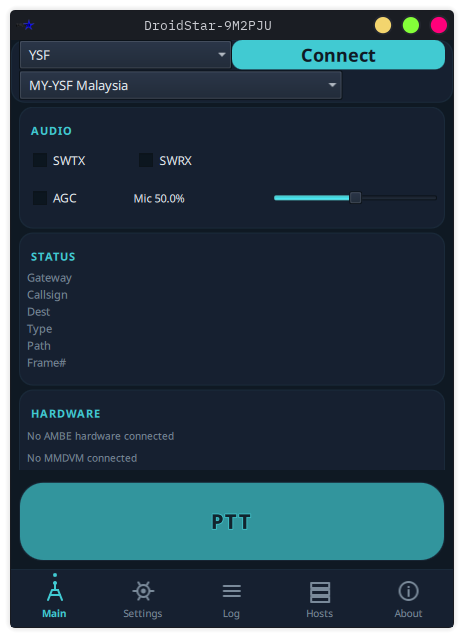
Picture this. It is a quiet evening, the rig is warming up, the kettle is on, and you would quite like to spend an hour or two on the digital voice networks without juggling five pieces of software and a tangle of vocoder plugins. The handheld is charging in the other room. The hotspot is somewhere in a drawer. What you actually have in front of you is a Linux laptop and a decent internet connection.
That is more than enough. DroidStar 9M2PJU for Linux is a free, open source desktop digital voice client that puts DMR, M17, Yaesu System Fusion (YSF), P25 and NXDN, plus D-STAR and AllStarLink reflectors, behind a single, calm, dark-themed window. No hotspot, no handheld, no separate vocoder download. The AMBE, Codec 2 and IMBE vocoders are compiled straight into the binary, so the moment it is installed you can talk on five digital voice modes from one app.
This is the 9M2PJU Linux build of Doug McLain AD8DP’s DroidStar, packaged in seven formats for pretty much every Linux distribution under the sun, with a redesigned interface, crash-proof error handling, and an in-app update checker that quietly tells you when a new release is out. It is the desktop counterpart to the 9M2PJU Android mod, same engine, same protocols, same relaxing “it just works” philosophy, just made for the shack instead of the pocket.
Last updated: July 2026.
A Quick Word on What DroidStar Is
If you have already read the Android article, feel free to skip ahead. For everyone else, the short version: DroidStar is the work of Doug McLain, AD8DP, and it is arguably the most versatile amateur radio digital voice application ever written. It is a cross-platform C++/Qt application that speaks essentially every digital voice mode in the hobby:
- DMR, BrandMeister, FreeDMR, HBLink, TGIF
- M17, the open source, patent-free standard
- Yaesu System Fusion (YSF/FCS), DN and VW
- P25, Phase 1
- NXDN, NEXEDGE
- D-STAR, REF, XRF, DCS reflectors
- AllStarLink, IAX2 client
It connects to all of these over UDP, straight to the reflectors and servers that already live on the internet. Your computer is the radio. If you happen to have a USB AMBE vocoder (ThumbDV, DVstick 30, DVSI) or an MMDVM modem, DroidStar can drive those too. The project grew out of dstar-monitor, a receive-only D-STAR listener, and matured into a full two-way client. The Linux build has been the spiritual home of DroidStar since the very beginning, Qt was born on the desktop, after all.
Why a Linux Build, and Why This One
Here is the honest truth about amateur radio software on Linux: a lot of it is brilliant and a lot of it is, shall we say, an acquired taste. You install a dependency, you chase a library version, you edit a config file in a text editor that looks like it was last touched in 1998, and somewhere along the way the actual radio part becomes the reward for surviving the setup.
DroidStar 9M2PJU for Linux takes the opposite approach. You pick the package format your distribution already understands, you install it the way you install anything else, and you are on the air. The vocoders are inside the binary. The interface is themed. The error handling does not crash on you. It is digital voice without the ritual.
This build is for the operator who runs Linux on the shack computer (and let’s be honest, a lot of us do), the SOTA activator with a Raspberry Pi or an ARM laptop in the backpack, the new licensee who wants to hear what DMR sounds like before spending money on a radio, and the old hand who simply wants one calm window instead of five.
Seven Package Formats, Pick Your Poison
One of the genuinely lovely things about this build is that it does not care which distribution you run. The same application ships in seven formats, for both x86_64 (amd64) and ARM64 (aarch64):
| Format | Best for | Install method |
|---|---|---|
| .deb | Debian, Ubuntu, Mint, Pop!_OS | sudo dpkg -i |
| .rpm | Fedora, RHEL, openSUSE | sudo rpm -i |
| .pkg.tar.zst | Arch Linux, CachyOS, EndeavourOS | sudo pacman -U |
| .AppImage | Any distro (portable) | Make executable & run |
| .flatpak | Any distro (sandboxed) | flatpak install |
| .snap | Ubuntu & snap-enabled | sudo snap install |
| .tar.gz | Manual / custom install | Extract & run |
If you are on a Debian-family system, grab the .deb. On Fedora or openSUSE, the .rpm. Arch users, the .pkg.tar.zst is right there waiting for pacman -U. Not sure, or running something exotic? The AppImage is a single file you make executable and double-click, no installation, no root, no mess. Prefer a sandbox? Flatpak keeps it tidy. Every package contains the exact same application, so you are not missing features by picking one over another.
And yes, there is an ARM64 build. That means a Raspberry Pi 4 or 5, a Pinebook, an ARM laptop, or one of the increasingly common ARM mini-PCs can become a perfectly respectable digital voice station with a USB microphone and a cup of tea.
What Is New in This Build
This is not just a repackage of upstream. The 9M2PJU Linux build brings over the redesigned UI and crash guards from the experimental branch, plus a few niceties that make daily use genuinely pleasant.
A Redesigned Interface
The default DroidStar window is functional but, charitably, utilitarian. This build ships a redesigned UI: a bottom navigation bar with custom icons, a card-based layout, and a dark theme with a cyan accent (#41cad2) pulled from the 9M2PJU logo. It reads like a piece of modern radio software, not a developer debug tool. On a dark evening in the shack it is easy on the eyes, and it does not blow out your night vision the way a bright white window does.
Crash-Proof Error Handling
Here is a small thing that makes a big difference. The build adds comprehensive null pointer guards across all modes, so the app never exits on a connection error. Instead of silently disappearing when something goes wrong, it shows a friendly popup explaining what happened. You acknowledge it, you try again, you carry on. No lost QSO, no mystery crash, no digging through a terminal for a segfault message.
DMR Connection Retry and Timeout
DMR connections now get three retry attempts with a 10-second timeout, and the error popups are specific: server rejection (MSTNAK), server shutdown (MSTCL), DNS failures, and unreachable hosts each get their own clear message. When a BrandMeister server is having a moment, you know it is the server and not your setup.
In-App Update Checker
On startup the app quietly checks GitHub for a new release and lets you know when one is available. No more manually polling the releases page, no more running a version three releases behind by accident. It is a small courtesy, and a welcome one.
Built-in Vocoders
This is the headline feature for anyone who has ever tried to set up stock DroidStar. The AMBE, Codec 2 and IMBE vocoders are compiled directly into the binary. No hunting for a vocoder_plug file, no pasting a URL into a settings field, no hoping the host is still online. You install, you configure your callsign, you talk. (You are still responsible for ensuring you are properly licensed to use any patented vocoder, as with any digital voice software, but the mechanical friction is gone.)
USB Vocoder Support
If you prefer a hardware AMBE chip for transmit quality, or you want to drive an MMDVM modem, the build supports external AMBE vocoders and MMDVM modems over USB serial. Plug in a ThumbDV, DVstick 30, or an MMDVM_HS hotspot stick and DroidStar will use it. Software vocoding for everyday chat, hardware vocoding when you want it, your call.
Features at a Glance
- Five digital voice modes in one app, DMR, M17, YSF, P25, NXDN, plus D-STAR (REF/XRF/DCS) and AllStarLink (IAX2) reflectors.
- Built-in vocoders, AMBE, Codec 2 and IMBE compiled in. No external plugin download.
- USB vocoder support, external AMBE vocoder or MMDVM modem over USB serial.
- Operator info auto-fetch, your handle and country are pulled automatically from your DMR ID via the Radioid API.
- Modern dark theme, deep navy and cyan, card-based layout, bottom navigation.
- M17 SMS and IAX DTMF, send SMS messages on M17 and DTMF tones over IAX, built in.
- Crash-proof error handling, friendly popups instead of silent exits.
- DMR retry and timeout, three retries, clear per-error messages.
- In-app update checker, knows when a new release lands.
- Seven package formats, for x86_64 and ARM64, no root needed for AppImage or Flatpak.
System Requirements
| Requirement | Detail |
|---|---|
| Operating system | Modern Linux distribution |
| Architecture | x86_64 (amd64) or ARM64 (aarch64) |
| Qt | 6.5+ |
| Root access | Not required (AppImage or Flatpak) |
| Package formats | 7 (.deb, .rpm, .pkg.tar.zst, AppImage, Flatpak, Snap, tar.gz) |
| Internet | Wi-Fi or wired (UDP to reflectors) |
| Optional hardware | USB AMBE vocoder or MMDVM modem |
How to Install
Pick the format that matches your distribution. All of these assume you have downloaded the relevant file from the DroidStar 9M2PJU for Linux project page.
AppImage (any distro)
The simplest possible path, no installation, no root:
chmod +x DroidStar-9M2PJU-*.AppImage

./DroidStar-9M2PJU-*.AppImage
Debian / Ubuntu (.deb)
sudo dpkg -i DroidStar-9M2PJU-*.deb

sudo apt-get install -f
The second line pulls in any missing dependencies.
Fedora / RHEL (.rpm)
sudo rpm -i DroidStar-9M2PJU-*.rpm
Arch Linux (.pkg.tar.zst)
sudo pacman -U DroidStar-9M2PJU-*.pkg.tar.zst
Flatpak (any distro, sandboxed)
flatpak install DroidStar-9M2PJU-*.flatpak

flatpak run org.dudetronics.droidstar
Snap (Ubuntu and snap-enabled)
sudo snap install DroidStar-9M2PJU-*.snap --dangerous
The --dangerous flag is just because the snap is not signed by the Snap Store, it is expected for a sideloaded package.
tar.gz (manual / custom)
Extract it somewhere sensible and run the binary inside. Useful if you keep your ham radio software in a specific directory, or if you are on a distribution the other formats do not quite fit.
First run? Configure your callsign, DMR ID, and host in Settings. The vocoders are built in, there is no extra download step.
First-Time Configuration
Before you transmit, you need three things: a valid amateur radio licence and callsign, a DMR ID (free, from Radioid.net), and, for BrandMeister, a SelfCare password.
- Get a DMR ID. Register your callsign at Radioid.net. You will be assigned a numeric ID (usually 7 digits). It can take a day or two to propagate, so register it before you plan to operate.
- Set up BrandMeister (for DMR). Create an account at the BrandMeister SelfCare portal using your callsign and DMR ID, and set a SelfCare password. This is what DroidStar sends to authenticate your client.
- Configure the app. Open DroidStar 9M2PJU and head to Settings. Fill in your Callsign, your DMRID, and your BM Pass (BrandMeister password, DMR only). That is the minimum. You can also set your latitude, longitude, location text and description, which appear on the network’s live map.
Connecting to Each Mode
Once Settings are filled in, go to the Main tab. The dropdowns select the mode and its parameters; the big button is PTT.
- DMR (BrandMeister): Mode DMR, Slot S2, CC1, pick a BrandMeister server near you (
BM_2352_Malaysia,BM_2350_Europe,BM_3102_USA_West), enter a talkgroup (91World Wide,2352Malaysia,2350Europe), Connect, then hold PTT. - M17: Mode M17, pick a reflector (
M17-USA,M17-KPH,M17-EU), pick a module letter, lower the mic gain by about 20-35% to avoid overdriving, Connect, PTT. - YSF: Mode YSF, pick a reflector (
YSF00001World Wide or a regional room), DG-ID usually99, Connect, PTT. - P25: Mode P25, pick a reflector (
P25-2020,P25-3020), enter the talkgroup, Connect, PTT. P25 uses your DMR ID as the source ID. - NXDN: Mode NXDN, pick a reflector (
NXDN-204Europe,NXDN-310North America), Connect, PTT. Some networks want an NXDN number in addition to your DMR ID.
USB Vocoder and MMDVM
If you have a USB AMBE vocoder or an MMDVM modem, DroidStar 9M2PJU can drive it over USB serial. Three ways to use it:
- As a vocoder source, a hardware AMBE chip for transmit quality, or to keep the CPU free.
- As a hotspot/repeater, connect an MMDVM modem, select it under Modems, and DroidStar becomes a personal hotspot bridging your local RF to the internet. Your handheld then talks through the computer’s connection.
- As a stand-alone transceiver, in MMDVM Direct mode (currently M17), DroidStar plus an MMDVM modem is a self-contained transceiver with no reflector in the middle.
Why This Matters
Digital voice is the part of amateur radio that most benefits from the internet, and the part that is most often locked behind hardware. To get on DMR conventionally you need a DMR radio with an AMBE chip, a hotspot or repeater, and a DMR ID. YSF wants a Yaesu radio. P25, NXDN, M17, each historically meant another radio, another antenna, another learning curve.
DroidStar collapses all of that into a single desktop window. One install, one callsign, one DMR ID, and you are on five digital voice networks from your Linux machine. The 9M2PJU build makes that install painless by bundling the vocoders, packaging it for every distribution, handling errors gracefully, and giving the whole thing a theme that looks like it belongs in a modern shack.
For the Linux operator who wants a calm digital voice station without a build-from-source afternoon, for the SOTA activator with an ARM laptop in the pack, for the new licensee who wants to listen before buying a radio, or for the experienced ham who just wants one window instead of five, DroidStar 9M2PJU for Linux is the most relaxed way onto digital voice there is.
It is free, it is open source (GPL v3.0), and it is built and maintained by 9M2PJU for the hobby. If it is useful to you, consider buying a coffee to keep the builds coming.
73, and may your reflectors be quiet and your QSOs be long.
Credits and License
Original DroidStar by Doug McLain, AD8DP. Modified and distributed by 9M2PJU.
- Upstream: github.com/nostar/droidstar
- License: GPL v3.0
- Built with Qt 6 + CMake
Sources and Further Reading
- DroidStar 9M2PJU for Linux, download and project page: https://droidstar-linux.hamradio.my/
- DroidStar 9M2PJU Mod (Android), companion article: https://hamradio.my/droidstar-9m2pju-mod/
- DroidStar 9M2PJU Mod (Android), project page: https://droidstar.hamradio.my/
- Original DroidStar by Doug McLain AD8DP, upstream repository: github.com/nostar/droidstar
- Radioid.net, register your DMR ID: https://radioid.net/
- BrandMeister SelfCare portal: https://brandmeister.network/
- M17 Project, the open source digital voice standard: https://m17project.org/
- Kapihan Network, DroidStar setup walkthroughs (DMR, M17, YSF, P25, NXDN): https://kapihan.net/connect/droidstar/
- G8SIB, DroidStar DMR guide: https://g8sib.radio/droidstar
- HamRadio.my, Amateur Radio Resources, Tools and Reviews: https://hamradio.my/
- About 9M2PJU, Malaysian Amateur Radio Operator: https://hamradio.my/about/



Post Comment