Antennaut: Your Entire Amateur Radio Shack, SDR and Offline Toolkit in One Browser Tab
Setting up a portable operating laptop usually means installing a dozen separate programs before you ever hear a signal. You install one suite for your RTL-SDR waterfall, another for satellite passes, a browser bookmark folder for NOAA space weather, a spreadsheet or phone app for POTA and SOTA summits, a separate calculator for cutting a 40 m dipole, and a CLI tool for your Meshtastic LoRa node. Move to a different laptop or lose mobile data on a hilltop, and half that stack stops working.
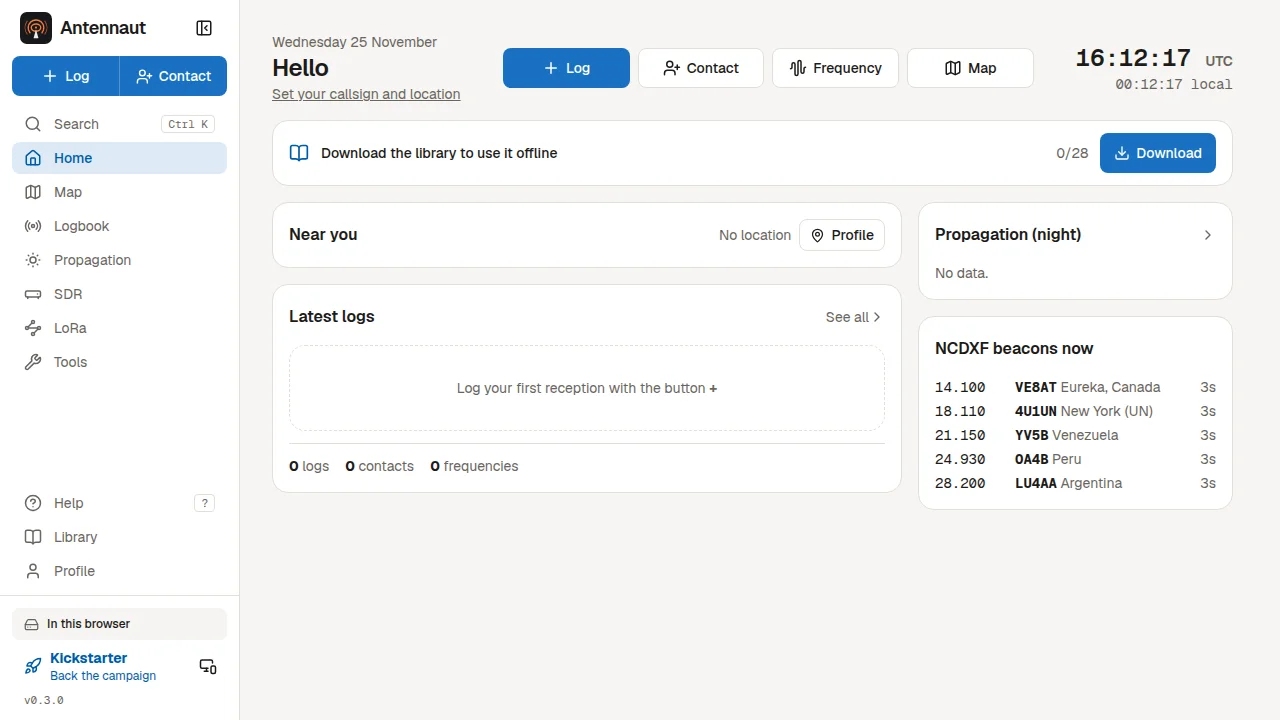
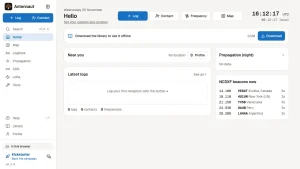
Antennaut collapses that entire shack into a single Progressive Web App that runs right inside your browser and works offline. Built by web developer Eduardo Moratón, this Antennaut browser radio shack combines a WebUSB SDR receiver, a Meshtastic and MeshCore LoRa lab, terrain-aware RF coverage mapping, live space weather, 28 downloadable offline radio databases, a local logbook, and 12 RF calculators with zero installation and no account required.
The project is currently in public beta (v0.3.0) and running a live Kickstarter campaign to fund ongoing development. You can open antennaut.com right now, plug in an SDR dongle or load a recorded IQ file, and start operating in seconds.
TL;DR: Antennaut (antennaut.com) is an all-in-one browser radio shack and offline PWA created by Eduardo Moratón. With no installation and no account required, it unites WebUSB SDR support (RTL-SDR, HackRF One, Airspy, Airspy HF+, HydraSDR RFOne, ADALM-Pluto, rtl_tcp, and IQ playback), Meshtastic and MeshCore LoRa decoding, WebGL terrain coverage maps, NOAA/HamQSL propagation tools, 28 offline radio databases (12.3 MB total), a local logbook, and 12 RF calculators across 20 languages.
What Antennaut is
Antennaut is a browser-based amateur radio and SDR workstation that bundles hardware SDR control, signal decoders, terrain coverage mapping, space weather, offline reference databases, a logbook, and RF calculators into one offline-capable web application. Everything runs locally in your browser with no mandatory sign-up, keeping your callsign, logs, contacts, and saved frequencies on your own machine.
At v0.3.0, Antennaut already ships with an interface translated into 20 languages (including English, Spanish, French, German, Italian, Portuguese, Dutch, Polish, Ukrainian, Turkish, Japanese, Chinese, and Korean) and keyboard-first navigation (Ctrl+K quick search, ? for the 224-entry operator help guide). Because it installs as a standard Progressive Web App, you can cache the entire application and its offline databases onto a laptop or tablet before heading out for SOTA, POTA, or EmComm field duty.
Inside the browser shack architecture
Most amateur radio web tools are thin front ends bolted onto a remote server. Antennaut puts the heavy lifting directly inside the browser using modern web APIs: WebUSB for talking directly to USB SDR hardware, WebGL2 in web workers for terrain coverage calculations, IndexedDB/Cache Storage for offline maps and databases, and Web Bluetooth/Serial for talking to real LoRa nodes.
+----------------------------------------------------------------------+
|                   Antennaut PWA (Browser Local Engine)               |
|                                                                      |
|  Hardware Inputs                 Offline & Live Data                 |
|  - WebUSB SDRs (RTL-SDR,         - 28 Offline Datasets (12.3 MB):    |
|    HackRF, Airspy, Pluto)          POTA, SOTA, WWFF, DMR, EiBi,      |
|  - FUNcube / Sound Card IQ         CelesTrak, SondeHub, WebSDRs      |
|  - rtl_tcp & IQ Recordings       - NOAA SWPC / HamQSL / KC2G         |
|  - Real LoRa Node (BT/USB/Wi-Fi) - Protomaps + WebGL2 Terrain        |
|                 |                                 |                  |
|                 +----------------+----------------+                  |
|                                  v                                   |
|    [ SDR ] [ LoRa ] [ Map + Sim ] [ Propagation ] [ Log ] [ Tools ]  |
|                                  |                                   |
|        Local Browser Storage (Zero Account Required, Works Offline)  |
+----------------------------------------------------------------------+
That local-first design matters in the field. When you pull out a laptop on a mountain summit or during a grid outage, Antennaut doesn’t stall on a login screen or fail because an external API is unreachable.
Plug-and-play SDR directly in the browser
The SDR tab is the centrepiece of Antennaut. Instead of compiling drivers, hunting down Zadig guides, or configuring virtual audio cables, you click Add radio and pick your hardware source:
| SDR source | Supported hardware / input | Best use case |
|---|---|---|
| USB (WebUSB) | RTL-SDR, HackRF One, Airspy, Airspy HF+, HydraSDR RFOne, ADALM-Pluto | Direct portable monitoring from any Chromium browser |
| FUNcube Dongle | FUNcube Dongle Pro / Pro+ | VHF/UHF weak-signal and amateur satellite reception |
| Sound card (IQ) | Any stereo baseband IQ sound-card interface | SoftRock and direct-conversion HF SDR receivers |
Network (rtl_tcp) |
Remote rtl_tcp servers on LAN or Raspberry Pi |
Operating a headless mast-mounted dongle from the desk |
| Recorded capture (IQ) | Local IQ capture files | Offline signal analysis, teaching, and testing with no hardware |
Having rtl_tcp and recorded IQ playback alongside direct WebUSB means you can test Antennaut even if you don’t have a dongle plugged in today, or connect it to an existing Raspberry Pi SDR server in your loft. The SDR workspace also integrates station GPS coordinates and satellite tracking so Doppler and pass context stay on the same screen.
Built-in Meshtastic, MeshCore and raw LoRa lab
Where many traditional SDR suites ignore modern licence-exempt mesh networks, Antennaut dedicates a full LoRa module to Meshtastic, MeshCore, and RAW LoRa traffic.
- Receive via SDR: Tune an attached SDR straight to regional presets such as Meshtastic
LongFast(SF11, 250 kHz, CR 4/5, sync0x2B, 869.525 MHz on EU_868) or MeshCoreEU/UK (Narrow)(SF8, 62.5 kHz, CR 4/8, sync0x12, 869.618 MHz), load community configs, and supply base64 channel keys to inspect live packets. - Connect a real node: Pair an actual Meshtastic node over Bluetooth, USB, or Wi-Fi, or a MeshCore node over Bluetooth, to bridge hardware messaging into the same browser workspace.
- Clear RF compliance guardrails: Before enabling any emulated LoRa transmit capability on a transmit-capable SDR (such as a HackRF or Pluto), Antennaut presents a mandatory compliance notice with a one-click Receive only mode. It explicitly reminds operators of regional ERP and duty-cycle limits (such as 500 mW ERP and 10% duty cycle in Europe’s 869.40-869.65 MHz sub-band) and warns that an unfiltered SDR emits out-of-band harmonics and requires an external band-pass filter.
Propagation, space weather and WebGL coverage maps
Antennaut’s Propagation and Map tabs bring together live HF conditions and local VHF/UHF terrain planning without opening five separate websites.
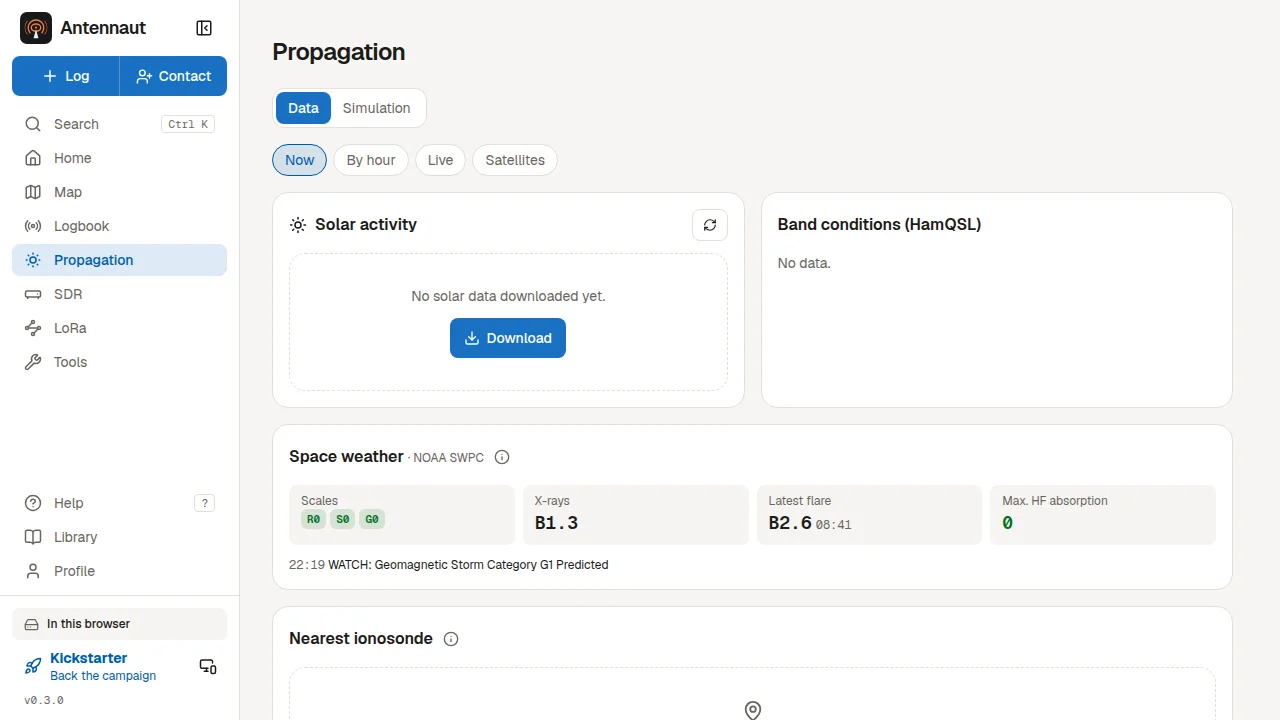
On the Propagation page, you get NOAA SWPC space weather scales (R, S, and G), live X-ray flux, latest solar flare timestamps, maximum HF absorption, active geomagnetic storm watches, HamQSL band conditions, KC2G nearest ionosonde lookups, satellite pass views, hourly forecasts, and propagation simulations. Right on the Home screen, a live NCDXF/IARU beacon panel tracks which international HF beacons are transmitting at that exact second across 14.100, 18.110, 21.150, 24.930, and 28.200 MHz.
On the Map tab, Antennaut renders OpenStreetMap vector data via Protomaps and Leaflet, layered with repeaters, activity sites, and a WebGL2 terrain coverage simulator (Simulate). You can download map tiles and terrain data for your specific operating area ahead of time so line-of-sight and repeater coverage checks still work offline in the field.
28 offline databases in 12.3 MB
One of the strongest reasons to bookmark and install Antennaut is the Library (/biblioteca). With one click, you can download either an Essential pack (1.5 MB) or All 28 curated global radio databases (12.3 MB total) straight into local browser storage:
- Portable awards: POTA parks (2.5 MB), SOTA summits (4.8 MB), and WWFF areas (1.4 MB) for offline summit and park lookups.
- Amateur digital & repeaters: BrandMeister DMR (91 kB), DMR talkgroups (0.5 MB), XLX and YSF reflectors (62 kB), hearham (0.6 MB), URE repeaters,
cty.datcallsign prefixes, and the WA7BNM contest calendar. - Shortwave & broadcast: EiBi shortwave schedules (83 kB), HFCC schedules (51 kB), FCC AM/FM and NOAA Weather Radio (US), ISED (Canada), and ACMA (Australia).
- Space, aviation & remote SDRs: CelesTrak satellites, SatNOGS transmitters, SondeHub radiosonde launches, OurAirports, VOR/NDB navaids, plus global receiver directories for KiwiSDR, OpenWebRX, WebSDR, UberSDR, and PhantomSDR+.
Pulling 28 separate amateur, aviation, shortwave, and space datasets into 12.3 MB of instant offline storage turns any cheap Chromebook or tablet into a serious field reference terminal.
12 RF calculators, local logbook and operator guide
The Tools tab packs 12 practical bench and field utilities so you never have to hunt for a calculator on mobile data:
- Antennas: Instant cut lengths across 160 m to 23 cm for half-wave dipoles and inverted Vs (with K-factor and apex angle), quarter-wave and 5/8-wave verticals, J-poles and Slim Jims, full-wave quad and delta loops, EFHW wires with harmonic frequencies, 3-element Yagis, and quarter-wave/half-wave coax stubs.
- Coax, SWR, Power & Link: Feedline loss, reflection/SWR, dBm-to-watt conversions, and RF link budgets.
- Electronics & Locator: Bench electronics formulas and Maidenhead grid square conversions.
- Morse, Exam, Walkies, Point & Fox hunting: CW practice, exam study, licence-free handheld channel reference, antenna pointing, and ARDF fox-hunting bearings.
Alongside the tools, Antennaut includes a local Logbook for reception logs, QSO contacts, and saved frequencies, plus a 224-entry Help reference covering the ITU/ICAO phonetic alphabet (with an interactive callsign speller), Q-codes, RST reporting, and standard operating phrases.
How Antennaut compares to traditional radio software
| Feature | Antennaut (v0.3.0) |
SDR++ / SDR# | GQRX / CubicSDR | Separate web bookmarks |
|---|---|---|---|---|
| Installation | None (browser / PWA) | Native desktop install | Native desktop install | None |
| Offline operation | Full (app, 28 DBs, maps) | DSP offline; no built-in DBs | DSP offline; no built-in DBs | Fails without internet |
| Hardware SDR input | WebUSB, rtl_tcp, IQ, audio |
Broad native drivers | SoapySDR / Osmocom | None (remote WebSDRs only) |
| Meshtastic & MeshCore LoRa | Built in (SDR + real node) | External tools required | External tools required | External apps required |
| Terrain RF coverage map | Built-in WebGL2 simulator | No | No | Separate sites (HeyWhatsThat) |
| POTA / SOTA / EiBi / DMR DBs | 28 offline databases built in | No | No | Separate websites |
| RF & antenna calculators | 12 built-in calculators | No | No | Separate sites / apps |
| Account required | None (local browser storage) | None | None | Often multiple accounts |
Traditional native SDR suites like SDR++ still win on raw high-sample-rate DSP throughput, wide plugin ecosystems, and support for niche drivers that WebUSB doesn’t expose. Antennaut shines as a zero-install, cross-platform command centre that unifies SDR listening, LoRa mesh work, offline reference data, propagation, and field calculators into one cohesive tab.
Honest limits to keep in mind
Because Antennaut is a fast-moving v0.3.0 beta, there are a few practical boundaries to know before you rely on it on a trip:
- Chromium browser recommended for WebUSB: Direct USB SDR access relies on WebUSB and Web Bluetooth, which work best on Chrome, Chromium, Brave, or Edge on desktop and Android; Firefox and Safari don’t expose WebUSB.
- Browser-local storage: Because no account is required yet, clearing your browser site data will wipe local logs and cached offline libraries unless you back them up first. Cloud sync is planned for a later release.
- Beta rough edges: The banner states plainly that features may change or break during testing. Always test your specific SDR dongle and download your 12.3 MB offline library before leaving Wi-Fi coverage.
- External filtering for SDR transmit: If you use a transmit-capable SDR like a HackRF One or ADALM-Pluto in the LoRa lab, you still need proper external band-pass filtering and legal compliance for your country.
Try Antennaut and back the Kickstarter
Independent software builders who care about usability, offline resilience, and privacy are rare in amateur radio. Eduardo Moratón has already put a working, genuinely useful v0.3.0 beta online for anyone to test for free before asking for support.
Here is how you can put it to work and help push the project forward:
- Test drive it right now: Open antennaut.com, pick your language, download the 1.5 MB Essential (or 12.3 MB full) offline library, and plug in an RTL-SDR, Airspy, or
rtl_tcpstream. - Back the campaign: If you want to see Antennaut grow with more decoders, deeper hardware support, and optional sync, visit the Antennaut Kickstarter campaign and back Eduardo’s work.
- Share it with your club: Forward antennaut.com to new operators, SWLs, POTA activators, and Meshtastic builders who get overwhelmed by installing ten different Windows utilities just to get started.
73 de 9M2PJU.

Post Comment