Isobar: A Modern, Cross-Platform HF Weather Fax (WEFAX) Decoder
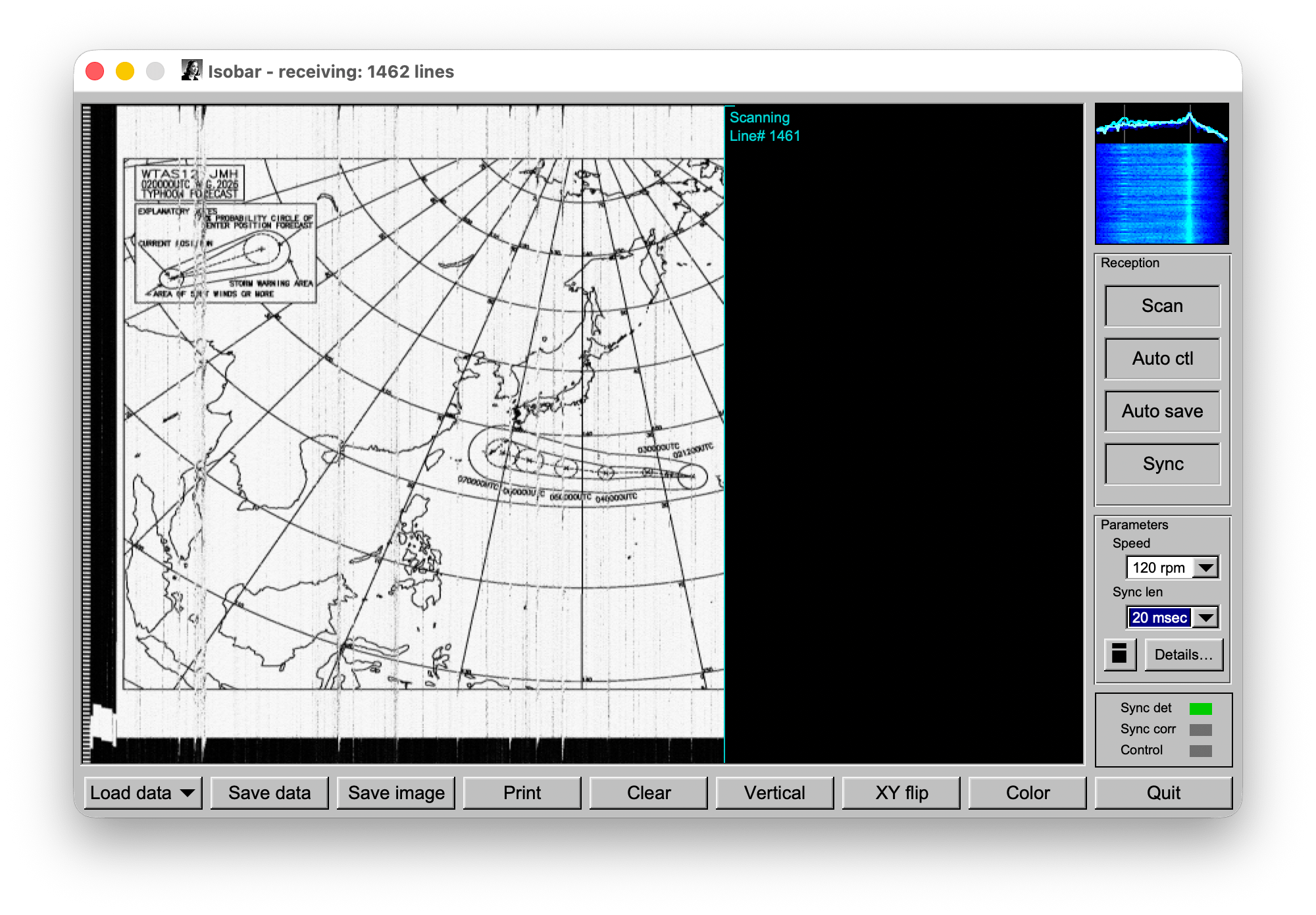
For decades, maritime communication has relied on HF weather fax (WEFAX) broadcasts to transmit synoptic charts, satellite imagery, and ice conditions to ships at sea. Broadcasters like JMH (Japan Meteorological Agency), NMG (US Coast Guard), and various BMV/ARC stations have faithfully sent these analogue image transmissions over shortwave radio.
Within the amateur radio and shortwave listening communities, software like KG-FAX (last updated around 2009) has long been the gold standard for decoding these signals on Windows. However, as operating systems evolved and the hobby shifted towards software-defined radios (SDRs) on diverse platforms (like macOS, Linux, and Raspberry Pi), the need for a modern, cross-platform WEFAX decoder became clear.
Enter Isobar, an independent, from-scratch reimplementation of a WEFAX decoder by Sara Sakuragawa (skgsara on GitHub). Licensed under the GPLv3+, Isobar brings reliable WEFAX decoding to modern operating systems while maintaining strict interoperability with legacy KG-FAX files.
What is Isobar?
Isobar is a cross-platform HF weather-fax (emission J3C) decoder that requires nothing more than your computer’s sound card (or virtual audio cable) and an HF receiver.
It was built from a functional specification produced by reverse-engineering the beloved KG-FAX v1.1.3 software. Isobar is not a derivative of KG-FAX, but a completely original C++17 codebase that can read and write KG-FAX .syn files, and even uses the same settings schema (storing configurations in isobar.ini or importing an existing kgfax.ini).
Key Features at a Glance
- WEFAX Decoding Standard: Fully supports WMO-No. 386 Part III §5 standards. It decodes 1500/2300 Hz FM sub-carriers around 1900 Hz, at 60 or 120 rpm, with an Index of Cooperation (IOC) of 576.
- Auto-Capture: Features IOC-selection (300 Hz) and stop (450 Hz) tone detection to automatically arm and disarm image capture.
- Live and Offline Decode: Supports live reception from any sound input, featuring a live spectrum scope and waterfall. It can also perform offline decoding from recorded WAV files at any sample rate (12 kHz from an SDR, 48 kHz from a sound card, etc.).
- Advanced Image Tools: Includes zooming, panning, vertical rotation toggling, XY flipping, multiple color palettes, BMP export, and printing support.
- Legacy Interoperability: Round-trips
.synfiles perfectly, including the radix-255 line-count encoding, and supports older legacy “Syn Fax” variants (fixed 2000×2280 body).
The Networked SDR Advantage: Surviving Audio Dropouts
One of the most significant challenges in modern shortwave listening is feeding audio from a remote, networked SDR (such as a KiwiSDR or WebSDR) over the internet. Internet feeds inevitably suffer from buffering stalls and dropped packets.
In traditional decoding software, a lost audio chunk shifts the sync position for the remainder of the image, skewing the chart and rendering it useless. Isobar takes a brilliant approach to this problem: it follows the shift on the specific line where the dropout occurs. The size of the dropout barely matters. If a ten-second internet outage occurs, you simply lose those ten seconds of the chart; the rest of the image remains perfectly aligned and intact.
Tuning the LockAfter Setting
Isobar’s dropout resilience is configurable via the LockAfter setting (found in the Details dialog, defaulting to 5). Acquiring sync requires LockAfter consecutive undisturbed line periods (about 2.5 seconds of clean audio).
If your remote SDR feed drops out more frequently than every 3 seconds, you can lower LockAfter to 1-3. While the higher default prevents false locks on noisy RF conditions, lowering it allows Isobar to maintain sync on clean but “gappy” internet feeds.
Under the Hood: C++17, FLTK, and RtAudio
Isobar is built with performance and portability in mind. The Digital Signal Processing (DSP) core (FM demodulation, sync detection, FFT, tone detection, resampling) is entirely dependency-free plain C++17.
For the graphical interface and live audio capture, Isobar uses two lightweight, cross-platform libraries:
- FLTK (Fast Light Toolkit) for the GUI, which ensures the application remains incredibly fast and resource-efficient.
- RtAudio for real-time audio input/output, allowing seamless integration with system sound cards across all major operating systems.
Platform Support and Installation
Isobar provides self-contained binaries for all major platforms, meaning you don’t need to install FLTK or RtAudio libraries on your target machine.
Supported Platforms
| Operating System | Architecture | Package Format | Notes |
|---|---|---|---|
| macOS | Apple Silicon (M1+) & Intel | .dmg |
Packaged as Isobar.app with embedded dylibs. Requires macOS 15+. Ad-hoc signed (requires Right-Click -> Open on first launch). |
| Windows | x64 | .zip |
Portable folder. Statically linked .exe with no DLL dependencies. Runs well on Windows-on-ARM via x64 emulation. |
| Linux | x86_64 & aarch64 | .AppImage |
Single executable file (chmod +x and run). The aarch64 build is perfect for ARM SBCs like the Raspberry Pi (requires glibc 2.35+, e.g., Debian 12 / Bookworm). |
Building from Source
For those who prefer to compile their own software, Isobar uses a standard CMake build system. On a Debian or Ubuntu system, building is as simple as:
sudo apt install libfltk1.3-dev librtaudio-dev cmake
cmake -B build -S .
cmake --build build
Once built, you can run the command-line decoder (isobar-decode) for headless WAV processing or launch the graphical interface (isobar-gui).
Conclusion
Isobar represents a massive leap forward for HF weather fax monitoring. By preserving the beloved workflow of KG-FAX while introducing rock-solid resilience to network dropouts and true cross-platform compatibility, Sara Sakuragawa has delivered an essential tool for the modern amateur radio operator and maritime weather enthusiast.
You can find the source code, read the extensive documentation, and download the latest releases on the Isobar GitHub Repository.






Post Comment