amateur radio
android
open source
Technology
Bluetooth mesh, Briar, disaster response, EmComm, end-to-end encryption, field day, GPL-3.0, internet shutdown, Kotlin, livestream, MeshLive, meshtastic, Obtainium, off-grid communications, POTA, sota, store-and-forward, video calls, voice calls
9M2PJU
0 Comments
MeshLive: Encrypted Voice Calls, Video Calls and Livestreams Over Bluetooth Mesh with No Internet
TL;DR: Quick Summary
MeshLive is a free and open source GPL-3.0-or-later Android app that carries encrypted voice calls, video calls, text chats and livestreams over a Bluetooth mesh with no internet, no SIM card, no account and no server. Every phone running it can relay: a livestream hops from phone to phone so range grows with the crowd, and calls go direct or through up to four relays. It uses three Bluetooth transports (LE GATT pairing-free by default, Classic for throughput, LE L2CAP CoC experimental), AES-256-GCM link encryption plus a second end-to-end layer, rotating Bluetooth IDs and QR-verified contacts. Install comes from GitHub releases or Obtainium with certificate-pinned verification, and the APK can even be shared phone to phone with no internet at all. The app is in beta with about 300 stars and 44 forks: video is small, audio-only mode reaches furthest, and the authors warn against relying on it where safety depends on it. For amateur radio operators it’s a natural companion for EmComm, Field Day, SOTA and POTA groups, foxhunts, club events and internet-shutdown scenarios: short-range team voice plus live video from the antenna site, all off grid.
What Is MeshLive?
MeshLive is a free open source Android application that provides end-to-end encrypted voice calls, video calls, messages and livestreams between nearby phones over a Bluetooth mesh network with no internet connection, SIM card, account or server involved.
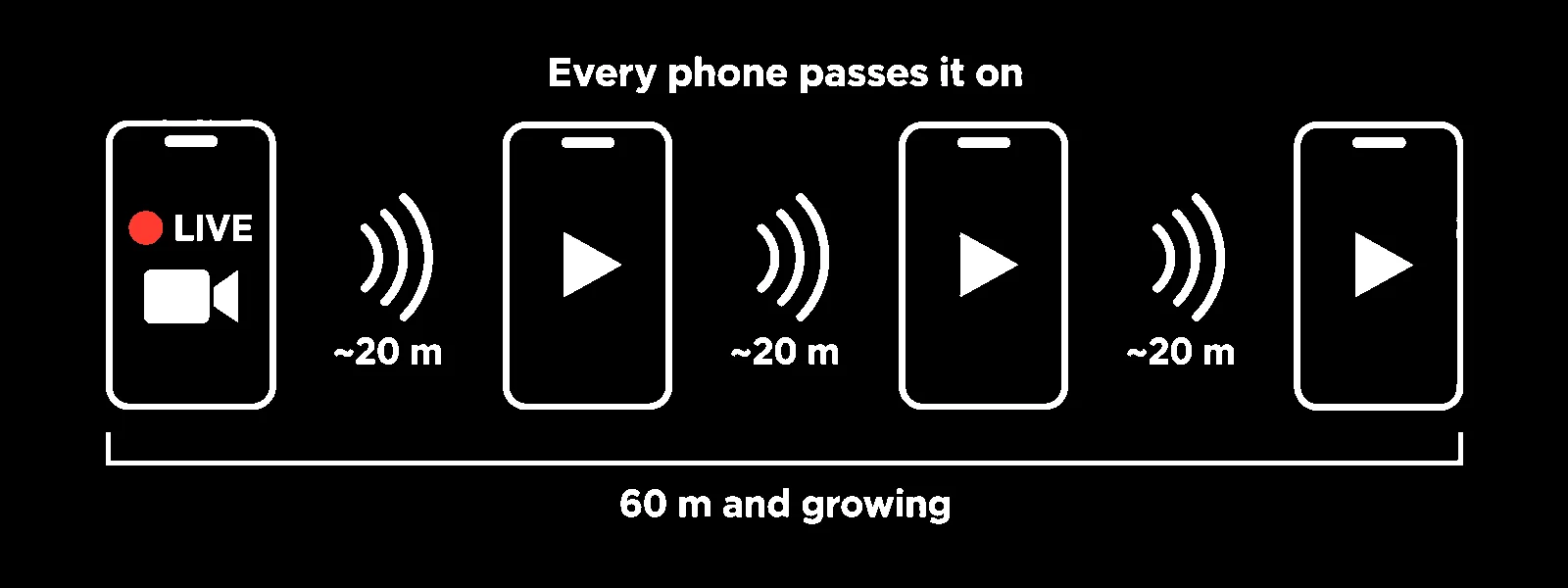
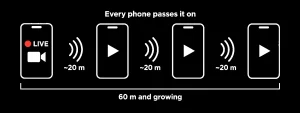
The project lives at https://github.com/MeshLive/meshlive-android with sibling builds for Windows (beta) and Apple platforms (source build, experimental). Bluetooth alone reaches about 10 to 30 metres; MeshLive stretches that by turning every phone running it into a relay, so a stream or call hops from phone to phone and the usable footprint grows with each participant.
Project Snapshot
| Item | Detail |
|---|---|
| Project | MeshLive for Android by the MeshLive org |
| License | GPL-3.0-or-later, free and open source |
| Requirements | Android 10 or newer, Bluetooth, same app on both ends |
| Status | Beta: works on tested phones, do not rely on it where safety depends on it |
| Traction | About 300 stars, 44 forks, 32 commits at write time |
| Transports | LE GATT default (no pairing), Bluetooth Classic (paired, higher throughput), LE L2CAP CoC (experimental); discovery always over Bluetooth LE |
| Media | Live video in AV1, VP9, HEVC or H.264 with mono 48 kHz Opus audio at 32 kbps; audio-only radio mode available |
| Encryption | Per-phone signing keys, signed handshakes, ordered AES-256-GCM records plus a second end-to-end layer relays cannot read |
| Distribution | GitHub releases per-ABI APKs, Obtainium auto-updates, phone-to-phone offline APK share, Windows beta, Apple source builds |
| Links | Android repo, latest release, user guide, privacy doc, supported phones |
What It Does: Calls, Livestreams, Contacts, Privacy
Calls
Voice and video calls with people nearby, end-to-end encrypted phone to phone. Missed-call history with call back, block-unknown-callers switch, hold-Mute-to-talk intercom style voice, ringer plus Do Not Disturb handling, proximity screen-off lock, answer and decline from the notification and over the lock screen. A GATT call that loses one audio direction can re-link itself on a fresh Bluetooth link within about 12 seconds without redialing, keeping the same keys. Relayed calling through up to four relays exists as an experimental debug feature.
Livestreams
Go live and share the phone camera with everyone around, or go audio-only like a local radio station that keeps playing with the screen off. Viewers can relay the stream onward (on by default, auto-paused below 20 percent battery or in Battery Saver), and each receiver verifies the stream truly comes from the original source. Authenticated pause, resume and stop states keep control with the broadcaster. Because Bluetooth is slow, video is small; audio-only streams use a fraction of the capacity and reach the most phones.
Contacts
Add people by scanning each other’s QR code in person or comparing a safety code, then call them from Contacts whenever they are nearby. Strangers never see your real name: they see a random two-word label such as Gold Fox, or a tilde name they asserted themselves, while your chosen name travels encrypted only to people you call. One-time five-minute codes and mutual scanning keep verification honest.
Privacy by default
No internet path for media, no SIM requirement, no account, no ads, no analytics, no servers. Rotating Bluetooth IDs, identity-hiding call handshakes and per-stranger throwaway identities are on by default, plus a Hide phone name default that renames the handset to Phone so nearby scanners learn nothing. Everything can be wiped from inside the app with a typed DELETE confirmation. Experimental store-and-forward messages (text, voice notes up to two minutes, photos, files to 64 MB) wait for accepted contacts and deliver on next proximity.
How It Works Under the Hood
Each hop adds a little delay and Bluetooth airtime is spent twice per forward, so quality falls with chain length: a multi-phone relay test in October 2026 showed relayed viewers at 0.9 to 7.6 FPS at 300 kbps. Short chains of low-rate video are realistic; long chains of high-rate video aren’t. Auto video quality starts near 360p on a typical link and adapts up or down, dropping to audio-only on very weak links rather than freezing.
Transports trade reach against speed: LE GATT works pairing-free on the most phones but is slowest, Classic needs a one-time mutual pairing in Android Bluetooth settings and carries the most, LE CoC is experimental with stack bugs on some phones. Discovery is always Bluetooth LE. A device-family policy registry centralizes known Bluetooth-stack and codec quirks with per-entry kill switches.
Install, Update and Verify
Install
- On the phone open the latest release and tap the APK (pick
MeshLive.apkarm64 for almost every phone since 2016, armeabi-v7a for older 32-bit models, universal when unsure). - Allow the browser to install unknown apps, then tap Install.
- Open MeshLive and grant Nearby devices, Camera and Microphone, then enable Bluetooth.
Updates three ways
- Obtainium: add the repo URL in Obtainium for automatic release tracking.
- In-app check: opt in once to Check for updates when online; the app then queries the GitHub release API at most daily, downloads nothing until tapped, and installs only same-key signed, newer, matching-ABI builds whose SHA-256 matches the published sums. Android always confirms; nothing installs silently or downgrades.
- From a nearby phone: connected peers advertise their version, and Settings can share the installed APK over Quick Share, Nearby Share, Bluetooth or experimental Wi-Fi Direct, with on-screen APK and certificate hashes to compare.
Verify a release
The release signing certificate SHA-256 is published in the release notes and the repo:
2E:EF:C0:5A:44:45:22:52:9D:9F:75:D7:EB:CE:FD:08:86:47:07:F2:1A:79:04:1D:B5:1E:BF:F8:36:49:E2:13
Check with apksigner verify --print-certs (single matching signer), sha256sum -c SHA256SUMS, and gh attestation verify for the source manifest. Never mix APKs from different publishers on one phone; updates require the same signing key.
Daily use notes
Tabs are Live, Calls (Nearby plus Recent), Contacts and Settings. First start asks to hide the phone Bluetooth name (recommended default) and offers one-tap background-running allowance so relays keep working with the screen off (relaying costs noticeable battery and warmth). Android 10 and 11 need the Location switch on for Bluetooth discovery even though the app never reads location. Contacts verify in person; everyone else stays an ID or rotating nickname.
How Amateur Radio Operators Can Use MeshLive
1. EmComm when the grid and internet fail
Floods, storms and outages routinely take out cellular data first while handsets stay powered. A team with MeshLive preinstalled keeps short-range voice coordination, audio-only broadcast announcements from net control, and contact-verified calling with no tower, no Wi-Fi and no account server. Pre-share the APK and verify contacts before deployment day, because there may be no internet to fetch it later.
2. Field Day and portable site talk-around
Field Day sites sprawl across tents, masts and parking. MeshLive gives tent-to-tent voice without tying up an amateur frequency for logistics chatter, plus live video from the antenna crew back to the operating tent (for example showing a masthead during raising). Audio-only mode is the workhorse here: lowest bandwidth, longest reach, plays with the screen off in a pocket.
3. SOTA, POTA and summit groups
Activators split across a summit (operating position, antenna ledge, parking shuttle) stay in voice contact over Bluetooth relay even where cellular coverage drops behind the ridge. The livestream lets the logger watch the antenna tune-up in real time. Remember the 10 to 30 metre per-hop Bluetooth reality: this suits one summit group, not valley-to-peak links. RF still does the QSOs; MeshLive does the logistics.
4. Foxhunts and direction-finding events
Hunt organizers can broadcast audio-only instructions and boundary changes to all teams at the start line, then take voice check-ins without burning a repeater channel. Because strangers see only rotating IDs, teams keep callsign privacy until they choose to identify, matching good hunt practice.
5. Club nights, hamfests and exam sessions
In a noisy hall with saturated Wi-Fi, MeshLive streams a demo bench to nearby phones and takes questions by voice call. VE teams can coordinate candidate flow across rooms with no venue network dependency. The rotating stranger IDs plus block-unknown-callers switch keep unsolicited calls out during presentations.
6. Internet-shutdown and censorship resilience
Where authorities throttle or cut the internet, Bluetooth mesh keeps working. MeshLive joins the toolkit alongside HF radio and sneakernets: local team voice plus one-to-many audio broadcast with no provider to block. Nothing identifying travels in the clear to strangers, and real names go encrypted only to chosen contacts.
7. Training new hams in net discipline
Before handing a novice a microphone on a repeater, run a practice net on MeshLive audio-only: callsign-style check-ins, directed-net control, relay discipline, prowords. Mistakes cost nothing and touch no spectrum. The mute-to-talk intercom feel transfers directly to push-to-talk habits.
Practical limits hams must respect
- MeshLive is beta and unaudited: never make it the sole safety or emergency channel. Amateur radio procedure plus a backup plan stay mandatory.
- Range is tens of metres per hop through open air and far less through walls; plan relay phone placement (high, central, screen-off relay volunteers) rather than assuming building-wide coverage.
- Video is small and relay chains degrade fast; default to audio-only for anything beyond two hops.
- Both ends need Android 10 plus with the same app; iPhones can’t join yet, so mixed groups need loaner handsets.
- Bluetooth and Wi-Fi based phone links aren’t amateur spectrum and carry no callsign requirement, but identify per the event plan anyway and keep RF operating separate and legal.
MeshLive Compared with Alternatives
| Tool | Bearer | Range model | Voice plus video | Works with no internet | Identity model | License |
|---|---|---|---|---|---|---|
| MeshLive | Bluetooth mesh, phone relays | 10 to 30 m per hop, grows with crowd | Yes, plus audio-only broadcast and beta messaging | Yes, fully offline after install | Rotating IDs, QR-verified contacts, E2E encrypted | GPL-3.0-or-later open source |
| Meshtastic | LoRa 868/915 MHz plus BLE to phone | Kilometres per hop with line of sight | Text plus telemetry, voice only experimental | Yes, needs dedicated LoRa radios | Node IDs, optional encryption | GPL-3.0 open source |
| Briar | Bluetooth, Wi-Fi, Tor | Bluetooth range or internet via Tor | Messaging plus forums, no calls | Bluetooth yes, full mesh needs Tor | Tor-hidden accounts, in-person verification | GPL-3.0 open source |
| Bridgefy | Bluetooth mesh | Bluetooth range per hop | Messaging, paid broadcast SDK | Yes after install | Phone-number based | Proprietary freemium |
| Serval Mesh | Wi-Fi adhoc plus UHF radio | Wi-Fi range per hop | Voice plus messaging | Yes with compatible phones or extenders | Mesh phone numbers | Mixed open source |
| Handheld FM simplex | Amateur RF 2 m/70 cm | Kilometres, terrain dependent | Voice (and APRS data separately) | Yes, needs license and radios | Callsign on air | Licensed service, open procedure |
MeshLive wins when everyone already carries an Android phone and the job is short-range team voice plus live pictures with zero infrastructure. Meshtastic wins for kilometre-scale text telemetry with dedicated radios. FM simplex remains the licensed, long-range, interoperable backbone; MeshLive complements it for logistics that should stay off the amateur frequencies.
Frequently Asked Questions
Does MeshLive need internet, a SIM or an account?
No. Calls, streams and beta messages travel only over Bluetooth between nearby phones. Internet permission exists solely for the optional release check and experimental Wi-Fi Direct APK sharing, never for media.
How far does MeshLive reach in practice?
One Bluetooth hop covers roughly 10 to 30 metres in the open and less through walls. Each relay phone extends the chain, but every hop costs airtime and quality. So plan short chains and prefer audio-only mode.
Can hams use MeshLive for emergency communications?
Yes as a complement, never as the sole safety channel. It suits team talk-around and announcements when cellular data fails, but it is beta and unaudited, so keep amateur radio procedure and backups in place.
Which phones run MeshLive?
Android 10 or newer on both ends. Tested reference phones include Samsung S24, S22, A55 and M31, plus Redmi, ASUS and OPPO models. Other phones may work or hit Bluetooth-stack bugs worth reporting.
How is MeshLive different from Meshtastic?
MeshLive runs on phones you already carry over Bluetooth with voice, video and broadcast; Meshtastic needs dedicated LoRa radios and excels at kilometre-scale text. Many groups will happily run both side by side.
Sources and Further Reading
- MeshLive Android repository: https://github.com/MeshLive/meshlive-android
- Latest release and APKs: https://github.com/MeshLive/meshlive-android/releases/latest
- User guide (install, features, FAQ): https://github.com/MeshLive/meshlive-android/blob/main/docs/user-guide.md
- Privacy document: https://github.com/MeshLive/meshlive-android/blob/main/docs/privacy.md
- Supported phones: https://github.com/MeshLive/meshlive-android/blob/main/docs/devices.md
- Architecture doc: https://github.com/MeshLive/meshlive-android/blob/main/docs/dev/architecture.md
- Meshtastic open source LoRa mesh: https://meshtastic.org/
- Briar secure messaging: https://briarproject.org/
- Obtainium app updater: https://github.com/ImranR98/Obtainium
73 de 9M2PJU. Short-range mesh on the phone, long-range work on the radio.

Post Comment