Android AirPlay Server: Turn Any Android Phone or TV into a Free AirPlay Receiver
TL;DR: Android AirPlay Server by jqssun is a free open source app that turns any Android 7.0 or newer phone, tablet or TV into an AirPlay receiver. It accepts screen mirroring with H.264 and H.265 video, audio streaming with AAC-ELD, AAC-LC and ALAC, HLS video playback and music with track info and cover art from iPhone, iPad and Mac on the same network. It is built on the UxPlay C library through a JNI bridge, ships on Google Play, F-Droid and GitHub, and is the first open source AirPlay 2 receiver for Android. If you have a spare Android device and an Apple device, you already own a wireless display and speaker with no Apple TV box required.
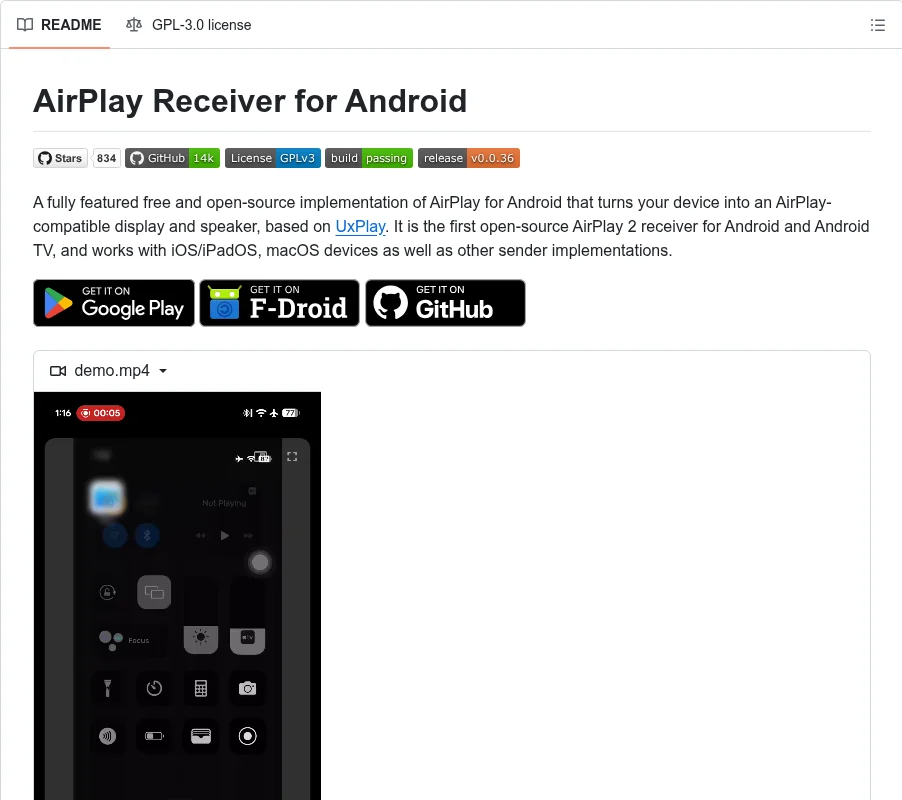
The screenshot above is the project README in one frame. Badges for 834 stars, 14k GitHub downloads, GPLv3, passing build and release v0.0.36 sit above a single sentence that carries the whole pitch: a fully featured free and open source AirPlay implementation for Android, based on UxPlay, the first open source AirPlay 2 receiver for Android and Android TV. Below it, three install buttons, Google Play, F-Droid and GitHub, plus a demo video showing an iPhone Control Center mirroring to the app. No Apple TV box in sight.
What Android AirPlay Server Is
Android AirPlay Server is a free open source Android application that turns a phone, tablet or TV into an AirPlay compatible display and speaker, receiving screen mirroring, video and audio from Apple devices with no Apple hardware on the receiving end.
It is developed by jqssun at github.com/jqssun/android-airplay-server, licensed GPL-3.0, with 877 stars and 132 forks at time of writing. The protocol work isn’t reinvented: the app embeds the C based UxPlay library, the established open source AirPlay server implementation, and connects it to the Android application layer through a JNI bridge. Decoding runs on Android MediaCodec hardware with a software fallback, and video playback goes through ExoPlayer components borrowed from the Next Player project, with lossless audio help from FFmpeg.
Why This Matters: AirPlay Without Apple Hardware
AirPlay is the glue in Apple only households: one tap sends the iPhone screen, a video, or the music queue to the living room. The catch has always been the receiving end. Officially that means an Apple TV box, a HomePod, or a TV with Apple licensed firmware, all of which cost money and all of which phone home to Apple. The open source world answered in pieces: shairport-sync nailed audio only on Linux and embedded boards, UxPlay brought full mirroring to Linux desktops and Portables, and Android users were left with closed source receiver apps full of ads and watermarks.
This app closes that gap. It’s the first open source AirPlay 2 receiver for Android, it covers all three receive modes instead of audio only, and it runs on the hardware people already own: the retired phone in the drawer, the Android TV that ships with every mid range set, the conference room stick PC. For a club, classroom or shack, that turns e waste into a wireless presentation display for any iPhone or iPad that walks in.
What It Receives: Mirroring, Video and Music
Three distinct receive paths share one app, and they behave differently.
- Screen mirroring. The iPhone or Mac screen appears live on the Android device with H.264 or H.265 decoding through MediaCodec. This is the demo video mode: Control Center, Screen Mirroring, pick the Android device name, and the phone UI is on the big screen. Expect mirroring latency in the hundreds of milliseconds, fine for demos and dashboards, not for rhythm games.
- Video playback. Send a video and the app plays the HLS stream or download with remote controls, so the Apple device acts as a remote while the Android device does the rendering. This is the efficient path for movie night: one stream, no per frame screen capture.
- Music playback. Audio streams with AAC-ELD, AAC-LC or ALAC decoding, and the app shows track information with cover art plus remote controls integrated into the Android notification and media session. The spare phone becomes a kitchen or shack speaker with album art on screen.
On top of all three sit the living room features: Android TV support with directional pad navigation and seeking, Picture in Picture, automatic resolution and mode switching, and optional PIN authentication so the neighbor kid can’t hijack the TV.
Under the Hood: UxPlay, MediaCodec and ExoPlayer
The architecture is a clean split between protocol and platform, and the README documents it with a flow diagram.
Apple devices speak RAOP for audio and the AirPlay mirroring and HLS protocols for screen and video, including mDNS discovery and the FairPlay handshake. That whole layer is UxPlay in C, reached through JNI. UxPlay hands decoded or demuxed streams to the Android side, where mirroring video goes through MediaCodec into a SurfaceView, audio goes through MediaCodec or a software ALAC decoder into AudioTrack, and HLS sessions are served through a local playlist proxy into ExoPlayer.
Two engineering choices are worth noting. First, hardware decoding is preferred but a software decoder fallback exists, which keeps old or odd chipset devices working at the cost of CPU and battery. Second, HLS goes through a local playlist proxy rather than handing Apple URLs straight to the player, which is what lets remote controls, seeking and the debug statistics behave consistently.
Native components live under app/src/main/cpp and build with CMake, with git submodules that must be initialized before building. Reproducible builds are spelled out in the CI workflow at .github/workflows/apk.yml, which is exactly the transparency you want before installing a network facing receiver from outside the Play Store.
Setup: From Install to First Mirror
One action per step, with an actor each time:
- Pick an install source. Install from Google Play for automatic updates, from F-Droid for a Google free build, or sideload the APK from GitHub releases.
- Join the same network. Connect the Android receiver and the Apple sender to the same subnet. AirPlay discovery uses mDNS, which doesn’t cross VLANs or subnets without a reflector.
- Open the app once. Launch it on the Android device and set a recognizable server name in settings.
- Mirror from the Apple device. Open Control Center on iPhone or iPad, tap Screen Mirroring, and select the Android device name.
- Enter the PIN if prompted. If you enabled PIN authentication, the TV shows a code that you type on the Apple device.
- Tune the picture. Adjust resolution, overscan and frame rate in the app until the mirrored image fills the display cleanly.
For audio only use, skip Control Center and use the AirPlay output picker inside the music app instead. The receiver shows track info and cover art with notification controls on the Android side.
Android TV and Hands Free Operation
The TV build is a first class citizen rather than a stretched phone layout. Directional pad navigation moves through the interface, seeking controls work during playback, and automatic resolution and mode switching match the TV instead of letterboxing everything into a phone shaped window. Picture in Picture keeps a mirrored session visible while you open another TV app.
Headless and fixed installations get ADB level control. On devices without a display, settings change over ADB through a broadcast receiver guarded by the DUMP permission, so random installed apps can’t reconfigure the receiver. List every setting with its current value as JSON, or push one key at a time:
export KEY="server_name" VALUE="Speaker"
am broadcast -n io.github.jqssun.airplay/.SettingsReceiver -a io.github.jqssun.airplay.SET_SETTING --es key "$KEY" --es value "$VALUE"
A neat party trick is the wired secondary display mode. Over USB tethering, the Android device acts as a reliable wired display for macOS or iPadOS, which suits conference rooms and demo tables where WiFi is congested or locked down. Apple devices natively use CDC-NCM tethering, so on Android devices that default to RNDIS you may need to switch with adb shell settings put global tether_force_usb_functions 1.
Tuning: Latency, Resolution and Debug Overlay
Receivers live or die on their settings page, and this one is well stocked.
- Audio latency control. Compensate for slow Bluetooth speakers or soundbars downstream so mirrored video and room audio stay in sync.
- Software decoder fallback. Force software decoding when a chipset MediaCodec build misbehaves, trading battery for compatibility.
- Video resolution, overscan and frame rate. Match odd projectors and overscanning TVs without touching the sender.
- Debug overlay. Real time FPS, bitrate, codec, resolution, frame count, audio volume and more, which turns every glitch report into data instead of vibes.
- Native media session. Playback controls surface in Android notifications, on the lock screen and on paired watches and cars, like any first party player.
Limits and Honest Caveats
The README states the big one up front: DRM content, for example from the Apple TV application, isn’t supported. FairPlay protected streams from services like Apple TV+, and in practice several other DRM heavy apps, will refuse to play or will show a black screen. This is a protocol and licensing wall, not a bug, and it applies to every open source AirPlay receiver including UxPlay.
The rest are the usual physics and fine print. Sender and receiver must share a subnet, so guest isolated or multi VLAN networks break discovery. Mirroring latency of a few hundred milliseconds rules out gaming and precise audio work. Congested 2.4 GHz WiFi stutters H.265 mirroring, so prefer 5 GHz or wired where possible. An old phone pressed into service as a permanent receiver will eat battery as a display, so plan for permanent power. And with 62 commits on main, this is a young project: releases move fast and behavior can change between versions, so check the release notes before updating a working installation.
Against the Alternatives
| Receiver | Platform | Video mirroring | Audio | Open source | Cost |
|---|---|---|---|---|---|
| Android AirPlay Server | Android 7.0+, Android TV | Yes, H.264 and H.265 | AAC-ELD, AAC-LC, ALAC | Yes, GPL-3.0 | Free |
| UxPlay | Linux desktops and SBCs | Yes, H.264 and H.265 | ALAC and AAC | Yes, GPL-3.0 | Free |
| shairport-sync | Linux and embedded | No, audio only | ALAC and AAC, multiroom | Yes | Free |
| AirScreen and AirPin | Android | Yes | Yes | No, proprietary with ads | Freemium |
| Apple TV 4K box | tvOS | Yes, native | Yes, plus DRM services | No | Hardware purchase |
| ESP32 AirPlay 2 Surround | ESP32-S3 boards | No, audio only | Multichannel AAC per speaker | Yes | DIY hardware |
The honest summary: if you need DRM streaming apps, buy the Apple TV box. If the receiver is a Linux machine or Raspberry Pi, run UxPlay. If the receiver is an Android device and you want mirroring plus video plus music with no ads, this app is currently the only open source option. For background on the DIY audio only end of the spectrum, see the companion article on ESP32 AirPlay 2 Surround wireless home cinema.
Ham Shack and Field Uses
- Club presentations. Point the hall TV at a spare Android stick, and any member with an iPhone or iPad can throw slides, logbooks or propagation maps onto the big screen with no dongles passed around.
- Shack display. Park a retired tablet above the rig as a wireless side screen for the iPad running logging, spotting or satellite tracking apps.
- Demo table. Mirror an SDR or APRS phone app to the TV so a crowd can follow along instead of huddling over one handset.
- Portable briefing. With USB tethering mode, drive a projector from a Mac over a wire at field day sites where the WiFi is unusable.
- Kitchen and workshop audio. A wall mounted old phone becomes an AirPlay speaker with cover art, fed from the daily driver iPhone.
Frequently Asked Questions
Does this replace an Apple TV box?
For mirroring, video and music from your own library it does. It can’t replace DRM streaming apps like Apple TV+, which need Apple licensed hardware. Match the tool to the job.
Which Apple devices can send to it?
Any iPhone, iPad or Mac on the same subnet that supports AirPlay 2 screen mirroring or audio output, plus other sender implementations. No extra app is needed on the Apple side.
Why can the Apple TV app not play video here?
Apple protects that content with FairPlay DRM, and open source receivers can’t obtain the needed licenses. The app states this up front. Use it for your own media and mirroring.
Does it work on Android TV sticks and old phones?
Yes, Android 7.0 and newer is supported, including Android TV with remote control navigation. Older devices can fall back to software decoding if hardware decoding misbehaves.
Is it safe to install outside the Play Store?
The F-Droid build and GitHub APKs come with reproducible CI builds and GPL-3.0 source you can audit. Prefer F-Droid or Play over random APK mirrors, and check release notes before updating.
Sources and Further Reading
- Android AirPlay Server GitHub repository
- Android AirPlay Server on F-Droid
- UxPlay open source AirPlay server for Linux
- Next Player video player components
- FFmpeg lossless audio decoder
- ESP32 AirPlay 2 Surround on hamradio.my, companion article
- Featured image: project README screenshot, shared via Reddit
73 de 9M2PJU



Post Comment