amateur radio
EDC
General Interest
Technology
9M2PJU, amateur radio, capillary action, clean screens, computer monitor, gadget care, ham radio, ICOM IC-705, ICOM IC-7300, microfiber cloth, oleophobic coating, scratch prevention, screen cleaning, screen protector, smartphone screen, swirl marks, tech tips, television display, transceiver
9M2PJU
0 Comments
The Physics of Screen Cleaning: Why Straight-Line Wiping Beats Circular Motions on Phones, TVs, and Radio Transceivers
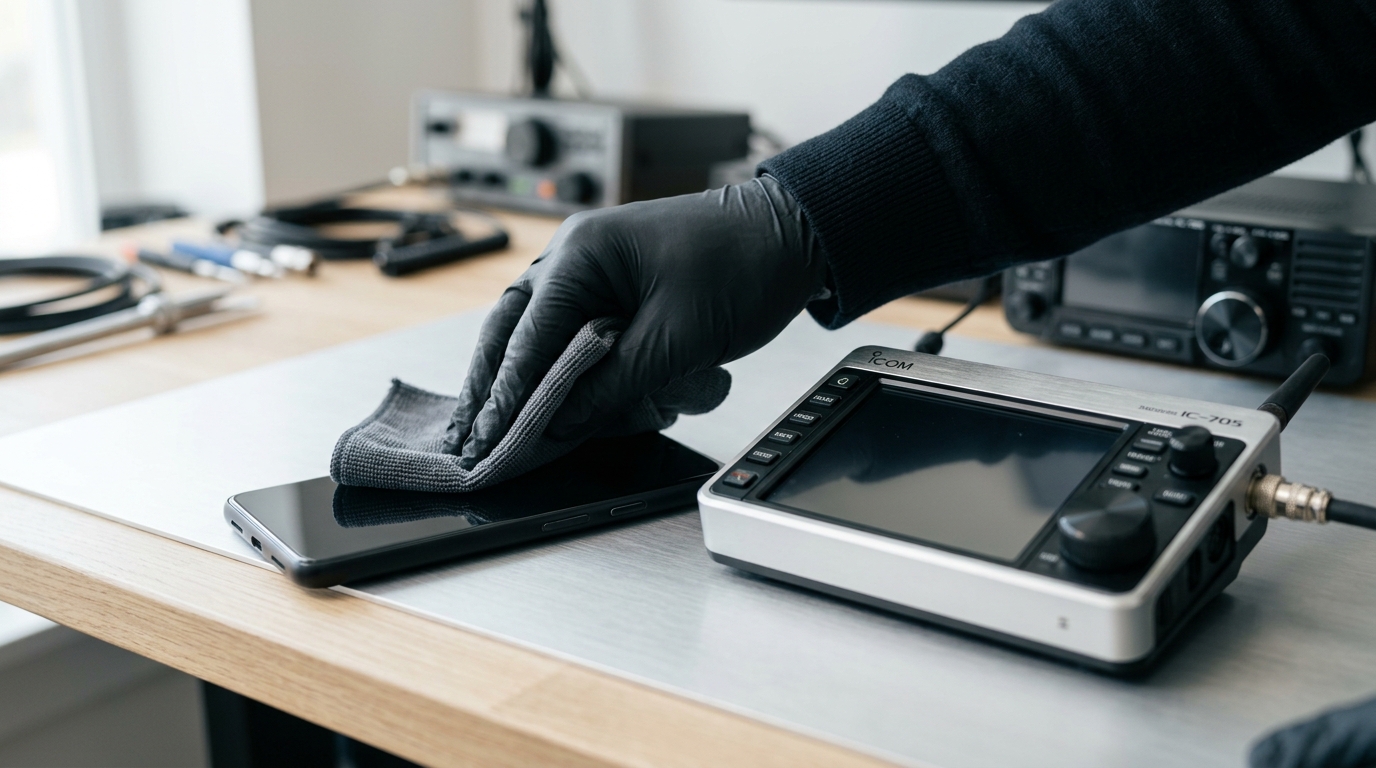
TL;DR: To clean smartphone screens, televisions, computer monitors, and touchscreen amateur radio transceivers safely, wiping in straight lines (top-to-bottom or left-to-right) is far superior to circular rubbing. Circular motions trap micro-abrasive dust and grind it into the glass, creating 360-degree swirl marks that catch ambient light, while smearing skin oils without lifting them. Straight-line strokes evacuate debris to the bezels, protect delicate oleophobic and anti-reflective nano-coatings, and prevent liquid ingress through capillary action.
Whether you are cleaning your daily smartphone screen, a living room OLED television, a studio monitor, or a modern touchscreen transceiver in the radio shack, how you wipe the glass matters. Most people instinctively clean glass displays using tight circular motions, assuming the technique works just like polishing a car’s clear coat or washing a dinner plate.
In precision optics and consumer electronics maintenance, circular rubbing is the leading cause of micro-scratches, permanent haze, and ruined surface coatings. Wiping in single-direction straight lines (linear push-pull strokes) is the industry standard recommended by optical glass manufacturers and display engineers.
This guide explains the surface friction mechanics of screen cleaning, the optical physics behind swirl marks, the danger of capillary liquid seepage into display bezels, and the exact step-by-step protocol for maintaining pristine displays across all your tech gear.
Last updated: September 2026.
Why Circular Wiping Ruins Modern Electronic Displays
Swirl marks on electronic displays refer to circular micro-scratches and uneven oil smudges created when abrasive dust particles and sebum oils are ground into the glass surface in repetitive rotational strokes.
+-------------------------------------------------------------------------+
|                    SURFACE FRICTION DYNAMICS ON GLASS                   |
+-------------------------------------------------------------------------+
|                                                                         |
|  [ CIRCULAR MOTION (AVOID) ]                                            |
|  - Abrasive silica dust trapped inside rotation path                    |
|  - Continuous rotary grinding action (Grinding Wheel Effect)            |
|  - Creates 360-degree omnidirectional light reflections (Swirl Marks)   |
|  - Recirculates sebum oils and grime across the same area               |
|                                                                         |
|                     ( @ ) -> ( @ ) -> ( @ )                             |
|              [ Concentrated Friction & Curved Scratches ]               |
|                                                                         |
+------------------------------------+------------------------------------+
|                                                                         |
|  [ STRAIGHT-LINE MOTION (RECOMMENDED) ]                                 |
|  - Particles pushed forward and trapped by split microfiber edges       |
|  - Evacuates debris cleanly toward display bezels (Lift & Evacuate)     |
|  - Unidirectional micro-lines reflect light at narrow, invisible angles |
|  - Preserves oleophobic and anti-reflective nano-coatings               |
|                                                                         |
|             ======================================>                     |
|                 [ Unidirectional Stroke & Even Load ]                   |
|                                                                         |
+-------------------------------------------------------------------------+
There are four primary physical reasons why circular motions degrade glass and plastic display surfaces:
1. Swirl Marks and 360-Degree Multi-Directional Light Scattering
When you rub a screen in circles, any micro-abrasions or residual oil streaks form concentric arcs. In optical physics, a circular scratch scatters light in every direction (isotropic/multi-directional light scattering).
Regardless of where ambient room lights, ceiling lamps, or sunlight hit your screen, some portion of a circular scratch will always sit perpendicular to the incoming light beam. This reflects glaring highlights directly into your eyes, making the screen look permanently hazy, scratched, or greasy.
In contrast, fine linear micro-scratches scatter light anisotropically along a single axis. Unless light strikes the screen at an exact glancing angle, linear scratches remain virtually invisible during normal viewing.
2. The Microscopic Grinding Wheel Effect
Everyday ambient dust contains microscopic quartz and silica minerals with a Mohs hardness of 7, which is harder than standard aluminosilicate smartphone glass (Mohs 5.5 to 6.5) and far harder than acrylic display panels.
When a stray silica grain gets trapped under a cleaning cloth and you apply circular pressure, the cloth acts as a lapidary grinding wheel. The particle is dragged across the same square centimeter dozens of times in curved paths, cutting deep micro-grooves into the glass matrix.
Straight-line wiping pushes the particle forward in a single path where the deep split pockets of a microfiber cloth can trap and lift it away from the surface before it causes damage.
3. Sebum Smearing vs Mechanical Evacuation
Human fingertips deposit sebum, a complex mixture of fatty acids, squalene, and wax esters. Because sebum is hydrophobic and viscous, circular rubbing does not break it down. Instead, the rotational movement shears the oil into an ultra-thin, cloudy film spread uniformly across the center of the display.
A linear stroke shears and collects the oil in front of the leading edge of the microfiber cloth, transferring the residue into the cloth’s fiber weave and removing it from the glass.
4. Premature Oleophobic Coating Wear
Touchscreens on smartphones, tablets, and modern radio transceivers feature an ultra-thin (10 to 20 nanometer) fluoropolymer oleophobic coating that repels fingerprints. Circular wiping concentrates friction on a central pivot point, rapidly stripping this nano-coating in irregular patches. Once worn away, fingerprints stick aggressively to the bare glass, creating permanent dull spots.
Comparison Table: Straight-Line vs Circular Motion
| Cleaning Parameter | Straight-Line Motion (Linear Push-Pull) | Circular Motion (Rotational Rubbing) |
|---|---|---|
| Micro-Scratch Visibility | Extremely Low (narrow, single-axis reflection) | Very High (360-degree omnidirectional glare) |
| Grit & Silica Handling | Traps and pushes debris off the viewing area | Grinds trapped particles repeatedly into glass |
| Fingerprint & Oil Removal | Lifts and evacuates oil into microfiber weave | Smears oil in a wide, hazy circular film |
| Swirl Mark Formation | Zero (leaves a clean, uniform finish) | High (creates visible holographic halos) |
| Oleophobic Layer Wear | Evenly distributed, minimal coating loss | Accelerated wear at central pivot friction points |
| TV & Monitor Panel Safety | Ideal (follows horizontal/vertical pixel grid) | Risky (can delaminate delicate polarizing films) |
| Transceiver Screen Safety | Ideal (keeps dirt away from VFO knobs/bezels) | Pushes grit into rotary encoder seams and bezels |
The Danger of Direct Liquid Sprays and Capillary Action
One of the most destructive habits when cleaning televisions, computer monitors, and radio equipment is spraying liquid cleaner directly onto the screen.
+-------------------------------------------------------------------------+
|                  CAPILLARY INGRESS AT DISPLAY BEZELS                    |
+-------------------------------------------------------------------------+
|                                                                         |
|   [ Direct Liquid Spray on Screen ] (DANGEROUS!)                        |
|               |                                                         |
|               v  (Gravity pulls fluid downward to bottom bezel)         |
|   +-----------------------------------------------------------------+   |
|   |                      GLASS DISPLAY PANEL                        |   |
|   +-----------------------------------------------------------------+   |
|               |                                                         |
|               v  (Capillary Action / Micro-Seepage)                     |
|   +-----------------------------------------------------------------+   |
|   |  BEZEL SEAM & DISPLAY DRIVER INTERFACE                          |   |
|   |  - Fluid wicks into polarizing film adhesive                    |   |
|   |  - Reaches Chip-on-Film (COF / COG) ribbon cable interconnects  |   |
|   |  - Causes electrolytic corrosion, vertical lines, or dead panel |   |
|   +-----------------------------------------------------------------+   |
|                                                                         |
+-------------------------------------------------------------------------+
Why Direct Spraying Causes Hardware Failure:
- Capillary Action Ingress: The microscopic gap between the glass screen and outer bezel acts as a capillary tube. When liquid runs down the screen and pools at the bottom edge, surface tension pulls fluid into the internal housing.
- Chip-on-Film (COF) Driver Corrosion: Along the bottom edge of LCD and OLED panels sit fragile flexible ribbon cables bonded with anisotropic conductive film (ACF). Even tiny moisture droplets cause rapid electrolytic corrosion and short circuits, manifesting as permanent vertical lines, flickering, or total display failure.
- Backlight Diffuser Panel Staining: On LCD monitors and transceiver screens, fluid that penetrates behind the glass is absorbed by the optical diffuser sheets, leaving permanent dark watermarks that cannot be wiped away.
The Golden Rule of Liquids: Always mist liquid cleaner onto your microfiber cloth until barely damp. Never spray directly onto any electronic device.
Forbidden Chemicals and Household Hazards
Avoid common household cleaning products on digital displays. These substances permanently damage specialized optical coatings:
- Ammonia-Based Glass Cleaners (Windex, Household Sprays): Ammonia strips anti-reflective coatings, dissolves oleophobic layers, and permanently clouds polycarbonate and acrylic plastics.
- High-Concentration Isopropyl Alcohol (IPA >70%): While diluted 70% alcohol is acceptable for occasional smartphone disinfection, higher concentrations or frequent use dissolve protective display coatings.
- Acetone and Nail Polish Removers: Acetone instantly dissolves polarizers, plastic bezels, and rubber seals.
- Paper Towels, Tissues, and Cotton Rags: Wood-pulp paper products contain coarse cellulose fibers that act as micro-abrasives, creating permanent hairline scratches across optical glass.
Step-by-Step Professional Screen Cleaning Protocol
Follow this standard procedure to clean any touchscreen or monitor safely:
+-------------------------------------------------------------------------+
|                 LINEAR SCREEN CLEANING PROTOCOL                         |
+-------------------------------------------------------------------------+
|                                                                         |
|  [ STEP 1 ] Power down the device and allow the display to cool.        |
|                                                                         |
|  [ STEP 2 ] Clear loose silica dust using a dry optical bulb blower.    |
|                                                                         |
|  [ STEP 3 ] Use a clean, dry optical microfiber cloth (300+ GSM).       |
|                                                                         |
|  [ STEP 4 ] Wipe in smooth, single-direction straight lines.            |
|                                                                         |
|  [ STEP 5 ] For stubborn grime, apply distilled water to the cloth.     |
|                                                                         |
|  [ STEP 6 ] Buff dry immediately using the dry side of the cloth.       |
|                                                                         |
+-------------------------------------------------------------------------+
Step 1: Power Down and Cool the Display
Turn off the device and disconnect power cords on TVs and monitors. A dark screen provides the contrast needed to spot dust specks and oil smudges. Furthermore, cold glass prevents cleaning fluids from evaporating prematurely before lifting grime.
Step 2: Clear Loose Grit with an Air Blower
Before touching the screen with a cloth, use a manual rubber bulb blower (camera lens blower) or an ultra-soft optical dusting brush to blow away loose grit. This ensures hard silica particles cannot be dragged across the glass.
Step 3: Select a High-Density Microfiber Cloth
Use a clean optical-grade split microfiber cloth with a weight of at least 300 GSM (grams per square meter). The split-weave design traps dirt deep within its microscopic wedge channels rather than dragging it along the surface.
Step 4: Wipe in Single-Direction Straight Lines
Fold the microfiber cloth into a flat pad. Starting at the top corner, draw the cloth in a straight line from top to bottom (or left to right) using only light hand pressure. Lift the cloth, move over by half a cloth width, and repeat the stroke. Avoid rubbing back and forth aggressively.
Step 5: Treat Stubborn Grime with Distilled Water
For dried smudges, lightly mist one corner of the microfiber cloth with distilled water or a certified alcohol/ammonia-free screen cleaning solution. Distilled water contains zero dissolved minerals (calcium or magnesium) that leave white mineral spotting on evaporation.
Step 6: Buff Dry Immediately
Turn the cloth over to an unused, dry section and wipe the damp area in straight lines until the glass is completely dry and streak-free.
Special Considerations for Ham Radio Transceivers and EDC Displays
Modern amateur radio stations increasingly center around high-resolution touchscreen transceivers, including the Icom IC-705, IC-7300, IC-7610, IC-9700, Yaesu FTDX10, FT-710, FTM-500D, Xiegu X6100/X6200, and Elecraft K4, alongside dedicated HamClock dashboards and field cyberdecks.
+-------------------------------------------------------------------------+
|                  HAM RADIO TRANSCEIVER DISPLAY CARE                     |
+-------------------------------------------------------------------------+
|                                                                         |
|   +-----------------------------------------------------------------+   |
|   |             TOUCHSCREEN TRANSCEIVERS (ICOM / YAESU)             |   |
|   |                                                                 |   |
|   |   - Real-Time Spectrum Waterfall (FFT Scope Display)            |   |
|   |   - Touch Menu Selections & Band Filter Adjustments             |   |
|   |   - Exposed to field dust, grit, and finger sweat salts (SOTA)  |   |
|   +-----------------------------------------------------------------+   |
|                                                                         |
|   [ IMPACT OF PROPER LINEAR CLEANING ]                                  |
|   1. Maintains maximum visual contrast for weak-signal waterfalls.      |
|   2. Prevents liquid wicking into rotary VFO encoders and pot shafts.   |
|   3. Eliminates glare-producing swirl marks during outdoor field ops.   |
|   4. Preserves secondary resale value of expensive shack gear.          |
|                                                                         |
+-------------------------------------------------------------------------+
Why Transceivers Need Dedicated Cleaning Care:
- Field Deployments (SOTA / POTA / Field Day): Portable operations expose gear to windblown dust, fine sand, and salty sweat from operators’ hands. Tapping the spectrum scope transfers grit directly to the screen. Always blow away outdoor dust before wiping.
- Proximity to Rotary Encoders and VFO Knobs: Transceiver displays sit millimeters away from rotary optical encoders and switches. Liquid sprayed near the display will wick into the VFO bearings, washing away dampening grease and fouling optical encoder discs.
- Weak-Signal Waterfall Readability: Swirl marks create glare that obscures faint FT8 traces and weak CW signals on the spectrum waterfall display, especially during outdoor battery-powered operations under bright sunlight.
Proper Microfiber Cloth Maintenance
A dirty microfiber cloth stores sharp dust particles inside its weave, turning into sandpaper on its next use:
- Wash Separately: Wash microfiber cloths separately from lint-shedding cotton towels to prevent fiber contamination.
- Use Mild Liquid Detergent: Wash with standard liquid laundry detergent free of dyes, perfumes, or bleach.
- Never Use Fabric Softener: Fabric softeners coat microfibers with silicone wax, destroying their electrostatic charge and ability to absorb oils.
- Air Dry Naturally: Hang the cloths to dry in a clean, shaded area. High dryer heat can melt synthetic polyester and polyamide fibers.
Frequently Asked Questions (FAQ)
Can I use household glass cleaner (like Windex) on my TV or phone screen?
No. Household glass cleaners contain ammonia and harsh detergents that strip anti-reflective coatings and oleophobic layers, leaving the glass dull, hazy, and prone to permanent fingerprint staining.
Why do circular scratches look worse than straight scratches?
Circular scratches scatter light in all 360 degrees, making them reflect ambient light and glare from any viewing angle. Straight scratches only reflect light along a narrow axis, remaining mostly invisible.
Are facial tissues or paper towels safe for wiping screens?
No. Paper products are made from wood pulp and contain abrasive cellulose fibers that cause permanent micro-scratches on glass, plastic bezels, and optical coatings.
Why should I turn off my device before cleaning the screen?
Powering down provides a black background that makes dust and oil smudges clearly visible, prevents accidental touch inputs, and keeps the screen cool so cleaning moisture does not evaporate prematurely.
Can I use tap water instead of distilled water for screen cleaning?
Avoid tap water. Tap water contains dissolved minerals like calcium and chlorine that leave stubborn white residue (hard water spots) on the glass surface when dried.
Sources and Further Reading
- Corning Incorporated. (2025). Care and Cleaning Guidelines for Gorilla Glass Surfaces. Corning Technical Documentation.
- Apple Support. (2026). How to clean your Apple products (iPhone, iPad, Mac, and Displays). Apple Official Support: https://support.apple.com/en-us/103258
- Samsung Electronics. (2026). Recommended cleaning guidelines for Samsung TV screens and monitors. Samsung Customer Care.
- Society for Information Display (SID). (2025). Display Surface Treatments: Anti-Reflective and Oleophobic Coatings Durability Standards. Journal of Information Display.
- Icom Incorporated. (2026). IC-705 and IC-7300 Transceiver Maintenance and Display Handling Manual. Icom Japan.
73,
9M2PJU
hamradio.my





Post Comment