Understanding RSSI & SNR in APRS LoRa: What Do These Numbers Mean?
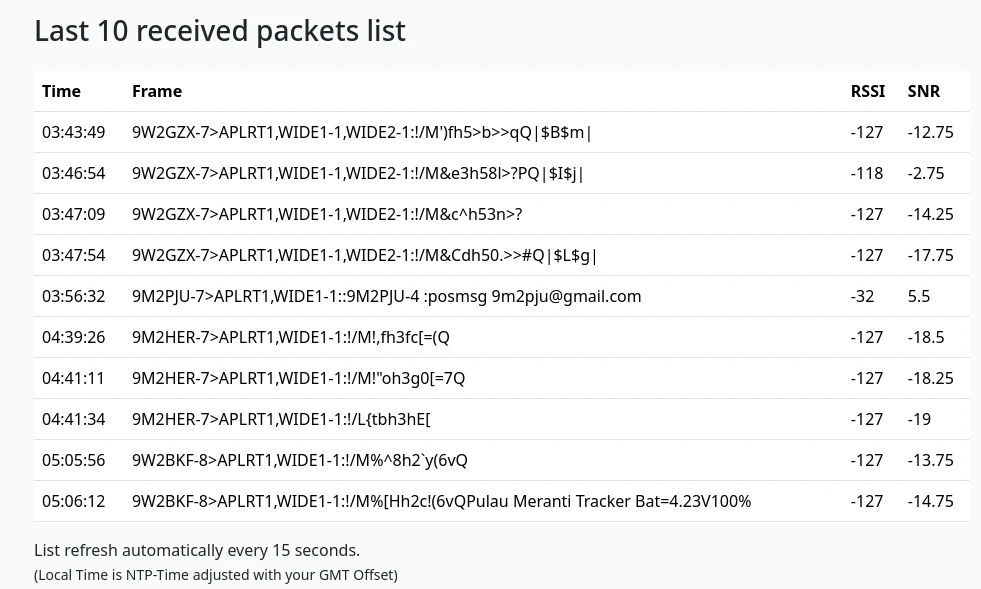
If you’ve ever looked at APRS LoRa logs and seen cryptic numbers like -127 and -12.5, you might’ve asked yourself, “Is that good or bad?” Don’t worry – you’re not alone. In this post, I’ll walk you through what RSSI and SNR actually mean, how they affect your APRS system, and what you can do to improve them.
🔍 What Is APRS with LoRa?
APRS (Automatic Packet Reporting System) is a digital communication system used by Amateur radio operators to send real-time data such as location, weather, messages, and more. When combined with LoRa – a long-range, low-power radio technology – it becomes a powerful way to send packets over large distances using very little power.
You’ll typically see these packets logged like this:
03:03:03 9W2BKF-8>APLRT1,WIDE1-1:!/M!GTh1eR(96Q -127 -12.5
🧠 Breaking Down the Line
| Part | Meaning |
|---|---|
03:03:03 | Time the packet was received |
9W2BKF-8> | Sender’s callsign with SSID |
APLRT1,WIDE1-1: | Path used (digipeaters etc.) |
!/M!GTh1eR(96Q | Encoded location or data |
-127 | RSSI – Received Signal Strength |
-12.5 | SNR – Signal-to-Noise Ratio |
📶 What Is RSSI?
RSSI stands for Received Signal Strength Indicator. It measures how strong a signal is when it reaches your receiver, expressed in dBm (decibels relative to 1 milliwatt).
- Closer to 0 = stronger signal
- More negative = weaker signal
| RSSI Value | Signal Strength |
|---|---|
| -30 dBm | Extremely strong |
| -70 dBm | Good |
| -90 dBm | Fair |
| -120 dBm | Very weak |
| -127 dBm | Barely detectable |
So if you’re seeing -127, it means your LoRa module barely managed to pick up that packet – it’s right at the edge of detection.
🌐 What Is SNR?
SNR stands for Signal-to-Noise Ratio, measured in dB. It compares the level of the signal to the level of background noise.
- Positive SNR = Good
- Negative SNR = Bad
| SNR Value | Signal Quality |
|---|---|
| +10 dB | Excellent |
| 0 dB | Just OK |
| -10 dB | Weak and noisy |
| -20 dB | Likely corrupted |
For example:
- An SNR of
-12.5 dBmeans the signal was 12.5 decibels below the noise floor. That’s not great. - A positive SNR, like
+5.5 dB, means your signal was clearly above the noise and much easier to decode.
🔧 How to Improve RSSI and SNR
If your signal quality isn’t ideal, don’t panic. Here are some practical tips:
📡 Improve Your Antenna
- Use a higher gain antenna
- Position it as high as possible
- Ensure it’s vertical and unobstructed
🧵 Use Better Cables
- Use low-loss coaxial cables
- Keep cable runs short
🏡 Change Your Setup
- Move your node away from interference (metal walls, routers, etc.)
- Try an outdoor enclosure
🔁 Try Different Spreading Factors (SF)
If you’re building LoRa nodes, changing the spreading factor in your LoRa configuration can affect both range and reliability.
🌀 What Is Spreading Factor (SF) in LoRa?
Now, let’s talk about a hidden hero: Spreading Factor, or SF.
🧭 What Is It?
Spreading Factor controls how long each symbol (bit of data) is spread over time on the air. It directly impacts:
- Range
- Transmission time
- Reliability
The higher the SF:
- The longer the signal stays on the air (better decoding in noise)
- The greater the range (good for distant nodes)
- But also slower data rate (more air time per packet)
| Spreading Factor | Range | Speed | Reliability |
|---|---|---|---|
| SF7 | Short | Fastest | Lowest |
| SF9 | Medium | Medium | Balanced |
| SF12 | Long | Slowest | Most robust |
🎛️ Do Bandpass Filters Improve Signal?
Yes – in the right situation, a bandpass filter can significantly improve signal quality in LoRa-based APRS systems.
🧠 What Is a Bandpass Filter?
A bandpass filter is an RF component that only lets a specific frequency range pass – like 433 MHz or 915 MHz – and blocks everything else.
This helps reduce interference from:
- Wi-Fi routers (2.4 GHz)
- LTE/4G towers
- Noisy power supplies
- Nearby transmitters on other bands
✅ When It Helps:
- You’re in a noisy urban environment
- Your node is near multiple RF sources
- You notice packet loss, even when RSSI looks okay
- You’re getting false or corrupted APRS frames
❌ When It May Not Help:
- You live in a quiet rural area
- There’s no significant interference
- Your main issue is low signal strength, not noise
📊 Real Benefits:
- 🚫 Reduces noise floor
- ✅ Improves SNR
- 🧠 Prevents receiver overload
- 📈 Improves reliability of weak signals (especially with SF12)
🛠️ Filter + LNA Combo
For advanced users: combine a bandpass filter + LNA (low-noise amplifier):
- Filter first → clean up the signal
- Then amplify → boost only the good stuff
This gives the best results for distant or mobile stations.
📈 Real World Example
Here’s a simplified snapshot of real LoRa APRS signals received on 9M2PJU-2:
| Callsign | RSSI (dBm) | SNR (dB) | Quality |
|---|---|---|---|
| 9W2BKF-8 | -127 | -12.5 | Weak |
| 9W2GZX-7 | -127 | -17.75 | Very poor |
| 9M2HER-7 | -127 | -19 | Barely usable |
| 9M2PJU-7 | -32 | +5.5 | Excellent 🚀 |
🎯 Final Thoughts
Understanding RSSI and SNR is crucial for maintaining a healthy APRS LoRa system. By monitoring these values, you’ll know whether your setup is working well or needs a boost.
So the next time you see -127 and wonder “Is that good?”, now you know – it’s not! But with some tweaks, you can push your packets further and clearer than ever.

Post Comment