XBrowser: The 1MB Lightweight Powerhouse Android Browser with Built-in Tampermonkey Scripts and Zero Bloat
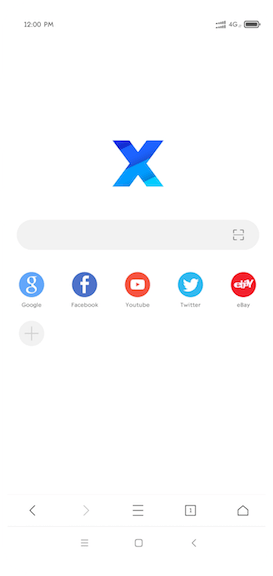
TL;DR: XBrowser is an ultra-lightweight (~1MB) Android web browser engineered by independent developer Cheng Kai that delivers desktop-grade power user capabilities without corporate bloatware. Featuring native Tampermonkey/Greasemonkey user script support, an ABP-compatible ad blocker (100/100 on ADBlock Tester), built-in video/media resource sniffing, external downloader hooks (ADM, 1DM), desktop bookmark synchronization, and zero background services or telemetry, XBrowser provides lightning-fast performance while respecting user privacy and battery life.
In an era where mainstream mobile web browsers consume hundreds of megabytes of storage, drain battery through persistent background processes, and bombard users with unwanted news feeds and tracking daemons, mobile web browsing has become remarkably bloated. Heavyweight browsers like Google Chrome for Android have completely locked down extensibility, preventing power users from running custom scripts, blocking cosmetic ad elements, or tailoring their browsing workflow.
XBrowser (available at xbext.com and en.xbext.com) takes the opposite approach. Built on the philosophy of extreme minimalism, XBrowser packs an astonishing array of advanced features into an installation package under 2MB.
In this comprehensive guide, we explore the architecture of XBrowser, its native Tampermonkey script runtime, dual-engine ad blocking mechanics, media sniffing capabilities, power-user ergonomics, and how to configure it for an optimal mobile browsing setup.
What Is XBrowser?
XBrowser is an ultra-lightweight, privacy-focused Android mobile web browser that combines a 1MB native footprint with built-in Tampermonkey user script support and advanced ad filtering without running background processes or tracking services.
+-------------------------------------------------------------------------------------------------+
|                                  XBROWSER ARCHITECTURAL STACK                                   |
+-------------------------------------------------------------------------------------------------+
|                                                                                                 |
|   +-----------------------------------------------------------------------------------------+   |
|   |                        MINIMALIST GESTURE & ERGONOMIC INTERFACE                         |   |
|   |       Bottom Address Bar • Gesture Bindings • Tab Pinning • Quick URLs (x:bm, x:st)     |   |
|   +-----------------------------------------------------------------------------------------+   |
|                                               │                                                 |
|   +---------------------------------------+   │   +-----------------------------------------+   |
|   |     NATIVE TAMPERMONKEY RUNTIME       |   │   |       DUAL-ENGINE AD BLOCKER (ABP)      |   |
|   |  GM APIs • User Scripts • GreasyFork  |   │   |  URL Pre-Filtering • DOM Element Hiding |   |
|   +---------------------------------------+   │   +-----------------------------------------+   |
|                                               │                                                 |
|   +-----------------------------------------------------------------------------------------+   |
|   |                            MEDIA SNIFFER & TOOLCHAIN BRIDGES                            |   |
|   |       M3U8 / MP4 Sniffing • External Downloaders (ADM/1DM) • External Players (VLC)     |   |
|   +-----------------------------------------------------------------------------------------+   |
|                                               │                                                 |
|   +-----------------------------------------------------------------------------------------+   |
|   |                      NATIVE SYSTEM ANDROID WEBVIEW (CHROMIUM CORE)                      |   |
|   |               Zero Bundled Bloat • Hardware Accelerated Rendering • Low RAM             |   |
|   +-----------------------------------------------------------------------------------------+   |
|                                                                                                 |
+-------------------------------------------------------------------------------------------------+
Created by independent software developer Cheng Kai (known as chenkai / examplecode on GitHub), the letter “X” originates from the word eXtreme. The browser was designed from scratch to strip away every non-essential layer, delivering pure browsing speed without compromising on power-user flexibility.
Unlike bloated browsers that bundle their own massive multi-megabyte Chromium binaries, XBrowser taps directly into Android’s native system WebView. This architectural choice keeps memory consumption minimal, ensures immediate startup, and eliminates unnecessary background daemons.
The Problem with Modern Mobile Browsers
Modern mobile browsers have largely diverged from their primary mission of displaying web pages efficiently. Instead, they have transformed into complex content delivery networks and advertising platforms:
+-------------------------------------------------------------------------------------------------+
|                                   MAINSTREAM BROWSER BLOAT SPIRAL                               |
+-------------------------------------------------------------------------------------------------+
|                                                                                                 |
|   [ 150MB - 300MB APK Download ] ──> Bundles redundant Chromium binary copies                   |
|   [ Constant Background Services ] ──> Drains mobile battery and wakes CPU                      |
|   [ Non-Removable News Feeds ] ──> Consumes cellular data with clickbait portals                |
|   [ Extension Lockout ] ──> Chrome Android completely disables extensions and user scripts      |
|   [ Aggressive Telemetry ] ──> Reports browsing patterns, location, and device metrics          |
|                                                                                                 |
+-------------------------------------------------------------------------------------------------+- Storage and RAM Exhaustion: Mainstream browsers frequently exceed 200MB to 400MB of storage after installation, consuming substantial RAM even when running in the background.
- Mandatory Feed Injection: Popular commercial browsers clutter the homepage with unrequested news feeds, weather widgets, and sponsored notifications that consume mobile data.
- No User Script or Extension Support: Standard mobile browsers strictly prohibit user scripts, leaving users powerless against mobile-specific website annoyances such as aggressive popups, anti-copy scripts, and forced app-install banners.
- Intrusive Permissions: Many commercial browsers demand broad device permissions, including GPS location, contacts, and phone identity.
XBrowser eliminates every one of these compromises: it asks for minimal permissions, has zero background processes, contains no news feeds or push notifications, and provides deep script customizability out of the box.
Core Features and Technical Capabilities
Despite its sub-2MB binary size, XBrowser matches or exceeds the functionality of desktop browsers through intelligent native engineering.
+-------------------------------------------------------------------------------------------------+
|                                  XBROWSER KEY FEATURE MATRIX                                    |
+-------------------------------------------------------------------------------------------------+
|                                                                                                 |
|   [ 1MB Footprint ]            [ Tampermonkey Engine ]          [ Dual AdBlock Engine ]         |
|   Instant start, near-zero     Native GM API support,           ABP/AdGuard filter parser,      |
|   RAM usage, zero battery      GreasyFork installation,         100/100 ADBlock Tester,         |
|   drain on standby.            lightweight JS injection.        200k rules without lag.         |
|                                                                                                 |
|   [ Media Sniffer ]            [ Toolchain Bridges ]            [ Ergonomic UI ]                |
|   Auto-detects HLS/M3U8 &      Integrates ADM, 1DM,             Bottom address bar, custom      |
|   MP4, cast to TV, play        Aria2, VLC, MPV for              gestures, tab locking, and      |
|   via external players.        heavy media operations.          instant quick URLs (x:bm).      |
|                                                                                                 |
+-------------------------------------------------------------------------------------------------+
1. Built-in Tampermonkey & Greasemonkey Engine
The flagship capability of XBrowser is its integrated user script runner. On desktop systems, running user scripts requires installing extensions like Tampermonkey, Violentmonkey, or Greasemonkey. On mobile, Chrome completely prohibits extensions, while Firefox and Kiwi require heavyweight extension management frameworks.
XBrowser implements native support for Tampermonkey metadata and APIs directly in its core engine:
- Header Metadata Parsing: Automatically parses
// ==UserScript==blocks, including@name,@match,@include,@exclude,@run-at(document-start,document-end,document-idle), and@require. - Greasemonkey API Support: Natively supports critical GM APIs such as
GM_setValue,GM_getValue,GM_deleteValue,GM_listValues,GM_xmlhttpRequest,GM_addStyle,GM_registerMenuCommand, andGM_setClipboard. - Direct Script Installation: Clicking any
.user.jslink on repositories like GreasyFork or OpenUserJS triggers XBrowser’s native script installation dialog. - Curated Script Directory: The official XBrowser portal maintains a library of optimized scripts at xbext.com/user-scripts/, covering bilingual translation, dark mode forcing, automatic “Read More” expansion, and search engine switchers.
// Example: Minimal Tampermonkey script running natively in XBrowser
// ==UserScript==
// @name         Clean Reading Helper
// @namespace    com.xbrowser.script
// @version      1.0
// @description  Removes sticky headers and forces readable fonts
// @match        *://*/*
// @grant        GM_addStyle
// @run-at       document-end
// ==/UserScript==

(function() {
    'use strict';
    GM_addStyle(`
        header.sticky, div.fixed-banner { display: none !important; }
        body { font-size: 16px !important; line-height: 1.6 !important; }
    `);
})();
2. High-Performance Dual-Engine Ad Blocking
XBrowser includes a powerful ad blocker that achieved a perfect 100/100 score on ADBlock Tester. The engine is compatible with over 90% of standard Adblock Plus (ABP) and AdGuard syntax, capable of parsing and evaluating over 200,000 rules simultaneously without causing UI frame drops on mobile processors.
The blocking architecture operates across two distinct stages:
+-------------------------------------------------------------------------------------------------+
|                                 DUAL-ENGINE AD BLOCKING MECHANISM                               |
+-------------------------------------------------------------------------------------------------+
|                                                                                                 |
|   1. URL BLOCKING ENGINE (Pre-Request Interception)                                             |
|      • Matches network resource URLs before socket requests are dispatched.                     |
|      • Intercepts third-party trackers, ad scripts, telemetry endpoints, and popunder URLs.      |
|      • Result: Saves substantial cellular bandwidth and speeds up page loading.                 |
|                                                                                                 |
|   2. HIDDEN ELEMENT ENGINE (DOM Cosmetic Filtering)                                             |
|      • Evaluates CSS selector rules (e.g. ##.ad-box, ##div[id^="google_ads"]) after rendering. |
|      • Injects dynamic stylesheets to remove ad containers, whitespace gaps, and floating bars. |
|      • Result: Eliminates visual clutter without breaking underlying page logic.                |
|                                                                                                 |
+-------------------------------------------------------------------------------------------------+
In addition to subscribed rule lists (EasyList, AdGuard Base, EasyPrivacy), XBrowser features:
- Visual Element Picker: Tap “Block Element” in the toolbox, select any annoying banner or modal dialog on the page, and XBrowser will generate an element-hiding rule permanently.
- Strong Ad Blocking Mode: An aggressive heuristic mode that intercepts rogue JavaScript redirects, malicious application download triggers, and unrequested popups.
3. Media Sniffing & Downloader Toolchain Integration
Rather than bloating the browser with built-in torrent clients or heavy video editing suites, XBrowser follows the Unix philosophy of doing one thing well and integrating cleanly with specialized tools:
- Resource Sniffing: Automatically detects media files loaded by web pages, including MP4 videos, HLS (M3U8) streams, audio tracks, and PDF documents.
- External Video Players: Sniffed video streams can be sent directly to media players like VLC, MX Player, or MPV for hardware-accelerated playback with subtitle support and custom aspect ratios.
- DLNA / TV Casting: Stream web video links directly to smart TVs and UPnP/DLNA renderers on the local network.
- External Downloader Binding: Offload heavy files, multi-part downloads, and segmented video streams to dedicated Android download managers such as ADM (Advanced Download Manager), 1DM (IDM+), Xunlei, or Aria2.
4. Power-User Ergonomics & Gesture Controls
XBrowser offers deep customization of its user interface to facilitate comfortable one-handed operation on modern large-screen smartphones:
- Bottom Navigation Layout: Position the URL address bar, search controls, and primary action buttons at the bottom of the display for easy thumb reach.
- Custom Toolbar Gestures: Assign custom actions to long-presses or swipes on every navigation button (e.g., long-press Forward to restore recently closed tabs, long-press Search to switch search engines).
- Tab Management: Swipe left or right on tab cards to close them, drag favicons to reorder tabs, or lock important tabs to prevent accidental closure during “Close All Tabs” operations.
- Internal Quick URLs: Fast keyboard shortcuts for accessing core browser destinations:
| Quick URL | Target Destination | Description |
|---|---|---|
x:home |
Homepage | Opens standard start page with speed dials |
x:bm |
Bookmarks | Opens bookmark manager with folder hierarchy |
x:dl |
Downloads | Opens active and completed downloads list |
x:his |
History | Opens browsed history log with search filter |
x:st |
Settings | Opens global browser preferences |
x:sc |
User Scripts | Opens Tampermonkey script management interface |
x:rf |
Offline Reading | Access saved offline articles and reading lists |
x:me |
User Account | Opens cloud sync and profile management |
x:help |
Help & Docs | Opens local documentation and usage guide |
5. Granular Per-Site Settings
XBrowser allows users to configure isolated rules on a per-domain basis without modifying global browser defaults. Tapping the website favicon in the address bar reveals site-specific toggles:
- Custom User-Agent (UA): Spoof Desktop Chrome, iPad Safari, iPhone, or custom UA strings for individual sites.
- JavaScript Toggle: Disable JavaScript entirely on text-heavy news sites for maximum speed and ad elimination.
- Clipboard Lockdown: Prevent websites from reading or modifying the system clipboard without authorization.
- Background Audio Playback: Force media elements to continue playing when switching tabs or turning off the screen.
- Prevent App Redirects: Stop aggressive web pages from automatically opening external shopping or social media apps.
Cross-Device Bookmark Synchronization
A common challenge when using lightweight mobile browsers is synchronizing bookmarks with desktop environments. Proprietary browsers lock bookmark synchronization behind closed accounts (such as Google or Microsoft accounts).
XBrowser solves this via its open-source Bookmark Sync Assistant (xbrowser-bookmark-sync):
+-------------------------------------------------------------------------------------------------+
|                               CROSS-DEVICE BOOKMARK SYNCHRONIZATION                             |
+-------------------------------------------------------------------------------------------------+
|                                                                                                 |
|   +--------------------------+                         +------------------------------------+   |
|   |  DESKTOP BROWSERS        |                         |  XBROWSER (ANDROID)                |   |
|   |  Chrome / Edge / Firefox |                         |  Mobile Client (1MB APK)           |   |
|   +--------------------------+                         +------------------------------------+   |
|                 │                                                         │                     |
|                 │ (Open-Source Extension)                                 │ (Native Sync)       |
|                 ▼                                                         ▼                     |
|   +-----------------------------------------------------------------------------------------+   |
|   |                        XBROWSER ENCRYPTED CLOUD SYNC SERVICE                            |   |
|   |           Email Identifier Only • No Phone / Social Login • Fast 2-Way Sync             |   |
|   +-----------------------------------------------------------------------------------------+   |
|                                                                                                 |
+-------------------------------------------------------------------------------------------------+- Open-Source Desktop Extension: Available on the Chrome Web Store, Microsoft Edge Add-ons, and Mozilla Firefox Add-ons. Source code is published openly on GitHub under the examplecode/xbrowser-bookmark-sync repository.
- Minimal Identifier Requirement: The sync service requires only an email address and password as an account identifier. No phone numbers, Google IDs, or third-party social logins are required.
- Local Encrypted Backups: In addition to cloud sync, XBrowser provides automated local backup options, exporting bookmarks and settings to encrypted local storage files.
Mobile Browser Comparison
The following table compares XBrowser with mainstream mobile browsers and alternative lightweight competitors:
| Feature / Metric | XBrowser | Google Chrome Android | Mozilla Firefox Android | Kiwi Browser | Via Browser | Brave Android |
|---|---|---|---|---|---|---|
| Package Size (APK) | ~1.5 MB | ~180 MB | ~95 MB | ~170 MB | ~2.0 MB | ~160 MB |
| Installed Disk Size | < 15 MB | 350+ MB | 200+ MB | 300+ MB | < 20 MB | 300+ MB |
| Engine Architecture | System WebView | Bundled Blink/V8 | GeckoView | Bundled Blink | System WebView | Bundled Blink |
| Tampermonkey Engine | Built-in Native | No | Via Add-on | Via Chrome Ext | Built-in Basic | No |
| Ad Blocking Engine | ABP Dual-Engine | No | Via uBlock Ext | Via Extensions | Basic Rules | Brave Shields |
| AdBlock Tester Score | 100 / 100 | 20 / 100 | 95 / 100 (uBlock) | 95 / 100 | 85 / 100 | 92 / 100 |
| Media Sniffer | Yes (M3U8/MP4) | No | No | No | Yes | No |
| Downloader Binding | Yes (ADM/1DM) | No | No | No | Yes | No |
| News Feed / Bloat | Zero (Clean) | Yes (Discover) | Minimal | No | Zero (Clean) | Optional News |
| Background Processes | None (0 idle) | Constant | Minimal | Moderate | None | Moderate |
| Desktop Sync | Open Extension | Google Account | Firefox Sync | No | None / Web | Brave Sync Chain |
Practical Setup & Quick-Start Guide
Setting up XBrowser for an optimal, power-efficient mobile browsing experience takes less than five minutes:
+-------------------------------------------------------------------------------------------------+
|                                 5-MINUTE QUICK-START WORKFLOW                                   |
+-------------------------------------------------------------------------------------------------+
|                                                                                                 |
|   1. Download App ──> Get APK from xbext.com or Google Play Store (com.xbrowser.play)           |
|   2. Enable AdBlock ──> Settings > Ad Blocking > Subscribe to EasyList & AdGuard lists          |
|   3. Install Scripts ──> Visit GreasyFork or xbext.com/user-scripts/ to add custom functions    |
|   4. Tune Ergonomics ──> Move Search Bar to Bottom & set Long-Press button gestures             |
|   5. Configure Tools ──> Bind external player (VLC) and downloader (ADM / 1DM)                  |
|                                                                                                 |
+-------------------------------------------------------------------------------------------------+
Step 1: Installation
Download XBrowser directly from the official website (xbext.com/download/xbrowser-release.apk) or through the Google Play Store.
Step 2: Configure Subscribed AdBlock Lists
- Open the menu and navigate to Settings > Ad Blocking.
- Ensure Ad Blocking and Strong Blocking are enabled.
- Tap Filter Subscriptions and enable EasyList, EasyPrivacy, and localized ad-blocking filters.
- Test your configuration on adblock-tester.com to verify full 100-point coverage.
Step 3: Install Essential Tampermonkey User Scripts
- Visit GreasyFork or xbext.com/user-scripts/.
- Recommended starter scripts:
- Web Page Translator: Dual-language inline translation supporting Google, Microsoft, and DeepL engines.
- Auto Full Text Expander: Automatically clicks “Read More” and removes paywall overlays on article sites.
- Dark Mode Assistant: Enforces clean CSS dark mode on websites lacking native night themes.
- Click Install; XBrowser will parse the metadata and register the script automatically.
Step 4: Configure Ergonomics and Gestures
- Go to Settings > Appearance / Layout and set Search Bar Position to Bottom.
- Go to Settings > Gesture Settings and configure long-press gestures:
- Set Long-Press Back to Close Current Tab.
- Set Long-Press Forward to Reopen Closed Tab.
- Set Long-Press Search to Switch Search Engine.
Step 5: Link External Downloaders & Players
- Go to Settings > Downloads and select your preferred third-party downloader (ADM, 1DM, or Aria2).
- Go to Settings > Video Playback and bind external media playback to VLC or MX Player.
Frequently Asked Questions (FAQ)
How is XBrowser able to stay under 2MB in size?
XBrowser utilizes Android’s native system WebView rendering engine and core OS libraries rather than bundling redundant copies of the Chromium codebase, eliminating hundreds of megabytes of unnecessary binary bloat.
Does XBrowser require root access or special permissions?
No. XBrowser operates fully as a standard user application without root access. It requests only minimal runtime permissions, avoiding unnecessary access to contacts, location, or device telephony.
Can XBrowser run desktop Chrome extensions (.crx files)?
XBrowser supports Tampermonkey/Greasemonkey user scripts (.user.js) natively, but does not load full desktop Chrome extensions (.crx). Most extension functionality (ad blocking, translation, cosmetic fixes) can be achieved through user scripts.
Does XBrowser collect user browsing data or history?
No. XBrowser contains no tracking SDKs, analytics frameworks, or background telemetry. If you choose to use cloud bookmark synchronization, only your email identifier is used without mandatory personal data collection.
Can XBrowser play web video or audio in the background?
Yes. By navigating to Site Settings (tapping the address bar icon) and enabling Background Playback, XBrowser allows video and audio streams to continue playing when switching tabs or locking the screen.
Conclusion
In a mobile landscape saturated with bloated browsers that prioritize commercial advertising over user performance, XBrowser demonstrates what thoughtful, minimalist engineering can accomplish. By pairing a 1MB native footprint with native Tampermonkey script execution, dual-engine ABP ad blocking, media sniffing, and clean external toolchain integration, independent developer Cheng Kai has built one of the fastest and most flexible Android web browsers available.
For power users, tinkerers, and privacy-conscious individuals looking to regain control of their mobile browsing experience, XBrowser offers an outstanding balance of speed, efficiency, and extensibility.
73, and enjoy fast, bloat-free mobile web browsing!
Sources and Further Reading
- Official XBrowser Portal: https://www.xbext.com/
- XBrowser English Portal & Documentation: https://en.xbext.com/
- XBrowser Documentation & Guides: https://en.xbext.com/docs/
- XBrowser Curated User Scripts Directory: https://www.xbext.com/user-scripts/
- XBrowser Bookmark Sync Extension (GitHub): https://github.com/examplecode/xbrowser-bookmark-sync
- XBrowser Useful User Scripts Repository (GitHub): https://github.com/examplecode/useful-user-scripts
- ADBlock Tester Benchmark Suite: https://adblock-tester.com/
- GreasyFork User Script Repository: https://greasyfork.org/
- HamRadio.my – Open Source Tools & Tech Guides: https://hamradio.my/
- About 9M2PJU – Station Profile & Software Projects: https://hamradio.my/about/









Post Comment