9M2PJU HamClock Installer: Space Weather, VOACAP Propagation, and Shack Automation Dashboard

TL;DR: The 9M2PJU HamClock Installer (hosted at hamclock.hamradio.my and on GitHub) is an open-source, community-revitalised distribution and multi-platform deployment suite for Elwood Downey WB0OEW’s HamClock. Featuring hardcoded Open HamClock Backend (OHB) cloud integration, automated multi-architecture Docker containers (amd64, arm64, arm/v7), native packaging (Debian .deb, Fedora .rpm, Arch AUR, AppImage, Snap, Flatpak), automated Windows PowerShell and Android Termux installers, Fully Kiosk Browser integration for sub-3W touch dashboards, Hamlib rigctld/flrig transceiver CAT band synchronisation, rotctld antenna rotator tracking, real-time ADIF UDP live QSO plotting, and pre-compiled resolution scaling from 800×480 to 4K UHD, it provides the definitive station telemetry command centre for modern amateur radio shacks.
For nearly a decade, Elwood Downey WB0OEW’s iconic HamClock has served as the visual centrepiece of modern amateur radio shacks worldwide. Presenting real-time greyline day/night terminators, live NOAA space weather indices, VOACAP high-frequency propagation coverage maps, satellite orbital passes, DX cluster spots, and contest calendars on a single screen, HamClock redefined the amateur radio dashboard.
Following the passing of WB0OEW (Silent Key) and the shutdown of the original centralised Clear Sky Institute backend servers, the global amateur radio community mobilised to preserve, modernise, and expand this essential instrument.
The 9M2PJU HamClock Installer project (showcased at hamclock.hamradio.my and available on GitHub at github.com/9M2PJU/9M2PJU-HamClock-Installer) delivers a modern, fully maintained, and production-ready distribution and automated installer suite for HamClock.
Featuring out-of-the-box support for the Open HamClock Backend (OHB) at ohb.hamclock.app:80, universal one-line installation scripts for Linux, Raspberry Pi, Windows, Android Termux, macOS, and FreeBSD, native package repositories, automated multi-architecture Docker containers with instant resolution switching, transceiver CAT band synchronisation, and antenna rotator tracking, this project ensures WB0OEW’s legacy continues propagating across the globe.
Last updated: August 2026.
What is the 9M2PJU HamClock Installer?
The 9M2PJU HamClock Installer is an open-source deployment suite and modernised distribution of HamClock that equips amateur radio stations with real-time space weather, VOACAP propagation modelling, satellite orbital tracking, and transceiver/rotator hardware automation across desktop, mobile, container, and embedded platforms.
+-------------------------------------------------------------------------+
|             9M2PJU HamClock Installer Platform Architecture             |
+-------------------------------------------------------------------------+
|                  External Live Data Feeds (OHB Cloud)                   |
|  - Open HamClock Backend: ohb.hamclock.app:80 (No /etc/hosts hacks)     |
|  - NOAA Space Weather: Solar Flux (SFI), Sunspots, Kp/Ap, SDO EUV Images|
|  - VOACAP HF Propagation: Real-Time 80m-10m MUF / SNR Circuit Modelling |
|  - Ephemeris & Astronomy: CelesTrak TLEs, NCDXF Beacons, DX Clusters   |
+------------------------------------+------------------------------------+
                                     | (High-Speed HTTP / REST API)
+------------------------------------v------------------------------------+
|               Core HamClock Engine (C++ / POSIX HAL)                    |
|  - Plan-13 Satellite Orbital Mechanics Engine (ISS, AO-91, RS-44)       |
|  - Multi-Projection Cartography: Mercator, Robinson, Azimuthal Great Cir|
|  - Dual DE/DX Local Clocks, Solar Ephemeris & Maidenhead Grid Overlay   |
|  - Real-Time ADIF UDP Ingestion: WSJT-X, N1MM Logger+, Log4OM Contacts  |
+------------------------------------+------------------------------------+
                                     |
           +-------------------------+-------------------------+
           |                                                   |
+----------v-------------------------+       +-----------------v----------+
|  Native Desktop & Mobile Targets   |       |  Multi-Arch Docker Engine  |
|  - 1-Line Universal Bash Installer |       |  - ghcr.io/9m2pju/         |
|  - Windows 10/11 (PowerShell/WSLg) |       |    esphamclock:latest      |
|  - Android Termux + Fully Kiosk    |       |  - amd64, arm64, arm/v7    |
|  - Linux Packages (.deb, .rpm, AUR)|       |  - Pre-compiled 4-res      |
|  - AppImage, Snap Store, Flatpak   |       |    instant switching       |
|  - Raspberry Pi OS (Direct fb0)    |       |  - Zero X11 host deps      |
|  - macOS (XQuartz) & FreeBSD       |       |  - Auto-CI Release Builds  |
+------------------+-----------------+       +-----------------+----------+
                   |                                           |
                   +-------------------+-----------------------+
                                       |
+--------------------------------------v----------------------------------+
|               Station Automation & Remote Presentation Modes            |
|  - Transceiver CAT (rigctld / flrig): Auto-Switch Bands on VFO Dial     |
|  - Antenna Rotator (Hamlib rotctld): Auto-Turn to DX Bearing / Satellite|
|  - Interactive WebSocket Mirror: Port 8081 (http://<ip>:8081/live.html) |
|  - Read-Only Monitor: Port 8082 | RESTful Live Screenshot: Port 8080    |
|  - Dedicated Full-Screen Kiosk Mode via Fully Kiosk Browser (Android)   |
+-------------------------------------------------------------------------+
Built upon the battle-tested C++ codebase and POSIX hardware abstraction layer (ArduinoLib), the distribution combines standalone local operation with modern cloud-native deployment patterns and universal packaging.
Key Enhancements in the 9M2PJU Distribution
The 9M2PJU distribution resolves legacy operational pain points and introduces modern deployment workflows:
+-------------------------------------------------------------------------+
|                    Legacy HamClock vs 9M2PJU HamClock                   |
+------------------------------------+------------------------------------+
| Legacy Clear Sky HamClock          | 9M2PJU HamClock Installer          |
+------------------------------------+------------------------------------+
| - Hardcoded to defunct CSI servers | - Hardcoded OHB (ohb.hamclock.app) |
| - Complex manual source compiling  | - Universal 1-line curl/PowerShell |
| - No native binary packages        | - .deb, .rpm, AUR, AppImage, Snap  |
| - No Windows automated setup       | - PowerShell installer with WSLg   |
| - No Android tablet deployment     | - Termux script + Fully Kiosk (<3W)|
| - No official Docker images        | - Multi-arch Docker (GHCR auto-CI) |
| - Resolution locked at compile     | - Instant Docker resolution switch |
| - Manual rig & rotor scripting     | - Native rigctld & rotctld support |
+------------------------------------+------------------------------------+
1. Native Open HamClock Backend (OHB) Integration
Older versions of HamClock required custom wrapper scripts (sudo ohb, sudo fix-hosts, sudo csi) or /etc/hosts DNS overrides to redirect traffic away from the defunct Clear Sky Institute servers. In the 9M2PJU distribution (v4.29+), the firmware connects directly to the community-maintained high-availability Open HamClock Backend (ohb.hamclock.app:80), restoring all solar, satellite, and propagation data without any manual network hacks.
2. Universal Multi-Platform Package Ecosystem
Deploying HamClock previously required compiling from C++ source files on every single machine. The 9M2PJU distribution provides ready-to-run packages across major package managers:
- Arch Linux / Manjaro: AUR package
hamclock-git(oresphamclock-git). - Debian / Ubuntu / Raspberry Pi OS: Pre-compiled
.debbinaries foramd64,arm64, andarmhf. - Fedora / RHEL / openSUSE: Pre-compiled
.rpmpackages forx86_64andaarch64. - Universal Linux: Standalone portable
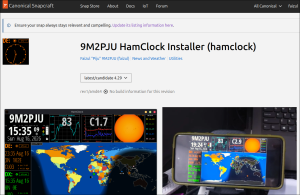
.AppImagesingle-file executables. - Snap Store: Canonical Snap package
esphamclockvia Snapcraft. - Flatpak / Flathub: Flathub package
my.hamradio.HamClock(PR #9797).
3. Automated Windows 10 & 11 Deployment (PowerShell & WSLg)
Radio amateurs operating Windows workstations can now launch HamClock with a single PowerShell command (irm https://raw.githubusercontent.com/9M2PJU/9M2PJU-HamClock-Installer/main/scripts/install.ps1 | iex). The script detects the host environment and configures HamClock to run smoothly via WSL2 / WSLg as a hardware-accelerated desktop window or via Docker Desktop as a local background service.
4. Low-Power Android Tablet & Phone Shack Clock (<3W) with Fully Kiosk
Spare Android tablets and phones can be repurposed into permanent, responsive shack touch monitors using Termux. The dedicated Termux installer script compiles HamClock natively on ARM using Clang with Android Bionic libc fdsan protection, running as a high-efficiency background daemon (hamclock -k &).
When paired with Fully Kiosk Browser & Launcher, the Android device becomes a dedicated shack appliance:
- True Full-Screen Borderless Display: Completely hides Android system status bars and navigation buttons.
- Automatic Screen Fitting: Scales and centres the HamClock viewport perfectly across 800×480, 1600×960, or 2400×1440 resolutions without clipping or scrollbars.
- 24/7 Always-On Display: Prevents the device from sleeping, with customizable night dimming schedules to protect screens from burn-in.
- Sub-3-Watt Power Consumption: Consumes a fraction of the electricity required by desktop monitors or Raspberry Pi setups. This ultra-low power profile makes it ideal for 24/7 shack wall displays, off-grid solar stations, portable field activations (SOTA, POTA, BOTA), and tactical Emergency Communications (EmComm) deployments.
5. Multi-Architecture Docker with Instant Resolution Switching
For operators running home labs, Proxmox nodes, TrueNAS/Unraid boxes, Synology NAS units, or headless Raspberry Pis, the official Docker container (ghcr.io/9m2pju/esphamclock) provides a complete, self-contained deployment:
- Multi-Arch Support: Automated GitHub Actions workflows build native binaries for
linux/amd64,linux/arm64(Raspberry Pi 4/5, Apple Silicon), andlinux/arm/v7(Raspberry Pi 2/3). - All Four Resolutions Pre-Compiled: The image includes all four resolution targets pre-built. You can switch between
800x480,1600x960,2400x1440, and3200x1920simply by editing theRESOLUTIONenvironment variable and restarting the container.
6. Transceiver CAT Integration (rigctld & flrig)
HamClock connects directly to your radio transceiver via Hamlib’s rigctld daemon or flrig. As you spin your radio’s physical VFO dial, HamClock automatically detects frequency changes and switches its VOACAP HF propagation prediction bands in real time. Clicking on any DX cluster spot on the HamClock screen sends a Click-to-Tune (QSY) command to your rig, instantly jumping to the spotted frequency and mode.
7. Antenna Rotator Control (rotctld)
With built-in support for Hamlib’s rotctld, HamClock provides full 1-axis (Azimuth) and 2-axis (Azimuth/Elevation) antenna rotator tracking. Clicking any location on the Azimuthal Great Circle map automatically turns your beam antenna to the short-path or long-path bearing. During satellite passes, HamClock actively tracks and slews elevation rotators to follow the spacecraft across the sky.
Core Feature Subsystems
+-------------------------------------------------------------------------+
|                  HamClock Comprehensive Subsystems                      |
+-------------------+--------------------+-------------------+------------+
| Space Weather     | HF Propagation     | Cartography       | Automation |
| - Solar Flux (SFI)| - VOACAP De-DX     | - Mercator / Rob. | - Rig CAT  |
| - Sunspot Number  | - Band Conditions  | - Azimuthal Beam  | - Rotators |
| - Geomag Kp / Ap  | - NCDXF Beacons    | - Greyline Sun/Moon- ADIF Logs |
| - SDO EUV Images  | - PSK Reporter FT8 | - Maidenhead Grid | - GPS NMEA |
+-------------------+--------------------+-------------------+------------+
1. Space Weather & Solar Dynamics
- Live Solar Metrics: Real-time ingest of the 10.7 cm Solar Flux Index (SFI), Sunspot Number (SSN), planetary geomagnetic disturbance Kp and Ap indices, and GOES satellite X-ray flare flux.
- Solar Dynamics Observatory (SDO): High-resolution solar ultraviolet imagery displaying active sunspot regions and coronal holes across multiple wavelengths.
- Geomagnetic Alerts: Real-time warnings for geomagnetic storms, solar radiation events, and aurora oval visualisers.
2. VOACAP Propagation Engine & Band Conditions
- Point-to-Point Modelling: Evaluates ionospheric critical frequencies and ray-path geometry to predict Maximum Usable Frequency (MUF) and circuit reliability between your station (DE) and any target grid square (DX).
- 80m through 10m Band Matrix: Visual dashboard indicating active HF band openings in real time.
- NCDXF/IARU International Beacon Network: Synchronised tracking of the global 18-beacon HF network across 20m, 17m, 15m, 12m, and 10m bands.
3. Advanced Cartography & Greyline Tracking
- Projection Versatility: Switch between standard Mercator, Robinson world maps, and Azimuthal Great Circle projections centred directly on your station QTH to visualise exact antenna beam headings.
- Real-Time Day/Night Terminator: Visualises solar sunrise/sunset greyline propagation paths where D-layer ionospheric absorption drops while F-layer refraction remains active.
- Overlay Layers: Maidenhead 6-character grid locators, CQ zones, ITU zones, and active weather radar overlays.
4. Digital Modes, Satellites & Live ADIF Logging
- Real-Time ADIF Log Ingestion: Accepts live UDP broadcast packets from WSJT-X, N1MM Logger+, and Log4OM, rendering on-air contacts instantly as glowing pins on the world map.
- PSK Reporter Integration: Visualises real-time FT8, FT4, and CW spots on the globe.
- Satellite Tracking: Predicts next pass times, elevation trajectories, Doppler frequency shifts, and Earth-Moon-Earth (EME) mutual visibility windows for ISS, AO-91, RS-44, and IO-117.
Display Resolution Guide
HamClock supports four display geometries tailored for different viewing environments:
+-------------------------------------------------------------------------+
|                      Four Scaled Resolution Targets                     |
+--------------------+---------------------+------------------------------+
| 800 × 480          | 1600 × 960 ⭐        | 2400 × 1440 / 3200 × 1920    |
| - Standard Def     | - Full HD Sweet Spot| - 2K Quad HD / 4K Ultra HD   |
| - 5"–7" RPi Screens| - Desktop & Tablets | - High-DPI & Command Centres |
+--------------------+---------------------+------------------------------+| Resolution | Dimensions | Recommended Use Case |
|---|---|---|
800x480 |
800 × 480 px | Standard 5″ and 7″ Raspberry Pi official touchscreens, compact smartphones, and small kiosks. |
1600x960 (Recommended) |
1600 × 960 px | 1080p Full HD monitors, desktop windows, iPads, Android tablets, and wall dashboard screens. |
2400x1440 |
2400 × 1440 px | 2K / QHD monitors, high-DPI computer screens, and wide shack control displays. |
3200x1920 |
3200 × 1920 px | 4K UHD large televisions, club station dashboards, and emergency operations centres (EOC). |
Comparison: 9M2PJU HamClock vs Alternatives
| Feature | 9M2PJU HamClock Installer | Original Clear Sky HamClock | CYD Ham Dashboard (ESP32) | Online Web Portals |
|---|---|---|---|---|
| Backend Integration | Native OHB (ohb.hamclock.app) | Defunct (Offline) | Direct REST APIs | Cloud Server |
| Supported Platforms | Linux, Windows, Android, Pi, Mac, BSD, Docker | Linux, RPi, ESP8266 | ESP32-2432S028R | Any Browser |
| Binary Packages | .deb, .rpm, AUR, AppImage, Snap, Flatpak | Source only | Firmware binary only | N/A |
| Windows Support | Automated PowerShell + WSLg / Docker | Manual WSL setup | N/A | Browser |
| Android Tablet Support | Native ARM Termux build + Fully Kiosk (<3W) | No | No | Browser |
| Multi-Arch Docker | Yes (amd64, arm64, arm/v7) | No | No | N/A |
| Resolution Targets | 800×480, 1600×960, 2K, 4K | Fixed at Compile | Fixed (320×240) | Browser Dependent |
| Docker Res Switching | Instant (via ENV Variable) | No | No | N/A |
| Interactive Web Mirror | Yes (WebSocket on Port 8081) | Yes (Port 8081) | No | Native |
| Rig CAT & Rotator | Yes (rigctld, flrig, rotctld) | Yes | No | No |
| Official Portal | hamclock.hamradio.my | clearskyinstitute.com (EOL) | GitHub | Varies |
Complete Installation & Deployment Guide
Choose your operating system or deployment method below:
+-------------------------------------------------------------------------+
|                  Universal Deployment Methods Matrix                    |
+--------------------+---------------------+------------------------------+
| 1. Native 1-Liner  | 2. Windows Script   | 3. Android Termux + Kiosk    |
| curl -fsSL...|bash | irm ...install.ps1  | termux/install.sh + Fully    |
+--------------------+---------------------+------------------------------+
| 4. Native Packages | 5. Docker Launcher  | 6. Docker Compose Stack      |
| .deb, .rpm, AUR    | install-docker.sh   | docker compose up -d         |
+--------------------+---------------------+------------------------------+
1. Universal 1-Line Native Installer (Linux, Raspberry Pi, Mac, FreeBSD)
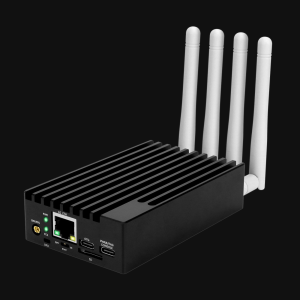
For dedicated Raspberry Pi touchscreens, Inovato Quadra mini PCs, or Linux workstations:
curl -fsSL https://raw.githubusercontent.com/9M2PJU/9M2PJU-HamClock-Installer/main/install.sh | bashYou can also pass your desired resolution target directly:
# Full HD Desktop (1600x960)
TARGET=1600x960 curl -fsSL https://raw.githubusercontent.com/9M2PJU/9M2PJU-HamClock-Installer/main/install.sh | bash

# Raspberry Pi Direct Framebuffer (/dev/fb0)
TARGET=fb0-800x480 curl -fsSL https://raw.githubusercontent.com/9M2PJU/9M2PJU-HamClock-Installer/main/install.sh | bash

# Headless Web Server Only (No GUI libraries needed)
TARGET=web-1600x960 curl -fsSL https://raw.githubusercontent.com/9M2PJU/9M2PJU-HamClock-Installer/main/install.sh | bash
2. Windows 10 & 11 Automated PowerShell Installer
Open PowerShell (press Win + X, then click Terminal or PowerShell) and run:
irm https://raw.githubusercontent.com/9M2PJU/9M2PJU-HamClock-Installer/main/scripts/install.ps1 | iex- WSL2 / WSLg: Renders HamClock directly as a smooth, hardware-accelerated Windows desktop window.
- Docker Desktop: Starts the containerised headless service and opens
http://localhost:8081/live.html.
3. Android Phone & Tablet Setup (Termux <3W Touch Clock & Fully Kiosk Browser)
Repurposing an old or spare Android tablet or phone creates one of the lowest-power (<3W), most responsive, and cost-effective dedicated HamClock touch dashboards available.
+-------------------------------------------------------------------------+
|                  Android Termux + Fully Kiosk Architecture               |
+-------------------------------------------------------------------------+
| [Hardware Layer]: Android Tablet / Phone (ARM64 / ARMv7, <3 Watts Power)|
|                                    |                                    |
| [Userspace Layer]: Termux (F-Droid)                                     |
|  - Native Clang Compiler + POSIX HAL                                    |
|  - Android Bionic fdsan runtime hook (disable-fdsan.o)                  |
|  - HamClock Web Daemon: hamclock -k & (Listening on Port 8081 / 8080)   |
|                                    |                                    |
| [Presentation Layer]: Fully Kiosk Browser & Launcher                     |
|  - Start URL: http://localhost:8081/live.html                           |
|  - Edge-to-Edge Fullscreen (Hides Status & Nav Bars)                    |
|  - Auto-Fit Scaling + Screen Wake Lock + Night Dimming Schedules        |
+-------------------------------------------------------------------------+
Step 1: Install Termux via F-Droid
Important: Do NOT install Termux from the Google Play Store. The Play Store build is deprecated and unsupported due to Android OS target SDK restrictions. Install the official build from F-Droid or from the Termux GitHub Releases.
Step 2: Run the Automated 1-Line Termux Installer
Open the Termux app and paste this single command:
pkg update -y && pkg install -y curl && bash -c "$(curl -fsSL https://raw.githubusercontent.com/9M2PJU/9M2PJU-HamClock-Installer/main/termux/install.sh)"The installer automatically performs the following tasks:
- Detects the Termux Android environment.
- Installs required build tools (
clang,make,git,curl) viapkg. - Prompts you to select your desired resolution (
1600x960for tablets,800x480for phones, or2400x1440for 2K displays). - Compiles the
disable-fdsan.chelper to prevent Android Bionic libc socket aborts. - Builds the native ARM binary with Clang and places
hamclockinto$PREFIX/bin/hamclock.
Step 3: Non-Interactive / Scripted Resolution Installs
If you prefer to bypass the interactive prompt, pass the TARGET variable directly:
# For Standard Tablets & 1080p Displays (Recommended)
TARGET=1600x960 bash -c "$(curl -fsSL https://raw.githubusercontent.com/9M2PJU/9M2PJU-HamClock-Installer/main/termux/install.sh)"

# For Smartphones & Compact Displays
TARGET=800x480 bash -c "$(curl -fsSL https://raw.githubusercontent.com/9M2PJU/9M2PJU-HamClock-Installer/main/termux/install.sh)"

# For 2K High-DPI Tablets
TARGET=2400x1440 bash -c "$(curl -fsSL https://raw.githubusercontent.com/9M2PJU/9M2PJU-HamClock-Installer/main/termux/install.sh)"
Step 4: Prevent Android Sleeping & Configure Wake Lock
To ensure HamClock runs continuously without Android killing the background process:
- In Termux, acquire a CPU wake lock:
termux-wake-lock - Disable Android Battery Optimization: Go to Android Settings ➔ Apps ➔ Termux ➔ Battery and set it to “Unrestricted” (or Don’t optimize).
Step 5: Start the HamClock Daemon
Launch HamClock in the background:
hamclock -k &(The -k flag skips the initial setup countdown and boots immediately. Use hamclock -k -g & to automatically geolocate your station DE grid via public IP).
Step 6: Configure Fully Kiosk Browser (Edge-to-Edge Shack Display)
For the ultimate borderless, 24/7 dedicated shack dashboard experience:
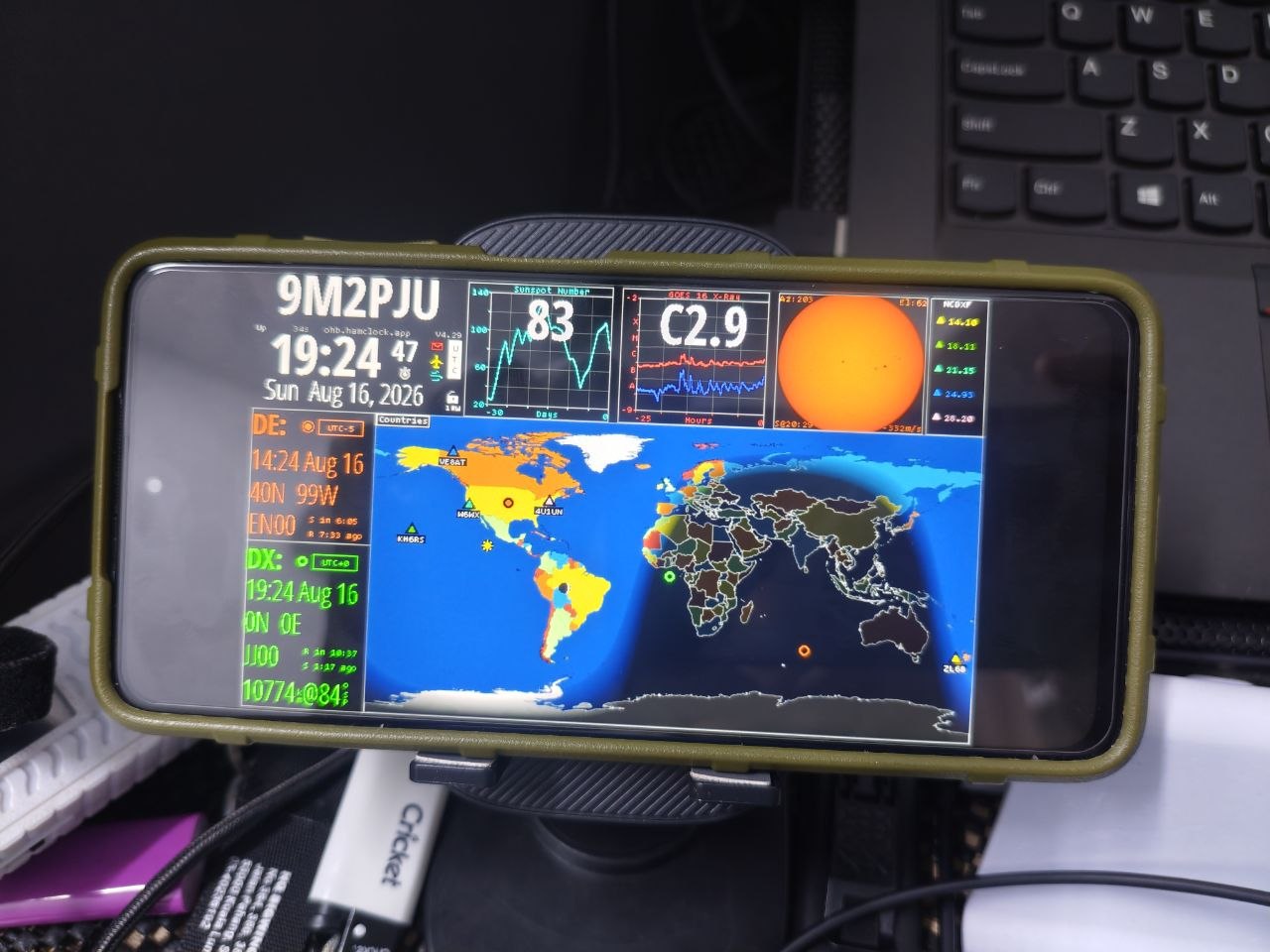
- Install Fully Kiosk Browser & Launcher from the Google Play Store (or direct APK from fully-kiosk.com).
- Open Fully Kiosk Browser settings:
- Web / Start URL: Set to
http://localhost:8081/live.html - Display / Enable Fullscreen Mode: Turn ON (completely removes Android status and navigation bars).
- Web Zoom and Scaling / Auto-fit to Screen: Turn ON (automatically fits and centres the HamClock canvas to your tablet’s exact aspect ratio with zero black borders).
- Device Management / Keep Screen On: Turn ON (maintains 24/7 display illumination).
- Screen Off and Screensaver: (Optional) Set brightness dimming schedules during late night hours to conserve display life while remaining readable in the dark.
- Appliance Mode: (Optional) Set Fully Kiosk as your Android Home app / default launcher to boot directly into HamClock on power-up.
- Web / Start URL: Set to
Step 7: Autostart on Android Device Boot (Termux:Boot)
To make HamClock start automatically whenever your Android tablet powers on or reboots:
- Install the Termux:Boot add-on from F-Droid.
- Launch the Termux:Boot app once to grant background launch permissions.
- In Termux, create the autostart script:
mkdir -p ~/.termux/boot
cat << 'EOF' > ~/.termux/boot/start-hamclock.sh
#!/data/data/com.termux/files/usr/bin/bash
termux-wake-lock
hamclock -k &
EOF
chmod +x ~/.termux/boot/start-hamclock.sh
Step 8: Under the Hood – Android Bionic libc fdsan Stability
On Android 10 and newer, Google introduced the File Descriptor Sanitizer (fdsan) in Bionic libc. By default, fdsan forces fatal aborts whenever a file descriptor is closed while still associated with an open C standard library FILE* stream.
The 9M2PJU Termux distribution includes a custom constructor (termux/disable-fdsan.c) and WebSocket connection patch (termux/patches/01-ws-fdsan-fix.patch) that seamlessly handles socket state transitions. This guarantees 100% crash-free 24/7 operation across Android 10, 11, 12, 13, 14, 15, and 16 devices.
Why Android Termux HamClock is Ideal for SOTA, Field Operations, and EmComm
Deploying HamClock on a smartphone via Termux and Fully Kiosk Browser provides critical tactical and operational advantages for portable field activations (Summits on the Air – SOTA, Parks on the Air – POTA, Islands on the Air – IOTA) and Emergency Communications (EmComm) teams:
- Ultra-Low Power Budget (<1.5W to 3W): Traditional field dashboards built on laptops or Raspberry Pi setups with HDMI monitors draw 15W to 35W, rapidly depleting portable 12V LiFePO4 batteries. An Android smartphone running native ARM HamClock consumes less than 3W, operating for 8 to 14+ hours on its internal battery alone. It can run indefinitely when topped off by a tiny 10W folding USB solar panel or 10,000mAh power bank, reserving station battery capacity entirely for radio transmissions.
- Zero Added Pack Weight for SOTA Climbers: On arduous mountain summit ascents where every single gram matters, packing separate single-board computers, cables, and screens is impractical. Activators already carry an Android smartphone for logging and APRS beaconing. HamClock runs in the background on the same handset without adding extra pack weight.
- 100% Offline Ephemeris and Great Circle Bearings: HamClock calculates Plan-13 satellite orbital mechanics, local solar sunrise/sunset greyline terminators, Great Circle beam headings, and Maidenhead grid distances purely through internal mathematical algorithms and cached Keplerian orbital elements (TLEs). Even when activating remote valleys or peaks with zero cellular reception, operators retain full directional and solar telemetry.
- Instant Cellular Ingest and Field Team Wi-Fi Sharing: When 4G/5G mobile data is available at an incident command post or summit, HamClock automatically pulls live NOAA space weather (SFI, Kp index) and DX cluster spots. Enabling the Android portable Wi-Fi hotspot allows the entire field camp, SAR team, or EmComm operations tent to view the live interactive HamClock dashboard from their own phones, tablets, or rugged laptops via
http://<phone-ip>:8081/live.html. - Sunlight Readability and Rugged Kiosk Lockdown: Modern outdoor-rated smartphone displays deliver 1,000 to 2,000+ nits of peak brightness, ensuring legibility under intense mountaintop sun where typical field LCDs wash out. Fully Kiosk Browser locks the display into a borderless, accidental-touch-resistant dashboard that prevents accidental app switching in rain, wind, or while wearing tactical gloves.
- Tactical EmComm Situational Awareness: During emergency disaster deployments (floods, typhoons, power grid failures), the Net Control Station (NCS) gains instant real-time visibility into geomagnetic storm levels, solar flare X-ray flux, and ionospheric absorption, enabling timely tactical QSY decisions for regional Near Vertical Incidence Skywave (NVIS) and long-distance emergency traffic nets.
4. Native Linux Packages (.deb, .rpm, AUR, AppImage, Snap, Flatpak)
Arch Linux / Manjaro (AUR)
# Using yay
yay -S hamclock-git

# Using paru
paru -S hamclock-git
Debian / Ubuntu / Raspberry Pi OS (.deb)
# Download the matching deb for your CPU architecture
sudo dpkg -i hamclock_4.29-1_amd64.deb    # x86_64 PCs
sudo dpkg -i hamclock_4.29-1_arm64.deb    # Raspberry Pi 4/5 & 64-bit ARM
sudo dpkg -i hamclock_4.29-1_armhf.deb    # Raspberry Pi 2/3 & 32-bit Raspbian
sudo apt-get install -f                   # Resolve any missing dependencies
Fedora / RHEL / openSUSE (.rpm)
sudo rpm -Uvh hamclock-4.29-1.x86_64.rpm  # x86_64
sudo rpm -Uvh hamclock-4.29-1.aarch64.rpm # ARM64
Universal Linux AppImage
chmod +x HamClock-4.29-x86_64.AppImage
./HamClock-4.29-x86_64.AppImage -r 1600x960
Snap Store (Ubuntu / Universal Linux)
sudo snap install esphamclockFlatpak / Flathub
flatpak install flathub my.hamradio.HamClock
flatpak run my.hamradio.HamClock
5. 1-Line Automated Docker Installer
Run the automated Docker launcher to pull the container, select your resolution, and start HamClock immediately:
curl -fsSL https://raw.githubusercontent.com/9M2PJU/9M2PJU-HamClock-Installer/main/install-docker.sh | bash6. Docker Compose Stack
- Create a
docker-compose.ymlfile:services: hamclock: image: ghcr.io/9m2pju/esphamclock:latest container_name: hamclock restart: unless-stopped ports: - "8080:8080" # RESTful API & Live Screenshot (/live.png) - "8081:8081" # Real-time Interactive Web UI (/live.html) - "8082:8082" # Read-Only Web Monitor environment: - RESOLUTION=1600x960 # Options: 800x480, 1600x960, 2400x1440, 3200x1920 - EXTRA_ARGS=-k volumes: - hamclock_data:/home/hamclock/.hamclock volumes: hamclock_data: - Start the container:
docker compose up -d - Open your browser and navigate to:
http://<your-server-ip>:8081/live.html
CLI Options and Runtime Reference
| Flag | Argument | Description | Example |
|---|---|---|---|
-k |
none | Skip initial setup countdown and boot immediately | hamclock -k |
-g |
none | Auto-initialize DE location using public IP geolocation (requires -k) |
hamclock -k -g |
-b |
<host:port> |
Override backend server (default: ohb.hamclock.app:80) |
hamclock -b ohb.hamclock.app:80 |
-f |
on / off |
Force initial fullscreen display mode | hamclock -f on |
-d |
<directory> |
Specify working directory (default: ~/.hamclock/) |
hamclock -d /opt/hamclock_data |
-e |
<port> |
RESTful web server port (default: 8080, -1 to disable) |
hamclock -e 8080 |
-w |
<port> |
Read-write live web server port (default: 8081, -1 to disable) |
hamclock -w 8081 |
-r |
<port> |
Read-only live web server port (default: 8082, -1 to disable) |
hamclock -r 8082 |
-t |
<percent> |
Throttle maximum CPU usage percentage (default: 80) |
hamclock -t 50 |
-m |
none | Enable demo mode | hamclock -m |
-v |
none | Display version and build information | hamclock -v |
-h |
none | Display comprehensive help and command options | hamclock -h |
Frequently Asked Questions (FAQ)
What is the 9M2PJU HamClock Installer?
The 9M2PJU HamClock Installer is an open-source, maintained distribution and automated setup suite for HamClock, updated with native Open HamClock Backend (OHB) support, multi-architecture Docker deployment, and rig CAT/rotator automation.
Why was this updated distribution created?
Following the passing of HamClock creator Elwood Downey WB0OEW, the original Clear Sky Institute backend servers ceased operations. This repository ensures HamClock remains fully functional, modernised, and easy to deploy on modern operating systems and containers.
How do I run HamClock on an Android phone or tablet?
Install Termux from F-Droid, execute the 1-liner installer script to compile HamClock natively on ARM, and launch hamclock -k &. Open Fully Kiosk Browser pointing to http://localhost:8081/live.html for an edge-to-edge full-screen shack touch monitor consuming under 3 watts.
How does transceiver CAT and rotator automation work?
HamClock connects over rigctld, flrig, or rotctld. Rotating your transceiver’s VFO dial automatically updates HamClock’s VOACAP propagation band. Clicking DX spots commands the rig to tune to that frequency, while clicking the map slews antenna rotators.
How do I change the resolution in Docker?
All four resolutions (800×480, 1600×960, 2400×1440, 3200×1920) are pre-compiled in the Docker image. Simply change the RESOLUTION environment variable in your docker-compose.yml and run docker compose up -d.
Summary: Keeping an Amateur Radio Legend Alive
HamClock represents the peak of amateur radio station visualisation. By bridging Elwood Downey WB0OEW’s masterpiece with the community-driven Open HamClock Backend, universal packaging (.deb, .rpm, AUR, AppImage, Snap, Flatpak), automated Windows and Android Termux installers, Fully Kiosk Browser touch integration, multi-architecture Docker containers, transceiver CAT synchronisation, and antenna rotator control, the 9M2PJU HamClock Installer ensures that every radio amateur can enjoy a reliable, high-resolution propagation dashboard in their shack.
73 from 9M2PJU.
Sources and Further Reading
- 9M2PJU HamClock Official Portal – Dedicated web portal, one-line installer commands, and feature guides.
- 9M2PJU-HamClock-Installer GitHub Repository – Source code, installation scripts, package builds, and documentation.
- HamClock Android & Termux Guide – Official repository documentation for Android setup.
- 9M2PJU HamClock Docker Container (GHCR) – Multi-arch container registry.
- Open HamClock Backend (OHB) Official Portal – Community-maintained backend infrastructure.
- Open Hamclock Backend Blog Post – Detailed technical analysis of the OHB server architecture.
- CYD Ham Dashboard Guide – Low-power ESP32 Cheap Yellow Display shack dashboard.
- 9M2PJU HF Propagation Prediction Tool – Free web-based VOACAP HF propagation predictor.



Post Comment