amateur radio
open source
Technology
2m, 70cm, 9M2PJU, Allmon3, AllStarLink, AllStarLink 3, amateur radio, app_rpt, ASL3, Asterisk, autopatch, baofeng, Bookworm, CM108, Cockpit, D-STAR, debian, digital voice bridging, DMK URI, DMR, DRA-30, DTMF, DVSwitch Mobile, EchoIRLP, echolink, ham radio, hamradio.my, IAX2, IAXRpt, IRLP, Jim Dixon, Jonathan Taylor, K1RFD, Linphone, node linking, NodeRemote, NXDN, P25, phone patch, Pi Zero 2 W, RA-42, raspberry pi, Raspberry Pi 4, Raspberry Pi 5, remote rig, Repeater, RepeaterPhone, SHARI PiHat, simplex, SIP, SVXLink, Transceive, Trixie, UV-K5, voip, WB6NIL, WebTransceiver, yaesu, Yaesu Fusion
9M2PJU
1 Comments
EchoLink and AllStarLink: Build a Home Node and Operate Your Radio From Your Phone
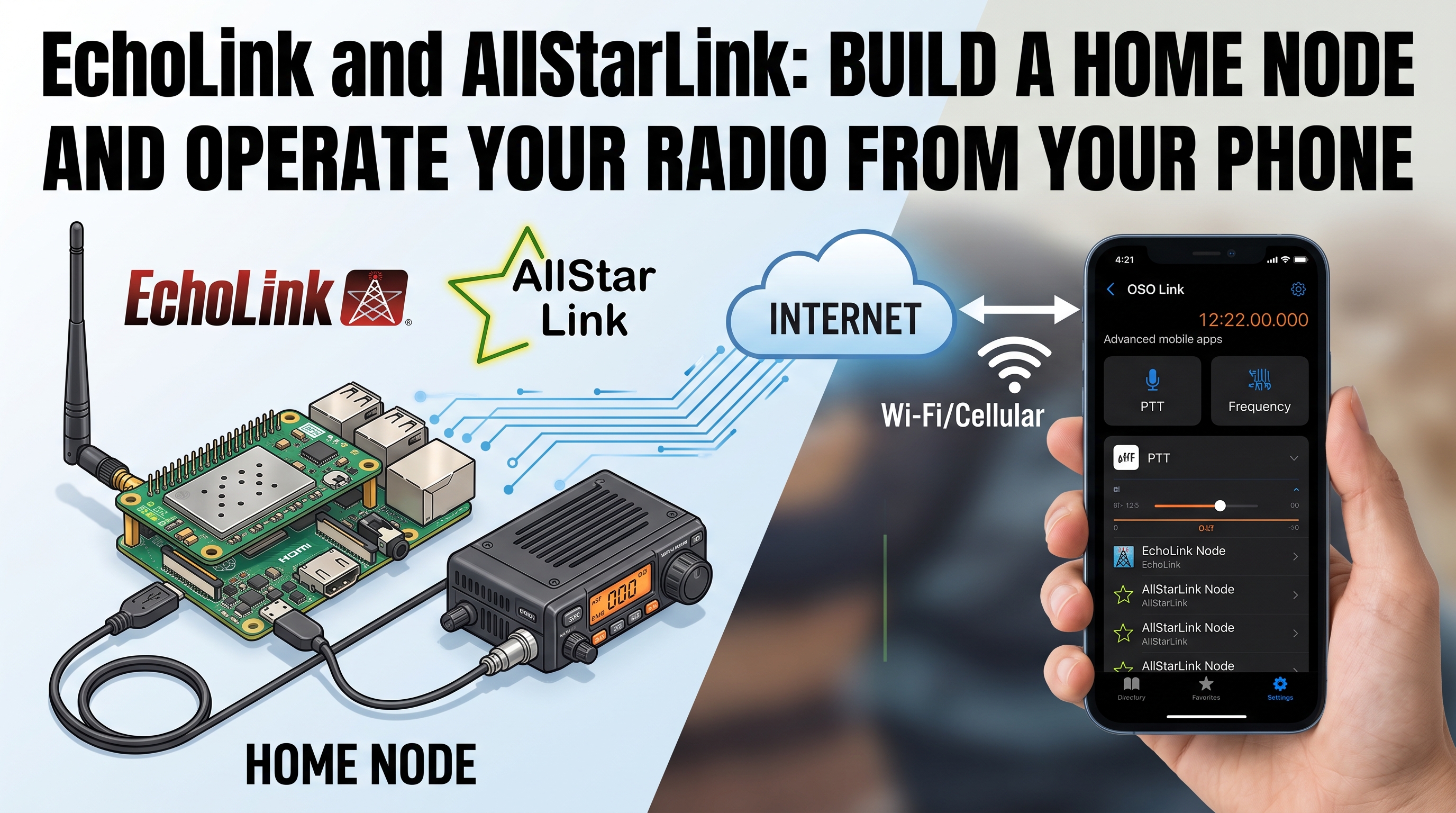
TL;DR: EchoLink and AllStarLink are the two free, open voice-over-IP networks that let you pipe audio between an amateur radio and the internet. You build a small “node” at home, a Raspberry Pi wired to a 2m or 70cm FM transceiver with a simple audio interface and a PTT circuit, and the node bridges RF to VoIP. Then you install the EchoLink app or an AllStarLink client (DVSwitch Mobile, RepeaterPhone, NodeRemote, IAXRpt, Transceive) on your phone, connect to your home node from anywhere on the internet, and talk into your phone to transmit on your radio’s frequency. AllStarLink 3 (ASL3) is the current generation, runs on a Raspberry Pi 3, 4, 5, or Zero 2 W with a free Debian-based image, and is the recommended path for a new home node in 2026. EchoLink is simpler and older, with official iOS and Android apps, but no rig control. Both require a valid amateur radio licence to transmit.
What Are EchoLink and AllStarLink?
EchoLink and AllStarLink are the two dominant amateur radio VoIP networks. Both do the same fundamental job: they bridge FM radio audio to the internet, so an operator with a phone (or a PC, or another radio) can talk to an operator on a real RF frequency, anywhere in the world, without needing a propagation path between them.
EchoLink
EchoLink was created by Jonathan Taylor K1RFD in 2002 and is the older and simpler of the two. It is a client/server VoIP system with a central validation server: you register with your callsign, prove you hold a ham licence, and the EchoLink servers assign you a node number. Once validated, you can:
- Run EchoLink in user mode on a phone or PC, talking to other EchoLink users over the internet with no radio involved.
- Run EchoLink in sysop mode on a PC (Windows) or a Pi (via SVXLink or EchoIRLP), wired to an FM transceiver, to create an RF gateway that bridges a simplex frequency or a repeater to the EchoLink network.
The EchoLink iOS and Android apps are official, free, and only do user mode. They do not run sysop nodes. To build an RF gateway node, you need a PC or a Pi running the sysop software, plus a radio interface.
EchoLink uses UDP ports 5198 and 5199 for audio, and TCP port 5200 for directory and connection setup. Port forwarding on your router is required for a sysop node.
AllStarLink
AllStarLink (ASL) was created by Jim Dixon WB6NIL around 2008 and is built on Asterisk, the open source PBX, with a custom app_rpt application that turns Asterisk into a radio repeater controller and VoIP bridge. Where EchoLink is a single-purpose VoIP system, AllStarLink is a full Asterisk telephony switch with radio capabilities, which means it can do things EchoLink cannot: link multiple nodes together into a conference, connect to SIP and IAX phones, run DTMF-controlled autopatches, and bridge to other VoIP systems.
The current version is AllStarLink 3 (ASL3), released in 2024 and actively developed on GitHub. ASL3 runs on Asterisk 22 LTS, Debian 12 (Bookworm) or 13 (Trixie), and supports the Raspberry Pi 3, 4, 5, Zero 2 W, and 400, plus any x86_64 or arm64 Debian machine. It is a complete rewrite of the older ASL1/ASL2/HamVOIP stack, with 15 years of Asterisk bug fixes and security improvements, non-root Asterisk for better security, and apt-based package updates that do not break on kernel upgrades.
AllStarLink nodes are numbered (e.g. node 53123), and you “dial” a node number to connect to it, like a phone number. You can link many nodes together simultaneously, creating a network of nodes that all participate in the same conversation. This is the core feature that makes AllStarLink more powerful than EchoLink for repeater and club use.
Last updated: August 2026. ASL3 is the current version; ASL2 and HamVOIP are legacy.
The Core Idea: A Node at Home, an App on Your Phone
The setup that makes both networks useful for the “phone patch” use case is the same: you build a node at home, and you connect to it from your phone.
+----------+    internet    +----------+    audio +    +----------+
|  Phone   |  VoIP audio   | Home node|  PTT wire |  FM radio|
|  (EchoLink app,          | (Pi +     |=========> |  on 2m   |
|   DVSwitch,              | Asterisk/ |           |  or 70cm)|
|   RepeaterPhone)         | EchoLink) |  <======= |  RX audio|
+----------+              +----------+   back     +----------+
       ^                        |                       |
       |    RX audio back       |    RF to/from         |
       +<=======================+    the air            |
                                +<=======================+
- You build a node: a Raspberry Pi running ASL3 (or EchoLink sysop software), wired to an FM transceiver through an audio interface and a PTT circuit.
- The node is connected to the internet and registered with the AllStarLink or EchoLink network.
- The radio is tuned to a simplex frequency (e.g. 145.500 MHz) or a repeater input.
- You install an app on your phone (EchoLink, DVSwitch Mobile, RepeaterPhone, etc.).
- From anywhere on the internet, you connect your phone app to your home node.
- When you press PTT on the phone and talk, the audio goes: phone mic, app, internet, node, audio interface, radio mic input, RF out.
- When the radio receives, the audio goes the other way: RF in, radio speaker out, audio interface, node, internet, phone speaker.
That is the phone patch. You hold your phone, talk into it, and your voice comes out of your home radio on 145.500 MHz (or whatever frequency you tuned it to). Anyone in RF range of your radio hears you. When they reply, you hear them on your phone. You can do this from your office, from a hotel, from another country.
The difference between EchoLink and AllStarLink at this level is mostly software and capability, not the basic concept. Both do the phone patch. AllStarLink does more on top.
EchoLink: The Simpler Path
What you need for an EchoLink sysop node
- A Windows PC, or a Raspberry Pi running SVXLink or EchoIRLP.
- An FM transceiver (a Baofeng UV-K5, a Yaesu FT-60, any 2m or 70cm handheld or mobile).
- An audio interface between the PC/Pi and the radio. This can be a commercial device (Signalink, RIGblaster, DRA-30, DMK URI) or a DIY circuit (a $5 USB sound card, two audio transformers, a PTT transistor, and some wire).
- A full-time internet connection with UDP ports 5198 and 5199 forwarded to the node.
- An EchoLink account with your callsign validated.
How the phone app works
The EchoLink app (iOS and Android) is the official client. You log in with your validated callsign, see a directory of all connected stations and conferences, and tap one to connect. When you connect to your own sysop node, you hear whatever the radio is receiving, and when you press the on-screen PTT, your phone audio goes out over the radio. The app does not give you rig control (you cannot change frequency or mode from the phone), but for a fixed-frequency simplex link or a single repeater, that is fine.
EchoLink also supports conferences, which are multi-station voice chat rooms. You can connect your sysop node to a conference, and then anyone on RF and anyone on the conference can hear each other. This is how large regional nets work over EchoLink.
The Raspberry Pi path: SVXLink
If you do not want to dedicate a Windows PC, the standard Linux EchoLink sysop software is SVXLink, maintained by SM0SVX. It runs on a Raspberry Pi (3B+ or 4B recommended, Bullseye or Bookworm) and provides:
- EchoLink sysop mode (RF gateway).
- Repeater logic (COR/CTCSS detection, ID, timeout timer).
- Remote control via DTMF.
- GPIO-based PTT (a single transistor on a GPIO pin keys the radio).
- Multiple receivers and transmitters on one Pi.
SVXLink is in the Debian repositories (sudo apt install svxlink-server), so installation is one command. Configuration is through text files in /etc/svxlink/. The GPIO PTT is configured in /etc/svxlink/gpio.conf. You wire the radio’s audio to a USB sound card on the Pi, and the PTT line to a GPIO pin through a switching transistor.
The alternative Pi path is EchoIRLP, which combines EchoLink with IRLP (the older Internet Radio Linking Project). EchoIRLP runs on a Pi with a dedicated IRLP node board (the IRLP V3 board from the IRLP project), which provides the audio interface and PTT hardware. This is a more expensive but more polished setup.
AllStarLink: The More Powerful Path
AllStarLink is the recommended path for a new home node in 2026, because ASL3 is actively developed, runs on modern hardware (including the Pi 5), and gives you capabilities EchoLink does not.
What you need for an ASL3 node
- A Raspberry Pi 3, 4, 5, or Zero 2 W (Pi 4 or 5 recommended).
- A microSD card (8 GB or larger, Class 10).
- An FM transceiver (same as EchoLink: any 2m or 70cm radio).
- A radio interface. The most common for ASL3 is a USB audio interface with a PTT output: the DMK URI (URIb), the SHARI PiHat, the DRA-30, the RA-42, the MD-400, or a simple CM108 USB sound card with a GPIO PTT mod. The CM108 is the cheapest option (about $5-10) and is the basis of most DIY ASL3 nodes.
- A full-time internet connection. ASL3 uses IAX2 (Inter-Asterisk Exchange) on UDP port 4569 by default, plus HTTP for registration on TCP port 80.
- An AllStarLink account (free, validated with your callsign at allstarlink.org).
The ASL3 Appliance image
The easiest way to start is the ASL3 Appliance image, a pre-built Raspberry Pi OS image with ASL3, Asterisk 22, Allmon3 (web monitoring), Cockpit (web administration), and the ASL3 menu system all pre-installed. You download it from the AllStarLink GitHub, flash it to a microSD card with Raspberry Pi Imager or balenaEtcher, boot the Pi, and run asl-menu to configure your node.
The ASL3 Appliance includes:
- Debian 12 (Bookworm) or 13 (Trixie) operating system.
- Asterisk 22 LTS with
app_rpt. asl-*command-line tools.- ASL3 Menu (
asl-menu) for configuration. - Allmon3 for web-based node monitoring.
- Cockpit for web-based system administration.
- A landing page for the Pi.
How the phone app works
AllStarLink has several phone apps, each with different strengths:
- DVSwitch Mobile (Android) – the most full-featured ASL3 client. Supports IAX2 direct authentication, Web Transceiver mode (using your AllStarLink portal account), and Node mode (where the app registers as its own node number). Has a dedicated PTT interface, hardware PTT button support for network radios, background PTT when the screen is locked, Bluetooth headset support, full-duplex audio, and USRP bridging to DMR/D-Star/Fusion/NXDN/P25 through DVSwitch. Free on Google Play.
- RepeaterPhone (iOS) – the primary iOS client. Supports AllStarLink and EchoLink, with a big PTT button (toggle or hold-to-talk), node directory search, favorites, Bluetooth headset support, Apple Watch app for PTT and favorites, and software mic gain boost. Uses ASL Portal/WebTransceiver authentication or node-specific IAX credentials. Free on the App Store.
- NodeRemote (iOS and Android) – a node control app rather than an audio app. It connects to your ASL3 node’s Asterisk Manager Interface and lets you connect/disconnect your node to other nodes, monitor active connections, and view node status from your phone. Pairs with an audio app for the voice path.
- IAXRpt (PC) and Transceive (macOS) – desktop softphone clients that connect to ASL3 nodes over IAX2.
- Linphone and other SIP/IAX softphones – generic VoIP clients that can connect to ASL3 if you configure SIP or IAX authentication on the node.
The typical workflow: you run an ASL3 node at home, wired to a 2m radio on 145.500 simplex. You install DVSwitch Mobile (Android) or RepeaterPhone (iOS) on your phone. From anywhere, you open the app, connect to your home node, and you have a two-way audio path to your radio. Press PTT on the phone, talk, and you are on 2m. Release PTT, and you hear whatever the radio receives.
What AllStarLink can do that EchoLink cannot
This is where the comparison gets interesting. AllStarLink is Asterisk, which means it inherits the entire Asterisk telephony feature set:
- Node linking: dial a node number to connect your node to another node, or to many nodes at once. You can build a private network of nodes that are all linked together, so a transmission on one is heard on all. This is how regional AllStarLink nets work.
- DTMF control: from your phone app or from an RF radio, you send DTMF commands to connect, disconnect, monitor, or control nodes.
*3connects to a node,*1disconnects,*72autopatch, etc. - Autopatch: AllStarLink can connect to a phone line (or a SIP trunk) and let RF users make phone calls through the node. This is the literal, original phone patch, and ASL3 still supports it.
- SIP and IAX phones: you can register a SIP desk phone, a softphone, or an IAX client to your ASL3 node, and it becomes an extension on your radio system. This is useful for club stations where multiple operators can monitor and transmit from their own devices.
- WebTransceiver: a browser-based PTT interface, so you can operate from a laptop without installing an app.
- Allmon3: a web dashboard that shows all connected nodes, audio levels, last-heard callsigns, and node status in real time.
- Bridging to digital modes: through DVSwitch and Analog_Bridge, ASL3 can bridge to DMR, D-STAR, Yaesu Fusion, P25, and NXDN. Your analog 2m node can talk to a DMR repeater or a D-STAR reflector.
- Multi-radio, multi-node: one Pi running ASL3 can run multiple nodes, each connected to a different radio, each with its own node number. A club can run a 2m node, a 70cm node, and a 10m FM node from one Pi.
EchoLink has conferences (multi-station chat rooms), but it does not have DTMF node linking, autopatch, SIP/IAX phone support, digital mode bridging, or multi-radio on one server. If you want any of those, AllStarLink is the answer.
Comparison: EchoLink vs AllStarLink vs RigPi
| Feature | EchoLink | AllStarLink 3 (ASL3) | RigPi |
|---|---|---|---|
| Primary purpose | VoIP-to-RF audio bridge | VoIP-to-RF audio bridge + repeater controller | Full station server (rig control + audio + CW + digital) |
| Software base | Custom (EchoLink) / SVXLink | Asterisk + app_rpt | Custom (Hamlib + Mumble) |
| Runs on | Windows PC, Pi (SVXLink) | Raspberry Pi 3/4/5/Zero 2W, x86_64, arm64 Debian | Raspberry Pi 3B+/4B (no Pi 5) |
| Cost | Free software + radio interface (~$5-50) | Free software + radio interface (~$5-50) | Free software + Pi + audio board (~$50-100) |
| Phone apps | EchoLink (official iOS/Android) | DVSwitch Mobile (Android), RepeaterPhone (iOS), NodeRemote, IAXRpt | Mumble client (any) + browser |
| Rig control | No | No | Yes (Hamlib, 200+ radios) |
| CW keying | No | No | Yes (K1EL WinKeyer) |
| Digital modes (FT8, etc.) | No | No (but bridges to DMR/D-Star/etc. via DVSwitch) | Yes (WSJT-X, Fldigi pre-installed) |
| Node linking | Conferences only | Full DTMF node linking, many-to-many | No |
| Autopatch (phone calls via RF) | No | Yes (SIP trunk or phone line) | No |
| SIP/IAX phone support | No | Yes | No |
| Multi-radio on one server | No | Yes (multiple nodes) | Yes (MOMR) |
| Web monitoring | No | Allmon3 | Built-in web UI |
| License | Free, closed source (EchoLink) / GPL (SVXLink) | GPL (Asterisk, app_rpt) | MIT (RigPi 4) |
| Active development | EchoLink stable, SVXLink maintained | Active (ASL3, 2024-current) | Active (hlnurse, 2025-current) |
The pattern: EchoLink is the simplest, AllStarLink is the most capable for audio/linking/repeater use, RigPi is the only one that gives you rig control and digital modes. For the phone patch use case (talk into your phone, transmit on your radio), EchoLink and AllStarLink are both good; AllStarLink gives you more room to grow.
Building an ASL3 Node: Parts List and Setup
This is the recommended path for a new home node in 2026. Total cost is about $40-80 depending on what you already have.
Parts
- Raspberry Pi 4B (2 GB or 4 GB) – about $35-55. A Pi 3B+ works but is slower. A Pi 5 is the fastest option. A Pi Zero 2 W works for a single low-power node.
- 8 GB+ microSD card, Class 10 – about $8.
- 5V 3A USB-C power supply – about $8.
- USB audio interface with PTT – the CM108 USB sound card is the cheapest ($5-10, requires a simple PTT transistor mod on the GPIO pin). The DMK URI (URIb) is the standard commercial option ($30-40). The SHARI PiHat is a Pi-hat version ($35-45). The DRA-30 and RA-42 are higher-end options ($50-70).
- FM transceiver – any 2m or 70cm handheld or mobile. A Baofeng UV-K5 ($25) works for a simplex node. A Yaesu FT-60, FT-65, or any mobile radio works for more power.
- Audio cable and PTT cable – from the USB interface to the radio’s mic and speaker jacks. Pre-made cables are available for common radios (Baofeng K-plug, Yaesu MH-31, Icom, etc.) for $10-15, or you build your own.
- Internet connection – Ethernet or WiFi, with UDP port 4569 forwarded to the Pi.
Setup steps
- Download the ASL3 Appliance image from the AllStarLink GitHub (about 2-3 GB).
- Flash it to the microSD card with Raspberry Pi Imager or balenaEtcher.
- Boot the Pi, connect it to your network (Ethernet is recommended for a node, WiFi works but is less stable).
- Open a browser and navigate to the Pi’s address (shown on the boot screen or in your router’s DHCP list). The ASL3 landing page gives you a web-based setup wizard.
- Create an AllStarLink account at allstarlink.org if you do not have one. Validate with your callsign and licence.
- Register your node in the AllStarLink Portal. You will be assigned a node number.
- Run
asl-menuon the Pi (via SSH or the Cockpit web terminal) and configure:- Your node number and server.
- The USB audio interface (select it from the device list).
- The radio settings (CTCSS tone, timeout timer, ID).
- The PTT method (GPIO pin for CM108/SHARI, or USB signal for DMK URI).
- Wire the radio: connect the USB interface’s audio out to the radio’s mic input, audio in to the radio’s speaker output, and PTT to the radio’s PTT line.
- Set audio levels: use the ASL3 tune menu to adjust RX and TX audio levels so the radio deviates correctly and the node hears the radio cleanly.
- Test: key up the radio with a handheld, you should hear yourself on the node. Connect to the node from a phone app, you should hear RF audio on the phone and be able to transmit on RF from the phone.
Installing the phone app
- Android: install DVSwitch Mobile from Google Play. Open it, add an account, choose “Web Transceiver” mode (uses your AllStarLink portal credentials) or “IAXRpt” mode (uses credentials you configure on the node). Enter your node number, connect, and you have a PTT button and audio path to your radio.
- iOS: install RepeaterPhone from the App Store. Open it, add an AllStarLink account with your portal credentials, search for your node number, tap to connect, and you have a PTT button and audio. The Apple Watch app lets you trigger PTT from your wrist.
Practical Notes and Honest Caveats
- You need a ham licence to transmit. This is the same point as in the RigPi article. The licence covers the operator and the transmission, not the device. Whether you press PTT on a microphone, a phone screen, or a DTMF keypad, you need a valid amateur radio licence for the band and mode you are using. In Malaysia, that means an Amateur Radio Operator’s Certificate from MCMC and a callsign. EchoLink and AllStarLink both validate your callsign against your licence before activating your account.
- EchoLink validation can take days. EchoLink’s validation is manual (a volunteer checks your licence against your country’s database). AllStarLink validation is faster but still requires proof of licence. Plan for a few days between registration and first use.
- Port forwarding is required. Both EchoLink (UDP 5198/5199) and AllStarLink (UDP 4569) need inbound ports forwarded to the node. If your ISP does not give you a public IP (cellular, CGNAT, some Starlink), you need a VPN or a VPS to get inbound traffic. This is the most common setup problem.
- Audio levels are the hardest part. Too much audio from the radio into the node causes clipping and distortion on the VoIP side. Too much audio from the node into the radio causes overdeviation and splatter on RF. Budget time for level adjustment with the ASL3 tune menu or EchoLink’s audio settings. A service monitor or a second radio helps.
- A Baofeng is fine for a simplex node, but not for a repeater. The Baofeng UV-K5 and similar radios work well for a low-power simplex node on 145.500 MHz. For a repeater link node, you want a mobile radio (Yaesu FT-7900, AnyTone AT-778, etc.) with better duty cycle and a real heat sink. A handheld will overheat if you transmit continuously.
- AllStarLink is more complex to configure than EchoLink. ASL3 has more moving parts (Asterisk, app_rpt, rpt.conf, extensions.conf, usbradio.conf). The ASL3 menu and the web setup wizard help a lot, but expect to spend an evening reading the manual. EchoLink sysop mode on Windows is point-and-click; SVXLink on a Pi is text-file configuration. AllStarLink is text-file configuration with a menu helper.
- EchoLink mobile apps do not do sysop mode. The EchoLink iOS and Android apps are user-mode only. You cannot run an RF gateway node from a phone. The node must be a PC or a Pi. The phone app connects to the node as a client.
- AllStarLink nodes are public by default. Your node appears in the AllStarLink node directory, and anyone can connect to it. You can configure your node to require authentication, or to only accept connections from specific node numbers, if you want it private.
- Latency is lower than RigPi’s Mumble path. AllStarLink’s IAX2 protocol and EchoLink’s UDP protocol are both designed for low-latency voice. Typical round-trip latency is 100-200 ms over the internet, which is fine for ragchewing. RigPi’s Mumble path adds a similar amount. None of them are suitable for fast CW or contest pileups over the internet.
- The CM108 USB sound card is the cheap node hack. The CM108 (or CM108A, CM119, CM119A) is a $5 USB sound card chip that has a GPIO pin accessible through a modified USB descriptor. By soldering a wire to the GPIO pin and adding a switching transistor, you get a USB audio interface with PTT for under $10. This is the basis of most DIY ASL3 nodes. The SHARI PiHat and the DMK URI are essentially polished, pre-built versions of the same idea.
Who Is This For?
- Hams who want to operate their home radio from their phone. This is the core use case. You have a 2m radio at home, you build a node, you install an app, and you can talk on 2m from anywhere with internet.
- Club stations and repeater operators. AllStarLink is the standard for linking repeaters over the internet. A club can put an ASL3 node at the repeater site and link it to other club repeaters, or to nodes at members’ homes.
- EmComm and disaster response. AllStarLink nodes can be deployed in the field with a Pi, a battery, and a radio. Operators can connect from their phones over cellular or WiFi, giving a team a voice network without needing RF coverage to a central point.
- Hams who want a phone patch without vintage hardware. The classic phone patch (telephone line to radio) is obsolete. AllStarLink’s autopatch (SIP trunk to radio) is the modern equivalent, and the basic node-to-phone audio path is the everyday version.
- Hams who want to link into digital modes (DMR, D-Star, Fusion) from an analog radio. AllStarLink + DVSwitch bridges analog FM to digital voice networks, so a 2m FM radio can talk to a DMR repeater or a D-STAR reflector.
- Hams who want a simple, free, low-cost project. A Pi, a CM108, a Baofeng, and some wire gets you a working AllStarLink node for under $50. The software is free and open source.
It is less ideal for hams who want rig control (tune the VFO from the phone, run FT8, send CW), for which RigPi is the right tool, or for hams who want a turnkey commercial product with no setup, for which a commercial remote rig service is the answer.
Frequently Asked Questions
What is the difference between EchoLink and AllStarLink?
EchoLink is a simpler VoIP-to-RF bridge with official phone apps. AllStarLink is built on Asterisk and adds node linking, DTMF control, autopatch, SIP/IAX phone support, and digital mode bridging. Both let you talk into your phone and transmit on a radio.
Can I run an EchoLink or AllStarLink node on a Raspberry Pi?
Yes. EchoLink runs on a Pi via SVXLink or EchoIRLP. AllStarLink 3 (ASL3) has a pre-built Raspberry Pi image (the ASL3 Appliance) for the Pi 3, 4, 5, and Zero 2 W. The Pi 4 or 5 is recommended.
Do I need a ham licence to use EchoLink or AllStarLink?
Yes. Both networks validate your callsign against your amateur radio licence before activating your account. Transmitting on any amateur band requires a valid licence, regardless of whether you press PTT on a microphone or a phone screen.
What phone app do I use for AllStarLink?
On Android, DVSwitch Mobile is the most full-featured client. On iOS, RepeaterPhone is the primary client. Both connect to your ASL3 node over the internet and give you a PTT button and two-way audio to your radio.
Can I connect my 2m FM radio to a DMR or D-Star network?
Yes, through AllStarLink and DVSwitch. ASL3 bridges analog FM audio to DVSwitch, which converts it to DMR, D-STAR, Yaesu Fusion, P25, or NXDN. Your 2m FM radio can talk to a DMR repeater or a D-STAR reflector.
Sources and Further Reading
- EchoLink official site: https://www.echolink.org/
- EchoLink sysop node setup guide: https://echolink.org/howto_sysop_node.htm
- EchoLink sysop nodes (overview): https://echolink.org/sysop_nodes.htm
- EchoLink FAQ (new node setup): https://echolink.org/faq_new_node.htm
- AllStarLink official site: https://www.allstarlink.org/
- AllStarLink 3 (ASL3) manual: https://allstarlink.github.io/
- ASL3 Appliance (Raspberry Pi) installation: https://allstarlink.github.io/install/pi-appliance/
- ASL3 external applications (phone apps): https://allstarlink.github.io/user-guide/externalapps/
- ASL3 on GitHub (open source): https://github.com/AllStarLink/ASL3
- ASL3 Pi image on GitHub: https://github.com/AllStarLink/asl3-pi-image
- SVXLink (EchoLink on Linux, by SM0SVX): https://www.svxlink.org/
- SVXLink on Raspberry Pi OS Bullseye (VE6PLC guide): https://ccc.myrac.ca/VE6PLC_installing_svxlink.pdf
- DVSwitch Mobile on Google Play (Android): https://play.google.com/store/apps/details?id=org.dvswitch
- RepeaterPhone (iOS, AllStarLink + EchoLink client): https://repeaterphone.com/
- RepeaterPhone on the App Store: https://apps.apple.com/us/app/repeaterphone/id1637247024
- NodeRemote (iOS/Android, ASL3 node control): https://github.com/G1LRO/node-remote-setup
- DVSwitch (digital voice bridging): http://dvswitch.org/
73 de 9M2PJU

1 comment