Ubuntu Touch: The Complete Guide to the Privacy-First Mobile Linux OS
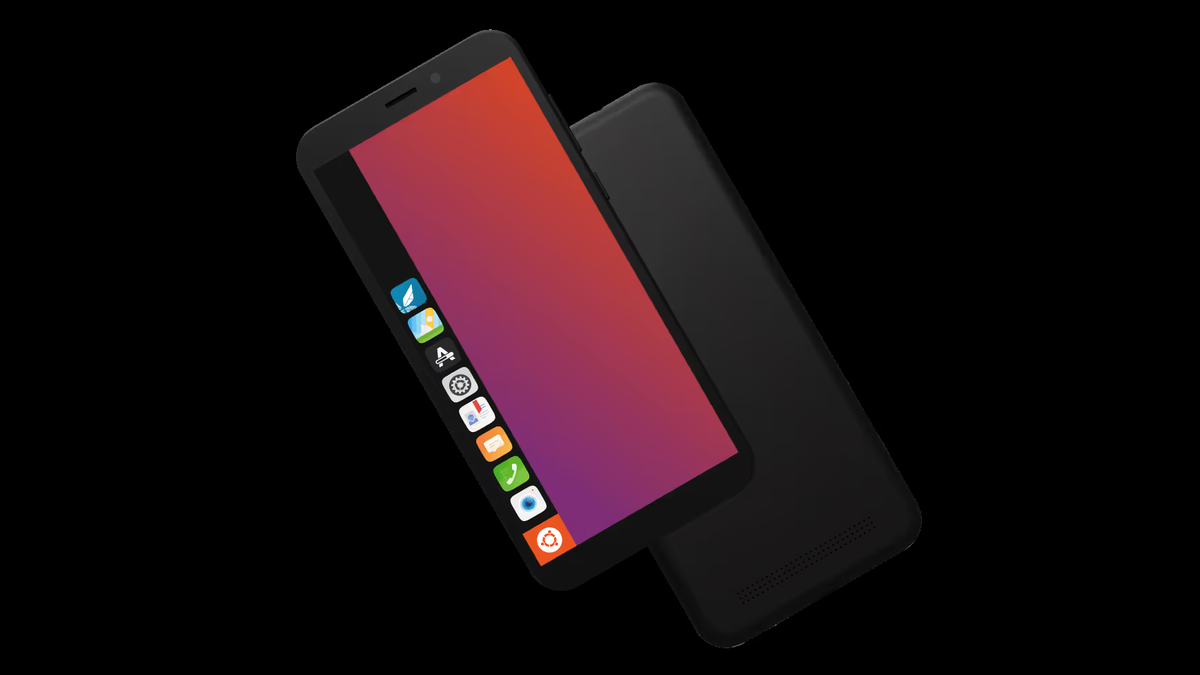
TL;DR: Ubuntu Touch is a privacy-first, open source GNU/Linux mobile operating system maintained by the community-led UBports Foundation. Built on an Ubuntu LTS base (20.04 Focal / 24.04 Noble) with the gesture-driven Lomiri desktop shell, Ubuntu Touch turns your smartphone into a true personal computer with full hardware convergence, read-only root security, and zero corporate telemetry. It supports native Linux software, runs Android apps via Waydroid, and can be easily installed on dozens of mainstream devices using the automated UBports Installer.
The modern mobile ecosystem is dominated by an Apple and Google duopoly where user privacy is traded for cloud services, system updates are arbitrarily cut short, and true administrative root control over your own hardware is locked away. For developers, Linux enthusiasts, and privacy-conscious users, the smartphone has long felt like an untrusted appliance rather than a personal computer.
Ubuntu Touch changes that equation completely. Developed and maintained by the non-profit UBports Foundation at ubuntu-touch.io, Ubuntu Touch is a genuine GNU/Linux operating system engineered specifically for mobile devices.
In this comprehensive guide, we explore the origins of Ubuntu Touch, its modern architectural stack, Lomiri convergence, Waydroid Android app emulation, supported hardware, and why it represents the future of open-source mobile computing.
What Is Ubuntu Touch?
Ubuntu Touch is an open-source, gesture-based GNU/Linux mobile operating system that provides a secure, privacy-focused alternative to Android and iOS without proprietary background telemetry or mandatory account requirements.
Unlike custom Android ROMs (such as LineageOS or GrapheneOS) that still rely on the Android Java/Kotlin runtime, Android framework services, and Google-derived plumbing, Ubuntu Touch is a real Linux distribution. It utilizes standard GNU coreutils, systemd, Wayland display protocols, PulseAudio/PipeWire audio routing, and the Qt/QML-based Lomiri desktop environment.
When you boot an Ubuntu Touch device, you are running the same software architecture that powers millions of Linux servers and desktop workstations worldwide, complete with terminal shell access, APT package management, and standard POSIX networking tools.
The History: From Canonical’s Moonshot to UBports Foundation
The journey of Ubuntu Touch is one of the most remarkable community rescue stories in open-source software history.
+--------------------------------------------------------------------------------+
|                       THE EVOLUTION OF UBUNTU TOUCH                            |
+--------------------------------------------------------------------------------+
|  2011-2013: Canonical's Convergence Dream                                      |
|  • Mark Shuttleworth announces Ubuntu for Phones and the Ubuntu Edge campaign. |
|  • Vision: "Convergence" - one OS spanning phones, tablets, and desktop PCs.  |
|  • Canonical releases Unity 8, Mir display server, and Ubuntu 15.04/16.04 OS.  |
|                                                                                |
|  April 2017: Canonical Pivots; UBports Steps Up                                |
|  • Canonical ceases internal mobile development to refocus on cloud and IoT.   |
|  • Marius Gripsgard and the UBports community take over development.          |
|  • UBports Foundation established as an official non-profit gGmbH in Germany.  |
|                                                                                |
|  2020-Present: The Modern Era                                                  |
|  • Unity 8 rebranded to Lomiri and ported to Wayland.                          |
|  • Massive migration from Ubuntu 16.04 (Xenial) to Ubuntu 20.04 (Focal Fossa). |
|  • Integration of Waydroid for native Android application execution.           |
|  • Active transition toward Ubuntu 24.04 LTS (Noble Numbat).                   |
+--------------------------------------------------------------------------------+
Canonical and the Convergence Dream (2011-2017)
In October 2011, Canonical founder Mark Shuttleworth announced an ambitious vision: Convergence. The goal was to build a single operating system that adjusted its interface based on the form factor. On a smartphone screen, it behaved like a touch-first mobile UI; connected to an external monitor, keyboard, and mouse, it transformed instantly into a full desktop workstation.
Canonical partnered with manufacturers like BQ (Aquaris E4.5, E5, M10) and Meizu (MX4, PRO 5) to bring commercial Ubuntu Phones to market. However, maintaining a proprietary Mir display server, Unity 8 interface, and mobile hardware abstraction layer proved commercially difficult. In April 2017, Canonical pivoted away from consumer mobile to focus on enterprise cloud and IoT.
The UBports Foundation: Rebuilding for Freedom
Rather than letting the project die, the community rallied around developer Marius Gripsgard and formed UBports.
Over the past decade, UBports transitioned from an informal volunteer group into the legally recognized UBports Foundation (gGmbH) in Germany. The foundation modernized the entire stack:
- Renamed Unity 8 to Lomiri: Transitioned the user interface to a clean, desktop-agnostic desktop environment running on standard Wayland.
- Upgraded to Ubuntu 20.04 LTS (Focal Fossa): Rewrote foundational system services, migrating away from legacy 16.04 Xenial code.
- Integrated Waydroid: Added optional, sandboxed Android app compatibility so users do not lose access to essential banking or transit apps.
- Maintained the UBports Installer: Created an intuitive, cross-platform graphical desktop application that makes flashing an Android phone with Ubuntu Touch as simple as plugging in a USB cable.
Core Architecture & Key Features
Ubuntu Touch delivers a distinct user experience that feels completely different from commercial mobile operating systems.
+-------------------------------------------------------------------------------------------------+
|                                UBUNTU TOUCH SYSTEM ARCHITECTURE                                 |
+-------------------------------------------------------------------------------------------------+
|                                                                                                 |
|   +-----------------------------------------------------------------------------------------+   |
|   |                      LOMIRI USER INTERFACE & GESTURE SHELL                              |   |
|   |           Edge Swipes • App Switcher • Indicators • Notifications • Convergence         |   |
|   +-----------------------------------------------------------------------------------------+   |
|                                               │                                                 |
|   +---------------------------------------+   │   +-----------------------------------------+   |
|   |         OPENSTORE NATIVE APPS         |   │   |          WAYDROID CONTAINER             |   |
|   |   Qt6 / QML • C++ • Python • Click    |   │   |      Sandboxed Android App Support      |   |
|   +---------------------------------------+   │   +-----------------------------------------+   |
|                                               │                                                 |
|   +-----------------------------------------------------------------------------------------+   |
|   |                                UBUNTU 20.04 LTS LINUX CORE                              |   |
|   |         systemd • AppArmor • PulseAudio / PipeWire • NetworkManager • Mir / Wayland     |   |
|   +-----------------------------------------------------------------------------------------+   |
|                                               │                                                 |
|   +-----------------------------------------------------------------------------------------+   |
|   |                            HALIUM / LIBHYBRIS HARDWARE LAYER                            |   |
|   |     Android Kernel Drivers • Qualcomm / Mediatek Blobs • Direct Linux GPU Drivers       |   |
|   +-----------------------------------------------------------------------------------------+   |
|                                                                                                 |
+-------------------------------------------------------------------------------------------------+
1. The Lomiri User Interface: Edge Gesture Navigation
Lomiri (pronounced Low-mee-ree) avoids traditional on-screen back buttons and navigation bars in favor of full-screen edge swipes:
- Left Edge Swipe: Opens the Application Launcher dock for instant app switching.
- Right Edge Short Swipe: Opens the visual App Switcher showing running tasks.
- Right Edge Long Swipe: Quickly flips back to your previously used application.
- Top Edge Swipe: Pulls down the interactive Indicator menu (WiFi, Bluetooth, Battery, GPS, Sound, Flashlight) without leaving your current app.
- Bottom Edge Swipe: Reveals contextual actions and in-app toolbars.
2. True Hardware Convergence
Convergence is not a simulated screen mirror; it is real desktop Linux. When you connect your Ubuntu Touch phone to an external monitor via USB-C DisplayPort, HDMI dock, or wireless Miracast:
- The phone screen can act as a touchpad/keyboard or remain independent.
- The external monitor displays a full desktop panel, desktop-style Lomiri window manager, and resizable application windows.
- LibreOffice, GIMP, Firefox, and native terminal windows run in full desktop mode.
3. Waydroid: Bridging the Android App Ecosystem
One of the primary historical barriers to mobile Linux adoption was the lack of commercial apps (banking, messaging, ride-sharing).
Ubuntu Touch solves this through Waydroid. Waydroid runs a containerized Android runtime (LineageOS base) directly on top of the host Linux kernel using LXC containers. Because it shares the host kernel and hardware GPU drivers, Waydroid incurs virtually zero battery overhead when idle and launches Android apps seamlessly alongside native Linux windows.
4. Read-Only Root Filesystem & AppArmor Sandboxing
Security on Ubuntu Touch is built into the architecture:
- Read-Only Root Partition (
/): System binaries cannot be modified by third-party apps or malware. Operating system updates are applied atomically via OTA (over-the-air) image-based updates. - AppArmor Sandboxing: Every application installed from the OpenStore runs inside an isolated AppArmor confinement profile. An app cannot access your microphone, camera, contacts, or GPS without explicit runtime permission prompts.
- Zero Telemetry: The operating system collects no diagnostic tracking, user telemetry, or identifier profiles. There are no mandatory cloud accounts.
Supported Devices and the UBports Installer
Installing a custom Linux operating system on a smartphone used to require compiling custom kernels, unlocking partitions with adb/fastboot, and manual command-line flashing.
The UBports Installer has transformed this process into a point-and-click desktop utility for Windows, macOS, and Linux.
+---------------------------------------------------------------------------------------------------+
|                              POPULAR UBUNTU TOUCH SUPPORTED DEVICES                               |
+----------------------+---------------------------+------------------------------------------------+
| Device Model         | Device Category           | Notable Hardware Features                      |
+----------------------+---------------------------+------------------------------------------------+
| Volla Phone 22 / X23 | Dedicated Privacy Phone   | Removable battery, physical privacy toggles    |
| Fairphone 4 / 5      | Modular & Repairable      | Sustainable design, modular replacement parts  |
| PinePhone / Pro      | Native Linux Mainline     | Hardware kill switches for cameras/mic/modem   |
| Google Pixel 3a / XL | Mainstream Secondary Use  | Excellent camera, OLED display, budget-friendly|
| OnePlus 6 / 6T       | High Performance Daily    | Snapdragon 845, 8GB RAM, fast performance      |
| Xiaomi Redmi Note 9  | Accessible Global Model   | High battery capacity, budget hardware         |
+----------------------+---------------------------+------------------------------------------------+
To see the complete list of dozens of supported devices, check the official Ubuntu Touch Device Directory.
Why Linux Enthusiasts, Makers, and Hams Love Ubuntu Touch
For amateur radio operators, network engineers, and Linux power users, Ubuntu Touch is a portable pocket server:
+--------------------------------------------------------------------------------+
|                      UBUNTU TOUCH FOR HAMS & POWER USERS                       |
+--------------------------------------------------------------------------------+
|                                                                                |
|  [ Native Terminal Access ]  ===> Real bash/zsh shell with APT / Libertine.    |
|  [ Built-in SSH Server ]     ===> Manage your phone over WiFi or USB tether.   |
|  [ USB-OTG Peripheral Support]=> Plug in RTL-SDR dongles, TNCs, and serial GPS.|
|  [ Python / Scripting Engine]===> Run custom field logging & packet utilities. |
|  [ Full Offline Privacy ]    ===> Zero mandatory cloud connections in field.   |
|                                                                                |
+--------------------------------------------------------------------------------+- Full Terminal Access: Open the built-in Terminal app and run standard bash scripts, curl requests, ping sweeps, and SSH sessions directly from your pocket.
- SSH Daemon on Phone: Enable the built-in OpenSSH server in Developer Settings. You can SSH into your phone from your laptop to transfer files, inspect logs, or configure services over WiFi.
- USB-OTG Hardware Interfacing: Connect USB serial adapters, KISS TNCs for packet radio, RTL-SDR software-defined radio receivers, or external keyboards.
- Libertine Chroots: Need desktop software that is not in the OpenStore? Libertine allows you to create classic Debian/Ubuntu APT containers to run native desktop packages like Python libraries, Emacs, or GCC directly on the device.
Operating System Comparison
| Feature | Ubuntu Touch (UBports) | Standard Android / One UI | PostmarketOS | Sailfish OS |
|---|---|---|---|---|
| Base Operating System | Ubuntu 20.04 / 24.04 LTS | Android Linux Kernel (AOSP) | Alpine Linux (musl) | GNU/Linux (RPM-based) |
| User Interface | Lomiri (Qt/Wayland) | Google SystemUI / Launcher | Phosh / Plasma Mobile / Sxmo | Silica (QML) |
| Hardware Convergence | Yes (Full Desktop UI) | Samsung DeX (Proprietary) | Yes | No |
| Android App Compatibility | Yes (via Waydroid) | Native | Yes (via Waydroid) | Proprietary AlienDalvik |
| Package Management | Click / OpenStore / APT | Google Play / APK | APK / Flatpak | RPM / Jolla Store |
| Root File System | Read-Only / Atomic OTA | Read-Only (Modern Android) | Read-Write | Read-Write |
| Telemetric Tracking | Zero (Privacy by design) | Heavy (Google Services) | Zero | Minimal |
| Open Source Licensing | 100% Free & Open Source | Mixed (AOSP + Closed Blobs) | 100% Free & Open Source | Proprietary UI (Core FOSS) |
How to Get Started with Ubuntu Touch
If you have a compatible device sitting in a drawer, testing Ubuntu Touch takes less than 30 minutes:
- Verify Your Device: Visit devices.ubuntu-touch.io and ensure your exact model and variant is supported with high maturity ratings for calls, SMS, camera, and WiFi.
- Download the UBports Installer: Grab the desktop installer for Linux, Windows, or macOS from ubuntu-touch.io.
- Unlock Bootloader & Enable USB Debugging: Follow the device-specific prompts in the installer.
- Connect via USB and Flash: Select your device in the installer, choose the stable release channel, and let the software automatically flash recovery and system images.
- Explore the OpenStore: Install open-source native utilities, browsers, Telegram clients, and set up Waydroid if you require specific Android apps.
Frequently Asked Questions (FAQ)
Can Ubuntu Touch run Android apps?
Yes. Through the integrated Waydroid container system, Ubuntu Touch can run most Android applications directly on the Linux kernel with hardware GPU acceleration.
Is Ubuntu Touch completely free and open source?
Yes. The entire operating system, including the Lomiri desktop environment, core services, and installer, is 100% open source and managed by the non-profit UBports Foundation.
Does Ubuntu Touch require an online account to use?
No. Ubuntu Touch does not require any account creation, Google ID, or cloud login. The system works completely standalone from the first boot.
What is Convergence in Ubuntu Touch?
Convergence allows you to plug your phone into a monitor, mouse, and keyboard, instantly transforming the mobile screen into a full windowed Linux desktop workstation.
Can I install Debian or Ubuntu APT packages?
Yes. While the root system is read-only for security, you can use Libertine to create sandboxed Debian/Ubuntu containers and install traditional CLI or GUI packages via APT.
Conclusion
Ubuntu Touch proves that smartphones do not have to be surveillance tools locked behind commercial ecosystems. By combining a reliable Ubuntu LTS foundation, the fluid Lomiri gesture interface, real hardware convergence, and seamless Waydroid Android app execution, the UBports community has built a viable, mature, and liberating mobile operating system.
Whether you want to de-Google your digital life, repurpose an older smartphone, or carry a pocket-sized Linux workstation into the field, Ubuntu Touch delivers true digital freedom.
73, and enjoy real Linux in your pocket!
Sources and Further Reading
- Official Ubuntu Touch Portal: https://www.ubuntu-touch.io/
- UBports Foundation Community & Documentation: https://ubports.com/
- Ubuntu Touch Supported Devices Directory: https://devices.ubuntu-touch.io/
- Ubuntu Touch OpenStore App Directory: https://open-store.io/
- Waydroid Container Architecture & Project: https://waydro.id/
- Lomiri Desktop Shell Repository (GitLab): https://gitlab.com/ubports/development/core/lomiri
- APRSdroid 9M2PJU Mod – Android & Mobile APRS: https://aprsdroid.hamradio.my/
- HamRadio.my – Amateur Radio Tools and Open Source Projects: https://hamradio.my/
- About 9M2PJU – Station Profile & Projects: https://hamradio.my/about/

Post Comment