SDR–: The Open-Source Modular Node-Based SDR Where You Patch Receivers Together
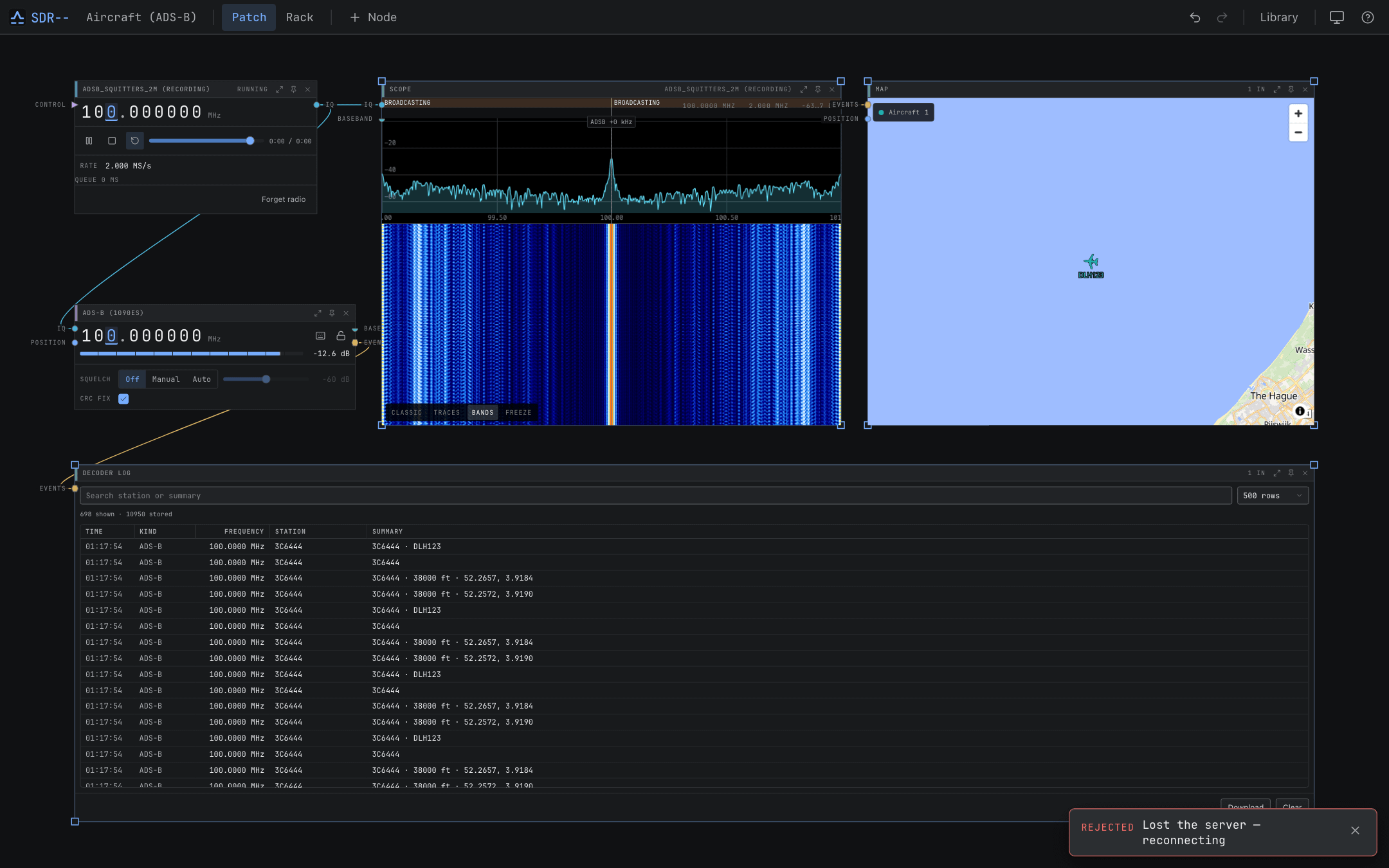
TL;DR: SDR– (sdrminusminus / SDRMM) is a free, open-source software-defined radio application created by Newspicel that reimagines radio signal processing as a visual modular patch bay. Running locally on desktop or headlessly on a remote server, it lets you wire SDR hardware, multi-channel demodulators, decoders, and audio sinks together on an interactive canvas, then pin favorite controls to a streamlined rack interface.
What Is SDR–?
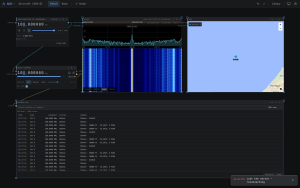
SDR– (also known as SDRMM or sdrminusminus) is a modern, open-source software-defined radio platform that models signal processing chains as an interactive visual node graph. Developed by Newspicel under the GPL-3.0 license, SDR– replaces the rigid, single-frequency layouts of conventional SDR software with a flexible Patch view where operators can drop and wire together receivers, digital filters, multi-mode decoders, and audio outputs before pinning their essential controls to a clean Rack view.
+------------------------------------------------------------------------+
|                          SDR-- Modular Patch Canvas                    |
+-------------------+      +-------------------+      +------------------+
|   Device Node     | IQ   |   Channel Node    | Audio|   Speaker Node   |
| · RTL-SDR / Airspy+----->| · WFM / SSB / AM  +----->| · Audio Output   |
| · 2.4 MS/s Stream |      | · Filter & S-Meter|      | · Level & Mute   |
+---------+---------+      +---------+---------+      +------------------+
          | IQ                       | Events / Data
          v                          v
+---------+---------+      +---------+---------+
| Spectrum / Water  |      | RDS / APRS / ADS-B|
| · Panadapter View |      | · Live Data Decode|
+-------------------+      +-------------------+
Traditional SDR programs lock users into fixed monolithic interfaces where adding a second receiver, recording a raw baseband stream, or decoding digital telemetry often requires juggling multiple external applications or cumbersome virtual audio cables. SDR– treats radio frequency data like modular audio synthesis, giving operators complete freedom over their signal routing.
The Dual-Interface Architecture: Patch vs Rack
SDR– separates signal chain engineering from everyday radio operation through two distinct view modes:
+------------------------------------------------------------------------+
|                          Patch View vs Rack View                       |
+-----------------------------------+------------------------------------+
| Patch View (The Signal Lab)       | Rack View (The Operator Console)   |
+-----------------------------------+------------------------------------+
| · Unlimited canvas node graph     | · Clean vertical rack layout       |
| · Color-coded cable patching      | · Pinned dials, sliders & meters   |
| · Visual IQ, audio, & data buses  | · Distraction-free daily listening |
| · Real-time signal flow inspection| · Fast frequency & bandwidth tuning|
+-----------------------------------+------------------------------------+
1. The Patch Canvas
In Patch View, every component of your radio station is an independent node with typed input and output jacks:
- IQ Streams (Blue): High-speed raw complex baseband data from hardware tuners to demodulators.
- Audio Streams (Green): Demodulated analog audio routed to local speakers, virtual soundcards, or network streams.
- Events and Data (Yellow): Decoded digital telemetry, APRS text, AIS vessel beacons, and ADS-B aircraft positions.
- Video Streams (Orange): Fast-scan amateur TV (ATV) and analog video signals.
2. The Daily Operator Rack
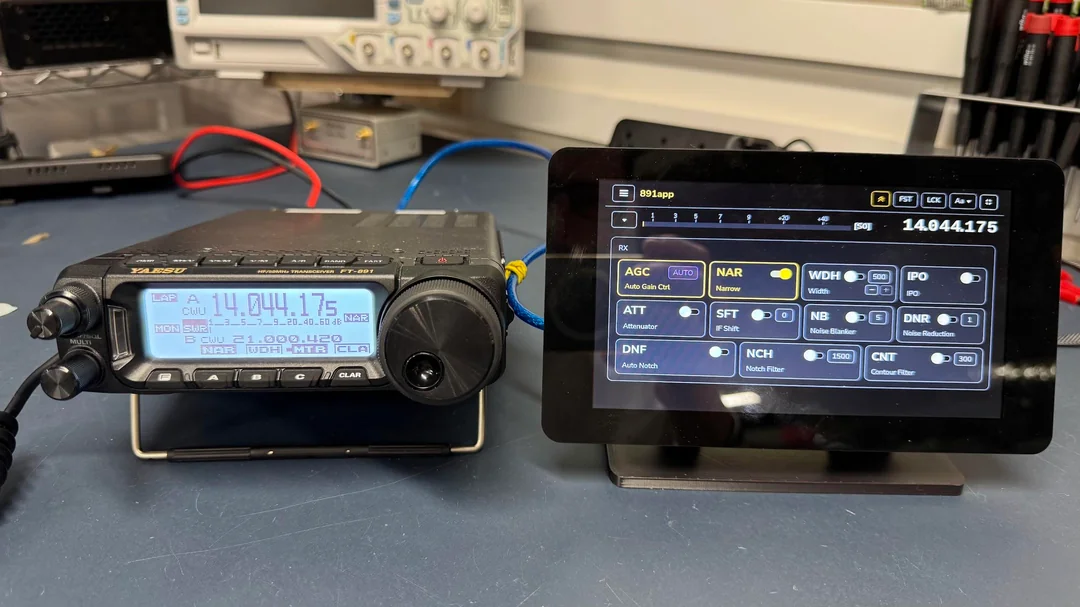
Once you have wired your receiver patch, pressing p on any node pins its primary controls (frequency dial, volume slider, S-meter, bandwidth filter) to the Rack View. This creates a sleek, distraction-free operating dashboard reminiscent of physical ham radio equipment racks.
Client-Server and Remote Antenna Architecture
SDR– features a decoupled architecture with a high-performance Rust digital signal processing core:
+-----------------------------------------------------------------------+
|                    Remote Antenna / Headless Server                   |
|  Raspberry Pi / Linux Server at Mast · Native Drivers · Rust DSP Core  |
+-----------------------------------+-----------------------------------+
                                    | WebSocket / WebRTC Streaming
                                    v
+-----------------------------------------------------------------------+
|                    Client Desktop & Browser Displays                  |
|  macOS · Windows · Linux · Chrome / Firefox / Safari (Port 8080)      |
+-----------------------------------------------------------------------+
- Desktop Application: Run SDR– natively as a standalone desktop program on macOS, Windows, or Linux with a local USB SDR.
- Headless Antenna Server: Install
sdrmmon a Raspberry Pi or low-power server located directly at your outdoor antenna feedpoint. The server processes signals locally and streams compressed audio, waterfall FFTs, and decoded data over Wi-Fi or LAN to any web browser on port 8080, completely eliminating coax loss.
Comprehensive Hardware and Decoder Support
SDR– includes built-in drivers for leading amateur radio and commercial SDR hardware:
+-----------------------------------------------------------------------+
|                          Supported Hardware & Nodes                   |
+---------------------+---------------------+---------------------------+
| SDR Receivers       | Demodulators        | Decoders & Tools          |
+---------------------+---------------------+---------------------------+
| · RTL-SDR (v3/v4)   | · Broadcast WFM+RDS | · ADS-B Airplane Tracker  |
| · Airspy R2 / Mini  | · Narrowband FM     | · AIS Marine Vessel Map   |
| · Airspy HF+        | · AM & Synchronous  | · APRS Packet Monitor     |
| · HackRF One        | · Single Sideband   | · POCSAG & FLEX Pagers    |
| · SDRplay RSP       | · CW with S-Meter   | · FT8 / FT4 / WSPR Engine |
| · PlutoSDR / AD936x | · Digital Voice     | · SSTV Picture Decoder    |
| · KrakenSDR 5-Ch    | · Raw IQ Streamer   | · SigMF IQ Record/Playback|
+---------------------+---------------------+---------------------------+
Advanced Radio Capabilities
- Coherent Multi-Channel Arrays: Native support for 5-channel KrakenSDR devices for radio direction finding (DoA), beamforming, and passive radar experiments.
- Multiple Simultaneous Channels: Run dozens of independent VFO channels across the same wideband SDR slice (e.g. listening to airband ATC while decoding ADS-B and monitoring local APRS packets).
- Automated Recording & SigMF Support: Record raw RF baseband with metadata in standard SigMF format for archival and post-event analysis.
Platform Comparison
The table below contrasts SDR– with other leading software-defined radio applications:
| Feature / Dimension | SDR– (SDRMM) | SDR++ (SDRPlusPlus) | GQRX | GNU Radio Companion |
|---|---|---|---|---|
| Workflow Paradigm | Modular Node Patch & Rack | Multi-VFO Fixed Panels | Single VFO Fixed Window | Pure DSP Simulation Flow |
| User Interface | Web & Native Canvas | Native C++ / ImGui | Qt Desktop Window | Flowgraph Canvas (No Radio UI) |
| Remote Server Mode | Yes (Built-in Web Server) | Yes (SDR++ Server) | rtl_tcp client only | Requires custom TCP/UDP |
| Integrated Decoders | ADS-B, AIS, APRS, Pagers, FT8 | Limited Plugins | No (External Audio) | Full custom DSP blocks |
| Dual View (Patch/Rack) | Yes (Modular + Clean) | No (Side Panels) | No | No |
| Coherent Array Support | Yes (KrakenSDR / DoA) | No | No | Yes (Manual DSP Graph) |
| License & Price | Open Source (GPL-3.0) | Open Source (GPL) | Open Source (GPL) | Open Source (GPL) |
Quick-Start Guide: Building Your First Receiver
Setting up a receiver in SDR– takes only five simple steps:
1. Installation
Install the desktop application or server using Homebrew on macOS/Linux:
brew tap newspicel/tap
brew install --cask sdrminusminus
Or install the standalone headless server:
brew install sdrmm
brew services start sdrmm
2. Patching the Hardware Node
- Connect your RTL-SDR or Airspy dongle via USB.
- Open SDR– and drop a Device node onto the Patch canvas.
- Select your SDR hardware and set the sample rate (e.g., 2.4 MS/s).
3. Adding Demodulators and Sinks
- Click + Node and select a WFM (Wideband FM) or NFM (Narrowband FM) channel.
- Drag a cable from the Device
IQoutput port to the ChannelIQinput port. - Add a Speaker node and wire Channel
audiointo Speakeraudio. - Add a Spectrum node to view the real-time panadapter.
4. Pinning to Rack View
Select your active channel node, press p to pin it to your Rack, and switch to Rack View for clean daily tuning.
Frequently Asked Questions
What is the difference between SDR– and traditional SDR software?
Traditional SDR software uses fixed layouts with single tuners. SDR– uses a visual node-based patch canvas, allowing you to route multiple tuners, filters, decoders, and outputs simultaneously, then pin controls to a simplified rack view.
Can SDR– run headlessly on a remote Raspberry Pi?
Yes. You can install the headless sdrmm server on a Raspberry Pi near your antenna mast and control it over Wi-Fi or LAN from any desktop web browser on port 8080.
Which SDR hardware devices are supported natively?
SDR– natively supports RTL-SDR (v3/v4), HackRF One, Airspy (R2, Mini, HF+), SDRplay RSP, PlutoSDR, KrakenSDR, SpyServer, and any device compatible with SoapySDR.
Does SDR– include digital mode decoders?
Yes. SDR– features integrated decoders for ADS-B aircraft tracking, AIS marine vessels, APRS packet radio, POCSAG/FLEX pagers, FT8/FT4, and SSTV slow-scan television.
Is SDR– free and open source?
Yes. SDR– is licensed under the GPL-3.0 license, with full source code hosted publicly on GitHub by Newspicel.

Post Comment