SkyPath on Garmin Instinct 3 Solar: HF Propagation Maps on Your Wrist for SOTA, POTA and Field DX
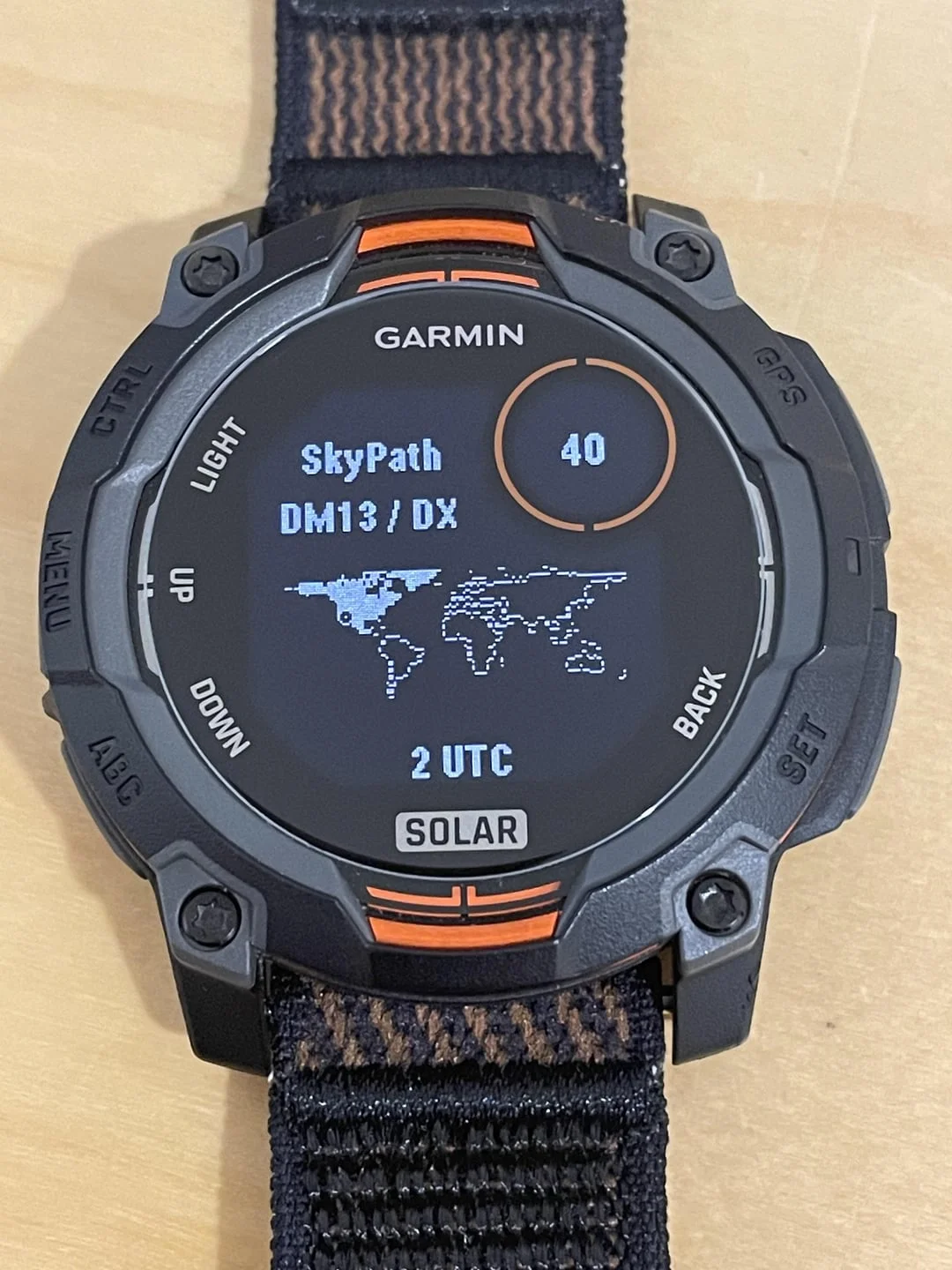
TL;DR: A photo of a Garmin Instinct 3 Solar showing a SkyPath screen with DM13 / DX, a pixel world map, 40, and 2 UTC is exactly what portable operators want: live HF propagation on the wrist. The watch does not replace a rig or a phone, it puts the go or no-go answer where you can see it with a flick of the wrist on a summit, in a park, or at a field station. This guide decodes the photo, explains why the Instinct 3 Solar is ideal for SOTA, POTA, and EmComm, shows how Garmin Connect IQ propagation apps fetch HamQSL (N0NBH) data through your phone, and lists two verified apps you can install today: Propagation for HamRadio by f5hla and HF Companion: Propagation and Morse by SO5KM.
What Is Wrist HF Propagation for Ham Radio?
Wrist HF propagation for ham radio is a Garmin Connect IQ watch display that shows live solar indices and day and night HF band conditions from the HamQSL N0NBH feed on a rugged outdoor watch. So a portable operator can decide which band to call on without pulling out a phone.
+----------------------------------------------------------------------------------+
|                      WRIST PROPAGATION SYSTEM TOPOLOGY                             |
+----------------------------------------------------------------------------------+

  [ Space Weather Sources ]        [ Phone Bridge ]            [ Wrist Display ]
  +------------------------+       +---------------------+     +----------------------+
  | HamQSL N0NBH XML       |       | Garmin Connect app  |     | Garmin Instinct 3    |
  | SFI, SSN, K, A, X-ray  | ----> | on Android / iPhone | --> | 3 Solar (MIP + solar)|
  | Day / night band state |  HTTPS| Bluetooth to watch  | BT  |                      |
  +------------------------+       | Internet required   |     | SkyPath style screen:|
  | NOAA SWPC (upstream)   |       +---------------------+     | DM13 / DX, world map,|
  | Behind HamQSL values   |                                   | band number, UTC time|
  +------------------------+                                   +----------------------+
Every portable operator knows the moment. You hike to a summit for SOTA, you set up a wire and a QRP rig, you look at the time, and you ask one question: which band is actually open right now. On a summit that question is painful to answer. Your phone is in a dry bag, your hands are cold, the sun washes out the screen, and the battery is already low from logging and mapping.
A wrist display fixes that friction. One glance shows the band, the world map, and the UTC hour. You pick 40m, 20m, 15m, or 10m, you spot yourself, and you call.
Decoding the Photo: SkyPath, DM13 / DX, World Map, 40, 2 UTC
The featured photo shows a Garmin Instinct 3 Solar on a fabric strap. The screen reads:
- GARMIN at the top, standard system header.
- SkyPath in large light blue pixels, the app or watch face name.
- DM13 / DX, your operating context.
- A pixel world map, the classic propagation map view.
- 40 inside an orange ring, top right.
- 2 UTC, the time reference for propagation.
- SOLAR at the bottom, the Instinct Solar branding.
Here is the practical reading, based only on what is visible:
SkyPath
SkyPath is the name drawn on this particular screen. Aviation operators will recognise an Apple Watch app called SkyPath for flight turbulence, but that’s a different product for pilots. In this ham radio photo, SkyPath is the label of the watch screen showing propagation. Treat the name as the screen title in the photo, not as proof of a specific Connect IQ store listing. The function is what matters: HF conditions on the wrist.
DM13 / DX
DM13 is a Maidenhead grid square in Southern California, covering parts of Los Angeles and the surrounding area. It is almost certainly the operator location or the configured home grid. DX next to it signals long distance mode: the screen is answering whether DX paths are open from DM13, not just short skip.
For Malaysian operators, think of this as the equivalent of seeing OJ03 or OJ04 on your own wrist in Kuala Lumpur or Puchong. The concept travels: home grid plus DX target.
Pixel world map
The dotted world map is the signature of a propagation glance screen. On memory constrained watches it is drawn as a coarse bitmap, not a detailed coastline. Its job is orientation: daylight versus darkness, your location versus the DX target, and at a glance which ocean path you’re trying to cross.
40
The large 40 in the orange ring most plausibly means the 40m band, 7 MHz. That matches a common field choice: 40m for regional daytime NVIS and evening DX, easy wire antennas, and reliable QRP contacts. It could in theory be a solar flux value on some layouts, but 40 would be an extremely low flux number for this solar cycle, so band number is the sensible reading.
2 UTC
Propagation lives in UTC. Greyline, band openings, and DX cluster spots are all logged in UTC. Showing 2 UTC keeps the wrist in sync with spots, logs, and other stations. For reference, 2 UTC is 10 AM in Malaysia (UTC+8).
SOLAR
The SOLAR badge confirms the hardware family: Instinct 3 Solar with photovoltaic charging around the display. It isn’t a propagation value, it’s the model line.
Why a Watch Changes Portable Operating
A shack operator can keep HamClock on a second monitor, a browser tab on HamQSL, and VOACAP open for path predictions. A field operator can’t.
Consider the SOTA workflow without a watch:
- Stop on an exposed summit in wind.
- Remove gloves or fight with a touchscreen.
- Dig out the phone from a pack or dry bag.
- Unlock, wait for the propagation page to load on weak data.
- Lock the phone, stow it, pick a band, and hope conditions didn’t change while you fiddled.
With propagation on the wrist:
- Raise your wrist.
- Read band and UTC.
- Spin the VFO to the band the ionosphere supports.
That is three seconds versus three minutes, with warm hands and a dry phone. For POTA activators running a pileup, for QRP hikers counting grams, and for EmComm volunteers working off grid, that time and attention saving is real.
The watch also solves sunlight readability. Phone OLED screens wash out on a bright summit. The Instinct 3 Solar uses a transflective memory-in-pixel (MIP) display that gets more readable as ambient light increases. Full sun is its best case, which is exactly when phone screens fail.
Why the Garmin Instinct 3 Solar Fits Field Radio
The Instinct series is the rugged outdoor branch of the Garmin family, distinct from the AMOLED Fenix and Forerunner lines. The Instinct 3 Solar is built for the same environments where SOTA and POTA happen: rock, rain, heat, dust, and long days away from chargers.
Key traits that matter to hams:
- MIP display for direct sun: Transflective monochrome style display stays readable in harsh daylight without boosting backlight. Ideal for summits, beaches, and open fields.
- Solar charging: A photovoltaic ring around the display trickles charge during outdoor use. It won’t run the watch forever on its own, but it stretches battery life on multi-day activations, hikes, and emergency deployments.
- Weeks of battery as a watch: Garmin rates the Instinct 3 Solar line in weeks in smartwatch mode and dozens of hours in GPS modes. A propagation glance screen draws little because it’s a static page you visit, not an animated face running constantly.
- Physical buttons: Five labelled buttons (CTRL, MENU, ABC, GPS, SET, BACK, UP, DOWN, LIGHT in the photo) work with gloves and rain. No capacitive swipe precision needed on a windy ridge.
- Rugged build: 10 ATM water resistance, MIL-STD-810 thermal and shock rating, and a fibre reinforced case. It survives the same pack as an FT-818, a linked dipole, and a throw weight.
- ABC sensors: Altimeter, barometer, and compass help with summit height, weather trend, and beam heading when you carry a directional antenna.
- No radio interference: The watch is a receiver for GPS plus Bluetooth to your phone. It doesn’t transmit HF, it doesn’t desense your rig, and it doesn’t need an antenna tuner.
Limitations to keep in mind: the MIP screen is low resolution by phone standards, so maps are coarse pixel art. Connect IQ apps on this family fetch internet data through the phone over Bluetooth, so the phone must be nearby with Garmin Connect running and with data coverage. There’s no on-watch HF receiver, no WSPR decoder, and no direct radio control. It’s an indicator, not an instrument.
How Connect IQ Propagation Apps Actually Work
Newcomers often assume the watch receives solar data from space. It doesn’t. The data path is ordinary and worth understanding:
+----------------------------------------------------------------------------------+
|                         HOW A WATCH GETS PROPAGATION DATA                          |
+----------------------------------------------------------------------------------+

  Step 1: HamQSL publishes solar XML
    https://www.hamqsl.com/solarxml.php
    SFI, SSN, K-index, A-index, X-ray, solar wind, MUF, band day/night states

  Step 2: Phone with internet fetches the feed
    Garmin Connect app on phone performs HTTPS GET (directly or via proxy)
    Typical refresh gate: 15 to 60 minutes, HamQSL asks clients not to hammer

  Step 3: Phone relays to watch over Bluetooth
    Connect IQ Communications API, small text or XML payload
    Watch caches last good reading in device storage

  Step 4: Watch renders glance screen
    Band pills, SFI / SSN / K text, world bitmap, UTC clock
    No GPS, no heart rate, no background polling needed
Practical consequences:
- Phone required nearby: If the phone is off, in airplane mode, or without Garmin Connect running, the watch shows the cached reading with a stale timestamp. That is normal and by design.
- Refresh is manual or gated: Good apps fetch only when you open them or tap refresh, and enforce a minimum interval. This protects both your battery and Paul Herrman N0NBH’s free feed.
- Credit the feed: Solar terrestrial data used by almost every ham dashboard comes from N0NBH. Keep default refresh intervals. Don’t set 1 minute polling.
- No radio link: These apps can’t key your rig, read S meter, or tune your antenna. They answer whether to try, not how to tune.
Two Verified Apps You Can Install Today
The photo shows a SkyPath labelled screen, but store availability changes and custom sideloads exist. Rather than guess at one unlisted build, here are two verified Connect IQ propagation apps with public listings you can install right now. Both use the same HamQSL data family as desk tools like PropMon and HamClock.
1. Propagation for HamRadio by f5hla
- Store listing:
apps.garmin.com/apps/ea4ea437-25c9-44ca-9400-843574f98a40 - Type: Widget
- Cost: Free
- Rating footprint: Around 4.9 stars with 100+ downloads at time of writing
- Data: N0NBH band colour logic
- Best for: Instinct, older MIP watches, and operators who want a quick widget swipe
This is the long standing community widget. Install it from the Connect IQ Store on your phone, add it to your widget loop, open it when you want a reading. Version history shows fixes for band colour settings and added device support, which signals an active maintainer responding to user reports.
2. HF Companion: Propagation and Morse by SO5KM
- Store listing:
apps.garmin.com/apps/0c797907-fec1-4597-bdca-cdea1387c728 - Type: Device app
- Cost: Free
- Source code:
github.com/mashu/hf-companion, MIT licence - Data: HamQSL solar terrestrial feed
- Shows: SFI, SSN, K-index, geomagnetic state, signal to noise estimate, four HF band groups (80-40m, 30-20m, 17-15m, 12-10m) each with day and night colour chips, plus feed timestamp
- Best for: Fenix 8 AMOLED owners who want a polished dark dashboard plus a Morse reference
HF Companion is explicitly a companion, not a controller. The README states it isn’t connected to and can’t control or wake a radio. It opens fast, shows the last cached reading instantly, and fetches fresh data only when you press START or tap. A settings page controls refresh policy and an optional manual location label. Source is open, so you can audit what it fetches and how often.
Side by side comparison
| Feature | Propagation for HamRadio (f5hla) | HF Companion (SO5KM) | SkyPath screen in photo |
|---|---|---|---|
| Store status | Live widget listing, free | Live device app listing, free | Screen label in photo only |
| Display style | Compact widget, N0NBH colours | Dark dashboard, gauge plus pills | Pixel world map plus band number |
| Bands shown | HF day and night states | 80-40m, 30-20m, 17-15m, 12-10m | Single focus band (40 in photo) |
| Solar indices | Via N0NBH logic | SFI, SSN, K, geomag, SNR estimate | Not visible in this photo crop |
| Morse aid | No | Yes, on watch reference | No |
| MIP watch fit | Good, widget is light | Targets AMOLED Fenix 8 | Shown on MIP Instinct 3 Solar |
| Internet path | Phone Bluetooth via Connect | Phone Bluetooth via Connect | Same pattern assumed |
| Radio control | None | None | None |
If you own an Instinct 3 Solar today, start with Propagation for HamRadio because its widget form suits MIP watches. If you also own a Fenix 8 AMOLED, add HF Companion for the richer dashboard and Morse reference. Either way you get the same core answer the photo promises: can I make the contact from here, now.
Wrist vs Phone vs Desk: Honest Tradeoffs
No single display wins everywhere. Use each where it shines:
| Method | Best use | Sunlight | Battery impact | Detail level |
|---|---|---|---|---|
| Garmin wrist glance | SOTA summit, POTA trail, tower work | Excellent on MIP | Minimal, static page | Low, go or no-go |
| Phone browser (HamQSL, PropDeck, DXRadar) | Detailed path planning at camp | Poor in direct sun | High, screen plus data | High, maps plus spots |
| Desk instruments (PropMon, HamClock, DXMon) | Shack ambient awareness | Indoor only | Mains or always on Pi | Highest, full indices |
The winning combo for portable work is wrist plus phone. Glance at the wrist to pick a band, then use the phone only when you need a detailed VOACAP path, a greyline map, or a cluster spot list. The wrist keeps the phone stowed, dry, and charged for logging and spotting.
Setup Walkthrough: From Box to First Summit Reading
These steps cover both verified apps. Exact menus vary by watch, but the flow is stable across Connect IQ.
1. Prepare the phone
- Install Garmin Connect from the app store and pair your Instinct 3 Solar or Fenix 8.
- Keep the phone connected by Bluetooth with mobile data on.
- Open Connect IQ Store from inside Garmin Connect, not from a desktop browser alone.
2. Install the propagation app
- Search Connect IQ Store for Propagation for HamRadio (widget) or HF Companion Propagation and Morse (device app).
- Tap Install and accept the Communications permission. No GPS or sensor permission is needed for propagation.
- For a widget, add it to your widget loop in watch settings. For a device app, find it in the activities and apps list.
3. Configure refresh policy
- In Garmin Connect, open the app settings.
- Choose manual refresh or timed refresh with at least 30 to 60 minutes between fetches.
- If a home grid or location label field exists, enter your grid such as OJ03 for Kuala Lumpur or DM13 if you operate in California. This is a label only, it doesn’t change the solar data.
4. Take a test reading at home
- With the phone nearby and online, open the widget or app on the watch.
- Wait a few seconds for the Bluetooth fetch.
- Confirm you see fresh SFI, K-index, band states, and a current timestamp.
- Lock in what GOOD, FAIR, and POOR colours mean on your model before you need them in the field.
5. Build a field habit
- On arrival at a summit or park, raise the wrist before unpacking the antenna.
- If 10m and 15m show GOOD in daylight, favour a short vertical or end fed for DX.
- If only 40m and 30m show GOOD near sunset, rig a low dipole or inverted V for regional plus greyline DX.
- If K-index is 5 or higher, expect flutter and fading on polar paths, shorten your CQ calls, and favour robust modes such as CW or FT8 over SSB.
Field Workflows for SOTA, POTA, and EmComm
SOTA summit sprint
Weight and time rule summits. You carry a QRP rig, a wire, a battery, water, and safety gear. Every minute exposed on a ridge costs warmth and daylight.
A wrist check before you deploy the mast tells you whether to favour 20m for intercontinental skip or drop to 40m for closer chasers. After your first four contacts for SOTA points, a second glance tells you whether a band change is worth the retune or whether to pack up and descend before weather moves in. The SOLAR trickle charge helps most here: hours in open sun while you hike in slowly top up the watch without a power bank.
POTA park activation
POTA runs longer than SOTA, often one to three hours from a picnic table or car boot. Here the watch helps you ride the greyline. Check 2 UTC versus local sunset, watch 20m fade and 40m rise, and time your band hop to stay in the pileup. The UTC readout in the photo isn’t decoration, it’s the shared clock for spots and logs. Keep the watch on UTC and your logger on UTC and your spots will line up.
EmComm and off grid exercises
In simulated emergency tests and real deployments, the grid may be down but HF still works. A volunteer with an Instinct 3 Solar and a paired phone (even on marginal data) can confirm that 40m NVIS is rated GOOD for in-state traffic before passing formal traffic. When data drops entirely, the last cached reading with its timestamp is still useful context: it tells you what the ionosphere was doing an hour ago, which beats guessing. Pair this with a printed band plan and a battery powered rig for a resilient go kit.
What the Watch Cannot Do (and Why That Is Fine)
- No real time radar: It shows index driven band states, not live WSPR paths or RBN spots. For live proof of a path, check PSK Reporter or Reverse Beacon Network on the phone when you have data.
- No VOACAP prediction: It doesn’t compute point to point MUF for your exact summit to target. Use VOACAP online, PropDeck, or HamClock planning screens before the trip.
- No rig link: It won’t set your FT-891, IC-705, or TX-500 to 7.030 MHz. You still spin the VFO.
- Phone dependent: Without Bluetooth to a connected phone, no fresh fetch happens. Cache carries you through short outages, not days offline.
- Coarse maps: The pixel continents confirm orientation, they don’t show greyline precision. For greyline work, use a proper terminator map on a larger screen.
None of these limits break the use case. The watch answers one binary question fast: try now or wait. Detailed tools answer the follow up: where exactly and on what frequency.
Historical Context: From WWV to the Wrist
Wrist propagation closes a loop that started nearly a century ago. In the 1930s through 1960s, operators copied WWV time and propagation bulletins on HF itself. In the 1990s, packet BBS bulletins and later the web brought HamQSL and NOAA pages to the shack PC. In the 2010s, HamClock by Elwood Downey WB0OEW (SK) put space weather on a dedicated shack screen fed by the Open Hamclock Backend community project after the original service sunset. In the 2020s, N4MI desk instruments shrank that awareness to a palm sized AMOLED gauge beside the VFO.
The wrist is the next shrink. Connect IQ puts the same N0NBH derived band states on a solar assisted outdoor watch that already tracks your hike to the summit. The physics didn’t change: solar flux ionises the F layer, K-index measures geomagnetic disturbance, D layer absorption kills low bands by day. Only the display moved, from wall to desk to wrist.
Frequently Asked Questions (FAQ)
Does the Garmin watch receive HF signals directly?
No. Connect IQ propagation screens fetch HamQSL N0NBH text over Bluetooth from the Garmin Connect phone app. The watch has no HF receiver and can’t decode on air signals.
Which Garmin watches run these propagation apps?
Propagation for HamRadio targets many watches including MIP models like Instinct. HF Companion targets Fenix 8 AMOLED models. Check the Compatible Devices tab on each Connect IQ listing before installing.
Do I need mobile data in the field?
Yes for fresh data. The phone needs internet when the watch requests a refresh. Without data the watch keeps showing the last cached reading with its timestamp.
Will this drain my watch battery fast?
No, when used as a glance page. These are static screens with no background polling by default. Battery cost is a few screen draws plus an occasional short Bluetooth transfer.
Can the watch control my transceiver?
No. These are informational companions. They can’t tune, key, or read your rig. Use them to pick a band, then operate normally.
Sources and Further Reading
- Photo concept: Garmin Instinct 3 Solar showing SkyPath HF propagation glance with DM13 / DX, world map, 40, and 2 UTC (featured image via provided Reddit preview).
- Propagation for HamRadio (Connect IQ widget by f5hla): apps.garmin.com/apps/ea4ea437-25c9-44ca-9400-843574f98a40
- HF Companion: Propagation and Morse (Connect IQ app by SO5KM): apps.garmin.com/apps/0c797907-fec1-4597-bdca-cdea1387c728
- HF Companion source code (MIT): github.com/mashu/hf-companion
- HamQSL Solar-Terrestrial Data by Paul Herrman N0NBH: hamqsl.com/solar.html
- NOAA Space Weather Prediction Center: swpc.noaa.gov
- Garmin Instinct 3 Solar family: rugged MIP outdoor watches with solar charging, see the current Instinct lineup on garmin.com.
- Related reading on HamRadio.my: PropMon desk instrument, DXMon touchscreen monitor, APRSMon local monitor, and Open Hamclock Backend infrastructure guides.
73 de 9M2PJU

Post Comment