APRS Web Decoder: Decode Packet Radio in Your Browser with aprs.blink.tel
TL;DR: aprs.blink.tel is a free APRS Web Decoder that runs entirely in your browser. Plug your radio audio into your computer, or press Play demo, and it decodes 1200 baud AFSK packets with a hand written modem, plots every station on a live Leaflet map, and explains every byte of every packet against the APRS 1.01 and AX.25 specifications. Nothing is uploaded, nothing is installed, and a built in Learn bench with 19 teaching samples makes it one of the fastest ways to finally understand what is inside an APRS packet.
What Is the APRS Web Decoder?
The APRS Web Decoder at aprs.blink.tel is a free browser based tool that decodes 1200 baud AFSK APRS audio from a radio into positioned stations on a live map, with a byte level dissector that links every field to the specification chapter that defines it.
+----------------------------------------------------------------------------------+
|                        APRS WEB DECODER SIGNAL PATH                                |
+----------------------------------------------------------------------------------+

  [ Radio ]                  [ Browser (100 percent local) ]        [ Your screen ]
  HT / mobile / base         1. Band-pass 900-2500 Hz              Live feed
  144.390 MHz FM             2. 1200 / 2200 Hz correlators         Map with pins
  (144.800 EU,              3. Discriminator + AGC                Signal scope
   144.525 MY)               4. Three slicers (0, +0.25, -0.25)    Inspector
       |                     5. DPLL bit clock at 1200 Hz           Stations list
       | USB audio CODEC     6. NRZI decode                       Weather list
       | or speaker cable    7. HDLC flags, destuff, CRC-16       Messages list
       v                     8. AX.25 to APRS dissect              Learn bench
  Computer mic input  --->   Web Audio API, nothing uploaded  ---> You learn
If you have ever watched APRS packets scroll past on a terminal and wondered what DEMO-9>APDR16,WIDE1-1:!4142.88N/07243.63W>123/045/A=000980 actually means, this site answers that question visually. Each packet becomes a row in a live feed, a pin on the map, and, with one click, a colour coded strip where source, destination, path, data type, latitude, longitude, symbol, data extension, and comment are painted in different colours with plain language explanations.
Why This Matters to Amateur Radio Operators
APRS looks simple from the outside: a tracker beacons, a map shows a dot. Underneath it’s a 1980s protocol stack that most operators never see. Bob Bruninga WB4APR designed APRS on top of AX.25 UI frames, which ride inside HDLC frames, which ride on 1200 baud audio frequency shift keying originally built for telephone Bell 202 modems. When something goes wrong, a tracker with a bad path, a weather station sending mangled telemetry, a Mic-E packet that plots in the wrong hemisphere, the fix requires reading raw packets. Most tools show you the raw packet and leave you to decode it by hand against a 100 page PDF.
The APRS Web Decoder closes that gap in three ways that complement, rather than replace, classic tools like Dire Wolf:
- Zero friction first decode. No compile, no config file, no audio device plumbing in ALSA or PulseAudio. Open the URL, press Play demo, and 19 packets decode instantly. Newcomers see results in ten seconds, which is exactly when curiosity is highest.
- The modem is visible. The Signal scope shows the 1200 Hz mark envelope in green, the 2200 Hz space envelope in pink, the discriminator trace, carrier detect, and per packet decode or bad CRC markers. When a real radio signal won’t decode, you can see whether the problem is level, twist, or noise instead of guessing.
- Every byte is taught. The Inspector doesn’t just parse, it cites. Each field links to the APRS 1.01 chapter or AX.25 section that defines it: address encoding, Data Type Identifiers, compressed position base-91 math, Mic-E destination field packing, telemetry equations. It’s a protocol reference disguised as a decoder.
For club training nights, license classes, and Elmers introducing APRS, this is gold. Project the Learn bench on a screen, paste packets from your local RF network, and walk through them field by field.
Getting Audio from Radio to Browser
The About panel gives refreshingly honest setup advice. There are three input paths, in order of usefulness:
1. USB connection (cleanest)
Many modern mobiles present a USB Audio CODEC when plugged into a computer. Select that input after clicking Use radio / mic. The audio is flat, isolated, and free of laptop fan noise. This is the recommended path for daily decoding.
2. Speaker or headphone cable (universal)
Run a cable from the radio speaker or headphone jack into a cheap USB audio adapter on the computer. Keep the volume moderate: too hot and the waveform clips, too quiet and the discriminator starves. The scope panel shows carrier level in dBFS and twist in dB. So you can tune the knob while watching numbers instead of guessing.
3. No radio at all (still useful)
Press Play demo to decode a bundled recording instantly, or drop your own .wav recording with Open recording. Field recordings of a busy channel become homework you can dissect packet by packet later.
Tune the radio to your regional APRS frequency with FM and squelch open: 144.390 MHz in North America, 144.800 MHz in most of Europe, 144.525 MHz in Malaysia. An open squelch keeps the decoder fed with continuous audio so weak packets under the noise still get a chance, and the carrier detector sorts signal from static.
Tour of the Five Panels
The Monitor workbench organises everything into collapsible panels with a Fit all map control and a Reset layout button.
Map
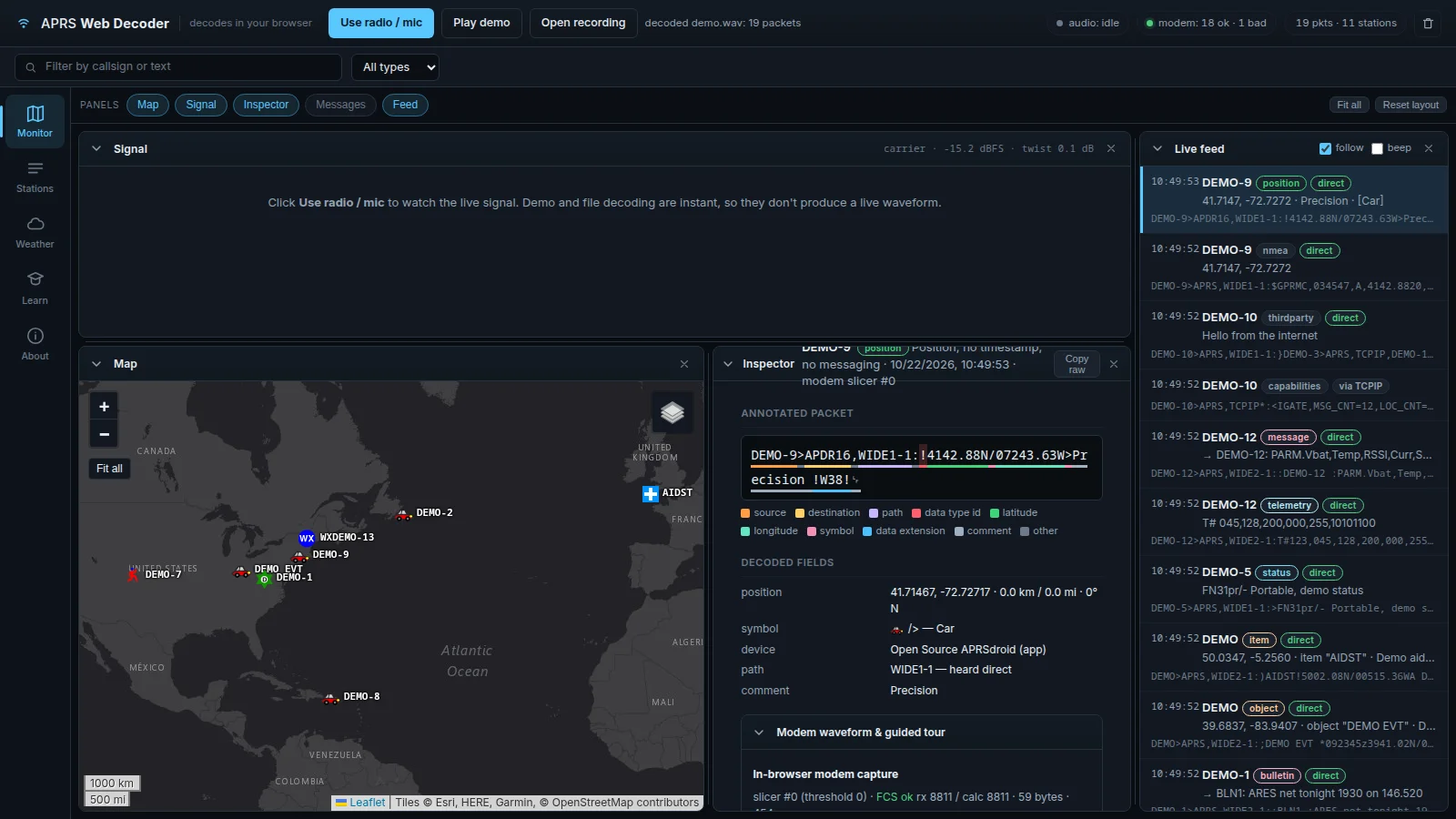
A Leaflet map with OpenStreetMap, Esri, and OpenTopoMap tiles. Decoded stations appear with proper APRS symbols from the hessu symbol set: cars, houses, digipeaters, weather stations, aid stations. Clicking a station opens its popup and jumps to its packets. The featured screenshot shows demo traffic spread across the US east coast with an aid station item off West Africa, which demonstrates how the map handles position, object, and item reports side by side.
Signal
The oscilloscope view for live radio input. Four traces (mark envelope, space envelope, discriminator, carrier) plus green decode ticks and red bad CRC markers. The header reports carrier level and twist, the two numbers that diagnose 90 percent of decode failures. Demo and file decoding run instantly and skip the live trace, which the empty state text explains plainly instead of leaving a confusing blank box.
Inspector
The heart of the site. Click any packet and the raw TNC2 line is painted as a colour coded strip: source in orange, destination in yellow, path in pink, data type in red, latitude in green, longitude in teal, symbol in magenta, data extension in blue, comment in grey. Below that, decoded fields read like a lab report: position with distance and bearing, symbol name, device identification from the tocalls list (the screenshot correctly fingered Open Source APRSdroid from APDR16), path analysis (WIDE1-1 heard direct), and comment text. A Modem waveform and guided tour section shows the per slicer capture with FCS check results, so you can see which of the three slicers won the packet.
Messages and bulletins
A dedicated panel collects addressed messages, bulletins like BLN1 ARES net tonight, group traffic, and acknowledgements. Net control operators watching a public service event can follow tactical messaging without it drowning in the position packet flood.
Live feed
Every decoded frame scrolls here with timestamp, callsign, colour coded type pill (position, nmea, thirdparty, capabilities, message, telemetry, status, item, object, bulletin), direct or via path badge, human summary line, and raw TNC2. Filters narrow by callsign text or packet type, follow pins the scroll to newest, and beep gives audio confirmation of each decode, handy when adjusting an antenna with your eyes elsewhere.
The Learn Bench: 19 Packets That Teach the Protocol
The Learn tab is what elevates this from a utility to a teaching instrument. It contains:
- A dissect anything box. Paste any packet in TNC2 form (
SRC>DEST,PATH:data) and press Dissect. It renders the same annotated Inspector view as live traffic. - A teaching sample dropdown with 19 curated packets covering the full protocol: uncompressed position with course, speed and altitude; timestamped position with PHG; compressed base-91 position; two Mic-E variants including one with altitude; weather with position; positionless weather; message with ID; acknowledgement; bulletin; object; item; status with grid square; telemetry; telemetry PARM definitions; station capabilities from an IGate; third party gated traffic; raw NMEA
$GPRMC; and position with!DAO!extra precision. - An 8 step modem explainer that walks from band pass filter through correlators, discriminator with per tone AGC for receiver twist, triple slicers, DPLL bit clock recovery, NRZI, HDLC flag handling with bit destuffing and CRC-16, up to AX.25 and APRS decode. Each step maps to something you can see in the Signal scope.
- Reference tables for every Data Type Identifier, every SSID convention from -0 primary station through -15, and links to the APRS 1.01 PDF, AX.25 v2.2, the tocalls device list, and Dire Wolf for those ready to run a full software TNC.
Work through the samples in order with a club group and you’ll have covered position formats, messaging, objects, telemetry, weather, and gating in one evening.
APRS Web Decoder vs Classic Decoding Tools
| Feature | APRS Web Decoder (aprs.blink.tel) | Dire Wolf | APRSdroid / HT apps |
|---|---|---|---|
| Install | None, opens in browser | Compile or package install, config file | App store install |
| First decode time | Seconds via Play demo | Minutes to hours of setup | Minutes of pairing |
| Modem visibility | Built in scope with mark, space, discriminator, carrier | Console stats and optional kidisplay | Hidden |
| Byte level teaching | Colour coded strip plus spec links per field | Raw packet log only | Parsed display only |
| Map | Built in Leaflet with symbols | Needs external client (Xastir, YAAC) | Built in phone map |
| Transmit / IGate | None, receive and learn only | Full TX, digipeat, IGate | TX via radio or internet |
| Privacy | All local, IndexedDB only, one click clear | Local files | App dependent |
| Best role | Learn, demo, diagnose, train | Permanent station engine | Portable operating |
The honest summary: run Dire Wolf for your home IGate, carry an HT app for portable operating, and open the Web Decoder whenever you need to understand or explain what the RF is actually saying.
Practical Workflows
Diagnose a tracker that plots wrong
Record ten minutes of the tracker channel to WAV. Open the recording in the decoder, click the suspect packets, and read the Inspector. Swapped Mic-E hemisphere bits, ambiguity spaces degrading precision, and !DAO! versus base-91 mismatches all show up as plain field values instead of mysteries.
Validate a new digipeater path
Beacon through the new digi from a portable station with several path settings. The Inspector path line shows exactly which digipeaters repeated each frame (the asterisk H bit marks the repeaters), so you can confirm WIDE1-1 versus WIDE2-1 behaviour from RF evidence rather than theory.
Teach Mic-E in one screen
Mic-E hides latitude inside the destination callsign, which breaks brains. Load the two Mic-E samples, click the destination field, and follow the spec link. Students watch SX5PTU unfold into coordinates, message bits, and hemisphere flags. That single demo does more than a chapter of reading.
Run a club build night
Laptops plus one shared radio feed (or just Play demo on each machine) gives every attendee a working decoder in a minute. The follow and beep toggles turn it into a game: first table to dissect the telemetry PARM packet and name all five analog channels wins.
Check weather station health
The Weather tab aggregates position and positionless reports with wind, gust, temperature, rain buckets, humidity, and barometer fields decoded per APRS chapter 12. A station reporting 0 volts or frozen rain counters is visible at a glance before you climb the mast.
Privacy and Limits, Stated Upfront
The site earns trust by stating its boundaries in the About panel:
- Audio never leaves the computer. Decoding runs on the Web Audio pipeline locally.
- Packets persist only in the browser IndexedDB, cleared with one button. No account, no cloud log.
- Map tiles come from OpenStreetMap, Esri, and OpenTopoMap, which is the only network traffic besides the page itself.
- The optional radio control ideas (frequency, S meter, GPS over CI-V via Web Serial) are explicitly marked as not part of this build. What you see is the whole product, and the whole product works in all modern browsers.
Known limits: receive only, no transmit or IGating, no APRS-IS connection, and live scope needs real time microphone input rather than instant file decode. Those are design choices for a teaching tool, not gaps.
Frequently Asked Questions (FAQ)
Do I need a radio to use aprs.blink.tel?
No. Press Play demo for instant sample traffic or open a WAV recording. A radio on 144.390, 144.800, or 144.525 MHz via USB audio unlocks live decoding.
Is my radio audio uploaded anywhere?
No. The modem runs locally with the Web Audio API. Packets stay in your browser IndexedDB and clear with one button.
What packet types does it understand?
Position, Mic-E, object, item, message, bulletin, status, telemetry, weather, capabilities, queries, third party, and NMEA, each linked to its APRS 1.01 chapter.
How is this different from Dire Wolf?
Dire Wolf is a full software TNC with transmit and IGating for permanent stations. This is a zero install receive and teaching bench that shows you what each byte means.
Can I use it for training my club?
Yes. The Learn tab with 19 samples, the 8 step modem guide, and the spec linked Inspector were built for exactly that. Project it and dissect live traffic together.
Sources and Further Reading
- APRS Web Decoder: aprs.blink.tel
- APRS 1.01 Protocol Reference (PDF): aprs.org/doc/APRS101.PDF
- AX.25 v2.2 Specification (PDF): tapr.org/AX25.2.2.pdf
- APRS tocalls device identifiers: github.com/aprsorg/aprs-deviceid
- APRS symbols (hessu, CC BY-SA): github.com/hessu/aprs-symbols
- Dire Wolf software TNC: github.com/wb2osz/direwolf
- Leaflet mapping library: leafletjs.com
- Related reading on HamRadio.my: APRSdroid 9M2PJU Mod, LoRa APRS iGate V4.0.0, APRSPHs Messenger, and 9M2PJU LoRa APRS Tracker guides.
73 de 9M2PJU

Post Comment