5036-WebTAK: Browser TAK Client, Bluetooth Helmet Camera Streaming and OpenTAKServer Video in One Node.js Server
TL;DR: Quick Summary
5036-WebTAK is a free and open source TAK companion server that puts TAK in the browser, registers users on OpenTAKServer with approval, and pipes Bluetooth helmet camera video into the TAK common operating picture automatically. One Node.js service on port 5036 serves a WebTAK map client for phones and PCs, a phone camera app for helmet cameras over Bluetooth, per stream MJPEG, HLS and MPEG-TS links for ATAK and WinTAK, automatic OpenTAKServer video feed registration, drone and screen share ingest over RTMP, RTSP and SRT, Meshtastic LoRa bridging, and multi server federation. If you run OpenTAKServer and want body worn video plus a no install TAK client that works on iPhone Safari, this is the missing piece.
What Is 5036-WebTAK?
5036-WebTAK is a free and open source Node.js server that adds a browser TAK client, managed TAK user onboarding and automatic camera stream publishing on top of OpenTAKServer.
In practice it fills three gaps at once. Phones and PCs get WebTAK at https://<server>/eud/, a lean ATAK style map client as a web app with markers, drawing, chat, video, data packages, missions and overlays. New team members request real TAK access at https://<server>/join/ and the admin approves them, after which the app creates the OpenTAKServer account, sets callsign, team and role, and hands over ATAK, iTAK and WebTAK enrollment material. And every helmet or phone camera stream gets one link per stream at https://<domain>/<user>/<streamId> plus HLS, MPEG-TS and snapshot variants, auto registered as a video feed in OpenTAKServer so it shows up under Video in ATAK and WinTAK as rtsp://<TAK server>:8554/<path>. The chain is short:
Helmet camera --Bluetooth--> phone browser --HTTPS--> your server --> ATAK, WinTAK, admin
The project lives at https://github.com/fredy060795/5036-WebTAK with 128 commits, companion firmware in ESP32-Flash for the Bluetooth helmet camera, and a single file TAK server sibling in 5040-WebTAK_Server for Windows and Raspberry Pi.
Where It Fits in the TAK Family
A short TAK history for new readers
TAK, the Tactical Assault Kit, started as an Android app for military teams sharing positions over the Cursor on Target (CoT) protocol, then grew into a family: ATAK on Android, iTAK on iPhone, WinTAK on Windows, TAKX and WebTAK variants, plus civilian and amateur radio adoption for public service events, search and rescue, wildland fire, statewide programs like COTAK, and ham deployments such as marathon and parade support bridged to APRS. We covered that arc and self hosting in our OpenTAKServer Docker guide here at HamRadio.MY.
The standard self hosted stack today is OpenTAKServer with MediaMTX for video, Let Encrypt certificates, enrollment by QR or data package, and video feeds added by hand. That works, but three pain points stay: iPhone users without a native option that matches ATAK, body camera onboarding that needs per feed setup, and new user provisioning that means manual account creation.
What 5036-WebTAK adds
5036-WebTAK sits beside OpenTAKServer, not instead of it. OpenTAKServer stays the CoT and certificate authority. 5036-WebTAK adds the web client, the registration desk, the camera ingest, the drone ingest page, the Meshtastic bridge and the federation relay. Connect it once under Settings > OpenTAKServer and registration, and camera streams plus WebTAK positions flow into the same picture ATAK users already see.
How the Helmet Camera Pipeline Works
One link per stream
Every stream gets its own random stream ID, so many streams run at once with no conflicts. One user can hold several streams.
| Link | Format | Note |
|---|---|---|
https://<domain>/<user>/<streamId> |
MJPEG | Main link, low latency, no ffmpeg needed. In a browser it opens a fullscreen view, tap toggles fill vs whole image |
https://<domain>/<user>/<streamId>/index.m3u8 |
HLS in H.264 | Needs ffmpeg on server, about 4 to 8 s latency. Use this one for OpenTAKServer |
https://<domain>/<user>/<streamId>/stream.ts |
MPEG-TS in H.264 | Needs ffmpeg, continuous HTTP stream |
https://<domain>/<user>/<streamId>/snapshot.jpg |
JPEG | Last image |
Frame rate comes from the camera over Bluetooth, about 2 to 5 frames per second at 320×240. Try MJPEG first in ATAK or WinTAK for lowest delay, HLS for OpenTAKServer pulls, MPEG-TS where a continuous stream fits better. All three carry the same aligned image.
The five step field workflow
- In the admin window show or print the QR code for all users. One code covers everyone.
- The user scans it and enters name and unit. They get their own stream URL at once, for example
https://<domain>:5036/max-mueller/qugzu48s8q. The phone remembers the signup. - Choose the source: phone rear camera or helmet camera over Bluetooth, then align it. The page shows Ready. Nothing is sent yet.
- You switch on with Live in the admin list or viewer window. The phone vibrates briefly and sends. Live off or All to ready returns to Ready.
- In the admin list: align, image size, TAK path, block, kick or delete.
Keep the phone screen on and the app in the foreground. Browsers stop camera and Bluetooth when the page goes to the background. On Android run ATAK and the page in split screen.
Image size, alignment and rotation
The admin sets image size per stream or as default for new streams: 160×120 very fast preset, 320×240, 640×480, or 1280×720 for phone cameras only. Changes apply live on the phone, even mid stream.
Every helmet mounts differently, so alignment is first class. On the phone card Align and in the admin viewer window: View > matches slider for any angle 0 to 359.5 degrees clockwise, fine steps, 0 reset, Mirror, plus Fill which crops edges with no black corners or Whole image which keeps black corners for oblique angles. The phone rotates every image before sending, so MJPEG, HLS, MPEG-TS and snapshot plus OpenTAKServer and ATAK all get the aligned image. From 45 degrees the image turns portrait and HLS restarts briefly on landscape to portrait switches. A base angle for new streams lives under Settings > rotation, for cameras mounted sideways in the housing.
Hardware notes that matter on day one
- Phone camera: works in every phone browser over HTTPS, including Safari on iPhone. About 5 frames per second. Camera picker lists rear, front and USB UVC cameras on Windows, macOS, Linux, iPad with USB-C and some Android devices. Not iPhone USB cameras.
- Helmet camera over Bluetooth: Android needs Chrome, not Samsung Internet or Firefox. No iPhone browser supports Bluetooth, so use the free Bluefy app on iPhone. The page shows a Copy the link for Bluefy path.
- Keep video and radio apart: while a video stream runs, the Meshtastic radio link is released and reconnected when the stream ends, to protect throughput.
- Address of the server: set it once in the admin and it lands in every QR code and link, for example
https://tak.example.com:5036. Empty or Automatic falls back to PUBLIC_URL or the address used to open the page.
Automatically in OpenTAKServer: No Hand Made Feeds
As soon as OpenTAKServer is connected in the admin, the server registers every camera stream automatically as a video feed. Nothing to do by hand.
- New streams get a path from the name, for example
cam/alpha-10. - OpenTAKServer and MediaMTX pull on demand over the HLS link with sourceOnDemand. That needs ffmpeg in the streams server Docker image and a public address set under Links and QR codes or PUBLIC_URL.
- In ATAK and WinTAK the stream appears under Video as
rtsp://<TAK server>:8554/<path>. - Blocking, switching off the checkbox in the TAK path column or deleting removes the stream again.
The admin has one section for this, Video feeds. Top half lists cameras from WebTAK: whoever starts video in WebTAK is an OpenTAKServer feed cam/<callsign> right away. Bottom half lists all feeds in the TAK server with origin labels WebTAK or external, the ATAK link to copy, and a form for more feeds by path plus source in rtsp, rtmp, srt, udp or HLS. Edit the path field and press Enter to move a feed. The dot shows state: green registered, yellow waiting, red error with explanation on hover. Switches cover Add new streams automatically, only while the camera is sending vs while enabled, path prefix, and Sync which also runs at startup and every 10 minutes.
Without an OpenTAKServer connection, copy the HLS link with QR and Links and add it by hand in OpenTAKServer under Video streams > Add Video.
Drones, Screens and External Cameras: Everything Becomes a Feed
The same Video feeds table absorbs drones and computers, so nothing is created by hand in ATAK.
| Source | How |
|---|---|
| DJI drone with DJI Fly or DJI Pilot 2 | Share menu > Transmission or Livestream > RTMP, paste the address from the /access/ page |
| OBS or Larix Broadcaster | RTMP, RTSP or SRT using the addresses below |
| Phone screen | Larix Screencaster Android app with the RTMP address. Phone browsers cannot share the screen |
| PC screen | WebTAK > Video > Share screen, desktop browsers only |
| Helmet camera or phone as camera without TAK access | Camera app at /app/ reached by QR under Links and QR codes |
Template addresses, filled in on /access/ and in WebTAK under Video:
rtmp://<TAK server>:1935/drone-<callsign>?user=<user>&pass=<password>
rtsp://<user>:<password>@<TAK server>:8554/drone-<callsign>
srt://<TAK server>:8890?streamid=publish:drone-<callsign>:<user>:<password>
Open ports 1935 for RTMP, 8554 for RTSP and 8890 UDP for SRT on the TAK server.
Password handling is kind to field users. A drone address without a typed password works when the device already logged in to WebTAK or opened from the access page: unique per user as drone-<callsign>. The password stays on the device only after the TAK server confirms it, like ATAK. Registered users never type it when the device connects with its user certificate, including logins by data package, p12 or iPhone home screen app. Only users WebTAK doesn’t manage type their TAK password once for checking, then it is stored like ATAK.
Note the limit: DJI Fly and DJI Pilot 2 over RTMP send video only, no drone position or heading. For a moving drone icon and cone you need a KLV source or the ATAK UAS Tool path described below.
Field of View Cones and Drone Telemetry
Cones show where a camera looks
Every contact or marker with a field of view sensor tag, as in ATAK, draws a cone in 2D and in 3D. Own live streams carry view direction, 60 or 66 degree angle and 100 m range. Phone camera uses the back of phone compass direction, also in north up mode. Helmet camera uses GPS course while moving, phone compass while standing still when the phone is carried facing forward. The compass permission comes from a tap on the stream button, no need to enable the compass first. Cones render at least about 70 px long at any zoom.
KLV drone telemetry while watching
When a drone feed carries KLV per MISB ST 0601, from professional drones, ATAK UAS Tool, QGroundControl or STANAG 4609 encoders, WebTAK shows while watching: the drone position, height, view direction and cone, the ground footprint corners from KLV or computed from height, angle and field of view, and the image center SPI. The player reads like UAS 1050 m, 227 deg, FOV 60 deg, tap jumps the map to the drone. The viewer also forwards the drone to the TAK server so ATAK in HQ sees it too.
The server reads the KLV track with ffmpeg while someone watches, shared by all viewers. For feeds of the own TAK server it uses MediaMTX RTSP with the OpenTAKServer login, because RTSP keeps KLV while OpenTAKServer HLS usually strips it.
WebTAK App: A Lean ATAK Level Client in the Browser
At https://<server>/eud/ lives WebTAK, a lean TAK client as a web app with an English interface for multinational teams. Runs on Android and iPhone via Safari Share > Add to Home Screen. Layout follows ATAK: top bar with maps, markers, draw, chat and video plus a tile grid menu with Servers, Contacts and Markers, Clear Content, Data Packages, Maps, Overlays, Data Sync, Video, Meshtastic, R and B Line, Draw, Bloodhound, Markers, Chat and Settings. Menu > Edit pins up to 5 tools plus menu to the top bar in tap order, stored per device across updates.
Highlights that matter for ham and EmComm use:
- Draw ATAK style: line, rectangle, polygon and circle in 9 colors. Shapes use ATAK CoT types, show in ATAK, WinTAK and iTAK, sync to all servers and over Meshtastic, with rename, delete and radius or length readout.
- Bloodhound: from any marker, user or drawing window, or the Bloodhound tool plus a tap. Live line from own position with distance, bearing and ETA while moving, color coded red, yellow under 500 m, green under 100 m.
- Contacts and Markers by type: contacts plus Friendly, Hostile, Neutral and Unknown by 2525 affiliation, other points, drawings and routes. Each group expands, collapses and clears on its own. Clear Content clears several groups plus overlays and chat, optionally deleting own markers on the TAK server too.
- Gestures like ATAK: two finger rotate after about 12 degrees so zoom doesn’t wobble, Shift plus wheel on PC, two finger push for tilt.
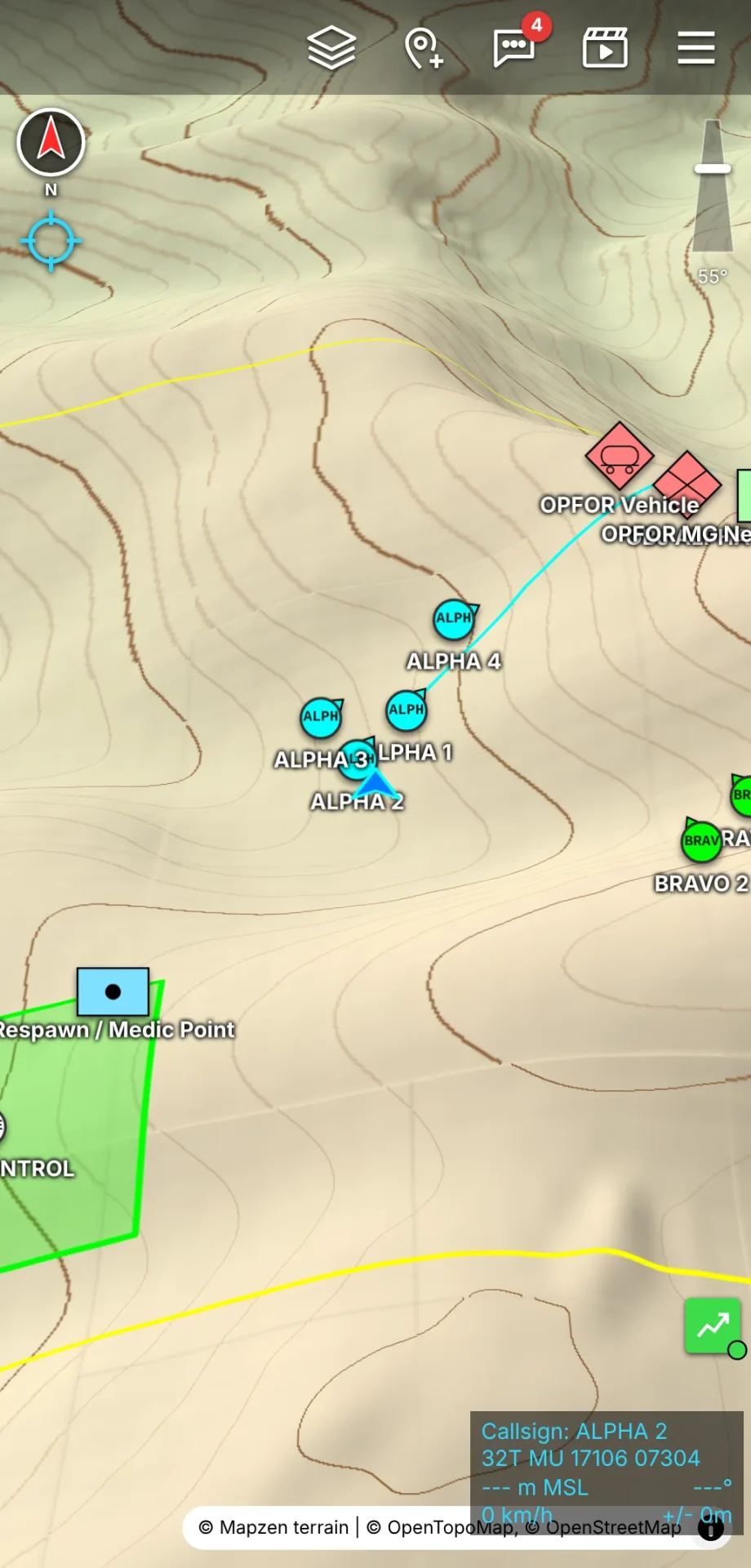
- Real 3D map like WinTAK: tilt slider plus double tap to flatten. When tilted, MapLibre GL renders terrain with elevation, sky and horizon up to 88 degrees, symbols upright with names, routes draped on terrain. At 0 degrees it returns to the flat map for drawing and measuring with the same extent and rotation. 3D is default and can be turned off. Elevation uses free AWS Terrain Tiles through a local cache, saved offline on request. Without WebGL 2 it falls back to flat tilt or 3D without terrain.
- Markers with 2525 symbology: name prefix plus index, affiliation, dimension for Ground, Air, Sea, Sub and Space, and symbol for infantry, armor, artillery, helicopter, fighter, drone, ship, submarine and satellite. Tap to place, then Move, rename or delete in the popup with the same UID behavior as ATAK.
- Servers plural: connect several TAK servers at once on one map. Per server: ATAK enrollment QR, data package zip, certificate p12, truststore, or manual address plus port with Request certificate on 8446. Unknown certificates ask once by fingerprint.
- Chat: GeoChat to All, minimized or closed like video, auto deleted after 3 days.
- Video watching: all situational streams plus TAK server feeds in a docked viewer with minimize, fullscreen and close. HLS plays everywhere via hls.js, including OpenTAKServer feeds with jwt keys passed through. RTSP feeds from MediaMTX auto convert through the MediaMTX HLS output via the local
/api/eud/mediarelay, so no mixed content or CORS pain. Fallback offers Open in new tab or Copy address for VLC. - TAK Data over API port 8443: data packages, Data Sync mission subscribe including password missions, auto reload on change, overlays from KML and KMZ including multi level raster maps kept offline, auto push of server sent packages and mission invites. KML from Google Earth, My Maps, QGIS, CalTopo and WinTAK imports with UTF-16 and ISO-8859-1 support.
- Maps and offline: OpenStreetMap, OpenTopoMap, Esri Satellite and Topo or custom z x y URL through a server side tile cache under DATA_DIR tiles. Save offline for the visible area or a drawn corridor with width in meters and zoom range. The docs ask to fetch only what you need since free tile services forbid bulk download.
- Meshtastic LoRa with no internet: direct Bluetooth to a Meshtastic radio on Android Chrome or iPhone Bluefy. Positions and chat ride LoRa as TAK packets like the Meshtastic ATAK plugin, markers move and delete as CoT on port 257 with fountain blocks for larger ones. Offline first, with 30 s to 5 min position cadence and 50 m movement trigger.
- Security model: the server only relays at
/ws/takand/api/eud/mediawith target checks. Certificates and keys stay on the phone. Lock Allowed TAK servers in the admin so the box can’t serve as an open relay.
Limits are stated plainly. A TAK server on the phone itself at 127.0.0.1 can’t be reached from a web app since browsers can’t open raw TCP or TLS. IOS pauses background web apps. Safari has no Bluetooth, hence Bluefy for helmet and Meshtastic links.
TAK Access With Approval: Registration Desk for OpenTAKServer
Users request real TAK access here. After approval the app creates the account on OpenTAKServer and the user gets login details, QR codes and an illustrated guide.
No OpenTAKServer yet? The sibling 5040-WebTAK_Server is a single file TAK server for Windows and Raspberry Pi that installs in one step, federates several servers, and speaks the same OpenTAKServer web API. Point it at https://<server>:8443 with admin login and accept the self signed certificate.
Workflow:
- User opens
https://<server>/join/from the admin Registration QR, reads what TAK does, sends name, unit, requested callsign and email plus optional code word. They get a confirmation email at once with a personal status link and a live timeline of request, email confirm, approval and login details. Admin gets an email per request. - Admin approves in Users and requests. Nothing happens without approval. Admin sets callsign, team and role.
- The app creates the OpenTAKServer account with role user, username from callsign, random password per user or a fixed one, verifies login works, sets team groups, and builds the ATAK enrollment QR. User gets email if SMTP is set or the admin hands over the shown link.
- On
/access/the user finds callsign, team, role, server, user, password, truststore download, QR codes and step guides for ATAK, iTAK and WebTAK. The WebTAK QR opens the EUD with all data and fetches the certificate automatically.
Management adds search and filter, approve, decline, edit, block and unblock with OpenTAKServer deactivation, new password, new ATAK QR, copy access link and delete on both sides. Signup rate limits to 5 per hour per IP. Passwords live in DATA_DIR db.json at mode 600, access links carry 48 secret characters.
Callsign, team and role override uses OpenTAKServer device profiles per device. ATAK applies them on next connect, new devices sync every 2 minutes or on demand. Web EUD applies team and role at once and locks them while callsign stays editable for shared logins. ITAK ignores server profiles, so users set fields from the access page.
Teams and visibility default to everyone sees everyone through TEAM name groups with IN plus OUT, readable across teams and exchange with groupless ANON devices. Per user receive only or send only flags plus a who sees whom matrix let several units share one server without cross talk. Missions without groups are flagged as invisible in ATAK and WebTAK with a one click Share with all fix.
Federation, Clear Map and Server Admin
Federation passes data between TAK servers
Admin > TAK server > Federation turns WebTAK into a bridge client with one certificate per server. Live positions, markers, drawings, chat and deletions forward at once in all directions. Data packages sync every N minutes or on demand by SHA-256 compare, uploaded ATAK style, so nothing arrives twice. Forwarded CoT carries a marker and is never passed on again, duplicates from two servers forward once, pings and mission changes stay local. Works with the own OpenTAKServer plus any number of others by address, ports and user password for cert fetch or p12.
Clear map after a mission
Admin > Clear map on all devices picks markers by affiliation, other points, drawings and routes, overlays, contacts and chat plus an optional note. Every WebTAK device prompts CLEAR NOW or LATER at next connect. Only content from before the request clears, new markers stay, cleared content doesn’t return on resend. ATAK, iTAK and WinTAK aren’t affected.
Managing OpenTAKServer from the same admin
Under TAK server the admin manages OpenTAKServer users including hand made ones, groups, missions with Data Sync, and Meshtastic channels, plus new user creation, import, role, block, password, groups and delete. Helpers under System > Helpers get limited logins that can approve requests and edit users but can’t touch settings, deletions, OpenTAKServer admins or stream keys.
Installation: Docker on 5036, Windows Test, or Bare Metal
With Docker, recommended, port 5036
The server runs on port 5036 with HTTPS, required for camera and Bluetooth in phone browsers. Easiest path reuses the TAK server Let Encrypt certificate:
- In
docker-compose.ymlreplacetak.example.comwith your domain in PUBLIC_URL and certificate paths. - Open port 5036 in the firewall.
- Run
docker compose up -d. - Open
https://<domain>:5036/admin/and log in with admin and admin123, then change credentials at once.
Stream links look like https://<domain>:5036/<user>/<streamId>. Renewed certificates reload automatically. With free ports 80 and 443, Caddy can fetch certs instead via the caddy profile and deploy/Caddyfile. Key variables: PUBLIC_URL for links and reset mail, ADMIN_HOST to pin admin to one domain, PORT and BIND default 5036 on all interfaces, DATA_DIR for db.json, FFMPEG_PATH, MAX_TAK_PER_IP default 40 for shared field routers, TLS_CERT and TLS_KEY for direct HTTPS, TRUST_PROXY for reverse proxy headers.
Testing on a Windows PC
Download ZIP, unpack, double click start.bat. Missing Node.js offers a winget install. First start installs packages, creates own HTTPS test certificates with a test CA in data/certs, adds the test CA to Windows after a Yes prompt, opens the admin at https://<PC-IP>:5036/admin/, and opens port 5036 plus Node.js in Windows firewall with one admin rights prompt, logged to firewall.log and start.log. Install the phone CA once per phone from the QR and Links > Certificate for the phone path: Android installs a CA certificate, iPhone installs the profile plus full trust. Then scan the all users QR, sign up, pick a camera and stream. For HLS and MPEG-TS on PC install ffmpeg by winget or drop it in tools/ffmpeg/bin/. Test certs are test only. Use real Let Encrypt certs on internet servers.
Without Docker
Needs Node.js 18 or newer, optional ffmpeg, and a certificate. The deploy/helm-camera.service unit runs HTTPS direct on 5036, or sit behind Caddy or nginx with the shipped examples. Clone, npm ci --omit=dev, copy and edit the unit, enable and start. Data stays in DATA_DIR db.json with scrypt hashed admin password. After 10 wrong passwords the login blocks that IP for 15 minutes.
Comparison: 5036-WebTAK, OpenTAKServer Alone and Related Options
| Attribute | 5036-WebTAK plus OpenTAKServer | OpenTAKServer alone | 5040-WebTAK_Server single file | ATAK only with manual feeds |
|---|---|---|---|---|
| TAK client on phone | Yes, WebTAK PWA in browser, iPhone supported | No, needs ATAK, iTAK or WinTAK | Yes, same WebTAK approach | Needs installed ATAK or iTAK |
| User onboarding | Self registration with approval, auto account, QR and guide | Manual account and QR per user | Same registration model, smaller server | Manual, per device |
| Helmet and phone video | Auto per stream links plus auto OpenTAKServer registration | Manual feed add per camera | Planned subset, no MediaMTX | Manual feed add |
| Drones and screen share | RTMP, RTSP and SRT ingest pages with per user addresses | Manual MediaMTX paths | Basic | Manual |
| Meshtastic LoRa | Built in Bluetooth bridge with CoT over LoRa | Needs separate plugin path | Listed as not included | Via ATAK plugin |
| Video formats | MJPEG plus HLS plus MPEG-TS plus snapshot | Depends on source and MediaMTX | Depends on source | Depends on source |
| Map depth | 2D plus 3D terrain, offline tiles and corridors, KLV cones | Depends on client | Same WebTAK map | Full ATAK maps |
| Install shape | Node.js Docker on 5036 beside OpenTAKServer | Docker Compose TAK server | One file Windows and Pi | App installs |
| Best for | Teams wanting browser TAK plus body video fast | Clean TAK authority on a VPS | Single file trial or Pi field server | Single user phone only |
The honest takeaway: OpenTAKServer stays the authority and certificate home. 5036-WebTAK is the onboarding desk, the web client and the camera man. For a club or EmComm group that needs iPhone access without App Store friction plus helmet video in ATAK with no manual feed work, the pair beats either half alone.
Practical Ham and EmComm Uses
- Public service event with mixed phones: hand out one registration QR at briefing. Android users run ATAK, iPhone users open WebTAK from home screen. Helmet cameras on course marshals stream to net control with cones showing where each marshal looks.
- Search and rescue hasty team: phone rear camera plus Bluetooth helmet camera both work through the same signup. Live positions plus MJPEG in the admin viewer plus auto RTSP in ATAK give the ICP eyes without a PC on the team.
- Field day or portable exercise with no internet: preload offline tiles and corridor to site, run Meshtastic over LoRa for positions and chat, sync to TAK servers when back on network.
- Drone overwatch for an antenna farm or flood watch: DJI RTMP to the per user drone address, KLV capable source where heading matters, footprint and SPI visible to viewers and forwarded so HQ ATAK sees the drone too.
Honest Limitations
- Small repo, early days: 3 stars and 128 commits at time of writing. Read the code, test on a LAN, and back up DATA_DIR db.json before trusting it on a public server.
- Browser background limits: phones stop camera and Bluetooth when the page backgrounds. Keep the page foreground with screen on, or split screen with ATAK on Android.
- iPhone Bluetooth gap: Safari can’t do Bluetooth, so helmet and Meshtastic links on iPhone need the Bluefy app path.
- Video is low frame rate: 2 to 5 frames per second at 320×240 over Bluetooth. Fine for situational eyes, not for cinematic FPV.
- DJI RTMP has no telemetry: position, heading and cone need KLV, UAS Tool or QGroundControl paths.
- Tile and mail manners: fetch only offline areas you need, set PUBLIC_URL plus SMTP for reset and approval mail, and set Allowed TAK servers so the relay can’t be used openly.
Why It Matters
Amateur radio keeps meeting TAK at real incidents: bike races, parades, storm nets and search teams where hams carry the comms and the served agency carries the map. The friction was never the protocol, it was onboarding and video. New volunteers stall on certificates, iPhone owners stall on apps, and body video stalls on manual feed setup.
5036-WebTAK attacks exactly that friction with boring, useful engineering: a web client at ATAK CoT level, a registration queue with approval and illustrated guides, one link per camera with rotation and size handled once, and automatic registration where ATAK already looks. Combined with OpenTAKServer and, where the path is RF only, Meshtastic and APRS bridges we have covered before, a club can field a common picture with eyes on every team from hardware it already owns.
Frequently Asked Questions (FAQ)
What is 5036-WebTAK?
It is a free open source Node.js TAK companion server on port 5036. It serves a browser WebTAK map, manages OpenTAKServer user signup, and auto publishes helmet camera video as TAK feeds.
Do I still need OpenTAKServer?
Yes for full use. OpenTAKServer stays the CoT authority and video hub. 5036-WebTAK connects to it, creates accounts on approval, and registers camera streams as feeds automatically.
How does helmet camera streaming work?
The user scans one QR, picks phone or Bluetooth helmet camera, and the admin sets Live. The server publishes MJPEG, HLS, MPEG-TS and snapshot links per stream for ATAK and WinTAK.
Does it work on iPhone?
Yes for map, chat, markers and phone camera over HTTPS. Bluetooth helmet and Meshtastic links need the Bluefy app because Safari has no Bluetooth support.
Can drones and Meshtastic join?
Yes. DJI, OBS and Larix push RTMP, RTSP or SRT to per user addresses. Meshtastic radios bridge positions, chat and markers over LoRa when offline.
Sources and Further Reading
- 5036-WebTAK GitHub Repository – Source, README, Docker setup, API details and end to end tests.
- 5040-WebTAK_Server Single File TAK Server – Sibling single file server for Windows and Raspberry Pi with the same web API.
- ESP32-Flash Helmet Camera Firmware – Firmware source and Bluetooth protocol in PROTOCOL.md for the ESP32-CAM side.
- OpenTAKServer Official Site – The TAK server 5036-WebTAK plugs into for accounts, certificates and MediaMTX video.
- ATAK Developer Documentation – TAK product line, CoT protocol and enrollment background.
- Meshtastic Official Site – LoRa mesh platform bridged by WebTAK over Bluetooth.
- MediaMTX Media Server – RTSP, RTMP, HLS and SRT engine behind OpenTAKServer video.
- MapLibre GL JS – 3D map engine used by the WebTAK client.
- Self Host a TAK Server with 9M2PJU OpenTAKServer Docker Stack – HamRadio.MY guide to the OpenTAKServer base this project extends.
73 de 9M2PJU

Post Comment