amateur radio
open source
Technology
3D printing, Arduino, FreeRTOS, Gazebo simulation, Home Assistant, KiCad, LiDAR SLAM, local first, makerspet, Nav2, OOMWOO, Open Mower, open source robot vacuum, privacy, raspberry pi, Roborock drive wheels, robot vacuum, ROS 2, STM32G473, Valetudo
9M2PJU
0 Comments
OOMWOO Open Source Vacuum Robot: Drive Wheels, CAD, PCB, Firmware and ROS 2 Install Explained
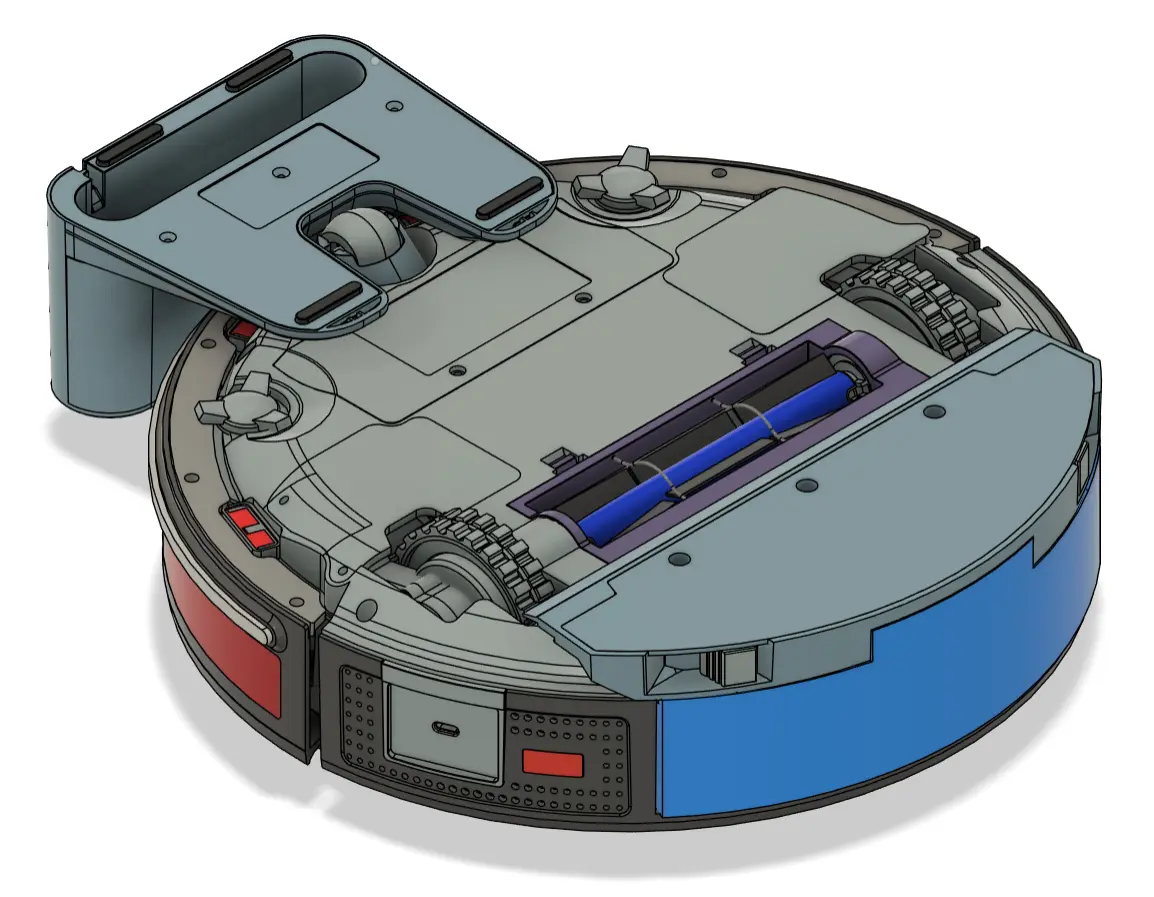
TL;DR: OOMWOO is an open source robot vacuum you build yourself from a Raspberry Pi, STM32 I/O board, 2D LiDAR and 3D printed parts. The latest drive wheels progress proves the sourced Roborock wheel modules work on the bench, while the four build repos (oomwoo-cad, oomwoo-pcb, oomwoo-firmware, oomwoo-install) cover chassis, electronics, safety firmware and ROS 2 navigation. You can run the full stack in simulation today with no hardware.
What OOMWOO Is and Why It Matters for Builders Who Want Local Control
OOMWOO is an open source home robot vacuum cleaner you build yourself from 3D printed parts, sourced vacuum modules, a custom STM32 I/O board and a Raspberry Pi or Android phone running ROS 2, with no cloud account required for normal cleaning.
That one sentence is the whole project. If you have followed Valetudo, VacuumTiger, Open Mower or Dennis Giese teardowns on robotinfo.dev, OOMWOO sits one layer deeper. Valetudo replaces cloud firmware on a vacuum you already own. OOMWOO replaces the vacuum itself. The chassis, motor drivers, safety firmware, SLAM stack and install tooling are all open under Apache-2.0, sponsored by makerspet.com and remake.ai, with an optional parts kit planned but every file staying open.
The Reddit thread that sparked this article, r/oomwoo post 1xj75ia titled opensource vacuum robot progress drive wheels, shows the moment a project like this becomes real. It isn’t a render. It’s a sourced Roborock S5 Max drive wheel assembly spinning on the bench, with encoder pulses on the scope and measured current numbers. That’s the hardware bring-up milestone. This guide combines that update with the four repos that turn wheels into a robot: oomwoo-cad for mechanics, oomwoo-pcb for electronics, oomwoo-firmware for real-time safety, and oomwoo-install for the ROS 2 brain.
For hamradio.my readers the hook is familiar. A modern robot vacuum is a mobile computer with a LiDAR that maps the inside of your home and uploads it to a vendor cloud. Hams rejected that deal for repeaters, loggers, hotspots and shack PCs a long time ago. OOMWOO applies the same local-first logic to floor cleaning: maps stay home, firmware is auditable, Home Assistant integration is native, and a broken wheel means a 24 USD spare part, not a new appliance.
A Short History: From Trilobite to Roomba to Open Source
2001 to 2002: the appliance is born
Electrolux Trilobite (2001) proved a consumer robot vacuum could sell. IRobot Roomba (2002) proved it could scale, with random bounce navigation, a side brush, cliff sensors and a dock. Both locked hardware, firmware and maps inside the vendor.
2010s: LiDAR, cameras and the cloud
Neato added LiDAR SLAM. Roborock, Dreame, Xiaomi and iRobot added 2D LiDAR, visual obstacle avoidance, mopping, auto-empty docks and phone apps. Cleaning got excellent. Privacy got worse. Maps, schedules and voice clips moved to vendor clouds by default.
2018 to today: the open source response
- Valetudo (2018 onward): cloud-free firmware replacement for supported Roborock, Dreame and Xiaomi vacuums. Keeps stock hardware, adds local MQTT and Home Assistant. Doesn’t fix hardware lock-in.
- Dennis Giese / robotinfo.dev: teardowns, rootability tables and UART root methods. The reference for what consumer boards actually contain.
- VacuumTiger / codetiger/VacuumRobot: low-level reverse engineering of 3irobotix CRL-200 based vacuums (Proscenic M6 Pro, Roborock S5 Max class), including a documented CPU to MCU serial protocol. OOMWOO cites this directly as the model for its own CPU to MCU link.
- Open Mower: open source outdoor lawn mower. Same spirit applied to grass: RTK GPS, ROS, 3D printed parts, real yard work.
- Kaia.ai LDS libraries: open 2D LiDAR drivers for 23 plus LiDAR models in C++ and Python, used across ROS vacuum projects.
- remake.ai vacuum_ros2_bridge: ROS 2 bridge for SangamIO vacuums, the shortcut OOMWOO uses to run its Nav2 stack on a placeholder Proscenic M6 Pro today.
OOMWOO started in June 2026 under Ilia O. At Maker’s Pet. Main repo makerspet/oomwoo holds goals, architecture, design research and the bill of materials. Four satellite repos hold the build: CAD, PCB, firmware and install. Star counts move fast, but the structure has stayed stable: print geometry, source mechanisms and wear items, run ROS 2 on top, keep safety on the MCU.
Project Map: The Five Repos in One Picture
| Repo | What it holds | Language and tools | Status at time of writing | You can do today |
|---|---|---|---|---|
makerspet/oomwoo |
Goals, architecture, BOM, design research, RFC board | Markdown, docs | Active, 300 plus commits | Read BOM, pick an RFC, follow build |
makerspet/oomwoo-cad |
OOMWOO One 3D CAD, STEP, mounts, dock concept | CAD, STEP, 3D print files | Design in progress, 73 commits | Study reverse engineered assemblies, print test fits |
makerspet/oomwoo-pcb |
STM32G473 I/O board, sensor boards, charging dock | KiCad, schematics, SPEC.md | Placement phase, 150 commits | Review SPEC.md, v1 phone board schematic PDF |
makerspet/oomwoo-firmware |
STM32 Arduino plus FreeRTOS safety firmware | C, C++17, PlatformIO, Unity tests | Protocol bring-up, 36 commits | Build protocol tests, run Nucleo identity handshake |
makerspet/oomwoo-install |
ROS 2 Jazzy Docker, Gazebo sim, Nav2, coverage tools | Docker, ROS 2, Python, Gazebo | Active, 500 plus commits | docker run sim, SLAM, coverage and docking today |
All code is Apache-2.0. Hardware design files are under an open hardware license. The project states no manufacturing support: files are shared as-is for reference and your own work.
Drive Wheels Progress: Why a Spinning Roborock Module Is Big News
The Reddit update shows a Roborock S5 Max drive wheel assembly powered on the bench. Each assembly packs a DC motor, gearbox, suspension spring, tire, Hall encoder and wheel-drop microswitch in one module.
Why sourced wheels instead of printed wheels:
- Wheel modules take impact, dust, hair and stall current every day. A printed gearbox won’t survive that duty cycle.
- Roborock S5, S5 Max, S6, S7, Q5, Q7 and related families share compatible wheel modules. They are abundant on AliExpress, Amazon and eBay for 24 to 33 USD per pair, with cables and drop sensors included.
- Tires alone (57 mm ID, 68 mm OD, 14 mm width, Roomba pattern) cost 2 to 3 USD if you rebuild from scratch, but the full module is cheaper in time.
Bench results reported in the matching hardware bring-up post:
- Connector: JST ZH 1.5 mm, 7-pin male on the wheel side, female on the board side. Pinout confirmed by driving the motor and watching encoder output.
- Supply: 15 V or less for bench tests. Robot pack is 4S Li-ion, 14.4 V nominal, 16.8 V fully charged.
- Current: about 0.14 A no load, about 1.7 A stall at 14.x V per wheel. Size your H-bridge and current sense for stall plus margin.
- Encoder: Hall pulses with frequency proportional to wheel speed. Feed to MCU timer capture for odometry and velocity PID.
- Wheel-drop switch: normally closed contact that opens when the wheel hangs free. MCU must cut drive within milliseconds.
Practical takeaways:
- If you buy wheels now, search multiple keywords:
roborock s5 maxv wheels,roborock s5 wheels,S502 wheels,Q7 Max wheels. Prices spread 3x across listings. Coupons, 3-piece lots and seasonal sales set the 24 USD floor. Single-piece buy-it-now sets the 33 USD ceiling. - Keep the suspension travel free. The module is designed to float. A rigid printed mount defeats traction and cliff sensing.
- Log encoder PPR yourself. Many listings lack datasheets. Spin at known voltage, count pulses per revolution, store in firmware config.
This is exactly the part-specs and source-3d-models RFC pattern: measure the real part, publish pinout and current, model a STEP mount so others can print it.
oomwoo-cad: Print Geometry, Source Mechanisms
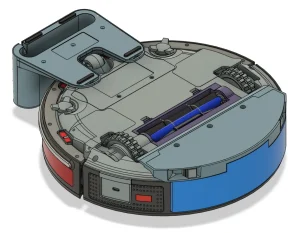
The CAD repo is organized as designs/ for products, lib/ for off-the-shelf parts, and docs/ for spec references. designs/one/stock/ is OOMWOO One itself, about 349 mm diameter and 95 mm tall.
Active work visible in the repo:
- Base plate with drive wheel pockets, mop assemblies and caster seat, September 2026 revision.
- Reverse engineered side brush arm and vacuum assembly with split anti-tangle main brush and POM gearbox.
- Dock concept with charging contacts, IR beacon bay and wash tray space for later tiers.
Design rules that matter:
- Print the chassis, ducts, brush housings, LiDAR turret and dock shell. Source motors, fans, brushes, filters, wheels and sensors.
- Wear parts use common abundant sizes so builders can buy universal replacements anywhere.
- Main brush drive uses a 25 mm geared DC motor plus five module 1.6 spur gears (12 teeth each): pinion, two idlers, one gear per brush so brushes counter-rotate inward. Module 1.0 doesn’t print well. Practical minimum is about 1.42. POM filament or Delrin sheet cutting is recommended over PLA for gears.
- Bearings are 608 2RS (8 x 22 x 7 mm) as insurance for printed tolerances. Shafts are M3 threaded rod with printed hex couplers.
If you contribute, the highest value task is source-3d-models: take calipers to a sourced part (wheel module, caster, fan, cliff sensor), build a STEP model, and submit it so mounts fit first try.
oomwoo-pcb: STM32G473 I/O Board and Sensor Family
The PCB repo holds the I/O board in KiCad with SPEC.md as source of truth. Two variants exist:
- v1 main-phone, in progress: Android phone as compute over USB-C. No Raspberry Pi, cameras, M.2, SD card, speaker or mopping. STM32 runs every motor and sensor including LiDAR and front ToF, and forwards data to the phone. Fastest path to a driving robot.
- main CM4/CM5 carrier, planned: full robot with 2x MIPI cameras, NPU options via third-party CM4-compatible modules, always-on Wi-Fi, audio codec, SD card for hacking, IMU over SPI or I2C, LiDAR over serial, MCU link over serial.
MCU choice is STM32G473VCT6 in LQFP-100, hand solderable and JLCPCB friendly:
- Cortex-M4F at up to 170 MHz with FPU for PID, filters and odometry.
- HRTIM plus general timers for every motor PWM channel and clean BLDC fan drive.
- 5x 12-bit ADCs for per-motor current sense, VBat, source current, 4x cliff IR, 2x dock IR, 2x side IR.
- CORDIC and FMAC accelerators, 512 KB flash, 128 KB RAM, USB device, RTC, built-in op-amps for ultrasonic carpet sensor echo.
What the MCU owns:
- Actuators: 2x drive wheels (H-bridge plus Hall encoders), suction fan (BLDC with FG feedback), main brush, side brush, LiDAR spin motor, water pump, mop motors, mop-lift and side-brush-arm servos.
- Sensors: 4x cliff IR, 2x dock IR, 2x side proximity IR with LED PWM, 2x bumper switches, 2x wheel-drop switches, wheel encoders, IMU with FSYNC, current and voltage channels.
- Power: 4S charging with 0.5C cap, input DPM, USB-C PD and dock input, motors power enable, vacuum power, CPU power and CPU reset.
- HMI: power and home buttons plus LEDs, dock sense, USB serial shell.
Safety architecture, quoted from SPEC.md in spirit: MCU firmware uses FreeRTOS with static allocation, watchdog and bounded reaction time. MCU is watchdog for CPU and resets CPU if health packets stop. MCU stops motors on overcurrent, bumper, cliff or wheel-drop without CPU help. MCU toggles a watchdog GPIO or external circuitry cuts motor power. Serial protocol is custom, not micro-ROS, to keep third-party churn out of safety code.
The v1 package ships as one panel with V-cuts or mouse bites to share parts and cut fab cost: main board (refs 1 to 999), charging dock (1000s, 20 V brick, CH32V003 MCU, robot detection before contacts go live, IR beacon), two front ToF boards (2000s, same design fitted twice), side sensor board (3000s), six cliff boards (4000s), rear docking IR board (5000s), two Hall boards (6000s).
Front sensing deserves a note. The October 2026 update replaced a forward stereo camera pair with one floor camera: single RGB, parallel DVP interface (not MIPI), wide angle about 120 degrees horizontal on 4:3, lens about 71 mm above floor, tilted 37.6 degrees down so the image runs from bare floor at the bumper to chair legs, never above robot height nearby. Two VL53L7CX 8×8 ToF sensors (90 degrees diagonal each, turned 30 degrees left and right) give depth. The camera sees stains and mop lines in reflected light. ToF gives geometry. The tilt math follows the lens: change camera_hfov_deg and tilt adjusts. Topics are /camera/image and /camera/camera_info in camera_optical_frame, off by default, enabled with enable_cameras:=true.
oomwoo-firmware: Arduino on Top, Hard Real Time Underneath
Firmware targets the same STM32G473VCT6 with STM32duino API, FreeRTOS task structure, and a HAL plus timer-ISR real-time core. The core design decision is three layers:
| Layer | Code lives here | Determinism | Who touches it |
|---|---|---|---|
| Layer 3 Arduino API | New behaviors, peripheral bring-up | Best effort | Community |
| Layer 2 FreeRTOS tasks | Comms, control loop, telemetry, charging and safety supervisors, static allocation | Soft real time | Maintainer plus community |
| Layer 1 real-time core | PWM, encoder capture, hard cutoffs, CPU watchdog in timers and ISRs | Hard real time | Maintainer, safety reviewed |
The safety rule: contributor Arduino code can’t defeat a cliff stop, overcurrent cutoff or CPU watchdog. Those live in interrupts and an independent watchdog the upper layers can’t starve. Hang the Arduino layer in a test and the robot must still stop.
Current bring-up status is protocol first, motors later:
- Heap-free C frame encoder and decoder with CRC-16/CCITT-FALSE, bounded incremental UART decoder with corruption and gap recovery.
- Typed payload codec with exact lengths and contract-defined bounds.
- All 23 canonical wire-v1 vectors imported from the io-board-interface RFC.
- CPU ingress gate that only dispatches CRC, direction and payload-valid messages.
MCU_HELLOidentity service on Nucleo G474RE harness.- Native Unity tests plus strict C11 and C++17 sanitizer tests, pinned PlatformIO cross builds for Cortex-M4F.
Build it on a Nucleo-G474RE first:
python -m pip install platformio==6.1.19
pio test -e native -e native_v2
pio pkg install -e nucleo_g474re
pio run -e nucleo_g474re -e nucleo_g474re_v2
Roadmap is bench-testable in order: blink plus SWD plus identity, CPU serial link with health handshake, one drive motor closed loop (H-bridge PWM plus encoder plus velocity PID, the pattern for every motor), all actuators with current sense, all sensors, ISR-level safety layer with measured worst-case cutoff times, charging supervisor (0.5C cap, weak-charger handling), then end-to-end against CPU or the simulated MCU serial tool in oomwoo-install.
Safety-critical changes need maintainer review plus a short hazard note covering over-current, thermal, short and pinch risks.
oomwoo-install: ROS 2 Brain You Can Run Today With No Robot
This is the repo to clone first. It’s a ROS 2 Jazzy Docker setup for Raspberry Pi 4 and 5 (2 GB plus) and for Linux or Windows WSL2 development with no hardware.
Deploy on Pi:
git clone https://github.com/makerspet/oomwoo-install
source oomwoo-install/ubuntu/install_oomwoo_runtime_jazzy.sh
Try in Docker with no robot:
docker pull makerspet/oomwoo:jazzy-dev
docker run -d --name oomwoo makerspet/oomwoo:jazzy-dev sleep infinity
docker exec -it oomwoo bash
Inside the container, default robot model is oomwoo_one:
ros2 launch oomwoo_gazebo world.launch.py
ros2 launch oomwoo_gazebo world.launch.py headless:=true
ros2 run kaiaai_teleop teleop_keyboard
ros2 topic pub -r 10 /cmd_vel geometry_msgs/msg/Twist '{linear: {x: 0.2}}'
Map and navigate with SLAM:
ros2 launch oomwoo_bringup navigation.launch.py use_sim_time:=true slam:=True
ros2 run nav2_map_saver map_saver_cli -f ~/maps/map
ros2 launch oomwoo_bringup navigation.launch.py use_sim_time:=true map:=~/maps/map.yaml
ros2 launch oomwoo_bringup monitor_robot.launch.py use_sim_time:=true
Coverage cleaning headless (agent and CI friendly):
ros2 launch oomwoo_sim_support coverage_regression.launch.py
ros2 topic echo /coverage_meter/ratio
Read sensors:
ros2 topic echo /scan
ros2 topic echo /bumper_left/contact ros_gz_interfaces/msg/Contacts
Physical placeholder robot (Proscenic M6 Pro over Wi-Fi via SangamIO bridge):
kaia config robot.model proscenic_m6pro
ros2 launch proscenic_m6pro bringup.launch.py robot_ip:=<robot-ip>
ros2 launch oomwoo_bringup navigation.launch.py slam:=True
Why this matters: software and hardware proceed in parallel. Simulation first, placeholder vacuum second, custom OOMWOO One hardware third. The October 2026 releases show real tuning: lighter Nav2 (only controller, planner, behaviors, BT navigator, velocity smoother and collision monitor for slam_toolbox localization, about 20 percent less idle CPU), no voxel layers with 2D LiDAR, 1 s lifecycle bond heartbeat, Regulated Pure Pursuit instead of DWB for edge jobs, contour follower standoff moved 0.20 to 0.23 m because the bumper ring (0.1814 m corner radius) touches before the 0.1745 m body, LiDAR noise-adaptive corner guard, edge manager that sweeps every obstacle edge once (99.0 percent swept, 0.2 m written off in Gazebo torture course), and automatic docking that turns to find the IR beacon, fits the dock with LiDAR, stages 0.35 m out, reverses 15 mm short of the back, and exits 0 on success.
Tutorials on makerspet.com cover Gazebo simulation, hello-world ROS 2 package, Proscenic bridge part 1 and part 2, headless coverage for LLM agents, and smartphone ROS 2 in Termux with measured Nav2 loads.
Bill of Materials: About 200 USD Plus Pi for Mid-Range Performance
Target is about 200 USD in sourced parts plus a Raspberry Pi 5 4 GB, aiming at the capability of a 500 to 600 USD commercial vacuum with mopping and possibly premium obstacle detection (ToF plus color camera plus NPU).
| Subsystem | Pick | Price range USD | Notes |
|---|---|---|---|
| Drive wheels pair | Roborock S5 Max family | 24 to 33 | Motor, encoder, suspension, tire, cables, drop sensors |
| Caster | Roomba push-in | 2.50 to 5 | iRobot I3 to J7 pattern |
| Suction fan 6 kPa | Dreame MSD-C-3 or Nidec 20N series | 10 to 23 | Verify kPa against fan model, not vacuum model |
| Suction fan 10 kPa | Roborock BL24131616 | 12 to 24 | S8 MaxV Ultra class |
| Main brush anti-tangle dual | Dreame X50 or X60 pattern | 7 to 10 | Tapered, rubber plus bristles, one-side mount |
| Side brush 3-arm | Dreame angled hex mount | 3 to 8 | Tangle resistant required |
| Side motor | JGA25-310 12 V 150 RPM | about 6.50 | PWM limit from 16.8 V pack, N20 life too short |
| Battery 4S2P 5200 mAh | BRR-2P4S-5200 pattern | 16 to 30 | 14.4 V Li-ion with BMS, 4-pin B+, B-, NTC, sense |
| 2D LiDAR | Dreame, Roborock or 3irobotix pulls | 13 to 32 | Camsense, LDS02RR, Delta-2A, LD14P patterns work |
| Compute | Raspberry Pi CM4 or CM5 2 GB plus | 62.50 to 72.50 | CM4102000 or CM5102000 Lite, NPU carriers interesting |
| Cliff plus bumper bundle | Roomba 500 to 800 pattern | 1.50 to 2.50 each | 4x cliff plus 2x bumper with cables |
| ToF pair | VL53L7CX 8×8 | 8 to 15 each | 126 degrees covered ahead, IC about 5.50 USD at volume |
| HEPA filter | Dreame or Roborock pattern | 2 to 3 | Match kPa class and slot size |
| Custom I/O PCB | STM32 plus drivers | about 40 | Panelized with sensor boards |
| Wiring, fasteners, gaskets | Misc | 12 to 25 | Magnets, tubing, seals |
| Filament | Printed parts | 5 to 15 | You print chassis, ducts, housings |
| Robot subtotal sourced | Without SBC | about 130 to 270 | Excludes Pi or phone |
Dock tiers share one robot base: basic charge first (housing, contacts, wall adapter, IR beacon), auto-empty second (dock fan, bin, sealed port), auto-empty plus wash plus dry third (tanks, pumps, heater, own ESP32 Wi-Fi controller).
Sourcing tip from the BOM author: record two prices per part. Rock bottom (often 3-piece lots plus coupons plus seasonal sales) for kit planning, and realistic single-piece with a few minutes of search for builders. Search keyword variants plus site:aliexpress.com to find the floor.
OOMWOO vs The Alternatives
| Feature | OOMWOO One | Stock Roomba or Roborock | Valetudo conversion | Open Mower |
|---|---|---|---|---|
| Hardware open | Yes, CAD plus STEP | No | No, reuses stock | Yes |
| Firmware open | Yes, Apache-2.0 | No | Yes, replacement | Yes |
| Cloud required | No | Yes for app and maps | No, local MQTT | No |
| Navigation | ROS 2, SLAM, Nav2 | Vendor SLAM | Vendor SLAM, local UI | ROS, RTK GPS |
| Compute | Pi CM4 or CM5, phone v1 | Vendor SoC | Vendor SoC | Pi plus GPS |
| Repair path | Spare modules, print mounts | Vendor spares | Vendor spares | Spare modules |
| Build effort | High, print plus wire plus flash | None | Medium, flash plus config | High |
| Best for | Builders who want full control | Buy and clean | De-cloud an owned vacuum | Builders who mow |
Try It This Weekend: Three Paths
Path 1: simulation only, 15 minutes, no hardware
Pull makerspet/oomwoo:jazzy-dev, launch world.launch.py, drive with teleop_keyboard, run navigation.launch.py with slam:=True, save a map, navigate to a goal in RViz. You’ll learn TF frames (base_footprint to base_link to base_scan), EKF odometry fusion, cartographer tuning and Nav2 costmaps without spending a dollar.
Path 2: placeholder vacuum, one evening, 150 to 250 USD used
Buy a used Proscenic M6 Pro (SangamIO / 3irobotix CRL-200 class), follow the two-part tutorial to bridge it to ROS 2, run the same SLAM and coverage stack on real hardware. Odometry source switch (odom_source:=truth vs robot_wheels) teaches wheel slip: expect about 98 percent turn rate and 99 percent speed vs ground truth in sim.
Path 3: bench bring-up, ongoing, calipers plus Nucleo
Get a Nucleo-G474RE, install PlatformIO 6.1.19, run the firmware protocol tests, confirm MCU_HELLO handshake. Then buy one Roborock wheel module, power at 14 V with current limit, scope the Hall encoder, measure no-load and stall current, document JST ZH pinout. That single RFC contribution unblocks mounts, drivers and odometry for everyone.
Ham Shack Angle: Why hams Should Care
- Local maps are radio discipline applied to the home. No cloud means no surprise uploads of your floor plan, same reason we run local loggers and packet nodes.
- ROS 2 plus Gazebo is an excellent DSP and robotics trainer: SLAM, EKF, PID, costmaps and behavior trees map cleanly to SDR, rotator and antenna tracker thinking.
- Home Assistant native control means the vacuum can pause when the HF rig transmits, avoid the shack during a net, or dock when the smoke alarm triggers.
- The bench skills transfer: JST ZH crimps, current sense shunt sizing, H-bridge thermal budgets, encoder PPR math, KiCad review, PlatformIO testing.
- EmComm relevance: a fully local cleaning robot is a template for local mapping robots generally. Same stack drives a telepresence or damage-survey platform with no internet.
Limitations and Honest Notes
- Not buildable end to end yet. CAD is in design, PCB is in placement, firmware is in protocol bring-up. Simulation plus placeholder vacuum is the working path.
- No manufacturing support. The designer won’t help with JLCPCB orders, substitutions or debug of third-party builds.
- Suction is sourcing, not engineering. A 6 kPa Dreame pull cleans well. A 2 kPa budget pull will disappoint no matter how good Nav2 is.
- Battery safety is on you. 4S Li-ion at 75 Wh needs 0.5C charge cap, NTC sensing, and a proper enclosure. Don’t charge unattended on a bench supply with no cutoff.
- Camera privacy by design helps (floor camera sees floor, not faces), but LiDAR maps still reveal your home layout. Keep maps local and back up with care.
Frequently Asked Questions
What is the cheapest way to start with OOMWOO today?
Pull the Jazzy Docker image and run the Gazebo simulation. No hardware is needed and you learn SLAM, Nav2 and coverage cleaning in about 15 minutes.
Which drive wheels does OOMWOO use?
Roborock S5 Max family wheel assemblies with motor, gearbox, Hall encoder and drop switch. They cost 24 to 33 USD per pair and run at 14 to 16 V.
Do I need a Raspberry Pi or will a phone work?
Both paths exist. V1 uses an Android phone over USB-C for fast bring-up. The planned carrier uses Raspberry Pi CM4 or CM5 for cameras, NPU and always-on Wi-Fi.
Is OOMWOO better than Valetudo?
Different goals. Valetudo de-clouds a vacuum you own. OOMWOO lets you build the vacuum itself from open CAD, PCB, firmware and ROS 2.
When will full build instructions be ready?
After BOM validation on real hardware. Follow the main repo, makerspet.com blog and r/oomwoo. Simulation and placeholder vacuum tutorials already work.
Sources and Further Reading
- OOMWOO main project: https://github.com/makerspet/oomwoo
- OOMWOO CAD: https://github.com/makerspet/oomwoo-cad
- OOMWOO PCB: https://github.com/makerspet/oomwoo-pcb
- OOMWOO Firmware: https://github.com/makerspet/oomwoo-firmware
- OOMWOO Install (ROS 2 Jazzy): https://github.com/makerspet/oomwoo-install
- OOMWOO official site: https://oomwoo.com/
- Hardware bring-up, wheels fans and brushes: https://makerspet.com/blog/oomwoo-hardware-bring-up/
- How to source the BOM: https://makerspet.com/blog/how-to-source-bom-for-oomwoo-open-source-vacuum-robot/
- How the cleaning algorithms work: https://makerspet.com/blog/how-oomwoo-cleaning-algorithms-work/
- Simulate OOMWOO One in Gazebo: https://makerspet.com/blog/simulate-oomwoo-one-robot-vacuum-in-gazebo-with-ros-2/
- Connect Proscenic M6 Pro to ROS 2: https://makerspet.com/blog/tutorial-connect-robot-vacuum-cleaner-to-ros-2-proscenic-m6-pro/
- Headless sim and coverage cleaning: https://makerspet.com/blog/oomwoo-headless-sim-coverage-cleaning-llm-agents/
- Reddit r/oomwoo drive wheels progress: https://www.reddit.com/r/oomwoo/comments/1xj75ia/opensource_vacuum_robot_progress_drive_wheels/
- Valetudo cloud-free vacuum firmware: https://valetudo.cloud/
- Open Mower open source lawn mower: https://openmower.de/
- Kaia.ai 2D LiDAR libraries: https://github.com/kaiaai/LDS
- Vacuum ROS 2 bridge: https://github.com/remakeai/vacuum_ros2_bridge
- Robotinfo teardowns and rootability: https://robotinfo.dev/
73 de 9M2PJU. Build local, own your maps, and keep the cloud out of your living room.

Post Comment