amateur radio
open source
Technology
CI-V, Elgato Stream Deck, HamShackFeed, IC-7610, ManualShelf, mode launcher, N3FJP ACLog, N4MI, open source, PowerShell, propagation dashboard, PSTRotatorAz, rig control, rigplane, rotator control, shack automation, storm alerts, Stream Deck, WeatherFlow Tempest, WSJT-X
9M2PJU
0 Comments
Stream Deck for Ham Radio: N4MI’s One-Press Shack Automation with Mode Launchers, Propagation Dashboard, and IC-7610 Control
TL;DR: Quick Summary
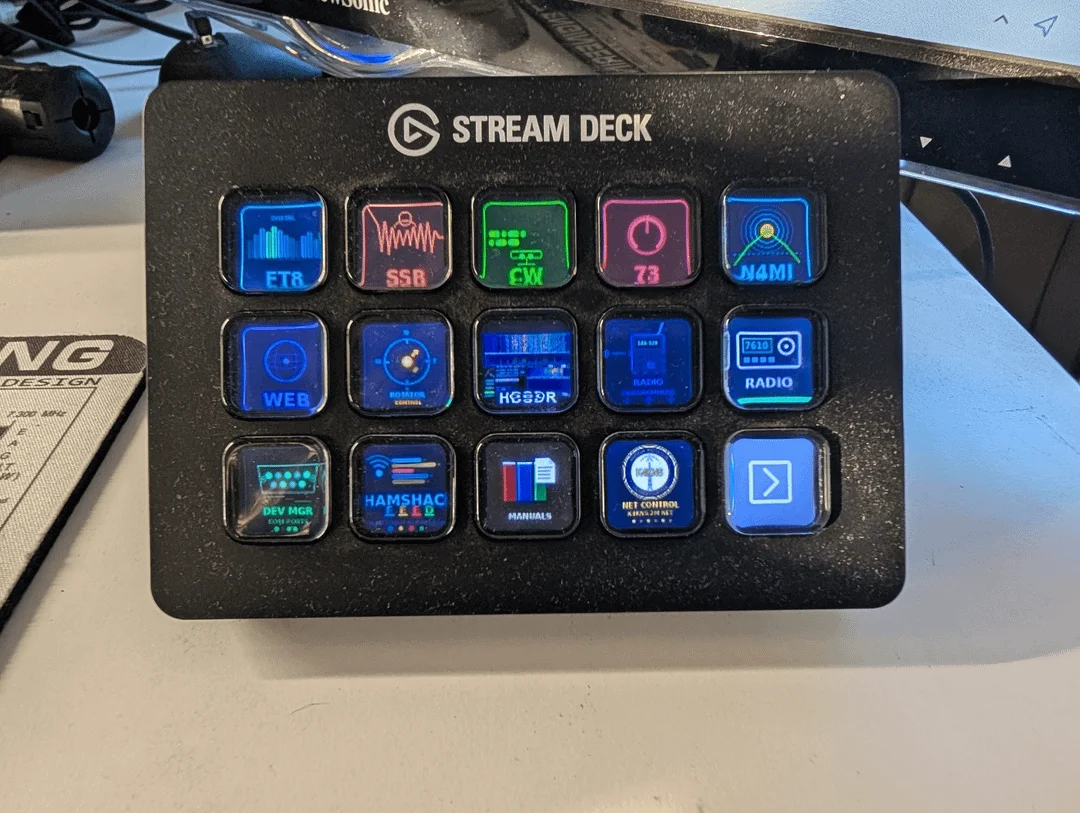
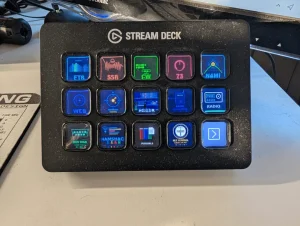
Stream Deck for Ham Radio by Dan Marshall N4MI is a free open source project that turns an Elgato Stream Deck into a one-press control surface for a Windows ham shack. Tap FT8 and the full digital stack (ACLog, WSJT-X, JTAlert, rotator software) launches in order with correct delays; tap CW or SSB and the matching stack comes up instead. Other buttons park everything cleanly, swing a Yaesu rotator to preset DX headings via PSTRotatorAz UDP, open a locally hosted propagation dashboard with live solar data and three-level tower storm alerts, drive an Icom IC-7610 over its Ethernet port without touching the logger’s USB COM port, aggregate ham blogs and podcasts in HamShackFeed, and catalog radio manuals in ManualShelf. Everything is PowerShell, Python, and HTML you can read and adapt, MIT licensed at github.com/N4MI73/streamdeck-hamradio, documented across a nine-part blog series at n4mi.tech. It is built for one specific station, so expect to edit paths, ports, and callsigns, ideally with an AI assistant helping.
What Is Stream Deck for Ham Radio?
Stream Deck for Ham Radio is a free open source collection of PowerShell scripts, Python web servers, and HTML dashboards that converts an Elgato Stream Deck into a purpose-built ham shack controller, launching complete mode software stacks, steering an antenna rotator, serving live propagation data, aggregating ham content, cataloging manuals, and operating an Icom IC-7610 over LAN from labeled hardware buttons.
The project lives at github.com/N4MI73/streamdeck-hamradio under the MIT license, built by Dan Marshall N4MI of Grovetown, Georgia (EM83) with Claude AI assisting on the programming while N4MI tested every behavior against real hardware. With 92 commits it’s an actively maintained personal system published as a working example rather than a turnkey product. A companion blog series at n4mi.tech walks through each part with screenshots and setup detail across nine installments, from mode launchers to IC-7610 rig control.
Why a Stream Deck Belongs in the Shack
Every HF operator knows the startup ritual. For FT8 you open the logger, then WSJT-X, then JTAlert, in that order, wait for each to settle, check the rotator software, confirm the right COM port survived, and only then call CQ. For CW it’s a different stack with a Morse decoder; for SSB something else again. Shutdown reverses the dance, and forgetting a step leaves a zombie process holding a COM port that breaks tomorrow’s session. Multiply by daily operation and the overhead is real.
The deeper problem is contention. On N4MI’s desk the IC-7610’s USB CI-V port already has an owner: N3FJP ACLog’s rig interface, or WSJT-X during digital sessions, and only one program can hold a COM port at a time. Anything new that wants to talk to the radio has to fight the logger for it. The Stream Deck project answers both problems with a hardware control layer: one press runs an ordered, delayed, reminder-equipped startup for each mode, and radio control bypasses USB entirely by using the IC-7610’s Ethernet port, so the logger never notices except that its frequency display follows along.
A $150 content-creator macro pad becomes, in effect, a custom shack controller of the kind that used to require dedicated hardware or a fully scripted PC. The buttons are physical, labeled with a consistent icon set, and safe to hit mid-QSO without looking at a screen.
One-Press Mode Launchers: FT8, CW, and SSB Stacks
The heart of the system is scripts/HamRadioLauncher.ps1, invoked from Stream Deck buttons through BarRaider’s free Advanced Launcher plugin with arguments like -mode ft8, -mode cw, or -mode ssb.
Each mode launches its complete application stack in dependency order with tuned delays between steps, so WSJT-X never starts before the logger owns the COM port. Popup reminders prompt for ACLog configuration details that humans forget, and steps needing administrator rights elevate themselves automatically. A companion CloseHamRadio.ps1 shuts everything down in correct dependency order and reminds the operator to return the rotator to North, which is exactly the step you skip at midnight after a long session.
Configuration is deliberately plain text at the top of the scripts: executable paths for ACLog, WSJT-X, JTAlert, MRP40 Morse decoder, and PSTRotatorAz, plus COM port references (COM 6 for the IC-7610, COM 10 for the WinKeyer on N4MI’s desk), UDP ports, Chrome profile names, and launch delays like $shortDelay and $jtalertDelay for slower PCs. You copy the tree to C:\Ham Scripts\, edit the paths in Notepad, and bind each button to pwsh.exe or powershell.exe with -ExecutionPolicy Bypass -File arguments. One caution from the rig-control notes generalizes: PowerShell 7 from the Microsoft Store or winget lives in a protected folder the Stream Deck software can’t reach, so buttons fail silently; use the MSI install in C:\Program Files\PowerShell\7\ if you want pwsh.
Propagation Dashboard and Three-Level Storm Alerts
dashboard/ hosts a locally served propagation portal: dashboard_server.py (a small Python server that also proxies DX cluster data) plus N4MI_PropagationDashboard.html, launched and stopped from Stream Deck buttons via PID-file scripts. One press brings up live solar indices, band conditions, DX cluster spots, and propagation maps in a personal operating portal.
The standout feature is the storm alert system, built for a tower owner. A three-level banner (CAUTION, WARNING, CRITICAL) fuses WeatherFlow Tempest lightning data with NOAA National Weather Service alerts and warns when it’s time to lower the tower. The Tempest token lives in a Windows user environment variable named TEMPEST_TOKEN, never in the script files, and the server prints at startup whether it found one; without a token the alerts run on NWS data alone. Since October 2026 the dashboard server answers only the dashboard page and its /api/ endpoints, so stray files in its folder aren’t served to the network. Operators who want the portal always on rather than tied to the shack PC can run the Docker edition in the sibling n4mi-shack-server project, which reads the same token from an environment variable.
This same always-on logic is what later produced PropMon, the NAS-hosted propagation JSON backend feeding N4MI’s ESP32 desk instruments. PropMon started life in this repo’s propmon/ folder and moved to n4mi-shack-server on 19 October 2026. If you read our earlier PropMon guide, that’s the same software grown up: the dashboard taught the household that anything worth glancing at mustn’t depend on a PC that gets switched off.
Rotator Control: Compass Buttons and Preset DX Headings
scripts/RotatorAzimuth.ps1 and RotatorStop.ps1 send azimuth commands straight to PSTRotatorAz over UDP (enable Communication, UDP Control on port 12000 in PSTRotatorAz). Stream Deck buttons hold compass directions plus preset headings for key DX regions from N4MI’s EM83 grid in central Georgia: Europe at 50 degrees, West Africa at 80, South America at 145, the Pacific at 290, and Asia at 342. Any -az value from 0 to 360 works, and a dedicated stop button halts rotation immediately.
Operators outside Georgia must compute their own great-circle headings with ACLog, PSTRotatorAz’s DXCC lookup, or an online calculator, then update the -az arguments on their buttons. The hardware expectation is a Yaesu rotator with the ERC Mini USB interface, and the UDP port is one $udpPort variable away from matching whatever PSTRotatorAz is configured to use.
Web Launcher: The Contest-Grade Browser Setup
scripts/HamRadioChrome.ps1 opens the operator’s ham radio tabs (QRZ, LoTW, Club Log, PSKReporter, DX cluster) in a dedicated Chrome profile, separate from everyday browsing. A dedicated profile matters more than it sounds: it keeps cluster logins, LoTW certificates, and dark-theme dashboard tabs out of the way of normal web use, and one button rebuilds the whole operating browser after a reboot. The default profile name is Profile 1, a single variable at the top of the script.
HamShackFeed and Pro: A Personal Ham Content Aggregator
HamShackFeed solves feed fatigue: ham blogs, podcasts, and YouTube channels scattered across dozens of sites, each checked never. The original HamShackFeed/HamShackFeed.html is a single self-contained file aggregating everything into one searchable dashboard with favorites, read tracking, and a built-in podcast player, fetching through the rss2json.com proxy. It needs a free rss2json API key pasted into RSS2JSON_KEY (without one the proxy throttles to one request per 10 seconds and adding sources fails), which gives 10,000 requests per day on the free tier.
HamShackFeed Pro in hamshackfeedpro/ removes that dependency with a Flask server, direct RSS parsing, SQLite persistence, background refresh every 30 minutes, and LAN-wide access on port 8074, so read state follows you between shack PC, laptop, and phone. A migration script imports custom sources from the HTML version’s localStorage, and YouTube channels should be added by full channel URL rather than handle. The tradeoff table from the repo says it best:
| Feature | HamShackFeed (single file) | HamShackFeed Pro (server) |
|---|---|---|
| RSS proxy API key | Required (rss2json, free tier) | Not needed, direct fetching |
| Read/source persistence | Browser localStorage | SQLite database |
| Cross-device access | No, single browser | Yes, across the local network |
| Background refresh | No, refresh on open | Every 30 minutes automatically |
| Hosting | Open the file | Python server on port 8074 |
Pro runs on the shack PC or as an always-on Docker container in n4mi-shack-server, with a Windows Firewall rule opening TCP 8074 for other devices.
ManualShelf: The Radio Manual Catalog
Every shack accumulates PDFs: rig manuals, amplifier guides, antenna analyzer references, screenshots of menu settings that took an hour to perfect. manualshelf/ catalogs them in a Flask app on port 8075 with auto-generated thumbnails from PDF first pages via PyMuPDF, tagging, full-text search across indexed PDF contents (with a purple PDF TEXT badge on text matches), a bulk tag editor, and an update flow where re-scanning a folder flags changed files with an amber UPDATE badge while preserving titles and tags.
The cross-computer design is clever: each instance writes a manifest to a shared NAS exchange folder every 5 minutes, and the other machine lists those remote manuals under a Remote Manuals filter with a note that the file must be fetched via LocalSend or the NAS share. Since October 2026 ManualShelf binds to the local computer only, because its API can open desktop files and has no login; set MANUALSHELF_HOST=0.0.0.0 to restore LAN access at your own risk. Supported formats span PDF, images, Office documents, text, markdown, and HTML, while executables and scripts are refused outright.
IC-7610 Rig Control over LAN: The Flagship Addition
The October 2026 addition, documented in rigcontrol/ and in the latest n4mi.tech post, is the technically deepest part of the project: full band, mode, filter, tuning-step, split, preamp, NR, and NB control of the Icom IC-7610 from Stream Deck buttons, sent over the radio’s Ethernet port instead of USB.
The architecture is one PowerShell script plus a hidden helper: each button runs powershell.exe rig.ps1 <action>, the script talks to rigplane (open source Python library for Icom’s LAN protocol) serving a rigctld-compatible endpoint on 127.0.0.1 port 4532, and rigplane logs into the radio over UDP ports 50001 to 50003 as a network user. The first press of the day starts the helper and logs in over about 5 to 10 seconds; every press after that is near instant because the session stays up. Every press begins by reading the radio’s frequency, so a dead helper is restarted automatically (self-healing), a failed press plays the Windows error sound, and a rolling rig.log records the reason. The helper binds to localhost only, since it can key the transmitter, and the radio password is stored in rig_cred.xml encrypted with Windows DPAPI so only the same user on the same PC can read it.
The button set mirrors real operating: ten band buttons (160 through 6 m) that save your current frequency, mode, and filter into the departing band’s stack register before recalling the new band’s, exactly like the front-panel keys; SSB with automatic LSB below 10 MHz and USB above; CW with narrow FIL3; USB-D1 data mode for FT8 and FT4; a FILTER cycler; plus and minus 100 kHz steps that stop at US band edges instead of leaving the band; one-press SPLIT UP 5 for SSB and UP 1 for CW pileups (copy MAIN to SUB, offset, split on, refused with an error tone if transmit would land out of band); PREAMP cycling; NR and NB toggles; and STOP to release the LAN session. Split safety is enforced globally: band, mode, and tuning buttons drop split first so transmit never strands itself on the wrong band or mode. Sixty metres is absent because the 7610 has no band-stacking register for it, and remote power-on was tried and dropped as unreliable.
Real-hardware testing taught lessons no simulator would: 6 m band codes are BCD so the band reads 0x10 not 0x0A, a mode change can silently restore that mode’s last filter so the command is sent twice and verified by readback, computer-issued band changes don’t save your departing spot so the script writes the register itself, and two rigplane 2.11.1 commands stall two seconds waiting for replies the radio never sends, so the script uses equivalent CI-V commands that return promptly (the project pins rigplane 2.11.1 for exactly this reason). Setup takes about fifteen minutes: enable Network Control on the radio and power-cycle it, set a network user and password with a DHCP reservation, copy the folder, install rigplane in a venv, set $RadioIP, run rig.ps1 setup, and bind buttons. Owners of other LAN-capable Icoms like the IC-705 or IC-9700 can adapt it with different CI-V addresses and band codes, testing every button before trusting it on the air.
Custom Icons and Adapting It to Your Station
The icons/ folders hold ready-made 144×144 PNG buttons in one consistent design language, including 26 rig-control icons, with Pillow scripts (make_icons.py) that regenerate them so you can change labels or colors in code rather than by hand. The author’s layout nests a RADIO folder on the main page holding ten band buttons, STOP, and a MODES folder with the rest.
The repo is explicit that this is a starting point, not a product: paths, COM ports, UDP ports, Chrome profiles, callsign and grid, Tempest tokens, DX headings, launch delays, band edges (US allocations), filter choices, split offsets, and the radio IP all encode one Georgia station. The good news, as the README notes, is that AI assistants adapt this kind of well-organized script collection far faster than writing from scratch, and N4MI’s own series was built exactly that way, with the human testing on real hardware and the AI doing the programming.
Stream Deck Shack Control Versus the Alternatives
| Approach | Cost | Operating feel | Rig integration | Shack-wide scope |
|---|---|---|---|---|
| N4MI Stream Deck system | Stream Deck hardware plus free software, MIT | Physical labeled buttons, one press per task | IC-7610 over LAN, no COM fight; PSTRotatorAz over UDP | Launchers, dashboard, rotator, feeds, manuals, rig in one repo |
| Touch Portal / Macro Deck phone app | Free or low cost app | Touchscreen, no tactile keys | Via plugins and scripts, DIY | Comparable if you build it all |
| Dedicated controllers (RC-28 knob, band decoders) | Hundreds of dollars | Excellent single-purpose feel | Native, purpose built | One device per job, no launcher logic |
| Pure software (SDR console, logger macros) | Free | Mouse and keyboard only | Depends on CAT sharing | Limited to each app’s own window |
| Voice or fully automated control | Varies | Hands free but brittle | Script dependent | High setup cost |
The Stream Deck’s edge is tactile one-press reliability across the whole shack rather than depth in any single function: no single button here beats a dedicated controller. But no dedicated controller launches your logger stack, checks the solar wind, parks the rotator, and files your manuals.
Frequently Asked Questions
Do I need the exact same radio and software as N4MI?
No. Paths, COM ports, callsign, grid, headings, band edges, and the IC-7610 address are variables at the top of readable scripts. Adapt them to your station, and use an AI assistant to help port unfamiliar parts.
Will this work on Linux or macOS?
No, this repo is Windows PowerShell plus Windows-only helpers like DPAPI credential storage. The always-on Python services also run as Docker containers in n4mi-shack-server, which suits any NAS or Linux host.
Does rig control interfere with my logger or WSJT-X?
No, that is the point of the LAN design. The buttons use the IC-7610 Ethernet port while the logger keeps the USB COM port, and the logger display simply follows frequency changes.
Is my radio password and API token handling safe?
The radio password is DPAPI encrypted readable only by your Windows login, the helper listens on localhost only, and the Tempest token lives in an environment variable rather than committed files. Never commit rig_cred.xml.
Where do I start with this large repo?
Read the nine-part series at n4mi.tech from Part 1, then install one piece at a time: a mode launcher first, the dashboard second, rotator third, and rig control last after its fifteen-minute setup and bench testing.
Sources and Further Reading
- streamdeck-hamradio on GitHub – scripts, dashboard, HamShackFeed, ManualShelf, and rig control source
- IC-7610 rig control README – LAN architecture, button table, setup, and lessons learned
- Driving My IC-7610 from the Stream Deck – the October 2026 build story with photos
- N4MI Ham Radio blog series – all nine Stream Deck installments plus PropMon, APRSMon, DX Monitor, and Weather Sentinel
- PropMon guide on HamRadio.my – the NAS propagation backend that grew out of this project
- DX Monitor guide on HamRadio.my – the desk instrument consuming PropMon data
- APRSMon guide on HamRadio.my – local APRS and weather desk instrument
- rigplane on PyPI – open source Icom LAN protocol library
- BarRaider Advanced Launcher – free Stream Deck plugin used for script buttons
- PSTRotatorAz by YO3DMU – rotator control software with UDP interface
73 and good DX.

Post Comment