NightDX: Unattended Overnight Shortwave and Medium Wave Listening with the AirSpy HF+
TL;DR: Quick Summary
NightDX is a free open source Python application by Marco Zennaro that turns an AirSpy HF+ software defined radio into an unattended overnight broadcast DX station. Before bed you arm a night mission, the software scans every band to measure what is really audible, predicts which scheduled broadcasters should propagate to your location, records the most promising stations through the night with a discovery mode that prefers stations you have never logged, then classifies each recording as speech, music, or noise with an optional on-device AI model and transcribes speech with Whisper. In the morning a browser report presents every catch with an audio player, a one-click reception report generator with SINPO and program details that files as a Gmail draft with the recording attached, and a day-by-day log with QSL card tracking. Schedules come from EiBi and AOKI plus broadcaster HFCC technical data downloaded automatically, propagation uses a compact VOACAP-style HF model and an ITU-R medium wave model with live NOAA solar data and self-calibration from your own scans, and the whole interface is a keyboard-driven 1990s style terminal UI. It runs on macOS, Windows 10/11, and Linux, installs with one uv command, and is MIT licensed at version 0.9.10.
What Is NightDX?
NightDX is a free open source unattended shortwave and medium wave broadcast listening station built around the AirSpy HF+ receiver, combining automatic schedule downloads, physics-based propagation prediction, real band-scan measurements, overnight scheduled recording, optional AI audio classification and transcription, reception report generation, and QSL card logging in a single menu-driven terminal application.
The idea is simple and aimed at a real shortwave listener problem. The best broadcast DX happens while you sleep: transatlantic medium wave openings peak in the small hours, Asian and Pacific shortwave targets line up with greyline at dawn, and nobody wants to sit at the radio at 3 AM pressing record. NightDX closes that gap. You spend five minutes in the evening checking the plan, arm the mission, go to bed, and wake up to a morning report that tells you what was on, what it sounded like, and which stations are worth a reception report. Every recording is already named after its most likely station, already measured, already auditioned by the AI, and one click away from a properly formatted report email.
The project lives at github.com/marcozennaro/nightdx under the MIT license, written in Python on the Textual terminal UI framework. At the time of writing it is at version 0.9.10, with 19 commits since the 0.9.0 release candidate on 19 October 2026, and development is visibly active with several releases per week driven by real on-air use from the author’s station in Trieste, Italy, plus early testing reports from Windows users with real HF+ hardware.

Why Unattended Listening Matters for SWL and MW DX
Shortwave and medium wave broadcast DX has always been a scheduling problem as much as a radio problem, and three facts make unattended recording almost mandatory for serious results.
First, propagation dictates the timetable, not the listener. The D layer absorbs medium wave and lower HF signals during daylight, so transatlantic medium wave DX into Europe opens roughly between local midnight and sunrise, while Asiatic shortwave into Europe peaks around dawn greyline. A listener in Malaysia chasing European evening broadcasts faces the mirror image: the opening happens on somebody else’s night. Either way the best signals arrive when a human operator is least alert.
Second, broadcast schedules are dense and volatile. On a typical evening the 49, 41, 31, and 25 metre bands carry thousands of scheduled transmissions from the EiBi and AOKI lists, many overlapping on shared channels, with seasonal A/B schedule changes twice a year plus unannounced frequency swaps. No human can monitor more than one or two frequencies at once, so manual listening samples a tiny fraction of what is actually audible.
Third, verification takes longer than listening. A proper reception report needs the station name, frequency, date and UTC time, SINPO code, program details sufficient to prove you heard them, and often an audio clip. Writing that up from a live listening session means pausing to note details while the signal fades. A recorded file with metadata, an AI transcript, and a signal measurement turns a frantic scribble into a calm morning task.
NightDX attacks all three: it predicts using schedules plus propagation, measures using real band scans, records the best candidates automatically, and packages the evidence for reporting. The closest mainstream equivalents are KiwiSDR scheduled recordings and general SDR software timers, but those record blind. NightDX records with a reason attached to every file.
The Night Mission Workflow: Arm Before Bed, Read the Report at Breakfast
The signature concept is the night mission, and it is worth understanding as a workflow before diving into components.
In the evening you open NightDX and press F6. A dialog asks for the mission window, typically something like 22:00 to 06:30, plus optional targets if you’re chasing specific stations or countries. The F4 plan preview shows what the software intends to record and why, ranked by predicted audibility. If something looks wrong you press I on any entry for the full reasoning: schedule source, transmitter power and beam from HFCC data, predicted field strength, live solar indices, the learned self-calibration correction from your own past scans, and the resulting score.
You arm the mission and walk away. NightDX keeps the computer awake, steps through the plan frequency by frequency, records each slot as FLAC with full station metadata, and moves on. The Windows build runs the mission hidden in the background and keeps going even if you close the main window. A discovery mode biases the scheduler toward stations and countries missing from your log, so the system actively works through your DXCC-style wanted list instead of re-recording the same strong routine stations every night.
In the morning you press F8 or open the HTML report in a browser. Every recording appears with the AI verdict (speech, music, or noise), an embedded audio player, the measured signal against the prediction, the other stations scheduled on the same channel, carrier offset measurements, and a Send report button that remembers whether you already wrote to that station. You listen, confirm the identification with your own ears, click through the genuine catches, and file the rest. That’s the whole loop: five minutes at night, fifteen minutes in the morning, and a logbook that fills itself.
Schedules: EiBi, AOKI, HFCC Technical Data, MWLIST, and Your Own List
Prediction is only as good as its input data, and NightDX layers five schedule sources.
EiBi is the backbone: Eike Bierwirth’s long-running shortwave broadcast schedule, the standard reference the whole SWL community uses, covering international broadcasters with frequency, time, language, target area, and site. The AOKI list from the Nagoya DX Circle complements it with additional monitoring-based entries, catching stations and seasonal changes the main list misses. Both download automatically with nightdx update.
HFCC data is the differentiator added in version 0.9.7. The High Frequency Coordination Conference publishes the broadcasters’ own coordinated technical schedules: real transmitter power, beam azimuth, and antenna type for roughly two thirds of shortwave broadcasts. NightDX matches about 3,000 of 4,800 shortwave entries against EiBi by frequency, time, and site, and folds the real power and beam into the prediction. Tested on roughly 1,000 recordings from Trieste, this single change lifted ranking quality from 0.64 to 0.68 AUC and the correlation of predicted with measured signal from 0.37 to 0.48. HFCC lines that EiBi doesn’t confirm are deliberately excluded, on the sound principle that not everything registered actually goes on the air.
MWLIST covers medium wave properly. EiBi and AOKI handle international MW broadcasters, but the full MW band needs the community MWLIST/FMSCAN database. Registration at fmlist.org is free: log in at fmscan.org, set your location, download the Perseus/ELAD/Winradio user list in CSV tab-separated format, drop it in the mwlist folder inside the data directory, and press Ctrl+U. Note the MWLIST data is licensed for personal non-commercial use.
Your own stations joined in 0.9.6 via my_stations.csv, opened from Settings and edited in any text editor with format guidance at the top of the file. One broadcast per line with frequency, UTC window, days, station, and optional country, language, target, coordinates, and power. Only frequency, time, and name are required; without coordinates the transmitter is placed in the named country. NightDX reloads the file on save, reports unreadable lines, and treats your entries as first-class citizens in predictions, scans, missions, and reports, replacing any schedule entry with the same frequency and name. This is the correct home for pirates, clandestines, local low-power stations, and corrections the big lists get wrong.
Propagation: Compact VOACAP-Style HF, ITU-R Medium Wave, Live Solar Data, Self-Calibration
With schedules loaded, NightDX needs to answer the core question: which of these 4,800 broadcasts will actually be audible at my station tonight? It uses real physics, not heuristics.
On shortwave the model walks the great-circle path in F2 hops, derives critical frequency foF2 from local time, solar flux, and Kp index, computes maximum usable frequency from hop geometry, applies George and Bradley D-layer absorption, and adds ITU-R P.372 atmospheric noise. On medium wave it switches to an ITU-R P.368 ground-wave fit plus the ITU-R P.1147 sky-wave formula, which is the right tool for the job since MW night propagation is a different physical regime from HF skip.
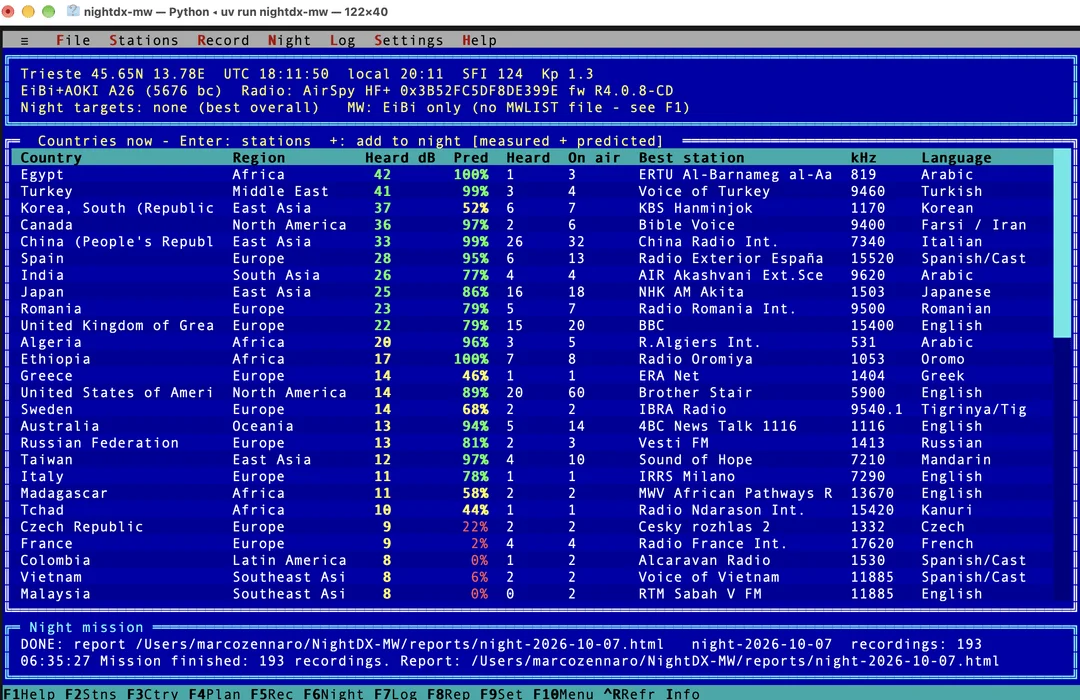
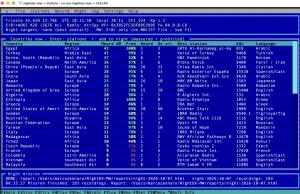
Live space weather comes from NOAA SWPC: solar flux and Kp feed the model on every run, so a geomagnetic storm automatically demotes high-latitude paths in the evening plan. Pressing F3 shows the most likely countries right now, ranked with measured against predicted values side by side.
The most interesting part is self-calibration. After every band scan, NightDX learns the gap between prediction and measurement. Since 0.9.8 the learned correction is split into a receiver-wide component (your antenna, your local noise floor, the model’s systematic bias, measured around minus 33 dB at the author’s station) applied to every station, plus a bounded per-station deviation held within plus or minus 10 dB on shortwave. The earlier design applied only per-station corrections, which meant unscanned stations with no correction jumped ahead of calibrated ones and a few wild values up to plus or minus 40 dB poisoned predictions. The split design tested on about 800 shortwave recordings improved AUC from 0.68 to 0.72 and rank correlation from 0.38 to 0.48. Every scan measurement used for learning is appended to scan_pairs.jsonl in the data folder, capped at 20 MB, so future calibration changes can be validated against real history. Pressing I (why this score) exposes both correction components for any entry, which is exactly the transparency a technical hobbyist wants.
Band Scan: Measuring What Is Really Audible
Models predict, but the band scan measures. Press Ctrl+R and NightDX snapshots every band through the HF+ in 768 kHz chunks of about half a second each, completing a full sweep in roughly 10 seconds, then compares each scheduled carrier against the local noise floor.
The main screen presents the payoff directly: countries ranked by measured Heard dB next to the propagation prediction. When measurement and model agree, confidence is high. When they disagree, the disagreement is data: either conditions differ from the solar indices, or the schedule is wrong, and the self-calibration machinery records the lesson.
Two practical details matter. The scan uses libairspyhf directly, so no other SDR program can hold the radio at the same time; close SDR#, SDR++, or HDSDR first. And the receiver is tuned 10 kHz above the station by default (adjustable under Settings, Receiver, Tune offset), with NightDX shifting the signal back in software, which keeps the wanted signal clear of the small DC spike at the center of the receiver spectrum. This isn’t a frequency correction, just clean engineering, and the frequency you hear and record is exactly the one you chose.
Recording, Listen Live, and the Retro Terminal Interface
Recording is AM demodulation straight from the IQ stream, saved as FLAC with full station metadata embedded. The interface tradecraft around it is thoughtful.
Listen live (key L, added in 0.9.9) plays the highlighted frequency through the computer speakers without recording, complete with a signal meter and the stations scheduled there. Tune with minus/plus keys, Page Up/Page Down for 5 kHz steps, or type a frequency directly, and the Record button converts a live session into a normal recording at any moment. The 0.9.10 release fixed the station information panel to a constant height so the tuning buttons stop jumping around while stepping through the band.
The essential keyboard map is worth learning: F2 stations on the air now, F3 most likely countries, F4 tonight’s plan preview, F5 or Enter record the highlighted station, F6 night mission, F7 listening log, F8 report, F9 settings, I why this score, L listen live, X skip the station in night missions, Ctrl+R scan now. F1 shows the full key list. Any list sorts by clicking a column title, click again to reverse, third click restores the default order.
Skipping (key X, also 0.9.9) deserves a mention because it solves a real annoyance: some schedule entries are permanently wrong for your location, or simply uninteresting. Skipping excludes a station on that frequency or on all frequencies from night missions, lists are marked accordingly, and Night, Skipped stations restores them with Enter.
The aesthetic is deliberate: a menu-driven text interface that looks like 1992, built on Textual. No browser dashboard, no Electron shell, no GPU required. It runs over SSH, sips resources during overnight missions, and every function also exists on the command line (nightdx update, nightdx best -n 20, nightdx record 9420, nightdx plan, nightdx night --now --end 06:30, nightdx report), which makes cron and Windows Task Scheduler automation straightforward.
AI Audio Verdicts and Whisper Transcripts (Optional)
The optional ai extra, about 2 GB plus models on first use, adds two machine listening stages to every recording.
First, the MIT AST AudioSet transformer classifies 10-second windows as speech, music, or noise, with the label set cleaned in 0.9.1 to radio-relevant tags only so noisy shortwave audio no longer comes back tagged Vehicle or Insect. This triage is the real value: a night mission can produce dozens of files, and knowing which ones contain actual program audio versus empty-channel hiss decides where your morning listening time goes.
Second, OpenAI Whisper Small transcribes and translates speech for the reception report. Two design choices stand out: weak signals are left blank rather than guessed, which is the honest behavior for evidence-grade reporting, and the detected language is compared against the scheduled language as an identification check (more on that below).
Both models run locally on your machine. Nothing is uploaded to any cloud service, which matters for a hobby that already hands enough data to third parties.
Honest Identifications: Candidates, Carrier Fingerprints, and Co-Channel Rivals
The standout engineering honesty in NightDX, developed across versions 0.9.3 through 0.9.5, is its treatment of station names as candidates, not identifications.
On a crowded channel, and medium wave above all, the scheduled station may not be what you actually hear. So every recording carries its evidence: the language Whisper heard versus the scheduled language, the measured signal versus the prediction, and a verdict of probably another station when they disagree (for example Italian speech at 40 dB on a channel where a Korean station 8,700 km away is scheduled), consistent with the schedule when the language matches, or candidate minus not verified otherwise. Reception reports for flagged recordings ask for confirmation first, in both the browser and terminal flows, and recordings the AI labelled noise can still be reported with an explicit note, because the final call is the listener’s.
Each recording also lists the other stations scheduled on the same frequency at that time, highlighting whichever one’s language fits what was actually heard, and measures carrier offsets within plus or minus 25 Hz to about 0.01 Hz, displayed like carrier +10.35 Hz with co-channel companions and relative levels. On medium wave these offsets are transmitter fingerprints comparable across DXers’ logs. They are relative to your own radio’s frequency standard, so a receiver.freq_correction_ppm setting exists for a known oscillator error. This is proper DX craft encoded in software, and it is rare to see it done this carefully.
Reception Reports, Gmail Drafts, and the QSL Log
Each heard recording carries a Send report button. With no setup it opens a pre-filled email in Gmail or any mail program with SINPO, program details, and the QSL request, leaving you to attach the recording manually. With the lightweight gmail extra and a one-time Google Cloud setup (create a project, enable the Gmail API, register an External OAuth consent with yourself as test user, create a Desktop app client, save the JSON as gmail_credentials.json in the data folder, run nightdx gmail-setup, then publish the app so the grant stops expiring every 7 days), NightDX creates a real Gmail draft with the recording attached. The permission scope is drafts only: it never reads mail and never sends anything, you press Send. If the grant ever lapses, the next Send report click re-opens consent and then completes the draft as usual.
Station addresses come from a curated qsl_contacts.json researched from station pages and DX club QSL logs with sources, and your own entries take precedence. The report flow also guards against duplicate effort: since 0.9.3 NightDX warns if you already reported to that station, already have a draft waiting, or already received its QSL card.
The day-by-day log and QSL card collection live in the browser via Log, Open HTML report. QSL tracking includes an already-received flag that feeds back into reporting prompts and discovery scheduling, and an images extra adds iPhone HEIC photo support for QSL cards on Windows and Linux (macOS converts natively). From the QSL-button in the recording window the moment a file is saved (key Q in the log) to the archived card photo, the paper trail loop is closed.
Installation on macOS, Windows, and Linux
Requirements are an AirSpy HF+ (Discovery or Dual Port) with a suitable antenna, one of macOS 12+, Windows 10/11, or Linux, and internet access for schedules and space weather. The project status is candid: developed and used daily on Apple Silicon macOS, installation and first start confirmed on Windows with a real HF+, Linux covered by automated tests, and reports from other setups welcomed.
On macOS, install the driver with Homebrew (brew install airspyhf), install uv from astral.sh (close and reopen Terminal after), then uv tool install "nightdx @ git+https://github.com/marcozennaro/nightdx" and start with nightdx. On Windows 10/11 in PowerShell: install Git via winget in an administrator window, install uv in a normal window and open a fresh window, fetch SDR# x64 from airspy.com and copy airspyhf.dll, libusb-1.0.dll, and pthreadVC2.dll into %LOCALAPPDATA%\NightDX (plus the WinUSB compatibility driver from the same page if the radio isn’t found), then the same uv tool install line. The first start can take a minute under Windows Defender scanning; later starts take seconds. On Linux, install libairspyhf-dev, airspyhf, and libportaudio2 from the distribution (or build airspyhf from source), then follow the macOS uv steps.
Optional features install from the setup wizard with one click, or up front as uv tool install "nightdx[all] @ git+https://github.com/marcozennaro/nightdx": ai for classification and transcription, gmail for drafts with attachments, images for HEIC QSL photos. Updating is uv tool install --reinstall with the same specifier. Settings, log, recordings, and QSL cards live in the platform data folder (macOS Application Support, Windows AppData, Linux .local/share), recordings default under Documents/NightDX/recordings, and NIGHTDX_HOME relocates everything. With more than one HF+ connected, the wizard lists serial numbers to choose from, or set serial under [receiver] in config.toml.
First start opens the setup wizard: name, country, and coordinates, shortwave only or shortwave plus medium wave, a radio check, optional features, recording location, and report sender details. Re-run it any time from Settings or with nightdx setup.
NightDX Versus the Alternatives
| Approach | Scheduling intelligence | Real measurement | Unattended operation | Report and QSL loop | Cost and license |
|---|---|---|---|---|---|
| NightDX + AirSpy HF+ | EiBi, AOKI, HFCC power/beam, MWLIST, personal list, VOACAP-style + ITU-R models, live solar data, self-calibration | 10 s full band scan vs noise floor per carrier | Night missions with discovery mode, CLI, background on Windows | AI verdict, Whisper transcript, Gmail drafts with audio, QSL log | Free MIT software, ~200 USD class receiver |
| Manual listening with any SDR | Operator memory | Ears only | None, operator must be awake | Manual notes | Free but time hungry |
| SDR# or SDR++ timer recordings | Fixed timers, no propagation logic | None at record time | Timers only | Manual everything | Free, blind recording |
| KiwiSDR scheduled recordings | Fixed schedules | None locally | Scheduled slots | Manual everything | Shared public receivers, contention |
| General purpose SDR autorecord scripts | User scripts | Sometimes | Cron only | None built in | DIY maintenance burden |
The table flatters NightDX on features because the integration is genuinely the point: no single component is novel. But no alternative bundles prediction, measurement, recording, triage, transcription, reporting, and QSL tracking into one maintained package. The honest counterpoints: it is tied to the AirSpy HF+ (no RTL-SDR, no network receivers), broadcast only (no utility, ham, or number station workflows), and the AI and Gmail extras add gigabytes and Google Cloud setup respectively.
Practical Tips for a Good First Mission
Start with shortwave only for the first two or three nights, even if you plan to add medium wave later; the HF prediction is the more mature path and the morning review load is smaller while you learn the interface. Run nightdx update followed by Ctrl+R band scans at two different times of day before arming anything, so self-calibration has real measurements to learn your antenna and noise floor from. Read the F4 plan preview skeptically the first week and press I on anything surprising; early misrankings usually trace to a missing MWLIST file, wrong coordinates in the wizard, or another program holding the radio. Keep the computer on AC power with sleep disabled and, on Windows, confirm the mission survives closing the window before trusting it overnight. When reviewing, listen before reporting no matter what the AI verdict says, check the co-channel rival list on every MW catch, and file the Gmail draft the same morning while program details are fresh. After a week, turn on discovery mode and let the scheduler work your unheard list.
Frequently Asked Questions
What hardware do I need to run NightDX?
You need an AirSpy HF+ (Discovery or Dual Port) and a suitable shortwave or medium wave antenna, plus a Mac, Windows, or Linux computer with internet access. No other receiver is currently supported, and only one program can use the radio at a time.
Is NightDX free and open source?
Yes. It is MIT licensed Python software, free for any use including modification and redistribution. The EiBi, AOKI, HFCC, NOAA, and model dependencies are free, with MWLIST data limited to personal non-commercial use.
Do I need the AI features to use NightDX?
No. Prediction, scanning, missions, recording, reports, and QSL logging all work without them. The AI extra adds speech/music/noise triage plus transcription and translation, running fully offline after a roughly 2 GB one-time download.
Can NightDX identify stations automatically?
No, and that is deliberate. It names each recording after the most likely scheduled station with supporting evidence, flags mismatches, lists co-channel rivals, and measures carrier offsets, but the final identification is always the listener’s decision.
How do reception reports and QSL tracking work?
Each recording offers a Send report button producing a pre-filled email, or a real Gmail draft with audio attached after a one-time API setup. The browser log tracks reports sent and QSL cards received per station.
Sources and Further Reading
- NightDX on GitHub – source, README, changelog, and issue tracker
- EiBi shortwave schedules – Eike Bierwirth’s broadcast frequency lists
- AOKI list / Bi Newsletter – Nagoya DX Circle schedule data
- HFCC public data – broadcaster coordination schedules with power, beam, and antenna
- MWLIST / FMSCAN – medium wave database, free registration, personal use
- NOAA Space Weather Prediction Center – solar flux and Kp indices
- AirSpy HF+ – receiver hardware and Windows driver downloads
- astral uv installer – Python tool installer used for setup
- Textual terminal UI framework – the TUI toolkit NightDX is built on
73 and good DX.

Post Comment