amateur radio
open source
Technology
1090 MHz, 9M2PJU, ADS-B receiver, adsb.fi, adsb.lol, CYD Cheap Yellow Display, ESP-IDF, ESP32 display, Flightradar24 API, GC9A01 round display, ham radio gadgets, openstreetmap, OWLOS Flight Radar, plane spotting, RTL-SDR feeder, Web Serial flashing
9M2PJU
0 Comments
OWLOS Flight Radar: Live ADS-B Air Traffic on a $15 ESP32 Display
TL;DR: OWLOS Flight Radar turns 10 to 30 dollar ESP32 display boards into live ADS-B scopes fed by free community networks, flashed from the browser and driven by touch. Four boards supported, scriptable USB console, maps cached for offline viewing. Board guide, scope reading and ham feeder tie-ins inside.
What OWLOS Flight Radar Is
OWLOS Flight Radar is an open source ESP-IDF firmware that turns cheap ESP32 display boards into live air traffic scopes, drawing nearby aircraft as heading turned silhouettes colored by altitude with trails behind them.
Tap a plane and the panel reports callsign, type, registration, height, speed, track, distance, bearing and squawk. Data arrives over Wi-Fi from the free community ADS-B networks adsb.lol and adsb.fi, with automatic failover between them, or from Flightradar24 if you hold a paid API key. Four boards are supported, from the 10 dollar 2.8 inch Cheap Yellow Display to a 1.28 inch round panel and a 3.5 inch Raspberry Pi LCD. Flashing happens in Chrome or Edge over Web Serial, settings go over the same USB cable or the touch screen, and a scriptable USB console exposes everything to automation. The code is MIT licensed with the flasher site, firmware, PC preview and tooling in one repo.
Why an ESP32 Can Show Live Air Traffic
Aircraft broadcast their GPS position twice a second on 1090 MHz using ADS-B, unencrypted and receivable with 30 dollars of parts. A worldwide volunteer network of rooftop receivers collects these bursts and republishes them as simple web APIs. OWLOS Flight Radar skips the receiver entirely and asks those APIs over Wi-Fi, which is why a microcontroller with no radio front end can paint a radar picture.
This architecture has three consequences worth understanding. First, coverage follows feeder density, so cities show dense skies and remote areas show little. Second, the board needs internet, unlike a local 1090 MHz receiver that works off grid. Third, anyone can improve the shared picture by feeding, which is where hams with masts come in, covered later. The project picks the pragmatic side of each trade and documents the costs honestly.
The Four Supported Boards
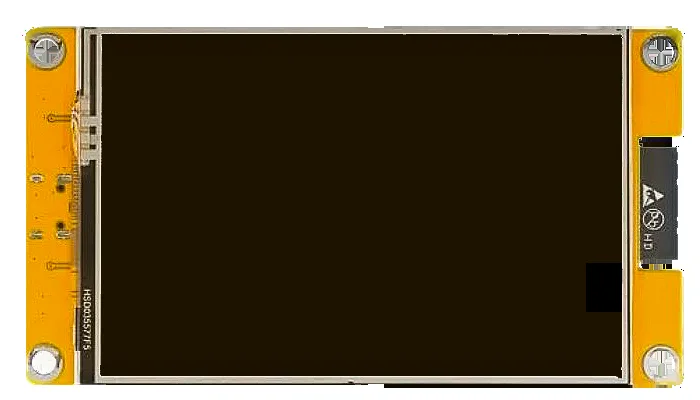
2.8 Inch CYD, the Ten Dollar Classic
The ESP32-2432S028R Cheap Yellow Display pairs an ESP32 with a 320 by 240 resistive touch screen, and one firmware build fits all three screen chips sold under that name. Most boards carry the v2 USB-C screen. A mirrored picture, wrong colors or a negative image means yours is v1 micro USB or v3 ST7789, fixed by pressing BOOT within 8 seconds of power on until the picture looks right. The choice survives resets and power cuts. Readers who already own this board from the CYD Ham Dashboard build can repurpose the same hardware in minutes.
3.5 Inch CYD, the Big Scope
The ESP32-3248S035 upgrades to a 480 by 320 ST7796 panel with resistive or capacitive touch detected automatically. The larger glass lists more planes in the panel, and the firmware puts the second ESP32 core to work drawing half the radar. If you buy one board for this project, this is the sweet spot between price and readability.
1.28 Inch Round CrowPanel, the Wrist Radar
Elecrow CrowPanel combines an ESP32-C3 with a 240 by 240 GC9A01 round display and capacitive touch. The whole glass is the scope. Tap a plane for its card, tap empty glass for hue, look, list and settings, drag the rim to rotate and inside to zoom. It's the most charming option and the least readable, best for desks already full of round gauges.
3.5 Inch RPi LCD Without Touch
A Waveshare RPi LCD (A) on the author OWLOSAirQuality carrier board gives a 480 by 320 ILI9486 display with no touch at all. BOOT steps through planes and held BOOT changes range, with the rest configured from the web page. This target exists because the author already had the carrier hardware, and it proves the display core ports cleanly to new panels.
Flashing and First Setup
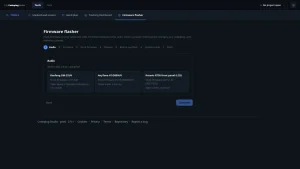
Flashing uses ESP Web Tools over Web Serial, so Chrome or Edge on a computer is required. Phones and Firefox can't do it. Connect with a data capable USB cable, press CONNECT and FLASH under your board, pick the port and accept the erase. Missing ports on Windows usually mean the CH340 driver is absent. A board that refuses connection often yields to holding BOOT while plugging in. Touch boards request five calibration crosses once.
Until Wi-Fi lands, the board flies a made up DEMO sky and says so in large letters. The two CYD boards take credentials on their own touch keyboards, complete with ABC capitals, symbols page, delete and show toggles. Every board also accepts settings from the web page over USB, including the round and RPi targets. Privacy handling is thoughtful throughout. Home coordinates round to about a kilometer before any network hears them, the page stores nothing, passwords and API keys enter the board one way and are never displayed or sent back.
Reading the Scope
Three looks cycle under one button. RADAR sweeps a beam over the OpenStreetMap picture, MAP fills the screen north up, CLASSIC renders the same map in OpenStreetMap native colors. Drag the rim to rotate the view until it matches how the screen stands, with snap back to north up. Drag inside to zoom, or step BOOT through 5, 10, 25, 50, 100 and 200 range steps in your chosen units.
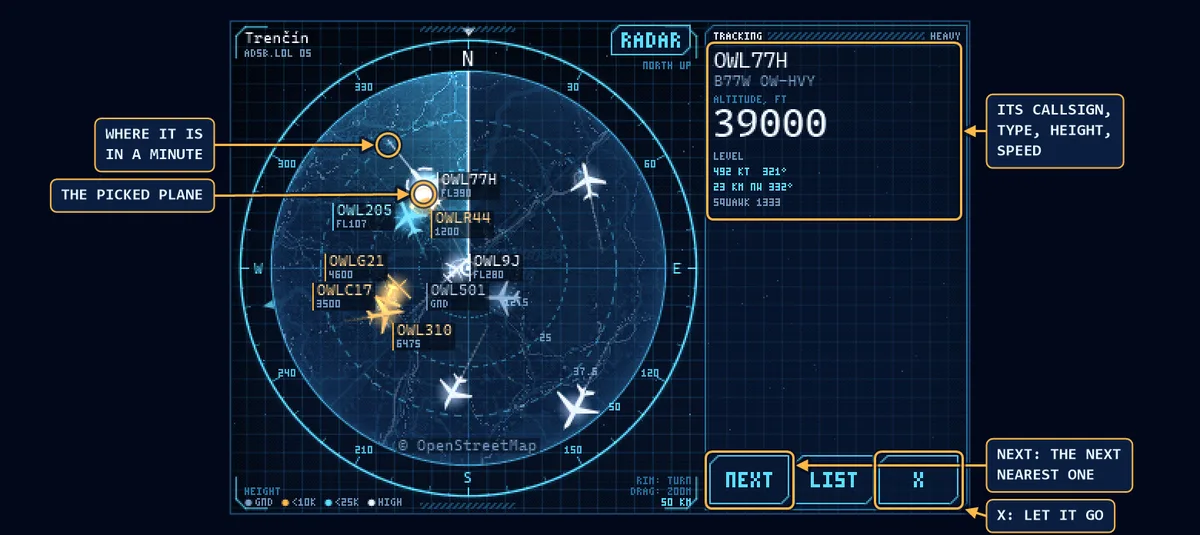
Color always means height. Grey sits on the ground, warm tones fly under 10,000 feet, the active theme color covers up to 25,000, white cruises above, and emergency squawks blink for attention. Five themes, Arctic, Phosphor, Amber, Crimson and Synth, recolor the scope without changing the code. Picked planes grow a one minute projection line, with NEXT stepping to the nearest neighbor.
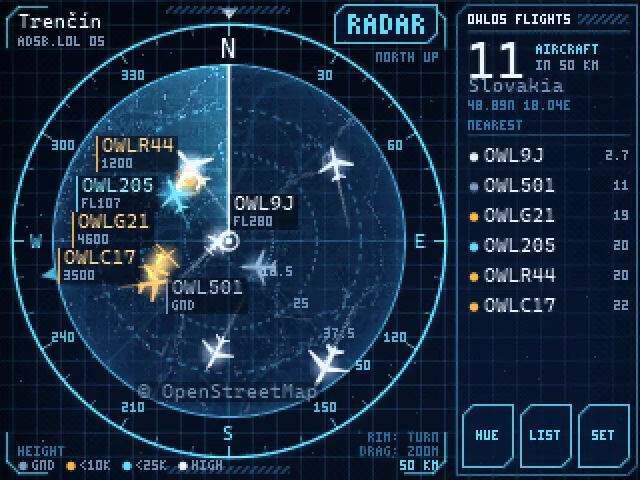
LIST ranks every flight nearest first with type, height, speed, distance and bearing, scrolling under a finger. SET holds range, units, feet or meters, orientation, labels, colors, look, map source, data source, Wi-Fi and touch calibration. The map tiles download once per area and persist in flash. So a previously viewed range redraws instantly with no network at all.
Where the Planes Come From
The default path costs nothing. The board queries adsb.lol first and falls over to adsb.fi when it goes quiet, both volunteer receiver networks publishing under share alike terms. A paid Flightradar24 API key upgrades answers with origin and destination airports, polled every 20 seconds to conserve credits. Map pictures and town names come from OpenStreetMap under the same open license, with the town lookup using the same rounded home point.
This stack explains the project economics. No receiver hardware, no antenna, no coax, no server bill. The trade is dependence on internet and on volunteers keeping their feeders online, which motivates the ham section below.
For Builders: ESP-IDF Core and a Scriptable Console
The firmware runs ESP-IDF 5.5 with the screen code in core/ written as plain C that also builds a PC preview, so new pages can be drawn and screenshotted on a computer before flashing. BUILD.BAT compiles each of the four screens with its own sdkconfig, GitHub Actions rebuilds everything on every push, and companion tools film tours, bake fonts and annotate guides from the same sources. It's an unusually complete pipeline for a young project.
The USB console deserves special attention. At 115200 baud the board answers OWLOS HELLO with its version, OWLOS GET with a JSON config of network, home, source, theme, uptime and reset history, and OWLOS SET with any subset of fields for scripted provisioning. Passwords and keys never cross back out. That interface turns fleet setup, logging and watchdogs into afternoon Python scripts rather than firmware forks.
The diagnostics page answers the classic embedded question of what happened while nobody watched. It reports uptime, the reset cause among power on, reset pin, watchdog or crash, and the previous run length to the minute, all surviving resets and power cuts.
OWLOS Versus Other Ways to Watch Planes
| Item | OWLOS Flight Radar | Raspberry Pi Tracker Display | Phone Flight Tracking App |
|---|---|---|---|
| Hardware | 10 to 30 dollar ESP32 board with screen | Pi plus display plus SDR dongle plus antenna | Phone you already own |
| Receiver needed | No, uses internet aggregators | Yes, own 1090 MHz station | No, uses vendor servers |
| Works offline | Cached map ranges only | Fully, local reception | Cached areas only |
| Touch scope UI | Yes, purpose built gestures | Depends on software chosen | Yes, polished commercial UI |
| Data cost | Free tiers, optional paid key | Free after hardware | Free tier, subscription for extras |
| Feed the network | No, pure consumer | Yes, shares your reception | No, pure consumer |
| Openness | MIT, full source and tools | Varies by software stack | Closed |
| Best for | Desk scope in minutes on pocket money | Hams wanting their own RF station | Travelers checking one flight |
Readers who want the full receiving station should see the FlightScnr Pi round display tracker and the mlat.uk multi domain tracking guide. OWLOS and a personal feeder complement each other beautifully, one showing the shared sky anywhere with Wi-Fi, the other hearing it directly off your own antenna.
Ham Radio Tie Ins: Feed, Listen, Script
The strongest ham contribution is feeding. A Raspberry Pi, an RTL-SDR dongle, a 1090 MHz ground plane antenna and free feeder software put your rooftop into adsb.lol and adsb.fi, improving the same picture your OWLOS board shows. Height and clear coax to the antenna beat dongle choice every time, and even a loft antenna hears airliners across a small country.
The scope itself fits shack life well. It draws little power, stays silent, and shows callsigns visitors ask about. The USB console invites automation a shack already runs. Log overhead traffic to the station diary, flash a lamp on emergency squawks, or mirror selected callsigns to the shack dashboard. Receive only operation needs no license anywhere, making it a perfect first build for new licensees and shortwave listeners alike.
Honest Limits
This is a young project with a short commit history. So expect rough edges and answer your own questions from the readable source. Internet dependence means dead zones show only cached maps. Position data lags real time by seconds, fine for spotting, useless for separation. Touch resistive CYDs want firm presses that overshoot small targets. The Flightradar24 key costs real subscription money for origin data most viewers won't miss. And no screen in this price class stays readable in direct sun, so plan shade for window seats.
Sources and Further Reading
- OWLOS Flight Radar flasher site and full guide: https://kirindenis.github.io/OWLOS-FLIGHT-RADAR/
- Firmware source, boards, tools and README: https://github.com/KirinDenis/OWLOS-FLIGHT-RADAR
- Free community ADS-B network, primary source: https://adsb.lol/
- Free community ADS-B network, failover source: https://adsb.fi/
- Flightradar24 API for key holders: https://fr24api.flightradar24.com/
- Browser flashing via ESP Web Tools: https://esphome.github.io/esp-web-tools/
- Espressif ESP-IDF framework docs: https://docs.espressif.com/projects/esp-idf/
- OpenStreetMap copyright and license: https://www.openstreetmap.org/copyright
- CYD Ham Dashboard repurposing the same 2.8 inch board: https://hamradio.my/esp32-cyd-ham-dashboard-hamclock-touchscreen/
- Raspberry Pi ADS-B tracker display build: https://hamradio.my/flightscnr-pi-round-display-adsb-flight-marine-tracker-raspberry-pi/
- Live air, maritime and space tracking guide: https://hamradio.my/mlat-uk-live-air-maritime-space-tracker/
73 de 9M2PJU

Post Comment