APRSSwift: Universal Apple APRS App for iPhone, iPad, Mac, and Apple Watch with Built-in AFSK Sound Modem
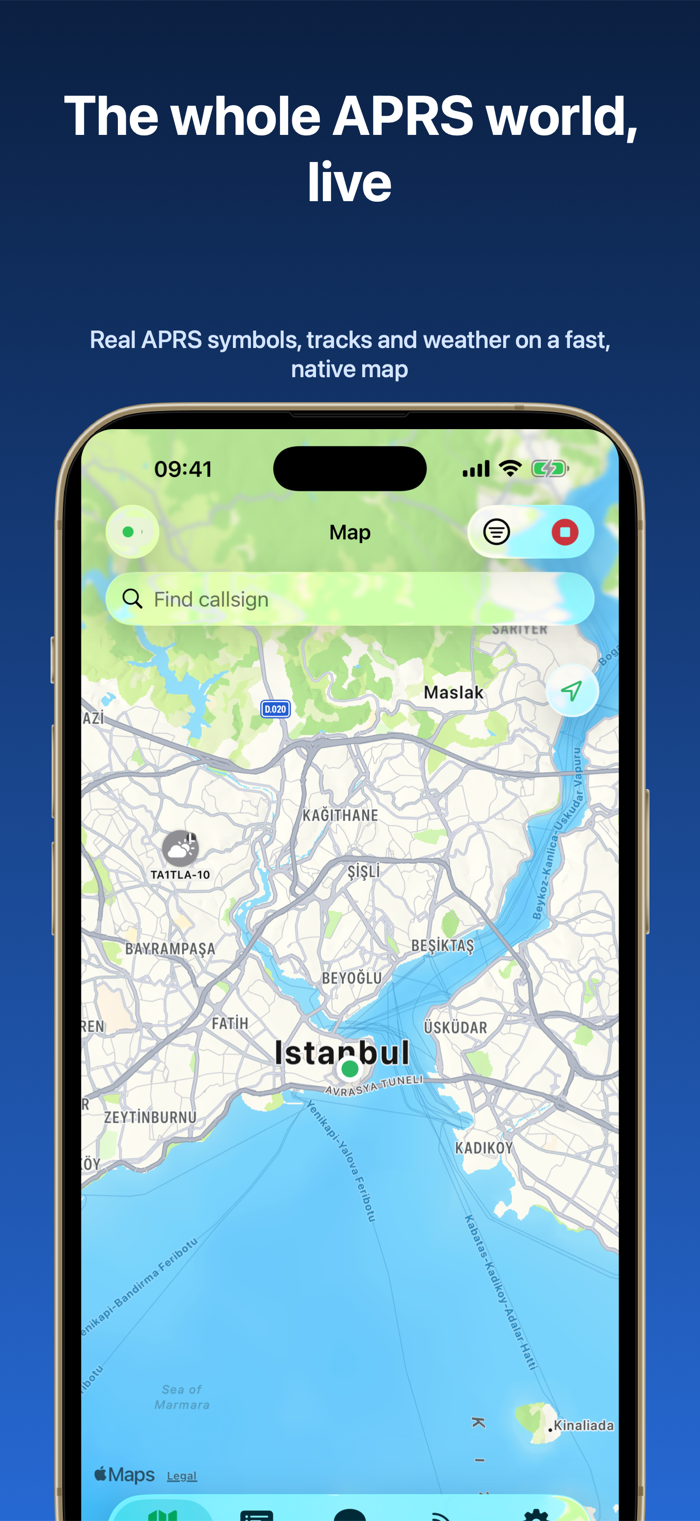
TL;DR: APRSSwift is an open-source-friendly, universal amateur radio APRS client built by Turkish operator Şevket Buğra Canata (TA1JS) natively for the Apple ecosystem (iOS, iPadOS, macOS, and watchOS). It combines four distinct connectivity modes into a clean SwiftUI interface: global APRS-IS, network TCP KISS TNCs, wireless Bluetooth TNCs (like the Mobilinkd series), and a built-in 1200-baud Bell 202 AFSK audio DSP sound modem that operates directly through the device headphone or USB-C audio jack. With SmartBeaconing™, live symbol mapping, Mic-E decoding, two-way messaging, Apple Watch wrist telemetry, and strict zero-tracking privacy, APRSSwift sets a new benchmark for mobile APRS on Apple hardware.
What is APRSSwift?
APRSSwift is a native Apple ecosystem application that enables amateur radio operators to track positions, decode telemetry, and exchange two-way APRS messages across internet, Bluetooth, network, and direct radio audio connections.
+-------------------------------------------------------------------------+
|                               APRSSwift                                 |
|                                                                         |
|  +--------------------+   +---------------------+   +----------------+  |
|  | Native iOS/macOS   |   | CoreLocation Engine |   | Full APRS DSP  |  |
|  | SwiftUI Interface  |   | (SmartBeaconing™)   |   | & Packet Engine|  |
|  +---------+----------+   +----------+----------+   +--------+-------+  |
|            |                         |                       |          |
|            +-------------------------+-----------------------+          |
|                                      |                                  |
|            +-------------------------v-----------------------+          |
|            |           Selectable Connection Backend         |          |
|            +----+---------------+---------------+-------+----+          |
|                 |               |               |       |               |
+-----------------|---------------|---------------|-------|---------------+
                  |               |               |       |
                  v               v               v       v
           [Built-in AFSK]  [Bluetooth TNC] [TCP KISS TNC] [APRS-IS Net]
            (Audio Jack/     (Mobilinkd      (Dire Wolf     (Tier 2
             TRRS Cable)      TNC3/TNC4)      Port 8001)     Servers)
                  |               |               |       |
                  +-------+-------+---------------+       |
                          |                               |
                          v                               v
                [VHF/UHF Transceiver]           [Global Internet Map]
                 (144.390 / 144.800)               (aprs.fi Feeds)
Amateur radio operators frequently carry Apple devices into the field for portable operations, emergency communications (EmComm), and outdoor activities like Summits on the Air (SOTA) and Parks on the Air (POTA). While Android has long enjoyed mature APRS clients like APRSDroid, the Apple ecosystem historically suffered from a split landscape: web-centric viewers that lacked direct radio interfacing, or legacy audio tools that remained unmaintained for years.
APRSSwift closes this gap. Developed by active amateur radio operator Şevket Buğra Canata (TA1JS), APRSSwift delivers a modern, unified codebase built in pure SwiftUI that runs seamlessly across iPhone, iPad, Apple Silicon / Intel Macs, and the Apple Watch.
Unlike single-purpose tracking apps, APRSSwift acts as a complete communications terminal. It connects to the global APRS-IS network over Wi-Fi/cellular, links to hardware TNCs wirelessly via Bluetooth, bridges to remote network TNCs via TCP, or runs an internal software DSP modem that modulates and demodulates 1200-baud audio directly through standard TRRS or USB-C audio cables.
Four Versatile Connection Backends
APRSSwift supports four independent connectivity profiles, allowing operators to transition smoothly between home base stations, mobile vehicles, and off-grid wilderness setups:
[APRSSwift Backend Selector]
 ├── 1. Built-in AFSK Sound Modem  (Direct TRRS/USB-C audio cable to radio mic/spkr)
 ├── 2. Bluetooth KISS TNC          (Wireless connection to Mobilinkd TNC3/TNC4)
 ├── 3. TCP KISS TNC                (Network socket connection to Dire Wolf / aprx)
 └── 4. APRS-IS Internet Backbone   (Global Tier 2 APRS server gateway)
1. Built-in 1200-Baud AFSK Sound Modem (Zero Extra Hardware)
The application includes a native digital signal processing (DSP) audio modem. By connecting an iPhone or iPad to a handheld transceiver using a basic TRRS audio adapter or audio interface cable (such as a Digirig Mobile, BTech APRS cable, or DIY interface), APRSSwift decodes incoming Bell 202 tones (1200 Hz mark / 2200 Hz space) and generates outgoing audio packets. A built-in “Play test tones” utility in the settings menu allows precise adjustment of input/output audio levels, and transmission is triggered using radio VOX or hardware PTT circuits.
2. Bluetooth KISS TNC
For clean, cable-free portable operation, APRSSwift pairs directly over Bluetooth Low Energy (BLE) or classic Bluetooth with hardware TNCs such as the Mobilinkd TNC3, Mobilinkd TNC4, and compatible open-source KISS modems. This keeps your phone free from physical tethering while your radio and TNC remain secured in a backpack or vehicle mount.
3. TCP KISS TNC (Network Soundcards)
When operating in a home shack or field command post, APRSSwift connects across the local network via TCP (typically port 8001) to software TNCs like Dire Wolf, aprx, or Raspberry Pi digipeaters. This allows operators to leverage high-gain base station antennas while monitoring and messaging comfortably from an iPad or MacBook anywhere in the building.
4. APRS-IS Internet Backbone
When operating beyond RF digipeater coverage or without radio hardware, APRSSwift connects directly to the worldwide APRS-IS network. The app automatically calculates your APRS-IS validation passcode from your callsign, allowing immediate position reporting, weather monitoring, and global messaging.
Key Features and Technical Highlights
+-----------------------------------------------------------------------+
| APRSSwift Live Map & Station Interface                                 |
+-----------------------------------------------------------------------+
| [Map] [Messages] [Heard List] [Telemetry] [Settings]                  |
+-----------------------------------------------------------------------+
| 🗺️ Map: (Showing 24 Stations Nearby)                                  |
|                                                                       |
|      [9M2PJU-9] (House)           [TA1JS-7] (Car, 45 km/h, 180°)     |
|      03°08.12'N 101°41.50'E       Direct RF (-82 dBm)                 |
|      Grid: OJ03vb                 SmartBeaconing: Active              |
|                                                                       |
| 💬 Messages: [9M2PJU-9 <-> TA1JS-7]                                   |
|    TA1JS-7: 73 from Istanbul!                                         |
|    9M2PJU-9: QSL! Loud and clear via Mobilinkd TNC4.                  |
+-----------------------------------------------------------------------+
| ⌚ Apple Watch Companion: OJ03vb | 45 km/h | 144.800 MHz | [BEACON NOW] |
+-----------------------------------------------------------------------+
| Privacy: Zero Tracking | No Accounts | Localized in 8 Languages       |
+-----------------------------------------------------------------------+
1. Interactive Live Vector Map
- Authentic APRS Symbols: Displays stations with exact primary and alternate symbol icons, including tactical overlays and direction vectors.
- Heading & Speed Tracks: Visual movement lines indicate station course and velocity with historical breadcrumb tracks.
- Symbol Filtering & Search: Filter displayed stations by category (e.g. mobile trackers, base stations, weather stations, repeaters, or objects) or perform instant callsign lookups.
- Dead Reckoning: Calculates predicted position advances between beacon intervals for moving vehicles.
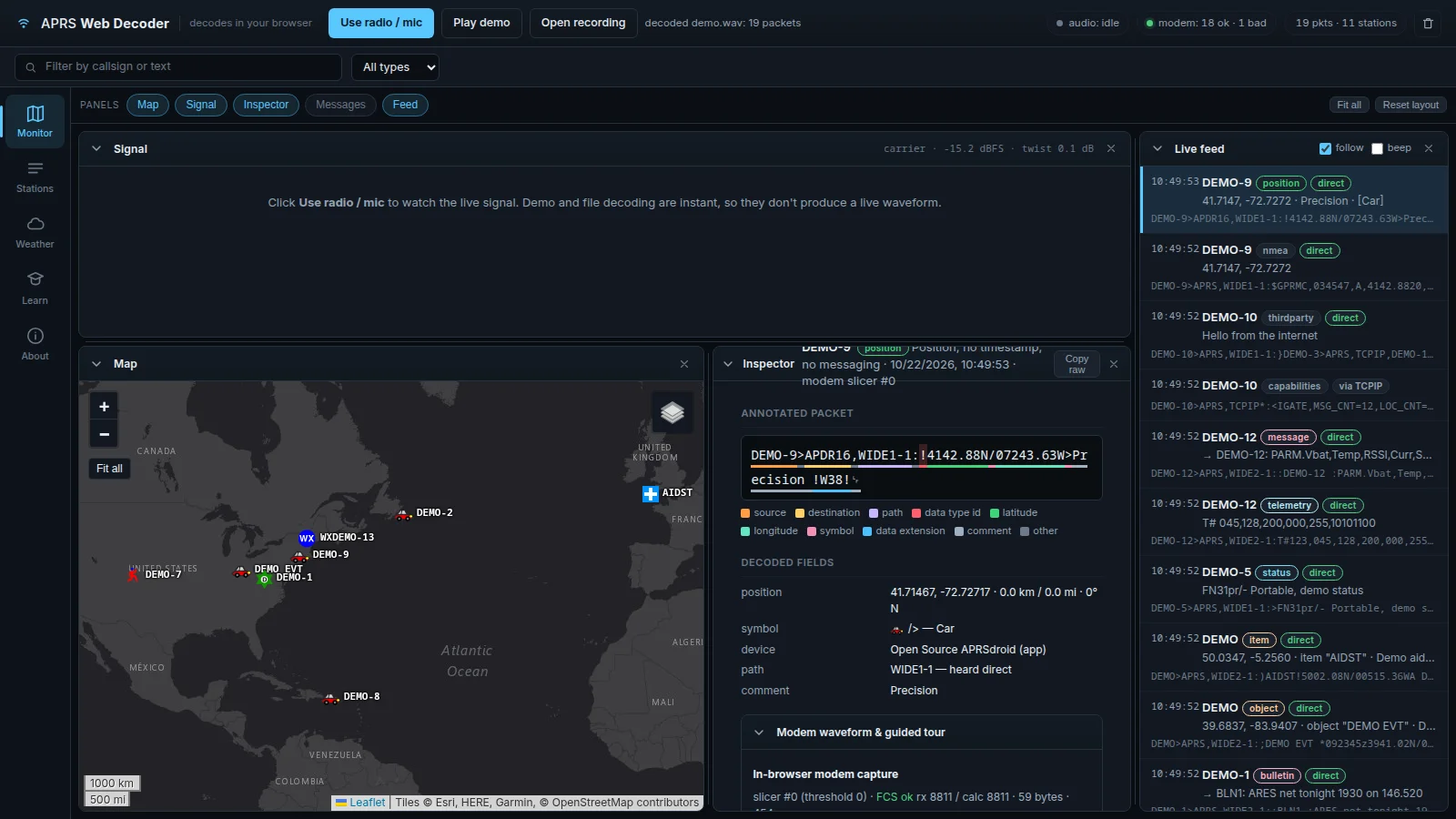
2. Comprehensive Protocol Decoding
APRSSwift decodes every standard APRS packet structure:
- Position Reports: Uncompressed and compressed coordinates with Maidenhead grid squares.
- Mic-E Frames: Complete demodulation of compressed Mic-E telemetry, course, speed, and emergency status.
- Weather Stations (WX): Live parsing of wind speed, direction, temperature, barometric pressure, rainfall, and humidity.
- Objects & Items: Displays temporary emergency waypoints, search-and-rescue grids, and repeater objects.
- Telemetry & Status: Graphs remote voltage, solar sensor, and station status text.
3. SmartBeaconing™ Technology
APRSSwift implements genuine SmartBeaconing™ driven by Apple’s high-precision CoreLocation framework:
- Adaptive Rate Control: Automatically increases beacon frequency when driving at highway speeds and extends intervals when stationary.
- Corner Pegging: Detects heading changes and automatically triggers a beacon immediately after negotiating a turn, ensuring accurate road path logging without spamming the RF channel on straight roads.
4. Two-Way Messaging with Delivery Acknowledgements
- Reliable Packet Exchange: Composes messages with standard 9-character addressee padding and message sequence numbers.
- Auto-ACK Engine: Correlates incoming
ackandrejpackets, handles automatic acknowledgement generation for incoming traffic, and alerts you when a message delivery succeeds. - Proximity & Direct-RF Alerts: Notifies you when a favorited station enters your immediate area or when a packet is heard directly on simplex RF rather than through an internet digipeater.
5. Native Apple Watch Companion App
The included watchOS companion operates as an independent telemetry display and control surface:
- Displays your current Maidenhead Grid Square and coordinates on your wrist.
- Shows real-time connection status and counts of nearby active stations.
- Provides a single-tap Manual Beacon button for portable hikers and SOTA activators.
6. Privacy-First Architecture and Multi-Language Support
- Zero Tracking: Contains no advertisements, no third-party SDKs, no analytics trackers, and requires no user account creation.
- 8 Built-in Languages: Fully localized in English, Turkish, German, French, Spanish, Simplified Chinese, Japanese, and Korean with an instant in-app language switcher.
Comparison: APRSSwift vs Alternative Mobile APRS Apps
| Feature | APRSSwift | APRS.fi (iOS) | PocketPacket (iOS) | APRSDroid (Android) |
|---|---|---|---|---|
| Target Platform | iOS / iPadOS / macOS / watchOS | iOS / iPadOS | iOS (Legacy) | Android |
| UI Framework | Modern SwiftUI | Native iOS UIKit | Classic iOS | Native Android |
| Built-in AFSK Modem | Yes (1200 Baud Bell 202) | No (APRS-IS only) | Yes (1200 Baud) | Yes (AFSK Audio) |
| Bluetooth KISS TNC | Yes (Mobilinkd / BLE) | No | No | Yes (Bluetooth / USB) |
| TCP KISS TNC | Yes (Dire Wolf network) | No | No | Yes (TCP) |
| Apple Watch Companion | Yes (Native watchOS) | No | No | N/A |
| SmartBeaconing™ | Yes (CoreLocation based) | No | Yes | Yes |
| Privacy / Tracking | 100% Zero Tracking / No Ads | Third-party analytics | No Ads | Open Source (GPL) |
| Multi-Language | 8 Languages built-in | English | English | Multi-language |
How to Connect Your Radio
+-------------------+          +--------------------+          +--------------------+
|  iPhone / iPad    |          | Audio Interface    |          | Handheld Radio     |
|                   |  TRRS    | (e.g. Digirig /    |  K-Plug  | (e.g. Baofeng,     |
|  APRSSwift App    |=========>| BTech APRS Cable)  +=========>| Yaesu, Kenwood,    |
|  AFSK Sound Modem |  USB-C   | Level Attenuation  |  DataIn  | Quansheng UV-K5)   |
+-------------------+          +--------------------+          +--------------------+
1. Direct Audio Cable (TRRS / USB-C)
- Plug a standard 4-pole TRRS adapter or USB-C audio interface into your iPhone or iPad.
- Connect the audio line to your radio’s microphone and speaker ports.
- Open APRSSwift Settings ➔ Backend and select Built-in AFSK Modem.
- Tap Play test tones to verify that audio modulates your radio cleanly without clipping or overdrive.
- Enable radio VOX (or use an interface with hardware PTT) and start beaconing.
2. Wireless Bluetooth TNC (Mobilinkd)
- Power on your Mobilinkd TNC3/TNC4.
- In APRSSwift Settings, choose Bluetooth TNC and select your Mobilinkd device from the discovered list.
- Once paired, all RF packets route silently through Bluetooth while your phone remains free in your pocket.
Frequently Asked Questions
Is APRSSwift available on the Apple App Store?
Yes. APRSSwift is available directly on the Apple App Store for iPhone, iPad, Mac, and Apple Watch.
Does APRSSwift require a hardware TNC to work over radio?
No. You can use the built-in 1200-baud AFSK sound modem with an audio interface cable to transmit and receive packets directly through your radio sound card.
Can I use APRSSwift without an amateur radio license?
You can monitor APRS-IS traffic and maps without transmitting, but transmitting positions or messages over RF or APRS-IS requires a valid amateur radio callsign.
Does APRSSwift collect user location or analytics?
No. APRSSwift collects zero telemetry and contains no analytics or tracking code. Position reports are only broadcast to the APRS network when you explicitly enable beaconing.
Who developed APRSSwift?
APRSSwift was developed by Turkish amateur radio operator and software engineer Şevket Buğra Canata (TA1JS).
Sources and Further Reading
- APRSSwift Official Website
- APRSSwift on the Apple App Store
- APRSSwift Support and FAQ Documentation
- APRSSwift Privacy Policy
- Bob Bruninga (WB4APR) Official APRS Specification
73 de 9M2PJU

Post Comment