PyttiAPRS: Lightweight Python TUI APRS Client for Satellite and Terrestrial Packet Radio
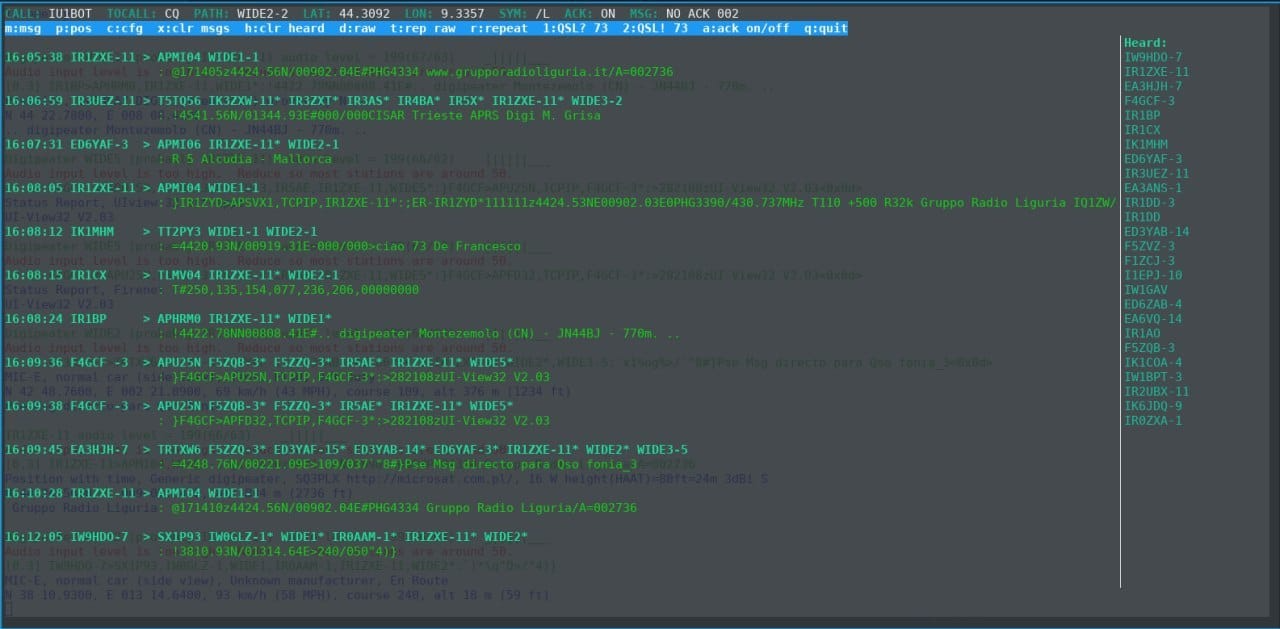
TL;DR: PyttiAPRS is an open-source, pure-Python terminal user interface (TUI) APRS client created by Italian radio amateur Lorenzo Gianlorenzi (IU1BOT). Designed specifically for high-speed satellite passes (such as the International Space Station on 145.825 MHz) and low-resource single-board computers, it features zero third-party dependencies, native KISS over TCP framing, a split-pane curses interface with mouse support, rapid-reply QSL shortcuts, Mic-E decoding, and automatic message acknowledgements. It connects seamlessly to Dire Wolf or any network TNC on Linux, macOS, and Windows.
What is PyttiAPRS?
PyttiAPRS is a lightweight, keyboard-driven terminal APRS client written in pure Python that connects to software or hardware TNCs over KISS TCP to send and receive AX.25 packet radio frames.
+-------------------------------------------------------------------------+
|                               PyttiAPRS                                 |
|                                                                         |
|  +--------------------+   +---------------------+   +----------------+  |
|  | Curses TUI Engine  |   | Native AX.25 Encoder|   | KISS TCP Client|  |
|  | (Split-Pane/Mouse) |   | & Decoder (UI Only) |   | (Port 8001)    |  |
|  +---------+----------+   +----------+----------+   +--------+-------+  |
|            |                         |                       |          |
|            +-------------------------+-----------------------+          |
|                                      |                                  |
|            +-------------------------v-----------------------+          |
|            |           APRS Messaging & Beacons              |          |
|            |  (Auto-ACK, Mic-E Decode, Quick QSL Shortcuts)  |          |
|            +-------------------------+-----------------------+          |
+-------------------------------------------------------------------------+
                                       |
                                       v (KISS over TCP)
                     +-----------------------------------+
                     |   Soundcard TNC (e.g. Dire Wolf)  |
                     +-----------------+-----------------+
                                       | (Audio / PTT)
                                       v
                             [VHF/UHF Transceiver]
                       (145.825 MHz ISS / 144.390 / 144.800)
Working APRS through Low Earth Orbit (LEO) satellites presents unique operational challenges. A typical amateur satellite pass, such as the packet digipeater aboard the International Space Station (ISS / RS0ISS) or amateur CubeSats, lasts only 8 to 12 minutes from acquisition of signal (AOS) to loss of signal (LOS). During this brief window, operators must track Doppler frequency shifts, manage directional handheld antennas (such as an Arrow II or Elk log-periodic), and exchange grid squares or short messages across a crowded single-channel packet channel.
Heavy graphical APRS applications like Xastir, YAAC, or APRSIS32 load comprehensive map layers, tile caches, and multi-window dialogs. While great for base stations, they introduce visual clutter, consume substantial memory on portable field laptops or Raspberry Pi cyberdecks, and require awkward touchpad navigation while juggling antennas.
PyttiAPRS addresses this environment with focused minimalism. Developed by Lorenzo Gianlorenzi (IU1BOT) under the Apache 2.0 license, PyttiAPRS runs in any standard terminal (80×24 minimum) using Python’s standard library. It requires zero external pip packages, provides single-key shortcuts for rapid contact confirmation, and implements robust AX.25 packet validation.
Core Architecture and Interface Design
PyttiAPRS utilizes a clean, two-pane curses layout designed for rapid situational awareness during high-stress operating conditions:
+--------------------------------------------------------------------------------+
| PyttiAPRS v2026 | MY: 9M2PJU-9 | TOCALL: APPYTT | PATH: RS0ISS | POS: =0308.12N... |
+--------------------------------------------------------------------------------+
| [Packet Traffic Log]                          | [Heard Stations (Click)]       |
| 06:42:15 RS0ISS*>CQ,qAR: >ARISS Digipeater    | IU1BOT-9   (06:44:02)          |
| 06:43:10 9M2PJU-9>RS0ISS: =0308.12N/10141.50E- | TA2AEC-7   (06:43:55)          |
| 06:43:45 IU1BOT-9>9M2PJU-9: :9M2PJU-9 :QSL? 73 | 9W2TVI-1   (06:43:18)          |
| 06:44:02 9M2PJU-9>IU1BOT-9: :IU1BOT-9 :ack001  | JA1ABC-9   (06:42:40)          |
| 06:44:12 9M2PJU-9>IU1BOT-9: :IU1BOT-9 :QSL! 73 | VK3XYZ-7   (06:41:50)          |
|                                               |                                |
+--------------------------------------------------------------------------------+
| [m] Msg  [p] Beacon  [1] QSL?  [2] QSL!  [r] Repeat  [a] ACK:OFF  [c] Config   |
+--------------------------------------------------------------------------------+
1. Two-Pane Split Screen Layout
- Left Pane (Packet Traffic): Displays a real-time, scrolling log of all received, transmitted, and digipeated packets. Station callsigns, paths, and payload contents are syntax-highlighted for instant readability.
- Right Pane (Heard Station List): Tracks recently decoded stations along with their last-heard timestamps.
- Mouse Integration: The interface includes terminal mouse support. Clicking any callsign in the Heard list immediately selects that station as the recipient for your next message or quick QSL shortcut.
2. Status and Command Bars
- Top Status Bar: Shows your active callsign and SSID, TOCALL identifier (default
APPYTT), active digipeater path, beacon coordinates, symbol selection, ACK tracking mode, and connection health. - Bottom Command Bar: Provides a persistent reference for single-key operational hotkeys.
Technical Features Deep Dive
PyttiAPRS includes several purpose-built features that make it particularly effective for packet radio:
1. Self-Contained KISS over TCP and AX.25 Engine
PyttiAPRS communicates directly with software TNCs (such as Dire Wolf) or hardware TNCs equipped with network interfaces via KISS over TCP (default port 8001):
- Native Framing: Implements complete KISS framing and unframing, including standard
FEND(0xC0) andFESCescape handling. - TCP Stream Buffer: Resilient stream parsing reassembles fragmented TCP packets and handles multi-port KISS frames cleanly.
- Pure AX.25 UI Implementation: Validates address strings, SSID ranges, reserved bits, and command/response bits, supporting up to 8 digipeater hops in the path.
2. Streamlined APRS Messaging with Auto-ACK
APRS messaging strictly follows protocol standards while offering flexible control:
- Addressee Formatting: Ensures exact 9-character padded addressee headers (
:{addressee(9)}:{text}). - UTF-8 & Latin-1 Fallback: Transmits text in UTF-8 while gracefully falling back to Latin-1 for legacy or binary-encoded frames.
- ACK Mode Toggle (
akey): In fast-moving satellite passes, message retry storms can congest the transponder. Pressingatoggles outgoing message IDs off (one-shot fire-and-forget mode). When enabled, PyttiAPRS tracks{NNNmessage IDs, waits forackorrejresponses, and performs a single conservative retry after 60 seconds. - Automatic Incoming ACKs: Automatically replies with an
ackframe whenever an incoming message addressed to your station contains a message ID.
3. Rapid-Reply QSL Shortcuts
To maximize contacts during a short satellite pass, PyttiAPRS provides dedicated single-key macros:
- Key
1: Instantly sendsQSL? 73to the currently selected station. - Key
2: Instantly sendsQSL! 73to confirm receipt. - Key
r: Resends the last outgoing message. - Key
t: Repeats the last raw payload.
4. Uncompressed Messaging-Capable Beacons
Pressing p broadcasts your station position using the messaging-capable = data type identifier. Coordinates are rounded with full mathematical precision into standard DDMM.mmN/S and DDDMM.mmE/W formats. Operators can configure primary (/) or alternate (\) symbol tables and custom overlay characters.
5. Mic-E Packet Decoding
PyttiAPRS includes a built-in Mic-E demodulator. When mobile trackers or portable handhelds (such as the Kenwood TH-D72 or Yaesu FT5D) transmit compressed Mic-E packets, PyttiAPRS extracts and displays the decoded latitude, longitude, course, speed, and ambiguity in plain text.
6. Unified Path Routing
The software enforces no hardcoded satellite paths:
- Satellite Passes: Set the path to
RS0ISS(ISS),ARISS, or specific satellite aliases. - Terrestrial Networks: Set the path to
WIDE1-1,WIDE2-2orWIDE2-1for standard ground relays. - Direct Simplex: Leave the path blank for point-to-point communication.
Comparison: PyttiAPRS vs Alternative APRS Clients
The table below outlines how PyttiAPRS compares against other popular APRS clients:
| Feature | PyttiAPRS | YAAC | Xastir | APRSIS32 | PinPoint APRS |
|---|---|---|---|---|---|
| User Interface | Lightweight TUI (Curses) | Full GUI (Java Swing) | Full GUI (X11/Motif) | Full GUI (Win32) | Modern GUI (.NET) |
| Primary Focus | Satellite & Portable | General / Mapping | Mapping / GIS | Base Station / Map | Mobile / Mapping |
| Dependencies | Python standard library | Java Runtime (JRE) | Extensive C libraries | Windows only | Windows / .NET |
| Mouse Support | Yes (Terminal mouse) | Yes | Yes | Yes | Yes |
| Satellite Hotkeys | Yes (1, 2, r, t) |
No | No | No | No |
| Memory Footprint | Extremely Low (<30 MB) | High (200–500 MB) | Moderate (80–150 MB) | Moderate (100 MB) | Moderate (120 MB) |
| TNC Connection | KISS over TCP | Serial, KISS, AGWPE | Serial, KISS, AX.25 | Serial, TCP, AGWPE | Serial, KISS, AGWPE |
| License | Apache-2.0 | LGPL | GPL-2.0 | Proprietary (Freeware) | Proprietary (Freeware) |
Setup and Field Operation Walkthrough
Setting up PyttiAPRS takes less than two minutes on any operating system:
+-------------------+          +-------------------+          +--------------------+
|  PyttiAPRS (TUI)  |  KISS    |  Dire Wolf (TNC)  |  Audio   |   Handheld Radio   |
|  Python 3 Client  |=========>|  1200 Baud Modem  |=========>|   VHF Transceiver  |
|  (Local/Remote)   | TCP:8001 |  (ALSA/WASAPI)    | Mini-DIN |   (145.825 MHz)    |
+-------------------+          +-------------------+          +--------------------+
1. Prerequisites and Installation
Clone the repository to your machine:
git clone https://github.com/vash909/PyttiAPRS.git
cd PyttiAPRS
Ensure your TNC (such as Dire Wolf) is running and listening on KISS TCP. In direwolf.conf, verify that KISS TCP is enabled:
KISSPORT 80012. First-Time Configuration
Launch PyttiAPRS:
python3 PyttiAPRS.pyOn initial launch, an interactive wizard prompts for basic operating parameters:
- Callsign and SSID: Enter your station callsign (e.g.
9M2PJU-9). - TOCALL: Enter
APPYTT(or leave default). - Digipeater Path: Enter
RS0ISSfor the ISS,WIDE1-1,WIDE2-2for terrestrial, or leave blank. - Latitude and Longitude: Enter your coordinates (e.g.
0308.12N,10141.50E). - Symbol Table and Code: Select table
/and symbol-(House),[(Runner), or>(Car). - KISS Host and Port: Enter
localhostand8001.
Settings are saved to aprs_tui_config.json automatically upon exit.
3. Working a Satellite Pass
- Tune your transceiver to 145.825 MHz simplex (the standard worldwide VHF satellite APRS frequency).
- Connect your audio interface (Digirig, SignaLink, or audio cable) to Dire Wolf.
- Start PyttiAPRS. As the satellite rises, incoming packets will populate the left pane, and heard callsigns will appear on the right.
- Click a heard callsign in the right pane, then press
1to sendQSL? 73ormto send a custom greeting. - Press
pto drop an uncompressed position beacon through the transponder.
Frequently Asked Questions
What platforms can run PyttiAPRS?
PyttiAPRS runs on any system with Python 3.7 or newer, including Linux (Raspberry Pi OS, Debian, Arch), macOS, and Windows.
Does PyttiAPRS require an internet connection?
No. PyttiAPRS operates purely over RF through your local KISS TNC, requiring zero internet connectivity.
Can I click on callsigns in the terminal?
Yes. PyttiAPRS enables terminal mouse tracking, allowing you to click any callsign in the Heard list to select it as the message target.
What is the default TOCALL?
The default TOCALL is APPYTT, the officially registered software identifier for PyttiAPRS.
Who developed PyttiAPRS?
PyttiAPRS was created by Italian amateur radio operator Lorenzo Gianlorenzi (IU1BOT) and is distributed under the Apache 2.0 open-source license.
Sources and Further Reading
- PyttiAPRS GitHub Repository
- PyttiAPRS Telegram Group
- ARISS Satellite APRS Operations Guide
- Dire Wolf Soundcard Packet TNC
- APRS 1.01 Protocol Specification
73 de 9M2PJU

Post Comment