amateur radio
open source
Technology
145.800 MHz, 437.550 MHz, BK4819, Doppler app, Doppler shift, F4HWN Labs, FM satellites, ham radio satellites, iss, MarcBoettinger, MIT license, overlay app, pass predictor, Quansheng UV-K1, Quansheng UV-K5, RIT, satellite tracking, UV Studio, UV-K6, zero beat
9M2PJU
0 Comments
Doppler App for F4HWN Labs: Auto Satellite Tracking on UV-K5, UV-K1, UV-K6
Your Quansheng handheld can now follow a satellite across the sky by itself, retuning the receiver as orbital velocity bends the downlink up and then down. That’s what the Doppler overlay app by Marc Boettinger does on F4HWN Labs firmware: it models the pass, moves the dial for you, and never touches the transmitter.
This post is a companion to the Quansheng UV-K1 and UV-K5 V3 F4HWN custom firmware guide. That guide covers flashing, the four editions, and the overlay platform. Here we go deep on one app: Doppler 0.3, a 4 KiB MIT-licensed overlay that turns the radio into a self-tracking satellite receiver with a pass predictor, a zero-beat meter, and integer-only orbital math.
TL;DR: Doppler 0.3 is a free MIT overlay app for F4HWN Labs firmware (ABI 1 / API 3) that tracks satellite Doppler shift on Quansheng UV-K5, UV-K1, and UV-K6. Set the VFO to the downlink, enter rise time, duration, peak elevation, and altitude, and the app retunes the receiver through the pass with ear correction. RX only, install the .app file in UV Studio Apps (Labs), launch with F plus 7.
What the Doppler App Is
The Doppler app is an RX-only overlay program for F4HWN Labs firmware that simulates and tracks the Doppler shift of a moving transmitter on a stationary Quansheng receiver, retuning the dial automatically through a satellite pass while the transmitter stays permanently off. You give it four numbers from any pass predictor, it counts down to the rise, then drives the receiver frequency along the velocity curve: plus 7 km/s approaching, zero at closest approach, minus 7 km/s receding. PTT never transmits; it only wakes the screen.
Why Doppler Matters on a Handheld
A satellite in low orbit moves at about 7.6 km/s relative to you, so the frequency you hear slides by the fraction v/c. On the ISS UHF downlink near 437.8 MHz that is more than 11 kHz from rise to set. On 2 m near 145.8 MHz it is about 3.4 kHz each way. A handheld FM receiver hears a few kHz of that before the voice goes fuzzy and drops, which is why working satellites by hand means constantly spinning the dial.
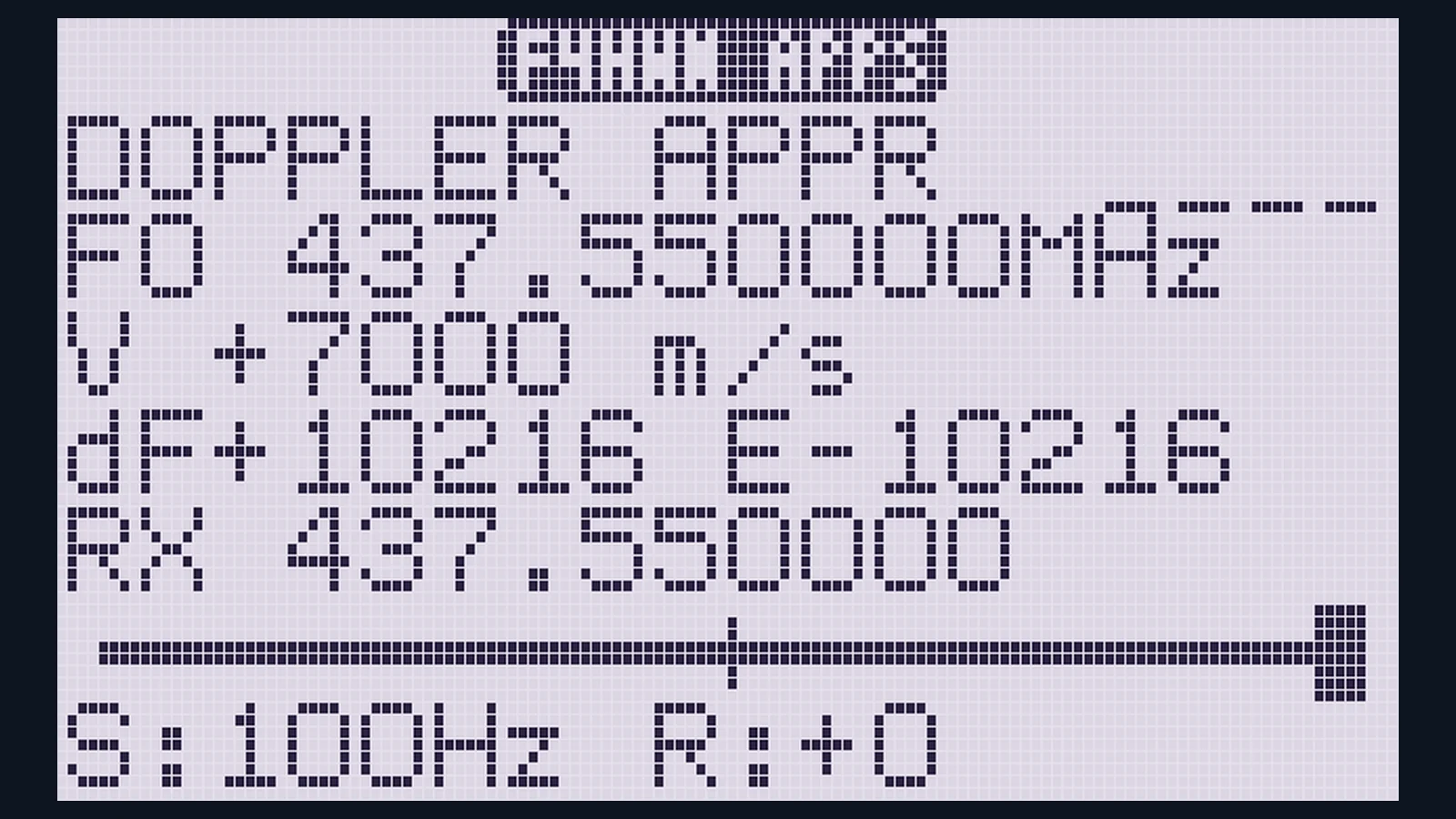
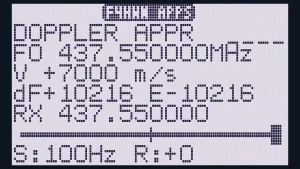
The screenshot above is the proof the model is honest. At 437.550 MHz and plus 7000 m/s, the shift must be 437,550,000 times 7,000 divided by 299,792,458, which is 10,217 Hz. The screen reads dF+10216. One hertz of rounding on a radio with no floating point unit. That’s the whole project in one line: exact physics on a Cortex-M0+ that can’t divide.
Manual Mode: a Tour of the Screen
Launch the app and it starts on your VFO frequency, so set the VFO to the downlink first: 145.800 MHz for ISS voice and APRS, 437.550 MHz for the UHF example in the screenshot. Each screen line has one job.
| Screen line | Meaning |
|---|---|
DOPPLER APPR plus bars |
approaching, receding, LOST right after a retune, or SIM; 4 bars show simulated signal quality |
F0 437.550000MHz |
the carrier you typed, or the VFO at launch |
V +7000 m/s |
relative velocity, sign is direction |
dF+10216 E-10216 |
Doppler shift in Hz, and your tuning error in Hz (plus means you sit above the signal) |
RX 437.550000 |
where the receiver actually listens: dial plus RIT |
| meter | block marks where the signal sits in your passband; center is zero beat, full scale is plus or minus 2.9 kHz |
S:100Hz R:+0 |
dial step and RIT offset |
The quality bars come straight from the tuning error: within 50 Hz earns 4 bars, 300 Hz earns 3, 1 kHz earns 2, 3 kHz earns 1, beyond that nothing. Zero-beating by the meter is the fastest way to find the voice.
Every key, no guessing
| Key | Action |
|---|---|
| Arrows | VFO dial by one step; hold to accelerate times 10 after 12 repeats, times 100 after 40 |
* |
step cycle: 1 Hz, 10 Hz, 100 Hz, 1 kHz |
1 / 3 |
RIT minus or plus 100 Hz, range plus or minus 5 kHz; 2 zeroes RIT; 0 zeroes dial and RIT |
9 |
auto zero-beat: sets the dial so the error reads 0 |
F |
flips approaching and receding |
7 |
toggles meters per second and km/h display; the stored velocity never changes |
MENU |
type the carrier as ddd.ddddd MHz, MENU, type velocity in 5 digits, MENU to finish; EXIT is backspace, then cancel |
4 |
opens pass setup |
EXIT |
quits the app |
Two hardware truths sit under those keys. Every real retune mutes the audio for 40 ms while the synthesizer settles, shown as LOST. And the BK4819 chip resolves 10 Hz, so the 1 Hz step is exact on the screen but aspirational on the air.
Pass Mode: Enter Four Numbers, Watch It Track
Pass mode is the reason to install the app. Take rise time, duration, and maximum elevation from any pass predictor (AMSAT status and passes page, Heavens-Above, N2YO, or the 9M2PJU AMSAT tracker), add the satellite altitude, and the radio runs the pass.
- Press
4for PASS SETUP. Type the time until rise as digits filling from the right:52045becomes 5:20:45. PressMENU. Type duration in minutes,MENU. Type peak elevation in degrees,MENU. Type altitude in km, up to 4 digits between 200 and 2000,MENU. For the ISS skip the last field: 420 km is the default. The countdown starts. - The header shows
T-5:20:45and the dial already sits on the rise frequency. The radio beeps one minute before the rise and again at the rise itself. - From the rise, velocity follows the curve while the header shows
P mm:sswithAPPRorRECD. The dial recenters itself whenever it drifts 200 Hz off, about 34 retunes across an 11 minute pass, each costing one 40 ms audio gap. - Correct by ear at any time: arrows add a correction the tracking keeps,
1and3layer RIT on top,0clears both, and8declares this moment the closest approach, realigning the whole timeline to what you hear. That single key absorbs prediction error, clock error, and Earth rotation in one press. EXITstops the pass; a secondEXITleaves the app. A low beep marks the end of the pass.
The app clock runs only while the app is open and its accuracy over hours is unknown, so start the countdown 10 to 15 minutes before the pass, not hours ahead. On exit the app parks the synthesizer exactly where the VFO had it, so the radio is unchanged.
Integer Orbital Math on a Chip That Cannot Divide
The Cortex-M0+ in these radios has no divide instruction and no floating point unit, and the overlay API offers only 32-bit division helpers because even libgcc division wouldn’t fit the overlay. So the whole model is integer arithmetic, and it is verified rather than trusted: the host test suite compiles the same header for the PC and fuzzes 2 million random frequency and velocity pairs against floating point, plus gait checks on the pass curve.
- Shift is exact to plus or minus 1 Hz up to 1.3 GHz: v/c rides as ppb times 4, a quarter of a part per billion per unit.
- The velocity curve fits exact circular-orbit geometry:
v = V u / sqrt(u^2 + c^2)with horizon at 1 and closest approach at 0, peak 7.3 km/s, shape constant interpolated from an 18-entry table across 10 to 90 degrees elevation. - Within about 90 m/s of the exact model at 420 km: 45 Hz at 145.8 MHz, 136 Hz at 437.8 MHz.
- Altitude gets linear corrections, about 1.24 m/s less peak speed per km and a widening curve: within about 250 m/s from 350 to 1200 km (122 Hz at 145.8 MHz), where ignoring altitude would err by up to 1.9 km/s.
- Earth rotation is deliberately not modeled: up to plus or minus 150 Hz at 145.8 MHz depending on pass direction. The arrows and the
8key exist precisely to absorb it by ear.
That last point is good engineering honesty. A 150 Hz miss on FM voice is a slightly fuzzy corner, not a lost pass, and one tap corrects it for the rest of the flyover.
Install in UV Studio and Launch with F Plus 7
You need F4HWN Labs firmware on a UV-K1, UV-K5 V3, or UV-K6, because only Labs runs the overlay app platform. If Labs isn’t on your radio yet, the F4HWN custom firmware guide walks through flashing, calibration backup, and the four editions.
- Download
Doppler.appfrom the project releases or repo root. - Open UV Studio in desktop Chrome or Edge, connect the radio over USB serial, and go to Apps (Labs).
- Install the local
.appfile into a free slot. App files must come from the same firmware release so the ABI and capability flags match: this build targets Labs ABI 1 / API 3. - On the radio, launch with
Fplus7. - Set the VFO to the downlink before launching, or type the carrier with
MENUafter launch.
Builders can compile from source two ways: the Docker route with ./compile-app.sh doppler from the firmware repo root, or natively with arm-none-eabi-gcc plus python3 via ./build.sh. The host test needs only gcc: gcc -std=c11 -Wall -Wextra -Werror -fsanitize=address,undefined -I. test/test_core.c -o /tmp/tc -lm && /tmp/tc, with sanitizers on.
Doppler App Versus the Other Ways to Chase Satellites
| Task | Doppler overlay app | Manual dial by printed table | Phone app plus handheld | PC tracker with CAT rig control |
|---|---|---|---|---|
| Needs a second device in the field | No, runs on the radio | No | Yes, phone in hand | Yes, laptop plus interface |
| Follows Doppler automatically | Yes, 200 Hz threshold retunes | No, you spin the dial | No, you read and dial | Yes, full rig control |
| Knows the pass shape | Yes, 4 numbers model it | Only what you printed | Yes, full predictions | Yes, TLE propagation |
| Corrects mid-pass by ear | Yes, arrows plus 8 peak key |
Naturally, it is all ear | By hand on the radio | Usually by offset settings |
| Transmit risk | None, RX only by design | None | None from the app | Real, PTT works normally |
| Works without data in the field | Yes, numbers in your notebook | Yes | Cached passes only | Cached TLEs only |
| Best for | Single-radio portable FM satellite work | Learning the sound of Doppler | Spotting and planning | Base station and rotators |
The table isn’t a ranking. A PC with GPredict and a CAT cable remains the base station king, and a phone app remains the best planner. The overlay wins on integration: one device predicts, tunes, and listens, with no screen to juggle while holding an Arrow-style antenna overhead.
Honest Limits and Safety Rules
The app is experimental research software with its limits printed in the source, and they deserve repeating in plain language.
- RX only by design: no transmit API is used anywhere, and PTT only wakes the screen. There’s nothing to key by accident.
- The SIM window: the RF path and filter stay as the loader set them, so the receiver genuinely retunes only within plus or minus 2 MHz of the launch VFO. Farther out the header shows
SIMand the app is a calculator, not a receiver. - Audio gaps are real: every retune costs 40 ms of
LOST, about 34 gaps in a typical pass. Speech survives; you’ll hear the rhythm. - Resolution floor: BK4819 tunes in 10 Hz steps, RSSI gates the speaker at minus 115 dBm, and the 1 Hz step flatters the display.
- Clock and model drift: the clock runs only inside the app, Earth rotation is unmodeled, and altitude outside 350 to 1200 km stretches the fit. Start countdowns late, press
8at the peak, keep corrections small. - Labs only, ABI matched: overlay
.appfiles must match the firmware release (ABI 1 / API 3 here). Mismatched apps are how strange behavior starts. - Standard F4HWN precautions apply: calibration backup named by serial before experimenting, compatible cable, transmit only where licensed. The firmware guide covers all of it.
Safety checklist before a satellite pass
- Confirm the Labs edition and ABI match for the
.appfile - Set the VFO to the published downlink and confirm the band plan
- Take rise, duration, and peak elevation from a current predictor, plus altitude
- Start the countdown 10 to 15 minutes out, not hours
- Run one receive-only pass on a new setup before trusting the timeline
- Keep the antenna matched to the band and the power question moot: this app never transmits
Your First Pass in Five Minutes
- Look up the next ISS voice pass: rise time, 10-ish minutes duration, peak elevation. Note 420 km altitude.
- Set VFO A to 145.800 MHz FM, open the app with
Fplus7. - Press
4, type the rise countdown digits,MENU, duration,MENU, elevation,MENU, thenMENUpast altitude to accept 420. - Watch
T-count down, listen for the beeps, then followPwithAPPRflipping toRECDat the middle. - When the voice peaks, tap
8. Fine tune with arrows until the meter block centers, then put the radio down and just listen. You’re tracking a spacecraft with a 30 dollar handheld and four numbers.
Why It Matters
FM satellites are the most accessible space contact in amateur radio, and Doppler has always been the tax: print tables, phone in one hand, dial in the other, antenna in the third hand you don’t have. This app pays that tax in 4 KiB of overlay RAM with integer math exact to a hertz and a test suite that fuzzes millions of cases against floating point.
It also shows what the Labs overlay platform is for. The firmware guide described a 30-app collection in abstract; Doppler is the concrete proof that third-party apps can do real radio work inside it: read the VFO, drive the synthesizer, gate the speaker on RSSI, and leave every register as found. If one focused app can do this, the next thirty get interesting fast.
Sources and Further Reading
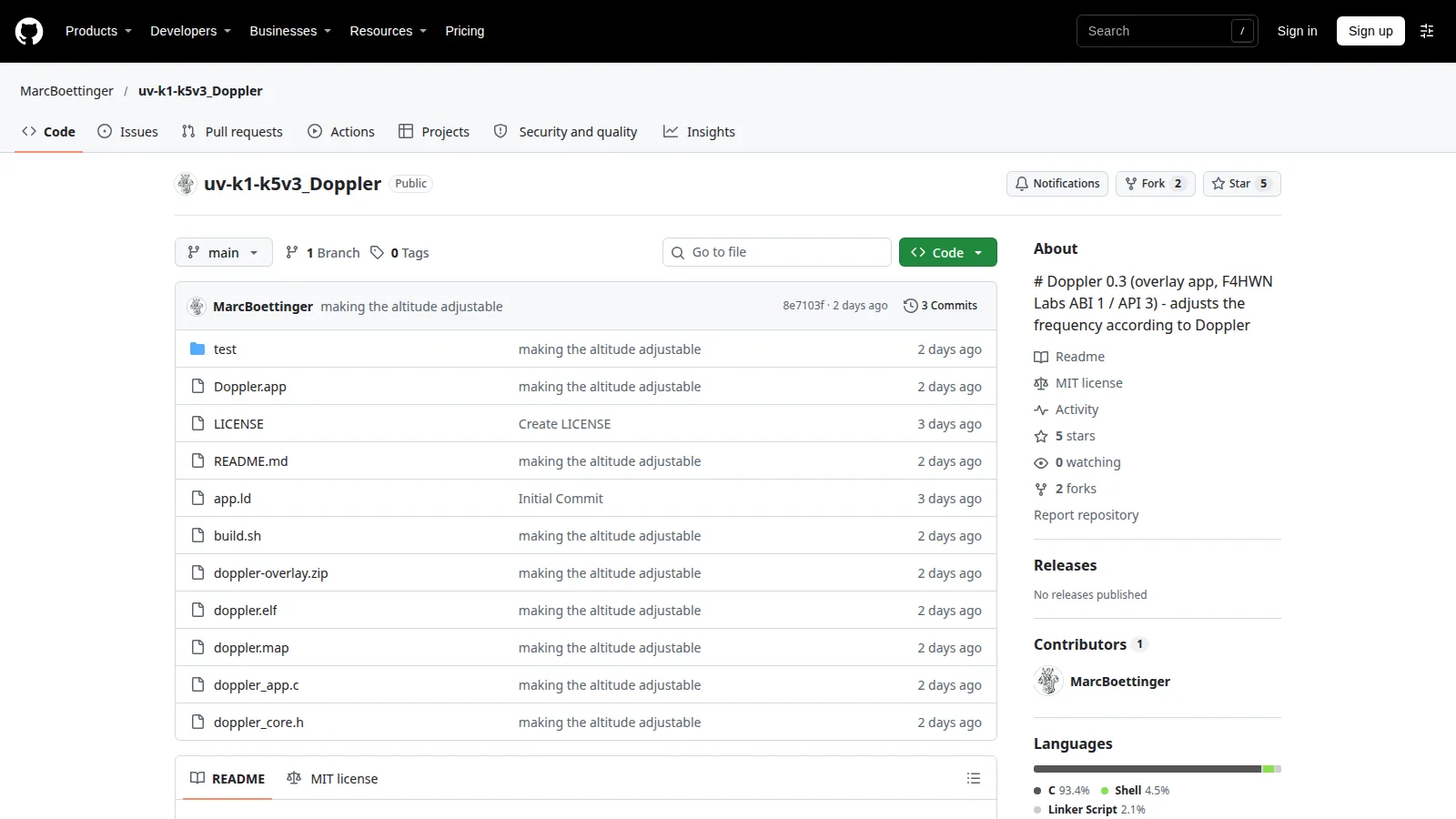
- uv-k1-k5v3_Doppler on GitHub – Doppler 0.3 overlay app source, README, build script, and installable .app file, MIT license.
- UV Studio Apps page – Browser installer for Labs overlay apps, firmware slots, and radio management.
- F4HWN custom firmware guide on HamRadio.my – Flashing, editions, Labs overlay platform, and safety notes this app builds on.
- AMSAT satellite tracking – Pass predictions and FM satellite status.
- Heavens-Above – ISS and satellite pass predictions by location.
- N2YO satellite tracking – Real-time tracking and 10-day predictions.
- 9M2PJU AMSAT tracker – Web satellite tracking with Doppler tuning and rotator control for the shack side.
- ARRL satellite communication resources – Getting started with amateur satellites.
73 de 9M2PJU.


Post Comment