amateur radio
open source
Technology
airband monitoring, Airspy, ArchangeSDR, FalconSDR, frequency scanner, GTK4, hackrf, Linux ham radio, MIT license, ntfy, open source, PMR446, radio recording, rtl-sdr, SDR scanner, SoapySDR, speech detection, transcription, uConsole, Whisper.cpp
9M2PJU
0 Comments
ArchangeSDR: A Lightweight Linux Scanner That Records People Talking, Not Static
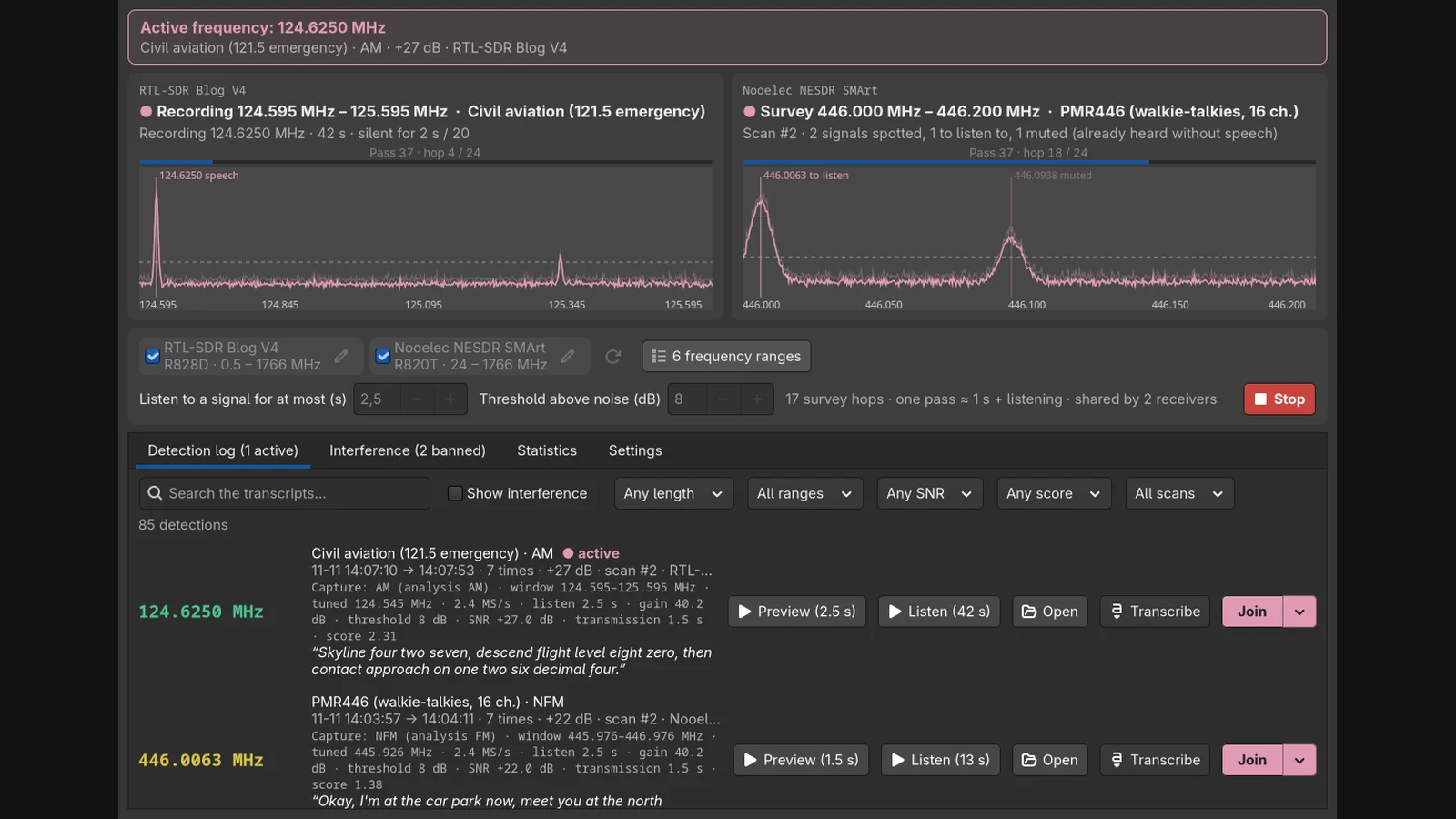
Most scanners stop on anything louder than the squelch: carriers, data bursts, pager blasts, interference. ArchangeSDR by bt0r does the opposite. It sweeps the bands you choose, listens briefly wherever something transmits, checks the audio for actual human speech, and keeps only the conversations. Carriers and data get forgotten. Repeat offenders get banned. Everything runs locally on any Linux box, from a desktop PC to a ClockworkPi uConsole in the field.
This post pairs well with the FalconSDR wideband scanner guide. FalconSDR watches a whole capture bandwidth at once through a browser UI. ArchangeSDR sweeps with one or more dongles through a native GTK4 desktop app, decides by speech rather than energy, and transcribes locally with whisper.cpp. Different engines, same goal: a log full of people talking.
TL;DR: ArchangeSDR is a free MIT-licensed Linux SDR scanner that sweeps your chosen bands at 0.1 s per 2 MHz hop, tests each signal for human speech, records whole conversations with pauses, bans repeat interference, transcribes with local whisper.cpp, and pushes phone alerts via ntfy. RTL-SDR works out of the box, HackRF through PlutoSDR via SoapySDR. One Python file, distro packages only, nothing to compile. Clone, run install.sh, tick receivers and ranges, press Scan.
What ArchangeSDR Is
ArchangeSDR is a lightweight open source SDR scanner for Linux that sweeps selected frequency ranges, tests every signal it finds for human speech instead of raw energy, records complete conversations with pauses included, and keeps a searchable log with transcripts, statistics, and phone notifications. It runs as one Python file with a GTK4 interface plus an optional terminal mode, uses RTL-SDR dongles out of the box and HackRF, Airspy, SDRplay, LimeSDR, or PlutoSDR through SoapySDR, and needs nothing compiled: dependencies come from your distribution packages.
Speech, Not Squelch: the Core Idea
A classic scanner asks one question: is this louder than the threshold. That fills logs with carriers, telemetry bursts, tones, and wideband crud. ArchangeSDR asks a better question after demodulating: does this sound like a person. It tries AM, FM, and SSB on each candidate, then checks the audio for speech fingerprints: syllable rhythm, natural pauses, energy in the voice band, voice pitch. Carriers, data, tones, and wide signals fail the test and are rejected, usually within 1 to 2.5 seconds.
No neural network is involved in that decision, which is the point. The detector is signal processing rather than AI, so it stays fast on a small ARM board like the uConsole while the optional transcription step, which does use a model, runs only on audio already judged to be speech. The project ships a test suite that needs nothing but the program itself (synthetic signals, fake receivers, python3 -m unittest in about 40 seconds) plus a benchmark tool (tools/bench.py) that measures each scan step cost on your own machine.
Whole Conversations, Pauses Included
When speech is confirmed, the receiver stays and records the whole conversation, pauses included, until 20 seconds of silence closes it. Each detection keeps a 2.5 second audio preview alongside the full recording. So triaging a busy day means skimming previews instead of scrubbing hours. Every entry logs the details a listener actually wants: tuned frequency, capture and analysis mode, window, sample rate, listen time, gain, threshold, SNR, transmission length, and a speech score.
The Join button hands any frequency to your regular SDR software: GQRX, SDR++, rtl_fm with aplay, or your own command. That closes the loop between discovery and deep listening. The scanner finds it, your favorite receiver lets you live in it.
Interference Memory: Three Strikes and Banned
Every band has its polluters: a telemetry link that keys up every minute, a birdie that never speaks. ArchangeSDR remembers. A frequency heard 3 times in a row without speech is banned for good, and the Interference tab shows the rap sheet. Mark a false positive as not interference and it returns to the rotation.
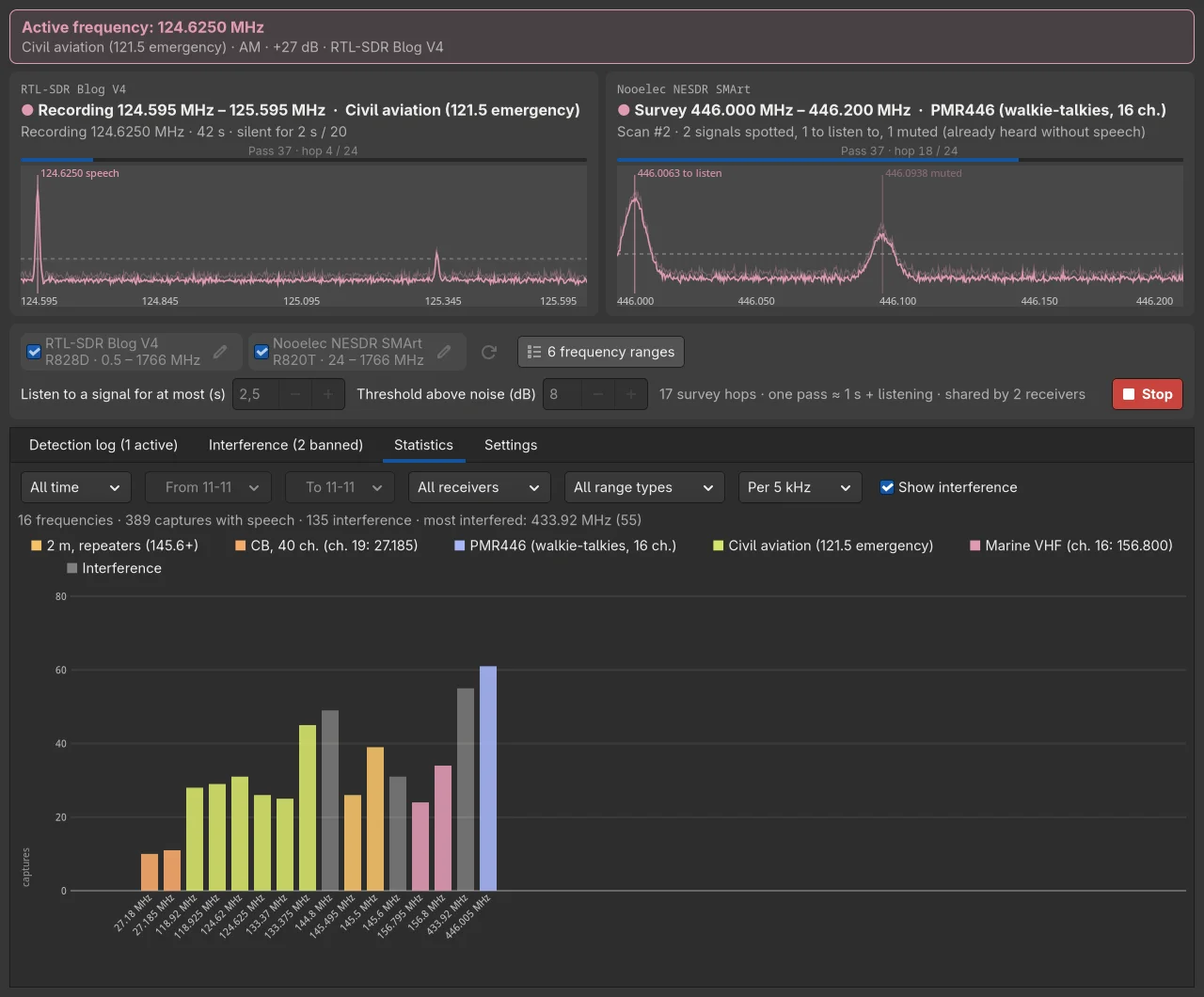
The statistics screenshot tells the story at a glance: 16 frequencies, 389 captures with speech, 135 interference events, most interfered 433.92 MHz with 55 hits. That’s the ISM crud band doing what it always does, quantified. Over days the bans compound and the scanner spends its time where people actually talk.
Several Receivers Share the Work
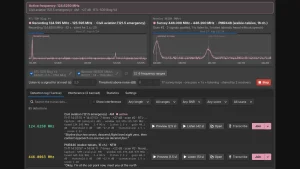
Tick more than one dongle and they divide the ranges, each taking first what only it can tune (HF goes to the Blog V4 with direct sampling, for example), and never two on the same frequency. The featured screenshot shows the pattern: the Blog V4 records 124.625 MHz airband while a Nooelec NESDR SMArt surveys PMR446, 17 survey hops with one pass around a second plus listening time, shared by 2 receivers.
RTL-SDR of any model works out of the box. Everything else arrives through SoapySDR: HackRF, Airspy, SDRplay, LimeSDR, PlutoSDR, with the receiver module installed from distro packages. One constraint is explicit: the receiver must sample at 2.4 MS/s or more, which excludes the Airspy HF+. The SIGUSR1 trick deserves mention for launcher setups: pkill -USR1 -f /archangesdr pauses the scan and frees the receivers for whatever needs them next.
Transcription That Stays on Your Machine
Transcription is optional, but it is what makes the log searchable instead of merely playable. Two engines are supported: whisper.cpp on the machine itself, or any OpenAI-compatible API (a local server, or a hosted provider). The local path keeps every byte at home: install whisper-cli, pick a model in Settings, click Install. The base model at 60 MB suits a uConsole; large-v3-turbo at 574 MB suits a recent PC.
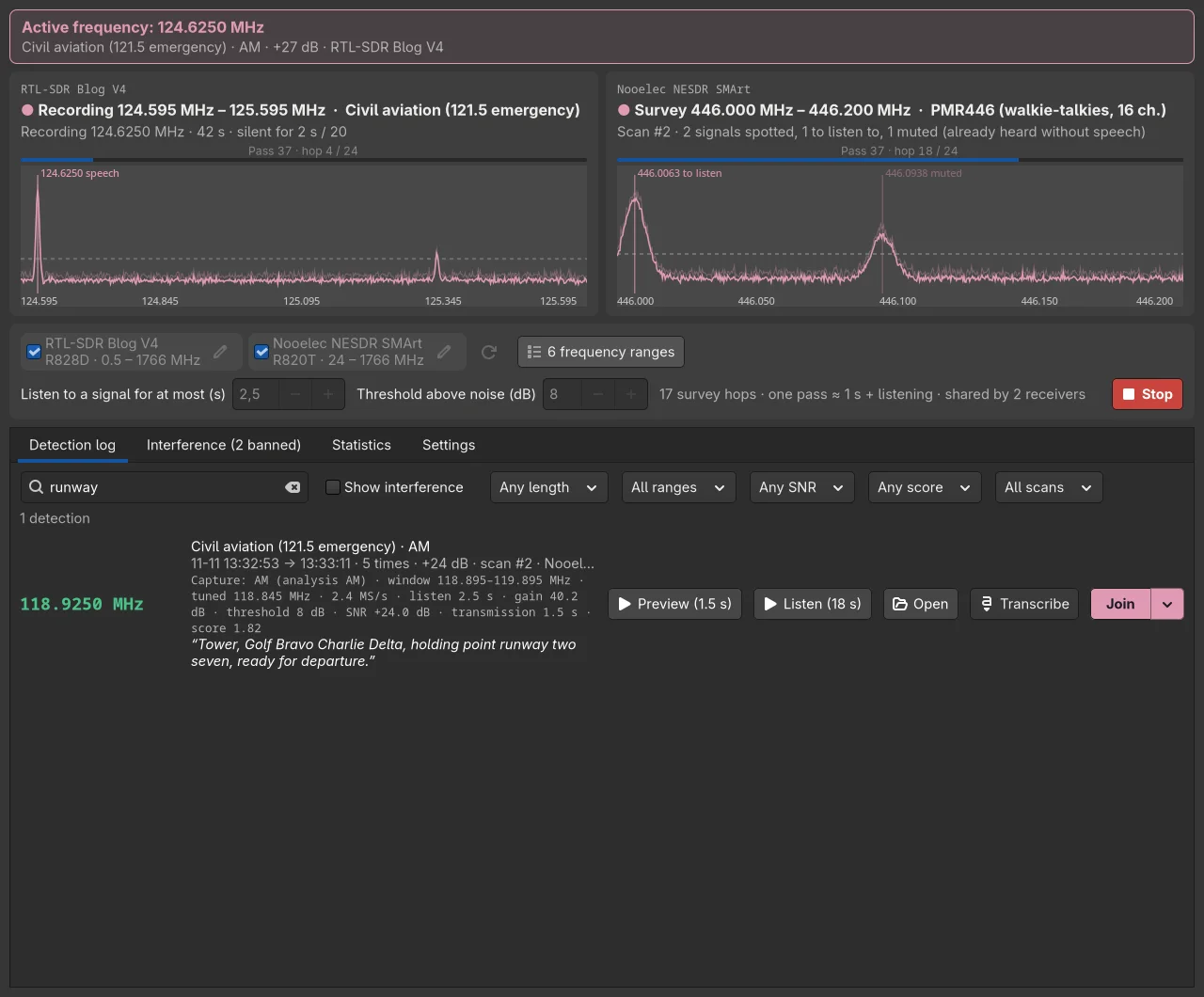
The search screenshot shows the payoff. Type runway and one detection surfaces from 85: Tower calling Golf Bravo Charlie Delta holding at runway two seven, with Preview, Listen, Open, Transcribe, and Join one click away, filtered by length, range, SNR, score, and scan. For airband monitors, event staff, or club members logging a contest, that’s the difference between an archive and a tool.
Phone Alerts and Desktop Pings
Push notifications go through ntfy: install the free app on the phone, subscribe to a topic on ntfy.sh or your own server, and the scanner pings for every recording or only selected ones by score and frequency. Desktop notifications use plain notify-send. Nothing here needs an account with the project, because there’s no project server. Your recordings stay on your computer unless you choose a remote transcription API or ntfy with attachments.
Install in Four Commands
Requirements are deliberately boring: Python 3.8 plus numpy, GTK4 Python bindings, and librtlsdr, all from distro packages (GTK4 implies Debian 12, Ubuntu 22.04, Fedora 36, openSUSE Leap 15.4 or newer). Then:
git clone https://github.com/bt0r/ArchangeSDR.git
cd ArchangeSDR
./install.sh
archangesdr
The installer works for your user only (~/.local/share/archangesdr/app, command in ~/.local/bin), reports exactly what is missing with the per-distro install command, and uninstalls cleanly while keeping settings and recordings. Two classic dongle gotchas are documented: the kernel DVB-T driver grabbing the stick (blacklist dvb_usb_rtl28xxu, unplug, replug) and permission errors meaning the udev rules group, usually plugdev, needs your user added.
Terminal users get the same detector without the window: archangesdr --cli 144-146 --passes 3 reports every signal and why, --device 0,1 splits two dongles, --device hackrf:1234 addresses a SoapySDR receiver, --bands lists configured ranges. A plain KEY=value config file covers gain defaults, language, and region for headless or scripted setups.
Sixteen Regions, Four Languages, Honest Boundaries
Each region ships default ranges matched to local reality: Japan FM starts at 76 MHz, 2 m stops at 146 outside the Americas, Europe gets PMR446 and CEPT CB, the Americas get FRS/GMRS and MURS, Australia gets UHF CB 476 to 477, China gets 409 MHz public walkie-talkies, Russia gets LPD433. Ranges live as JSON per region per language (generated by tools/gen-ranges.py) and are ticked in the Ranges UI. The interface speaks English, French, German, and Spanish with dark and light themes.
Two honest notes for this audience. There’s no Malaysia or Southeast Asia region yet; the closest starting points are the Australia set for UHF CB style ranges plus custom entries for local VHF repeaters and airband. And the project states its legal boundary plainly: only analog voice is listed, digital voice, data, and must-not-listen services (police, emergency, phones) are left out, recordings stay local, and your national law governs disclosure. Ranges end with notes on how each region treats listening.
ArchangeSDR Versus Its Rivals
| Task | ArchangeSDR | FalconSDR | Classic channel scanner (SDR++ / memory scan) |
|---|---|---|---|
| Detection method | Sweep plus speech test (rhythm, pauses, voice band, pitch) | Full-bandwidth FFT, parallel channel scoring | Energy squelch per channel |
| Interface | Native GTK4 desktop plus terminal CLI | Self-hosted browser UI, phone friendly | Desktop app |
| Simultaneous conversations | One per receiver, receivers split ranges | Many at once, one slot per frequency | One at a time |
| Recording model | Whole conversation with pauses to 20 s silence, plus 2.5 s preview | One file per transmission with hold time | Whatever the stop catches |
| Transcripts | whisper.cpp local or OpenAI-compatible API, searchable log | Whisper/faster-whisper, searchable library | None |
| Phone alerts | ntfy push, filtered by score and frequency | Browser access from any device | None |
| Interference handling | Auto-ban after 3 speechless hits, false positive restore | Quality scores per recording | Squelch and lockout lists by hand |
| Hardware | RTL-SDR native, rest via SoapySDR (needs 2.4 MS/s) | RTL-SDR and SoapySDR | Whatever the app supports |
| Headless operation | CLI mode plus SIGUSR1 handoff | Dedicated server mode plus systemd | Varies |
| Best for | Desktop or uConsole listener who wants speech only | Always-on home server with phone browsing | Quick manual band checks |
The honest takeaway matches the FalconSDR guide: run FalconSDR on the always-on box the household browses, run ArchangeSDR where you sit or carry, and both agree that carriers aren’t content.
Practical Uses for Hams
Airband logging at the club station is the obvious one: point a Blog V4 at 118 to 137 MHz, let interference bans learn the ATIS loop and data bursts, and keep every tower call with transcripts. PMR446 and LPD433 event monitoring works the same way for rallies and public service days. A 2 m repeater watch catches the weekly net without recording a night of squelch crashes. And the uConsole profile turns the whole thing into a portable spectrum diary: same program, i3 keybindings, recordings on the handheld.
The author fits the same setups twice over: ArchangeSDR reuses profiles from archSDR (Hyprland desktop) and uBonsole (i3 on the uConsole), so scanner history and recordings follow whichever environment you run.
Honest Limits
- Sweep, not stare: a 2 MHz hop every 0.1 s means a brief call can fall between hops where a wideband recorder would catch it. More receivers narrow the gaps.
- Speech test needs speech: very short overs, heavy accents under noise, and non-voice modes (SSTV, APRS bursts, DMR) are rejected by design. That’s the feature, but know its edge.
- Transcription costs:
large-v3-turbowants a real PC; the uConsole getsbaseand patience, or no transcription at all. - SoapySDR floor: 2.4 MS/s excludes the Airspy HF+, and Soapy modules vary by distro.
- GTK4 baseline: older LTS releases without GTK4 are out; the CLI still runs where Python and numpy exist.
- Law first: recording is easy, publishing what you hear is often illegal. Log for yourself, check Malaysian and local rules before sharing anything.
Sources and Further Reading
- ArchangeSDR on GitHub – Source, README, region files, tests, and screenshot scripts, MIT license.
- FalconSDR wideband scanner guide on HamRadio.my – The always-on wideband counterpart to this sweeping scanner.
- ntfy push notifications – Free phone alerts ArchangeSDR publishes to.
- whisper.cpp – Local transcription engine behind the searchable log.
- SoapySDR – Vendor-neutral SDR layer for HackRF, Airspy, SDRplay, LimeSDR, and PlutoSDR.
- archSDR desktop setup – Hyprland environment by the same author that ArchangeSDR plugs into.
- uBonsole uConsole setup – i3 environment for the ClockworkPi uConsole.
- RTL-SDR Blog receivers – The reference dongles used in the project screenshots.
73 de 9M2PJU.


Post Comment