Excalidraw: The Open-Source Virtual Whiteboard for Seamless Collaboration
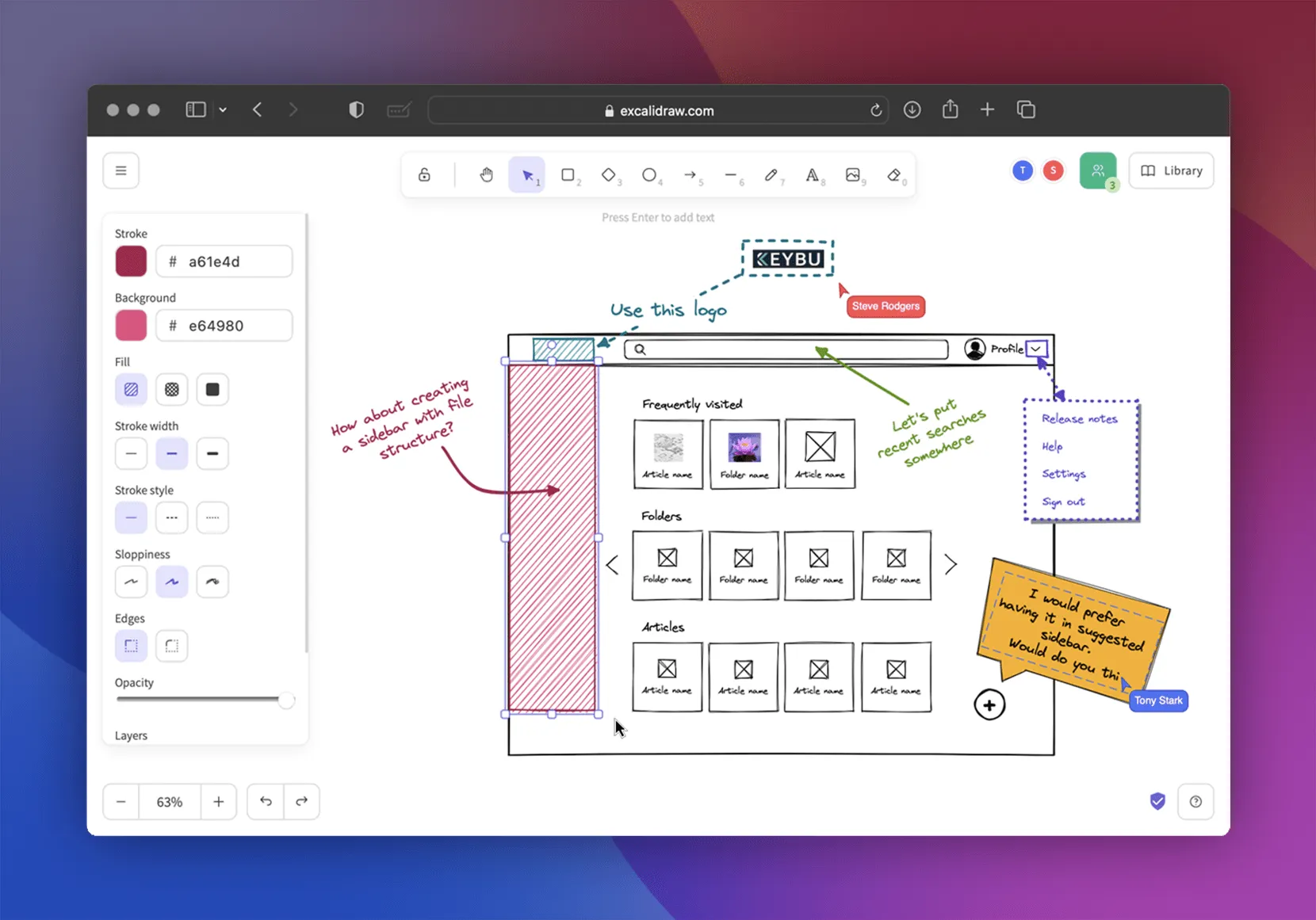
In the age of remote work and digital collaboration, whiteboards have evolved. Enter Excalidraw-a virtual whiteboard that feels like sketching on paper, but with the power of modern web technologies.
Whether you’re a software engineer, designer, student, educator, or product manager, Excalidraw gives you the freedom to draw your ideas, create user flows, design architecture diagrams, or even build visual notes.
🌟 Why Choose Excalidraw?
Excalidraw isn’t just another drawing tool. It offers a unique blend of simplicity, privacy, and performance:
- Sketch-style look: Your drawings look like hand-sketched art, adding a human touch to technical content.
- Collaborative in real time: Work with teammates or clients as if you’re standing in front of a whiteboard together.
- No sign-up required: Use instantly without an account.
- Cross-platform: Use it on desktop, tablet, or phone.
- Self-hosting support: Want full control? You can host it yourself!
🛠️ How to Self-Host Excalidraw (With Docker)
For privacy-conscious users or organizations, running your own instance of Excalidraw is a great choice.
Here’s how to do it using Docker:
✅ Prerequisites
- A server or local machine with Docker installed.
- Terminal access.
- Internet connection to pull the Docker image.
🚀 Step-by-Step Tutorial
Step 1: Pull the Excalidraw image
docker pull excalidraw/excalidraw
Step 2: Run the Docker container
docker run --rm -dit --name excalidraw -p 5000:80 excalidraw/excalidraw:latest
This exposes Excalidraw on port 5000. You can visit it in your browser:
http://localhost:5000
Or if you’re deploying to a server:
http://your-server-ip:5000
🎉 That’s it! You now have your own private Excalidraw whiteboard.
🧩 Bonus: Enable Collaboration in Your Self-Hosted Instance
By default, collaboration is not enabled in the Docker version. But you can add it using the Excalidraw Room Server (WebSocket server for real-time sync).
You’ll need to:
- Clone the collaboration server repository.
- Run the server (Node.js required).
- Point your self-hosted Excalidraw client to use that WebSocket server.
This gives you full control over shared drawing sessions without sending any data to external servers.
🔐 Why Self-Host Excalidraw?
- Full control over data
- No cloud dependency
- Can be used offline or behind a firewall
- Ideal for internal tools, education, and companies with strict compliance needs
🎨 Use Cases
- Brainstorming sessions
- Class whiteboards for educators
- Visual documentation for developers
- UI/UX wireframes and user flows
- Mind maps and project planning
🔗 Try Excalidraw Now
Want to try it without installing anything?
👉 Head over to the official site: https://excalidraw.com
You’ll be sketching in seconds-no account required.











Post Comment