amateur radio
open source
802.11s, ADS-B, AREDN, ATAK, BATMAN-adv, BATMAN-V, CivTAK, community networks, disaster response, EmComm, Haven, lora, MANET, mesh radio, meshtastic, MM6108, MM8108, Morse Micro, off-grid, OpenMANET, openwrt, Parallel, raspberry pi, Reticulum, rtl-sdr, search and rescue, situational awareness, Tailscale, TAK, Wi-Fi HaLow, wireguard
9M2PJU
1 Comments
Haven: The Open Source MANET Mesh Radio You Can Build From A Raspberry Pi
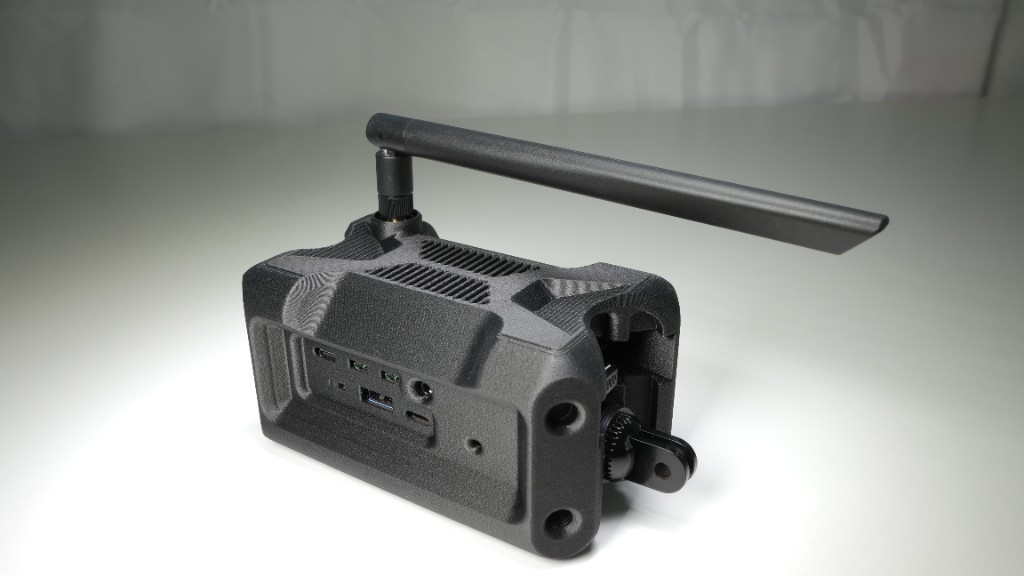
If you have ever looked at the kind of mesh radios that military and federal teams carry, the Trellis MPU5 and the Persistent Systems MPU family, the Silvus radios, the L3 Harris manpacks, you have probably noticed two things. First, they are remarkable pieces of engineering, fully digital, self-forming, self-healing networks that just work wherever you drop them. Second, they cost about twenty thousand dollars a unit, sometimes more, and they are not for sale to you.
Haven is the open source answer to that. It is a project from a small outfit called Parallel that publishes a complete, buildable, field-tested MANET, Mobile Ad Hoc Network, IP mesh radio based on a Raspberry Pi, a Wi-Fi HaLow radio, and a stack of open source software that anyone can audit, modify, and improve. You source the parts, you flash the firmware, you print a case, and you have a node. Build two and you have a mesh. Build five and you have a private network that will span kilometres with no tower, no ISP, and no monthly fee.
This article is a relaxed walk through what Haven is, where it came from, how the pieces fit together, what hardware you need, what it actually does in the field, how it compares to the military kit it borrows ideas from, and why it should matter to hams, makers, search-and-rescue teams, and anyone who has ever wanted a private network that does not depend on someone else’s infrastructure.
What Haven Is, In Plain Language
Haven is a MANET-style IP mesh radio built from off-the-shelf parts. The repo lives at buildwithparallel/haven-manet-ip-mesh-radio on GitHub, MIT licensed, with about 640 stars and 94 forks at the time of writing. The codebase is mostly Python and shell scripts, the firmware images are prebuilt and downloadable, and the whole thing is documented in enough detail that a careful beginner can build a working node in an evening.
The core idea is this. Each Haven node is a small battery-powered box with two radios inside. One radio is regular 2.4 GHz Wi-Fi, the kind your phone already knows how to talk to. The other is a Wi-Fi HaLow (802.11ah) radio operating down in the sub-1 GHz band, where signals travel for kilometres instead of metres. The HaLow radios form the long-haul backbone between nodes. The 2.4 GHz radios serve your phone, laptop, or tablet as if it were a home Wi-Fi network. In between, a Layer 2 mesh routing protocol called BATMAN-adv stitches everything together so that any node can reach any other node, even if the path goes through several intermediate hops, and the whole thing heals itself automatically when a node moves, drops out, or comes back.
The result is a private IP network that behaves like a single big switch from the user’s point of view. Phones connect to Wi-Fi, get an IP address, and just talk to anything else on the mesh. Plug a Starlink dish, a cellular modem, or a hotel Wi-Fi router into one node, and the entire mesh gets internet backhaul. No proprietary gateway, no per-seat licensing, no carrier.
Where Haven Came From
Haven is built and maintained by Parallel, a small project that describes itself as focused on practical off-grid communications, resilient mesh networking, and field-ready Raspberry Pi builds. The project site is buildwithparallel.com, and they publish a paid “Haven Guide” with videos, schematics, Discord access, and field-tested deployment notes alongside the free, MIT-licensed GitHub repo.
The first version, Haven 1, ran on a Raspberry Pi 4 or Compute Module 4 with a Morse Micro MM601X HaLow radio as a SPI HAT. It used a firmware image called OpenMANET, an OpenWrt-based MANET distribution that the Haven project contributes to and builds on top of.
The current generation, Haven 2, runs on a Raspberry Pi 5 with the newer Morse Micro MM8108 HaLow chip connected over USB. Parallel publishes a custom Pi 5 OpenWrt image (the openwrt-morse-rpi5 repo) because the upstream Morse Micro SDK only shipped for Pi 4, so they backported the Pi 5 hardware support from OpenWrt 24.10 into the Morse SDK to get the same HaLow stack running on the newer board. Parallel’s pitch is that a Haven 2 node costs about $246 in parts and overlaps, in real and measurable ways, with military mesh systems that cost roughly eighty times more.
The two platforms interoperate fully. They use the same mesh protocol, the same addressing scheme, the same security model. You can mix Haven 1 and Haven 2 nodes in the same mesh.
How The Pieces Fit Together
Haven is not one piece of software, it is a stack. Each layer is open source and replaceable. From the bottom up:
The radio layer. Wi-Fi HaLow (IEEE 802.11ah) running in the sub-1 GHz ISM band, the same band LoRa and Meshtastic live in. Lower frequency means longer range and better penetration through walls, trees, and terrain. Morse Micro, the Australian fabless chip company that has been pushing HaLow hardest, holds a documented world record of 10 miles at 2 Mbps with the previous-generation MM6108 chip. The newer MM8108 in Haven 2 offers better range, better power efficiency, and roughly a third more throughput, up to about 43 Mbps versus the MM6108’s 32.5 Mbps. Real-world multi-hop range in a Haven mesh is on the order of 1 to 10+ km per hop, depending on terrain, antenna, and regulatory limits.
The mesh routing layer. Haven uses 802.11s for the basic Wi-Fi mesh framing and BATMAN-adv for the actual routing decisions. BATMAN-adv is a Layer 2 routing protocol, which means it works below IP and makes the entire mesh look like a single big switch to anything above it. The current OpenMANET firmware uses BATMAN-V, the newer variant that monitors per-hop link quality and reroutes automatically as nodes move or links degrade. The practical effect is that you can walk a node across a field, drive one down a road, or shut one down entirely, and the mesh finds a new path without anyone touching a config file.
The firmware layer. OpenWrt, the Linux-based routing OS that runs on a huge fraction of the world’s home routers. Haven 1 uses the OpenMANET OpenWrt image, which is its own community project with its own GitHub org and documentation. Haven 2 uses Parallel’s Pi 5-specific OpenWrt image with the Morse Micro HaLow drivers baked in. Both expose the standard OpenWrt LuCI web interface for configuration, so once a node is on the air you point a browser at it and change settings like any home router.
The user-facing layer. A bridge called br-ahwlan ties the HaLow mesh interface, the 2.4 GHz Wi-Fi AP, and (on the gate node) Ethernet together, so your phone gets a normal DHCP lease and sees a flat 10.41.0.0/16 network. The mesh may be doing multiple HaLow hops in the background, but your phone does not know or care. It just sees Wi-Fi.
The optional overlay layer. This is where Haven gets interesting for the off-grid and emcomm crowd. On top of the IP mesh you can run Reticulum, Mark Qvist’s encrypted overlay networking stack, for end-to-end encrypted messaging and file transfer via apps like Sideband and MeshChat. You can also bridge in ATAK / CivTAK for situational awareness, plug in a USB LoRa sidecar (Meshtastic or Reticulum RNode boards, with drivers already in the image for Heltec, RAK4631, Seeed Xiao, Walter, and others), or attach an RTL-SDR dongle and feed ADS-B aircraft positions into TAK as CoT messages. Haven 2 also ships with WireGuard and Tailscale built in for remote node management, with Headscale compatibility if you want to self-host the control plane.
The Two Hardware Platforms
Haven runs on two platforms. Both use the same mesh protocol and interoperate fully.
Haven 1 (Raspberry Pi 4 / CM4), Recommended. This is the proven, field-stable platform. The build is a Raspberry Pi 4 Model B or Compute Module 4, a Morse Micro MM601X HaLow radio as a SPI HAT (commonly the Seeed Studio WM1302 + Wio-WM6108 combo), and an RT5370 USB adapter for 2.4 GHz Wi-Fi (the Panda Wireless PAU06 is the usual pick). It runs the OpenMANET firmware image.
Haven 2 (Raspberry Pi 5), Experimental. This is the newer, faster, more flexible platform. The build is a Raspberry Pi 5 (4GB or 8GB), a Morse Micro MM8108 HaLow radio connected over USB, the same RT5370 USB Wi-Fi adapter, and a recommended USB hub for peripherals. It runs Parallel’s Pi 5-specific OpenWrt/Morse image, which you can build yourself from the openwrt-morse-rpi5 repo or download as a prebuilt v0.3.0-alpha release. Parallel is honest about the status: this platform is still being validated and is not yet recommended for production deployments. If you want something you can drop into the field tomorrow, build a Haven 1.
A nice touch: the official Haven case on Printables is 100% free, public domain, designed by MOROSX. You can print it, modify it, share it, no restrictions. STLs and part notes are on the Printables page, and the Haven Guide walks through the full build including radios, power, and mounting. The node enclosure includes GoPro-style mounting brackets and bolt holes, so you can strap one to a backpack, a vehicle, or a tripod without fabricating anything.
What It Actually Does In The Field
Once you have a couple of nodes flashed and configured, here is what using Haven looks like.
You power on a gate node and plug its Ethernet port into whatever internet you have, a Starlink dish, an LTE modem, a hotel Wi-Fi router in WAN mode, anything. The gate NATs the mesh into that upstream, so the whole mesh has backhaul without you doing anything clever. You power on one or more point nodes somewhere within HaLow range of the gate or of each other. They associate, BATMAN-adv figures out the topology, and within a few seconds you have a flat 10.41.0.0/16 network.
You pull out your phone, join the Wi-Fi SSID the point node is broadcasting, and you have internet. So does anyone else on the mesh. If you walk out of range of one point node and into range of another, your traffic roams, because the mesh looks like one big switch at Layer 2. If a node in the middle goes down, BATMAN-V reroutes around it. If you bring up Reticulum, you can send encrypted messages and files to anyone on the mesh without touching the internet at all. If you fire up ATAK, you see everyone’s positions on a shared map. If you plug in an RTL-SDR dongle and enable the ADS-B to CoT bridge, you see live aircraft tracks in ATAK too.
Default credentials out of the box are simple: the gate is havengreen with Wi-Fi SSID green and password greengreen, points are havenblue with SSID blue and password blueblue. The documentation is loud and clear that these are first-boot only and you must change them in LuCI before you rely on the mesh in the field. Sensible.
How It Compares To Military MANET Radios
This is the comparison the project itself invites, so let us be honest about it.
A Trellis MPU5 or a Persistent Systems MPU radio is a purpose-built, ruggedised, certified piece of military hardware. It runs licensed spectrum at higher power than ISM rules allow, it has been through environmental and EMC testing that a Raspberry Pi in a 3D-printed box has not, it has secure boot and certified crypto, and it has a support contract behind it. None of that is trivial, and none of it is free. If you are a federal team buying radios with a programme budget, the price is justified.
What Haven does is take the same architectural ideas, MANET routing, IP-native traffic, self-healing multi-hop, internet backhaul through any node, situational-awareness integration, and implement them on top of open source software and commodity hardware that anyone can buy. The radio layer is unlicensed ISM instead of licensed spectrum, so you give up some link budget and some regulatory protection. The platform is a Raspberry Pi in a printed case, so you give up ruggedness and certification. The crypto is WPA3 on the mesh plus Curve25519/AES-128 on the Reticulum overlay, which is genuinely strong, but it has not been through a certification regime.
The trade is that you also pay roughly one eightieth of the price, you can audit every line of the firmware, you can modify it, you can fix it in the field with a laptop and an SD card, and you do not need a procurement process to get one. For civilian use, search and rescue, disaster response, community networks, event coverage, farm and ranch telemetry, off-grid homesteads, and frankly for a lot of the things hams and emcomm teams actually do, that trade is a very good one. Haven is not a replacement for a Trellis in a military convoy. It is a replacement for “we have no comms at all because the cell tower is down and we cannot afford twenty thousand dollars per radio”.
Why Hams And Emcomm Folks Should Care
This is the part that ties Haven back to the rest of this blog.
Hams already live in the world of “build a network that does not depend on infrastructure”. AREDN on 2.4 GHz and 3 GHz is exactly that idea, applied to amateur bands. Haven is the same idea applied to unlicensed ISM spectrum, with Wi-Fi HaLow as the long-haul layer and BATMAN-adv as the routing brain. The two approaches are complementary, not competitive. AREDN gives you licensed-amateur-band power and the ability to use bigger antennas and amplifiers under your ham license. Haven gives you a turnkey IP mesh that anyone, licensed or not, can deploy, with a much more polished software stack and built-in integrations for TAK, Reticulum, and LoRa sidecars.
A few specific use cases where Haven fits neatly into ham and emcomm work:
- Served-agency events. A marathon, a parade, a bike race, a county fair. Drop a gate node at the command post with a cellular uplink, scatter point nodes along the course, and every operator with a phone or tablet has IP connectivity for APRS-IS, ATAK, ICS forms, or just group chat. No cellular coverage required along the course.
- Search and rescue. A Haven mesh in the field gives every team member ATAK situational awareness, position tracking, and messaging without depending on cellular. Add a LoRa sidecar for truly out-of-HaLow-range telemetry. Add an RTL-SDR for aircraft tracking if aircraft are involved.
- Disaster response. When the cell tower is down and the fibre is cut, a couple of Haven nodes and a Starlink dish give an EOC, a shelter, and a field team a shared IP network in an hour. Reticulum gives you encrypted messaging that does not touch the public internet at all.
- Off-grid and remote sites. A repeater site, a SOTA activation, a field-day location, a remote shack. A Haven link can bridge IP, telemetry, or APRS-IS traffic back to a base with internet, over kilometres, without a chain of mesh nodes or a cellular modem at the remote end.
- Learning. If you enjoy tinkering with networks and radios, Haven is a fantastic playground. It is real OpenWrt, real BATMAN-adv, real Wi-Fi HaLow, real Reticulum. You can ssh in, read the configs, watch the mesh protocol frames, change the routing, and break things in a way that is hard to do with commercial black-box gear.
One regulatory caveat worth being clear about: Haven uses unlicensed ISM spectrum under Part 15 (US) or the equivalent elsewhere, not amateur spectrum. You operate it under those rules, not under your amateur license. That means no amplifiers beyond what the certified radio allows, no modifying the radio to exceed certified power, and no encryption if you were to ever layer it on top of an amateur-band link instead of the ISM HaLow link. The good news is that on the ISM HaLow link, encryption is fine, and WPA3 plus Reticulum’s Curve25519/AES-128 gives you genuinely strong protection.
A Few Practical Notes If You Want To Build One
- Start with Haven 1, not Haven 2. The Pi 4 platform is the proven one. The Pi 5 platform is still being validated. If you want something that works tomorrow, build a Haven 1 node or two. If you want to experiment with the newest hardware and help shake out the bugs, build a Haven 2.
- Read the OpenMANET docs as well as the Haven repo. Haven sits on top of OpenMANET, and a lot of the networking behaviour, the
10.41.0.0/16addressing, the BATMAN-V setup, the gate-versus-point distinction, is documented over at openmanet.github.io. The Haven repo links out to it. - Pick the right firmware image for your HaLow board. OpenMANET firmware filenames encode the SBC, the Morse Micro chipset family (mm6108 or mm8108), and the HaLow interface (spi or sdio). If you have a Seeed Studio HaLow HAT, you want an
spiimage. If you have a Silex or Alfa SDIO board, you want ansdioimage. Flashing the wrong one is the most common bring-up failure. - Mind the SDIO conflict. On SDIO-based HaLow builds, the Pi’s onboard Wi-Fi usually shares the SDIO bus and cannot be used, which is why Haven adds a separate RT5370 USB Wi-Fi adapter. On SPI-based builds (the Seeed board), onboard Wi-Fi works for client AP mode. Know which one you have before you plan your build.
- Change the defaults before you go to the field. First-boot credentials and Wi-Fi passwords are documented and well-known. Change them in LuCI before you rely on the mesh anywhere it matters.
- Antenna and height still matter. Sub-GHz HaLow is forgiving, but it is still radio. A decent external antenna on an SMA port and a node mounted high up will dramatically outperform a node lying on a table with its chip antenna. The Haven docs have a Range Optimization page that walks through antenna selection, TX power, and channel width tuning.
- The OpenMANET custom BCF boosts TX power. OpenMANET ships a custom board configuration file that takes the HaLow radio from the Seeed default of about 21 dBm up to roughly 27 dBm. That is a meaningful link-budget improvement and one of the reasons OpenMANET outperforms a stock Seeed setup.
- Budget for power. A Pi 4 or Pi 5 with two radios running is not a coin-cell device. The Haven Guide recommends the Waveshare UPS HAT with a 4-cell battery stack for Haven 2, doubling the capacity of the older 2-cell setup. Plan for a serious battery if you want a node to last a day in the field.
Why Haven Still Matters
There is a quiet revolution happening in off-the-shelf radio. Wi-Fi HaLow silicon is finally shipping in volume from more than one vendor. Open source mesh routing, BATMAN-adv, 802.11s, Reticulum, has matured to the point where a careful beginner can deploy it. Single-board computers are fast enough and cheap enough that a $250 box can do what a $20,000 box did a decade ago. What was missing was someone doing the integration work, picking the parts, writing the firmware, documenting the build, and shipping it as a coherent project.
That is what Haven is. It is not a new protocol, it is not a new radio, it is a thoughtful integration of existing open source pieces into a turnkey MANET radio that anyone can build, modify, and deploy. The fact that it is MIT licensed, that the firmware images are prebuilt, that the case is public domain, and that the documentation is genuinely good, matters. It lowers the floor for who can build a private network from “defence contractor with a programme budget” to “anyone with a soldering iron and a weekend”.
For hams, emcomm teams, search and rescue, community network builders, and anyone who has ever wanted a private IP network that does not depend on a carrier, that is a tool worth knowing about. The next time the cell tower goes down, or the fibre gets cut, or you just need a network somewhere there is not one, remember that there is a Raspberry Pi in a printed box that can build you one. The schematic is on GitHub. The firmware is a download. The case is on Printables. The rest is up to you.
Sources and Further Reading
- Haven MANET IP Mesh Radio (GitHub repo): https://github.com/buildwithparallel/haven-manet-ip-mesh-radio
- Parallel (Haven project site): https://buildwithparallel.com/
- Haven 2, IP Mesh Radio (Digital Guide): https://buildwithparallel.com/products/haven
- Haven, Prebuilt Node: https://buildwithparallel.com/products/haven-prebuilt-node
- Haven 2 Is Here (Parallel blog post): https://buildwithparallel.com/blogs/news/haven-2-is-here
- OpenWrt Morse HaLow Firmware for Raspberry Pi 5 (GitHub repo): https://github.com/buildwithparallel/openwrt-morse-rpi5
- OpenMANET firmware (GitHub repo): https://github.com/OpenMANET/firmware
- OpenMANET documentation site: https://openmanet.github.io/docs/
- OpenMANET networking reference (BATMAN-V, 10.41.0.0/16, gate/point): https://openmanet.github.io/docs/networking
- OpenMANET hardware reference (Pi variants, HaLow modules): https://openmanet.github.io/docs/hardware
- Haven case on Printables (free, public domain, by MOROSX): https://www.printables.com/model/1468595-haven-case-for-raspberry-pi-based-manet-by-paralle
- Morse Micro (HaLow silicon, world record 10 miles at 2 Mbps): https://www.morsemicro.com/
- Reticulum (encrypted overlay networking, by Mark Qvist): https://reticulum.network/
- ATAK / CivTAK (TAK Product Center): https://tak.gov/
- BATMAN-adv mesh protocol (open80211s): https://www.open-mesh.org/
- OpenWrt project: https://openwrt.org/
- Wi-Fi HaLow article on this blog (companion reading): https://hamradio.my/wifi-halow-the-long-range-iot-wifi/





1 comment