linux
open source
Technology
ad blocker, AdGuard Home, blocklist, DNS dashboard, Docker, gravity, homelab, MIT license, network monitoring, open source, ph-intercept, Pi-hole, pixel art, raspberry pi, self-hosted, shack network, space shooter, Technitium DNS, visualization, wall display
9M2PJU
0 Comments
ph-intercept: Watch Your Pi-hole Win a Space Shooter Every Time It Blocks an Ad
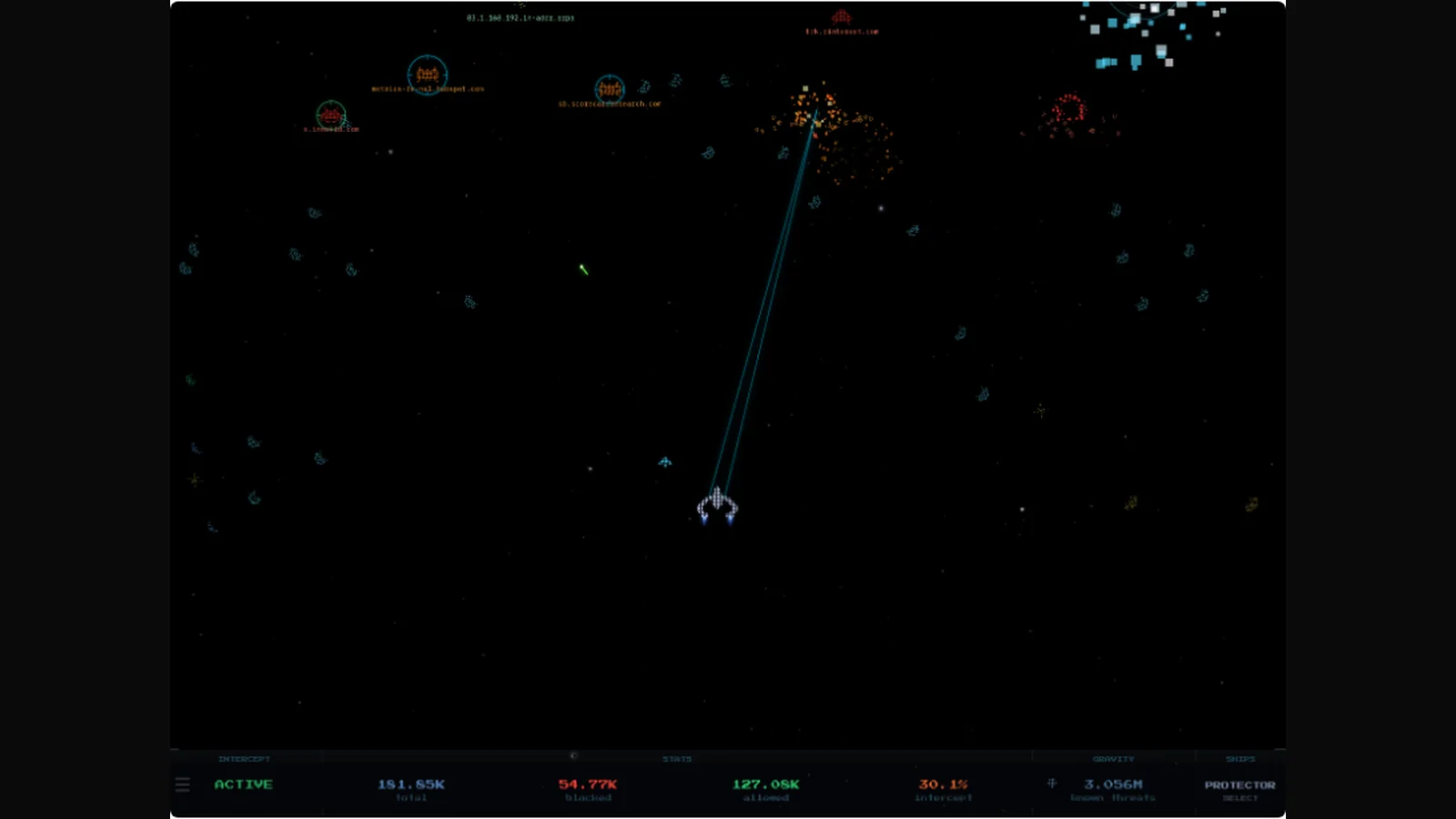
Your DNS dashboard is a table of numbers. It doesn’t have to be. Ph-intercept by m00grin turns a Pi-hole, AdGuard Home, or Technitium feed into a living pixel-art arcade game: allowed queries fly across the sky as friendly ships, blocked trackers spawn as space invaders, and your interceptor ship hunts them down in real time. Under the game is a serious tool: live stats, timed blocking toggles, gravity updates, ship selection, and a two-player split-screen for two DNS servers.
If the shack runs a Pi-hole or AdGuard Home on the network, and most shacks should, this belongs on the wall display next to the propagation dashboard.
TL;DR: ph-intercept is a free MIT-licensed Docker dashboard for Pi-hole v6, AdGuard Home, and Technitium DNS that renders live DNS queries as a pixel-art space shooter. Allowed queries fly as friendlies, blocked ones spawn as invaders for your ship to destroy, with tiers, support drones, 7 sci-fi ships, 5 backgrounds, HUD blocking controls, timed disables, gravity updates, and local 2-player split-screen. One compose file, port 4653, no analytics, no phone-home.
What ph-intercept Is
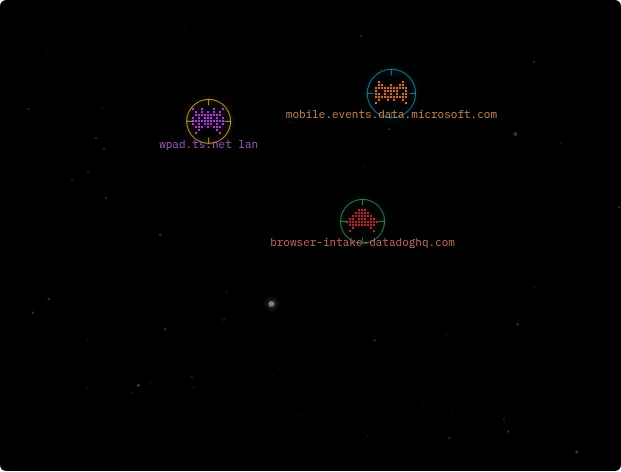
ph-intercept is a self-hosted Docker web app that streams live DNS query events from Pi-hole v6, AdGuard Home, or Technitium DNS and renders every query as a pixel-art spaceship on a starfield, with blocked domains spawning as enemies your interceptor ship destroys. Allowed queries cross the screen as green, blue, and lime friendlies. Blocked queries arrive as red crab and squid invaders that escalate to orange drones and purple bosses on repeat offense. The ship, drones, tiers, and backgrounds are the game layer; the HUD underneath is a full DNS remote control.
Entities: Every Query Gets a Ship
Each DNS query spawns one entity, and its look tells you its history at a glance. Repeat queries while still on screen climb tiers instead of respawning. So a chatty tracker visibly mutates into something bigger.
| Tier | Condition | Allowed shape | Blocked shape |
|---|---|---|---|
| 1 | First query | Rounded shuttle, delta wing, or X-wing in green, blue, lime | Crab invader or squid in red |
| 2 | Queried again on screen | Heavy transport in cyan | Heavy drone in orange |
| 3+ | Three or more on screen | Capital ship in gold | Boss in purple |
Cache-answered queries move faster than upstream-answered ones, so you can literally see your Pi-hole cache working: the sprinters paid no upstream cost. Weapon color tracks tier too: green beams for tier 1, cyan for tier 2, gold for tier 3 and up. At five simultaneous threats a support drone launches to flank; at ten a second drone deploys. Both stand down when the sky clears.
Seven Ships, From NSEA Protector to Missingno
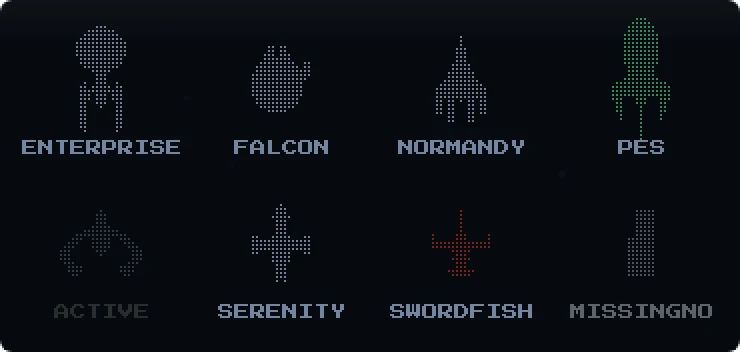
The HUD ship selector offers seven flyable hulls on an 8-slot grid: Protector (the NSEA Protector, default), Falcon, Swordfish II, NCC-1701 Enterprise, Serenity, Normandy, and the Planet Express Ship, with the eighth slot occupied by MISSINGNO, the glitch Pokemon, as the joke it deserves to be. Switching hulls triggers a warp-out and warp-in transition that shoves nearby entities aside, which is the correct amount of drama for changing a dashboard theme.
The HUD: a DNS Remote in Disguise
The bottom strip is four panels of real controls, not decoration.
- INTERCEPT shows blocking status and toggles it. The menu offers timed disables (10 seconds, 30 seconds, 5 minutes) or full disable, with a live countdown that survives navigation and syncs if blocking changes remotely.
- STATS shows total, blocked, and allowed queries plus block percentage, updating live.
- GRAVITY shows the gravity list size, and its arrow triggers a list update with confirmation.
- SHIPS shows the active hull; click to open the selector.
The hamburger at the HUD edge opens Settings: friendlies on or off, per-entity client labels (IP or hostname), domain labels, a link to the Pi-hole admin panel, and background selection. Display choices persist in browser localStorage and never leave the machine.
Five Backgrounds, One Real Sky
Backgrounds range from plain black (dark, zero canvas overhead) through a procedural GPU nebula and a synthwave outrun sunset that pairs with the CRT filter, to the default starfield: a real slice of night sky from the 12,200-star HYG catalog to magnitude 6.8, color-coded by spectral type in true equatorial positions, with the region set by sky preset (Summer Triangle, Orion, Scorpius, Southern Cross). Mars, Jupiter, ringed Saturn, and the Moon compute from real orbital elements hourly, with the ISS and meteors as occasional transients. A custom image can be mounted for a CUSTOM option. Per-browser live switching never changes anyone else default.
Install: One Compose File, Port 4653
Requirements are short: Pi-hole v6 (v5 is out), Docker with Compose, and a network route from container to Pi-hole. Images ship for amd64, arm64, arm v7, arm v6, 386, riscv64, and ppc64le. So anything from a Pi Zero 2 to a NAS runs it.
- Create the Pi-hole app password under Settings, Web interface / API, Configure app password. Not the web login password.
- Put
PIHOLE_URL(ending in/api, not/admin) andPIHOLE_PASSWORDin compose plus.env, or set them in the Portainer stack. docker compose up -d, openhttp://host:4653.
The compose file is hardened by default: read-only root filesystem, all capabilities dropped, no-new-privileges, PID and memory limits, capped json-file logging. Troubleshooting is one filtered log command that prints nothing on a healthy setup, with one line logged when a problem starts and one when it clears. AdGuard and Technitium users follow the dedicated guides in adguard/ and technitium/ with equivalent variables, and second instances of any provider enable the split-screen below.
Local 2-Player Split-Screen
Two DNS servers run side by side: player 1 ship on the left half, player 2 on the right, each streaming its own events, stats, toggles, and gravity state independently. Set PIHOLE2_URL (plus password if any) or the AdGuard and Technitium equivalents, flip it on in the 2-player panel, and the state persists across restarts. The author notes mixed pairs mirror the primary provider, so an AdGuard primary pairs with a second AdGuard. For a shack with separate family and lab Pi-holes, or IPv4 and IPv6 resolvers to compare, this is the money view.
Privacy and Testing, Stated Plainly
Ph-intercept talks only to your own DNS servers: no phone-home, no analytics, nothing collected, and cross-site requests to the blocking controls are refused so a malicious page can’t toggle your DNS through the dashboard. The author declined telemetry entirely and runs a usage poll on GitHub discussions instead.
Testing is four layers deep: async unit tests for every Pi-hole auth path and the live poller, API endpoint tests for every route plus headers and validation, Playwright integration across Chromium, Firefox, and WebKit, and the same suite replayed against 40-plus real device profiles from Pi touchscreens to 4K ultrawides. That’s an unusual amount of rigor for a dashboard whose headline feature is exploding spaceships, and it shows in the troubleshooting table: five known failure lines, each with the exact fix.
ph-intercept Versus Plain Dashboards
| Task | ph-intercept | Pi-hole / AdGuard stock dashboard | Generic uptime wallboard |
|---|---|---|---|
| See live queries as they happen | Yes, every query is a ship | Yes, as log rows | No |
| Tell cache hits from upstream | Yes, by ship speed | Only in numbers | No |
| Spot a tracker storm at a glance | Yes, escalating bosses plus drones | Only by reading the log | No |
| Toggle blocking with a timer | Yes, from the HUD with countdown | In admin, more clicks | No |
| Run two DNS servers side by side | Yes, split-screen 2-player | Two browser tabs | If you build it |
| Fun per square pixel | Maximum | Zero | Low |
| Best for | Wall display and daily driver | Deep admin work | Status at a glance |
The table isn’t a ranking. Keep the stock admin for deep work. But the display the household actually watches, the one that teaches kids what a tracker is when a red squid labeled with a telemetry domain explodes, is this one.
Shack Uses
The shack PC already runs the logging and cluster dashboard; the DNS box sits beside it unloved. Put ph-intercept on the wall monitor: during contests the allowed-query traffic tells you when the network saturates, the block percentage tells you the lists are current, and the timed disable in the HUD is the fastest way to unblock a logger update that a list broke, with auto re-arm. For club stations open to visitors, the game explains ad-blocking better than any lecture: green ships good, red squids bad, ship shoots squids. And the 2-player view earns its keep comparing the shack resolver against the house one.
Honest Limits
- Pi-hole v6 only. V5 APIs are out, and the URL must end in
/api. - It visualizes DNS, it doesn’t fix DNS. Slow upstreams and bad lists still need the stock admin.
- Browser canvas load is real on the starfield and nebula modes;
darkexists for weak clients, and the 40-profile device suite is the author answer to display bugs. - Timed disables are convenient and therefore dangerous: a 5-minute window during a drive-by is still a window. The countdown and remote sync mitigate, attention finishes the job.
- Pre-1.0 velocity: pinned
:X.Y.Ztags exist for a reason. Pin production, trail:lateston the test box.
Sources and Further Reading
- ph-intercept on GitHub – Source, compose file, AdGuard and Technitium guides, screenshots, MIT license.
- Pi-hole – The DNS sinkhole this dashboards, v6 API required.
- AdGuard Home – Alternative supported DNS server with its own setup guide in the repo.
- Technitium DNS – Self-hosted DNS server also supported, with its own setup guide.
- HYG stellar database – David Nash Hipparcos plus Yale Bright Star catalog behind the real-sky starfield.
- ph-intercept container image – Published image tags including pinned X.Y.Z releases and develop builds.
73 de 9M2PJU.

Post Comment