Someone Turned a Sony PSP Into an RTTY Encoder
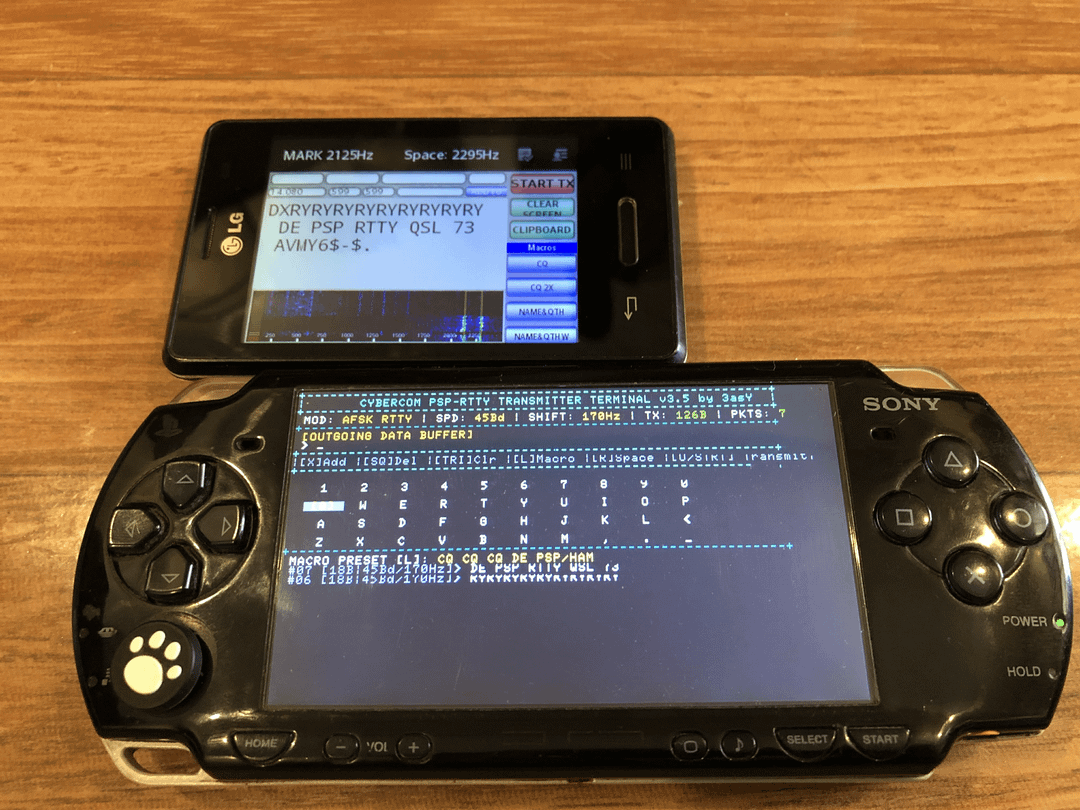
Someone Turned a Sony PSP Into an RTTY Encoder
The Sony PSP, released in 2004, was built to play games, movies, and music on the go. Two decades later, it is still finding new life in the homebrew community, and the latest project to land on r/amateurradio is exactly the kind of glorious, impractical-on-paper, brilliant-in-execution hack that makes ham radio fun: an AFSK RTTY encoder running as a standard PSP homebrew application.
The author, posting as u/X3asYG, generated amateur RTTY-style AFSK tones from the PSP’s audio output and successfully decoded them on both DroidRTTY (Android) and MMTTY (PC). Yes, a 20-year-old games console is now a digital modes terminal.
Last updated: July 2026.
What RTTY Is, In One Minute
RTTY (Radio Teletype) is one of the oldest digital modes in amateur radio, predating computers in the shack. The transmitter shifts between two audio frequencies (mark and space) to represent binary data, and a decoder on the receiving end turns those tones back into text. When the shifting is done in audio and then fed into an SSB transmitter, it is called AFSK (Audio Frequency-Shift Keying). 45.45 baud Baudot RTTY is still the standard for HF DXing and contesting on the digital modes.
Anything that can produce two stable, clean audio tones and switch between them fast enough can, in principle, be an RTTY encoder. Tape recorders, sound cards, smartphones, and, it turns out, a Sony PSP.
The PSP RTTY Encoder
The application is a normal PSP homebrew EBOOT.PBP. You install it the same way as any other homebrew, and it shows up in the Game Menu alongside your legitimate titles. It still plays games afterwards, because it is just another app, not a firmware replacement.
What it does:
- Generates RTTY-style AFSK tones through the PSP audio output.
- Tested at 45 baud with default settings. Other baud rates are untested, so 45 baud is the recommended starting point.
- Transmit/encode only. The PSP-2000 does not expose a convenient audio input path for decoding, so this is currently a one-way terminal rather than a full RTTY transceiver.
The signal was decoded cleanly by two popular decoders:
- DroidRTTY on Android, picking up the PSP’s built-in speaker with a phone microphone.
- MMTTY on a PC, fed from the PSP’s AUX output into a Baofeng BF-888S mic input, transmitted to a second BF-888S on the same frequency, and decoded on the PC.
That second test is the interesting one. The author pushed the AFSK audio through an actual UHF radio link, two handhelds talking to each other, and MMTTY still decoded the text. That is a real, if toy-scale, RTTY QSO using a PSP as the terminal.
How to Get It
The author has shared the EBOOT.PBP download on Google Drive. Install it on a homebrew-capable PSP running custom firmware (CFW), the same way you would install any homebrew. The standard disclaimer applies: you are responsible for what you flash to your own hardware.
A note on the PSP’s audio input: a commenter on the original thread pointed out that pin 1 of the PSP’s accessory connector is the microphone input, which works with some games and apps. If that can be tapped, a future version could add receive/decode and turn the PSP into a full RTTY transceiver. The author has indicated this is worth investigating.
Will It Run on a PS Vita?
In theory, yes. The PS Vita can run PSP EBOOT.PBP files through Adrenaline, a popular PSP backwards-compatibility shell by TheOfficialFloW. The author does not have a Vita to test on, but the homebrew should load through Adrenaline the same way any PSP title does. If you have a modded Vita on hand, this is an easy experiment.
A Word on Practicality
A common reaction to projects like this is “but why?” The honest answer is the only one that matters: because it works, and because it is fun. The same impulse that puts up a 20 metre mast to bounce signals off the ionosphere when we already have mobile phones is the impulse that puts RTTY on a PSP. Nobody needs either, and both are wonderful.
There is also a real technical angle. The PSP’s audio subsystem and thread scheduler have timing constraints that make precise baud rate generation non-trivial. Emulator authors on the PSP ran into the same problem years ago with NES and SNES audio, where scheduler jitter would cause frame drops and audio glitches. Getting clean enough timing for 45 baud RTTY to decode through a real radio link is not a trivial achievement, even if the result is “only” 45 baud.
Ideas for Where to Take It
- Add receive/decode by tapping the PSP accessory connector mic input (pin 1), turning the PSP into a full RTTY terminal.
- Use the PSP TV-out cable (component or composite) patched through an RCA-to-radio adapter to feed the AFSK audio straight into a transceiver’s mic input, no handheld relay required.
- Test higher baud rates once timing is locked down. 45 baud is the safe starting point; 50 baud and 75 baud are the next obvious targets.
- Add other AFSK modes. If the encoder can do RTTY, it can in principle do AFSK AX.25 packet, AFSK SSTV, or even PSK31 with a different modulation routine. The PSP becomes a general-purpose digital modes terminal.
Sources and Further Reading
- Original Reddit thread (r/amateurradio): reddit.com/r/amateurradio
- EBOOT.PBP download (Google Drive): Google Drive folder
- Adrenaline (PS Vita PSP emulator shell): github.com/TheOfficialFloW/Adrenaline
- MMTTY (Windows RTTY decoder): mmhamsoft.amateur-radio.com
- DroidRTTY (Android RTTY decoder): previously on Google Play, no longer listed





1 comment