amateur radio
open source
ADMS-14, amateur radio, AMS, APRS, BCD, Beaty Consultancy, binary format, C4FM, codeplug, CTCSS, DCS, DN, DTMF, FT-5D, FT-5DE, FT-5DR, ham radio, memory channels, microSD, odd split, open source, PMS, python, Repeater, reverse engineering, scan banks, SCU-25, VW, web app, yaesu
9M2PJU
0 Comments
5D Web Programmer: A Free, In-Browser Codeplug Editor for the Yaesu FT-5D
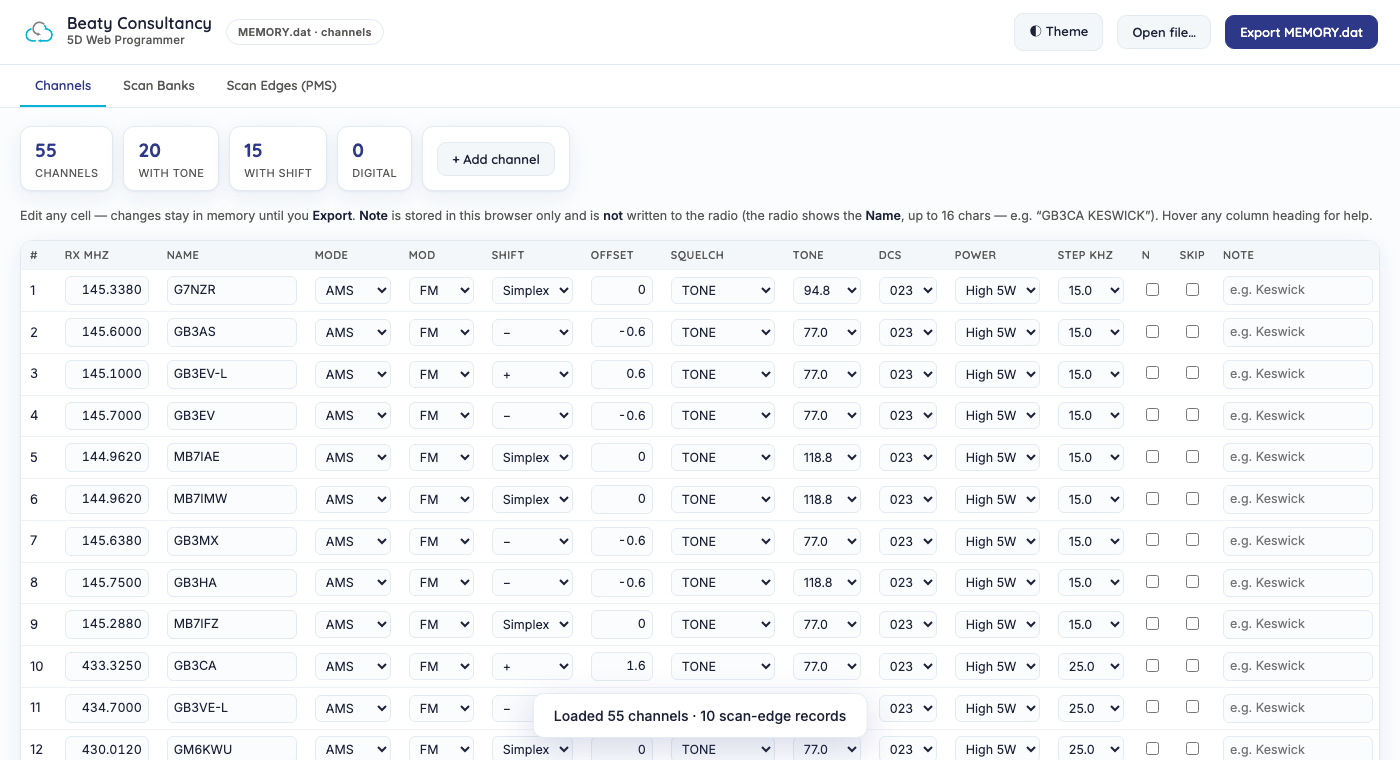
5D Web Programmer: A Free, In-Browser Codeplug Editor for the Yaesu FT-5D
The Yaesu FT-5D (and its UK/EU sibling the FT-5DE) is a capable tri-band C4FM digital handheld, but it has the same annoying programming story as every other modern Yaesu radio: bulk channel editing means using Yaesu’s Windows-only ADMS-14 software, which means buying the proprietary SCU-25 programming cable, which means being on Windows. If you are on Linux, macOS, or just do not want to buy a cable for a one-off channel load, you are out of luck.
A new open source project from Beaty Consultancy, 5D Web Programmer, fixes that. It is a single self-contained HTML file that reads and writes the FT-5D’s MEMORY.dat file directly from the microSD card, entirely in your browser. No Yaesu software, no drivers, no cable, no account, no upload. Your codeplug never leaves your machine.
Last updated: July 2026.
What It Does
The FT-5D stores its memory channels on the microSD card as a binary file at FT5D_MEMORY-CH/MEMORY.dat. The 5D Web Programmer decodes that file, presents every channel in a clean editable table, and writes a valid file back, recomputing the checksum so the radio accepts it. The whole thing runs client-side in a single static index.html with zero dependencies. You can open it from your local disk, host it on any static web server, or run it offline.
The editor covers the full channel record:
- Frequency, alpha tag, and tuning step
- Mode: Analog, AMS, DN, or VW (C4FM digital)
- Repeater shift, including odd and non-standard splits, plus explicit TX frequency
- CTCSS tone, TSQL (tone-squelch), and DCS codes
- TX power (L1/L2/L3/High), narrow FM, and scan-skip
- 24 scan banks, with a channel allowed to live in several banks at once
- Programmable Memory Scan (PMS) edge pairs, for sweeping a frequency range rather than a bank
- Private per-channel notes stored locally in your browser
If you point it at the radio’s full BACKUP.dat clone instead of MEMORY.dat, it auto-detects the larger file and unlocks additional editable regions: bank names and bank-link, an APRS beacon config (callsign/SSID, beacon on-off, interval, SmartBeaconing, digipath), the radio set-mode menu (auto-power-off, backlight, key-lock, squelch, TX time-out, battery save), and DTMF autodial memories. It edits only what you change and preserves everything else byte-for-byte.
Why This Is a Bigger Deal Than It Looks
The hard part of building a codeplug editor is not the web UI. It is reverse-engineering the binary file format. Yaesu does not publish the layout of MEMORY.dat. Beaty Consultancy worked it out the hard way and then wrote it up properly.
The result is docs/FT5D-FORMAT.md, a complete byte-level specification of the file, verified against the radio’s own output. Some highlights:
MEMORY.datis exactly 44,160 bytes. All multi-byte integers are big-endian.- Frequencies are stored as 3-byte packed BCD of
round(MHz x 1000), so 145.6000 MHz becomes the three bytes14 56 00. - Each channel is a 32-byte record covering band type, step index, shift direction, modulation, RX frequency, squelch type, digital mode, TX power, alpha tag, shift amount, CTCSS tone index, DCS code index, and a flag byte for AMS/VW/bell/attenuator/auto-step.
- The 50-entry CTCSS tone table, the 11-entry step table, the 12-entry squelch-type table, and the full 104-code DCS table are all documented with their index mappings.
- Scan-bank membership is 24 banks of 100 two-byte slots at the start of the file, with each slot encoding
(memory_type << 11) | indexand0xFFFFfor empty. - The 3-byte checksum at offset
0xAB19is justsum(file[0 : 0xAB19]) & 0xFFFFFF. Recompute it after any edit or the radio rejects the file. - The full
BACKUP.datclone is 130,496 bytes and is essentially the same memory map shifted by a constant offset, plus extra regions for set-mode, DTMF autodial, bank names, and APRS. Its 4-byte checksum at offset 130,492 issum(file[0 : 130492]).
That document alone is a contribution to the ham radio community independent of the tool. Anyone wanting to write an FT-5D codeplug generator in any language now has the spec.
The Python Engine
The same validated encoder ships as a small dependency-free Python library in the engine/ directory, so you can build codeplugs programmatically. The example from the repo:
from ft5d_codeplug import record, build

# one channel: GB3CA - 433.325 MHz, +1.6 MHz shift, 77.0 Hz access tone
rec = record(mhz=433.325, tag="GB3CA", mode="AMS",
             offset_mhz=1.6, tone_hz=77.0, sql="TONE", step_khz=25.0)

# build a full MEMORY.dat from a radio-exported template + a list of channels
out = build(base_bytes, channels=[...], pms=[...], banks={1: [1, 2, 3]})
record() is fully self-contained and produces a 32-byte channel record. build() takes a radio-exported MEMORY.dat as a structural template (it preserves the header and config regions and only rewrites the channel, scan-bank, and PMS areas), plus your channel list, PMS pairs, and bank assignments, and writes a valid file ready to copy back to the SD card.
This is the part that should excite anyone running a club, a contest station, or an event with a shared channel plan. You can keep your channel list in a CSV, a YAML file, or a database, regenerate the codeplug with a single command, and push it to every radio in the group. No GUI clicking, no per-radio manual entry.
How to Use It
Web editor:
- Open
index.htmlin any modern browser. Host it anywhere you like, it is a static file. - Eject the microSD card from the FT-5D, put it in your computer, and Open
FT5D_MEMORY-CH/MEMORY.dat. - Edit channels, banks, and scan edges. Hover any column heading for help.
- Export
MEMORY.dat, copy it back toFT5D_MEMORY-CH/on the card (replacing the original), and on the radio do MENU -> SD CARD -> 2 MEMORY CH -> Read from SD.
Python engine:
- Export a template
MEMORY.datfrom the radio once: MENU -> SD CARD -> 2 MEMORY CH -> Write to SD. - Copy
<SD>/FT5D_MEMORY-CH/MEMORY.datnext toengine/example.pyastemplate.dat. - Edit the
CHANNELS,PMS, andBANKSlists inexample.py(or write your own script). - Run
python3 example.py template.dat out.dat, then copyout.datback to the SD card.
Always keep a backup of your card before writing anything back. This is community software with no warranty, and a corrupted MEMORY.dat is a bad afternoon.
Compatibility and Caveats
- Built for and tested with the Yaesu FT-5DE (UK/EU). The FT-5D memory format is the same, so the FT-5DR should work too.
MEMORY.datediting covers channels, banks, and PMS only. APRS, WIRES-X, DTMF, and the radio menu live inBACKUP.dat, which the editor also handles in full-backup mode.- Not affiliated with Yaesu. “Yaesu” and “FT-5D” are trademarks of Yaesu Musen Co., Ltd. The project reads and writes an interoperable file format for interoperability purposes and contains no Yaesu software.
- Apache 2.0 licensed. Provided as-is with no warranty. Transmitting is your responsibility: only transmit where you are licensed and permitted to do so.
Why I Like This Project
Three things make 5D Web Programmer stand out from the usual “I wrote a chirp driver” news:
- It kills the cable tax. The SCU-25 is not cheap, and ADMS-14 is Windows-only. This works from a phone browser if you have a USB-C card reader. That alone makes it worth bookmarking.
- The format spec is published. Reverse-engineering a 44 KB binary file with packed BCD frequencies, bit-packed flag bytes, and a custom checksum is real work, and they documented it cleanly enough that anyone can reimplement it. That is a permanent contribution to the ecosystem.
- The Python engine makes codeplugs scriptable. A club that wants to push the same channel plan to 20 FT-5Ds can now do it from a script. That is the difference between a tool and a workflow.
If you have an FT-5D, give it a try. If you have a different Yaesu radio and want the same treatment, the format documentation approach in docs/FT5D-FORMAT.md is a good template for how to write up your own.
Sources and Further Reading
- 5D Web Programmer (GitHub repo): github.com/Beaty-Consultancy/5d-web-programmer
- FT-5D MEMORY.dat format documentation: docs/FT5D-FORMAT.md
- Python engine example: engine/example.py
- Beaty Consultancy: beatyconsultancy.co.uk
- Yaesu FT-5D product page: yaesu.com






Post Comment