General Interest
open source
Technology
10-band equalizer, 9M2PJU, anti-adblock bypass, chrome extension, declarativeNetRequest, Firefox addon, GPL-3.0, hamradio.my, local-first, Manifest V3, privacy, Return YouTube Dislike, sponsor skip, SponsorBlock, TrueBlock, TrueBlock for YouTube, YouTube ad blocker, YouTube adblock, YouTube enhancer, YouTube themes
9M2PJU
0 Comments
TrueBlock for YouTube: Block Ads, Skip Sponsors and Upgrade YouTube on Chrome and Firefox
YouTube in 2026 is a different site from the YouTube of 2016. A 20 minute technical lecture on antenna modeling can carry a pre-roll you can’t skip, two mid-rolls that pause the explanation at the worst moment, a banner sitting over the description links, a masthead promo pushing a sponsored premiere, and then a three minute in-video sponsor read for a VPN, delivered by the same presenter you came to learn from. Then the platform added the final insult: the full screen “Ad blockers are not allowed” wall that stops playback until you whitelist the site. For anyone who uses YouTube as a classroom, and that includes most radio amateurs working through hours of hamfest talks, SDR tutorials, and repair videos, the viewing experience now needs defending.
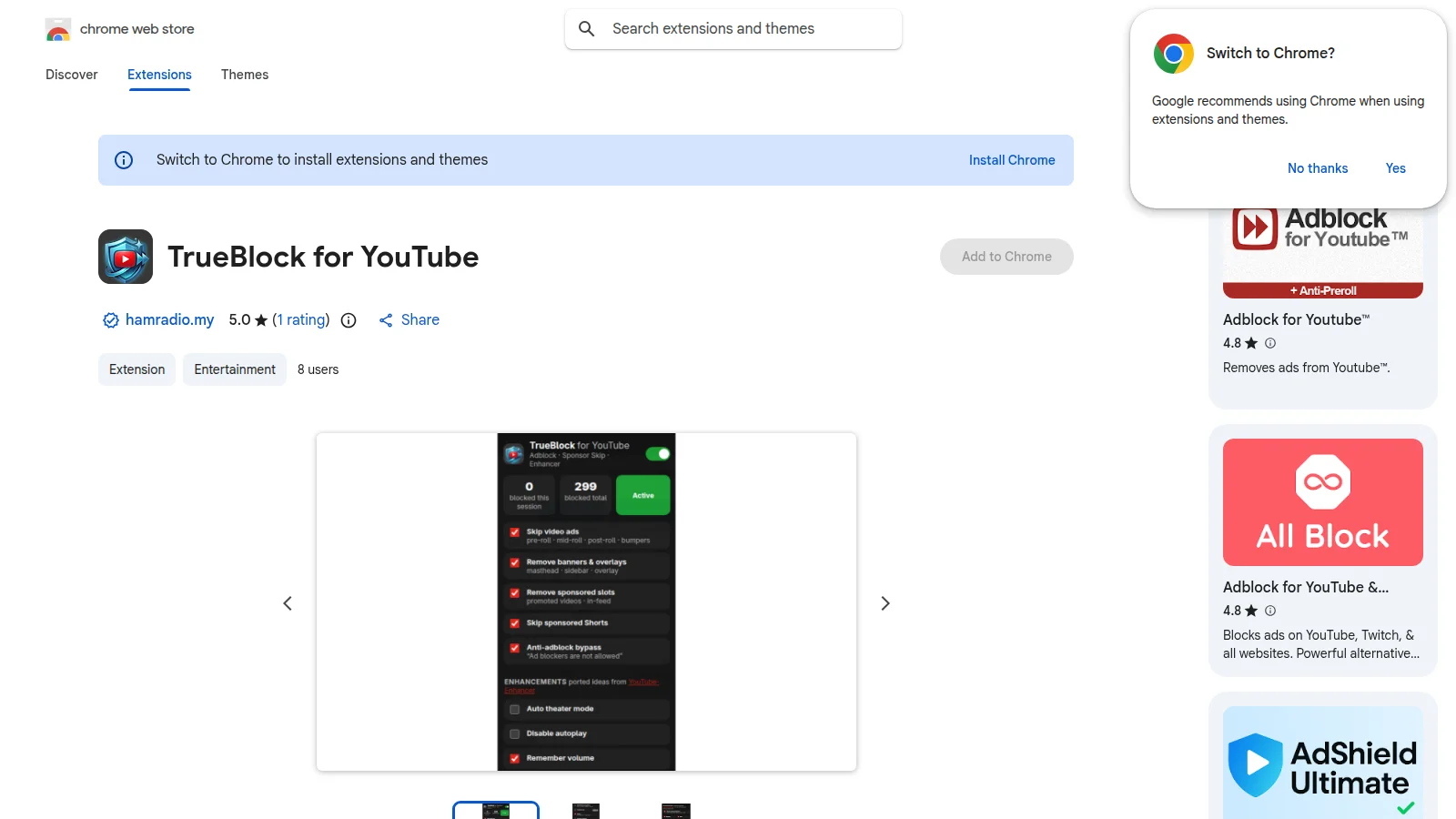
TrueBlock for YouTube is the answer built by 9M2PJU. It’s a free and open source extension for Chrome (plus Edge and Brave) and an addon for Firefox that combines three jobs in one small package: a three layer ad blocker, a crowdsourced in-video sponsor skipper across 8 categories, and a playback enhancer with theater mode, autoplay control, volume and speed memory, forced quality, seek and speed buttons, scroll wheel volume, Shorts controls, an audiophile 10-band EQ, a limiter, a live spectrum overlay, and page themes. Everything runs locally on your own machine with no account, no analytics, and no tracking. The current release is v2.0.0, published 5 November 2026, MIT-style GPL-3.0 licensed, with zero dependencies and a 406 KB install.
Last updated: November 2026. Current release v2.0.0 on the Chrome Web Store and Firefox Add-ons. Source code at 9M2PJU/trueblock-youtube-adblocker.
TL;DR: TrueBlock for YouTube is a free GPL-3.0 extension for Chrome, Edge, Brave and Firefox that blocks YouTube video ads, banners, overlays and sponsored slots, bypasses anti-adblock walls, auto-skips in-video sponsors across 8 SponsorBlock categories, restores dislike counts, and adds theater mode, autoplay control, volume and speed memory, forced quality, seek buttons, scroll volume, Shorts hiding, a 10-band EQ with limiter and spectrum, and dark themes. Install it from the Chrome Web Store or Firefox Add-ons in about 30 seconds, pin it to the toolbar, and manage everything from a tabbed popup. All filtering runs locally with no account and no tracking.
What TrueBlock for YouTube Is
TrueBlock for YouTube is a free open source browser extension for Chrome, Edge, Brave and Firefox that blocks YouTube ads at three levels, auto-skips in-video sponsor segments using the SponsorBlock community database, restores dislike counts, and adds playback, audio and page enhancements, all processed locally on the user’s device with no account or tracking.
Unpack that sentence and the design becomes clear. Most tools in this space do one job. A network blocker stops ad domains. A sponsor skipper jumps embedded reads. An enhancer adds theater mode. TrueBlock does all three from one toolbar icon, so a single install covers the pre-roll before the video, the sponsor read inside the video, and the clutter around the video. The popup is organized into five tabs, Block, Player, Audio, Page and Crowd, each with simple switches, and a live badge counter on the toolbar icon shows how many ads were stopped. Session and lifetime totals sit in the popup next to a status pill. The whole project is vanilla JavaScript with no frameworks, no build step for development, and a small build.sh that cuts the per-browser store zips, TrueBlock-Chrome.zip and TrueBlock-Firefox.zip.
Why YouTube Viewing Needs Defending in 2026
To understand why a tool like this exists, follow what happened to YouTube advertising over the last decade. Early YouTube ran a single skippable pre-roll. Then came unskippable 6 second bumpers, stacked mid-rolls on longer videos, overlay banners, sidebar companions, masthead takeovers, in-feed sponsored placements, and sponsored Shorts injected into the vertical feed. Creator-side sponsor reads grew in parallel, because channel revenue from platform ads became unpredictable and direct sponsorships paid better. A popular electronics or radio channel today can contain two platform ad breaks plus two embedded sponsor segments, which means four interruptions in a 15 minute video.
The platform then started fighting back against blockers. From 2023 onward YouTube deployed server side ad injection experiments, player response ad payloads that arrive inside the same JSON as the video metadata, and the now familiar anti-adblock wall that pauses playback and demands the blocker be disabled. At the same time, Google moved Chrome extensions to Manifest V3, which replaced the old blocking webRequest API with the more limited declarativeNetRequest rule system. Several classic blockers lost capability or required complex workarounds overnight. Users were left with a three way choice: accept every ad, pay for Premium, or assemble a fragile stack of three or four separate extensions that each solve one slice of the problem and occasionally fight each other.
TrueBlock is built for that exact situation. The network rule layer handles what Manifest V3 still allows. The player response patcher strips ad payloads that arrive bundled with video data, which network rules alone can’t see. The on-page skipper handles whatever survives both, muting, fast forwarding and auto-clicking Skip in under 100 ms, then cleaning the leftover banners and slots from the DOM. When YouTube changes a selector or endpoint, there’s one repository to patch and one extension to update, not three.
How the Three Layer Ad Blocker Works
The ad blocking core is the part that must be fast, because a slow blocker causes the very buffering and black screens it promises to remove. TrueBlock splits the work by where it runs in the browser.
| Layer | Where it runs | What it does |
|---|---|---|
| Network blocklist | rules/block_ads.json, 15 Manifest V3 declarativeNetRequest rules |
Blocks doubleclick, googlesyndication, googleadservices, stats and ad tracking hosts, and get_midroll_ endpoints before the request leaves the browser |
| Player response patch | src/inject.js, MAIN world |
Hooks JSON.parse, fetch and XHR to strip adPlacements, playerAds and adSlots from ytInitialPlayerResponse and /youtubei/v1/player responses before the player renders them |
| Skip and clean | src/content.js, ISOLATED world |
requestAnimationFrame loop mutes, sets 16x speed and seeks ads to the end, auto-clicks every Skip button variant, removes banners, masthead, overlays, companion and sponsored slots, kills the anti-adblock wall and resumes playback |
In practice the result is a sub-100 ms black flash where a pre-roll, mid-roll, post-roll or 6 second bumper used to be. Sidebar, masthead, overlay, companion and in-feed ads are removed from the page. Sponsored Shorts auto-advance instead of playing. The toolbar badge counts each kill, and the popup keeps session and total counters so the effect is visible and measurable.
Two engineering details keep this fast instead of merely functional. First, the expensive skip-button scan is gated behind actual ad detection, which cut steady state CPU cost roughly sixfold in the v1.9.3 optimization, from about 48 ms to about 8 ms per 20 second window in the maintainer’s measurement. Second, the player patch seeds from the initial page response, so ads bundled into the first paint are stripped before the player ever sees them, instead of being chased after they start.
Sponsor Skip and Dislike Counts: the Crowd Layer
Platform ads are only half the interruption. The other half is baked into the video file itself: the 90 second mattress pitch, the intro animation, the “smash that subscribe button” break, the recap of the previous episode. No network blocker can remove those, because they are part of the video stream. That’s what the Crowd tab solves with two community databases.
SponsorBlock skipping is on by default and covers 8 segment categories: sponsor, intro, outro, subscribe reminder, self-promotion, off-topic music, recap and preview, and filler tangents of the skip type. When a watched video has community submitted segments, TrueBlock auto-skips them with a small toast such as “Skipped sponsor (12s) via SponsorBlock”, caches the result per video, and never fights the ad skipper for control. If the lookup fails offline, it fails open and playback continues normally. The client is original code against the public read API, with no SponsorBlock code vendored into the extension, and requests go through the background worker because page-origin calls are blocked by the API’s CORS policy.
Return YouTube Dislike works the same way. Since YouTube hid public dislike counts, the extension refills the native like and dislike numbers from the Return YouTube Dislike public read API, shows exact totals in the button tooltip, and can draw an optional like-ratio bar under the buttons on watch pages. Shorts pages aren’t covered, and offline failure again fails open.
The honest privacy note sits right in the interface: these two features send the current video ID to sponsor.ajayyy.com for segments and returnyoutubedislikeapi.com for counts. Untick either category set and the extension goes fully offline. Everything else in TrueBlock never leaves the browser.
Enhancer, Equalizer and Themes: 19 Toggles Plus Audiophile Audio
Blocking is the headline, but the enhancer is what keeps the extension installed. The Player, Audio and Page tabs hold 19 optional toggles that fix long standing YouTube annoyances.
| Group | What you get |
|---|---|
| Player | Auto theater mode, autoplay off that still respects manual clicks, remember volume and speed, forced quality from 4K down to 360p, auto-dismiss of the “Continue watching?” prompt, remaining time readout, loop, timestamp copy and screenshot buttons, seek buttons from 5 to 30 seconds plus speed buttons, scroll wheel volume control, Shorts auto-scroll |
| Audio | Volume boost at 150, 200 or 300 percent, 10-band ISO equalizer with preamp plus auto clip guard, global Q, 7 presets including dynamic loudness and Rock and Metal, full custom sliders, limiter safety net at minus 3 dB with 20 to 1 ratio, live spectrum overlay on the player, per-video WebAudio graph that parks while paused |
| Page | Hide Shorts everywhere, hide end cards, live chat and paid promotion banners, hide posts, playlists, member-only shelves and playables, 1 to 8 videos per row, unwrap redirect links and strip tracker parameters, optional block of number-key seeking, 11 dark themes plus custom accent color that also tints the header logo |
The equalizer deserves special attention because it is unusually serious for a browser extension. Ten ISO bands with a preamp that enforces clip headroom, so preamp plus peak never exceeds 0 dB, a global Q control, seven presets informed by standard vocal presence and Fletcher-Munson loudness practice, and a limiter underneath as a safety net. The v1.10.4 release fixed the classic loud-blast-after-pause bug by restoring pre-ad speed, mute and volume state instead of stranding the player at 16x, and the graph now waits for the first user gesture so there’s no “AudioContext was not allowed to start” warning and no muted-audio window. Loudness presets flatten as volume rises, EQ changes toast their preset and decibel delta, and the spectrum overlay gives a live analyzer on the player for anyone checking microphone harshness or music balance.
Themes were rebuilt in v2 to actually stick. Eleven presets ship with Pure Black as the default, unmistakable when it applies, plus an accent color picker in any color. Controls live outside their labels so clicks can’t silently untick, enforcement runs both directions, selectors use doubled specificity with direct container fallbacks for YouTube layout variants, and a read-back self-check toasts a warning if the running YouTube variant ignores the override.
Privacy: Local-First With Two Disclosed Exceptions
The privacy story is short, which is the point. There are no servers, no analytics, no telemetry, and no tracking. Settings live in chrome.storage only. Permissions are minimal: the ad and tracker hosts, declarativeNetRequest, and storage. No <all_urls>, no tab content reading, no history access. The full policy is published at PRIVACY.md in the repository.
The only network calls outside YouTube are the two opt-out crowd lookups described above, SponsorBlock segments and dislike counts, which necessarily send the watched video ID to those two public APIs. The Chrome Web Store privacy disclosure states plainly that the developer doesn’t collect or sell user data, and the Firefox listing carries the matching data-use disclosure noting that watched video IDs go to the SponsorBlock API. That disclosure is why the Firefox review path matters: Mozilla’s human review sees exactly what the extension sends and why.
TrueBlock Against the Usual Stack
Most viewers who block ads today run a combination of tools. Here is how a single TrueBlock install compares to the common stack.
| Setup | Ad domains blocked | In-video sponsors skipped | Dislike counts | Enhancer and EQ | Anti-adblock bypass | Upkeep |
|---|---|---|---|---|---|---|
| TrueBlock | Yes, 3 layers | Yes, 8 categories built in | Yes, built in | Yes, 19 toggles plus 10-band EQ | Yes | One extension to update |
| General blocker alone (uBlock Origin and similar) | Yes, whole web | No | No | No | Partial, needs filter upkeep | Filter lists to maintain |
| SponsorBlock extension alone | No | Yes | No | No | No | Second install |
| Return YouTube Dislike alone | No | No | Yes | No | No | Third install |
| Enhancer for YouTube alone | No | No | No | Yes, player tools | No | Fourth install |
| YouTube Premium | Yes, by subscription | No, sponsors still play | No counts change | No EQ or themes | Not needed | Monthly fee, account required |
Read the table as a decision guide. A general blocker remains the right tool for the whole web, and TrueBlock doesn’t replace it there. But for YouTube specifically, one 406 KB local extension replaces three separate installs plus a subscription, with one popup, one settings store, and one codebase to keep current when YouTube moves selectors around. The project credits its inspirations openly: enhancement concepts re-implemented natively from YouTube-Enhancer/extension, EQ curves informed by standard mixing practice, sponsor data via the SponsorBlock public API, and counts via Return YouTube Dislike, all with original client code and nothing vendored.
Install in About 30 Seconds: Chrome and Firefox
Store installs are the normal path. Sideloading from the GitHub releases is the backup path for testing and for Linux distributions that prefer unpacked extensions.
| Browser | Path | Steps |
|---|---|---|
| Chrome, Edge, Brave | Chrome Web Store listing | Open the listing on desktop, click Add to Chrome, approve the minimal permissions, open YouTube, pin TrueBlock to the toolbar for toggles and stats |
| Firefox | Firefox Add-ons listing | Open the listing on desktop, click Add to Firefox, approve the minimal permissions, open YouTube, pin TrueBlock to the toolbar. Same codebase, verified with web-ext lint at zero errors and zero warnings |
| Manual load, Chromium | GitHub releases | Download TrueBlock-Chrome.zip, unzip, open chrome://extensions, enable Developer mode, click Load unpacked, select the folder |
| Manual load, Firefox | GitHub releases | Download TrueBlock-Firefox.zip, unzip, open about:debugging, choose Load Temporary Add-on, pick manifest.json. Note this lasts until browser restart. Proper signed release comes through Add-ons |
Firefox users should note one technical detail. The same source ships a per-browser manifest through build.sh: background.scripts for Firefox and service_worker for Chromium. Everything else is identical, which is why fixes land on both stores together.
After install, the fastest setup is: open any YouTube video, click the TrueBlock icon, confirm the status pill reads Active, leave Block and Crowd on, then walk the Player, Audio and Page tabs and untick anything you don’t want. Fresh installs default to sensible choices: volume memory, limiter, continue-skip, sponsor skip, Rock and Metal EQ, Pure Black theme, spectrum overlay, and Shorts auto-scroll.
Practical Uses for Radio Amateurs and Technical Viewers
The ham radio angle is straightforward, because YouTube is where much of modern amateur learning happens. A club training night projecting a 40 minute antenna modeling tutorial keeps its flow when mid-rolls and sponsor reads skip themselves. An Elmer assigning a three hour SDR or amplifier repair series can recommend one install instead of a paragraph of filter list instructions. Members on metered rural links or tethered field hotspots save real megabytes when ad video payloads never download. Shortwave listeners working through foreign language broadcast tutorials benefit from the speed memory and seek buttons when replaying weak signal passages. And anyone reviewing contest or DXpedition footage with music bed sponsor intros can jump straight to the operating.
Audio matters here too. Laptop speakers at a club venue are harsh, and the 10-band EQ with the limiter underneath can tame sibilance on a soft recorded talk without clipping the PA when the next video runs louder. The volume boost helps archive rips recorded at low level, while the spectrum overlay gives a visual check that the “no audio” complaint is a dead upload and not a local fault. Screenshot and timestamp buttons turn a tutorial moment into a club newsletter figure with one click.
Honest Limits
This section is deliberately blunt. TrueBlock is a YouTube extension, not a whole web ad blocker, so trackers and ads on other sites need a general blocker alongside it. Sponsor skips depend on community submissions, so obscure or brand new videos may have no segments yet, and auto-skip can occasionally jump a chapter that a viewer wanted to see, which is why per-video behavior plus the toast readout exists. Dislike counts are crowdsourced estimates plus API totals, not first party data, and Shorts pages aren’t covered. The crowd features require sending video IDs to two third party APIs, so fully offline users should untick them. Manifest V3 limits what any Chromium blocker can do at the network layer, which is exactly why the player patch and skipper layers exist, but it also means YouTube layout changes can temporarily break selectors until the next release. Anyone evaluating for a managed fleet should note the Firefox temporary sideload expires on restart and the signed Add-ons build is the supported path.
Getting Help, Contributing and Supporting
TrueBlock is free forever with no ads and no tracking, maintained by 9M2PJU and published under GPL-3.0. Issues with a changed YouTube selector are the most valuable bug reports: note the page type, the TrueBlock version, and what survived, and the fix usually lands in src/content.js under SKIP_SELECTORS. Pull requests are welcome, especially selector updates when YouTube rearranges the DOM. The repository documents its credits, including the Enhancer, SponsorBlock and Return YouTube Dislike inspirations, plus the declarativeNetRequest and Firefox add-on platform docs the implementation stands on. If the extension saves your sanity, the project accepts support through PayPal, Buy Me a Coffee and Wise.
Install it today from the Chrome Web Store or Firefox Add-ons, pin it, and watch one technical video end to end. The quiet is the feature.
Sources and Further Reading
- TrueBlock on the Chrome Web Store: https://chromewebstore.google.com/detail/trueblock-for-youtube/fdednacmppmjaeophlboceonmgejgacm
- TrueBlock on Firefox Add-ons: https://addons.mozilla.org/en-US/firefox/addon/trueblock-for-youtube/
- TrueBlock source code (GPL-3.0): https://github.com/9M2PJU/trueblock-youtube-adblocker
- TrueBlock privacy policy: https://github.com/9M2PJU/trueblock-youtube-adblocker/blob/main/PRIVACY.md
- SponsorBlock, the crowdsourced segment database: https://github.com/ajayyy/SponsorBlock
- Return YouTube Dislike, the counts API client: https://github.com/Anarios/return-youtube-dislike
- Return YouTube Dislike homepage: https://returnyoutubedislike.com/
- YouTube: https://www.youtube.com/
- Chrome declarativeNetRequest reference: https://developer.chrome.com/docs/extensions/reference/api/declarativeNetRequest
- Firefox add-on install guide: https://support.mozilla.org/en-US/kb/find-and-install-add-ons-add-features-firefox
- YouTube-Enhancer extension, enhancement concepts: https://github.com/YouTube-Enhancer/extension
- GPL-3.0 license text: https://www.gnu.org/licenses/gpl-3.0.en.html
- 9M2PJU, author and maintainer: https://hamradio.my/about/
- Support via PayPal: https://paypal.me/9M2PJU
- Support via Buy Me a Coffee: https://buymeacoffee.com/9m2pju
- Support via Wise: https://wise.com/pay/me/faizulz13
73 de 9M2PJU.



Post Comment