RefConnect: Link Your D-STAR Radio to REF, XRF, XLX, and DCS Reflectors Over USB
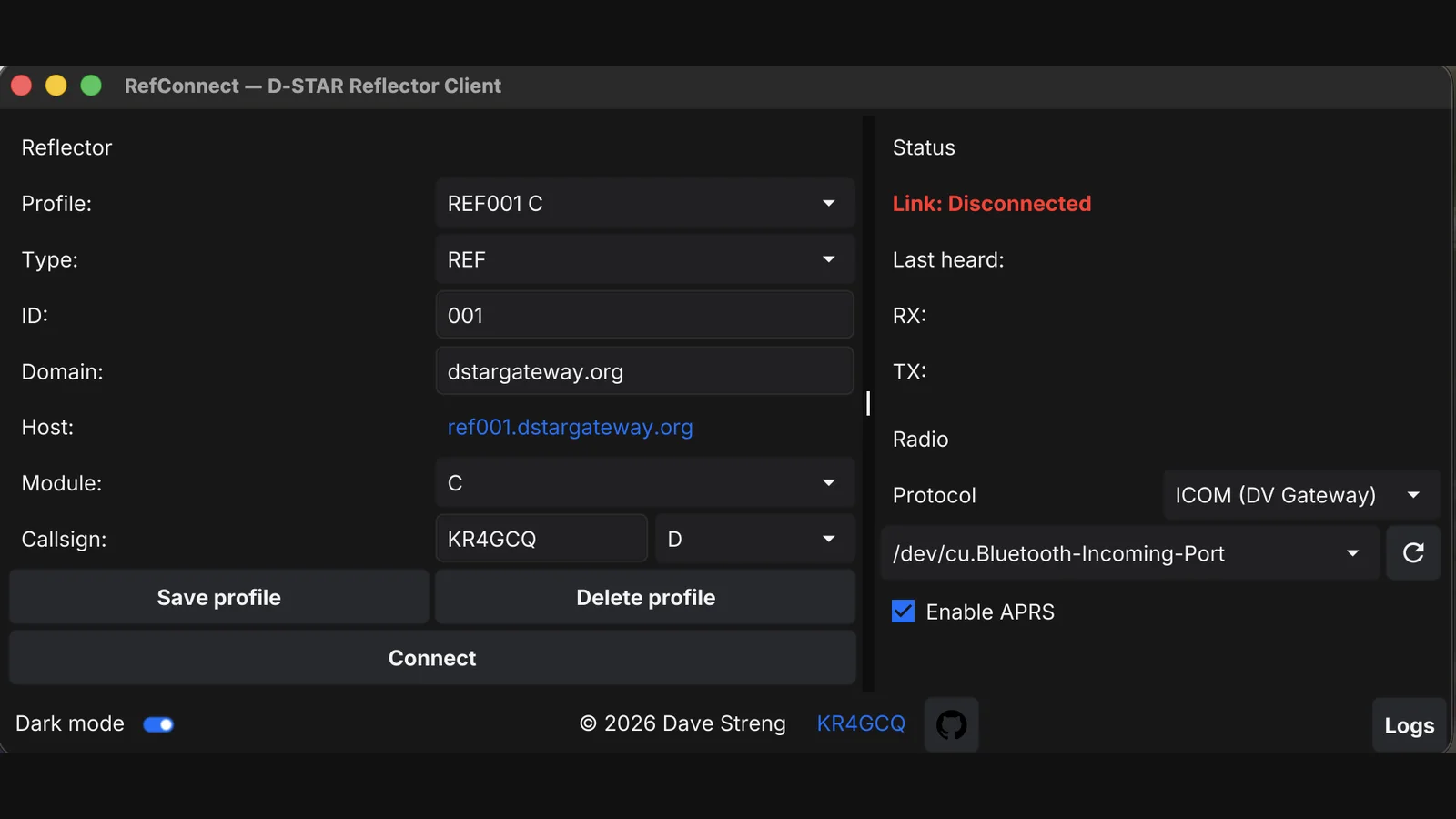
A D-STAR handheld with a USB cable and a laptop is everything you need to reach a reflector on the other side of the planet. No hotspot, no Raspberry Pi, no hotspot password to forget. RefConnect by Dave Streng KR4GCQ is a free Go app for macOS, Windows, and Linux that talks to your radio over serial, logs into REF, XRF, XLX, and DCS reflectors, and puts your voice on the net when you key up.
This post complements the dstar.guru reflector activity guide on HamRadio.my. That guide answers which reflector is busy right now. This one answers how your own radio gets there with nothing but a cable.
TL;DR: RefConnect is a free GPL-3.0 D-STAR reflector client for macOS, Windows, and Linux that connects Icom DV Gateway and Kenwood MMDVM radios to REF, XRF, XLX, and DCS reflectors over USB serial. Set your callsign, pick a saved profile, click Connect, and key up. Extras include APRS position beacons, ircDDB, a jitter-buffered audio path, and auto-updates. One-line install, YAML config, Fyne native UI.
What RefConnect Is
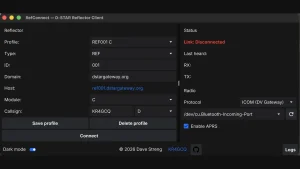
RefConnect is a free open source D-STAR reflector client that links a physical D-STAR radio to internet reflectors through a USB serial connection, speaking the DV Gateway Terminal protocol to Icom radios and the MMDVM protocol to Kenwood radios, and the DPlus, DExtra, and XLX reflector protocols to the network. You plug the radio in, pick a saved reflector profile, click Connect, and transmit with the radio itself. The computer is the gateway; the radio stays the radio.
The Gap It Fills: No Hotspot Required
Most hams reach D-STAR reflectors through a hotspot: a Pi-Star or WPSD box that bridges RF to the internet. That works, but it’s a second radio system to buy, power, configure, and carry. The alternative used to be vendor software or a tangle of ircDDBGateway plus soundcard plumbing.
RefConnect takes the third path. Modern D-STAR radios already expose a digital voice gateway over USB: Icom calls it DV Gateway Terminal mode, and Kenwood speaks MMDVM framing to hosts. RefConnect implements both host sides, so the laptop becomes a software gateway and the radio does what it does best: RF, microphone, speaker, and PTT. Field day, hotel room, or club station, the kit list is a radio, a cable, and a laptop you already own.
Reflectors and Radios: the Protocol Matrix
D-STAR reflectors come in four families, and RefConnect speaks to all of them.
| Reflector family | Network protocol | Example | Notes |
|---|---|---|---|
| REF | DPlus | REF001 C, the classic worldwide net | Callsign must be registered on the D-STAR gateway system (US Trust); unregistered callsigns get rejected |
| XRF | DExtra | XRF Freundeskreis style community reflectors | Open linking, popular outside the US trust system |
| XLX | XLX multiprotocol | XLX multiservice reflectors with D-STAR modules | Interlinks D-STAR, DMR, YSF, and more on one server |
| DCS | DCS (CCS) | DCS regional reflectors | Long-standing European reflector network |
On the radio side the matrix is just as clean.
| Radio | Host protocol | Baud | Cable and settings |
|---|---|---|---|
| Icom IC-705 and DV Gateway capable Icoms | DV-GW Terminal mode | 38400 8N1 | USB-B cable to the host; radio set to DV mode, Gateway Select to External Gateway USB-B, Terminal Mode on |
| Kenwood TH-D75 and MMDVM speaking Kenwoods | MMDVM | 115200 auto | USB cable; GPS config pulled from the radio PC output |
The IC-705 detail is worth spelling out because it bites everyone once. The radio presents two virtual serial ports over one USB cable: the first is CI-V control, the second (the *3 port on macOS, matching the CDC data interface number) carries DV Gateway data. The baud rate is nominally virtual on USB-CDC, but the IC-705 firmware uses the 38400 SET_LINE_CODING value to select DV Gateway mode: open the port at 115200 or 9600 and you get silence, just FF bytes back. RefConnect sets 38400 for Icom and 115200 for Kenwood automatically, and its PROTOCOL.md documents the whole reverse engineering trail: pcap-verified framing of [LEN][TYPE][DATA][0xFF], the FF FF FF init flush the radio echoes, and per-frame tables.
Five Minutes From Cable to First Contact
- Install with one line:
curl -fsSL https://raw.githubusercontent.com/S7R4nG3/refconnect/main/configs/setup.sh | shon macOS or Linux, the equivalentsetup.ps1one-liner on Windows. A desktop entry and app icon come with v0.12 and later. - Plug the radio in and switch it on. RefConnect detects supported radios, picks the right port, and sets the protocol; the hint under the port selector shows radio status. Unrecognized radio: pick the port and protocol by hand.
- Choose a reflector. The Profile dropdown holds saved entries, or fill Type, ID, Domain, and Module to define a new one.
- Enter your callsign and gateway suffix (G for the gateway module, the 8th character dashboards show as Via or Peer).
- Click Connect, watch the status panel confirm the link, and key up. Welcome to D-STAR.
Profiles persist in ~/.config/refconnect/config.yaml: saving with an existing name overwrites, a new name appends, and the last used profile is preselected next launch. Because profiles live in one YAML file, migrating a whole reflector list to a second laptop is a file copy. Callsign and suffix are global across profiles.
Under the Hood: Go, Fyne, and Real Engineering
RefConnect is written in Go with a Fyne v2 native UI, which is why one codebase ships identical dark, light, and system-theme windows on three operating systems. Serial I/O uses the standard go.bug.st/serial library, config is YAML, and the build matrix plus Dependabot runs in CI.
The internal/ tree shows a project that grew past minimum viable. Audio rides a jitter buffer so network wobble doesn’t chop syllables. An update package keeps the app current. A wakelock package keeps the laptop awake mid-QSO. The router decodes positions from Kenwood frames. And PROTOCOL.md is that rarest of open source documents: a complete, pcap-verified protocol reference written so the next developer never has to re-sniff the wire.
Beyond Voice: APRS, Beacon, and ircDDB
Tick Enable APRS and RefConnect forwards position data from the radio GPS to APRS-IS: NMEA sentences and DPRS from Kenwoods like the TH-D75, parsed and routed without ever sending position data back to the reflector or ircDDB. A beacon package handles the timed transmissions, and an ircDDB client keeps callsign routing working. These are the quiet features that separate a demo from a daily driver: your position lands on aprs.fi while your voice lands on the reflector, each on its correct network.
RefConnect Versus the Other Ways Onto Reflectors
| Task | RefConnect plus your radio | Pi-Star or WPSD hotspot | Phone app (DroidStar and forks) | ircDDBGateway plus dongle builds |
|---|---|---|---|---|
| Hardware to carry | Radio plus laptop plus cable | Hotspot box plus radio | Phone only | Varies, often a dedicated box |
| Uses your real radio RF | Yes, full power and antenna | Yes, via hotspot link | No, phone mic and speaker | Depends on build |
| Reflector families | REF, XRF, XLX, DCS | REF, XRF, XLX, DCS and cross-modes | DMR, M17, YSF, P25, D-STAR, AllStarLink | REF, XRF, DCS classically |
| Setup effort | One-line installer, USB cable | Image flash, Wi-Fi, passwords, firewall | APK plus vocoder setup | Manual compile and config |
| APRS position path | Radio GPS to APRS-IS | Varies by hotspot software | Varies | Varies |
| Works where phone data is dead | Yes, any internet on the laptop | Yes, needs its own uplink | No | Yes with uplink |
| Best for | Laptop ham wanting real-radio D-STAR anywhere | Home or club always-on gateway | Mode-hopping from the couch | Tinkerers with specific stacks |
The table isn’t a ranking. Hotspots remain the best always-on club solution, and phone apps remain the best couch solution across five modes. RefConnect wins for the traveling ham with a real D-STAR handheld: one cable, no extra box, no hotspot to secure, and the radio you already trust.
Honest Limits and License Notes
- Your callsign must be registered on the D-STAR gateway system to use REF reflectors. Registration usually goes through your national coordinator and can take days. XRF and many XLX reflectors are usable sooner, so plan a first contact there while registration clears.
- Gateway suffix matters: the G module suffix in the 8th callsign position is what dashboards and routing use. Wrong suffix, strange routing.
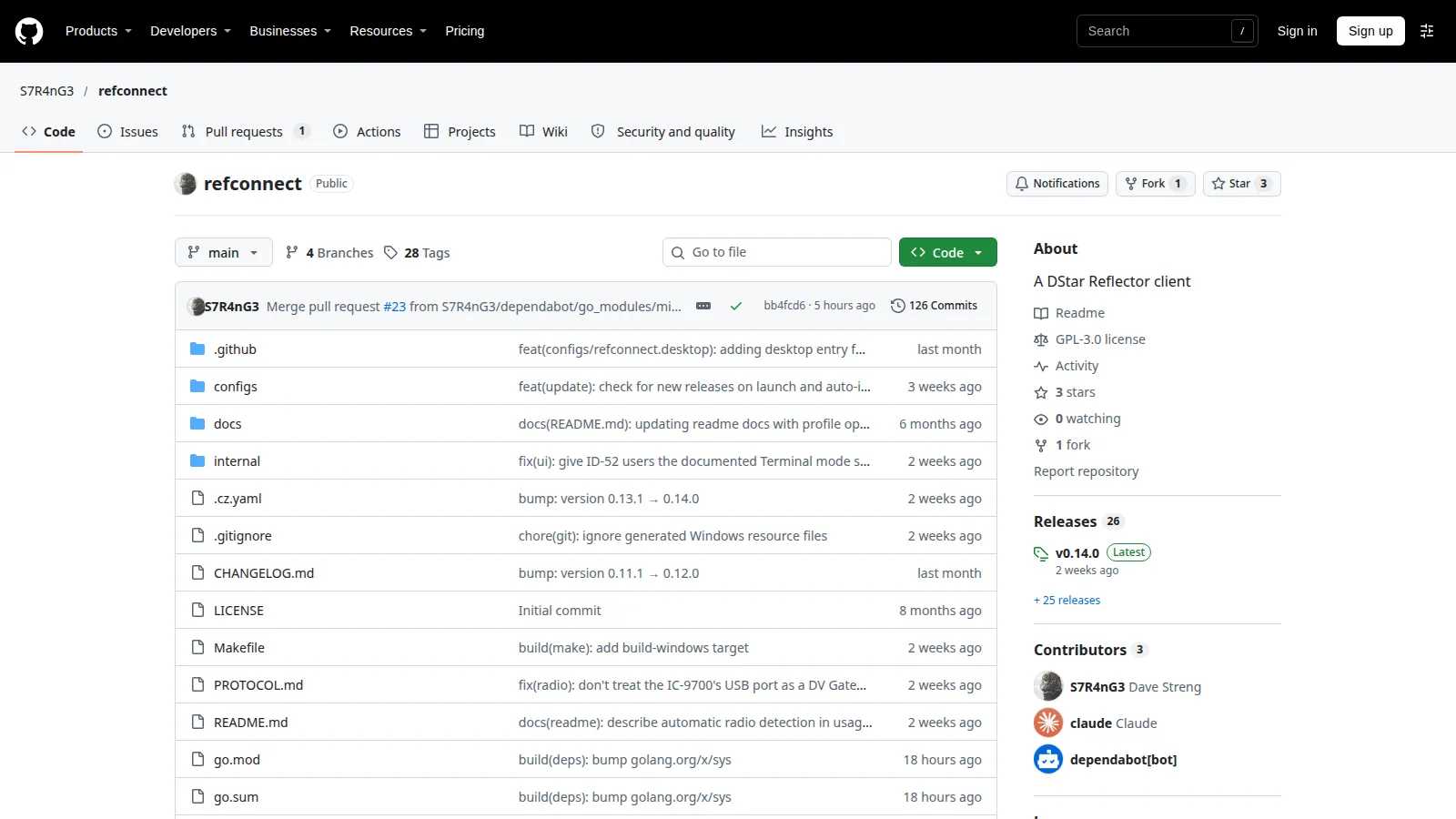
- The project is young and solo maintained (126 commits, version v0.14.0, supported by donations). File issues on GitHub with radio model, OS, and the timestamped log; the log panel exists for exactly this.
- Only analog RF leaves your antenna; the internet side is DVSI AMBE voice frames, not open Codec 2. That is D-STAR as a standard, not this app choice.
- Serial permissions on Linux mean dialout or plugdev group membership, same as any radio software. The DVB-T blacklist dance from the SDR world doesn’t apply here, but exclusive port access does: close CHIRP and friends first.
- Transmit where licensed, identify normally, and remember a reflector QSO is public to every linked repeater and dashboard.
Safety checklist before linking a reflector
- Callsign registered on the gateway system (for REF), suffix G set
- Radio in DV mode with the gateway or terminal path enabled
- Correct serial port selected (DV data port, not CI-V on dual-port Icoms)
- Profile host, module, and protocol match the current reflector listing
- Monitor first: confirm the reflector is active on dstar.guru before calling
- Keep the laptop awake and the cable strain-free during the QSO
Your First Reflector Contact in Five Steps
- Check dstar.guru for a busy module right now, for example a top REF or XLX module.
- Save it as a RefConnect profile with the right type, ID, domain, and module.
- Connect, confirm link-up in the status panel, and listen for a gap. D-STAR etiquette is the same as repeater etiquette: short calls, leave gaps, say your callsign.
- Call once with callsign and listening, for example
9M2PJU listening, then release and wait through the beep. - Log it: reflector, module, time in UTC, and stations worked. Your llog or paper log both count.
Why It Matters
D-STAR is twenty years old and still the only mainstream digital voice mode where the handheld itself can be the internet gateway endpoint. Every layer that used to stand between a new ham and a reflector contact, hotspot hardware, Pi images, port forwards, is now one Go binary plus the cable that came in the radio box. Solo-maintained, GPL-3.0, pcap-documented, and honest about its youth: this is exactly the kind of project that deserves users who file good bug reports.
If you run a net or a club station, put RefConnect on the shack laptop as the guest path: visitors with any DV-capable handheld get on the reflector without touching the club hotspot config. That’s a use case no phone app and no Pi can cover as cleanly.
Sources and Further Reading
- RefConnect on GitHub – Source, releases, setup scripts, configs, PROTOCOL.md, and wiki, GPL-3.0.
- RefConnect protocol reference – Pcap-verified DV Gateway Terminal framing and IC-705 USB specifics.
- dstar.guru reflector activity guide on HamRadio.my – Find a busy REF, XLX, or DCS module before you connect.
- dstar.guru live monitor – Real-time D-STAR reflector rankings across 146 countries.
- UV Studio Apps page – Browser-based radio management referenced for the install-and-manage workflow.
- APRS.fi live map – Where RefConnect forwarded positions land.
- ARRL D-STAR resources – Getting started with D-STAR digital voice.
73 de 9M2PJU.


Post Comment