amateur radio
open source
802.11s, 915 MHz, AllStarLink, amateur radio emergency communications, APRS, APRS-IS, ARDF, AREDN, ATAK, BATMAN-V, CoT, Cursor on Target, digital voice, disaster response, field day, MANET, mesh networking, MMDVM, Morse Micro, off-grid communications, OpenMANET, openwrt, packet radio, POTA, public service, raspberry pi, Repeater, search and rescue, sota, Wi-Fi HaLow
9M2PJU
0 Comments
OpenMANET: Build a Raspberry Pi Wi-Fi HaLow MANET Radio for ATAK
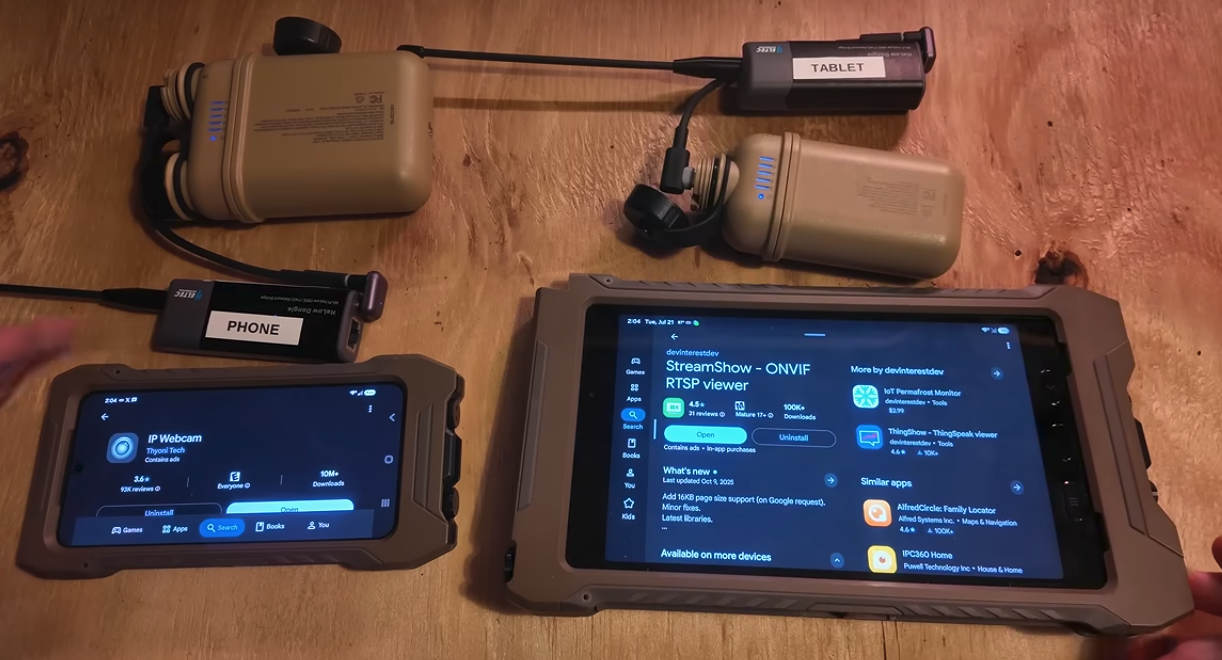
OpenMANET: Build a Raspberry Pi Wi-Fi HaLow MANET Radio for ATAK
Imagine arriving at a search-and-rescue staging area where the mobile network is overloaded, the nearest fibre connection is kilometres away, and the team still needs a shared map, position reports, files, and ordinary IP connectivity. A few Raspberry Pi nodes placed around the area could create a private network that keeps working without a tower or a fixed communications room.
That is the idea behind OpenMANET, an open-source project for building Raspberry Pi-based Mobile Ad-Hoc Network (MANET) radios with Wi-Fi HaLow (802.11ah) hardware from Morse Micro. In the 915 MHz region, where the local regulatory plan permits it, HaLow gives the mesh a long-range sub-GHz radio link while the Raspberry Pi provides a normal Linux network stack, Ethernet, local Wi-Fi access, and room for applications.
OpenMANET is especially interesting for civilian search and rescue, disaster response, airsoft and outdoor events, community networks, remote sites, and any operation that may need communications after the normal infrastructure has disappeared. It is designed to work with ATAK over multicast, but ATAK is only one application. The same mesh can carry web dashboards, SSH, telemetry, cameras, file transfers, APRS-IS gateways, and internet traffic when one node has an upstream connection.
This article explains what OpenMANET is, how the network is assembled, which hardware the project supports, how ATAK fits into the design, what the published range tests show, and how to approach a first build without treating a promising radio link as a magic substitute for planning.
What Is OpenMANET?
OpenMANET is a Raspberry Pi and OpenWrt-based network appliance built around Wi-Fi HaLow radios. A typical node contains:
- A Raspberry Pi 4, Compute Module 4, Raspberry Pi 3B, or Raspberry Pi Zero 2 W.
- A Morse Micro HaLow module connected through SPI, SDIO, USB, or a supported carrier board.
- An antenna suitable for the local 868 or 915 MHz band plan.
- OpenMANET firmware based on OpenWrt.
- Optional battery power, a second Wi-Fi adapter, and a USB GPS receiver.
The project is not a single-purpose messaging application. It is a small, portable IP network. The HaLow interface provides the long-haul radio path between nodes, while Ethernet and the Pi’s ordinary 2.4 or 5 GHz Wi-Fi can connect phones, tablets, laptops, sensors, and other IP devices at each location.
The firmware combines several established technologies:
| Layer | OpenMANET component | What it does |
|---|---|---|
| Operating system | OpenWrt | Runs the network, firewall, services, and device drivers |
| HaLow radio | Morse Micro MM6108 or MM8108 support | Provides the 802.11ah sub-GHz link |
| Mesh link | 802.11s | Lets HaLow radios associate as wireless mesh peers |
| Mesh routing | BATMAN-V through batman-adv | Tracks paths and forwards traffic across multiple hops |
| Local access | Ethernet and 2.4/5 GHz Wi-Fi | Connects normal end-user devices to the mesh |
| Management | OpenMANET web tools and openmanetd | Configures radios, addresses, services, topology, GNSS, and communications |
The important distinction is that the Raspberry Pi is not simply acting as a Wi-Fi access point with an unusually large antenna. Several OpenMANET nodes can forward traffic for one another. A phone connected to a node at the edge of the deployment can reach a device connected to a different node, with the mesh finding the path in the background.
MANET Explained Without the Acronyms
A conventional Wi-Fi network normally has a central access point. Every client talks to that access point, and the access point is connected to the rest of the network. If the access point fails, clients may still see the SSID, but the network has lost its centre.
A Mobile Ad-Hoc Network is organised differently. Nodes discover nearby nodes and form links directly. A message can travel from node A to node B, then through node C, before reaching node D. There is no requirement for a tower, a wired switch, or a permanent central controller in the field.
The useful properties are:
- Self-forming: nodes can discover and associate with compatible peers.
- Multi-hop: a distant client can be reached through intermediate nodes.
- Self-healing: routing can change when a node moves, powers off, or loses a link.
- Infrastructure-independent: the local mesh can keep operating with no internet connection.
- Application-agnostic: anything that uses IP can potentially use the network.
OpenMANET uses 802.11s for the wireless mesh relationship and BATMAN-V for routing decisions. BATMAN-V observes the quality of paths and advertises reachability between nodes. The result is intended to feel simple from the client side even when several radios and hops are involved.
That last point is important. An operator should not need to understand every BATMAN frame to use the network. A tablet should connect, receive an address, and open an application. The complexity belongs in the infrastructure, where it can be monitored and tested.
Why Wi-Fi HaLow at 915 MHz?
Wi-Fi HaLow is the Wi-Fi Alliance name for IEEE 802.11ah, a Wi-Fi family designed for sub-1 GHz operation. Compared with ordinary 2.4 GHz and 5 GHz Wi-Fi, a 915 MHz-class link generally offers better propagation around obstacles and a larger coverage area for the same kind of deployment. The tradeoff is lower throughput than modern wide-channel Wi-Fi and a much stronger dependence on local regulations, antenna quality, channel selection, and line of sight.
HaLow is a good fit for OpenMANET because it combines long-range radio behaviour with a familiar network model:
- Devices use IP addresses rather than a proprietary message format.
- Web interfaces, SSH, DNS, DHCP, TCP, UDP, and multicast are normal parts of the design.
- A node can connect to a laptop or phone without requiring a special client application.
- Higher-bandwidth traffic is possible than with very narrowband sensor systems, although the available capacity still has to be shared by every hop.
- A gateway can provide internet access without changing the local addressing plan.
This is different from a LoRa sensor network. LoRa and Meshtastic are excellent when the payload is small and the priority is very low power or long-range telemetry. OpenMANET is intended for a real IP network, where a team may want to run ATAK, a web service, a camera feed, a local map server, or a normal file transfer.
The frequency deserves a careful caveat. “915 MHz” is not a worldwide permission slip. OpenMANET hardware and antennas may be sold for 868 or 915 MHz variants, and channel availability, transmit power, duty cycle, and certification depend on the country. Operate the HaLow equipment under the applicable unlicensed or ISM rules. An amateur radio licence does not automatically authorise modifications or higher power on certified HaLow equipment.
The OpenMANET Network Design
OpenMANET’s current documentation describes an opinionated network layout intended to make field deployments predictable.
A flat client network
The mesh uses the 10.41.0.0/16 address space. Each node receives a reserved address and provides local client access through Ethernet and its auxiliary 2.4 or 5 GHz access point. A client with a 10.41.x.x address is on the OpenMANET network.
The mesh is designed as a flat broadcast domain. That matters for service discovery and for applications that use multicast. A device connected to one node can discover services and send traffic to devices connected through another node without the operator creating a separate route for every hop.
OpenMANET also supports mDNS reflection on the mesh. After hostnames propagate, a node can be reached with a name such as https://manet01.local or ssh [email protected], provided the client supports mDNS.
One routed mesh gate
The mesh gate is the node that connects the local MANET to an upstream network. In the current design it operates as a router and performs NAT. The uplink can be an Ethernet connection to an existing network, an LTE modem, Starlink, or another source of internet access.
The HaLow mesh stays on its own 10.41.0.0/16 space while the uplink keeps its own addressing. This separation means the upstream network normally needs no special configuration. If the gate has no upstream connection, the local mesh still has DHCP, local services, and node-to-node communication.
The documentation currently recommends using a single mesh gate. That keeps default routes and gateway selection easy to understand. Multiple gates and more advanced bonding are areas of ongoing development, so a first deployment should follow the supported topology instead of improvising a redundant gateway design.
BATMAN-V and multicast
BATMAN-V supplies the routing layer that makes the multi-hop network useful. OpenMANET also includes multicast-related firewall and batman-adv adjustments intended to improve traffic such as TAK, ADS-B to CoT, and mDNS.
Multicast is not a decorative feature. Many situational-awareness systems are designed around one sender publishing an update and multiple clients receiving it. Carrying that traffic across the mesh allows several ATAK devices to see the same event without every field device maintaining a separate unicast session.
The usual network rules still apply. Multicast traffic consumes airtime, every hop shares the same radio capacity, and an internet NAT boundary does not automatically carry local multicast to a remote site. For a deployment that spans the public internet, use a suitable TAK server, VPN, or documented overlay rather than assuming that a local multicast packet will cross an arbitrary ISP network.
Hardware: Raspberry Pi and Morse Micro Options
OpenMANET is deliberately based on parts that are available to hobbyists, makers, and civilian response teams. The documented hardware list is broader than one exact build, but the firmware image must match the board and radio interface.
Raspberry Pi choices
| Platform | Project status | Practical role |
|---|---|---|
| Raspberry Pi 4 | Tested | Straightforward general-purpose node |
| Raspberry Pi CM4 | Tested | Better expansion for carrier boards, multiple interfaces, or a permanent installation |
| Raspberry Pi 3B | Supported | Older, economical node when matched with the correct image |
| Raspberry Pi Zero 2 W | Supported with rpi3 images |
Lightweight or portable node with more limited resources |
| HaLowLink2 | Supported | Integrated platform with tight storage limits |
| Heltec boards | Supported | Compact alternative, subject to the current board guide |
| Gateworks Venice | Supported | More industrial carrier platform and multi-interface option |
For operators looking for a compact Heltec option, this Heltec HT-HD01 Wi-Fi HaLow Dongle is listed as an 802.11ah long-range wireless network bridge. The same listing also identifies the HT-H7608 Wi-Fi HaLow Router / Gateway. Treat marketplace listings as a hardware lead rather than a guarantee of firmware compatibility: confirm the exact model, Morse Micro chipset, interface, antenna connector, regulatory variant, and current OpenMANET image before ordering.
The Raspberry Pi 4 remains one of the most practical OpenMANET platforms. This Raspberry Pi 4 listing on AliExpress may be useful for sourcing a board, but verify the exact memory size, board revision, power supply requirements, and seller details before ordering.
For a first Raspberry Pi build, the Pi 4 with a supported SPI HaLow HAT is the least surprising starting point. A CM4 carrier can make a better permanent or advanced node when you need extra Ethernet, M.2, or mounting options. A Pi Zero 2 W can be attractive for a small portable point, but it should not be expected to have the same headroom as a Pi 4.
Morse Micro HaLow modules
| Module or board | Interface | Morse Micro chipset | Notes |
|---|---|---|---|
| Seeed WM1302 with Wio-WM6108 | SPI | MM6108 | Common Seeed configuration and a good starting point |
| Silex SX-SDMAH | SDIO | MM6108 | Higher-speed interface, with onboard Wi-Fi limitations on some Pi builds |
| Alfa AHPI6108E | SDIO | MM6108 | Another supported SDIO option |
| Gateworks GW16167 | M.2 E-Key with USB signalling | MM8108 | Suitable for supported Gateworks or CM4-style builds |
The interface choice changes the rest of the build. SPI-based Seeed boards are easier to pair with the Pi’s onboard Wi-Fi in client access-point mode, although SPI generally offers less throughput than SDIO. On SDIO-based HaLow builds, the onboard Wi-Fi often conflicts with the bus, so a separate USB Wi-Fi adapter may be needed for local client access. USB-based boards have their own power and carrier-board considerations.
The firmware filename records the details you need to get right:
rpi4orrpi3identifies the single-board computer family.mm6108ormm8108identifies the Morse Micro chipset family.spiorsdioidentifies how the HaLow radio connects.
Do not choose an image just because the filename contains “Raspberry Pi”. Match all three parts to the hardware. If the board configuration file, or BCF, does not match the radio module, calibration and regulatory parameters may be wrong. The official hardware and firmware pages explain the exceptions for specific boards.
Useful field accessories
The radio board is only the beginning of a deployable node. Useful additions include:
- An external 868 or 915 MHz antenna and the correct cable for the HaLow board.
- A UPS HAT and suitable rechargeable cells for portable operation.
- A short, reliable power cable and a supply that can handle the Pi, radio, and USB accessories at the same time.
- A USB GPS receiver if you want GPS-driven range tests or GNSS data in the management layer.
- A USB Wi-Fi adapter when the chosen HaLow interface prevents use of the Pi’s onboard Wi-Fi.
- A weather-resistant enclosure, strain relief, and a mounting method that gets the antenna above nearby obstructions.
Budget-friendly does not mean ignoring the radio installation. A poor antenna, an unstable battery, or a thin USB cable can create failures that look like routing bugs.
ATAK Over Multicast
The clearest application for OpenMANET is a team that wants a shared map without placing every client on cellular data. The civilian Android client is available as ATAK on Google Play.
ATAK and compatible TAK clients exchange Cursor on Target (CoT) data. Position reports, markers, routes, alerts, and other objects can be distributed to multiple clients. OpenMANET’s flat mesh and multicast-friendly configuration are intended to make that local distribution practical:
- A Raspberry Pi node forms or joins the HaLow mesh.
- ATAK devices connect to the node’s Ethernet-fed or 2.4/5 GHz client network.
- The ATAK clients use a compatible multicast configuration on the same operational network.
- CoT messages are carried over the OpenMANET LAN and forwarded through the mesh.
- Every reachable client receives the common operating picture without needing a separate radio link to every other client.
The exact multicast address, port, security settings, and TAK profile depend on the TAK client and the team configuration. OpenMANET supplies the IP transport; it does not replace the ATAK configuration or establish trust between team members.
The project documentation also describes an ADS-B to CoT path. With an RTL-SDR receiver, dump1090, and the adsbtocot package, a node can receive aircraft positions and multicast the resulting CoT data across the mesh. The official page lists compatibility with ATAK, WinTAK, iTAK, and TAKX. That is a good example of why an IP mesh is more flexible than a fixed-purpose tracker: the same network carries the aircraft feed and the team traffic.
For larger exercises, a local or remote TAK server remains useful. The server can handle certificates, user management, persistent data, and connections that are not on the same local multicast domain. OpenMANET can provide the resilient local and backhaul network underneath it. A self-hosted option such as OpenTAKServer Docker can be placed on the mesh gate or on an internet-connected server, depending on the deployment.
Ordinary IP and Internet Use
ATAK is a strong demonstration application, but the network is not limited to TAK. Because OpenMANET presents a normal IP LAN, a field team can use it for:
- A local web dashboard for logistics, check-in, or incident status.
- SSH access to each node for maintenance.
- File sharing and document distribution at a disconnected site.
- Local cameras or low-rate video where the link budget allows it.
- APRS-IS, telemetry, MQTT, or other TCP and UDP services.
- Voice or push-to-talk applications that operate within the available bandwidth.
- Internet access through the mesh gate when an upstream is available.
The internet case is deliberately simple. Plug an upstream connection into the mesh gate, let it obtain an address, and the gate NATs the 10.41.0.0/16 MANET into that uplink. A Starlink terminal, LTE modem, or ordinary Ethernet network can therefore become backhaul for the whole local deployment.
That separation is useful operationally. The local team can keep using node services and local applications if the upstream disappears, then regain internet access when the gate reconnects. It also avoids requiring the venue’s upstream administrator to understand the internal mesh addressing.
For an internet-spanning deployment, plan the overlay explicitly. The openmanetd project documents optional beyond-line-of-sight support using Tailscale or Headscale with VXLAN tunnels. That kind of feature can connect separated sites at Layer 2 or Layer 3 according to the configuration, but it adds a control plane, authentication, and an internet dependency. Treat it as an extension of the local MANET, not as a replacement for local radio coverage.
Beyond-Line-of-Sight (BLOS) Extensions
The HaLow mesh is excellent when nodes can reach one another over the radio path, but terrain and distance eventually create a boundary. A hilltop node may have a clear path to a nearby valley but no direct path to the club station. Two event sites may be hundreds of kilometres apart. This is where OpenMANET’s documented Beyond-Line-of-Sight (BLOS) extension becomes useful.
The openmanetd project can use Tailscale or Headscale as a VPN overlay and create VXLAN tunnels to selected peers. In practical terms, a node at one location can reach another OpenMANET node through an authenticated internet path even when the two HaLow radios cannot hear each other. The overlay can be used to extend selected mesh routes and services across the internet while preserving the normal OpenMANET client experience where the configuration supports it.
A BLOS deployment might connect a club station, a remote repeater site, and an emergency operations centre like this:
[OpenMANET site A] -- HaLow mesh -- [Site A gate] == VPN/VXLAN over internet == [Site B gate] -- HaLow mesh -- [OpenMANET site B]The local HaLow links still do the work inside each site. The BLOS overlay only bridges the gap between sites that already have some form of internet access. That makes it useful for remote repeater monitoring, distributed club networks, regional exercises, and an operations centre that needs to see a field mesh without placing a HaLow node along the entire route.
BLOS also changes the failure model. If the internet or the Tailscale/Headscale control plane disappears, the remote overlay disappears with it, even though each local HaLow mesh may continue working. Plan the local network so it remains useful without BLOS, and treat the overlay as an extension rather than the only path. Use explicit peer and subnet rules, strong authentication, and a firewall policy that exposes only the services the team intends to share.
For amateur radio, this separation is valuable. A club can keep local AREDN, APRS, repeater, and event services on the network where they are authorised, while using BLOS to connect management dashboards or selected IP services between sites. The VPN does not remove the operating requirements at an amateur RF endpoint, and it does not turn an internet path into an amateur-radio frequency. It is simply an IP transport between two OpenMANET locations.
OpenMANET for Amateur Radio Experimentation
OpenMANET gives an amateur-radio club a long-range IP network to explore around existing stations and field activities. The HaLow mesh handles the node-to-node path; the radio service, map, logger, sensor, or voice system at the edge remains a separate project. That separation leaves room for practical builds without presenting OpenMANET as a new amateur mode.
The spectrum boundary matters. A 915 MHz label does not decide how a node may operate in every country. The HaLow link must follow the local unlicensed or ISM rules for the hardware and band variant. An amateur licence does not automatically authorise changes to that equipment. If a VHF, UHF, HF, or satellite station attaches to a Pi, that station still follows its own callsign, identification, band, power, bandwidth, and third-party traffic rules.
A club field network
A club could put one OpenMANET node at an event shelter, one near an antenna line, and another at a checkpoint. Phones and tablets would use the local client network while the mesh carried a shared map, a local logging page, a check-in form, battery telemetry, or a small file store. A gate with LTE, Starlink, or wired internet could provide an uplink when available, while local services would still have value when the uplink disappeared.
Field Day, public-service exercises, ARDF, and fox-hunting events all offer a reason to try this. In an ARDF event, for example, OpenMANET might carry course maps, checkpoint status, safety messages, or finish-line data. The hunt transmitters would remain separate amateur RF equipment. The network would support the event around those transmitters.
ATAK is a natural application for this kind of experiment. The civilian Android client can share position and Cursor on Target data across the local multicast-friendly mesh. OpenMANET’s documented ADS-B-to-CoT integration offers another radio-adjacent experiment: an RTL-SDR and dump1090 can feed aircraft tracks to TAK clients. Amateur operators could use that combination to explore a common operating picture at a club exercise without claiming that the HaLow link itself carries amateur-band telemetry.
Packet and repeater experiments
A remote VHF or UHF packet station could use an OpenMANET point for IP backhaul to a clubhouse or event gate. The transceiver and TNC or sound-card modem would provide the packet-radio side; OpenMANET would carry the resulting IP traffic between sites. The same pattern could support an APRS iGate, a packet BBS, or a local telemetry display.
APRS-IS guidance needs a careful boundary. Its operator guidance says traffic should be treated as traffic that may be gated to or from amateur RF, and non-amateur data should not be injected as though it came from an amateur station. A club could keep event-only positions, weather data, or volunteer status on a local web service or local-only channel, then reserve APRS-IS for correctly identified amateur APRS traffic. OpenMANET supplies a path; it does not decide which data belongs on APRS.
A repeater site gives the Pi another role. A club might use the mesh to carry controller status, temperature, battery and solar readings, door alarms, a remote receiver audio stream, or access to a local management dashboard. A carefully bounded control interface could be part of the experiment, but the link should fail toward a safe state and a person at the site should retain a way to disable the transmitter. OpenMANET makes an IP connection possible; it does not make remote RF control unattended or risk-free.
Digital voice and remote receivers
Amateur digital-voice systems could use the mesh as their IP path, subject to the requirements of the system and the local network. AllStarLink, for example, connects repeaters, remote bases, and hotspots through VoIP. An AllStarLink node at a field station or remote repeater site might reach its server over OpenMANET when the HaLow path has enough capacity and stable latency. The AllStarLink software and radio interface remain separate from OpenMANET.
The same idea could be explored with a remote receiver, Hamlib control endpoint, or a narrowband SDR service. A Pi near a better antenna might send demodulated audio or selected decoded data to the club shack. Wideband IQ and several simultaneous streams would put a much heavier load on a multi-hop link, so the useful experiment is often on-node demodulation and a small audio stream.
The current OpenMANET documentation covers the mesh, multicast, ADS-B-to-CoT, GNSS/CoT, PTT audio, and BLOS. I would place APRS, Winlink, MMDVM, D-STAR, DMR, YSF, OpenWebRX, and AREDN in a separate integration category. A club could connect those systems at an IP boundary, but the external software and RF hardware would remain responsible for their own operation.
BLOS between separated club sites
BLOS is an interesting extension for a club with more than one site. The openmanetd project documents Tailscale or Headscale VPN support and VXLAN tunnels to selected peers. A hilltop mesh and a clubhouse mesh could therefore exchange chosen IP services through an authenticated internet path even when their HaLow radios could not hear one another.
That experiment would connect two local networks across backhaul, not create a new amateur RF path. The local HaLow mesh could keep operating if the internet or overlay control plane failed, while the remote services would disappear until the overlay returned. A repeater dashboard, club server, selected telemetry, or a TAK service might cross the overlay; a club would choose the services rather than expose the entire network by default.
The same separation applies to AREDN. A club with an AREDN site could test a routed Ethernet connection between an AREDN node and an OpenMANET gate. The HaLow radios would remain outside the AREDN RF mesh, and the two systems would keep different spectrum and operating assumptions. The experiment would be an IP gateway with deliberate service boundaries.
OpenMANET gives amateur operators a place to explore IP networking around the radio station: an event network, a packet backhaul, a repeater monitor, a remote receiver, a digital-voice link, or a BLOS connection between club sites. The interesting work is in choosing one useful service and seeing how it behaves over a long-range, multi-hop path. Because OpenMANET supplies the transport and leaves applications to the operator, a club can adapt the experiment to its own equipment and operating interests.
What the Published Range Tests Show
OpenMANET’s range-testing page is useful because it publishes measured results rather than only repeating a maximum-range claim. In one test near Pulpit Rock in Colorado Springs, two nodes used a 2 MHz channel, channel 42 at 923 MHz, and a Muzi Works whip antenna. The test used an iPhone speed-test application rather than iperf3, so the figures are best treated as field observations, not laboratory benchmarks.
| Test location | Approx. distance | Download | Upload |
|---|---|---|---|
| Parking garage | 1,548 m | 0.37 Mbps | 0.21 Mbps |
| Hospital | 619 m | 2.84 Mbps | 1.10 Mbps |
| Baseball lot | 669 m | 2.77 Mbps | 1.37 Mbps |
| Neighborhood | 1,038 m | 0.33 Mbps | Not reported |
The same page records about 4 Mbps locally on a 2 MHz channel and about 15 Mbps in a local 8 MHz test. Those numbers show the relationship between bandwidth, distance, terrain, and available throughput, but they do not promise that every build will reach a particular speed or distance. The project setup page specifically recommends avoiding 8 MHz bandwidth and automatic channel selection when starting a deployment, so follow the current project guidance and local spectrum rules rather than copying a test setting blindly.
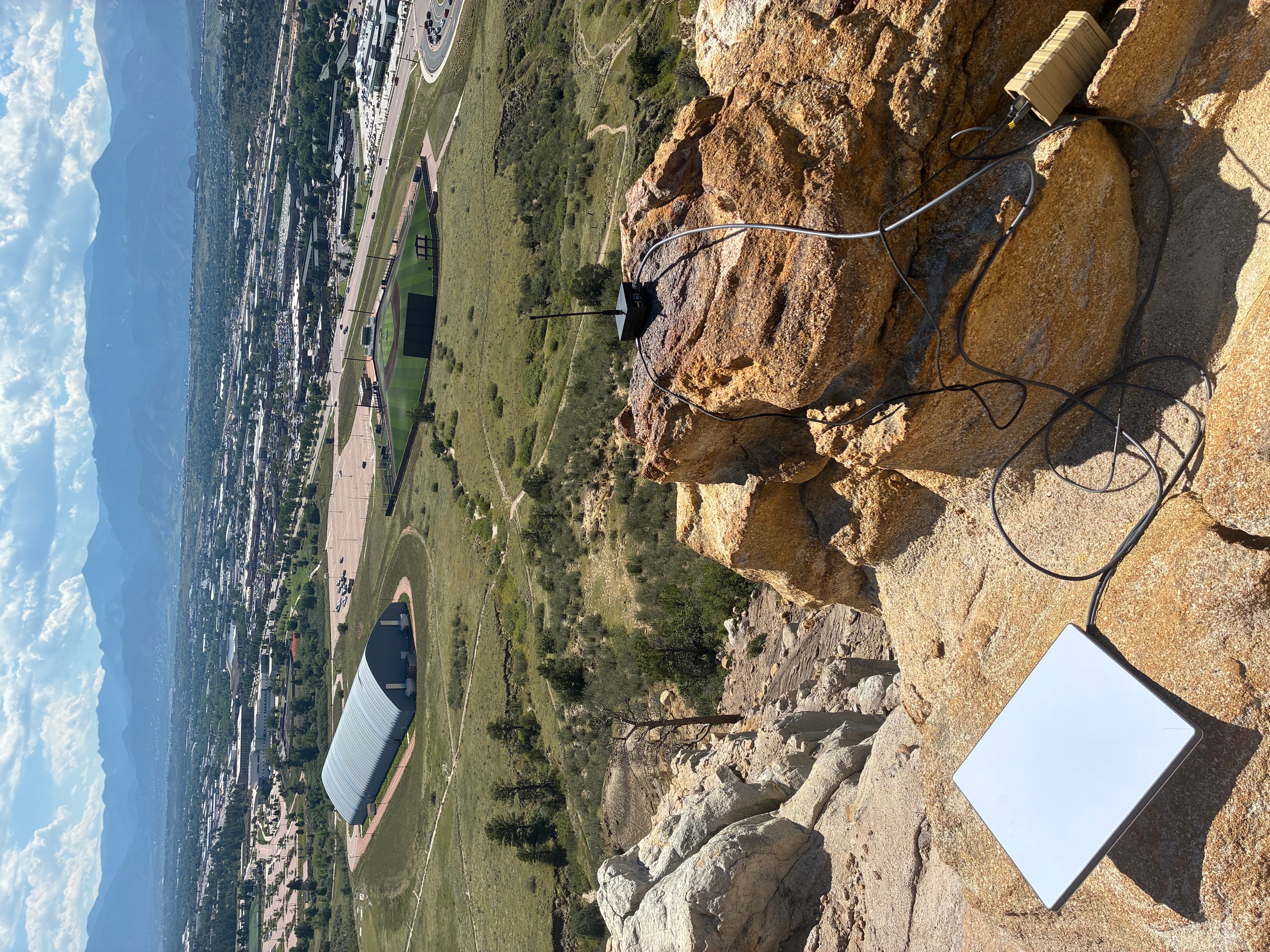
The practical lesson is familiar to anyone who has built an amateur radio link. Height, antenna placement, cable loss, polarization, obstructions, channel width, transmit limits, and receiver noise all matter. A node on a hill with a clear path can outperform a more powerful node hidden behind a building. A range test with GPS logs is more valuable than a distance claim on a product page.
How to Build a First OpenMANET Node
The official setup documentation changes as the firmware evolves, so use this as a workflow rather than a substitute for the current release notes.
Getting started video
The OpenMANET project also has a getting-started video on YouTube. Watch it alongside the current hardware, firmware, and initial-setup pages, because filenames, supported boards, and wizard screens can change between releases.
1. Select a matched hardware set
Start with a Raspberry Pi and a supported HaLow board. Confirm the Morse Micro chipset and the SPI, SDIO, or USB interface before buying an antenna, carrier board, or firmware image. Decide whether the node will be a gate, a field point, or a lightweight portable test node.
2. Download the correct image
OpenMANET publishes sysupgrade images through the firmware releases page. A release asset normally ends in something like squashfs-sysupgrade.img.gz. Select the asset that matches the Pi target, chipset, and interface.
Verify checksums from the release page. For a genuinely clean restart, the documentation recommends using SD Card Formatter with an overwrite format before flashing. Rewriting a partition table does not always remove the OpenWrt writable overlay and its old configuration.
3. Connect to the fresh node
After a fresh flash, the Raspberry Pi setup guide says the node is reachable over Ethernet at 10.41.254.1. The initial image uses the root account with a blank password, so this is a bring-up state, not a field-ready security configuration. Connect directly, open the web interface, run the wizard, and set a strong password immediately.
4. Create the mesh gate first
Configure one node as the mesh gate and connect its Ethernet uplink to the optional upstream network. The gate should be working before you add mesh points. This gives you a clear place to test routing, DHCP, DNS, and internet backhaul.
5. Configure compatible mesh settings
Every HaLow radio that should join the same mesh needs matching:
- Mesh SSID or network name.
- Password, if used.
- Channel number.
- Channel bandwidth.
After the wizard reserves the node’s address and DHCP range, the node reboots. Reconnect the client or release and renew DHCP so it receives a current lease.
6. Add a point and test the local network
Before testing ATAK, verify the infrastructure with ordinary tools:
- Confirm the client receives a
10.41.x.xaddress. - Browse each node by its
.localhostname where mDNS is supported. - Use
batctl dcto inspect the distributed ARP table and see which nodes are visible. - Ping across more than one hop.
- Disconnect the gate’s uplink and confirm local services still work.
- Connect an upstream and confirm that NAT restores internet access.
7. Add applications one at a time
Start with a simple web service or file transfer. Then add ATAK multicast, ADS-B to CoT, a telemetry service, or a PTT application. Testing one service at a time makes it much easier to tell whether a problem belongs to the mesh, the application profile, the multicast path, or the upstream connection.
OpenMANET Compared With Other Mesh Tools
| System | Primary radio or transport | Network model | Best fit |
|---|---|---|---|
| OpenMANET | Wi-Fi HaLow around the local sub-GHz band | IP-native multi-hop mesh | ATAK, field LANs, telemetry, services, and civilian off-grid networks |
| AREDN | Amateur-band Wi-Fi hardware | Amateur IP mesh | Licensed amateur emergency and community networks |
| Meshtastic | LoRa | Small-message mesh | Text, position, and sensor telemetry with very low power |
| Ordinary Wi-Fi mesh | 2.4 or 5 GHz Wi-Fi | Local IP mesh | High throughput over shorter links |
| ATAK | Software application | Uses an underlying IP or radio transport | Shared situational awareness, mapping, and team data |
This is not a competition where one tool replaces every other tool. AREDN can be the right answer where licensed amateur spectrum and amateur infrastructure are available. Meshtastic can be better when a tiny battery node only needs to send a short position report. ATAK can run over OpenMANET, AREDN, cellular, satellite, or a TAK server. OpenMANET is the transport layer that gives civilian users a long-range, normal IP network without requiring every participant to hold an amateur licence.
For a broader introduction to sub-GHz Wi-Fi, see Wi-Fi HaLow: The Long-Range, Low-Power Wi-Fi That Quietly Grew Up. The related Haven open-source MANET radio project shows another practical way to package Raspberry Pi, HaLow, and open-source mesh software into an off-grid node.
Limitations and Responsible Deployment
OpenMANET is promising, but it is still a project whose hardware matrix and firmware behaviour are evolving. Keep these constraints in view:
- The radio is not automatically legal everywhere. Confirm the permitted band, channel, bandwidth, power, antenna, and duty-cycle rules before transmitting.
- A high range number is not a deployment plan. Test the exact antenna, enclosure, battery, terrain, and channel settings you will use.
- All hops share airtime. A long multi-hop mesh has less usable capacity than a single short link, especially for broadcast and multicast traffic.
- SDIO and SPI behave differently. SDIO can offer higher performance but may prevent use of the Pi’s onboard Wi-Fi. SPI makes some builds simpler but may reduce throughput.
- Power matters. A Pi, HaLow radio, USB adapter, and GPS receiver can draw substantially more energy than a low-power LoRa node.
- Local multicast is not global multicast. ATAK clients at separate internet-connected sites need a server or explicit overlay design.
- Change default credentials. The fresh-flash password is documented and must never be left in place for a field deployment.
- Use the supported topology first. Begin with one gate and one or two points before adding overlays, redundant uplinks, or experimental hardware.
These are normal engineering constraints, not reasons to avoid the project. They are the difference between a weekend demonstration and a network that a team can trust during a long event.
Why OpenMANET Matters
OpenMANET takes a collection of accessible components and turns them into a coherent civilian MANET radio. The Raspberry Pi contributes a full Linux and IP environment. Morse Micro HaLow provides a sub-GHz wireless path with better reach than ordinary Wi-Fi. OpenWrt supplies a familiar network operating system. 802.11s and BATMAN-V provide the multi-hop behaviour. ATAK, CoT, ADS-B, PTT, telemetry, and ordinary IP services become applications on top.
That combination is valuable because it gives a response team choices. The mesh can remain completely local when the internet is unavailable. It can use a Starlink or LTE connection when backhaul returns. It can carry a shared ATAK map, but it can also carry a browser, a file server, or an application the team writes themselves. The hardware is budget-friendly enough to build several nodes instead of placing every function in one expensive box.
For search and rescue, disaster response, airsoft, public-service events, remote field work, and amateur radio experimentation, OpenMANET is a practical invitation to build the network you need instead of waiting for somebody else’s network to be available. The project is open, the firmware is published, the parts are understandable, and the measurements are visible. That is exactly the kind of foundation on which useful field communications projects grow.
Sources and Further Reading
- OpenMANET documentation: https://openmanet.github.io/docs/
- OpenMANET firmware repository: https://github.com/OpenMANET/firmware
- OpenMANET documentation repository: https://github.com/OpenMANET/docs
- Hardware guide: https://openmanet.github.io/docs/hardware
- Raspberry Pi parts and interface guide: https://openmanet.github.io/docs/hardware/raspberry-pi
- Raspberry Pi initial setup: https://openmanet.github.io/docs/initial-setup/raspberry-pi
- Firmware and release guidance: https://openmanet.github.io/docs/firmware
- Networking design: https://openmanet.github.io/docs/networking
- Wi-Fi HaLow range testing: https://openmanet.github.io/docs/range-testing.html
- ADS-B to CoT for TAK: https://openmanet.github.io/docs/adsb-to-cot
- ATAK for Android on Google Play: https://play.google.com/store/apps/details?id=com.atakmap.app.civ&hl=en
- Heltec HT-HD01 / HT-H7608 AliExpress listing: https://s.click.aliexpress.com/e/_c3CH5YgT
- Raspberry Pi 4 AliExpress listing: https://s.click.aliexpress.com/e/_c3SJjGFv
- OpenMANET management daemon: https://github.com/OpenMANET/openmanetd
- OpenWrt project: https://openwrt.org/
- batman-adv project: https://www.open-mesh.org/projects/open-mesh/wiki
- APRS-IS: https://aprs-is.net/
- AllStarLink: https://allstarlink.org/
- AREDN: https://www.arednmesh.org/


Post Comment