9M2PJU
amateur radio
android
Technology
9M2PJU, amateur radio software, Android APK, Android HamClock, DX cluster, Elwood Downey, geomagnetic K-index, Ham Radio Shack, HamClock, HF propagation, Maidenhead grid locator, OHB, Open Hamclock Backend, satellite tracking, solar flux index, space weather, VOACAP, WB0OEW
9M2PJU
1 Comments
9M2PJU HamClock for Android: Native Space Weather, Solar Telemetry, and HF Propagation Dashboard
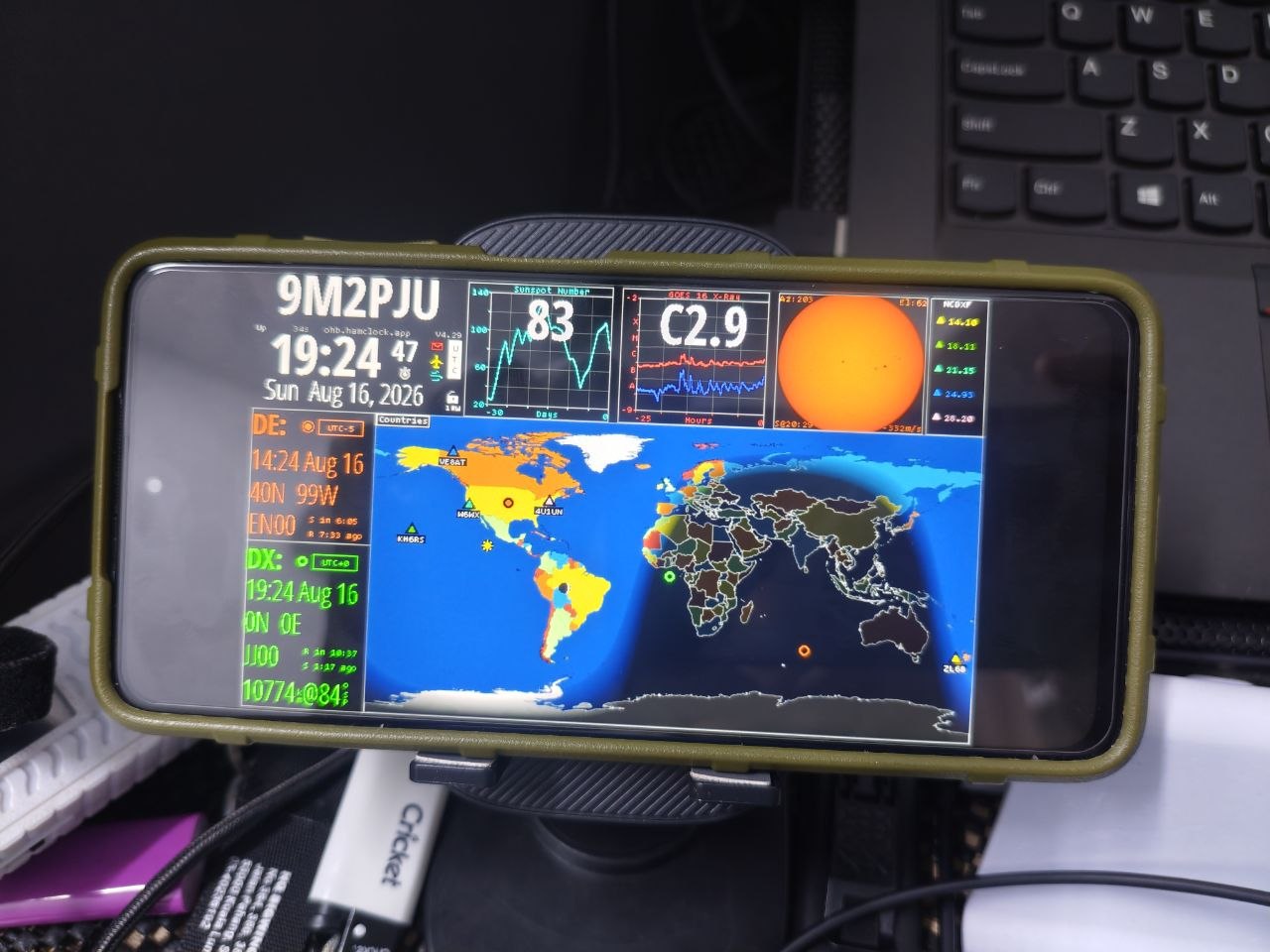
TL;DR: 9M2PJU HamClock for Android is a standalone native Android application (APK) that embeds the full C++ HamClock engine via the Android NDK. Free of Termux, root, or Linux deploy requirements, it delivers real-time NOAA space weather, solar flux index (SFI), VOACAP HF propagation predictions, satellite tracking, DX cluster monitoring, automatic GPS Maidenhead grid sync, OLED burn-in protection, Android TV support, and multi-device LAN web sharing to any Android phone, tablet, or desk monitor.
For nearly a decade, Elwood Downey WB0OEW’s iconic HamClock has served as the visual command centre of amateur radio shacks across the globe. By consolidating real-time greyline day/night terminators, NOAA solar indices, VOACAP high-frequency propagation predictions, amateur satellite orbital passes, and DX cluster spots into a single unified display, HamClock transformed how radio operators monitor band conditions.
Until recently, running HamClock on Android hardware required tedious workarounds: configuring Termux Linux environments, setting up X11 display servers or VNC viewers, running background browser wrappers, and fighting aggressive mobile battery managers.
The 9M2PJU HamClock for Android project solves this entirely. Available as a direct APK download from GitHub Releases at github.com/9M2PJU/9M2PJU-HamClock-Android-Releases, this application packages the full C++ HamClock engine into a high-performance native Android application using the Android Native Development Kit (NDK). With no Termux, no root, and no command-line setup required, any modern or legacy Android phone, tablet, car head unit, or Android TV box can now become a dedicated 24/7 shack telemetry station.
Last updated: August 2026.
What Is 9M2PJU HamClock for Android?
9M2PJU HamClock for Android is a standalone native mobile application that executes the complete C++ HamClock station telemetry engine via the Android Native Development Kit (NDK) to display real-time space weather, solar indices, VOACAP propagation maps, and satellite ephemeris directly on Android devices.
+-------------------------------------------------------------------------+
|             9M2PJU HamClock for Android: System Architecture            |
+-------------------------------------------------------------------------+
|                  Live Space Weather & Telemetry Ingestion               |
|  - Open HamClock Backend (OHB): ohb.works / ohb.hamclock.app            |
|  - NOAA Space Weather Prediction Center: SFI, Sunspots, Kp/Ap Indices   |
|  - VOACAP Propagation Engine: 80m-10m Band Opening & SNR Coverage Maps  |
|  - Orbital Ephemeris: CelesTrak TLEs, ISS Tracking, Moon/Sun Positions  |
|  - DX Cluster Feeds: Telnet DX Spots, Contest Calendars, NCDXF Beacons  |
+------------------------------------+------------------------------------+
                                     | (High-Speed HTTPS / REST Feeds)
+------------------------------------v------------------------------------+
|               Native Embedded Android Core Engine (C++ / NDK)           |
|  - C++ Core Engine: Direct execution on Android Bionic libc via NDK     |
|  - Edge-to-Edge Hardware Acceleration: SurfaceView / Direct Rendering   |
|  - Location Subsystem: Automatic GPS Hardware to Maidenhead Converter   |
|  - Persistence Layer: Station EEPROM State & Zip Backup/Restore Engine  |
|  - Display Protection: Pixel-Shift Engine & Scheduled Night Auto-Dimmer |
+------------------------------------+------------------------------------+
                                     |
           +-------------------------+-------------------------+
           |                                                   |
+----------v-------------------------+       +-----------------v----------+
|   Primary Touchscreen Interface    |       |   Integrated Network Stack |
|  - Edge-to-Edge Fullscreen Display |       |   - Port 8081: WebSocket   |
|  - Ghost-Free Floating Controls    |       |     Interactive Live Mirror|
|  - Android TV D-Pad Focus Support  |       |   - Port 8080: REST API &  |
|  - English & Bahasa Melayu Support |       |     Live Screen Capture    |
|  - 24/7 Foreground Service Daemon  |       |   - Port 8082: Read-Only   |
|    (WakeLock / WifiLock Support)   |       |     Passive OBS Stream     |
+------------------------------------+       +----------------------------+
Rather than wrapping a remote webpage or compiling a heavy container, 9M2PJU HamClock runs natively on the device’s CPU and GPU. It executes the core mathematical routines, planetary calculations, and map projection graphics locally, communicating with the Open HamClock Backend (OHB) for live geophysical data feeds.
Why a Native Android NDK Port Matters
Running HamClock on dedicated microcomputers like the Raspberry Pi or Inovato Quadra has always been straightforward, but repurposing surplus Android devices previously introduced significant friction.
Before this native port, operators had to install Termux, update repository mirrors, compile C++ sources or download pre-built Linux binaries, install an X11 server like Termux:X11 or VNC, and launch a full-screen browser in kiosk mode. This multilayered stack suffered from high RAM usage, frequent thermal throttling, background process termination by Android memory managers, and complicated touch calibration.
+-------------------------------------------------------------------------+
|                  Evolution of HamClock on Android Hardware              |
+------------------------------------+------------------------------------+
| Legacy Workaround Stack            | 9M2PJU HamClock Native Android APK |
+------------------------------------+------------------------------------+
| [HamClock C++ Binary]              | [HamClock C++ Core Engine (NDK)]   |
|   ↳ [X11 / VNC Server]             |   ↳ [Native Android Hardware HAL]  |
|     ↳ [Termux Linux Chroot]        |     ↳ [Android Fullscreen UI / OS] |
|       ↳ [Android OS Layer]         |                                    |
| - Complex multi-step setup         | - Single-tap APK install           |
| - High memory & battery overhead   | - Ultra-low memory (<8MB APK size) |
| - Unstable background execution    | - Dedicated Foreground Service     |
| - Manual grid configuration        | - Instant GPS Maidenhead Auto-Sync |
+------------------------------------+------------------------------------+
The native NDK architecture eliminates every intermediate translation layer. The C++ application links directly against Android’s native graphics and POSIX subsystem, providing:
- Instant Deployment: Install the APK, open the app, and view live space weather within seconds.
- Minimal Resource Footprint: Architecture-optimised APK packages range from just 7.3 MB to 8.3 MB, running smoothly even on older 32-bit hardware with limited RAM.
- Hardware-Accelerated Fluid Rendering: Map projections, satellite ground tracks, and solar magnetograms render directly to the screen buffer without X11 or VNC latency.
- Robust 24/7 Stability: A native Android Foreground Service with configurable
WakeLockandWifiLockensures the app runs continuously as a desk clock without being paused by system power managers.
Key Features Breakdown
9M2PJU HamClock for Android combines Elwood Downey WB0OEW’s core station dashboard with Android-native enhancements built specifically for shack operations, mobile setups, and emergency communications.
+-------------------------------------------------------------------------+
|                   9M2PJU HamClock Core Feature Matrix                   |
+-------------------+--------------------+-------------------+------------+
| Space Weather     | HF Propagation     | Station Sync      | Operations |
| - Solar Flux SFI  | - VOACAP Band Maps | - Auto GPS Locator| - Port 8081|
| - Sunspot Number  | - Aurora Forecasts | - EEPROM Zip Save | - D-Pad TV |
| - Kp/Ap Indices   | - MUF Predictions  | - Pixel-Shift Dim | - 24/7 Run |
| - SDO Solar Flare | - Greyline Tracker | - Malay / English | - Boot Auto|
+-------------------+--------------------+-------------------+------------+
1. 100% Standalone Native APK
The entire HamClock execution engine is compiled into a standalone Android package. You don’t need root access, developer mode modifications, Termux packages, or third-party Linux installers.
2. Automatic GPS and Maidenhead Locator Synchronization
For portable operators, SOTA/POTA activators, and mobile HF setups, maintaining accurate station coordinates is critical for VOACAP propagation calculations and satellite pass predictions. 9M2PJU HamClock interfaces directly with the device’s internal GPS hardware, calculates the precise 6-character Maidenhead grid square (such as OJ13ff), and automatically updates the station DE coordinates in real time via its internal REST API.
3. Station Configuration Backup and Restore
Transferring station preferences, custom DX cluster filters, alarm thresholds, and EEPROM settings across multiple tablets or phones is effortless. The app features complete configuration backup and restore functionality that packages station settings into a standard .zip archive via Android’s Storage Access Framework (SAF) and system Share Sheet. You can export your configuration to Google Drive, a local SD card, or email it to another device with one tap.
4. OLED Burn-in Protection and Night Dimmer
Shack monitors often run 24 hours a day, 7 days a week. To protect modern AMOLED and OLED screens from permanent image retention, 9M2PJU HamClock includes an integrated pixel-shift displacement engine that periodically shifts on-screen elements by imperceptible margins. In addition, an automated night dimming schedule (10:00 PM to 6:00 AM) drops screen luminosity during off-peak hours to prolong display panel longevity and reduce shack glare.
5. Android TV and Car Head Unit Integration
The application includes full support for Android TV (LEANBACK_LAUNCHER), enabling smooth navigation via standard D-Pad TV remote controls. For mobile HF installations, the app integrates with Android’s power state broadcasts, automatically launching when vehicle accessory power is connected and sleeping when the ignition is switched off.
6. Ghost-Free Floating Overlay Controls
Accessing settings and diagnostics on touch displays is managed through a redesigned floating overlay menu. When closed, the menu collapses completely (View.GONE) with 100% opacity zeroing, leaving no dark background shadows, outlines, or visual artifacts to obstruct map details.
7. 24/7 Shack Station Background Daemon
Dedicated shack displays require uninterrupted operation. 9M2PJU HamClock runs a dedicated Android Foreground Service that holds optional CPU WakeLock and network WifiLock states. This prevents Android from putting the network card to sleep or suspending background telemetry ingestion when running unattended on a desk stand.
8. Multi-Device LAN Mirroring and Web Streaming
Like the desktop version of HamClock, the Android application embeds a high-performance HTTP and WebSocket server that exposes three network endpoints across your local shack WiFi network:
| Service | Port | Local Endpoint | Description |
|---|---|---|---|
| Interactive Touch Screen | 8081 |
http://<DEVICE-IP>:8081/live.html |
Real-time WebSocket interactive dashboard for remote control from a PC, Mac, or iPad browser. |
| Backend RESTful API | 8080 |
http://<DEVICE-IP>:8080/ |
HTTP control API for automated rig integration, telemetry queries, and live JPEG/PNG screen captures. |
| Read-Only Monitor Screen | 8082 |
http://<DEVICE-IP>:8082/live.html |
High-speed passive video stream ideal for embedding into OBS Studio live streams or club displays. |
9. Bahasa Melayu and English Bilingual Support
The user interface and settings overlays include full localization for standard Bahasa Melayu alongside English, allowing operators in Malaysia and Southeast Asia to configure station parameters, backup tools, and network options in their native language.
10. Rich-Text In-App Update Checker
Stay current with upstream engine refinements and Android platform updates. The integrated update checker fetches releases directly from GitHub, rendering release notes and changelogs with complete Markdown formatting directly within the application.
Architectural Comparison: Native APK vs Other Platforms
The table below highlights how 9M2PJU HamClock for Android compares with other common methods of deploying HamClock in an amateur radio station:
| Feature / Metric | 9M2PJU HamClock (Android APK) | Android Termux + VNC Stack | Raspberry Pi 4/5 (Desktop/fb0) | Inovato Quadra Mini PC | ESP32 CYD (Cheap Yellow Display) |
|---|---|---|---|---|---|
| Installation Method | 1-Tap APK Install | Complex CLI Scripts | OS Flash + Build Tools | Pre-flashed / Manual | Serial Firmware Flashing |
| Hardware Required | Any Android Phone/Tablet | Modern Android Device | Raspberry Pi + Display | Inovato Quadra + HDMI | ESP32 2.8″ / 3.5″ Board |
| Typical Power Draw | 1W – 3W (Integrated Battery) | 2W – 5W | 5W – 15W | 3W – 5W | <1W |
| Touchscreen Integration | Native Android Multi-Touch | Emulated Mouse / VNC | Requires Touch Driver | Mouse Required | Resistive Touch Screen |
| Native GPS Grid Auto-Sync | Built-in (Internal GPS) | Manual Scripting | Requires USB GPS Dongle | Requires USB GPS Dongle | Not Supported |
| OLED Burn-in Protection | Built-in Pixel-Shift & Dim | Manual Screen Timeout | External DPMS Scripts | External DPMS Scripts | Fixed Display |
| Package / Binary Size | ~8 MB (Native NDK) | >500 MB (Linux Rootfs) | Full Linux OS (>2 GB) | Full Linux OS (>2 GB) | <4 MB (Flash Limit) |
| Remote Web Mirror (8081) | Supported Out of the Box | Requires Port Forwards | Supported Out of the Box | Supported Out of the Box | Not Supported |
| Android TV / Car Support | Native D-Pad & Power Sync | Not Supported | Not Supported | Not Supported | Not Supported |
| 24/7 Shack Daemon Service | Native Foreground Service | Process Termination Risk | Systemd Service | Systemd Service | Dedicated Microcontroller |
Architecture-Specific Packages and Downloads
The 9M2PJU HamClock Android project provides optimised binaries tailored to specific CPU architectures, ensuring minimal download sizes and optimal performance across all device categories.
+-------------------------------------------------------------------------+
|                    Available Android Package Flavours                   |
+-------------------------+---------------+-------------------------------+
| Package File Name       | Architecture  | Target Hardware               |
+-------------------------+---------------+-------------------------------+
| 9M2PJU-HamClock.apk     | Universal     | All Android Devices & Tablets |
| 9M2PJU-HamClock-arm64…  | arm64-v8a     | Modern 64-bit Phones (8.0+)   |
| 9M2PJU-HamClock-arme…   | armeabi-v7a   | Legacy 32-bit Phones/Tablets  |
| 9M2PJU-HamClock-x86_64… | x86_64        | PC Emulators (BlueStacks/WSA) |
| 9M2PJU-HamClock-x86.apk | x86           | 32-bit Intel Atom Tablets     |
+-------------------------+---------------+-------------------------------+
Direct Download Links (v1.0.4)
- Universal Release (Recommended):
9M2PJU-HamClock.apk(~17.4 MB) – Contains native libraries for all architectures; works on any Android phone, tablet, TV box, or car unit. - 64-bit ARM Package:
9M2PJU-HamClock-arm64-v8a.apk(~8.1 MB) – Optimised for modern 64-bit Android smartphones and tablets running Android 8.0 Oreo and newer. - 32-bit ARM Package:
9M2PJU-HamClock-armeabi-v7a.apk(~7.3 MB) – Designed for older repurposed Android tablets and low-power 32-bit ARM devices. - 64-bit x86 Package:
9M2PJU-HamClock-x86_64.apk(~8.1 MB) – Ideal for Android emulators (such as BlueStacks, LDPlayer, or Android Studio), Windows Subsystem for Android (WSA), and Intel-based tablets. - 32-bit x86 Package:
9M2PJU-HamClock-x86.apk(~8.3 MB) – Targeted for legacy 32-bit Intel Atom mobile processors. - SHA-256 Checksums: Cryptographic verification file to confirm binary package integrity.
Step-by-Step Installation and Setup Guide
Setting up 9M2PJU HamClock on an Android device takes under two minutes. Follow these simple steps:
Step 1: Download and Install the APK
- Open your Android device browser and navigate to the latest release page on GitHub: github.com/9M2PJU/9M2PJU-HamClock-Android-Releases/releases/latest.
- Download
9M2PJU-HamClock.apk(or the architecture-specific APK for your device). - Once downloaded, tap the notification or open your file manager to install the APK. If Android displays a security prompt, grant permission for your browser or file manager to “Install unknown apps”.
Step 2: First-Time Initialization
- Launch 9M2PJU HamClock from your app drawer or home screen.
- The application will initialize the native C++ runtime and launch the HamClock setup wizard.
- Tap the screen to enter your station callsign, DE latitude and longitude, or tap Sync with GPS to acquire your exact Maidenhead locator automatically from the internal GPS receiver.
- Select your preferred display resolution and time format (UTC/Local).
+-------------------------------------------------------------------------+
|                  Initial Station Configuration Workflow                 |
+-------------------------------------------------------------------------+
|  [Launch APK] ➔ [Grant GPS Permissions] ➔ [Auto-Sync Maidenhead Grid]   |
|         │                                                               |
|         ▼                                                               |
|  [Set Callsign] ➔ [Select Open HamClock Backend] ➔ [Save to EEPROM]    |
|         │                                                               |
|         ▼                                                               |
|  [Enable Foreground Daemon] ➔ [Shack Dashboard Active 24/7 on Desk]     |
+-------------------------------------------------------------------------+
Step 3: Configure 24/7 Shack Operation
- Tap the floating overlay menu button in the top-right corner.
- Toggle Keep Screen On to enable continuous display without system timeout.
- Ensure the Foreground Service toggle is active so that background telemetry polling continues without interruption.
- Check your device IP address displayed in the Station LAN Link section to mirror the display to other devices on your local network.
Practical Shack Deployments and Use Cases
The flexibility of a native Android build opens up versatile deployment scenarios for amateur radio operators:
+-------------------------------------------------------------------------+
|                  Versatile HamClock Deployment Scenarios                |
+-------------------------------------------------------------------------+
|  [Repurposed Desk Tablet]   [Android Car Head Unit]  [SOTA/POTA Field]  |
|  - Ultra-low power (<3W)    - Auto-power on ignition - Battery operated|
|  - 24/7 Space Weather HUD   - Mobile HF propagation  - Real-time GPS DE |
|  - Web mirror to PC/Mac     - D-Pad touch controls   - Offline resilience|
+-------------------------------------------------------------------------+
1. Repurposing Surplus Tablets as Dedicated Desk HUDs
Older Android tablets often gather dust in drawers despite having sharp displays and functional WiFi hardware. By installing 9M2PJU HamClock and mounting the tablet on a simple desk stand, you create a dedicated space weather monitor consuming less than 3 Watts of electricity.
2. Mobile HF Operating and Car Head Units
Operating mobile HF requires situational awareness of solar flares and geomagnetic storms. Installing 9M2PJU HamClock on an Android-powered car head unit provides real-time solar indices and VOACAP MUF curves directly on your dashboard. With automatic GPS synchronization, your Maidenhead locator updates continuously as you drive.
3. Portable SOTA and POTA Activations
During outdoor operations, power is at a premium. Instead of packing a laptop, power inverter, and external monitor, install HamClock directly on your primary smartphone. You can assess band conditions, check solar absorption (D-RAP), and review satellite passes directly in the field without carrying extra gear.
4. Radio Club Displays and Remote Monitors
By installing the application on an inexpensive Android TV streaming box connected to an HDMI television, radio clubs and emergency operations centres (EOC) can display a large-format station dashboard that boots automatically on power-up.
Frequently Asked Questions (FAQ)
Does 9M2PJU HamClock for Android require root access or Termux?
No. 9M2PJU HamClock is a 100% standalone native Android application compiled with the Android NDK. It installs directly from an APK without requiring root privileges, Termux, X11 servers, or terminal commands.
Which Android versions and architectures are supported?
The application supports Android 8.0 (Oreo) through Android 15. Pre-compiled binary packages are available for 64-bit ARM (arm64-v8a), 32-bit ARM (armeabi-v7a), 64-bit x86 (x86_64), and 32-bit x86 (x86), alongside a Universal APK.
Does the app work after the legacy Clear Sky Institute backend shutdown?
Yes. 9M2PJU HamClock is built with out-of-the-box support for the community-driven Open HamClock Backend (OHB), ensuring real-time space weather, VOACAP maps, and solar telemetry feeds continue operating reliably.
Can I view and control the dashboard from a PC or iPad?
Yes. The app runs an internal web server. By connecting to http://<DEVICE-IP>:8081/live.html on your local network, you can interact with the live screen using any desktop or tablet browser.
How does the GPS Maidenhead locator synchronization work?
The app queries the device’s internal GPS hardware for high-accuracy coordinates, computes the standard 6-character Maidenhead locator grid, and pushes the updated position into the HamClock engine via its internal REST API.
Sources and Further Reading
- 9M2PJU HamClock Android Releases (GitHub): github.com/9M2PJU/9M2PJU-HamClock-Android-Releases
- 9M2PJU HamClock Installer Project: hamclock.hamradio.my and github.com/9M2PJU/9M2PJU-HamClock-Installer
- Open HamClock Backend (OHB): ohb.works and github.com/openhamclock/open-hamclock-backend
- Clear Sky Institute HamClock (Elwood Downey WB0OEW): clearskyinstitute.com/ham/HamClock
- NOAA Space Weather Prediction Center (SWPC): swpc.noaa.gov
- VOACAP High-Frequency Propagation Predictions: voacap.com



1 comment